Trend Reversal Marker Indicator - Complete User Manual (MT4 & MT5)

Introduction
The Trend Reversal Marker Indicator is an 11-MA ribbon trend system for MetaTrader 4 and MetaTrader 5 that detects both structural trend changes and early reversal warnings. It uses eleven Simple Moving Averages (10, 20, 30, 40, 50, 60, 70, 80, 90, 100, 200) and the Rate of Change (ROC) function to compute a 0%-90% reversal probability that updates on every tick. Two label types -- structural Bull / Bear at the 200-MA ROC zero crossings and ReversalBull / ReversalBear when enough short MAs have flipped against the dominant trend -- provide entry and warning signals.
Key Features:
- Eleven Simple Moving Averages plotted as a color-switching ribbon
- ROC-based trend detection measuring slope direction of every MA
- Reversal probability scoring showing 0%-90% in real time
- Four signal types with full alert delivery (Bull, Bear, ReversalBull, ReversalBear)
- Trend-colored candle overlay so dominant trend direction is visible at every bar
- Real-time on-chart dashboard displaying current trend and reversal probability
- Non-repainting design -- signals fire only on closed bars and never disappear
- Four alert channels: popup, sound, push notification, email
Download the indicator:
- MetaTrader 5: Trend Reversal Marker MT5
- MetaTrader 4: Trend Reversal Marker MT4
TIP: This indicator is designed for trend traders who want a structured approach to identifying early reversals. It works on any symbol and any timeframe available in MetaTrader.
How It Works
The 11-MA Ribbon
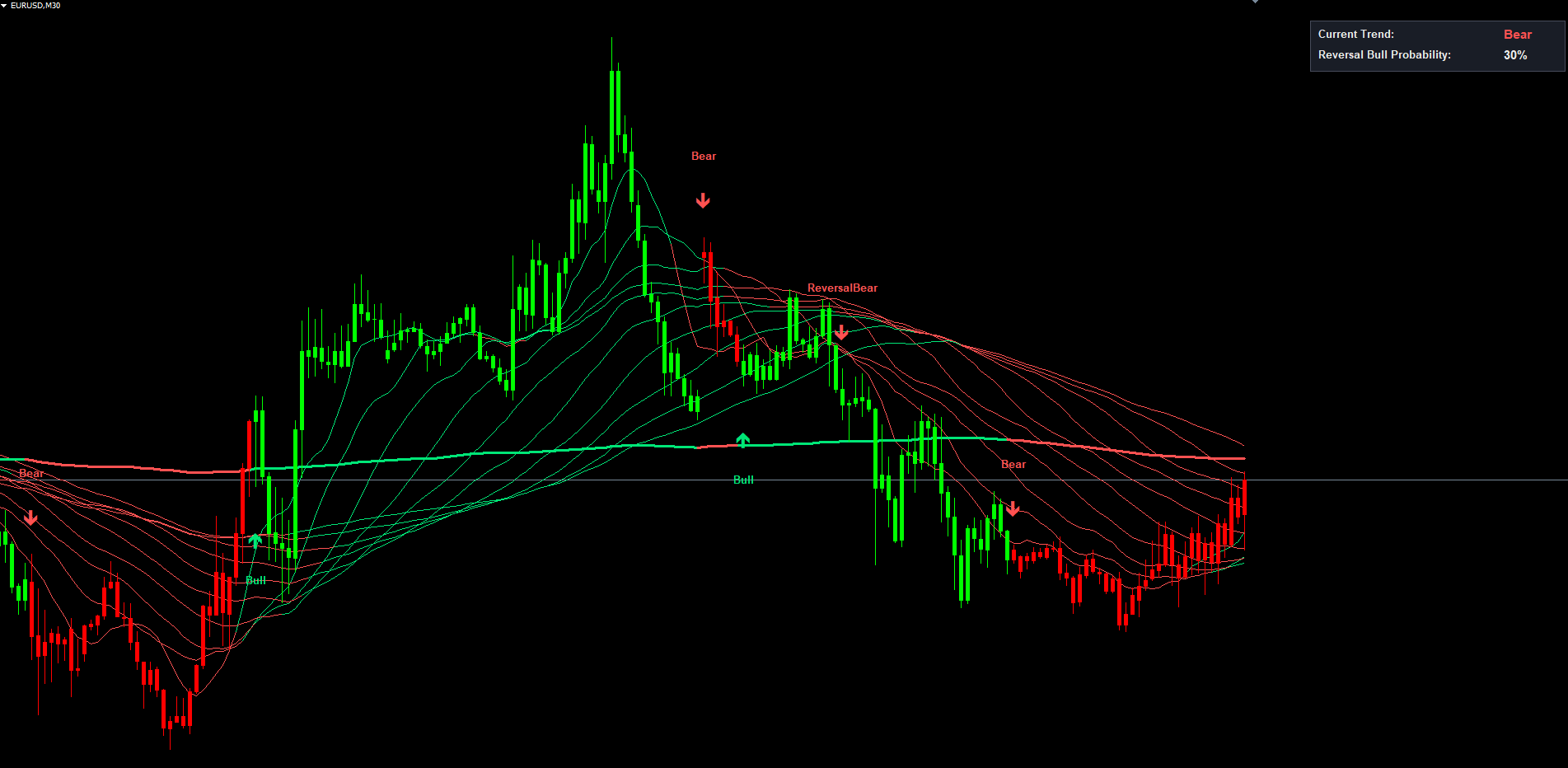
The indicator plots eleven Simple Moving Averages on every chart with default lookback periods 10, 20, 30, 40, 50, 60, 70, 80, 90, 100, and 200 bars. Each MA's slope is measured by computing the Rate of Change (ROC) over the last 14 bars. The 200-period MA is the long-term reference; its ROC sign defines the dominant trend direction.
Each MA line is colored individually:
- Trend color (green when uptrend, red when downtrend) when the MA's slope agrees with the long-term direction
- Opposite color when the MA's slope has flipped against the trend
- The MA200 line is always drawn in the dominant trend color and uses a thicker line width (3 pixels) to stand out
This produces a visual signature that immediately communicates the strength of trend agreement. In a healthy uptrend, all eleven MAs are green. As short MAs start to roll over, you see the 10, 20, 30 lines flip to red one by one.
Reversal Probability
On every bar the indicator counts how many short MAs (1-10, skipping MA6 to preserve compatibility with the original Pine source) are sloping against the dominant trend. The maximum count is 9. Multiplied by 10, this gives a 0%-90% reversal probability shown in the dashboard.
Signal Generation
Four explicit signals are generated:
- Bull -- when roc11 (the 200-MA's ROC) crosses above zero. A "Bull" label is placed below the bar's low in green
- Bear -- when roc11 crosses below zero. A "Bear" label is placed above the bar's high in red
- ReversalBull -- when the bull-count (short MAs flipping bullish during a downtrend) crosses above the SignalPercentage threshold and no Bear is firing on the same bar
- ReversalBear -- when the bear-count crosses above the SignalPercentage threshold and no Bull is firing
Crossover detection runs only on the most recently CLOSED bar. Once a label appears, it is permanent.
NOTE: Closed-bar evaluation means there is a one-bar delay relative to intra-bar price movement. This is what makes signals non-repainting. A label that appears on the chart was placed at the close of that bar and would have appeared in real time at the same moment.
Installation
The indicator is distributed through the MQL5.com Market and installs automatically.
Steps:
- Purchase the indicator from the MQL5 Market product page
- The indicator installs automatically into your MetaTrader terminal
- Open MetaTrader and press Ctrl+N to open the Navigator
- Expand Indicators > Market
- Locate Trend Reversal Marker in the list
- Drag onto any chart, or double-click its name
- Adjust parameters in the settings dialog (see sections below)
- Click OK to apply
After loading you will see:
- 11-MA ribbon drawn on the chart, color-switching by MA slope
- Trend-colored candles overlaying the chart's native candles
- Signal labels (Bull, Bear, ReversalBull, ReversalBear) at trigger bars
- Dashboard in the upper-right corner showing current trend and reversal probability
IMPORTANT: Do not manually copy files to the data folder. The MQL5 Market handles all file placement and updates automatically.
Signal System Overview
Each signal consists of two visual components:
1. Signal Arrow (OBJ_ARROW with Wingdings 233 / 234)
- Bull and ReversalBull arrows are green up-arrows placed below the bar
- Bear and ReversalBear arrows are red down-arrows placed above the bar
2. Text Label (OBJ_TEXT)
Below or above the arrow, a text label shows one of: Bull , Bear , ReversalBull , ReversalBear . The text is rendered in font size 10 with bold weight in matching trend color.
Non-Repainting Confirmation:
- Crossover detection runs only on closed bars (shift >= 1 in MQL terminology)
- Each signal type uses a per-event bar tracking variable to prevent same-bar duplicates
- Object names embed the bar's timestamp so re-calculation passes cannot redraw existing labels
- What you see in historical data is exactly what would have appeared in real time
Parameter Reference
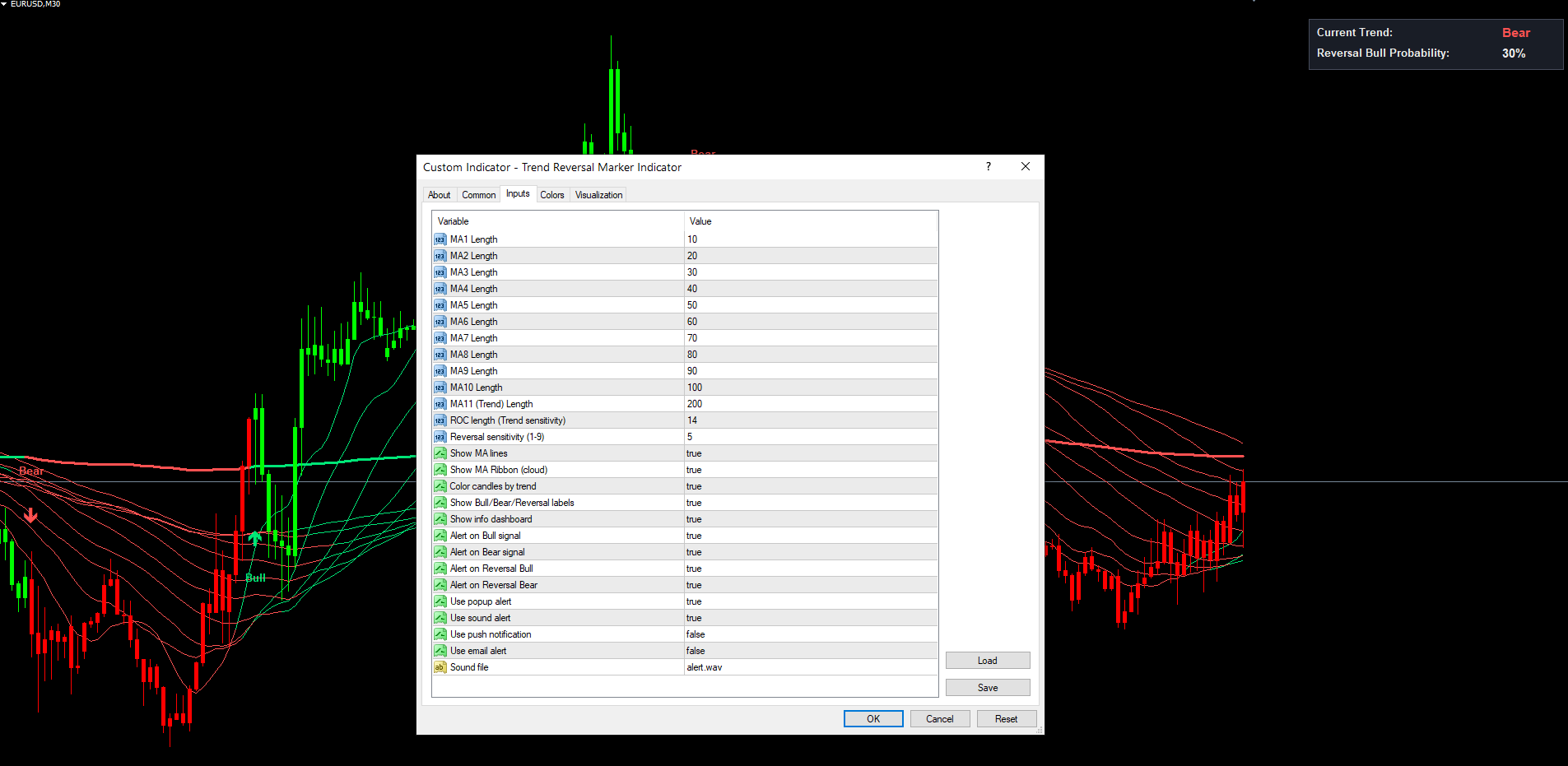
The following table lists all input parameters in the order they appear in the indicator settings dialog.
Moving Average Lengths
| Parameter | Default | Description |
|---|---|---|
| Length1 | 10 | Period for MA1 (fastest) |
| Length2 | 20 | Period for MA2 |
| Length3 | 30 | Period for MA3 |
| Length4 | 40 | Period for MA4 |
| Length5 | 50 | Period for MA5 |
| Length6 | 60 | Period for MA6 |
| Length7 | 70 | Period for MA7 |
| Length8 | 80 | Period for MA8 |
| Length9 | 90 | Period for MA9 |
| Length10 | 100 | Period for MA10 |
| Length11 | 200 | Period for MA11 (long-term trend reference) |
TIP: The default lengths form a geometric series of 10-bar increments up to 100, plus the 200-bar long-term anchor. This spread provides good coverage of short, medium, and long-term momentum. Custom configurations can use any positive integer for each length.
Trend Sensitivity
| Parameter | Default | Description |
|---|---|---|
| RocLength | 14 | Lookback length for the ROC calculation on every MA. Lower values react faster but produce more whipsaw signals; higher values are smoother but lag |
| SignalPercentage | 5 | Reversal sensitivity threshold (1-9). A ReversalBull or ReversalBear signal fires when the corresponding count crosses above this value. Lower values fire more signals; higher values fire only on near-unanimous agreement |
TIP: SignalPercentage = 5 is a balanced default. For trending markets where you want fewer false signals during pullbacks, set it to 7. For very active trading, set it to 3.
Visual Toggles
| Parameter | Default | Description |
|---|---|---|
| ShowMAs | true | Display the 11-MA ribbon on the chart |
| ShowColoredCandles | true | Overlay candles with bull/bear color matching the dominant trend |
| ShowSignals | true | Show Bull/Bear/ReversalBull/ReversalBear text labels and arrows |
| ShowDashboard | true | Display the upper-right info dashboard |
Alert Switches
| Parameter | Default | Description |
|---|---|---|
| AlertBull | true | Send alert when a Bull signal fires |
| AlertBear | true | Send alert when a Bear signal fires |
| AlertReversalBull | true | Send alert when a ReversalBull signal fires |
| AlertReversalBear | true | Send alert when a ReversalBear signal fires |
Alert Delivery Channels
| Parameter | Default | Description |
|---|---|---|
| AlertPopup | true | Show on-screen popup dialog |
| AlertSound | true | Play sound from AlertSoundFile |
| AlertPush | false | Send push notification to MT mobile app |
| AlertEmail | false | Send email through MT SMTP |
| AlertSoundFile | "alert.wav" | Filename of the sound to play (must exist in the MetaTrader Sounds folder) |
Complete Parameter List
| # | Parameter | Type | Default | Category |
|---|---|---|---|---|
| 1 | Length1 | int | 10 | Moving Averages |
| 2 | Length2 | int | 20 | Moving Averages |
| 3 | Length3 | int | 30 | Moving Averages |
| 4 | Length4 | int | 40 | Moving Averages |
| 5 | Length5 | int | 50 | Moving Averages |
| 6 | Length6 | int | 60 | Moving Averages |
| 7 | Length7 | int | 70 | Moving Averages |
| 8 | Length8 | int | 80 | Moving Averages |
| 9 | Length9 | int | 90 | Moving Averages |
| 10 | Length10 | int | 100 | Moving Averages |
| 11 | Length11 | int | 200 | Moving Averages |
| 12 | RocLength | int | 14 | Trend |
| 13 | SignalPercentage | int | 5 | Trend |
| 14 | ShowMAs | bool | true | Graphics |
| 15 | ShowColoredCandles | bool | true | Graphics |
| 16 | ShowSignals | bool | true | Graphics |
| 17 | ShowDashboard | bool | true | Graphics |
| 18 | AlertBull | bool | true | Alerts |
| 19 | AlertBear | bool | true | Alerts |
| 20 | AlertReversalBull | bool | true | Alerts |
| 21 | AlertReversalBear | bool | true | Alerts |
| 22 | AlertPopup | bool | true | Alerts |
| 23 | AlertSound | bool | true | Alerts |
| 24 | AlertPush | bool | false | Alerts |
| 25 | AlertEmail | bool | false | Alerts |
| 26 | AlertSoundFile | string | "alert.wav" | Alerts |
Dashboard Guide
The on-chart dashboard provides a compact, real-time summary of the indicator state in the upper-right corner of the chart.
Dashboard Settings:
| Parameter | Default | Description |
|---|---|---|
| ShowDashboard | true | Show or hide the dashboard |
The dashboard is anchored to CORNER_LEFT_UPPER internally with a calculated X position equal to chart_width - panel_width - margin . This means it sits in the upper-right but follows chart resizing without going off-screen.
Dashboard Rows
| Row | Content |
|---|---|
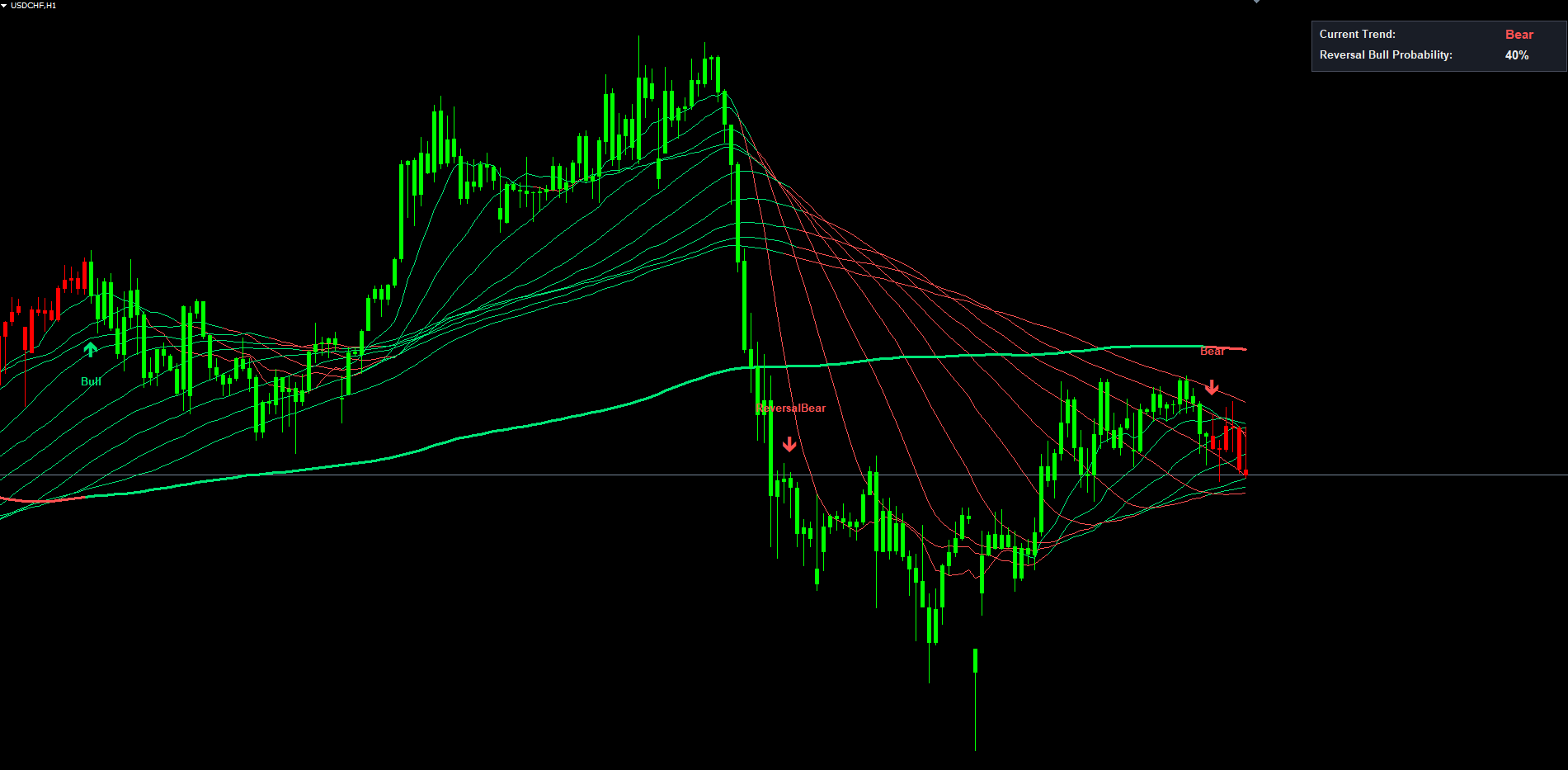
| Current Trend: | "Bull" in green when roc11 > 0, "Bear" in red when roc11 < 0 |
| Reversal X Probability: | "Reversal Bear Probability:" or "Reversal Bull Probability:" depending on current trend, with a percentage from 0% to 90% |
The percentage updates on every tick (or every 500 ms in MT5, driven by an internal timer). When the percentage crosses the SignalPercentage threshold (50% by default with SignalPercentage = 5), the corresponding ReversalBull or ReversalBear label fires.
TIP: If the dashboard overlaps with price action, set ShowDashboard = false to hide it. The chart still has the colored ribbon and labels for trend visualization.
Alert Configuration
Trend Reversal Marker supports four alert delivery channels and four distinct alert events.
Alert Channels
| Parameter | Default | Description |
|---|---|---|
| AlertPopup | true | Show a popup dialog in MetaTrader |
| AlertSound | true | Play the sound file specified by AlertSoundFile |
| AlertPush | false | Send push notification to the MT mobile app |
| AlertEmail | false | Send email notification |
| AlertSoundFile | "alert.wav" | Sound file (must exist in MT Sounds folder) |
Alert Events
The indicator fires alerts for four events, each guarded by per-bar tracking:
| Alert Event | Example Message |
|---|---|
| Bull Signal | [EURUSD H1] TRMI: Bull (ROC trend cross up) |
| Bear Signal | [EURUSD H1] TRMI: Bear (ROC trend cross down) |
| Reversal Bull | [EURUSD H1] TRMI: Reversal Bull (countBull > 5) |
| Reversal Bear | [EURUSD H1] TRMI: Reversal Bear (countBear > 5) |
Each alert fires only once per bar. Even if intra-bar price action briefly satisfies the crossover condition multiple times, you receive at most one alert per event per bar.
Enabling Push Notifications
- Install the MetaTrader mobile app on your phone (iOS or Android)
- Open the app and navigate to Settings > Messages
- Copy your MetaQuotes ID
- In the desktop MetaTrader, go to Tools > Options > Notifications
- Enter your MetaQuotes ID and enable notifications
- Set AlertPush = true in the indicator settings
Enabling Email Notifications
- In MetaTrader, go to Tools > Options > Email
- Check Enable
- Enter your SMTP server, port, login, password, and destination email address
- Click Test to verify the configuration works
- Set AlertEmail = true in the indicator settings
Trading Strategies
The following three approaches demonstrate different ways to use Trend Reversal Marker. Adjust based on your symbol, timeframe, and personal preference.
WARNING: Trading involves significant risk of loss. These strategies are provided for educational purposes only. Always test on a demo account first and never trade with money you cannot afford to lose.
Strategy A: Trend Following with Reversal Exit (H1 - H4)
Goal: Ride a trend from a structural Bull/Bear entry to a ReversalBear/ReversalBull warning.
Recommended settings: Default values (Length1-Length11 as set, RocLength = 14, SignalPercentage = 5).
Trade management:
- Wait for a Bull signal on the chart
- Enter long at the open of the next bar
- Place a stop loss below the recent swing low
- Hold while the dashboard shows a low Reversal Bear Probability (under 30%)
- Begin scaling out (close 1/3 to 1/2 of position) when the probability rises into the 40-50% range
- Close the entire position when a ReversalBear label appears, or when a Bear structural signal fires
The mirror logic applies to short trades on Bear signals.
Strategy B: Counter-Trend Reversal Entries (M30 - H1)
Goal: Enter against the dominant trend on a Reversal signal, betting on the imminent structural turn.
Recommended settings: SignalPercentage = 7 (require near-unanimous MA agreement before signaling), default everything else.
Trade management:
- Wait for a ReversalBull or ReversalBear label
- Enter in the reversal direction at the next bar open
- Place a tight stop loss beyond the recent swing high (for ReversalBear) or low (for ReversalBull)
- Take partial profit when the count drops back below the threshold
- Hold the remainder until the structural Bull/Bear confirmation, then close
NOTE: Strategy B is higher-risk than Strategy A because it enters against the dominant trend. The win rate per signal is typically lower but the reward per win is larger because the entry happens earlier in the new direction.
Strategy C: Multi-Symbol Alert-Based Monitoring
Goal: Monitor a watchlist of instruments for fresh structural turns.
Setup:
- Open charts for all symbols and timeframes you want to monitor
- Apply Trend Reversal Marker to each chart with your preferred settings
- Enable AlertPush = true and configure your MetaQuotes ID
- Disable AlertPopup if you have many charts to avoid notification spam
- When a push notification arrives, open the chart to evaluate the setup
TIP: For Strategy C, set AlertReversalBull = false and AlertReversalBear = false to receive only structural Bull/Bear notifications. This dramatically reduces notification volume on many-chart setups.
Parameter Tuning Presets
The following preset tables provide starting points for different trading styles.
Scalping Preset (M5 - M15)
| Parameter | Scalping Value |
|---|---|
| RocLength | 7 |
| SignalPercentage | 3 |
| ShowColoredCandles | true |
| AlertReversalBull | true |
| AlertReversalBear | true |
Lower RocLength makes the slope detection react faster, suitable for short-term moves. Lower SignalPercentage makes Reversal labels appear earlier.
Swing Trading Preset (M30 - H4)
| Parameter | Swing Value |
|---|---|
| RocLength | 14 (default) |
| SignalPercentage | 5 (default) |
| ShowColoredCandles | true |
| AlertBull | true |
| AlertBear | true |
| AlertReversalBull | true |
| AlertReversalBear | true |
Default values are optimized for this timeframe range. The 14-bar ROC and 5-out-of-9 threshold balance early warning against noise.
Position Trading Preset (H4 - D1)
| Parameter | Position Value |
|---|---|
| RocLength | 21 |
| SignalPercentage | 7 |
| ShowColoredCandles | true |
| AlertBull | true |
| AlertBear | true |
| AlertReversalBull | true |
| AlertReversalBear | true |
Longer RocLength smooths slope detection on higher timeframes. Higher SignalPercentage requires near-unanimous MA agreement, which is appropriate when each signal commits the trader to a multi-week or multi-month position.
TIP: Start with the default Swing Trading preset and modify one parameter at a time. Observe how each change affects signal frequency and quality before adjusting another.
Troubleshooting
No Signals Appearing on the Chart
Possible causes and fixes:
- Warmup period not reached. The indicator requires at least Length11 + RocLength + 5 bars (about 220 bars by default) before it can produce signals. Scroll back in history or wait for more bars to form.
- Dominant trend has not changed recently. Bull and Bear signals fire only when roc11 crosses zero. On higher timeframes this can be days or weeks apart. Switch to a lower timeframe to see more signals.
- SignalPercentage too high. With SignalPercentage = 9, a ReversalBull or ReversalBear signal requires all 9 measurable short MAs to flip simultaneously, which is rare. Lower the value.
- AlertReversalBull / AlertReversalBear disabled. If individual alert switches are off, the labels may still appear on the chart but no notification fires. Verify the toggle is enabled.
MA Lines Not Visible
- Verify ShowMAs = true
- Check that the chart has enough history for the longest MA (Length11 = 200 by default needs 200 bars minimum)
- The MA color changes are subtle on bars where the trend is strong (all MAs the same color); look for transition zones to see the visual switching
Dashboard Not Showing
- Confirm ShowDashboard = true
- If the chart window is too narrow, the panel may extend slightly beyond the visible area. Resize the chart wider
- The dashboard repositions automatically when the chart is resized
Alerts Not Firing
- Check that the master event toggle (AlertBull, AlertBear, AlertReversalBull, AlertReversalBear) is enabled for the signal type you expect
- Verify at least one delivery channel (AlertPopup, AlertSound, AlertPush, AlertEmail) is enabled
- For push notifications: verify your MetaQuotes ID is configured in Tools > Options > Notifications and that AlertPush = true
- For email: verify SMTP settings in Tools > Options > Email and that AlertEmail = true
- Alerts fire only once per bar per event type. If you missed the alert, you will not receive a duplicate on the same bar
Different Results Between MT4 and MT5
- The underlying calculation logic is identical between MT4 and MT5 (same SMA, same ROC, same threshold logic)
- Minor differences in tick timing or warmup behavior between MT4 and MT5 can cause the first few signals in history to appear at slightly different bar positions
- These differences diminish as more historical bars are processed
- Both versions should produce identical signals on the same closed bars after a few hundred bars of warmup
Indicator Loads Slowly
- The first calculation pass on a fresh chart processes all available history. With 11 SMAs and ROCs each, this can take a few seconds on a chart with thousands of bars
- After the initial pass, every new tick is processed incrementally with no noticeable delay
- If load time becomes a concern, reduce Max bars in chart in MetaTrader Options
Frequently Asked Questions
Q: Does the indicator repaint?
A: No. Bull, Bear, ReversalBull, and ReversalBear signals are evaluated only on closed bars (shift >= 1). Each signal type tracks the timestamp of the last bar on which it fired and cannot re-fire on the same bar. Object names embed the bar timestamp so re-calculation passes cannot duplicate or overwrite existing labels.
Q: What does the percentage in the dashboard mean?
A: It is the percentage of short MAs (out of 9 measurable, since MA6 is excluded for Pine compatibility) that have flipped against the dominant trend. 0% means every short MA agrees with the trend; 90% means nearly every short MA has flipped, indicating a structural reversal is likely already underway.
Q: Why is MA6 excluded from the count?
A: This preserves bit-for-bit compatibility with the original "Trend Reversal Probability Calculator" Pine Script source by cyatophilum, where the MA6 term was missing from the count formula. The indicator faithfully reproduces this behavior.
Q: Can I change the SMA periods?
A: Yes. All eleven Length inputs are user-configurable. Only the calculation order is fixed (the longest period MA is treated as the trend reference for ROC).
Q: What timeframes work best?
A: M30, H1, and H4 are the most common choices for swing trading. Lower timeframes (M5, M15) generate more signals suitable for scalping. Higher timeframes (D1, W1) generate fewer but more significant signals for position trading.
Q: Does it work on Crypto, Stocks, and Indices?
A: Yes. The calculation is purely price-based (close prices into SMAs), so it works on any instrument with sufficient history. No additional configuration is needed for different asset classes.
Download the indicator:
- MetaTrader 5: Trend Reversal Marker MT5
- MetaTrader 4: Trend Reversal Marker MT4
CONTACT & SUPPORT
- Email: info@forexobroker.com
- Questions: Use the Comments section on the product page or send a private message
- Bug Reports: Please include your broker name, account type, and a screenshot
-
✅ All MQL Tools: https://www.mql5.com/en/users/forexobroker/ ✅
--------------------------------------------------------------------------------------------------------------
🏦 **Broker I use**: https://icmarkets.com/?camp=55869
🏦 **Broker For EU Traders I use 1**: https://www.ictrading.com?camp=91414
🏦 **Broker I use 2**: https://one.exnessonelink.com/boarding/sign-up/a/c_thuv62ocfq
💻 **VPS**: https://chocoping.com/processing/aff.php?aff=738
💼 **Companies I use for getting funded**:
Fundednext: https://fundednext.com/?fpr=kestutis39
The5ers: https://www.the5ers.com/?afmc=16kl
FTMO: https://trader.ftmo.com/?affiliates=nRAyOhmFRnEnFdOpdLeh
Risk Disclaimer
Trading foreign exchange and CFDs on margin carries a high level of risk and may not be suitable for all investors. You may sustain a loss exceeding your initial investment. Trend Quorum is a technical analysis tool and does not guarantee profitable trades. Past performance is not indicative of future results. The authors accept no liability for any loss arising from use of the indicator. By using Trend Quorum you acknowledge sole responsibility for your trading decisions.