
More information on the official channel - https://t.me/EAQuantumLab
Official community chat - https://t.me/Chat_EA_Quantum_Lab
The best broker for trading with the EA - https://eaquantumlab.net/dashboard/broker
All settings are available here - https://drive.google.com/drive/u/1/folders/1K6uRO0ziFM4NvC7SjWuYAf8lOwLoS-oK
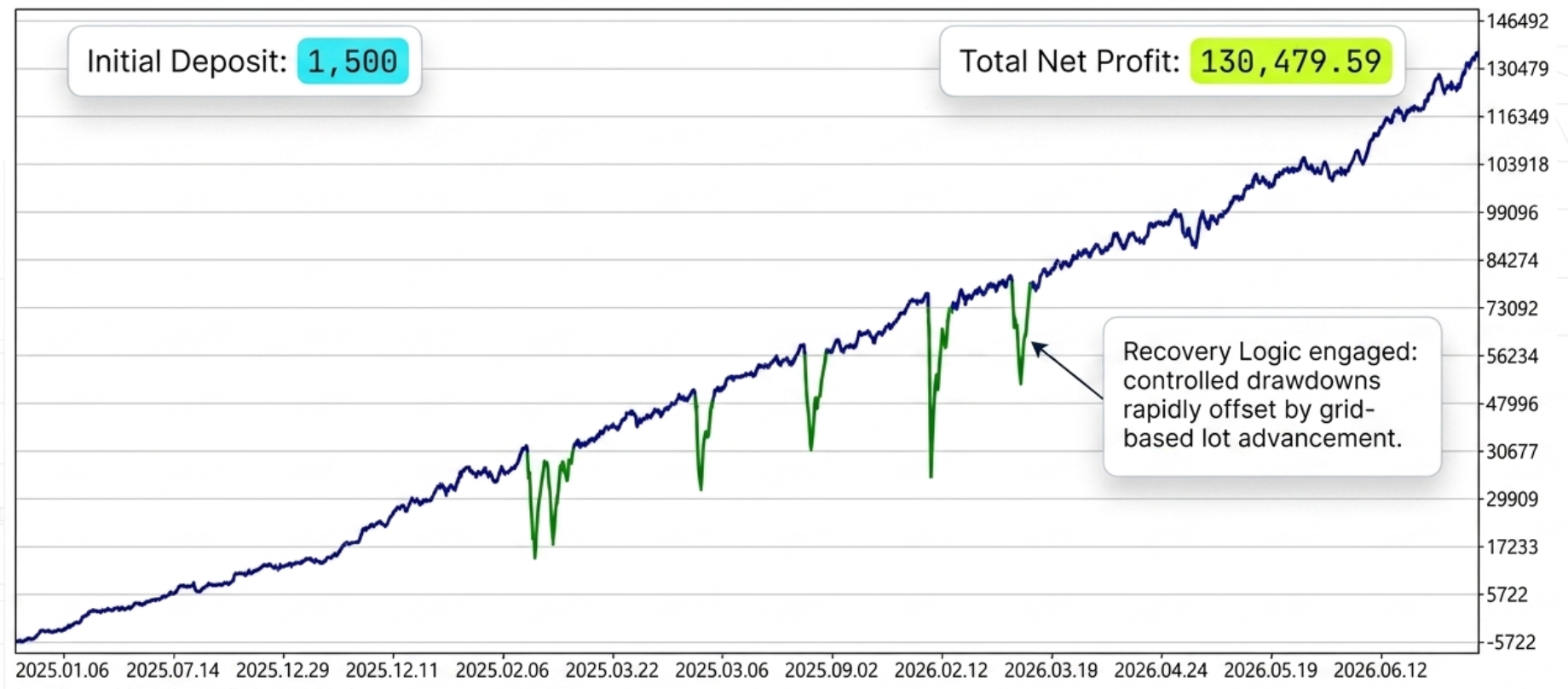
Settings Level A Timeframe M30 - H1: XAUUSD. XAGUSD. DE40. BTCUSD. ETHUSD. SOLUSD
Settings Level B Timeframe M15: EURUSD. GBPUSD. USDCAD. EURJPY. XAUUSD. DE40. BTCUSD. ETHUSD. SOLUSD
Settings Level C (High risk) Timeframe M5: XAUUSD. EURUSD. GBPUSD
EA Legendary Multi Strategy — A Complete Guide to Risk Management and Settings
Introduction
Practical examples of lot calculations for different balances.
Basic risk rule: 1,500 per 0.01 lot
The default EA settings set a risk of 1,500 deposit units for every 0.01 lot. This means:
For every 1,500 available account funds (USD/EUR/equivalent), you can safely open trades with a minimum volume of 0.01 lots when trading a single trading instrument.
Why 1,500?
This value is selected to:
- cover the strategy's maximum historical drawdown with a margin;
- leave a buffer for averaging and the EA's grid component;
- maintain the ability to weather news shocks on volatile instruments (XAUUSD, BTCUSD, etc.).
| Balance | Recommended starting lot |
|---|---|
| 1 500 | 0.01 |
| 3 000 | 0.02 |
| 4 500 | 0.03 |
| 7 500 | 0.05 |
| 15 000 | 0.10 |
⚠️ Round down to the nearest lot increment available from your broker (usually 0.01).
2. Trading several instruments on one account
If you run several copies of the EA on different symbols on the same account, the total risk grows and instrument correlation can amplify drawdowns. Therefore, for each additional instrument you must increase the capital allocated per 0.01 lot.
Scaling rule
For every additional instrument, add +1000 to the base risk of 1500.
| Number of instruments | Risk per 0.01 lot | Minimum balance per 0.01 lot on each |
|---|---|---|
| 1 instrument | 1,500 | 1,500 |
| 2 instruments | 2,500 | 2,500 |
| 3 instruments | 3,500 | 3,500 |
| 4 instruments | 4,500 | 4,500 |
| 5 instruments | 5,500 | 5,500 |
Example for 3 instruments
If you trade, for example, XAUUSD + EURUSD + BTCUSD simultaneously:
- For each of these symbols you should use 0.01 lot per every 3,500 of balance.
- With a balance of 10,500 you can run 0.03 lot on each of the three instruments.
- With a balance of 3,500 — strictly 0.01 lot on each.
Why it is so important to increase the risk parameter
Each instrument in the EA uses:
- its own averaging grid;
- its own stops and take-profits;
- a shared account drawdown limit ( StopTradeDD , CloseOrderDD ).
If you do not increase the risk parameter when adding symbols, the drawdown protections will trigger and the EA will stop trading at the worst possible moment.
3. Ready-made settings presets
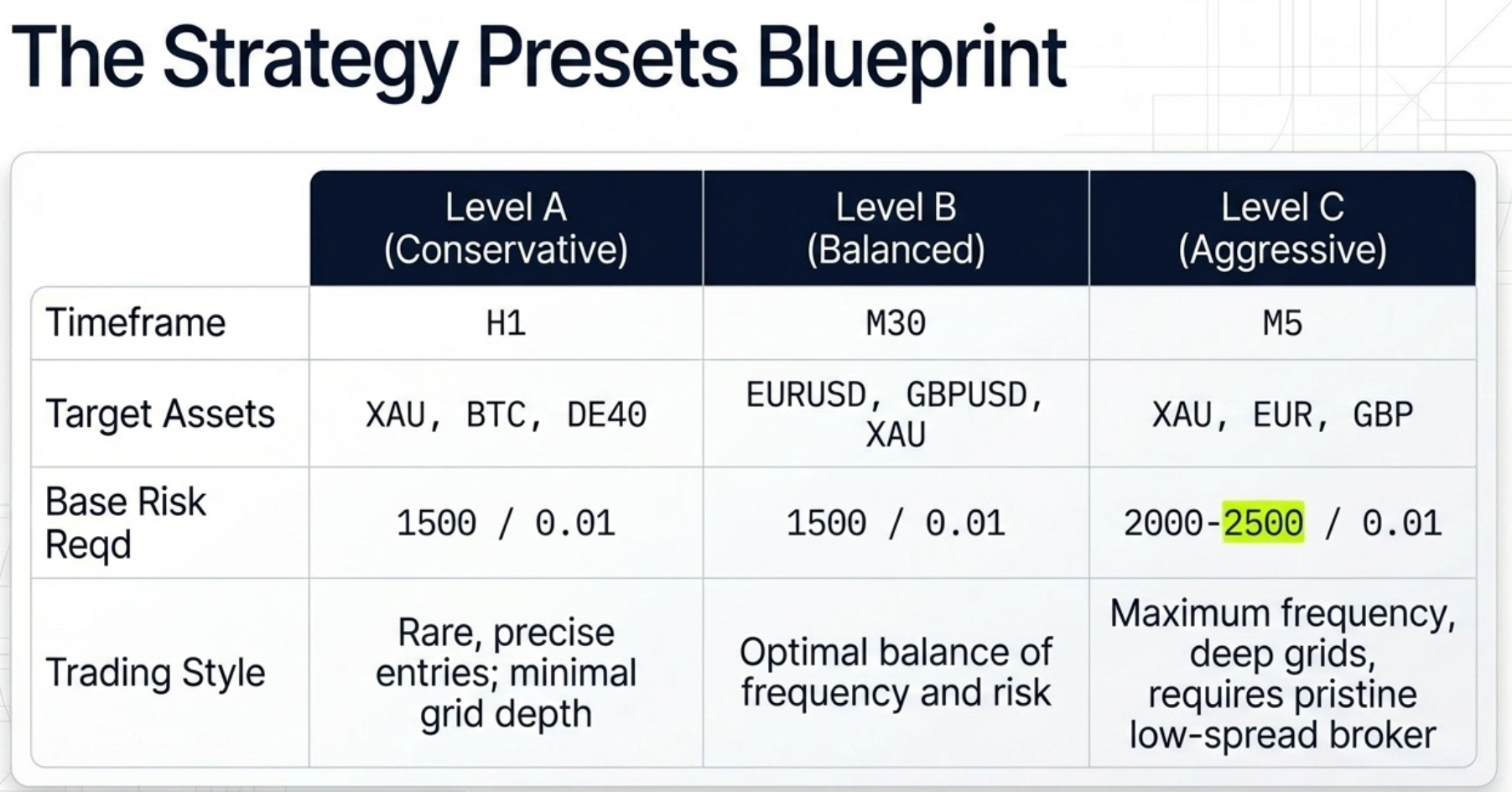
The EA ships with three settings levels — A, B and C — for different trading styles and different groups of instruments.
🟢 Settings Level A — Conservative (recommended for beginners)
- Timeframe: H1
- Instruments: XAUUSD, XAGUSD, DE40, BTCUSD, ETHUSD, SOLUSD
- Base risk: 1500 per 0.01 lot
- Trading character: rare but high-quality signals; minimal grid depth; maximum stability.
Ideal for:
- long-term account growth;
- investment and prop accounts with strict drawdown limits;
- "set and forget" operation.
🟡 Settings Level B — Balanced
- Timeframe: M30
- Instruments: EURUSD, GBPUSD, USDCAD, EURJPY, XAUUSD, DE40, BTCUSD, ETHUSD, SOLUSD
- Base risk: 1500 per 0.01 lot (with 1 instrument)
- Trading character: optimal balance between trade frequency and risk.
Suitable for traders who want to:
- see regular trades every day;
- combine 2–3 instruments on one account;
- get a good profit/drawdown ratio.
🔴 Settings Level C — Aggressive (high risk)
- Timeframe: M5
- Instruments: XAUUSD, EURUSD, GBPUSD
- Base risk: 1500 per 0.01 lot, recommended to increase to 2000–2500 per 0.01 lot
- Trading character: maximum trade frequency, aggressive grid, high volatility.
⚠️ Experienced traders only. Use this preset:
- on dedicated accounts;
- with a clear understanding that drawdown can be significantly larger;
- only with brokers that offer minimal spread and commission on XAUUSD/EURUSD/GBPUSD.
4. Practical scenarios
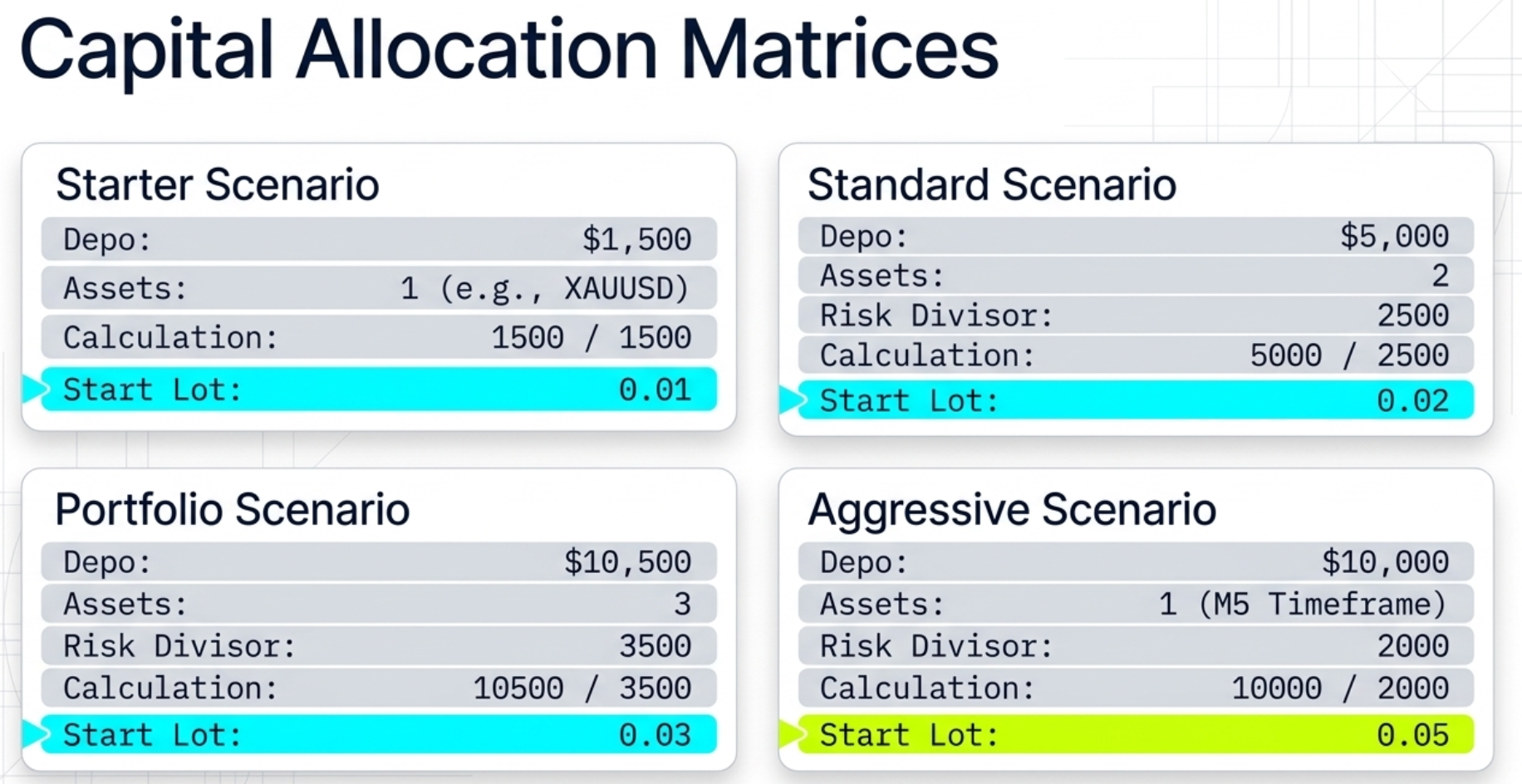
Scenario 1. Deposit 1,500 — one instrument
- Preset: Level A, XAUUSD H1
- Lot: 0.01
- Risk parameter: 1500
- Expected behavior: 1–3 trades per day, smooth growth.
Scenario 2. Deposit 5,000 — two instruments
- Preset: Level B, EURUSD M30 + XAUUSD M30
- Risk parameter: 2500 per 0.01 lot
- Lot on each symbol: 0.02 (5000 / 2500 = 2)
Scenario 3. Deposit 10,500 — three instruments
- Preset: Level B, XAUUSD + EURUSD + BTCUSD
- Risk parameter: 3500 per 0.01 lot
- Lot on each symbol: 0.03 (10500 / 3500 = 3)
Scenario 4. Deposit 10,000 — aggressive mode
- Preset: Level C, XAUUSD M5
- Risk parameter: 2000–2500 per 0.01 lot
- Lot: 0.04–0.05
- Required: StopTradeDD and CloseOrderDD enabled.
5. Pre-launch checklist
- I have selected a settings preset A / B / C that matches my trading style and instrument.
- The chart timeframe matches the chosen preset (H1 / M30 / M5).
- I have calculated the starting lot using the formula (Balance / Risk) * 0.01 .
- If there is more than one instrument — I have increased the risk parameter by +1000 for every additional symbol.
- Protective parameters are enabled: StopTradeDay , StopTradeDD , CloseOrderDD .
- The TimePermission time filter is configured for the session of the chosen instrument.
- Order comment ( ExpertName ) is set — for convenient account analytics.
Conclusion
EA Legendary Multi Strategy is a tool that reveals its full potential only with proper risk configuration. Remember three simple rules:
- 1500 per 0.01 lot — base risk with one instrument.
- +1000 to the risk parameter for each additional instrument. With 3 instruments — 3500 per 0.01 lot on each.
- Choose the preset (A / B / C) that fits your trading style and use only the recommended symbols and timeframes.
Following these rules will let the EA work stably over the long run and protect your deposit even during periods of increased market turbulence.
Happy trading! 🚀
More information on the official channel - https://t.me/EAQuantumLab
Official community chat - https://t.me/Chat_EA_Quantum_Lab
The best broker for trading with the EA - https://eaquantumlab.net/dashboard/broker
All settings are available here - https://drive.google.com/drive/u/1/folders/1K6uRO0ziFM4NvC7SjWuYAf8lOwLoS-oK