
Take Control of Your Portfolio While It’s Still Trading – Introducing What-If Simulator

Many traders running multiple EAs eventually face the same frustrating situation: the portfolio is profitable, but the drawdown is too high, the equity curve is choppy, and certain hours or symbols seem to drag everything down.
Manually tweaking each EA is complicated, risky, and time-consuming. Too often, traders end up living with these weaknesses, hoping things will "eventually improve."
The What-If Simulator in PortfolioLab solves exactly this problem.
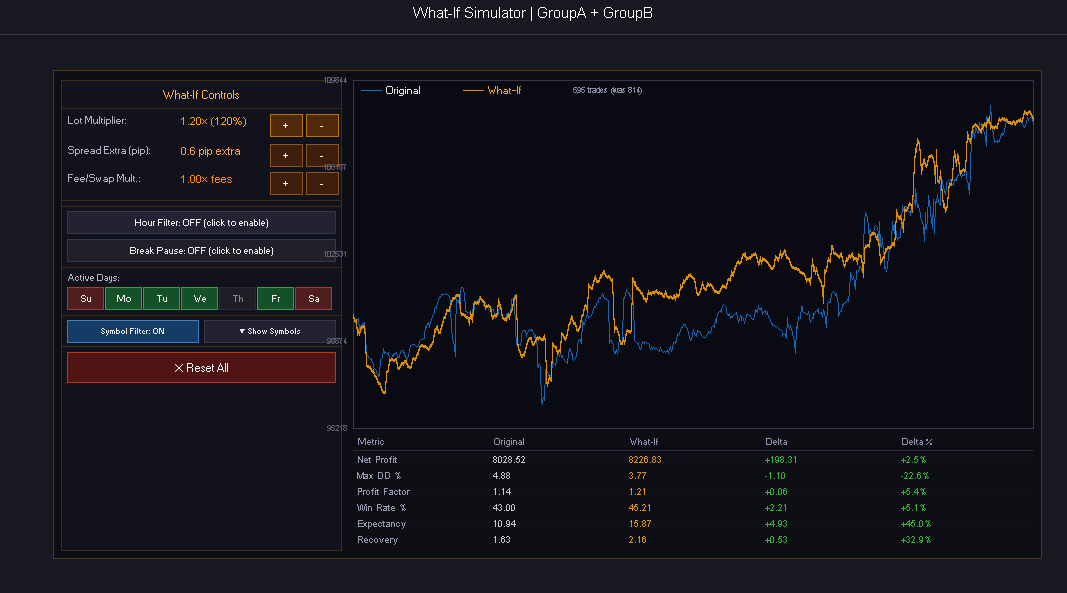
It lets you change lot sizing, add extra spread, apply time filters, breaks, or disable specific symbols directly on your real account history — while your EAs continue trading live. In seconds, you can see exactly how the equity curve would change if you applied those modifications today.
You can quickly answer critical questions like:
- What would happen if I reduced or increased the overall lot size?
- How much would the drawdown improve by excluding certain trading hours or symbols?
- How would performance change with more realistic execution costs?
A Recent Addition to PortfolioLab Pro
This powerful feature was recently introduced to further enhance PortfolioLab’s analytical capabilities.
PortfolioLab was already one of the most complete tools for monitoring and analyzing multi-EA portfolios with features like Heatmap, Monte Carlo, Radar, and Health Check. The What-If Simulator now adds the ability to test alternative real-world scenarios on your live portfolio without resetting anything or waiting for new data.
It transforms PortfolioLab from a simple monitoring tool into a true active portfolio management solution.
Why It’s Especially Valuable for Multi-EA Trading
In portfolio trading, the real challenge is rarely finding good EAs — it’s making them work well together without hurting each other.
The What-If Simulator helps you quickly identify which symbols add more noise than profit, which hours increase risk disproportionately, whether your current lot sizing is optimal, and what impact more conservative execution costs would have.
All of this happens in seconds, with a clear visual comparison between the real blue curve and the simulated orange curve.
How to Use It Effectively
The key is simplicity: change one variable at a time. Test a different lot multiplier, a tighter time filter, or disable a suspicious symbol. Immediately compare the original and modified curves and observe the impact on maximum drawdown, profit factor, and recovery factor.
Often, small targeted adjustments — such as excluding a weak session or slightly reducing lot size on certain pairs — deliver a significant improvement in portfolio stability without sacrificing too much return.
Maximum impact. Minimum effort.
With What-If you don’t need to stop your EAs, reset anything, or wait months for new history. Run the simulation in minutes and make informed decisions based on your real account data.
Final Thoughts
The What-If Simulator is not just another backtester. It’s a practical tool that gives you real control over your portfolio while it’s already trading live.
If you manage multiple EAs and want to finally take full control of your portfolio’s risk and equity curve quality, this is one of the most powerful features available today.
Ready to take control of your portfolio?
Click here to discover PortfolioLab Pro and try the What-If Simulator on your own account →