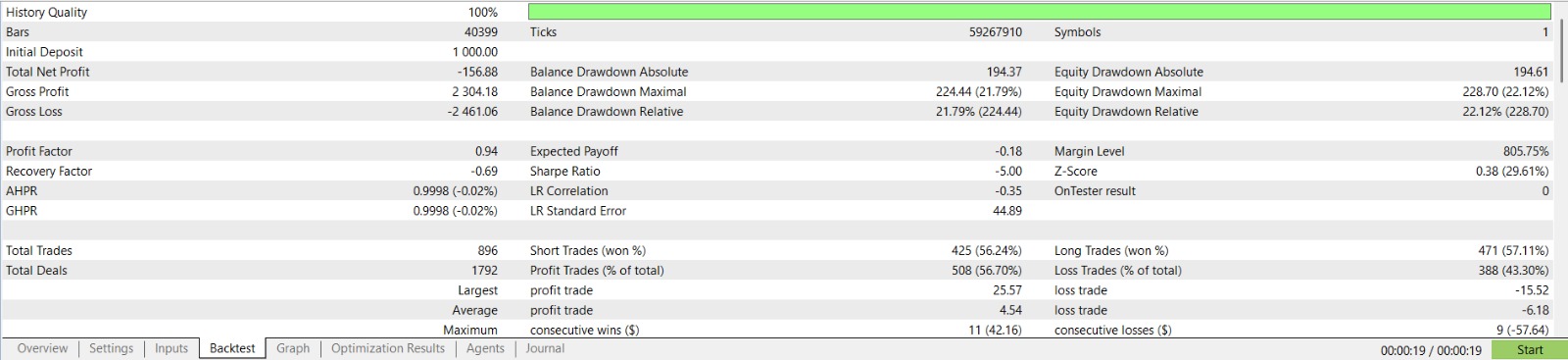
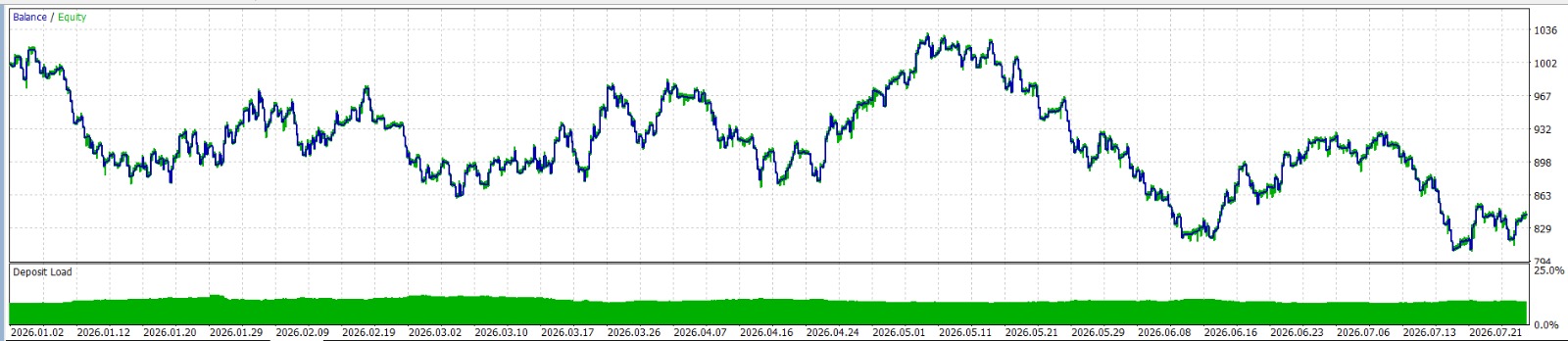
The Impossible Gold — Optimisation Settings
The Impossible Gold works out of the box — attach to XAUUSD M5 and trade. The v2.0 defaults are the genetically optimised values (36,375+ passes, Jan 2023 – Apr 2026, Every tick based on real ticks). No separate .set file is needed for standard accounts.
For questions or .set file requests, leave a comment below or send a private message.
The Impossible Gold has been tested across multiple broker conditions. For live raw-ECN execution on XAUUSD, we recommend RoboForex for tighter pricing and cleaner fills with this strategy profile.
Open Recommended Raw ECN Broker (RoboForex)
Gold vs Bullion
The Impossible Gold is the stable/free baseline for XAUUSD M5.
The Impossible Bullion is the advanced edition focused on tighter trade selection and expanded control, including:
- Progressive TP management to improve profit capture in trending phases
- 9-factor scoring for higher-quality entry filtering versus the Gold baseline
- Advanced trend-direction control for trade entries
- Enhanced Discord reporting and improved on-chart UI/monitoring features
See The Impossible Bullion on MQL5 Market.
⚠️ IMPORTANT
These settings are optimised for standard accounts. Always validate on your broker conditions before going live.
- Always test on a demo account for at least 2–4 weeks before running on any live account
- Past performance and backtest results do not guarantee future results
- The developer is not responsible for any losses incurred on live or personal accounts
Links
| The Impossible Gold — FREE on MQL5 Market |
| The Impossible Bullion — on MQL5 Market |
| Open Recommended Raw ECN Broker (RoboForex) |
| MQL5 Seller Profile |
| Discord Community — signals and trader chat |
Default Parameters
All v2.0 defaults listed below. These are the production values — optimised and validated on Every Tick with realistic spreads.
Strategy
| Parameter | Default |
|---|---|
| LookbackBars | 36 |
| BufferPips | 2.5 |
| MinRangePips | 20.0 |
| MaxRangePips | 1500.0 |
| MinScoreToTrade | 60 |
Session
| Parameter | Default |
|---|---|
| SessionStart | 2 GMT |
| SessionEnd | 19 GMT |
| ExcludeStart | 12 |
| ExcludeEnd | 15 |
| BlockWednesday | true |
Risk and Trade Management
| Parameter | Default |
|---|---|
| RiskPerTrade | 1.5% |
| CompoundAggressive | true |
| TP_Pips | 300 |
| SL_Pips | 55 |
| MaxSpread | 50 |
| SpreadMultiplier | 5 |
| MaxOpenTrades | 1 |
| MaxTradesPerDay | 10 |
| MagicNumber | 778899 |
Trailing Stop
| Parameter | Default |
|---|---|
| UseTrailingStop | true |
| TrailingStart | 15 |
| TrailingStep | 20 |
Regime Filter
| Parameter | Default |
|---|---|
| EnableRegimeFilter | true |
| RegimeEMAPeriod | 50 |
| RegimeLookback | 4 |
| RegimeMinSlope | 0.30 |
Optimised Set File
v2.0 is a full genetic re-optimisation. The v1 defaults used SL=25 which was too tight for Gold's intraday volatility — normal noise frequently hit the stop before the trade could develop. v2 widens SL to 55, giving trades room to survive volatility while the trailing stop (TrailingStart=15, TrailingStep=20) locks partial profits as price moves.
What changed from v1 to v2.0 (11 parameters):
| Parameter | v1 | v2 | Why |
|---|---|---|---|
| LookbackBars | 16 | 36 | Wider consolidation window (3 hours vs 80 min) — catches higher-quality breakouts |
| BufferPips | 1.5 | 2.5 | More buffer above/below range — fewer false breakouts |
| MinRangePips | 5 | 20 | Only trades ranges ≥$2.00 on Gold — filters noise |
| MinScoreToTrade | 50 | 60 | Higher confidence threshold — fewer but higher conviction entries |
| SessionStart | 10 | 2 | Catches Asian session breakouts (02:00 GMT) |
| SessionEnd | 20 | 19 | Stops 1 hour earlier — avoids thin late-session liquidity |
| BlockWednesday | false | true | Wednesday net-losing across ALL top 8 optimisation results |
| SL_Pips | 25 | 55 | Wider SL gives trades breathing room — DD and Sharpe both improve |
| SpreadMultiplier | 3 | 5 | Wider spread buffer for EnforceMinStops at order placement |
| TrailingStep | 2 | 20 | Genetically optimised — SL trails 20 pips behind price once trailing starts |
| MaxTradesPerDay | 5 | 10 | More opportunities during high-volatility sessions |
SpreadMultiplier and Trailing Stop: SpreadMultiplier=5 only affects the EnforceMinStops() function at initial order placement — it ensures SL/TP are far enough from entry to satisfy broker minimum distance requirements. It does not affect the trailing stop. The trailing stop function uses the broker's SYMBOL_TRADE_STOPS_LEVEL (typically 0 on Gold), so trailing works identically on backtest and live.
Every trade has three possible outcomes:
| Outcome | When | Result (0.01 lot) |
|---|---|---|
| Full SL | Price reverses before trailing starts | -$5.50 (55 pips) |
| Trailing Exit | Trailing engages, then price reverses | Variable partial win |
| Full TP | Price reaches 300 pips | +$30.00 |
Every Tick validation (Q1 2026): +$109,486 on $100K with only 3.6% gap from OHLC backtests. 63.2% win rate, PF 1.18. Trailing stop engages consistently on both backtest and live.
How to Load a Set File
- Download the .set file (request via comment or PM)
- Open MT5 and attach the EA to XAUUSD M5
- In the EA inputs tab, click Load and browse to the downloaded file
- Click OK — all parameters are applied
To return to defaults at any time, click Reset in the inputs tab.
Version History
| Date | Set File | Changes |
|---|---|---|
| Apr 2026 | v2.0 (current) | Full genetic re-optimisation — 36,375+ passes. 11 parameters changed. SL widened 25→55, SpreadMultiplier 3→5, TrailingStep 2→20, SessionStart 10→2, BlockWednesday enabled. Defaults are now the optimised values — no separate .set file needed. |
| Feb 2026 | v1.0 | Initial release. Default parameters. SL=25, TP=300, SessionStart=10, SpreadMultiplier=3. |
Past performance does not guarantee future results. Trading involves significant risk. Only trade with capital you can afford to lose.