| 🏆 ALITA GOLD ◈ CRYSTAL AI SYSTEMS ◈ Institutional-Grade Expert Advisor | MetaTrader 5 | XAUUSD (Gold) only VERSION 1.87 Complete User Guide — by jawadtrader22 · Product Page |
| ⚡ What Changed in This Update This guide replaces the v1.80 edition. Version 1.87 adds ✂ Tight SL Precision Mode, a 📡 real-time Slippage Tracker, a 📶 live Ping Monitor, the 📊 Aurora Live Dashboard and 🧠 Forgetful Mode. ⚠ The input parameters have changed. If you are upgrading, read Section 08 before you attach the EA. The broker and VPS recommendations have also been updated after live testing. |
01 Introduction
Alita Gold is a precision-engineered, fully automated Expert Advisor built by Crystal AI Systems for one purpose only — to trade Gold (XAUUSD) with the discipline of a machine. No emotions. No hesitation. No revenge trades.
Under the hood sits a proprietary signal engine — a closed, battle-tested core that hunts high-probability Gold setups and executes them with defined risk. Deploy it correctly, configure your risk sensibly, and let it work.
| ◈ The Alita Promise Every trade is born with a hard Stop Loss. Every position has a defined, calculated risk. No grids. No martingale. No averaging into losers. Ever. |
| ◈ Key Highlights ► Built exclusively for XAUUSD — calibrated for Gold's specific price behaviour |
02 What Makes Alita Different
Most "Gold robots" survive backtests by hiding catastrophic risk — stacking grids, doubling lots after losses, averaging down until one bad move wipes the account. Alita rejects all of it.
| Risk Mechanic | Typical Gold EAs | Alita Gold |
|---|---|---|
| Grid stacking | ❌ Yes — often unlimited | ✅ Never |
| Martingale lot doubling | ❌ Yes | ✅ Never |
| Averaging into losers | ❌ Yes | ✅ Never |
| Hard Stop Loss every trade | ⚠️ Often none | ✅ Always |
| Risk per trade | ❌ Uncontrolled | ✅ Calculated & capped |
| Position logic | ❌ Recovery baskets | ✅ Clean, defined trades |
| ⚠ The Trade-Off You Must Accept Because there is no martingale or grid to mask them, Alita will take small, controlled losing trades. That is by design and it is the healthy way to trade Gold. Judge performance over many trades, never over a single one. |
03 Your Infrastructure Decides Your Results
Most users skip this section, and it is the one that costs them the most. Alita's signal engine is fixed. Your broker and hosting are not — and between them they set the two largest recurring costs the EA pays: spread and latency.
Alita does not fire market orders on a signal. It arms pending stop orders and waits for Gold to come to the level. That design changes what your infrastructure does to you:
| Step | What happens, and what latency does to it |
|---|---|
| 1 — Arming | The request travels to the broker's server and the confirmation travels back. Your ping is paid twice — once out, once back. |
| 2 — Trigger | The pending order converts to a market order on the broker's server. Alita accepts a max deviation of 50 points. If the market has run past that window, the fill is rejected or worse. |
| 3 — Cancelling | When a setup is invalidated the EA deletes the pending order. ⚠ If your terminal is offline, that order stays armed on the broker's server — and can trigger hours later in a completely different market. This is the failure mode nobody sees coming. |
| 4 — Trailing | Every trail step is another round trip. And critically, the trailing stop only exists while MetaTrader is running. Your SL and TP are safe on the broker's server, but the profit-locking logic is client-side. |
| ◈ The Honest Summary Your stop loss survives a power cut. Your edge does not. Alita's protection is broker-side; Alita's intelligence is terminal-side. A VPS is what keeps the intelligence switched on. |
3.1 Recommended Broker — Vantage Markets (RAW ECN)
On a system taking 40 to 150 trades a month, spread is the single largest controllable cost in the entire operation. A wide-spread account can turn a working system into a losing one without you changing a single setting.
| Feature | Vantage Markets — RAW ECN (Recommended) |
|---|---|
| Account Type | RAW ECN — raw spreads plus transparent commission, no markup |
| Commission | USD $3.00 per standard lot per side ($6 round turn) |
| Typical XAUUSD Spread | From around 0.0 – 0.3 pips under normal conditions; widens around news |
| Minimum Deposit | USD $50 |
| Server Location | London & New York — Equinix infrastructure. This is what makes a matched VPS location possible. |
| Platforms | MetaTrader 5 (required for Alita), MT4, TradingView, Vantage App |
| Regulation | Group entities under Mauritius FSC · VFSC · ASIC (Australia) · FSCA (South Africa) |
| Open Account | ➪ Open a Vantage RAW ECN Account |
| ⚠ Check Before You Sign Up Vantage does not accept clients from certain jurisdictions, including India, Canada, China, Singapore and the United States, among others. Which entity you register with — and therefore which regulator covers you — depends on your country of residence. Read the disclosures on the registration page; they are not boilerplate. |
3.2 ECN vs Standard Account
| Factor | Standard / Market Maker | ECN / Raw Spread ✔ |
|---|---|---|
| Spread on XAUUSD | Several pips, all-in | ~0.0–0.3 pips + commission |
| Execution model | Broker may be your counterparty | Direct market access, no dealing desk |
| Spread during news | Can widen sharply | Reflects real market conditions |
| Cost transparency | Hidden inside the spread | Spread + stated commission you can audit |
| Effect on this EA | ❌ Significantly reduced result | ✅ Fully realised |
| ⚠ Do NOT Use These Account Types ✗ Wide-spread standard / market-maker accounts — the cost you pay most often, and the one setting you cannot fix later |
04 VPS — Not Optional, It Is Required
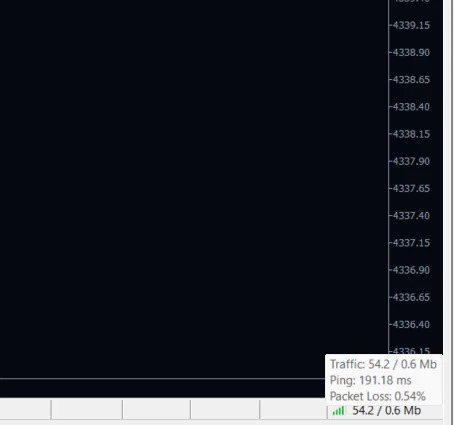
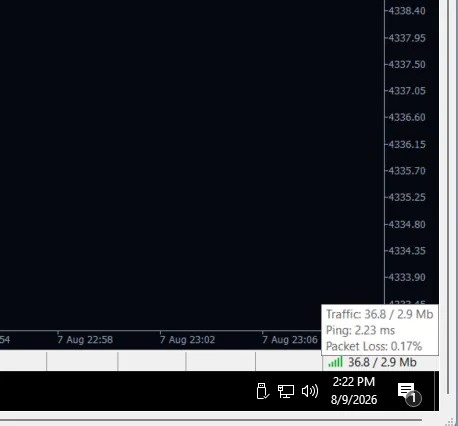
Below are two readings from MetaTrader's own status bar — same broker, same account, same day. One machine was at home. One was a VPS in a datacentre.
| Machine | Traffic | Ping | Packet Loss |
|---|---|---|---|
| ❌ Home PC (Wi-Fi) | 54.2 / 0.6 Mb | 191.18 ms | 0.54% |
| ✅ VPS (broker datacentre) | 36.8 / 2.9 Mb | 2.23 ms | 0.17% |
| 86× further away. Every order the EA sends, every stop it moves and every close it requests makes that journey twice. Read your own number any time — hover the bottom-right corner of MetaTrader. |
4.1 What Your Ping Number Means
| Ping | Verdict | What it means for Alita |
|---|---|---|
| Under 5 ms | ✅ TARGET | Same-region datacentre. Order placement, cancellation and trail steps are effectively instant. |
| 5 – 50 ms | ✅ EXCELLENT | Well within tolerance. No practical disadvantage. |
| 50 – 150 ms | ⚠️ ACCEPTABLE | Works, but you pay a delay on every order and every trail step. Worth fixing. |
| Over 150 ms | ❌ RED FLAG | The Aurora dashboard turns red here for a reason. Move closer to your broker's server region. |
4.2 Six Ways a Home Computer Breaks an Automated System
| What happens | What it does to the EA |
|---|---|
| Windows Update reboots overnight | Terminal closes with positions open. Trailing stops freeze. Pending orders stay armed with nobody managing them. |
| PC goes to sleep | Connection drops. The EA is not running. It resumes hours later into a market it has no context for. |
| ISP drops for 40 seconds | Long enough to miss a trigger, a cancellation, or several trail steps during a fast move. |
| Power cut | Same as a reboot, but you may not be there to restart it. |
| Wi-Fi instead of ethernet | Packet loss and resent requests. Your average ping looks fine; your worst-case ping is what costs you. |
| You use the computer | A video call, a game or a large download competes with MetaTrader at exactly the wrong moment. |
05 ⚠ BEFORE You Buy a VPS: Find Your Broker's Server Location
| ⚠ Do this FIRST. Not after you have paid. |
Every argument above collapses into one decision: which city do I put the VPS in? And the answer is never "the city closest to me." Once the VPS is running, your own location is irrelevant — you only connect to it to look at things. What matters is the distance between the VPS and your broker's trading server.
Most traders buy a VPS in their own country, get a disappointing ping, and conclude that "VPS doesn't help." They bought the right product in the wrong place.
5.1 The Logic, In Order
| Step | Action |
|---|---|
| 1 | Find which server your account is on. The server name is in MT5's bottom-right status bar, and under File → Login to Trade Account. Write the exact name down — e.g. VantageInternational-Live 5. The number matters; brokers often run Gold on a different line server than FX majors. |
| 2 | Find where that server physically sits. The server name alone does not tell you the city. Use the methods below — and use at least two, so you are not relying on a guess. |
| 3 | Match the VPS location to that city. London server → London VPS. New York server → New York VPS. |
| 4 | Verify with a real ping before you commit. Take a cheap trial, install MT5, log in, read the status bar. That number is the only proof that counts. |
5.2 Five Ways to Find Your Broker's Server Location
| Method | How to do it | Reliability |
|---|---|---|
| 1. Ask your broker directly | Open your broker's live chat or email support and ask: "Which datacentre is my MT5 server hosted in — London Equinix LD4, New York Equinix NY4, or somewhere else?" Give them your exact server name. Most reply within minutes. | ✅ Highest — straight from the source |
| 2. Ask the VPS provider's support | Fastest route if you are unsure. Open a live chat or ticket with FXVM, give them your broker name and exact server name, and ask which of their locations is closest. They answer this all day long — and they will tell you before you pay anything. | ✅ Highest — and completely free |
| 3. Broker's "trading servers" page | Serious brokers publish where their infrastructure lives. Vantage, for example, publishes London and New York on Equinix. Search the broker's site for "our servers" or "data centre". | ✅ High |
| 4. A broker latency table | Go to fxvm.net/forex-broker-latency, pick your broker, and see measured latency from each location. If your broker is not listed, browse by location instead. | ✅ High |
| 5. MetaQuotes' VPS page | At mql5.com/en/vps you can enter your broker's server name and MetaQuotes will estimate network delays and show the nearest access point. A useful free cross-check. | ⚠️ Good second opinion |
5.3 Copy This Message and Send It to Support
| "Hello. I run an Expert Advisor on MetaTrader 5 and I need the lowest possible latency to my broker. My broker is [BROKER NAME] and my server is [EXACT SERVER NAME]. Which of your VPS locations is physically closest to that server? I want to choose the right location before I order." |
Fill in two blanks and send it. A two-minute message that decides your ping for the next two years.
5.4 Location Matching — Quick Reference
| If your broker's server is in… | Choose this VPS location |
|---|---|
| London (Equinix LD4) — most common for international brokers | London, UK |
| New York (Equinix NY4) | New York, USA |
| Amsterdam / Frankfurt / Zurich | The matching European hub |
| Singapore, Tokyo, Hong Kong | The matching Asian hub |
| You genuinely cannot find out | Ask VPS support, or take a trial and test London first |
| ⚠ Golden Rule Never guess, and never pick by your own country. Confirm with two independent methods, then verify the real ping in MetaTrader once the VPS is live. If the number is wrong, ask support to move you to another location before you go live with real money. |
06 Recommended VPS — FXVM
Our recommendation is FXVM, for two practical reasons. They have Equinix locations in the same financial hubs the major brokers use — London LD4, New York NY4, Amsterdam AM6, Tokyo TY8, plus Frankfurt, Zurich, Singapore, Dubai, Mumbai, Sydney, Hong Kong and more — and they give you a real Windows Server desktop over RDP, so you can read Alita's dashboard and open its CSV logs.
| Locations | Trial | Money Back | Uptime SLA |
|---|---|---|---|
| 16 | $0.99 for 7 days | 7 days on all plans | 99.99% |
6.1 Which Plan for Alita Gold?
| Plan | Resources | Right for you if… |
|---|---|---|
| Virtual Desktop from $12.75/mo | 2 cores · 3 GB RAM · 10 GB SSD ⚠️ One trading platform only | You will run one MT5 terminal, one mode, nothing else. Cheapest entry. |
| ★ Lite VPS — RECOMMENDED from $21.25/mo | 2 cores · 1.5 GB RAM · 60 GB SSD ✅ Full Windows + RDP | The sensible starting point. One or two MT5 terminals, full desktop, all 16 locations, and you can reach your CSV logs. |
| Basic VPS from $29.75/mo | 2 cores · 2.5 GB RAM · 80 GB SSD | Three or four terminals — e.g. Smart, Fast and Aggressive on separate charts. |
| Advanced VPS from $42.50/mo | 2 cores · 4 GB RAM · 90 GB SSD | Four to six terminals, multiple accounts, or extra software on the same box. |
Prices include the 15% discount code FXVM4LIFE, correct at the time of writing. Promotions change — check the current page.
➪ Get the FXVM VPS — try it for $0.99 first ➪
6.2 MQL5 VPS or a Full Windows VPS?
MetaTrader has built-in virtual hosting. It is convenient, but it is not a real Windows machine, and the limitations collide directly with v1.87's new telemetry features.
| Capability | MQL5 VPS | Full Windows VPS |
|---|---|---|
| Remote desktop access | ❌ No — no interface at all | ✅ Yes — full RDP |
| See the Aurora dashboard | ❌ No — nothing to look at | ✅ Yes |
| Retrieve slippage & ping CSV logs | ❌ No file system access | ✅ Yes — open the folder |
| Run several modes / accounts | ⚠️ One account per subscription | ✅ Several terminals, one server |
| Install other software | ❌ No | ✅ Yes |
| DLL-based tools | ❌ Blocked entirely | ✅ Allowed |
| ⚠ The Deciding Factor Alita's Slippage Tracker and Ping Monitor both write CSV files. On MQL5 virtual hosting you cannot reach those files. You would be running an EA that carefully measures your execution quality and then throws the evidence into a locked room. If you want to verify your setup, you need a machine you can log into. |
07 Trading Modes
Four selectable personalities. Each changes how often the engine seeks opportunities — without ever changing the core risk rules. Hard SL is always on, in every mode. No grid, no martingale, in every mode.
| Mode | Personality | Trades / Month | Min. Balance | Best Suited For |
|---|---|---|---|---|
| SLOW ★ | Most patient — fewest, most selective signals | 20–25 | $500 | New users, smallest drawdown |
| FAST ★★ | More frequent opportunity hunting | 40–50 | $500 | More market participation |
| AGGRESSIVE ★★★ | Maximum activity and responsiveness | 80–100 | $1,000 | Experienced users, higher turnover |
| SMART ⭐ (DEFAULT) | Balanced, adaptive sweet-spot | 80–150+ | $1,000 | Recommended for most users |
| ⚠ Read This Before Choosing Trade-frequency figures are approximate and depend entirely on market conditions — a quiet month produces fewer setups in every mode. A higher mode is not a higher-quality strategy; it is simply more active, which means more concurrent positions and more margin required. Always reduce your risk percent as you increase mode frequency. |
08 Installation & Input Parameters
| Step | Action |
|---|---|
| 0 | ⚠ Confirm your broker's server location first (Section 05), then order the VPS in the matching region. Do not skip this. |
| 1 | Connect to the VPS over RDP using the details from your provisioning email. |
| 2 | Download MT5 from your broker's own website onto the VPS and log in. |
| 3 | Check your ping immediately. Hover the bottom-right status bar. If it is wrong, fix the location now, before installing anything else. |
| 4 | Open File → Open Data Folder → MQL5 → Experts and paste Alita_Gold.ex5. Restart MT5 or refresh the Navigator. |
| 5 | Open a XAUUSD chart (any timeframe — the logic is internal) and drag Alita onto it. |
| 6 | Enable Allow Algo Trading, set your inputs, click OK. |
| 7 | Confirm the ☺ smiley appears top-right and the Aurora dashboard top-left. Set the VPS power plan to never sleep. ✅ Log out of RDP — do not shut down. |
| ⚠ Upgrading from v1.80? The input names have changed. InpMode, InpLotSize, InpAutoLot, InpAutoLotRisk and InpMaxSpread no longer exist. Do not carry an old .set file across — configure from scratch using the table below. |
| Setting | Default | Description |
|---|---|---|
| ◈ EA MODE · LOT SIZE | ||
| EA Mode | Smart Mode | Slow, Fast, Aggressive or Smart. |
| Lot Mode | Risk % of Equity | Choose Fixed Lot or automatic Risk-% sizing. |
| Fixed Lot | 0.10 | Lot used when Lot Mode = Fixed Lot. |
| Risk % of Equity | 5.0 | Percent of equity risked per trade. ⚠ 5% is aggressive — see warning below. |
| ◈ EA SETTINGS · ✂ TIGHT SL (NEW) | ||
| Magic Number | 77777 | Unique ID so Alita manages only its own trades. Different magic per mode. |
| Forgetful Mode | OFF | Duplicate-order guard. When ON, the EA will not re-arm a level it already acted on. |
| Enable Tight SL | OFF | New trades use a tighter protective stop — ✅ lot size stays unchanged. |
| Tight SL Distance | 500 points | The tighter stop distance applied when Tight SL is enabled. |
| 📡 TELEMETRY | ||
| Show Broker Warning | ON | Displays a broker-compatibility notice on attach. |
| Enable Slippage Tracker | ON | Logs real execution slippage so you can judge fill quality. |
| Enable Ping Monitor | ON | Shows live broker latency (ms) on the dashboard and reports periodically. |
| Ping Report Interval | 12 hours | How often a ping summary is printed, pushed to your phone and written to CSV. |
| ⚠ On the 5% Default Risk The factory default is 5% of equity per trade, which is aggressive. If you are new to automated Gold trading or running a smaller account, lower it to 1–2% until you are comfortable with the EA's behaviour. This is the single most important number in the settings window. |
| ◈ Recommended Starter Settings ► EA Mode: Smart (default) — or Slow for the most conservative start |
09 Risk Logic & ✂ Tight SL Precision Mode
🔒 Hard Stop Loss — always. Every trade carries a fixed, broker-level Stop Loss from the first moment. There is no scenario where a position sits unprotected. No averaging. No martingale rescue.
🎯 Take Profit — defined target. Each trade also carries a Take Profit. When Gold reaches it, profit is banked automatically.
📉 Smart trailing stop. Once in profit, the trailing logic follows price, ratcheting the stop in your favour. ⚠ Remember: the trailing stop requires MetaTrader to be running. This is the strongest argument for a VPS.
⚖ One trade, one defined risk. Risk is never rolled forward into a basket of recovery orders. This is exactly why a single bad candle cannot cascade into disaster.
Tight SL lets you tighten your protective stop without inflating your position size. Normally, halving a stop would double your lot for the same risk percentage. Alita's implementation does not:
| ✅ Stop distance tightens to your chosen value (default 500 points) |
| 💡 Tip & Trade-Off Keep the tight distance sensibly above your broker's minimum stop level. On Gold, 500 points is comfortably safe; very small values may be rejected. Trade-off: a tighter stop means a smaller loss when hit — but also a higher chance of being hit by normal Gold noise. Test it on demo first. |
10 📊 Dashboard & 📡 Telemetry
The Aurora panel (top-left) gives a real-time, colour-coded read on your account and the EA's status. The fields to check first:
| Readout | What you want to see |
|---|---|
| Ping | 🟢 Green = under 50 ms. 🟡 Amber = under 150 ms. 🔴 Red = fix your location. |
| EA Status | MONITORING (amber) = armed and watching. IN TRADE (green) = position being managed. IDLE (grey) = no setup right now — ✅ not a fault. |
| Orders / Pos | 🟠 Amber when pending orders are armed or positions are open. |
| Balance / Equity / Float P/L | Live account figures. 🟢 green up, 🔴 red down. |
| Lot · Mode · Forgetful · SlipTracker | Next trade lot with sizing mode, active personality, and which guards are on. |
🎯 Slippage Tracker. Slippage is the difference between the price the EA requested and the price it received. On fast-moving Gold it quietly eats results. The tracker records both prices for every fill and writes them to CSV in MetaTrader's Common files folder.
| ⚠ Why There Is No Pip Number in This Guide You will not find a slippage figure here, and you should be suspicious of any guide that gives you one. Slippage depends on your broker, account type, VPS location, session and the news calendar. Run the tracker for two weeks — that file is the truth about YOUR setup. Look for small numbers and consistency. |
📶 Ping Monitor. Samples your round-trip latency every 5 seconds and posts a min / max / average report to the Journal, your phone, and CSV. ⚠ Look at the maximum, not the average. An average of 3 ms with a maximum of 900 ms means something went wrong — probably during a fast move.
| ✅ Healthy Targets Ping: under ~50 ms excellent, under ~150 ms acceptable, under 5 ms is the goal on a matched VPS. |
11 📈 Backtesting & 💡 Pro Tips
Open the Strategy Tester (Ctrl+R), select Alita Gold and XAUUSD, set modelling to "Every tick based on real ticks", and choose a range of several months minimum to see behaviour across different Gold regimes. Use Visual Mode to watch the logic and dashboard live.
| ⚠ What a Backtest Cannot Tell You A backtest runs on historical spread data and has no concept of your latency, your VPS location or your real fills. It cannot show you slippage you have not yet experienced. Treat backtests as a study of the logic, and your demo account plus the Slippage Tracker as the study of your execution. You need both. |
| 💡 Pro Tips ► Always demo test first. Minimum two weeks before risking real capital. |
12 ❓ Frequently Asked Questions
| Question | Answer |
|---|---|
| The EA is not placing any trades. | Check in order — Algo Trading is ON (green), correct XAUUSD symbol, market open, sufficient free margin, dashboard shows MONITORING. Alita is selective by design; patience is normal. |
| Can I run it on other pairs? | ❌ No. Alita Gold is engineered specifically for XAUUSD. Other symbols are not supported. |
| Does it use grid or martingale? | ✅ No. Never. Every trade has its own hard stop and defined risk — no recovery baskets, no lot doubling. |
| Why did it take a small loss? | Controlled losses are part of the strategy. Without martingale to mask them, Alita books small, capped losses and moves on. |
| Can I just run it on my laptop overnight? | You can, but your trailing stop stops moving the moment the terminal closes, stale pending orders stay armed with nobody to cancel them, and you add roughly 190 ms to every order. |
| My SL is on the broker's server — am I not protected? | Yes — SL and TP survive any outage. What you lose when offline is everything the EA does actively: trailing into profit, cancelling invalidated levels, arming new ones. |
| How do I find where my broker's server is? | See Section 05. Quickest: ask your broker's live chat, or send your broker name + exact server name to the VPS provider's support. Both free, both take minutes. |
| My ping is still bad after buying a VPS. | Contact VPS support and ask to be migrated to a different location. Routine request. Do it before you go live with real capital. |
| Do I need a powerful VPS? | No. One MT5 terminal is a light workload. You are buying location, uptime and network quality — not CPU. |
| Does a VPS improve my results? | A VPS does not create an edge and nothing here guarantees profit. It removes avoidable costs and failure modes. It protects whatever the strategy produces; it does not manufacture it. |
| I upgraded from v1.80 and my settings are gone. | Expected. The inputs changed in v1.87. Configure from scratch; do not load an old .set file. |
13 Support & Useful Links
| Resource | Link |
|---|---|
| Product Page | Alita Gold on the MQL5 Market |
| Developer Profile | mql5.com/en/users/jawadtrader22 |
| Recommended Broker | ➪ Vantage Markets — RAW ECN |
| Recommended VPS | ➪ FXVM — Windows Forex VPS ($0.99 trial) |
| Check Broker Latency | fxvm.net/forex-broker-latency |
| Support | Use the Comments section on the MQL5 product page — answered within 24 hours |
⚠ Disclosure & Risk Disclaimer
| Affiliate disclosure. The FXVM and Vantage Markets links in this article are affiliate links. If you sign up through them, Crystal AI Systems may receive a commission at no additional cost to you. We recommend these services because they are what we use and test against; you should still do your own due diligence, and you are free to use any provider you prefer. Prices, spreads and commissions quoted here were correct at the time of writing and change without notice. Risk warning. Trading foreign exchange, CFDs and precious metals such as Gold (XAUUSD) carries a substantial risk of loss and is not appropriate for every investor. Leverage can work against you as well as in your favour. Consider your financial situation, objectives, experience and risk tolerance before trading. No guarantee of profit. Past performance of Alita Gold — on demo, backtests or live accounts — is not indicative of future results. Alita Gold is a fully automated system and will incur losses as part of normal operation. Only trade with capital you can afford to lose completely. Not financial advice. Crystal AI Systems and jawadtrader22 are not licensed financial advisors or regulated brokers. Nothing here constitutes financial, investment, legal or tax advice. You are solely responsible for your own broker selection, settings, risk configuration and trading decisions. Always test on demo first. |
| 🏆 ALITA GOLD ELITE · RELENTLESS · UNSTOPPABLE Version 1.87 | Crystal AI Systems | jawadtrader22 © Crystal AI Systems — All Rights Reserved |