
User Manual & Strategy Guide
Version 1.25
Author: Simon Draxler (DRX Trading)
DRX_Equilibrium → Link
1. Before You Start
DRX Equilibrium was developed for traders who want structure, not chaos.
Gold is volatile.
It can stay quiet for hours — and then move aggressively within minutes.
This Expert Advisor was built to handle both conditions automatically.
You do not need to analyze charts.
You do not need to predict direction.
You only define your risk.
Everything else is managed by the system.
Important:
After purchase, please send a short message to receive the additional files and recommended settings.
2. What You Need To Do
The setup is simple.
-
Open XAUUSD .
-
Attach DRX Equilibrium to the chart.
-
Activate Algo Trading.
-
Set your desired risk (InpRiskPercent).
That is all.
The EA scans the market automatically and waits for valid conditions.
No manual entries are required.
No intervention is necessary.
3. What The EA Does Internally
DRX Equilibrium constantly evaluates market structure on every new tick.
It distinguishes between two states:
Range Phase
The market is balanced and moves within defined zones.
The EA trades controlled reversals inside these zones.
Expansion Phase
Momentum enters the market.
The EA switches automatically to breakout execution.
Before any trade is placed, an internal neural filter evaluates the setup.
If confidence is too low, the trade is blocked.
The goal is not to trade often.
The goal is to trade with structure.
4. Risk & Position Management
Risk control is the core of the system.
You define your percentage risk per trade.
The EA calculates lot size automatically based on:
-
Account balance
-
Stop distance
-
Required Gold margin
Every position is opened with a defined Stop-Loss.
Optional protections:
-
Maximum daily loss limit
-
Friday automatic closure
-
Spread filter
-
Free margin check
The system never increases risk automatically beyond your defined settings.
If you choose conservative settings, exposure remains low.
If you allow higher risk, trade intensity increases accordingly.
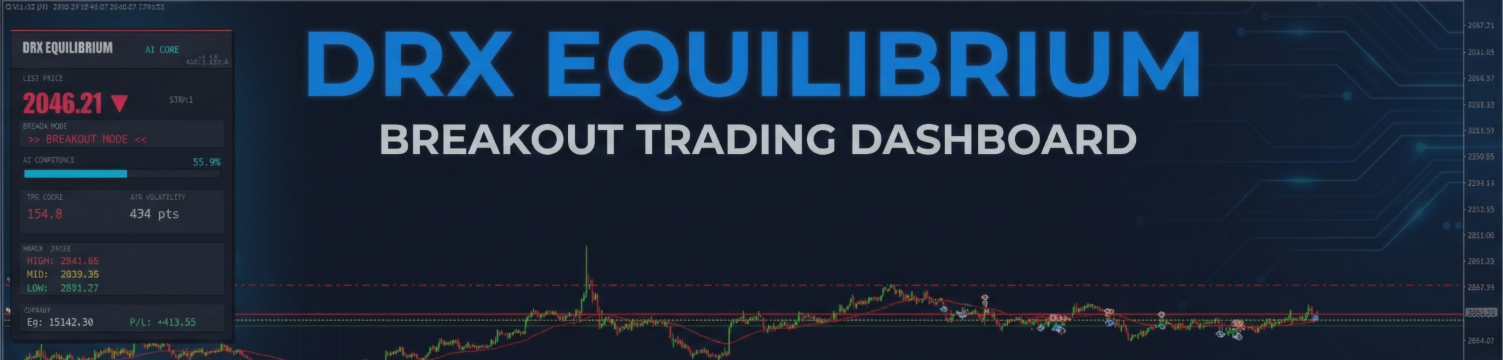
5. Visual Interface – Info Panel
The EA displays a live dashboard directly on your chart.
It shows:
-
Current Mode (Range or Breakout)
-
AI Confidence Level
-
TEQ Filter Value
-
Active Range Levels
-
Risk status
This gives you full transparency about what the system is currently evaluating.

The panel can be disabled during backtesting to increase speed.
6. Settings Overview
Below are the most important parameters.
InpUseAI
Enables or disables the neural filter (recommended: true).
InpRiskPercent
Risk per trade in percent of account balance.
InpMaxDailyLoss
Maximum daily loss in percent. Trading pauses automatically if reached.
InpFridayExit
Hour on Friday when all trades are closed.
InpTradeRejection
Enable range trades.
InpTradeBreakout
Enable breakout trades.
InpTrailMode
Trailing stop mode (Points or ATR based).
InpCancelDistance
Deletes pending orders if price moves too far away.
7. Recommended Configuration
Instrument: XAUUSD
Timeframe: H1
Account Type: ECN or Raw Spread
Minimum Capital: 1000 USD
VPS recommended for stable execution
For realistic backtests, use:
“Every Tick based on real ticks”
8. Live Operation
In live trading, the EA performs the following sequence:
-
Checks spread conditions
-
Calculates TEQ value
-
Runs neural validation
-
Determines Range or Breakout logic
-
Calculates position size
-
Monitors open trades via trailing and drawdown control
The system operates continuously and autonomously.
9. Best Practice
Use moderate risk settings, especially in the beginning.
Do not interfere with open trades unless necessary.
Evaluate performance over a meaningful period, not based on single trades.
Gold can remain inactive for hours.
Patience is part of the strategy.
10. Support
Developer: Simon Draxler
Contact: via MQL5 Profile Message
Before requesting support, please ensure:
-
The EA is attached to XAUUSD H1
-
Algo Trading is enabled
-
Risk settings are configured correctly
Most “no trade” situations are caused by filtering conditions being active.
DRX_Equilibrium → Link