

VORTEX TURBO EA - HOW TO SET UP
INFO
- Working symbols: XAUUSD(GOLD), other pairs will be added soon...
- Working Timeframe: H1
- Minimum recommended deposit $1000, for low risk trading $3000
- Required Leverage 1:30 for Conservative and Low risk trading (For higher risks need leverage 1:100 and more)
- Account type: Hedge
- It is also highly recommended to use a good-quality VPS for stable and uninterrupted operation - Recommended VPS
✅ Recommended Brokers for EA Trading
🔵 IC Markets
One of the most popular choices for Forex & EA trading.
👉 Open Account / Learn More
🔵 IC Trading
A strong alternative for automated trading.
👉 Open Account / Learn More
🔵 RoboForex
Convenient for automated trading and testing different account types.
👉 Open Account / Learn More
🔵 Vantage
Another solid option for Forex, Gold and Expert Advisors.
👉 Open Account / Learn More
🔵 Weltrade
Alternative broker suitable for automated trading.
👉 Open Account / Learn More
*An expert advisor can work with any broker. However, it is recommended to use a trading leverage of at least 1:100 or higher, as this allows trading with above-average risk levels. Trading with lower leverage is still possible, but it will significantly limit risk and position sizing. In general, the better the broker’s spreads and execution quality, the higher the potential profitability.
FEATURES
- Controlled grid trading with SL protection
- Hard Stop Loss and Take Profit for all trades
- Stable testing results with 99.9% quality quotes
- Not very sensitive to broker conditions
- Easy to install
- FTMO and Prop Firm ready (Suitable from the point of view of risk management daily DD control, but does not guarantee the uniqueness of trades!)
HOW TO SET UP
The expert uses the default settings, so you don't need to change anything. Just select the risk level and, if you wish, enable the news filter.
STEP 1 - Choose Risk Preset (Mode)

Manual - Manual risk setting is calculated by the Balance Step parameter (set manually by the user)
PROP - Risk setup for trading on prop firms, allows you not to exceed the maximum daily drawdown of more than 5%
Conservative - Conservative risk for trading on large deposits
Low - Low Risk setting
Normal - Normal Risk settings
High - High Risk settings
Vortex Boost Mode - Huge risk for fast acceleration of small deposits (Be careful there is a risk of losing the deposit)
STEP -2 NEWS FILTER (To enable the News filter)
True - Enable
False - Disable
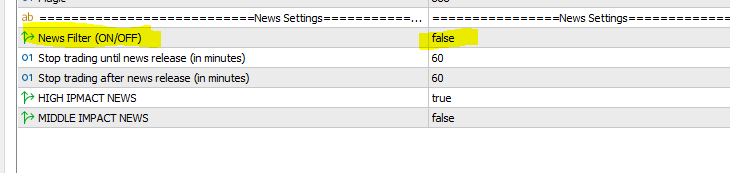
For correct work of the news filter you need to add the link to the terminal settings. You do not need to add a link for Metatrader 5 terminal, only for MT4.
Please allow web requests to the following URL for the news filter https://sslecal2.forexprostools.com/
!!!ATTENTION!!!
If you run EA at EXNESS broker, please activate this parameter in settings!
Just set True instead of False

✅ All MQL Signals and Experts: https://www.mql5.com/en/users/stanislav110685/seller ✅
🔵 Telegram Channel
🔵 Mail fintexea@gmail.com
🎁 SUPER PROMOTION 🎁 🎁 SUPER PROMOTION 🎁 🎁 SUPER PROMOTION 🎁
---------------------------------------------------------------------------------------------------------------------------------------
Buy any EA and get Second EA for FREE as a bonus
https://www.mql5.com/en/users/stanislav110685/seller
How? Simply send me a direct message, after Purchase. Please ask in private messages for more details.
https://www.mql5.com/en/users/stanislav110685
----------------------------------------------------------------------------------------------------------------------------------------
📌 Note: The bonus Expert is sent as a file with a link to the name from the trading terminal Metatrader or account numbers.




