
Range Cycle Pro MT5: Official Setup Guide & Optimized Preset Files

Welcome to the official support and setup guide for Range Cycle Pro MT5.
This page contains the installation instructions, performance verification, and the official optimized .set files for the Expert Advisor.
1. Visualizing the Strategy
Range Cycle Pro is designed to be transparent. It draws the reference box and breakout lines directly on your chart so you can verify the logic in real-time.
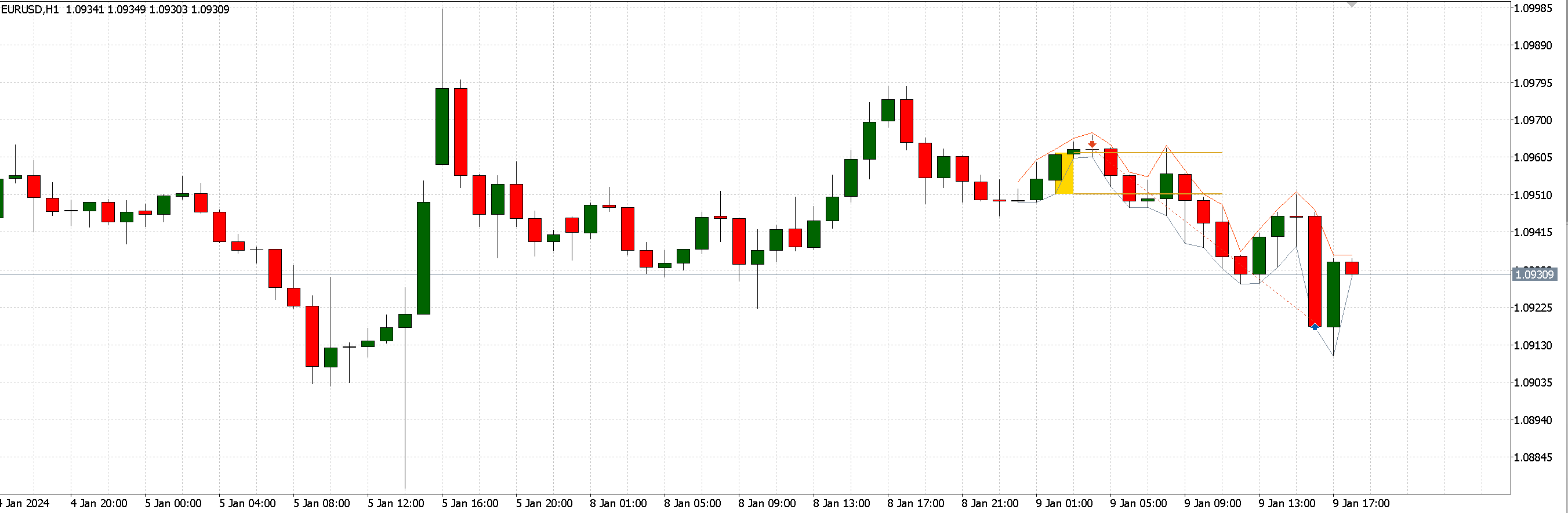
Above: Range Cycle Pro visualizing the breakout box and trade execution on EURUSD H1.
2. Advanced Portfolio & Hedging Configurations
One of the most powerful features of Range Cycle Pro is the ability to run multiple instances simultaneously to smooth out the equity curve.
A. Multi-Asset Portfolio
This backtest demonstrates running 3 different strategies at the same time: EURUSD (Reversion), NDX100 (Breakout), and Gold (Breakout).

Strategy: Portfolio Compilation (EURUSD + NDX100 + XAUUSD) Combined Net Profit: High Stability Note: This result is achieved by attaching the EA to 3 separate charts using the presets below.
B. Single-Asset Hedging
This setup runs two different reversion logic settings on the same symbol (EURUSD) to capture different market cycles.

Strategy: Hedge Style (EURUSD Preset 01 + EURUSD Preset 02) Concept: Diversifying entry logic on a single instrument. Note: Requires opening two EURUSD charts and applying a different Magic Number for each.
3. Individual Optimized Presets
Below are the individual preset files used to build the portfolios above. You can download the corresponding .set files from the Attachments section at the bottom of this post.
EURUSD (Mean Reversion) Setup 1

Preset: EURUSD_Reversion_H1_preset01.set Strategy: Reversion | Timeframe: H1 Account Balance: $10,000
EURUSD (Mean Reversion) Setup 2

Preset: EURUSD_Reversion_H1_preset02.set Strategy: Reversion | Timeframe: H1 Account Balance: $10,000
NDX100 / Nasdaq (Breakout)

Preset: NDX100_Breakout_H1_preset01.set Strategy: Breakout | Timeframe: H1 Account Balance: $10,000
Gold / XAUUSD (Breakout)

Preset: XAUUSD_Breakout_H1_preset01.set Strategy: Breakout | Timeframe: H1 Account Balance: $10,000
4. Installation & How to Load
-
Download: Scroll to the bottom of this page and download the .set files attached.
-
Open Chart: Open the correct symbol (e.g., EURUSD or XAUUSD).
-
Attach EA: Drag Range Cycle Pro onto the chart.
-
Load Preset:
-
Go to the Inputs tab.
-
Click the Load button.
-
Select the .set file you downloaded.
-
Click OK.
-
5. Understanding Money Management
Range Cycle Pro offers three distinct ways to manage risk. Check the M.M.S Logic setting in your preset:
-
+ Win | R Loss: Increases lot size after a win. Resets to base lot immediately after a loss to protect capital.
-
+ Win | - Loss: Increases lots after a win. Steps down gradually after a loss and Resets to base lot immediately after M.M.S Reset Cycle.
-
- Win | + Loss: Increases lot size after a loss. Steps down gradually after a win and Resets to base lot immediately after M.M.S Reset Cycle.
6. Important Notes
-
Magic Numbers: If you use multiple presets on the same account (e.g., EURUSD and Gold together, or the Hedging setup), you MUST ensure each chart has a unique Magic Number .
-
Account Size: We recommend a minimum balance of $400-$500 for every 0.01 lot traded to ensure sufficient margin for the recovery cycles.
https://www.mql5.com/en/market/product/160193



