

This tutorial applies to the EA 'MA Crossing Bot' whose product page is accessible by clicking on the image below:

This product is not just an EA that will open orders when the crossing of 2 moving averages occurs. Indeed, the main advantages of this EA are:
- It includes additional filters (3rd MA, RSI, Pivot Points...).
- It has a complete management of orders (closing on reverse signal, break even, trailing stop, closing before weekend, max lost or win / day ...).
- It can work with all market watch symbols at once.
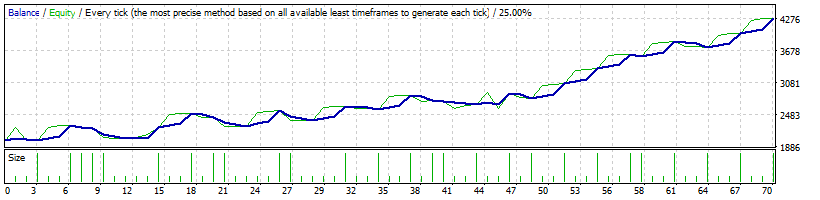
Below is the backtest of this EA for EURUSD (default settings) from 01/01/2024:
Detailed features are described on the product page. Below is the list of EA settings with explanations.
- 'Only symbol on the chart' : you should use this option for backtests or if you want to apply the bot on the chart symbol ;
- 'All major forex pairs' : the bot will scan all 28 major forex pairs (EUR/USD/GBP/CHF/AUD/NZD/JPY) ;
- 'Market watch' : the bot will scan all market watch symbols ;
- 'Only symbols listed below' : only symbols listed in the field below will be scanned
- 'Max % lost/day' ;
- 'Max % win/day' ;
- 'Close orders before weekend' ;
- 'Close on reverse crossing' ;
- 'Close order if price closes above/below a Ma' ;
- 'Break even' ;
- 'Trailing stop'.
Recommended value: false
Ma1 shift: shift of the 1st MA
Ma3 shift: shift of the 3rd MA
Monthly PP: identical to the previous parameter for monthly PP
Note: the more filters implemented, the fewer orders will be opened. If you find that there aren't enough open orders, try disabling some filters.
Same remark as 'Max spread'.
TP in pips, points...: take profit x pips above/below the current price at the opening of the order regardless of the 'SL mode' chosen
Close order if price closes above/below this Ma: MA to use for the previous parameter
Additional Notes :
- Before using the 'All major forex pairs' mode, verify that the 28 major currency pairs are present in the “Market Watch” tab of MT5.
- It is recommended to use multi-symbol mode for alerts only. When a profitable method is found on a symbol, it is better to apply it in ‘only_symbol_on_the_chart' mode.
- The EA works for all types of symbols but in some cases (depending on the broker), adaptations on SL and TP have to be done with certain types of symbols (other than forex and indices). In this case, settings in pips or points have to be multiplied by 10 to match the correct value. Example: for a stop loss of $10 on the Oil symbol the 'SL in pips, points...' parameter must take the value 100 and not 10 (x10). Tests can be carried out in backtest to find the right value.
Major forex pairs :




