Dua Yong Rew / Newsfeed
- Information
|
14+ Jahre
Erfahrung
|
7
Produkte
|
391
Demoversionen
|
|
0
Jobs
|
0
Signale
|
0
Abonnenten
|
For success in trading, a solid strategy or EA is essential. Additionally, choosing the right broker is crucial for a smooth journey. Here are the brokers I have traded with and successfully withdrawn funds from.
---
I use FXVM as my VPS provider. Sign up with the link below
https://fxvm.net/?aff=19429
---
IC Markets > https://www.icmarkets.com/?camp=67610
Sign up under my referral and get VIP commission rates at $5.50 instead of $7.00 for USD based account.
Other currency based account are also eligible for VIP rates
If you already have an existing ICMarkets profile, you can still connect it to our program. To do this, send an email to ICMarkets support (support@icmarkets.com), with a request to connect your profile to the referral number 67610
---
Fusion Markets > https://www.fusionmarkets.com/?refcode=80196
(Please copy and paste the link above instead of clicking it)
If you already have an account with the mentioned brokers, you can still join my IB by emailing them and quoting my referral code.
Fusion Markets (help@fusionmarkets.com)
Referral code > 80196
---
I use FXVM as my VPS provider. Sign up with the link below
https://fxvm.net/?aff=19429
---
IC Markets > https://www.icmarkets.com/?camp=67610
Sign up under my referral and get VIP commission rates at $5.50 instead of $7.00 for USD based account.
Other currency based account are also eligible for VIP rates
If you already have an existing ICMarkets profile, you can still connect it to our program. To do this, send an email to ICMarkets support (support@icmarkets.com), with a request to connect your profile to the referral number 67610
---
Fusion Markets > https://www.fusionmarkets.com/?refcode=80196
(Please copy and paste the link above instead of clicking it)
If you already have an account with the mentioned brokers, you can still join my IB by emailing them and quoting my referral code.
Fusion Markets (help@fusionmarkets.com)
Referral code > 80196
Freunde
541
Anfragen
Ausgehend
Eleni Anna Branou
Matrix Arrow Indicator MT4/5© is a unique 10 in 1 trend following 100% non-repainting multi-timeframe indicator that can be used on all symbols/instruments: forex, commodities, cryptocurrencies, indices, stocks. Matrix Arrow Indicator MT4/5© will determine the current trend at its early stages, gathering information and data from up to 10 standard indicators, which are: Average Directional Movement Index (ADX), Commodity Channel Index (CCI), Classic Heiken Ashi candles, Moving Average, Moving Average Convergence Divergence (MACD), Relative Vigor Index (RVI), Relative Strength Index (RSI), Parabolic SAR, Stochastic Oscillator, Williams' Percent Range.
When all indicators give a valid buy or sell signal, a corresponding arrow will be printed on the chart, at the opening of the next candle/bar indicating a strong uptrend/downtrend. The user can choose which indicators will use and can adjust the parameters of each indicator separately. Matrix Arrow Indicator MT4/5© gathers information only from the selected indicators and prints the arrow based only on their data. Matrix Arrow Indicator MT4/5© can also send terminal, push notification or email alerts for all new signals. Matrix Arrow Indicator MT4/5© is a super friendly & efficient solution whether you are a scalper, intraday or swing trader!
Matrix Arrow Indicator MT4/5© comes with a free add on, the Matrix Arrow Indicator Multi Timeframe Panel MT4/5© that offers the option to show the Matrix Arrow Indicator signals for 5 customizable timeframes of 16 modifiable symbols/instruments. It gives also the option to change the current chart it is attached onto, by clicking any one of the 16 modifiable symbol buttons. This will allow you to work much faster between different symbols and never miss a trading opportunity again.
✔️ 100% Non-Repainting indicator
✔️ 10 in 1 unique and extremely efficient Matrix and Arrow indicator
✔️ Works on all timeframes and all symbols/instruments
✔️ Super accurate entry Arrow signals that indicate a strong trend
✔️ Exit dot signals define neutral periods with no clear trend
✔️ Equally effective in trending and ranging markets
✔️ Each one indicator can be turned ON/OFF
✔️ Each and every parameter of all 10 indicators are fully adjustable
✔️ Matrix and Arrow colors are fully customizable
✔️ Free add on Panel with Matrix Arrow signals for 16 symbols and 5 timeframes
✔️ Terminal, Push Notification and Email Alerts available
✔️ Ideal for beginners but also a great asset for experienced traders
🔥🔥🔥🔥🔥 Matrix Arrow Indicator MT4/5© Demonstration Video: https://www.youtube.com/watch?v=-teba5v_90I
⭐️⭐️⭐️⭐️⭐️ Matrix Arrow Indicator MT4©: https://www.mql5.com/en/market/product/69726
⭐️⭐️⭐️⭐️⭐️ Matrix Arrow Indicator MT5©: https://www.mql5.com/en/market/product/69725
👉 Matrix Arrow Indicator MT4/5© Real Trading Examples: https://www.mql5.com/en/blogs/post/745715
✅ Matrix Arrow Indicator MT4/5© Installation Guide: https://www.mql5.com/en/blogs/post/745711
✅ Matrix Arrow Indicator MT4/5© Settings/Inputs: https://www.mql5.com/en/blogs/post/745707
💎💎💎💎💎 Check out all my Expert Advisors, Indicators and Utilities: https://www.mql5.com/en/users/eleanna74/seller
18 October 2026
When all indicators give a valid buy or sell signal, a corresponding arrow will be printed on the chart, at the opening of the next candle/bar indicating a strong uptrend/downtrend. The user can choose which indicators will use and can adjust the parameters of each indicator separately. Matrix Arrow Indicator MT4/5© gathers information only from the selected indicators and prints the arrow based only on their data. Matrix Arrow Indicator MT4/5© can also send terminal, push notification or email alerts for all new signals. Matrix Arrow Indicator MT4/5© is a super friendly & efficient solution whether you are a scalper, intraday or swing trader!
Matrix Arrow Indicator MT4/5© comes with a free add on, the Matrix Arrow Indicator Multi Timeframe Panel MT4/5© that offers the option to show the Matrix Arrow Indicator signals for 5 customizable timeframes of 16 modifiable symbols/instruments. It gives also the option to change the current chart it is attached onto, by clicking any one of the 16 modifiable symbol buttons. This will allow you to work much faster between different symbols and never miss a trading opportunity again.
✔️ 100% Non-Repainting indicator
✔️ 10 in 1 unique and extremely efficient Matrix and Arrow indicator
✔️ Works on all timeframes and all symbols/instruments
✔️ Super accurate entry Arrow signals that indicate a strong trend
✔️ Exit dot signals define neutral periods with no clear trend
✔️ Equally effective in trending and ranging markets
✔️ Each one indicator can be turned ON/OFF
✔️ Each and every parameter of all 10 indicators are fully adjustable
✔️ Matrix and Arrow colors are fully customizable
✔️ Free add on Panel with Matrix Arrow signals for 16 symbols and 5 timeframes
✔️ Terminal, Push Notification and Email Alerts available
✔️ Ideal for beginners but also a great asset for experienced traders
🔥🔥🔥🔥🔥 Matrix Arrow Indicator MT4/5© Demonstration Video: https://www.youtube.com/watch?v=-teba5v_90I
⭐️⭐️⭐️⭐️⭐️ Matrix Arrow Indicator MT4©: https://www.mql5.com/en/market/product/69726
⭐️⭐️⭐️⭐️⭐️ Matrix Arrow Indicator MT5©: https://www.mql5.com/en/market/product/69725
👉 Matrix Arrow Indicator MT4/5© Real Trading Examples: https://www.mql5.com/en/blogs/post/745715
✅ Matrix Arrow Indicator MT4/5© Installation Guide: https://www.mql5.com/en/blogs/post/745711
✅ Matrix Arrow Indicator MT4/5© Settings/Inputs: https://www.mql5.com/en/blogs/post/745707
💎💎💎💎💎 Check out all my Expert Advisors, Indicators and Utilities: https://www.mql5.com/en/users/eleanna74/seller
18 October 2026
Vladimir Pastushak
Averaging is a trading approach in which a robot opens additional orders when the market moves against the initial position. The main idea is to change the average entry price of the combined position...
Vladimir Pastushak
Усреднение — это торговый подход, при котором робот открывает дополнительные ордера, если цена движется против первоначальной позиции. Основная идея заключается в изменении средней цены входа по совокупной позиции...
Eleni Anna Branou
Basket EA MT4/5© is a powerful profit-harvesting tool and a comprehensive account protection system, all combined into a simple and easy-to-use solution. Its core purpose is to give you complete control over your trading account’s overall profit and loss by managing all open positions at the basket level, rather than individually. The EA offers a full range of basket-level features, including take profit, stop loss, break even, and trailing stop loss. These can be configured as a percentage of your account balance, a fixed amount in your account’s currency, or a target in average points across all managed trades. This flexibility allows traders to tailor risk and profit strategies to their unique needs. Basket EA MT4/5© also supports intelligent trade filtering, allowing you to include or exclude specific trades from management based on their magic number, symbol, or comment. This ensures that only the trades you want managed by the EA are affected, while others are left untouched.
For added protection, the EA includes advanced account safeguarding mechanisms. When a specified equity take profit or stop loss level or a maximum drawdown from the account's balance high is reached, the EA can automatically close all open trades, delete any pending orders, and shut down all charts, removing any Expert Advisors running on them. This feature helps protect your capital during unexpected market movements or when reaching your predefined account targets.
✔️ Does not use Martingale, Grid, Averaging, or other high-risk techniques
✔️ Allows exclusion of specific Magic Numbers, trade comments, or symbol trades from management
✔️ Basket Take Profit in % for all managed trades combined
✔️ Basket Stop Loss in % for all managed trades combined
✔️ Basket Break Even in % for all managed trades combined
✔️ Basket Trailing Stop Loss in % for all managed trades combined
✔️ Basket Take Profit in money for all managed trades combined
✔️ Basket Stop Loss in money for all managed trades combined
✔️ Basket Break Even in money for all managed trades combined
✔️ Basket Trailing Stop Loss in money for all managed trades combined
✔️ Basket Take Profit in average points for all managed trades combined
✔️ Basket Stop Loss in average points for all managed trades combined
✔️ Basket Break Even in average points for all managed trades combined
✔️ Basket Trailing Stop Loss in average points for all managed trades combined
✔️ Option to reset all Basket settings after each account balance update or after a Basket target is hit
✔️ Option to close all managed trades at break even after recovering from a drawdown
✔️ Option to close all managed trades at a specific time on a chosen day or daily
✔️ Account protection feature that closes all trades and charts when equity-based TP or SL is reached
✔️ Maximum drawdown % from balance high that closes all trades and charts/EAs if triggered
✔️ Optional on-chart panel to monitor profit/loss and close trades by type or all at once
✔️ Terminal, push notification, and email alerts when any Basket or protection condition is triggered
✔️ 100% automated Expert Advisor
✔️ Fully compatible with MQL5 VPS
⭐️⭐️⭐️⭐️⭐️ Basket EA EA MT4©: https://www.mql5.com/en/market/product/45192
⭐️⭐️⭐️⭐️⭐️ Basket EA EA MT5©: https://www.mql5.com/en/market/product/72782
📥 Download the Basket EA MT4© demo version in your demo account now: https://c.mql5.com/6/988/Basket_EA_MT4_2_20_Demo.ex4
📥 Download the Basket EA MT5© demo version in your demo account now: https://c.mql5.com/6/988/Basket_EA_MT5_2_00_Demo.ex5
✅ Basket EA MT4/5© detailed Settings/Inputs guide: https://www.mql5.com/en/blogs/post/746117
💎💎💎💎💎 Check out all my Expert Advisors and Utilities: https://www.mql5.com/en/users/eleanna74/seller
18 October 2026
For added protection, the EA includes advanced account safeguarding mechanisms. When a specified equity take profit or stop loss level or a maximum drawdown from the account's balance high is reached, the EA can automatically close all open trades, delete any pending orders, and shut down all charts, removing any Expert Advisors running on them. This feature helps protect your capital during unexpected market movements or when reaching your predefined account targets.
✔️ Does not use Martingale, Grid, Averaging, or other high-risk techniques
✔️ Allows exclusion of specific Magic Numbers, trade comments, or symbol trades from management
✔️ Basket Take Profit in % for all managed trades combined
✔️ Basket Stop Loss in % for all managed trades combined
✔️ Basket Break Even in % for all managed trades combined
✔️ Basket Trailing Stop Loss in % for all managed trades combined
✔️ Basket Take Profit in money for all managed trades combined
✔️ Basket Stop Loss in money for all managed trades combined
✔️ Basket Break Even in money for all managed trades combined
✔️ Basket Trailing Stop Loss in money for all managed trades combined
✔️ Basket Take Profit in average points for all managed trades combined
✔️ Basket Stop Loss in average points for all managed trades combined
✔️ Basket Break Even in average points for all managed trades combined
✔️ Basket Trailing Stop Loss in average points for all managed trades combined
✔️ Option to reset all Basket settings after each account balance update or after a Basket target is hit
✔️ Option to close all managed trades at break even after recovering from a drawdown
✔️ Option to close all managed trades at a specific time on a chosen day or daily
✔️ Account protection feature that closes all trades and charts when equity-based TP or SL is reached
✔️ Maximum drawdown % from balance high that closes all trades and charts/EAs if triggered
✔️ Optional on-chart panel to monitor profit/loss and close trades by type or all at once
✔️ Terminal, push notification, and email alerts when any Basket or protection condition is triggered
✔️ 100% automated Expert Advisor
✔️ Fully compatible with MQL5 VPS
⭐️⭐️⭐️⭐️⭐️ Basket EA EA MT4©: https://www.mql5.com/en/market/product/45192
⭐️⭐️⭐️⭐️⭐️ Basket EA EA MT5©: https://www.mql5.com/en/market/product/72782
📥 Download the Basket EA MT4© demo version in your demo account now: https://c.mql5.com/6/988/Basket_EA_MT4_2_20_Demo.ex4
📥 Download the Basket EA MT5© demo version in your demo account now: https://c.mql5.com/6/988/Basket_EA_MT5_2_00_Demo.ex5
✅ Basket EA MT4/5© detailed Settings/Inputs guide: https://www.mql5.com/en/blogs/post/746117
💎💎💎💎💎 Check out all my Expert Advisors and Utilities: https://www.mql5.com/en/users/eleanna74/seller
18 October 2026
Vladimir Pastushak
Why can averaging change the behavior of a trading robot?
When the market moves against an open position, some trading algorithms use averaging by opening additional orders. The goal is to change the average entry price of the combined position.
The logic may seem simple: if the price reverses, the combined position may need a smaller move to reach its target. However, averaging also changes how the entire trading system behaves.
What should developers consider?
📌 Average entry price. Additional orders change the price at which the combined position reaches breakeven.
📌 Position volume. Each new order increases total exposure and affects the financial result of subsequent price movements.
📌 Basket exit conditions. A robot may manage several positions as one system rather than treating every trade independently.
📌 Algorithm logic. Results depend on grid spacing, volume rules, and the conditions used to close the entire basket.
VR Smart Grid uses a grid-based trading approach. Studying systems like this helps explain how individual orders interact and why the complete algorithm matters more than the first entry alone.
When developing Expert Advisors, do you prefer fixed order volumes or dynamic position sizing?
Explore my publications and trading robots:
https://www.mql5.com/en/users/voldemar
#MQL5 #Forex #TradingRobots #AlgorithmicTrading
Почему усреднение может изменить поведение торгового робота?
Когда цена движется против открытой позиции, некоторые торговые алгоритмы используют усреднение — открывают дополнительные ордера, чтобы изменить среднюю цену входа по совокупной позиции.
На первый взгляд логика кажется простой: если цена продолжит движение в нужную сторону, для выхода из серии может потребоваться меньшее обратное движение. Но вместе с этим меняется и поведение торговой системы.
Что важно учитывать при разработке таких алгоритмов?
📌 Средняя цена позиции. Новые ордера меняют цену, при которой совокупная позиция достигает безубыточности.
📌 Объём позиции. Каждый дополнительный ордер увеличивает суммарный объём и влияет на финансовый результат при последующем движении цены.
📌 Условия закрытия серии. Робот может управлять несколькими позициями как единой системой, а не рассматривать каждую сделку отдельно.
📌 Логика алгоритма. Результат зависит от расстояния между ордерами, правил увеличения объёма и условий завершения серии.
В VR Smart Grid используется сеточный подход к торговле. Изучение подобных систем помогает лучше понять, как взаимодействуют отдельные ордера и почему важно анализировать весь алгоритм, а не только первую сделку.
А вы при разработке советников предпочитаете фиксированный объём ордеров или динамическое изменение объёма?
Мои публикации и торговые роботы:
https://www.mql5.com/ru/users/voldemar
#MQL5 #Forex #TradingRobots #AlgorithmicTrading
When the market moves against an open position, some trading algorithms use averaging by opening additional orders. The goal is to change the average entry price of the combined position.
The logic may seem simple: if the price reverses, the combined position may need a smaller move to reach its target. However, averaging also changes how the entire trading system behaves.
What should developers consider?
📌 Average entry price. Additional orders change the price at which the combined position reaches breakeven.
📌 Position volume. Each new order increases total exposure and affects the financial result of subsequent price movements.
📌 Basket exit conditions. A robot may manage several positions as one system rather than treating every trade independently.
📌 Algorithm logic. Results depend on grid spacing, volume rules, and the conditions used to close the entire basket.
VR Smart Grid uses a grid-based trading approach. Studying systems like this helps explain how individual orders interact and why the complete algorithm matters more than the first entry alone.
When developing Expert Advisors, do you prefer fixed order volumes or dynamic position sizing?
Explore my publications and trading robots:
https://www.mql5.com/en/users/voldemar
#MQL5 #Forex #TradingRobots #AlgorithmicTrading
Почему усреднение может изменить поведение торгового робота?
Когда цена движется против открытой позиции, некоторые торговые алгоритмы используют усреднение — открывают дополнительные ордера, чтобы изменить среднюю цену входа по совокупной позиции.
На первый взгляд логика кажется простой: если цена продолжит движение в нужную сторону, для выхода из серии может потребоваться меньшее обратное движение. Но вместе с этим меняется и поведение торговой системы.
Что важно учитывать при разработке таких алгоритмов?
📌 Средняя цена позиции. Новые ордера меняют цену, при которой совокупная позиция достигает безубыточности.
📌 Объём позиции. Каждый дополнительный ордер увеличивает суммарный объём и влияет на финансовый результат при последующем движении цены.
📌 Условия закрытия серии. Робот может управлять несколькими позициями как единой системой, а не рассматривать каждую сделку отдельно.
📌 Логика алгоритма. Результат зависит от расстояния между ордерами, правил увеличения объёма и условий завершения серии.
В VR Smart Grid используется сеточный подход к торговле. Изучение подобных систем помогает лучше понять, как взаимодействуют отдельные ордера и почему важно анализировать весь алгоритм, а не только первую сделку.
А вы при разработке советников предпочитаете фиксированный объём ордеров или динамическое изменение объёма?
Мои публикации и торговые роботы:
https://www.mql5.com/ru/users/voldemar
#MQL5 #Forex #TradingRobots #AlgorithmicTrading
Eleni Anna Branou
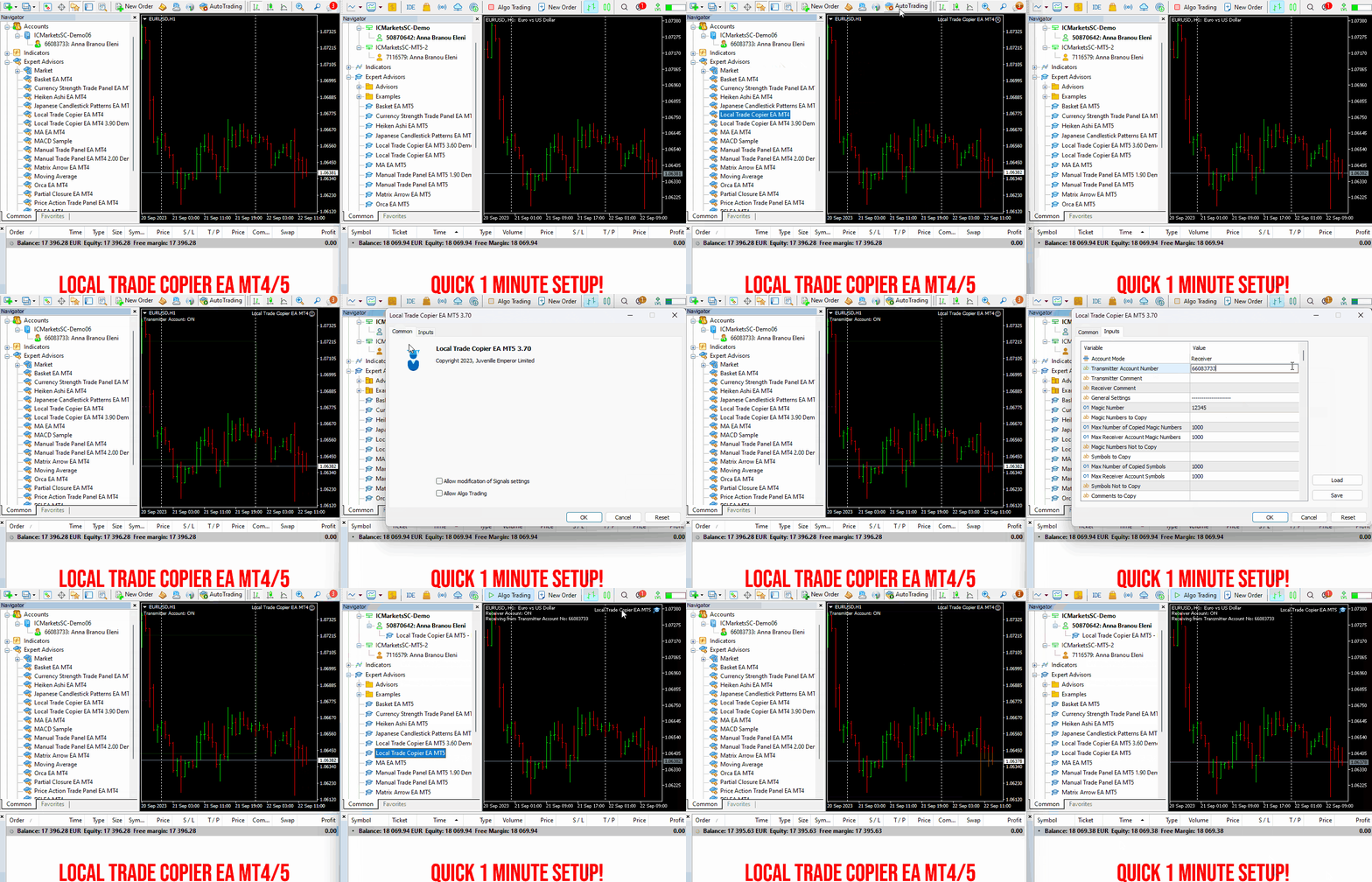
Local Trade Copier EA MT4/5© is a fast and flexible trade copier for copying and managing trades between multiple MetaTrader 4 and MetaTrader 5 accounts on the same Windows computer or Windows VPS.
Set up your Transmitter and Receiver terminals in about 1 minute and copy manual or EA trades between accounts at the same or different brokers. Under suitable conditions, trade information can be synchronized between local MetaTrader terminals in under 0.5 seconds. Actual trade execution depends on broker latency, network conditions, computer/VPS performance and terminal workload.
Each Receiver account can use its own lot sizing, risk management, trade filtering, symbol mapping, trade management and account-protection settings. This allows the same trading activity to be synchronized across multiple accounts while each Receiver can be configured according to its own requirements.
✔️ Copying & Connectivity: Copy between multiple MT4/MT5 accounts* on the same Windows computer or VPS, across different brokers and real/demo accounts.
✔️ Lot Sizing & Risk Management: Choose from 18 lot size and risk options, with independent sizing and risk settings for each Receiver.
✔️ Trade Filtering & Copying Controls: Filter copied trades by symbol, magic number, comment, ticket, volume, direction, day and time.
✔️ Trade Management: Manage market and pending orders, TP/SL, partial closures, reopening, reverse copying, better-price conditions and trade splitting.
✔️ Account Protection: Control lot limits, risk, daily drawdown/profit, copying restrictions and emergency protection independently for each Receiver.
✔️ Broker Compatibility & Symbol Mapping: Copy between different brokers and configure suffixes and special symbol mappings when symbol names differ.
✔️ Notifications & Reliability: Use email/push notifications, persistent settings and MetaTrader logs for monitoring and troubleshooting.
✔️ 20 Activations: Each MT4/MT5 version includes 20 activations, allowing you to install and use it on multiple Windows computers or VPSs.
* MT4 → MT5 and MT5 → MT4 copying requires both LTC versions. Both terminals must run on the same Windows computer or Windows VPS.
🔥🔥🔥🔥🔥 Watch the Local Trade Copier EA MT4/5© Quick Setup Video: https://www.youtube.com/watch?v=zhc9s56QhlE
⭐️⭐️⭐️⭐️⭐️ Local Trade Copier EA MT4©: https://www.mql5.com/en/market/product/68950
⭐️⭐️⭐️⭐️⭐️ Local Trade Copier EA MT5©: https://www.mql5.com/en/market/product/68951
📥 Download the Local Trade Copier EA MT4© Free Demo: https://c.mql5.com/6/1030/Local_Trade_Copier_EA_MT4_4_60_Demo.ex4
📥 Download the Local Trade Copier EA MT5© Free Demo: https://c.mql5.com/6/1030/Local_Trade_Copier_EA_MT5_4_40_Demo.ex5
✅ Local Trade Copier EA MT4/5© Purchase, Installation & Quick Setup Guide: https://www.mql5.com/en/blogs/post/745683
✅ Local Trade Copier EA MT4/5© Detailed Inputs/Settings Guide: https://www.mql5.com/en/blogs/post/745681
✅ Local Trade Copier EA MT4/5© Troubleshooting Guide: https://www.mql5.com/en/blogs/post/746561
💎💎💎💎💎 View all my Expert Advisors, Indicators and Utilities: https://www.mql5.com/en/users/eleanna74/seller
18 October 2026
.
Set up your Transmitter and Receiver terminals in about 1 minute and copy manual or EA trades between accounts at the same or different brokers. Under suitable conditions, trade information can be synchronized between local MetaTrader terminals in under 0.5 seconds. Actual trade execution depends on broker latency, network conditions, computer/VPS performance and terminal workload.
Each Receiver account can use its own lot sizing, risk management, trade filtering, symbol mapping, trade management and account-protection settings. This allows the same trading activity to be synchronized across multiple accounts while each Receiver can be configured according to its own requirements.
✔️ Copying & Connectivity: Copy between multiple MT4/MT5 accounts* on the same Windows computer or VPS, across different brokers and real/demo accounts.
✔️ Lot Sizing & Risk Management: Choose from 18 lot size and risk options, with independent sizing and risk settings for each Receiver.
✔️ Trade Filtering & Copying Controls: Filter copied trades by symbol, magic number, comment, ticket, volume, direction, day and time.
✔️ Trade Management: Manage market and pending orders, TP/SL, partial closures, reopening, reverse copying, better-price conditions and trade splitting.
✔️ Account Protection: Control lot limits, risk, daily drawdown/profit, copying restrictions and emergency protection independently for each Receiver.
✔️ Broker Compatibility & Symbol Mapping: Copy between different brokers and configure suffixes and special symbol mappings when symbol names differ.
✔️ Notifications & Reliability: Use email/push notifications, persistent settings and MetaTrader logs for monitoring and troubleshooting.
✔️ 20 Activations: Each MT4/MT5 version includes 20 activations, allowing you to install and use it on multiple Windows computers or VPSs.
* MT4 → MT5 and MT5 → MT4 copying requires both LTC versions. Both terminals must run on the same Windows computer or Windows VPS.
🔥🔥🔥🔥🔥 Watch the Local Trade Copier EA MT4/5© Quick Setup Video: https://www.youtube.com/watch?v=zhc9s56QhlE
⭐️⭐️⭐️⭐️⭐️ Local Trade Copier EA MT4©: https://www.mql5.com/en/market/product/68950
⭐️⭐️⭐️⭐️⭐️ Local Trade Copier EA MT5©: https://www.mql5.com/en/market/product/68951
📥 Download the Local Trade Copier EA MT4© Free Demo: https://c.mql5.com/6/1030/Local_Trade_Copier_EA_MT4_4_60_Demo.ex4
📥 Download the Local Trade Copier EA MT5© Free Demo: https://c.mql5.com/6/1030/Local_Trade_Copier_EA_MT5_4_40_Demo.ex5
✅ Local Trade Copier EA MT4/5© Purchase, Installation & Quick Setup Guide: https://www.mql5.com/en/blogs/post/745683
✅ Local Trade Copier EA MT4/5© Detailed Inputs/Settings Guide: https://www.mql5.com/en/blogs/post/745681
✅ Local Trade Copier EA MT4/5© Troubleshooting Guide: https://www.mql5.com/en/blogs/post/746561
💎💎💎💎💎 View all my Expert Advisors, Indicators and Utilities: https://www.mql5.com/en/users/eleanna74/seller
18 October 2026
.
Tatiana Zyrianova
Trend Master Pro — Piyasa Yönünü ve Koşullarını Daha Net Anlamak
17 Oktober 2026, 20:00
TREND MASTER PRO GİRİŞ NOKTASI ARAMADAN ÖNCE PİYASANIN YÖNÜNÜ ANLAYIN Trend Master Pro, piyasanın yönünü, mevcut durumunu ve farklı zaman dilimlerindeki görünümünü belirlemenize yardımcı olur. Böylece bir işlem fırsatını değerlendirirken daha bilinçli kararlar verebilirsiniz...
Hamed Dehgani
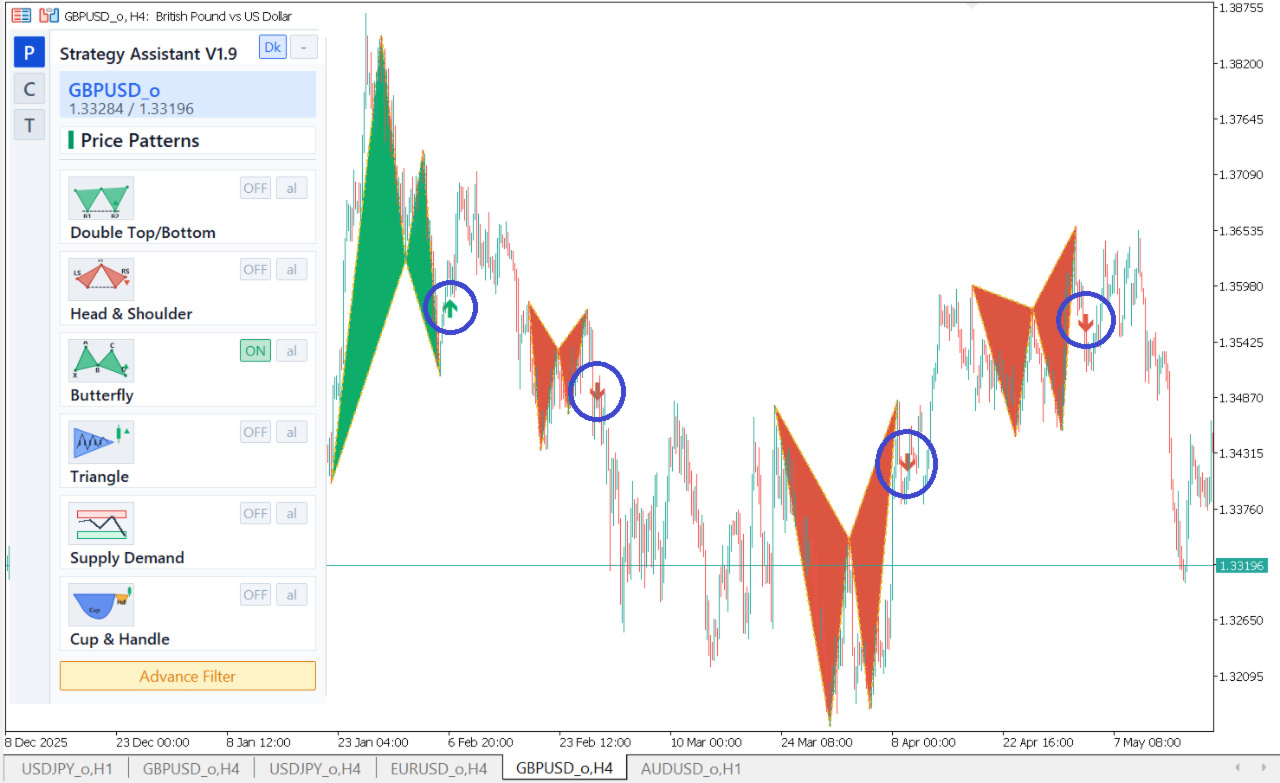
Strategy Assistant Improved
Download Latest Version Of This Power Full Indicator.
https://www.mql5.com/en/market/product/164910
Download Latest Version Of This Power Full Indicator.
https://www.mql5.com/en/market/product/164910
Vladimir Pastushak
Why Does a Trading Robot Behave Differently in Trending and Sideways Markets?
17 Oktober 2026, 12:16
Beginners often look for a universal trading strategy that performs equally well in every market environment. However, price action constantly changes. Directional trends give way to sideways ranges, while quiet periods can be interrupted by sudden price movements...
Vladimir Pastushak
Начинающие трейдеры часто ищут универсальную торговую стратегию, которая одинаково хорошо работает в любых рыночных условиях. Однако цена постоянно меняет характер движения: периоды направленного тренда сменяются боковыми диапазонами, а спокойные участки — резкими импульсами...
Vladimir Pastushak
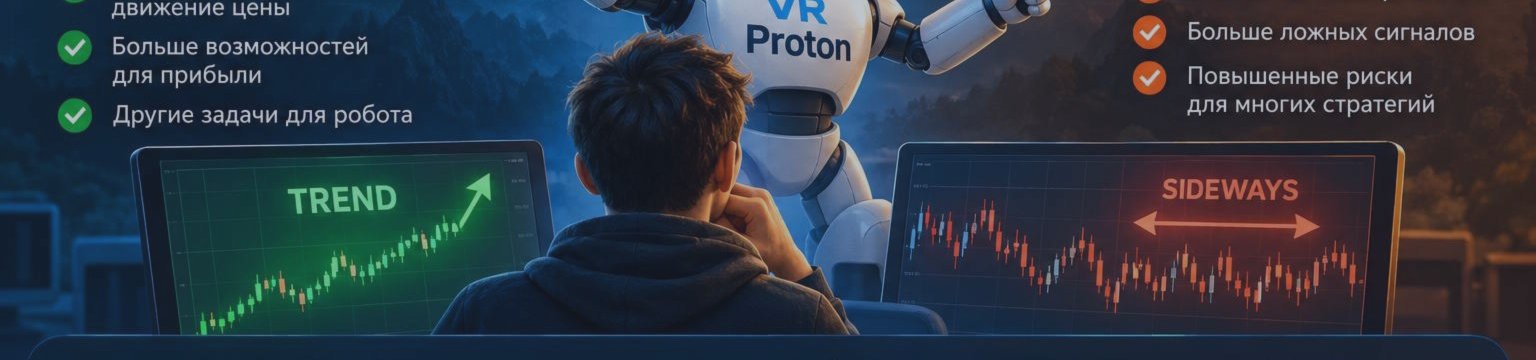
Why Does a Trading Robot Behave Differently in Trending and Sideways Markets? 📈
Beginners often ask: why can the same trading strategy produce different results depending on market conditions?
📈 Trend: price moves consistently in one direction, forming new highs or lows.
↔️ Sideways market: price moves within a range, frequently changing direction.
🤖 In automated trading, it is important to understand how an algorithm responds to these changes and manages open positions.
That is why, when exploring trading robots, you should look beyond entry signals and pay attention to trade management logic.
VR Proton is an Expert Advisor for MetaTrader 4 and MetaTrader 5 featuring trade-series management, adding positions in the direction of a move, breakeven functionality, and trailing stops.
Want to explore more automated trading tools and learn about algorithmic trading?
👉 Visit my MQL5 profile: https://www.mql5.com/en/users/voldemar
Add me as a friend, explore my developments, and download demo versions of my trading robots to discover how they work in practice.
Почему торговый робот по-разному работает на тренде и во флэте? 📈
Начинающие трейдеры часто задаются вопросом: почему одна и та же торговая стратегия показывает разные результаты в зависимости от движения рынка?
📈 Тренд — цена последовательно движется в одном направлении, формируя новые максимумы или минимумы.
↔️ Флэт — цена движется в определённом диапазоне, регулярно меняя направление.
🤖 Для автоматической торговли важно понимать, как алгоритм реагирует на эти изменения и каким образом управляет открытыми позициями.
Именно поэтому при изучении торговых роботов стоит обращать внимание не только на торговые сигналы, но и на логику сопровождения сделок.
VR Proton — торговый робот для MetaTrader 4 и MetaTrader 5, в котором реализованы механизмы управления торговой серией, добавления позиций по направлению движения, перевода сделок в безубыток и трейлинг-стопа.
Хотите познакомиться с другими разработками и узнать больше об автоматической торговле?
👉 Мой профиль MQL5: https://www.mql5.com/ru/users/voldemar
Добавляйте автора в друзья, изучайте мои разработки и скачивайте демоверсии торговых роботов, чтобы познакомиться с их работой на практике.
Beginners often ask: why can the same trading strategy produce different results depending on market conditions?
📈 Trend: price moves consistently in one direction, forming new highs or lows.
↔️ Sideways market: price moves within a range, frequently changing direction.
🤖 In automated trading, it is important to understand how an algorithm responds to these changes and manages open positions.
That is why, when exploring trading robots, you should look beyond entry signals and pay attention to trade management logic.
VR Proton is an Expert Advisor for MetaTrader 4 and MetaTrader 5 featuring trade-series management, adding positions in the direction of a move, breakeven functionality, and trailing stops.
Want to explore more automated trading tools and learn about algorithmic trading?
👉 Visit my MQL5 profile: https://www.mql5.com/en/users/voldemar
Add me as a friend, explore my developments, and download demo versions of my trading robots to discover how they work in practice.
Почему торговый робот по-разному работает на тренде и во флэте? 📈
Начинающие трейдеры часто задаются вопросом: почему одна и та же торговая стратегия показывает разные результаты в зависимости от движения рынка?
📈 Тренд — цена последовательно движется в одном направлении, формируя новые максимумы или минимумы.
↔️ Флэт — цена движется в определённом диапазоне, регулярно меняя направление.
🤖 Для автоматической торговли важно понимать, как алгоритм реагирует на эти изменения и каким образом управляет открытыми позициями.
Именно поэтому при изучении торговых роботов стоит обращать внимание не только на торговые сигналы, но и на логику сопровождения сделок.
VR Proton — торговый робот для MetaTrader 4 и MetaTrader 5, в котором реализованы механизмы управления торговой серией, добавления позиций по направлению движения, перевода сделок в безубыток и трейлинг-стопа.
Хотите познакомиться с другими разработками и узнать больше об автоматической торговле?
👉 Мой профиль MQL5: https://www.mql5.com/ru/users/voldemar
Добавляйте автора в друзья, изучайте мои разработки и скачивайте демоверсии торговых роботов, чтобы познакомиться с их работой на практике.
Tatiana Zyrianova
TREND MASTER PRO COMPRENDI LA DIREZIONE DEL MERCATO PRIMA DI CERCARE UN PUNTO D’INGRESSO Trend Master Pro ti aiuta a identificare la direzione del mercato, il suo stato attuale e il contesto di più timeframe , così puoi prendere decisioni più consapevoli quando valuti un’opportunità di trading...
Eleni Anna Branou
Partial Closure EA MT4/5© allows you to partially close any trade on your account, manually by a chosen percentage of the lot size and/or by trade ticket, or automatically at specified percentages of the TP/SL level, closing a percentage of the initial lot size across up to 10 take profit and 10 stop loss levels.. It can manage all or selected trades in your account by specifying or excluding certain magic numbers, comments, or symbols.
✔️ Extremely easy and straightforward interface
✔️ Works smoothly on any chart, account type, or broker
✔️ Automatic partial closure of managed trades at specified TP/SL levels, closing independent percentages of the initial lot size across up to 10 TP and 10 SL levels
✔️ Manual partial closure of all managed trades or any individual trade by ticket number, based on a percentage of the lot size
✔️ Option to move the stop loss to break even for the remaining portion of trades automatically partially closed as above
✔️ Option to move the stop loss to break even once a specified profit level (in points) is reached
✔️ Ability to exclude certain magic numbers, comments, or symbol trades from management
✔️ Compatible with MQL5 VPS
⭐️⭐️⭐️⭐️⭐️ Partial Closure EA MT4©: https://www.mql5.com/en/market/product/82356
⭐️⭐️⭐️⭐️⭐️ Partial Closure EA MT5©: https://www.mql5.com/en/market/product/82357
📥 Download the Partial Closure EA MT4© demo version in your demo account now: https://c.mql5.com/6/975/Partial_Closure_EA_MT4_1.30_Demo.ex4
📥 Download the Partial Closure EA MT5© demo version in your demo account now: https://c.mql5.com/6/975/Partial_Closure_EA_MT5_1.30_Demo.ex5
✅ Partial Closure EA MT4/5© installation & user guide: https://www.mql5.com/en/blogs/post/749385
💎💎💎💎💎 Check out all my Expert Advisors, Indicators and Utilities: https://www.mql5.com/en/users/eleanna74/seller
16 October 2026
✔️ Extremely easy and straightforward interface
✔️ Works smoothly on any chart, account type, or broker
✔️ Automatic partial closure of managed trades at specified TP/SL levels, closing independent percentages of the initial lot size across up to 10 TP and 10 SL levels
✔️ Manual partial closure of all managed trades or any individual trade by ticket number, based on a percentage of the lot size
✔️ Option to move the stop loss to break even for the remaining portion of trades automatically partially closed as above
✔️ Option to move the stop loss to break even once a specified profit level (in points) is reached
✔️ Ability to exclude certain magic numbers, comments, or symbol trades from management
✔️ Compatible with MQL5 VPS
⭐️⭐️⭐️⭐️⭐️ Partial Closure EA MT4©: https://www.mql5.com/en/market/product/82356
⭐️⭐️⭐️⭐️⭐️ Partial Closure EA MT5©: https://www.mql5.com/en/market/product/82357
📥 Download the Partial Closure EA MT4© demo version in your demo account now: https://c.mql5.com/6/975/Partial_Closure_EA_MT4_1.30_Demo.ex4
📥 Download the Partial Closure EA MT5© demo version in your demo account now: https://c.mql5.com/6/975/Partial_Closure_EA_MT5_1.30_Demo.ex5
✅ Partial Closure EA MT4/5© installation & user guide: https://www.mql5.com/en/blogs/post/749385
💎💎💎💎💎 Check out all my Expert Advisors, Indicators and Utilities: https://www.mql5.com/en/users/eleanna74/seller
16 October 2026
Vladimir Pastushak
🤖 Как создать торгового робота с нуля?
Мечта многих трейдеров — автоматизировать свою стратегию, чтобы торговая программа самостоятельно находила сигналы и выполняла заданные правила.
Но с чего начать, если вы никогда не создавали советников?
На самом деле разработка торгового робота состоит из нескольких последовательных этапов:
🔹 Стратегия — формулируем чёткие правила входа и выхода из сделок.
🔹 Программирование — переносим торговую логику в код на MQL4 или MQL5.
🔹 Тестирование — проверяем работу советника на исторических данных.
🔹 Проверка — анализируем результаты и тестируем программу на демосчёте.
⚠️ Важно понимать: даже если робот работает без ошибок, это ещё не гарантирует прибыль. Необходимо оценивать просадку, торговые издержки и устойчивость стратегии.
📚 Хотите разобраться подробнее?
Я подготовил руководство для начинающих, в котором разобраны основные этапы создания торгового робота и первые шаги в разработке собственного советника.
👉 Читать статью: https://trading-go.ru/beginner/kak-sozdat-torgovogo-robota-s-nulya/
Подписывайтесь на канал — впереди ещё больше материалов о торговых стратегиях, MetaTrader и разработке торговых роботов.
#Трейдинг #MQL5 #ТорговыеРоботы
Мечта многих трейдеров — автоматизировать свою стратегию, чтобы торговая программа самостоятельно находила сигналы и выполняла заданные правила.
Но с чего начать, если вы никогда не создавали советников?
На самом деле разработка торгового робота состоит из нескольких последовательных этапов:
🔹 Стратегия — формулируем чёткие правила входа и выхода из сделок.
🔹 Программирование — переносим торговую логику в код на MQL4 или MQL5.
🔹 Тестирование — проверяем работу советника на исторических данных.
🔹 Проверка — анализируем результаты и тестируем программу на демосчёте.
⚠️ Важно понимать: даже если робот работает без ошибок, это ещё не гарантирует прибыль. Необходимо оценивать просадку, торговые издержки и устойчивость стратегии.
📚 Хотите разобраться подробнее?
Я подготовил руководство для начинающих, в котором разобраны основные этапы создания торгового робота и первые шаги в разработке собственного советника.
👉 Читать статью: https://trading-go.ru/beginner/kak-sozdat-torgovogo-robota-s-nulya/
Подписывайтесь на канал — впереди ещё больше материалов о торговых стратегиях, MetaTrader и разработке торговых роботов.
#Трейдинг #MQL5 #ТорговыеРоботы
Yuri Papshev
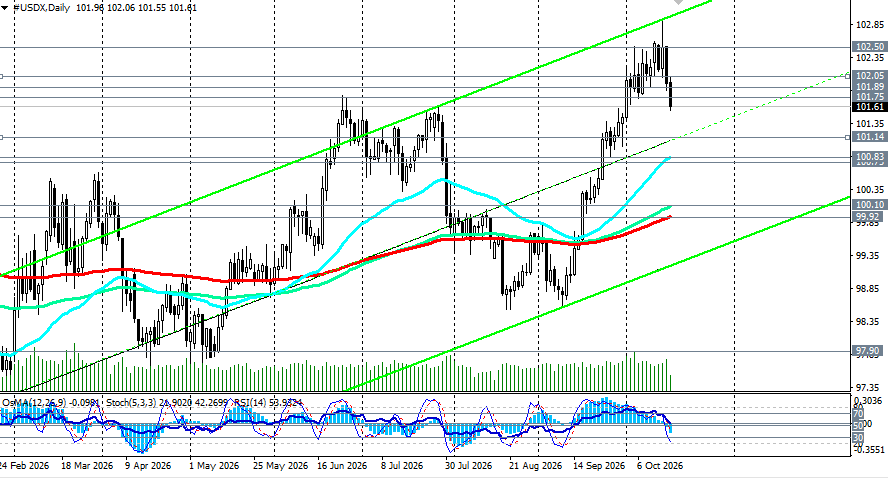
USDX завершает неделю в состоянии неопределённости. Горячая инфляция не смогла удержать доллар на максимумах, но и глубокого падения пока не наблюдается. Ключевой уровень для быков — 102.05, для медведей — 101.50. Доллар отступает от годового максимума, но фундаментальная поддержка остаётся в силе.
Наиболее вероятная динамика (базовый сценарий) - консолидация в диапазоне 101.00-102.00 с сохранением умеренно медвежьего уклона в краткосрочной перспективе. Доллар, вероятно, останется под давлением, но без резкого падения, поскольку фундаментальные факторы — ястребиные ожидания ФРС и высокие доходности — ограничивают более глубокое снижение
👉 больше в Телеграм-канале https://t.me/fxrealtrading
Наиболее вероятная динамика (базовый сценарий) - консолидация в диапазоне 101.00-102.00 с сохранением умеренно медвежьего уклона в краткосрочной перспективе. Доллар, вероятно, останется под давлением, но без резкого падения, поскольку фундаментальные факторы — ястребиные ожидания ФРС и высокие доходности — ограничивают более глубокое снижение
👉 больше в Телеграм-канале https://t.me/fxrealtrading
Eleni Anna Branou
Matrix Arrow Indicator MT4/5© is a unique 10 in 1 trend following 100% non-repainting multi-timeframe indicator that can be used on all symbols/instruments: forex, commodities, cryptocurrencies, indices, stocks. Matrix Arrow Indicator MT4/5© will determine the current trend at its early stages, gathering information and data from up to 10 standard indicators, which are: Average Directional Movement Index (ADX), Commodity Channel Index (CCI), Classic Heiken Ashi candles, Moving Average, Moving Average Convergence Divergence (MACD), Relative Vigor Index (RVI), Relative Strength Index (RSI), Parabolic SAR, Stochastic Oscillator, Williams' Percent Range.
When all indicators give a valid buy or sell signal, a corresponding arrow will be printed on the chart, at the opening of the next candle/bar indicating a strong uptrend/downtrend. The user can choose which indicators will use and can adjust the parameters of each indicator separately. Matrix Arrow Indicator MT4/5© gathers information only from the selected indicators and prints the arrow based only on their data. Matrix Arrow Indicator MT4/5© can also send terminal, push notification or email alerts for all new signals. Matrix Arrow Indicator MT4/5© is a super friendly & efficient solution whether you are a scalper, intraday or swing trader!
Matrix Arrow Indicator MT4/5© comes with a free add on, the Matrix Arrow Indicator Multi Timeframe Panel MT4/5© that offers the option to show the Matrix Arrow Indicator signals for 5 customizable timeframes of 16 modifiable symbols/instruments. It gives also the option to change the current chart it is attached onto, by clicking any one of the 16 modifiable symbol buttons. This will allow you to work much faster between different symbols and never miss a trading opportunity again.
✔️ 100% Non-Repainting indicator
✔️ 10 in 1 unique and extremely efficient Matrix and Arrow indicator
✔️ Works on all timeframes and all symbols/instruments
✔️ Super accurate entry Arrow signals that indicate a strong trend
✔️ Exit dot signals define neutral periods with no clear trend
✔️ Equally effective in trending and ranging markets
✔️ Each one indicator can be turned ON/OFF
✔️ Each and every parameter of all 10 indicators are fully adjustable
✔️ Matrix and Arrow colors are fully customizable
✔️ Free add on Panel with Matrix Arrow signals for 16 symbols and 5 timeframes
✔️ Terminal, Push Notification and Email Alerts available
✔️ Ideal for beginners but also a great asset for experienced traders
🔥🔥🔥🔥🔥 Matrix Arrow Indicator MT4/5© Demonstration Video: https://www.youtube.com/watch?v=-teba5v_90I
⭐️⭐️⭐️⭐️⭐️ Matrix Arrow Indicator MT4©: https://www.mql5.com/en/market/product/69726
⭐️⭐️⭐️⭐️⭐️ Matrix Arrow Indicator MT5©: https://www.mql5.com/en/market/product/69725
👉 Matrix Arrow Indicator MT4/5© Real Trading Examples: https://www.mql5.com/en/blogs/post/745715
✅ Matrix Arrow Indicator MT4/5© Installation Guide: https://www.mql5.com/en/blogs/post/745711
✅ Matrix Arrow Indicator MT4/5© Settings/Inputs: https://www.mql5.com/en/blogs/post/745707
💎💎💎💎💎 Check out all my Expert Advisors, Indicators and Utilities: https://www.mql5.com/en/users/eleanna74/seller
16 October 2026
When all indicators give a valid buy or sell signal, a corresponding arrow will be printed on the chart, at the opening of the next candle/bar indicating a strong uptrend/downtrend. The user can choose which indicators will use and can adjust the parameters of each indicator separately. Matrix Arrow Indicator MT4/5© gathers information only from the selected indicators and prints the arrow based only on their data. Matrix Arrow Indicator MT4/5© can also send terminal, push notification or email alerts for all new signals. Matrix Arrow Indicator MT4/5© is a super friendly & efficient solution whether you are a scalper, intraday or swing trader!
Matrix Arrow Indicator MT4/5© comes with a free add on, the Matrix Arrow Indicator Multi Timeframe Panel MT4/5© that offers the option to show the Matrix Arrow Indicator signals for 5 customizable timeframes of 16 modifiable symbols/instruments. It gives also the option to change the current chart it is attached onto, by clicking any one of the 16 modifiable symbol buttons. This will allow you to work much faster between different symbols and never miss a trading opportunity again.
✔️ 100% Non-Repainting indicator
✔️ 10 in 1 unique and extremely efficient Matrix and Arrow indicator
✔️ Works on all timeframes and all symbols/instruments
✔️ Super accurate entry Arrow signals that indicate a strong trend
✔️ Exit dot signals define neutral periods with no clear trend
✔️ Equally effective in trending and ranging markets
✔️ Each one indicator can be turned ON/OFF
✔️ Each and every parameter of all 10 indicators are fully adjustable
✔️ Matrix and Arrow colors are fully customizable
✔️ Free add on Panel with Matrix Arrow signals for 16 symbols and 5 timeframes
✔️ Terminal, Push Notification and Email Alerts available
✔️ Ideal for beginners but also a great asset for experienced traders
🔥🔥🔥🔥🔥 Matrix Arrow Indicator MT4/5© Demonstration Video: https://www.youtube.com/watch?v=-teba5v_90I
⭐️⭐️⭐️⭐️⭐️ Matrix Arrow Indicator MT4©: https://www.mql5.com/en/market/product/69726
⭐️⭐️⭐️⭐️⭐️ Matrix Arrow Indicator MT5©: https://www.mql5.com/en/market/product/69725
👉 Matrix Arrow Indicator MT4/5© Real Trading Examples: https://www.mql5.com/en/blogs/post/745715
✅ Matrix Arrow Indicator MT4/5© Installation Guide: https://www.mql5.com/en/blogs/post/745711
✅ Matrix Arrow Indicator MT4/5© Settings/Inputs: https://www.mql5.com/en/blogs/post/745707
💎💎💎💎💎 Check out all my Expert Advisors, Indicators and Utilities: https://www.mql5.com/en/users/eleanna74/seller
16 October 2026
Vladimir Pastushak
📊 A trading robot may show impressive profits in historical testing, but does that mean it will perform the same way in live markets? Not necessarily. Test results depend on the market period, algorithm settings, historical data quality, and the broker's order execution conditions...
: