 MetaTrader 5
 Expert Advisors
 Indikatoren
 Skripte
 Bibliotheken
 Speicher
Schau, wie man Roboter kostenlos herunterladen kann
Finden Sie uns auf Twitter!
und werden Sie Mitglied unserer Fangruppe
und werden Sie Mitglied unserer Fangruppe
Interessantes Skript?
Veröffentliche einen Link auf das Skript, damit die anderen ihn auch nutzen können
Veröffentliche einen Link auf das Skript, damit die anderen ihn auch nutzen können
Hat Ihnen das Skript gefallen?
Bewerten Sie es im Terminal MetaTrader 5
Bewerten Sie es im Terminal MetaTrader 5

Close cross Kijun Sen - Experte für den MetaTrader 4

- Ansichten:
- 25345
- Rating:
- Veröffentlicht:
- Aktualisiert:
-
 Sie verpassen Handelsmöglichkeiten:
- Freie Handelsapplikationen
- Über 8.000 Signale zum Kopieren
- Wirtschaftsnachrichten für die Lage an den Finanzmärkte
Registrierung EinloggenSie stimmen der Website-Richtlinie und den Nutzungsbedingungen zu.
Wenn Sie kein Benutzerkonto haben, registrieren Sie sich -
 Benötigen Sie einen Roboter oder Indikator, der auf diesem Code basiert? Bestellen Sie ihn im Freelance-Bereich
Zum Freelance
Close on cross Kijun Sen 3.00
Stealth Mode: The EA will close all open orders across all charts corresponding to the EA chart symbol when Bid or Ask is equal to or crosses the Kijun Sen. For Buy orders the condition is met when Bid is equal or less than Kijun Sen. For Sell orders the condition is met when Ask is equal or greater than Kijun Sen.
Price gaps in Stealth Mode: If current price gaps past the Kijun Sen, the EA will close all relevant open orders at the first available price.
Spread Mode: The EA will close all open orders across all charts corresponding to the EA chart symbol when Kijun Sen price falls between the Bid-Ask spread. In this condition, Bid is lower than the Kijun Sen price and simultaneously Ask is higher than the Kijun Sen price. This condition is true for both Buy and Sell orders.
Price gaps in Spread Mode: If current price gaps past the Kijun Sen, both Bid and Ask will either be greater than Kijun Sen or lesser than Kijun Sen. All relevant open orders will remain open until the current price retraces back to the Kijun Sen and the Kijun Sen price falls between the Bid-Ask spread or until relevant open orders are closed manually.
- Note: Check that the chart Kijun Sen and EA parameters match each other exactly.
- Changed parameters can be saved, named and loaded for re-use from the Save & Load buttons. See EA Properties Inputs Tab (F7 → Inputs Tab → Save, Load Buttons).
- Chart PopUp and Sound alert and Push Notification for mobile options.
- A set of Kijun Sen Indicators with various default periods is included in Kijun Zip. See - Download.
Enable/Disable Order Close function : Click on chart --> | close on ^ | close off.
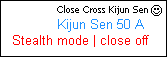
Limitations
- The Experts button has been renamed to AutoTrading and also works in a different way. See - https://www.youtube.com/watch?v=OOoV5prZy3M for more information.
- In order for an EA to discriminate control over any particular order and actions of other EAs, it must have access to the order's assigned magic number. It is not possible to assign magic numbers to order opened manually. As orders are opened manually and only closed by the EA the absence of magic number results in EA function limitations as highlighted below.
- For more information see - Magic Number: "Magic" Identifier of the Order - https://www.mql5.com/en/articles/1359. Quote from article/1359: when an order is being placed (a position is being opened), one can assign a unique number to it. This number will consequently be used to distinguish the above order from others. There is no use (or even possibility) applying this feature when trading manually.
- The EA will close all open trades for the symbol of the chart to which it is attached and all open trades on charts of the same symbol to which is not attached.
- Do not use the EA on more than one chart of the same symbol at the same time. This will frequently result in all open trades on all same symbol charts being closed by the first EA to meet any OrderClose conditions.
Push Notification: iOS and Android
- Push Notifications are fast, fail safe and easy to set up.
- First install MetaTrader 4 on Mobile Device.
- Locate MetaQuotes ID. See - Settings and Messages in MetaTrader 4 Mobile.
- Enter MetaQuotes ID in Client Terminal of MetaTrader 4 on computer (Tools → Options → Notifications).
- Note: The same MetaQuotes ID can be used with multiple Client Terminals (different Brokers).
- Click the Test Button.
- Open up MetaTrader 4 Terminal (Ctrl + T) and select the Journal Tab and check under Messages if the the Test was successful.
- Check that the test message has been received on the mobile device.
- Once a successful Test is obtained Push Notification Alerts can be set in the EA.
- Important: Ensure that your mobile device has sound turned on for notifications and also ensure MetaTrader 4 mobile is included in your phone Notifications or Messaging setting.
- If further clarification is required, google and youtube "MT4 push notification."
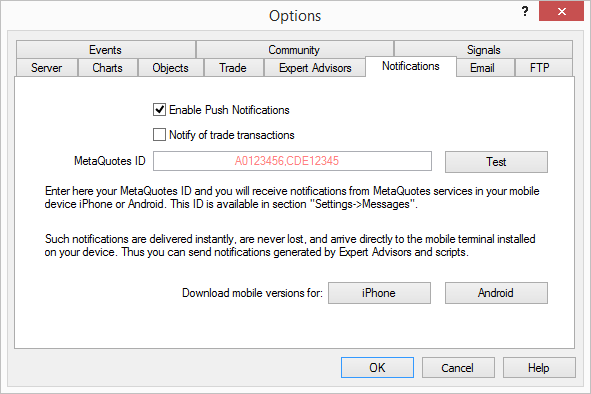
Please note: The EA only notifies of trades closed not any other trade transaction. If 'Notify of trade transactions' is checked, the user will receive notifications of all trade transactions.
To view images of similar Push Notifications as received on iOS and Android devices - Here (Scroll down to Push Notification).
Close Cross MA
The EA will close all open orders across all charts corresponding to the EA chart symbol when Bid or Ask is equal to or crosses the MA.
 Stop Loss and Take Profit Scripts
A collection of predefined Scripts immediately available for use without having to key-in. Step-by-step instruction how to make your own Scripts from Scripts Collection.
SignalViewer
Check out any MQL5 closed positions on a chart.
Screenshot in the original chart size
Take screenshot in the original chart size with labels (instrument, timeframe)