Template Switcher

Утилита TemplateSwitcher позволяет автоматически переключать набор используемых на графике индикаторов и объектов в зависимости от текущего таймфрейма графика и/или символа.

Часто бывает так, что на графике старшего таймфрейма используется индикатор с одним периодом расчета, а для младшего таймфрейма этот же индикатор необходим с увеличенным периодом расчета. Можно, конечно же, открыть два графика разных таймфреймов с нужными периодами индикатора. Но что, если мы не можем позволить себе дублирование графиков одного и того же символа? В этом случае остается только переключаться между двумя таймфреймами, постоянно перенастраивая шаблон графика.

Если же присоединить к графику TemplateSwitcher, то достаточно будет лишь один раз создать все необходимые шаблоны для любых таймфреймов графиков и символов, а после забыть про повторную настройку вида графика в момент переключения его таймфрейма.

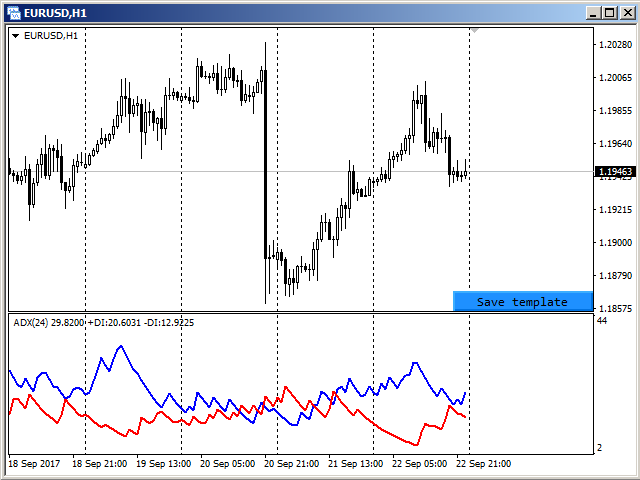
Создание шаблона графика производится при помощи нажатия кнопки, которая появляется в правом нижнем углу графика, если туда подвести курсор мыши (см. скриншот 1). При нажатии на кнопку шаблон сохраняется (см. скриншот 2) и в дальнейшем будет автоматически подгружен при переключении на график EURUSD, H1.


Параметры

Утилиту можно использовать для создания шаблонов, которые зависят от символов и таймфреймов, или зависят только от таймфреймов. Для этого в параметре "Templates difference / Различие шаблонов" достаточно выбрать нужный вариант разделения шаблонов.

Если выбран вариант "By symbol and timeframe / По символу и таймфрейму", то для каждого символа будут созданы индивидуальные шаблоны по всем используемым таймфреймам. Иными словами шаблон от EURUSD, H1 не будет использован ни для какого другого символа, т. е. открыв график GBPUSD, H1 не будет получен вид графика, настроенного на EURUSD, H1.

В случае выбора варианта "By timeframe only / Только по таймфрейму" сохранение и подгрузка шаблонов будет одинакова для всех используемых символов. К примеру, создав шаблон на графике EURUSD, H1 и поставив затем утилиту на график GBPUSD, H1, получим тот же вид графика, который был ранее настроен для EURUSD, H1.

Параметр "Templates name suffix / Суффикс имени шаблона" позволяет создавать разные шаблоны для одного и того же символа. Например, можно установить утилиту на двух графиках GBPUSD, но на каждом из них используйте разные суффиксы для имени шаблона. В этом случае для каждого графика будут использоваться разные шаблоны. Если в пределах одного и того же символа разница в шаблонах не требуется, то параметр должен быть оставлен пустым, как по умолчанию.

Параметр "Hide save button / Прятать кнопку сохранения" позволяет управлять видимостью кнопки сохранения шаблона. По умолчанию кнопка появляется только при наведении курсора мыши на правый нижний угол графика. Для тех случаев, когда другие индикаторы/эксперты не дают возможности отслеживания курсора мыши, этот параметр следует установить в "Нет". Тогда кнопка будет видна на графике всегда.

推荐产品
TradingCoPilot
Viktor Mitrofanov
Trading Co-Pilot for MetaTrader 5 专业级手动交易持仓管理助手 Trading Co-Pilot 是一款专为手动交易者设计的智能持仓管理工具,帮助您自动化控制风险与利润。 它不会开仓。 它只负责专业管理您的仓位。 您专注于入场,Co-Pilot 负责保护与优化出场。 工作原理 当您手动开仓后,Trading Co-Pilot 会自动: • 设置止损(Stop Loss) • 设置止盈(Take Profit) • 启用保本(Break Even) • 启用移动止损(Trailing Stop) 您可以选择两种模式: • SMART 智能模式(基于市场结构计算) • FIX 固定模式(基于预设点数) 每个模块都可以独立开启或关闭。 BUY 和 SELL 仓位分别独立管理。 核心优势 1. 专业风险控制 每一笔交易都按规则管理,而非情绪驱动。 2. 智能止损 根据所选时间周期的高低点自动计算止损位置。 3. 智能止盈 基于市场结构设定合理目标,而非随意设定。 4. 动态保本机制 当价格达到指定进度时自动移动至保本位。 5. 智能移动止损 随着价格朝有利方向运
FREE
Quick Close 1S
Tan Au Phuong
5 (7)
Quick Close 1S 是一款用于快速且有序交易管理的工具。它提供简洁的控制面板,可立即开仓或平仓,应用灵活的 SL/TP 设置,管理订单篮目标,并控制总体盈利或亏损。适合注重精准、高效和清晰执行的交易者日常使用。 主要功能 简化交易控制:通过直观面板管理持仓,可选择开/平特定类型订单或一次性全部执行。 灵活 SL/TP 设置:为单个订单或整个订单篮设置固定或基于K线的止损/止盈。 订单篮目标与移动止损:以点数设定订单篮 TP,并使用可自定义的移动止损维持仓位。 全局风险管理:当达到预设的盈利或亏损水平(金额或百分比)时自动平掉所有仓位。 可自定义界面:设置 Magic Number、滑点限制,并可启用按键点击音效。 感谢您选择此工具。如果您觉得它有帮助,请给予积极评价以肯定开发者的努力。本工具是无盈利分享的,您的反馈与支持对我们非常重要。
FREE
Risk Manager – Account Protection Tool Risk Manager is an Expert Advisor for MetaTrader 5 designed to protect your trading account by applying automatic risk management rules. This tool does not open trades . It continuously monitors your account and enforces predefined limits to help prevent excessive losses and maintain disciplined trading. Risk Manager works in the background and can manage positions opened by manual trading or other Expert Advisors. It is particularly useful for: • Manual tr
FREE
用於自動設置盈虧平衡水平的實用程序,在經過給定距離時將交易轉移到盈虧平衡點。讓您將風險降至最低。由專業交易者為交易者創建。該實用程序適用於交易者手動或使用顧問打開的任何市場訂單。可以通過幻數過濾交易。該實用程序可以同時處理任意數量的訂單。 MT4 版本 https://www.mql5.com/en/market/product/57076 公用事業可以做什麼: 從 1 點設置虛擬盈虧平衡水平 設定盈虧平衡的實際水平 分別處理每個訂單(為每個訂單分別設置盈虧平衡水平) 處理一籃子單向訂單(盈虧平衡水平設置為所有訂單通用,分別買入和賣出) 處理一籃子雙向訂單(盈虧平衡水平為所有訂單設置通用,一起買入和賣出) 對於測試和工作,您可以使用圖表上的按鈕。 選項: BREAKEVEN_STOP - 將訂單移動到盈虧平衡點的點數; BREAKEVEN_STEP - 訂單關閉時的利潤點數; BASKET - 一籃子訂單或每個訂單單獨; MULTIDIRECTIONAL - 雙向或單向訂單; 虛擬 - 真實或虛擬的止損和止盈; MAGIC_NUMBER - 訂單的幻數,如果 = -1,則它
FiT Panel Pro
Thonglak Janyakorn
Overview FiT Panel Pro is a professional-grade trade management panel designed for MetaTrader 5 traders who demand speed, precision, and full control over their trades. Built with a modern dark-theme UI, it combines one-click execution with advanced risk management, visual SL/TP drag lines, automatic Fibonacci-based levels, and comprehensive order management — all in a single, compact panel. Whether you are a scalper, day trader, or swing trader, FiT Panel Pro gives you the edge you need to exec
FREE
Exp Assistant 5
Vladislav Andruschenko
4.77 (125)
自动设置、止损、止盈、追踪止损、盈亏平衡水平,实现 虚拟 止损和止盈。 经验助理 将帮助您组织职位维护。 该程序(EA 交易)旨在自动设置 真实或虚拟   交易时您的仓位的 止损和止盈 水平。 您可以从图表上的控制面板轻松管理 EA 交易的所有操作。 如果您在为未平仓头寸设置止损、止盈、 追踪止损 或 盈亏平衡 时遇到任何困难 ,或者如果您更喜欢手动交易,您可以使用助手。 它将自动执行必要的操作,例如为您的交易设置止损和获利、打开追踪止损以及在需要时将止损移至盈亏平衡。 该助手还具有基于 抛物线 Sar 指标的追踪止损功能。 MT4 版本 详细描述 +DEMO +PDF 如何购买 如何安装     如何获取日志文件     如何测试和优化     Expforex 的所有产品 我们的助手的9个主要功能: 打开买入卖出; 止损/止盈集; 设置追踪止损; 一套收支平衡; 抛物线追踪止损; 虚拟止损和止盈; 虚拟栏杆止损和盈亏平衡; 显示当前柱的结束时间; 显示有关帐户的有用信息; 对于实时图表上的一键交易,您可以下载实用程序 VirtualTradePad for MetaTrade
FREE
This MQL4 code is a   custom indicator   that draws multiple colored rectangles on a chart, spaced apart by a defined pip distance, and projected into the future. Here's a brief breakdown: Purpose: Draws several horizontal rectangles (zones) starting from a specified price. Rectangles are spaced apart vertically by a pip distance. Colors alternate between FirstColor and SecondColor . Rectangles can be drawn behind candles and optionally filled. Each rectangle extends into the future for a specif
FREE
Calculating the volume of orders every time you create an order is an extremely important thing in risk management Let this tool simplify your work! ----------------------------------------------------- How to use? Attach the indicator to the chart and set its parameters:  Risk size in %  or money and Risk Reward Ratio. Click on the ON button and locate the horizontal line to your would-be StopLoss level. Options: Click on the Pending/Instant button to locate the horizontal line  to your would-b
FREE
This Tradepanel is an Utility for Traders Who want ot use Basic MoneyManagement for Calculation of Lotsize  I have created the basic edition only to give an Overview with Limited Functionality Full Features are available with  Auto TradePanel  Pro. (This is Only Because it can not be Tested in Strategy Tester ).  Complete Description is available at  "Auto TradePanel Pro".  in This Version Basic Functionality ( Calculation of Lotsize ) open /close Positions is working in the same way as in Pro
FREE
Linear Regression Channel v4.0 — MetaTrader 5 指标 Linear Regression Channel v4.0 是一款指标,使用R²系数自动计算线性回归通道的最佳长度,并绘制历史通道以可视化价格结构的演变。 v4.0 新功能 基于最大R²的自动长度计算。指标评估配置的最小值和最大值之间的所有长度,计算每个长度的R²,并选择最佳拟合当前价格的长度。图表上的面板实时显示找到的最佳长度、当前通道的R²百分比以及趋势方向。 可配置的通道历史。从当前通道向后绘制N根可配置K线的历史通道。每个历史通道独立运作,具有针对其覆盖周期的自适应标准差、每个通道可单独配置的颜色(最多5个历史通道)、显示每个历史通道R²的标签,以及用于区分当前通道的虚线。通道之间不会重叠。 自动长度计算的工作原理 在每根新K线上,指标在定义的范围内以可配置的步长测试各个长度,计算每个长度的R²,并绘制获得最高R²的长度通道。因此,通道反映了该时刻当前市场结构中最具代表性的长度。 历史功能的工作原理 每个历史通道计算其自身的线性回归和其覆盖周期的标准差。这使用户能够观察当前趋势是
FREE
Price Action Trade Panel EA MT5
Juvenille Emperor Limited
5 (4)
价格行为交易面板 MT5 根据指定(默认为 8 个)过去蜡烛的纯价格行为数据计算任何符号/工具的买入/卖出力量水平平衡。通过监控指标面板上可用的 32 个符号/工具的价格行为,这将为您提供最接近的市场情绪。超过 60% 的买入/卖出力量水平为买入/卖出特定符号(使用默认设置)提供了相当稳固的水平。价格行为交易面板 MT5 有 3 种计算模式,可用于标准、快速或缓慢接近价格行为,还提供可调整数量的价格行为蜡烛,以便更清晰或更平滑地适应实时变动。 价格行为交易面板 MT5 也是您可以找到的最简单易用的 MT5 交易面板。它的所有选项和功能都集中在一个表面上,无需打开额外的窗户或面板。它是一个订单管理、风险计算器、部分关闭和帐户保护实用程序的合一,使用起来极其方便!通过使用价格行为交易面板 MT5,您可以比传统的手动交易方法更快、更准确地进行交易,这让您有更多的时间和更清晰的头脑专注于您的交易决策。价格行为交易面板 MT5 也是一个很好的账户保护实用程序,它可以在达到账户止盈或止损净值后关闭所有未平仓交易、删除所有挂单并关闭所有带有任何 EA 的终端图表。 提示 :您可以在您的模拟账户中
Position Selective Close MT5
Francisco Manuel Vicente Berardo
The Position Selective Close is a multi-symbol multi-timeframe script used to close simultaneously various positions.  General Description   The Position Selective Close   possesses   three operation modes (Intersection,   Union   and All) that control the way   as   four position features (symbol, magic number,   type   and profit) are used. The modes, available through the Selection Mode input parameter, relate to the features, available through the “Select by Feature” and “Feature” input pa
FREE
Introducing a powerful MetaTrader 5 Expert Advisor designed to enhance your trading strategy – the Auto Breakeven EA! This feature-rich EA is tailored to bring your stop-loss to breakeven, ensuring a risk-free trade once the market moves in your favor up to a specified price. Explore the full potential of the Auto Breakeven EA. Download it for free now, and find the download link at the bottom of our page. Elevate your trading experience and take control of your risk management strategy. Happy
FREE
Free Access for the First 10 Downloads! I'm giving away this panel completely free to the first 10 traders who download it. After that, a price will be added. If you're one of the lucky first 10, please leave an honest review and any questions you have – your feedback means the world to me. Thank you in advance! Overview Peril Trader is a trading panel designed to assist with the execution of a dual pending order breakout strategy. The panel places a Buy Stop order above the current market
Statistical Arbitrage Spread Generator for Cointegration [MT5] What is Pair Trading? Pair trading is a market-neutral strategy that looks to exploit the relative price movement between two correlated assets — instead of betting on the direction of the market. The idea? When two assets that usually move together diverge beyond a statistically significant threshold, one is likely mispriced. You sell the expensive one, buy the cheap one , and profit when they converge again. It’s a statistica
FREE
Click Trading
Jawad Tauheed
5 (2)
One Click Trading – Auto TP SL Developer TraderLinkz Version 1.00 Category Utility What it does Adds missing TP and SL to your manual trades and pending orders Sets them once per ticket Lets you move TP and SL afterward Works on hedging and netting accounts Scans on every tick and reacts on trade events Why you want it You place faster entries You get consistent risk and exit targets You reduce fat finger errors You keep full manual control Quick start Attach the EA to any chart Keep TP and SL e
FREE
The indicator detects and displays М. Gartley's Butterfly pattern. The pattern is plotted by the extreme values of the ZigZag indicator (included in the resources, no need to install). After detecting the pattern, the indicator notifies of that by the pop-up window, a mobile notification and an email. The pattern and wave parameters are displayed on the screenshots. The default parameters are used for demonstration purposes only in order to increase the amount of detected patterns. Parameters z
Manual position management. Missing SL. Price moves against you. No protection. Trade Manager Lite automates Stop Loss, Take Profit, Trailing Stop, and Break-Even for your open positions. Attach to one chart. Configure your default SL/TP distance. Let it manage your positions automatically. What's Included (FREE Version) Auto SL/TP: Applies missing Stop Loss and Take Profit to positions based on your configured distance in points Trailing Stop: Adjusts SL dynamically as price moves in your favor
FREE
Very often there are situations when you need to quickly close all open positions or close only under a certain condition... The Positions Close script closes open positions according to the selected settings. You can choose to close All positions , only Buy, only Sell You can also choose by which symbols to close positions: by all symbols or only by the current one, on the chart of which the script was thrown There is a filter for closing profitable or unprofitable positions, as well as bo
FREE
Quantum Simulator – Discover the Power of Quantum Dynamic Risk Quantum Simulator is an Expert Advisor designed to demonstrate the effectiveness of the Quantum function, fully integrated into the RiskGuard Management system. Through a simple interface, you can simulate an equity curve starting from a fixed balance of €100,000 , using your own custom statistics: Win Rate (%) Average Risk/Reward Ratio Number of Trades Maximum Allowed Drawdown (Optional) Minimum Accepted Drawdown The EA performs a
FREE
Order Manager Pro: The Ultimate Trade Management Panel Take full control of your manual trading with Order Manager Pro , the all-in-one trade management utility designed for speed, precision, and flexibility. Stop juggling multiple windows and complex calculations. This powerful panel places every critical trading function right on your chart, allowing you to react to market movements instantly and manage your risk flawlessly. Whether you are a scalper, day trader, or swing trader, this tool wi
立即获取您的   免费实用EA ,让它在您的图表上实时展示已关闭仓位的精彩成果! 这个有趣的小功能将让每位交易者瞬间心花怒放,倍感愉悦! 无需担心开仓或管理,EA专注于为您提供清晰的历史交易数据,助力优化您的交易策略! 随心选择颜色和大小,打造属于您自己的个性化体验。 如果您喜欢这个免费工具,别忘了留下   五星好评 ,让更多人发现它的魅力! 此外,强烈推荐您查看我超人气的交易EA: EA Bull Scalper   —— 为多头交易打造的终极利器! EA Bear Scalper   —— 空头策略的绝佳助手! 或者同时入手两款EA,发挥最佳表现,轻松驾驭市场! 立即下载,开启您的交易新篇章吧!   Bull Scalper EA v2:智慧交易,掌控市场!   您是否想在金融市场中实现更高效、更精准的交易?Bull Scalper EA v2,为您提供专业的智能交易方案,助力实现交易目标!   核心亮点 : 1️⃣   实时追踪与控制 :通过先进的持仓追踪功能,随时掌握每一笔交易,确保精准无误。 2️⃣   动态止损策略 :采用灵活的动态止损机制,智能保护您的盈
FREE
Lot by Risk MT5
Sergey Vasilev
4.93 (14)
风险交易面板是为手动交易而设计的. 这是发送订单的另一种方式。 面板的第一个特点是使用控制线方便地下订单。 第二个特征是在存在止损线的情况下计算给定风险的交易量。 使用热键设置控制行: 获利-默认情况下T键; 价格-默认情况下p键; 止损-默认情况下,S键; 您可以在交易面板的设置中自行配置密钥。 运算算法: 1)-我们把水平在所需的地方(这是没有必要把所有的水平); 2)-指定风险(可选); 3)-点击绿色发送订单按钮; 4)-我们正在等待下订单,或者会出现带有错误消息的警报; 5)-如果我们想关闭当前符号的所有订单,通过魔术链接到专家顾问,然后点击关闭订单按钮。 您不应该多次按下发送订单按钮。 一次就够了。 下单后,按钮将呈现"未按下"状态。 要发送带有风险计算的订单,需要设置止损线并在交易面板的"风险"字段中设置风险。 否则,订单将以当前交易工具的最低手数放置。 风险是从账户余额计算出来的. 由于经纪商对保证金交易细节的限制,不可能承担100%的风险。 在"风险"字段中允许小数(例如,您可以以余额的0.5%的风险进行交易)。 如果指定的风险低于允许
FREE
As this is a free version, some features may not be fully developed yet. I ask for your kind understanding and hope you’ll share your feedback with me directly instead of leaving a negative review. I’m committed to improving and truly grateful to have you as a user. A MetaTrader 5 Expert Advisor (EA) that forwards your trading activity to Telegram (open / close / modify / partial close / pending activate). It also includes optional chart screenshots and daily/weekly history reports. 1. Preparat
FREE
AP VWAP Bands Pro (MT5) Volume-weighted average price with ±σ bands for clear intraday bias, mean-reversion zones, and dynamic support/resistance. Works on crypto (incl. BTC) , FX , indices , and metals . Uses tick-volume when real volume isn’t available. What it shows VWAP line (volume-weighted mean price). Two envelopes around VWAP (default ±1σ and ±2σ) to highlight balance vs. extension. Reset modes : Day , Week , or Anchor Time (HH:MM) to start VWAP where you need it (e.g., exchange open).
FREE
The utility is designed to control the update rate of the order book (or several) in the strategy tester. Management is carried out by a library, which is available here https://www.mql5.com/en/market/product/81400 Interface description: S/P   Start and pause playback ---    Decrease the speed by one step +++   Increase speed by one step R      Updating the character list <0>  Slider, moving left/right change the playback speed, after releasing the mouse it is restored to its original state. The
FREE
Imagine flying a real aircraft without ever stepping into a flight simulator. That's what trading is like. You have to simulate your strategy before you can take it to a live market. It is good if you can simulate things speedily before even stepping into any live market, or before coming up with an automated system.  People don't have all day to stare at a higher timeframe chart until the entry signal finally arrives. That's why I built this so that you can simulate your strategy with speed. Th
FREE
Swing Low
Teerathad Booranawisedkul
Key Features: Automatic swing detection on any timeframe (M1 to MN1) Visual arrow indicators (red for swing highs, blue for swing lows) Adjustable sensitivity with customizable swing strength parameter Dynamic arrow positioning that never overlaps with candles Instant display when changing timeframes - no delays Compatible with MT4 and MT5 platforms Clean, professional interface with minimal screen clutter Lightweight code for fast performance Customizable colors and arrow sizes Customizable S
FREE
Pnitrol Levels
Nikolay Mitrofanov
Draws trend lines from the high and / or low values ​​of the week. The color and thickness of the levels are customizable. All trend lines can be edited. Suitable levels of the past can be renamed and other properties changed. Levels are re-read only on the H1 timeframe once an hour. ...
FREE
Level Asisstant
MIKHAIL VINOGRADOV
Level Assistant is an expert assistant for manually setting support and resistance levels. Traders often form their own levels. If there are many charts of different periods, the level will be multiplied by all charts. When placing a horizontal line on a chart, the Assistant suggests converting this line into a level. At the same time, he himself will determine the color and thickness of the line, depending on the period of the instrument and where it is relative to the price. Mark the level
FREE
该产品的买家也购买
Trade Assistant MT5
Evgeniy Kravchenko
4.42 (209)
它有助于计算每笔交易的风险,容易安装新的订单,具有部分关闭功能的订单管理, 7 种类型的追踪止损和其他有用的功能。   附加材料和说明 安装说明   -   应用程序说明   -   模拟账户应用程序的试用版 线条功能  - 在图表上显示开仓线、止损线、止盈线。 有了这个功能,就可以很容易地设置一个新的订单,并在开仓前看到它的附加特性。   风险管理  - 风险计算功能在考虑到设定的风险和止损单的大小的情况下,计算新订单的成交量。它允许你设置任何大小的止损,同时观察设定的风险。 批量计算按钮 - 启用 / 禁用风险计算。 在 " 风险 " 一栏中设置必要的风险值,从 0 到 100 的百分比或存款的货币。 在 " 设置 " 选项卡上选择风险计算的变量: $ 货币, % 余额, % 资产, % 自由保证金, % 自定义, %AB 前一天, %AB 前一周, %AB 前一个月。   R/TP 和 R/SL - 设置止盈和止损的关系。 这允许你设置相对于损失的利润大小。 例如, 1 : 1 - 这决定了 TP = SL 的大小。 2 : 1 - 这意味着 TP 是 SL 的两倍。 RR -
欢迎来到 Trade Manager EA——这是一个终极风险管理工具,旨在使交易变得更直观、精准和高效。它不仅仅是一个下单工具,而是一个用于无缝交易计划、仓位管理和风险控制的全面解决方案。不论您是新手交易员、资深交易员,还是需要快速执行的剥头皮交易员,Trade Manager EA 都可以满足您的需求,适用于外汇、指数、大宗商品、加密货币等各种市场。 借助 Trade Manager EA,复杂的计算已成过去。只需分析市场,在图表上用水平线标记入场、止损和止盈,设置您的风险水平,Trade Manager 就会立即计算出理想的头寸规模,并实时显示以点、账户货币计价的止损和止盈。每笔交易都得以轻松管理。 主要功能: 头寸规模计算器 :根据定义的风险瞬间确定交易规模。 简单的交易计划 :在图表上用可拖动的水平线直接计划交易,设置入场、止损和止盈。 实时显示 SL 和 TP :以账户货币、点或分显示止损和止盈,便于分析。 高级保护工具 盈亏平衡选项 : 基本盈亏平衡 :当您的交易达到设定水平时自动保护利润。 多级盈亏平衡 :设置多达 4 个级别以逐步保护利润。 尾随止损选项 : 基本尾随
Local Trade Copier EA MT5
Juvenille Emperor Limited
4.96 (136)
通过 Local Trade Copier EA MT5 获得非常快速的交易复制体验。它的简单1分钟设置,使您可以在同一台Windows计算机或Windows VPS上在多个MetaTrader终端之间复制交易,具有闪电般快速的复制速度,低于0.5秒。 无论您是初学者还是专业交易者, Local Trade Copier EA MT5 都提供了广泛的选项,可根据您的特定需求进行自定义。对于任何希望增加利润潜力的人来说,这都是终极解决方案。 今天就尝试一下,看看为什么它是市场上最快、最简单的贸易复印机! 提示: 您可以在您的模拟账户中下载并试用 Local Trade Copier EA MT5 模拟版: 这里 将下载的免费演示文件粘贴到您的 MT5 >> 文件 >> 打开数据文件夹 >> MQL5 >> 专家文件夹并重新启动您的终端。  免费演示版本每次可在 4 小时内发挥全部功能,仅限演示帐户。 要重置试用期,请转至 MT5 >> 工具 >> 全局变量 >> Control + A >> 删除。 请仅在非关键模拟账户上执行此操作,不要在挑战道具公司账户中执行此操作。 如果您无法
测试版发布 Telegram to MT5 Signal Trader 即将进入正式的 Alpha 版本。一些功能仍在开发中,您可能会遇到一些小错误。如果您遇到问题,请反馈,您的意见将帮助我们改进软件。 Telegram to MT5 Signal Trader 是一款强大的工具,能够将 Telegram 频道或群组的交易信号自动复制到您的 MetaTrader 5 账户。 支持公开和私人频道,可将多个信号提供者连接至一个或多个 MT5 账户。软件优化、高效、稳定,精准控制每笔复制交易。 界面简洁,仪表盘美观,图表交互性佳,导航直观。您可以管理多个信号账户,自定义每个提供者的设置,并实时监控所有操作。 系统需求 由于 MQL 限制,EA 需要配合 PC 端应用与 Telegram 通信。 安装程序可通过官方 安装指南 获取。 核心功能 多提供者支持: 从多渠道复制信号至多个 MT5 帐户 高级信号识别: 关键词、模式和标签全面自定义 逐提供者控制: 可启用/禁用特定信号类型、平仓策略等 灵活风险管理: 固定手数、固定金额、余额/权益百分比、部分平仓设置 可定制 SL/TP: 覆盖信号
TradePanel MT5
Alfiya Fazylova
4.87 (153)
交易面板是一款多功能交易助手。该应用包含超过50种手动交易功能,并允许您自动执行大多数交易任务。 注意!优惠有效至2026年5月5日。从2026年5月6日起,价格将为100美元。 在购买之前,您可以在演示账户上测试演示版本。下载用于演示账户的试用版应用程序: https://www.mql5.com/zh/blogs/post/762579 。 完整说明 这里 。 贸易. 只需单击一下即可执行交易操作: 打開掛單和頭寸,並自動計算風險。 一鍵打開多個訂單和頭寸。 打開訂單網格。 按組別關閉掛單和頭寸。 反轉頭寸方向(關閉買入>打開賣出,關閉賣出>打開買入)。 鎖定頭寸(通過開啟缺少的頭寸,使買入和賣出頭寸的數量相等)。 一鍵部分關閉所有頭寸。 將所有頭寸的止盈和止損設置在同一價格水平。 將所有頭寸的止損設置在盈虧平衡水平。 開倉時,可使用以下功能: 在多個訂單或倉位之間分配計算出的數量(在單擊一次時開啟多個訂單和倉位)。 在開啟訂單前在圖表上可視化交易水平。 僅在當前點差不超過設定值時才開啟倉位。 止盈和止損之間的自動比例。 虛擬止損和止盈。 自動將止損和止盈的大小增加為當前點差的大小
ABQ Visual Risk Sizer
Cristian David Castillo Arrieta
ABQ Visual Risk Sizer - 机构级风险管理与交易执行工具 类别:实用工具 / 风险管理 手动计算手数既耗时又费钱。 在现代交易中,特别是在操作自营交易账户(Prop Firms)时,手数计算错误或下单延迟5秒都可能意味着违反每日回撤规则,或错过完美的入场价格。 ABQ Visual Risk Sizer 是一款专为彻底解决这一问题而设计的机构级工具。它将复杂的风险数学计算转化为直观、快速且100%准确的视觉体验,直接在您的 MetaTrader 5 图表上运行。 忘记外部计算器或 Excel 表格吧。只需在图表上拖动线条,即可实现一键交易。 为什么您需要 ABQ Visual Risk Sizer 为自营交易公司提供全面保护: 确保每笔交易的风险完全符合您设定的百分比(或金额)。在黄金或纳斯达克等高波动性资产中,再也不会开错手数。 反应速度: 当您用鼠标移动止损位时,毫秒级计算风险、所需保证金和风险回报比。 通用资产计算: 内部算法自动读取交易商的报价步长(Tick Size)和报价价值(Tick Value)。完美适用于外汇、指数、大宗商品、股票和加密货币。 主要
Farmed Hedge Yield Farming | All Markets (Manual - Hybrid - Semi/Automated EA) MULTI-ASSET SUPPORT Trade any asset available on your broker - Forex: Major, Minor, Exotic pairs - Crypto: BTC, ETH, XRP, SOL, BNB - Stocks: Apple, Tesla, Amazon, Google, etc. - Commodities: Gold, Silver, Oil, Gas - Indices: US30, NAS100, SPX500, DAX40 - Any CFD your broker offers VERIFIED TRADING RESULTS - Farmed Hedge Yield Axi Copy:  https://www.mql5.com/en/signals/2356376 - Farmed Hedge Yield Exn Copy:   https:/
Power Candles 策略扫描器——自优化多符号设置查找器 Power Candles策略扫描器 采用与Power Candles指标相同的自优化引擎,可同时扫描您“市场观察”中的所有交易品种。一个面板即可显示当前哪些品种在统计上具备交易价值、每种策略的最佳应用方向、最优止损/止盈组合,并在新信号触发时立即向您发送提醒。 本工具是 Stein Investments 生态系统的一部分 - 18+ 款工具,加上 Max,您的一对一 AI 交易导师。  随时在线,深入了解每一款指标,在您需要梳理思路的那一刻就在那里。  立即认识他: https://stein.investments 您的全面市场监控。每个交易品种超过3,000次自动优化。2种警报类型。一键切换图表并采取行动。 为何您需要此工具 大多数多标的扫描器仅展示价格 波动 。每只股票的波动率、百分比变化、RSI。您仍需自行摸索正确的策略、合适的止损位以及理想的入场阈值。Power Candles策略扫描器针对每只股票自动解答这些问题,仅在数学验证过的交易设置中触发实际入场信号时才会向您发出提示。这就是全部卖点。 自动
Exp COPYLOT CLIENT for MT5
Vladislav Andruschenko
3.82 (34)
适用于 MetaTrader 5 的专业交易复制器 快速、专业、稳定可靠的 交易复制器 ,适用于 MetaTrader 。 COPYLOT 可在 MT4 和 MT5 终端之间复制 Forex 交易,并支持 Hedge 和 Netting 账户。 COPYLOT 的 MT5 版本支持: - MT5 Hedge → MT5 Hedge - MT5 Hedge → MT5 Netting - MT5 Netting → MT5 Hedge - MT5 Netting → MT5 Netting - MT4 → MT5 Hedge - MT4 → MT5 Netting MT4 版本 完整说明 + DEMO + PDF 如何购买 如何安装 如何获取日志文件 如何测试和优化 Expforex 的所有产品 您也可以将交易复制到 MT4 终端(MT4 → MT4,MT5 → MT4): COPYLOT CLIENT for MT4 COPYLOT 是一款专业的交易和持仓复制器,可同时与 2、3 甚至 10 个终端协同工作。 支持从 模拟账户和投资者账户 复制,也支持同时在多个终端上运行。 您可以使
Trade Dashboard MT5
Fatemeh Ameri
4.94 (123)
疲于复杂的订单下达和手动计算?Trade Dashboard 是您的解决方案。凭借其用户友好的界面,订单下达变得轻而易举,只需点击一下,您就可以开设交易、设置止损和止盈水平、管理交易手数,并计算风险回报比,让您只需专注于您的策略。告别手动计算,使用 Trade Dashboard 简化您的交易体验。 立即下载演示版本 。 您可以在这里找到仪表盘功能和特性的详细信息 。 加入 Telegram 频道 。 购买后请给我发消息以获取支持。如果您需要添加更多功能,可以在产品的评论区留下您的想法,我愿意听取任何建议,希望您能在使用我的产品时获得最佳体验 。 这是 MT4 版本。 风险管理:使用 Trade Dashboard,可以将您的风险设置为账户余额或权益的百分比,或将风险设置为总金额。在图表上直观地定义您的止损,让工具准确计算每个货币对的适当手数。该工具还可以根据您期望的风险回报比自动设置止盈水平。它甚至可以在手数计算中涵盖佣金和点差费用。此外,您的止损和止盈可以转变为虚拟水平,隐藏于经纪商。通过 Trade Dashboard 的高级风险管理功能,掌控风险,保护您的资本。 交易线
Footprint Chart Pro — Professional OrderFlow EA for MetaTrader 5 Version 6.34 | Professional tool for real traders | Institutional-Grade Visualization DEMO USERS - PLEASE SELECT EVERY TICK / REAL TICK WHEN TESTING AND YOU HAVE DOWNLOADED HISTORICAL DATA. IF YOU SEE A WAITING SCREEN AND IT IS NOT DOWNLOADING, IT MEANS YOU HAVE LOW HISTORICAL DATA. TRY 1 MIN AND 5 MIN FIRST ON 1 DAY DATA. ONE DAY DATA SHOULD BE THE NEWEST AND MOST CURRENT DATE. PLEASE WAIT UNTIL THE MARKET HAS ROLLED OVER PERIOD.
Timeless Charts
Samuel Manoel De Souza
5 (4)
Timeless Charts is an advanced charting solution designed for professional traders seeking for custom charts / custom timeframes , including seconds charts / seconds timeframe, renko charts / renko bars, cluster charts / footprint charts and advanced tools present in most of the popular platforms. Unlike traditional offline charts or simplistic custom indicators, this solution constructs fully custom bars with true timestamp accuracy , down to miliseconds, allowing for a powerful and precise tr
Trade copier MT5
Alfiya Fazylova
4.59 (41)
Trade Copier 是一种专业实用程序,旨在复制和同步交易账户之间的交易。 复制发生从供应商的帐户/终端到收件人的帐户/终端,安装在同一台计算机或 vps 上。 促销活动 - 如果您已经购买了“Trade copier MT5”,您可以免费获取“Trade copier MT4”(用于 MT4 > MT5 和 MT4 < MT5 的复制)。欲了解更多详细条款,请通过私人消息与我们联系! 在购买之前,您可以在演示帐户上测试演示版本。 演示 这里 。 完整说明 这里 。 主要功能和优点: 支持复制MT5>MT5、MT4>MT5、MT5>MT4,包括МТ5 netting账户。 供应商和收件人模式在同一产品中实现。 简单直观的界面,允许您直接从图表中实时控制复制。 连接中断或终端重新启动时不会丢失设置和位置。 允许您选择要复制的符号,也可以替换接收者的符号,例如 EURUSD> USDJPY。 支持回拷贝。 能够仅复制某些订单。 允许您设置开仓交易价格的最大差异和最大时间延迟。 正确复制部分订单关闭的执行。 计算复制手数的几种方法。 同步止盈和止损。有几种方法可以计算它们的位置。 支持
Trade Manager DashPlus
Henry Lyubomir Wallace
5 (13)
DashPlus 是一款先进的交易管理工具,旨在提升您在 MetaTrader 5 平台上的交易效率和效果。它提供一整套功能,包括风险计算、订单管理、先进的网格系统、基于图表的工具和绩效分析。 主要功能 1. 恢复网格 实施一个平均和灵活的网格系统,以在不利的市场条件下管理交易。 允许设置战略性进出点,以优化交易恢复。 2. 叠加网格 通过在强劲的市场波动中增加仓位,最大化有利交易的潜在回报。 帮助您通过扩展获利交易来利用趋势市场。 3. 盈亏线 在图表上直接提供潜在利润和损失场景的可视化表示。 调整设置并拖动盈亏线,以在执行之前评估各种交易结果。 4. 篮子模式 简化同一交易品种的多仓位管理,将它们合并为一个聚合仓位。 基于平均价格,便于监控和应用止损、止盈以及其他订单修改。 5. 图表上的新闻 将预定的经济新闻事件整合到您的交易图表中。 帮助您随时掌握可能影响市场波动的即将发生的事件,从而更好地规划交易。 6. 警报 设置基于时间或价格的警报,通知会显示在 MT5 中,或通过 MT5 应用发送到您的移动设备。 对监控关键价格水平或重要的交易时段非常有用。 7. 绩效统计 提供详细的
Copy Cat More Trade Copier MT5 (复制猫MT5) 是一个本地跟单软件,也是一个完整的风险管理和执行框架,专为当今的交易挑战而设计。从资金管理公司挑战到个人投资组合管理,它能适应各种情况,结合了稳健的执行、资本保护、灵活配置和高级交易处理功能。 该跟单软件可在主端(发送方)和从端(接收方)模式下工作,实时同步市价单和挂单、交易修改、部分平仓和对冲平仓操作。它兼容模拟和实盘账户、交易或投资者登录,并通过持久的交易记忆系统确保恢复功能,即使EA、终端或VPS重启也不例外。可以同时管理多个主端和从端,使用唯一ID,并通过前缀/后缀调整或自定义品种映射自动处理跨经纪商差异。 手册/设置  | Copy Cat More MT4 | 频道  特色功能: 易于设置——快至30秒(见视频)。 快速、稳定、准确——Turbo模式下低延迟复制(见截图)。 高安全性——不使用潜在危险的DLL或WebRequest。 持久交易记忆,避免孤立、丢失或不准确的交易。 可从手动或EA复制,支持所有账户类型。 品种自动前缀/后缀,快速设置;支持MT4和MT5之间复制。 非常灵活的多主端
Seconds Chart MT5
Boris Sedov
4.59 (17)
秒级图表 (Seconds Chart) - 一款专为 MetaTrader 5 设计的独特工具,用于创建秒级时间框架的图表。 通过 秒级图表 ,您可以构建以秒为单位的时间框架图表,获得标准分钟或小时图表无法提供的极致灵活性和分析精度。例如,时间框架 S15 表示每根蜡烛图持续15秒。您可以使用任何支持自定义交易品种的指标和EA交易系统。操作它们就像在标准图表上交易一样方便。 与标准工具不同, 秒级图表 让您能够在超短时间框架下进行高精度交易,无延迟干扰。 秒级图表的优势 支持 1至900秒 的时间框架图表。 基于内置的实时报价数据库, 即时加载 历史数据。 数据实时更新, 无延迟或滞后 。 可同时创建 多个秒级图表 。 秒级图表的理想应用场景 剥头皮交易 和高频交易。 精确的入场和出场时机。 在短时间框架下测试交易策略。 时间框架设置 默认设置包含以下时间框架: S1、S2、S3、S4、S5、S6、S10、S12、S15、S20、S30 。 您可轻松自定义时间框架组合,只需按升序列出 1至900秒 的数值且避免重复即可。 其他免费工具 快速交易管理器 ( Quick Trade Ma
Anchor Trade Manager
Kalinskie Gilliam
5 (2)
Anchor: The EA Manager Run your full EA portfolio without conflicts, without stacked risk, and without watching every chart yourself. Anchor coordinates up to 64 Expert Advisors on a single account so only one trades at a time. Attach Anchor to any chart. Type your EA names and magic numbers in one line. Anchor handles the rest. Built for portfolios. Built for discipline. Built for prop firms. The Problem Running multiple EAs on the same account creates risk. Two gold EAs can open opposite posit
Custom Alerts AIO:多市场智能监控,一键启动,无需设置 概述 Custom Alerts AIO 是一款“开箱即用”的高级市场扫描工具,无需额外安装任何其他指标或进行复杂设置。它内置了 Stein Investments 的所有核心指标(FX Power、FX Volume、FX Dynamic、FX Levels 和 IX Power),可帮助您轻松监控所有主要资产类别,如外汇、黄金、指数和加密货币。如果您的经纪商支持股票,您也可以手动添加个股进行监控。 1. 为什么选择 Custom Alerts AIO? 无需额外购买任何指标 • 所有关键指标均已内置,开箱即用。 • 专注于实时预警,不包含任何图形元素,性能高效,界面简洁。 全面覆盖所有主要市场 • 支持监控外汇、金属、加密货币和指数市场。 • 无需手动输入任何交易品种,只需在设置中勾选资产类别即可启用。 • 股票并不属于默认类别,如有需要可手动通过参数输入添加。 高效、专业、便捷 • 无需图表模板和手动加载,适合自动化或远程交易环境。 • 非常适合 VPS 上长期运行,或作为后台市场预警工具使用。 2
Poc Breakout Signal: The Ultimate Institutional Order Flow & Price Action System Elevate your trading with Poc Breakout, a comprehensive technical analysis tool designed to bridge the gap between retail trading and institutional market understanding. This all-in-one system combines powerful Buy/Sell signals, advanced Volume Profile analysis, real-time Order Flow (Depth of Market), and critical macroeconomic data to give you a clear, unambiguous edge in the markets. Poc Breakout Signal decodes c
Telegram to MT5 Coppy
Sergey Batudayev
5 (8)
Telegram 到 MT5: 终极信号复制解决方案 使用 Telegram 到 MT5 简化您的交易,这款现代化工具可直接从 Telegram 频道和聊天室复制交易信号到您的 MetaTrader 5 平台,无需 DLL 文件。这款强大的解决方案可确保精准的信号执行、丰富的自定义选项,节省时间并提高您的效率。 [ Instructions and DEMO ] 主要特点 直接 Telegram API 集成 通过电话号码和安全码进行身份验证。 通过用户友好的 EXE 桥轻松管理聊天 ID。 添加、删除和刷新多个频道/聊天以同时复制信号。 使用高级过滤器进行信号解析 跳过包含异常词(例如“报告”、“结果”)的不需要的信号。 支持灵活的 SL 和 TP 格式:价格、点数或点数。 自动计算指定点而不是价格的信号的切入点。 订单定制和灵活性 使用多种模式配置订单大小:固定手数、动态手数(% 风险)或特定符号手数。 使用信号数据或自定义参数调整 SL/TP。 设置滑点限制、挂单到期时间和重试参数,以实现无缝执行。 综合符号管理 排除特定符号或映射到特定经纪人的符号。 自定义信号和经纪商符号之间
AntiOverfit PRO MT5
Enrique Enguix
5 (4)
在购买 EA 之前,先确认它到底是真的扛得住,还是只是刚好在回测里走运。 大多数机器人都是靠一份漂亮的回测卖出去的。 曲线一路向上。 Profit Factor 很好看。 看起来几乎没有疑点。 但即便如此,很多 EA 只要市场不再按照那段历史那样运行,很快就会出问题。 为什么? 因为回测只能证明一件事: 这个策略曾经在某一条特定的价格路径上有效。 它不能证明它在其他路径下也能扛住。 不能证明它足够稳健。 更不能证明它值得你花钱。 因为你买 EA,不是为了欣赏过去那条漂亮的曲线。 你买它,是为了在会变化的市场里使用它。 AntiOverfit PRO 是做什么的 AntiOverfit PRO 帮你判断一个 MetaTrader 5 Expert Advisor 到底是真的够扎实,还是只是恰好适配某一段特定历史。 它的原理其实很容易理解: 它拿真实历史数据,生成许多与原始历史相似、但路径不同的版本,然后让你看到当市场不再完全照着原来的路线走时,这个 EA 会有什么表现。 如果你只是稍微改变一下市场路径,这个机器人就开始失效,那就是个坏信号。 而如果它在许多与原始历史相似的场景里都能稳住
Ultimate Extractor
Clifton Creath
5 (9)
Ultimate Extractor - Professional Trading Analytics for MT5 *****this is the local HTML version of Ultimate Extractor. !!!!!it is not compatible with Cloud!!!! For the online version please reach out to me directly****** Ultimate Extractor transforms your MetaTrader 5 trading history into actionable insights with comprehensive analytics, interactive charts, and real-time performance tracking. What It Does Automatically analyzes your MT5 trading history across all Expert Advisors and generates
HINN MagicEntry Extra
ALGOFLOW OÜ
4.71 (14)
HINN MAGIC ENTRY – the ultimate tool for entry and position management! Place orders by selecting a level directly on the chart! full description   ::  demo-version  :: 60-sec-video-description Key features: - Market, limit, and pending orders - Automatic lot size calculation - Automatic spread and commission accounting - Unlimited partitial take-profits  - Breakeven and trailing stop-loss and take-profit  functions - Invalidation leves - Intuitive, adaptive, and customizable interface - Works
HINN Lazy Trader
ALGOFLOW OÜ
5 (2)
The core idea: using the user interface, you configure the parameters the chart must meet before entering a position (or positions), choose which entry models to use, and set the rules for when trading and planning should end. Lazy Trader  handles the rest: it  takes over all the routine chart watching and execution! full description  :: 3 key videos [1] ->  [2]   ->  [3] What can it do? - Understands Larry Williams market structure - Understands swing market structure by Michael Huddleston
Telegram To MT5 Receiver
Levi Dane Benjamin
4.31 (16)
将信号从您所属的任何渠道(包括私人和受限渠道)直接复制到您的 MT5。 该工具在设计时充分考虑了用户的需求,同时提供了管理和监控交易所需的许多功能。 该产品采用易于使用且具有视觉吸引力的图形界面。 自定义您的设置并在几分钟内开始使用该产品! 用户指南 + 演示  |   MT4版本  |   不和谐版本 如果您想尝试演示,请参阅用户指南。 Telegram To MT5 接收器在策略测试器中不起作用! Telegram 至 MT5 功能 一次复制多个通道的信号 从私人和受限频道复制信号 不需要机器人令牌或聊天 ID(如果出于某种原因需要,您仍然可以使用这些) 使用风险百分比或固定手数进行交易 排除特定符号 选择复制所有信号或自定义要复制的信号 配置单词和短语以识别所有信号(默认值应适用于 99% 的信号提供商) 配置时间和日期设置以仅在需要时复制信号 设置一次打开的最大交易量 交易和头寸管理 使用信号或自动设置的管理 通过设置每月、每周、每天、每小时或每分钟的最大交易次数,停止过度交易和报复性交易。 支持市价订单和挂单 每日最大利润目标(以美元为单位)以确保头寸并停止过度交易 确
Cerberus Equity Watcher
Samuel Bandi Roccatello
5 (3)
Cerberus the Equity Watcher 是一种风险管理工具,可以持续监控您的账户资产并避免因错误的 EA 或您的情绪行为(如果您是全权交易者)导致的重大亏损。对于依赖 EA 的系统交易者来说,它非常有用,EA 可能包含错误,或者在意外的市场条件下可能表现不佳。 Cerberus 允许您设置最小净值和(可选)最大值,如果达到其中任何一个,则所有头寸都被平仓,所有挂单被关闭,所有 EA 被“杀死”。在展平所有位置后,将向用户手机发送通知,并在屏幕上显示一条清晰的消息。在“扁平化”之后, Cerberus 继续关注股权价值,并继续扼杀任何进一步的交易尝试,直到它被重新初始化。 Cerberus 执行的任何操作都清楚地显示在屏幕上,报告在“专家顾问”选项卡上,并向用户发送通知。为了避免用户错误,对用户输入的输入值和自动交易的当前状态进行了多次检查。 ****** 特征 最小和最大权益值可以以账户货币或初始权益的百分比设置 最大净值是可选的 如果达到最小/最大净值,则所有 EA 将独立于它们交易的符号被终止 第一次压扁后几秒钟进行双重检查 Cerberus 在拉平后也继续监控股权
The product will copy all telegram signal to MT5 ( which you are member) , also it can work as remote copier.  Easy to set up, copy order instant, can work with almost signal formats, image signal,  s upport to translate other language to English Work with all type of channel or group, even channel have "Restrict Saving Content", work with  multi channel, multi MT5 Work as remote copier: with signal have ticket number, it will copy exactly via ticket number. Support to backtest signal. How to s
MT5 to Telegram Signal Provider 是一个易于使用且完全可自定义的工具,它允许向 Telegram 的聊天室、频道或群组发送 指定 的信号,将您的账户变为一个 信号提供商 。 与大多数竞争产品不同,它不使用 DLL 导入。 [ 演示 ] [ 手册 ] [ MT4 版本 ] [ Discord 版本 ] [ Telegram 频道 ]  New: [ Telegram To MT5 ] 设置 提供了逐步的 用户指南 。 不需要了解 Telegram API;开发者提供了您所需的一切。 关键特性 能够自定义发送给订阅者的订单详情 您可以创建分层的订阅模型,例如铜、银、金。其中金订阅获得所有信号等。 通过 id、符号或评论过滤订单 包括执行订单的图表截图 在发送的截图上绘制已关闭的订单,以便额外核实 延迟发送新订单消息的可能性,以便在发送前对位置进行调整 订单详情完全透明: 新的市场订单*带截图 订单修改(止损、获利) 已关闭的订单*带截图 部分关闭的订单** 新的挂单 修改的挂单(进场价格) 挂单激活(作为新的市场订单附加) 已删除的挂单 历史订单报告
Trade Assistant 38 in 1
Makarii Gubaydullin
4.91 (23)
多功能工具:手数计算器,网格订单,风险回报比,交易管理器,供求区域,价格行为等等 演示版本   |   用户手册 交易助手   不能在策略测试器中工作 :您可以下载   此处的演示版本  来测试此 工具 。 联系我   如有任何问题  / 改进建议 / 发现错误 如需MT4版本,请访问 此处 简化、加速并自动化您的交易   流程 。通过此   仪表板 扩展标准终端功能。 交易面板  适用于任何交易品种:外汇、股票、指数、加密货币等。 1. 开立新交易 :手数 / 风险 / 风险回报比计算 :手动交易的风险管理 手数计算器(根据风险大小计算交易量) 风险计算器(根据手数大小计算风险金额) 风险回报   比率 网格订单:  + 动态距离选项,及拆分手数选项 订单激活触发器,+ 买入止损限价 / 卖出止损限价 虚拟止损,虚拟止盈(隐藏止损,隐藏止盈:经纪商不可见) 智能止损 / 入场价位:若K线收盘突破则避免虚假触发 隐藏订单(虚拟挂单) 计划订单:即使市场休市也可挂单交易(周末计划器) 额外多级止盈价位 具有不同ID的OCO(一单取消另一单)订单 图表上的交易可视化 + 调整 止损 /
YuClusters
Yury Kulikov
4.93 (43)
Attention: You can view the program operation in the free version  YuClusters DEMO .  YuClusters is a professional market analysis system. The trader has unique opportunities to analyze the flow of orders, trade volumes, price movements using various charts, profiles, indicators, and graphical objects. YuClusters operates on data based on Time&Sales or ticks information, depending on what is available in the quotes of a financial instrument. YuClusters allows you to build graphs by combining da
作者的更多信息
Фрактальная дивергенция - это   скрытая дивергенция, построенная на фракталах Билла Вильямса. Бычья фрактальная дивергенция представляет собой комбинацию из двух нижних фракталов, последний из которых расположен ниже предыдущего, и при этом две свечи справа от минимума последнего фрактала имеют минимумы выше уровня предыдущего фрактала (см. скриншот 1). Медвежья фрактальная дивергенция - это комбинация из двух соседних верхних фракталов, последний из которых расположен выше, чем предыдущий верхн
FREE
A fractal divergence is a hidden divergence , based on Bill Williams' fractals. A bullish fractal divergence is a combination of two lower fractals, the last of which is located below the previous one, and, at the same time, two candles to the right of the Low of the last fractal have Lows higher than the previous fractal level (see screenshot 1). A bearish fractal divergence is a combination of two adjacent upper fractals, the last of which is located above the previous one, but, at the same ti
FREE
Канал фрактальной дивергенции базируется на   паттернах фрактальной дивергенции , представляя их в виде канала, границы которого изменяются в момент появления очередного паттерна. Верхняя граница канала соответствует верхней части последнего найденного медвежьего паттерна фрактальной дивергенции. Нижняя граница канала - это нижняя часть последнего найденного бычьего паттерна (см. скриншот 1). По отношению к индикатору   FractalDivergence_Patterns , канальная версия обладает теми же параметрами,
FREE
Fractal Divergence Channel is based on the fractal divergence patterns , representing them in the form of a channel with the borders changing the moment the next pattern appears. The upper border of the channel corresponds to the upper part of the last found bearish fractal divergence pattern. The lower border of the channel is the lower part of the last found bullish pattern (see screenshot 1). Compared to the FractalDivergence_Patterns indicator, the channel version has the same parameters wit
FREE
The indicator shows the number and ratio of ticks with the price growth and fall for each candle of the chart. The upper part of the histogram in the form of thin lines shows the number of price growth ticks (bullish strength), while the lower part shows the amount of price fall ticks (bearish strength). The thicker histogram bars is the difference between the strength of bulls and bears. A positive difference is displayed in green, and the negative one is red. The strength of bulls increases wh
FREE
The "Chart synchronization" utility (the SynchronizeCharts indicator) can help traders in simultaneous trading on multiple financial instruments, as it automatically scrolls all or selected charts of the terminal according to the position of the master chart.  Four charts are shown in the screenshot 1. The EURUSD chart is the master chart, as the SynchronizeCharts indicator is attached to it. As a result, the other three charts are displayed on the timeline starting from 2017.02.17 23:15. Any fu
TemplateSwitcher
Ihor Herasko
5 (2)
The TemplateSwitcher utility allows automatically switching the set of indicators and objects used on the chart depending on the current timeframe and/or symbol. It often happens that an indicator with a certain period is used on a chart of a higher timeframe, while the same indicator with an increased calculation period is required for a smaller timeframe. Of course, it is possible to open two charts of different timeframes with the required indicator periods. But what if duplication of charts
The Expert Advisor generates trading signals based on the values of the FractalDivergence_Patterns indicator. A Buy signal is generated when the indicator detects a support level, and a Sell signal is generated when the resistance level is found (see Fig. 1: blue arrows show buying, red arrows show selling). The Expert Advisor does not require the indicator to be additionally used, and can display the appropriate support and resistance levels. Parameters The "Fractal divergence parameters" bloc
General information The indicator determines the areas of flat and trending market states by comparing the average and current volatilities. Flat areas are rectangles of a user-defined color. It is easy to determine the maximum and minimum of the flat area, as well as its height in points. The beginning of each trend area is marked with an arrow indicating the direction of the trend. Tuning parameters 1. Averaging period - period for calculating average volatility 2. Color of flat region -
The indicator identifies ordered trend structures. Each structure consists of at least three waves: the formation of the primary movement, a rollback, and a breakout of the primary movement. One wave in the structure is considered to be the market movement between opposite price extremes, which corresponded to different positions of the points of the classic Parabolic Support And Reverse (PSAR) indicator relative to the closing prices of the candles: a point below the price - searching for a m
筛选:
无评论
回复评论