Easy Order Panel

The Panel does not work in the tester.

You can test it live with demo version. Demo version link: https://www.mql5.com/en/market/product/61344?source=Site+Market+MT4+Utility+Rating004


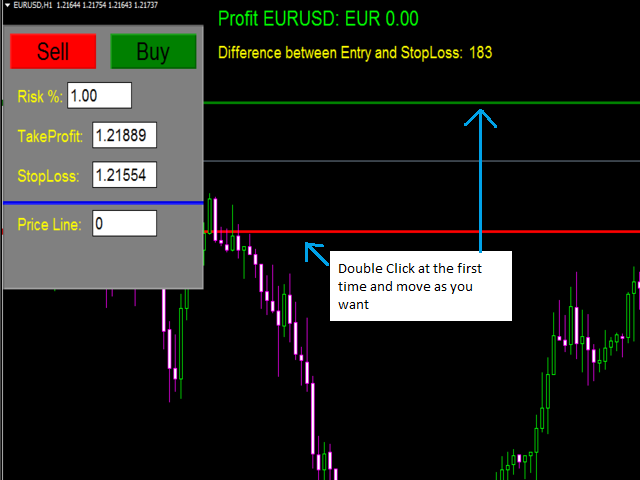
Easy Order Panel is a easy panel that can help you to place your orders quickly and easily. Works on all currencies.

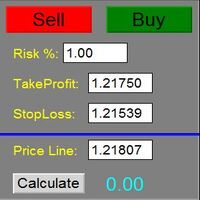
Configure the Risk and automatically when you press Sell/Buy button an operation with the right lot will be opened. in this way you lose at most the percentage entered.


- just double click on the red line (StopLoss) and then you can move it as you like. You can also insert value of StopLoss directly in the panel, without moving the red line.

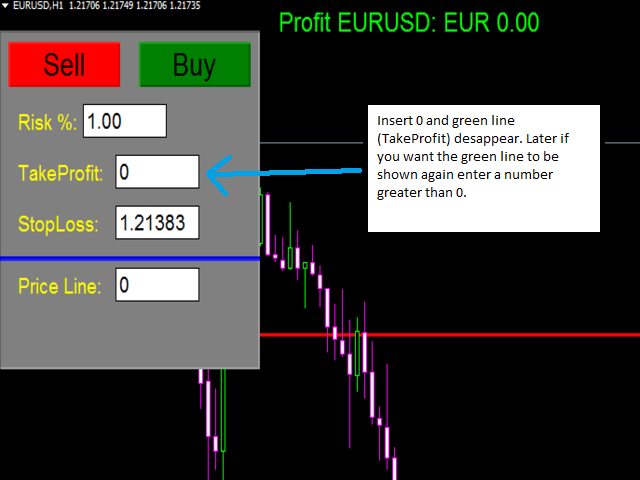
- just double click on the green line (TakeProf) and then you can move it as you like. You can also insert value of TakeProfit directly in the panel, without moving the green line. if you don't want the green line to be shown enter 0 in the panel for TakeProfit. Later if you want the green line to be shown again enter a number greater than 0.

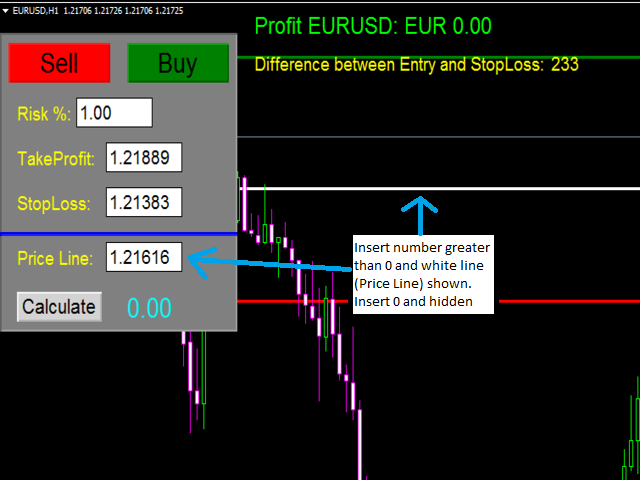
- if you enter a value greater than 0 in the "Price Line" panel, a white line will appear on the graph. This line represents the price and can be used to calculate the right lot at an income other than the current price. So double click on white line and move it as you like. Place the white line (Price) and the red line (StopLoss) where you want and press the calculate button, so the correct lots for the operation will be displayed.

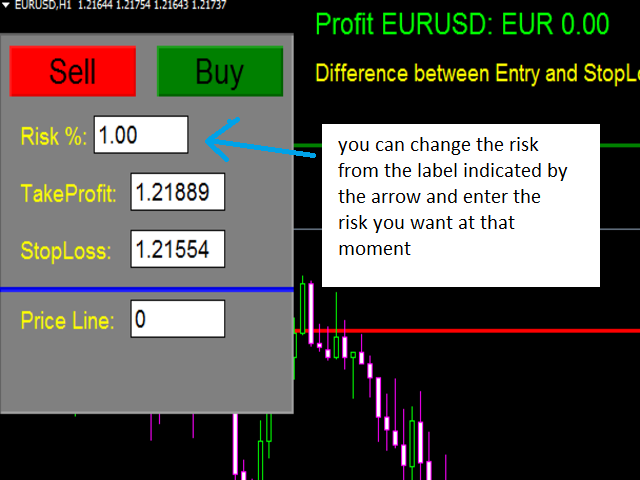
- If click on label risk you can set risk that you want.


Easy order panel informs you about distance between enter price and stoploss.

Easy order panel iforms you obout Risk Reward.


Initial inputs of Easy Order Panel:

- Active TP Line: //True to display TakeProfit Line, False to not display TakeProfit Line

- Active SL Line: //True to display StopLoss Line, False to not display StopLoss Line

- Risk %: //Number with comma (no more 2 digits after comma)

- Magic Number: //Integer number, enter a different number for each chart you place Easy Order Panel

- Comment: //Insert comment that you want to display in your orders

First 10 downloads at 35 dollars, after the price will increase. 7/10 Sold at 35$.


推荐产品
Description: Please tick "Show object descriptions" in chart properties to enable hrays views That utility converts a trendline into a horizontal ray known as tool for drawing supply and demand zones. Simply create a trendline on a chart and once selected, it will get converted. Ray remains horizontal while dragging.  Quick ray plot: press "R" key to create horizontal ray. It will be snapped to the nearest OHLC value Further versions will be improved. For feature request please post new comm
VN Trade Panel II
Vyacheslav Nekipelov
4 (1)
The new version of the trading panel, which now has the ability to separately close Buy and Sell orders, display targets for all orders on the chart, as well as the ability to use the panel to trade with brokers working on the FIFO rule. Also, the new version adds option buttons for separate management of open orders. It has a convenient visualized interface and intuitive control without a lot of additional tabs to which traders have to be distracted and switch their attention. Thanks to this,

Blahtech Market Profile
Blahtech Limited
4.53 (15)
Was: $249  Now: $99   Market Profile defines a number of day types that can help the trader to determine market behaviour. A key feature is the Value Area, representing the range of price action where 70% of trading took place. Understanding the Value Area can give traders valuable insight into market direction and establish the higher odds trade. It is an excellent addition to any system you may be using. Blahtech Limited presents their Market Profile indicator for the MetaTrader community. Ins
BoxChart MT4
Evgeny Shevtsov
4.4 (5)
The market is unfair if only because 10% of participants manage 90% of funds. An ordinary trader has slim changes to stand against these "vultures". This problem can be solved. You just need to be among these 10%, learn to predict their intentions and move with them. Volume is the only preemptive factor that faultlessly works on any timeframe and symbol. First, the volume appears and is accumulated, and only then the price moves. The price moves from one volume to another. Areas of volume accumu
This script is designed for quick and precise placement of pending orders. Just drag and drop it on the chart. Select the position for Open price, TP price and/or SL price. Pending Orders Levels Seeker understands what kind of pending orders you want to place. It warns you if there are incorrect values in Open price, TP price or SL price. Lot can be changed from the panel of the script only at the first launch or if you want to set a new value for it. The script remembers the lot size of the las

HTF Candles is a practical technical analysis indicator that plots candles from a selected higher timeframe directly on your chart. It displays both the candle body and wicks, allowing you to see the full price structure of the chosen timeframe without switching chart intervals. The indicator allows you to: • observe higher timeframe context without leaving your current chart • quickly determine bias (trend tendency — whether buyers or sellers currently have the advantage) and the range of the h
This panel is a part of the SupDem-Pro trading system and is used to search for the best opportunities for any available instruments. Which can be selected manually in the Market Watch (open it with CTRL + M). Using this trading panel in combination with ShvedSupDem-Pro_Zone allows to analyze multiple currency pairs with a single click. The panel allows to load any instruments from the Market Watch, from 6 major currency pairs up to all instruments (480). The indicator parameters Button Width -
MR Volume Profile 4
Sergey Khramchenkov
The "MR Volume Profile 4" indicator is a charting tool that displays trading volume at different price levels rather than time intervals. A key concept in volume profile is the point of control (POC)—the price level with the highest volume traded during the session or time range. While tools like VWAP or OBV provide volume trends, the "MR Volume Profile 4" indicator offers granular detail about where the most market activity occurs at specific price levels. This makes it a more precise tool for
Volume Profile Sniper v11.1是一款全面的市场分析工具 专业的交易方法 Volume Profile Sniper v11.1在一个指标中结合了超过15个关键过滤器,根据对市场情况的全面评估提供清晰的信号。 主要特点 成交量不平衡分析-该算法计算每个蜡烛中买家和卖家的份额,表明其中一方的优势(可配置阈值从50%到90%)。 多级信号滤波-指标考虑到: 趋势指标(EMA9/21) Rsi不包括超买/超卖区域 蜡烛图案(针杆,吸收,锤子) 支持/阻力水平(自动检测) 音量峰值,以确定主要参与者的活动 经典和放大的RSI分歧 波动率评估的ATR 用于确定趋势强度的ADX 价格行动(内部和外部酒吧) 多时间帧确认 市场结构(高点/低点) 会话过滤器(亚洲,伦敦,纽约会话) 防止新闻排放 灵活的配置系统-MinFiltersRequired参数允许您设置生成信号所需的最小数量的滤波器。 这使得可以使指标适应任何交易策略,从激进到保守。 可视化设置-您可以通过将指示器集成到图形样式中来更改箭头的大小和颜色(ArrowSize,BuyArr
Program Overview: This program is a trading tool designed to monitor and analyze the 7 major currency pairs. It is a variant of a similar program used for tracking stock indices, but this version focuses on the seven major currency pairs. The program helps in identifying and calculating significant price movements (gaps) between the high and low prices of these currency pairs over a specified time frame. It then provides insights through comments and alerts based on the calculated gaps. Major Cu
Blahtech Supply Demand
Blahtech Limited
4.58 (36)
Was: $299  Now: $99   Supply Demand uses previous price action to identify potential imbalances between buyers and sellers. The key is to identify the better odds zones, not just the untouched ones. Blahtech Supply Demand indicator delivers functionality previously unavailable on any trading platform. This 4-in-1 indicator not only highlights the higher probability zones using a multi-criteria strength engine, but also combines it with multi-timeframe trend analysis, previously confirmed swings
History Pattern Search
Yevhenii Levchenko
该指标建立当前报价,可以与历史报价进行比较,并在此基础上进行价格走势预测。指示器有一个文本字段,用于快速导航到所需日期。 选项: 符号 - 选择指标将显示的符号; SymbolPeriod - 选择指标从中获取数据的时段; IndicatorColor - 指示器颜色; HorisontalShift - 由指标绘制的报价移动指定的柱数; Inverse - true 反转引号,false - 原始视图; ChartVerticalShiftStep - 图表垂直移动(键盘上的向上/向下箭头); 接下来是文本字段的设置,您可以在其中输入日期,您可以通过按“回车”立即跳转到该日期。 接下来是文本字段的设置,您可以在其中输入日期,您可以通过按“回车”立即跳转到该日期。
ProfileVolumesMarket
Sergey Zhukov
5 (3)
The ProfileVolumesMarket indicator calculates tick volume on each price level in a selected range. Volume is vital when determining strength and therefore significance of price levels. The calculation range is set by a trader by means of moving two vertical lines. Thus the indicator allows to track important levels on different steps of a symbol price formation. A histogram of volume profile can be displayed on the chart (or removed from the chart) if you press "ON" ("OFF") button. When you chan
Displays the local time with the time difference you set. (It does not correspond to the time difference in 30-minute increments.) It also displays a price line with a good price, such as 100.000 .100 or .200. The standard gridlines are displayed with the time and price by MT4, but they are very confusing as they become the broker's time and are displayed at the halfway point along with the price. It hides them and displays gridlines at user-defined time differences and prices in easy-to-unders
Signal Copy Multiplier automatically copies trades on the same account, for example, to get a better entry and adjusted volume on a subscribed signal. MT4-Version:  https://www.mql5.com/de/market/product/67412 MT5-Version:  https://www.mql5.com/de/market/product/67415 You have found a good signal, but the volume of the provider's trades is too small? With Signal Copy Multiplier you have the possibility to copy trades from any source (Expert Advisor, Signal, manual trades) and change the volume o
VolumeProfile
Robert Hess
3.8 (5)
Descption: The Volume Profile displays detailed informations of historical trading activities at certain price levels (Market Profile). So you can locate the areas with the best prices in the market and get an advantage about other market participants. Features: Customizable Volume Profile / Market Profile Shows the "fair" Value Area with 70% of all Volume Shows critical low volume zones Shows VPOC, VAL and VAH Points Works on all timeframes Also available for MT5 ( https://www.mql5.com/en/mark
Dynamic Trend Sniper MT4
Vincent Georges David Ferrier
Trade Like an Institution. Protect Like a Professional. Early Sniper Access: Limited Launch Offer! Get ready to elevate your trading precision. We are offering an exclusive, highly limited launch price for the first Dynamic Trend Sniper users. Our Unbeatable Launch Offer: First 10 Snipers Only: $69 (Full lifetime access + all v1.x updates) Standard Retail Price (After 10 Purchases): $129 Why Act Now? This is not just a discount; it's a strategic entry point. We are committed to rewarding o
Mobile LotSize Trade on the go with confidence Have you ever spotted the perfect trade opportunity on your phone, only to enter with the wrong lot size and end up risking more than you intended? With Mobile LotSize , that’s no longer a problem. Leave this EA running on your trading platform, and it will automatically monitor your pending orders set at 0.01 lots. If you’ve placed a stop loss or take profit from your phone, Mobile LotSize will calculate and adjust the trade size to match your ris
GoldenTrend
Aliaksandr Sych
GoldenTrend — a next-generation high-frequency scalping Expert Advisor designed to extract profit from the smallest market movements. Utilizing advanced algorithms for price action and volume analysis, it opens dozens of highly accurate trades daily with minimal risk. Why GoldenTrend? Монитор Ultra-Fast Trades : Captures profit from 5–15 pip movements. Ideal for ECN accounts with low spreads. Adaptive Strategy : Automatically adjusts to current market volatility and dynamically shifts tradi
Auto Fibo Pro m
DMITRII GRIDASOV
“Auto FIBO Pro” Crypto_Forex 指标 - 是交易中的绝佳辅助工具! - 指标自动计算并放置在图表斐波那契水平和局部趋势线(红色)上。 - 斐波那契水平指示价格可能反转的关键区域。 - 最重要的水平是 23.6%、38.2%、50% 和 61.8%。 - 您可以将其用于反转剥头皮或区域网格交易。 - 还有很多机会可以使用 Auto FIBO Pro 指标来改进您当前的系统。 - 它具有信息价差掉期显示 - 它显示所连接的外汇对的当前价差和掉期。 - 显示屏还显示账户余额、净值和保证金。 - 可以将信息价差掉期显示定位在图表的任何角落 . 点击这里查看高质量的交易机器人和指标! 这是仅在此 MQL5 网站上提供的原创产品。 ...............................................
Smart Backtest
Mr Chaiyaporn Boonsamorn
For those who are still not confident in their system or are testing new techniques to make it easier without wasting time to change the charts one by one, we recommend EA Smart Backtest to help you backtest your system efficiently. -The EA is intended to Backtest your system.   -Able to open buy or sell in visual mode and can modify values ​​for LOT, SL, TP.   -The chart also shows the Balance Equity Profit status. -Can choose to close, Buy, Close, Sell
ARM View Lots
Aleksandr Ryzhkov
Утилита для подсчета лотов в закрытых сделках прямо на графике, чтобы не вести подсчеты на бумаге, в таблице или в уме, была разработана данная программа которая будет считать за вас! Очень удобно для торговли, где необходим постоянный контроль количества лотов закрытых позиций, для подсчета комиссионных с комиссий и спреда которые как раз и начисляются за это количество лотов.
EA123 Snipper MACD
Jose Francisco Flores Rojas
MACD Divergence Pro is an intelligent and adaptive Forex trading robot designed to capitalize on MACD signals and detect divergence patterns that often precede major price reversals. The EA automatically places Buy and Sell trades when: Bearish divergence is detected at market highs Bullish divergence is detected at market lows MACD crossover signals confirm potential entry points Key Features: Fully automated trading using MACD and divergence logic ️ Customizable MACD settings for f
Utility, which draws buy or sell trendlines, which can also become support or resistances able to close any position on the screen Algorithm that calculates the gain of the position, at the touch closure of the line.   The benefits you get: Works on forex and CFD, timeframe from M1 to Weekly. Easy to use screen control panel. Audible warning messages at the touch of the line. Easy to use.
Gold Venamax MT4
Sergei Linskii
3 (2)
Gold Venamax   - 這是最好的股票技術指標。 此指標演算法分析資產的價格變動並反映波動性和潛在的進入區域。 指標特點: 這是一個帶有 Magic 和兩個趨勢箭頭塊的超級指標,可實現舒適且有利可圖的交易。 圖表上顯示用於切換方塊的紅色按鈕。 Magic 在指標設定中進行設置,以便您可以將指標安裝在顯示不同區塊的兩個圖表上。 Gold Venamax 可以放置在具有不同箭頭緩衝區(GV 和 SD)的兩個圖表上。 為此,您需要在設定中選擇不同的 Magic,例如,一個具有 Magic = 999,另一個具有 Magic = 666。接下來,您可以使用圖表上的紅色按鈕選擇箭頭緩衝區。 指標設定中的每個箭頭緩衝區(GV и SD)都有一個單獨的箭頭過濾器,以實現舒適且有利可圖的交易(UseFiltrGV = true; 和 UseFiltrSD = true;)。 進入的最佳訊號 = 遵循兩個緩衝區的訊號箭頭(GV 和 SD)+ 所有三個 MA 線(紅色或藍色)的方向 + TMA 通道邊界(下或上) 。 TMA 通道邊界(下限或上限)也可用於鎖定利潤和/或以較短的停損位進行逆
自动盈亏平衡水平 使用   此   工具 ,   您 可以 激活 自动 止损 移动, 当 交易 达到 预期 利润时.  对于   短期   交易者   尤其   重要.   偏移选项也可用: 可以保护部分利润. 多功能工具 : 66+ 功能, 包括此工具  |   联系我  如有任何问题  |   MT5版本 激活自动盈亏平衡功能的过程: 1.   选择符号或交易   将为其激活自动盈亏平衡功能: 对于当前   [Symbol]   / 对于   [ALL]   所有交易 / 或特定交易   [Ticket] . 除了[Symbol]或[ALL]规则外 - 您可以为特定交易设置单独规则, 通过其票号: 单独[Ticket]的规则将优先. 2. 选择您要激活自动盈亏平衡的   交易类型   : [ALL]: 所有活跃交易; [Longs]: 仅买入交易; [Shorts]: 仅卖出交易; 3.   [When profit] : 只有当   交易达到指定利润金额时 , SL才会被移动. 4.   [+ Offset] : 您可以设置   额外的SL偏移 , 向 TP水平方向. 因此,
Strategy creation : Create lines of stop loss, entry and take profit. Live parameters such as lot size, gap in pip from SL to TP, Risk/Reward ratio are update whenever lines of SL and Entry move.   This function allows traders to clarify their strategy before making any orders.   Risk management  - The risk calculation function calculates the volume for a new order taking into account the set risk and the distance from the Stoptloss to Entry Line.     In addition, maximum risk (%), RR value are

FREE
SmartLot MT4
Nikita Chernyshov
演示账户免费版   | MT4 版本 The SmartLot for  MT4   是一款交互式且简单的面板,用于快速计算手数,直接从图表设置挂单和市价单。 不适用于策略测试器 。要测试该工具,请下载适用于模拟账户的免费版本。说明和文件位于描述顶部。 功能: 图形界面: 带有盈亏区域颜色标记的交互式入场、止损、止盈线。 实时计算: 当更改止损/止盈水平时,面板会自动重新计算风险/利润值(货币单位 / 点数 / %)。 执行: 通过点击图形线上的按钮来开单。支持主要订单类型。 风险管理: 用于处理动态手数(存款百分比)或固定交易量的内置模块。 独立魔术码: 可为每个订单单独指定魔术码。 如果在安装或使用中遇到任何问题 — 欢迎随时联系,我将乐意为您提供帮助。
MT4 Discord Copier  - the perfect tool for those looking to remotely copy trades between multiple MT4 accounts on different computers over the internet! With the added convenience of Discord transactions monitoring, you can now easily share trades with a global group of people on your own terms, all while benefiting from the features of a Discord server . This solution is ideal for both providers and receivers, as providers can effortlessly copy trades to multiple receivers, while receivers can

NRP Risk Manager Pro Institutional-Grade Trade Management & Prop Firm Protection Get the MetaTrader 4 Version Here: https://www.mql5.com/en/market/product/179888 Get the MetaTrader 5 Version Here: https://www.mql5.com/en/market/product/179885 Trading isn't just about finding the right entry; it is about flawlessly executing your edge while fiercely protecting your capital. NRP Risk Manager Pro is not an automated trading robot—it is a comprehensive, institutional-grade trade terminal d
该产品的买家也购买
欢迎来到 Trade Manager EA——这是一个终极风险管理工具,旨在使交易变得更直观、精准和高效。它不仅仅是一个下单工具,而是一个用于无缝交易计划、仓位管理和风险控制的全面解决方案。不论您是新手交易员、资深交易员,还是需要快速执行的剥头皮交易员,Trade Manager EA 都可以满足您的需求,适用于外汇、指数、大宗商品、加密货币等各种市场。 借助 Trade Manager EA,复杂的计算已成过去。只需分析市场,在图表上用水平线标记入场、止损和止盈,设置您的风险水平,Trade Manager 就会立即计算出理想的头寸规模,并实时显示以点、账户货币计价的止损和止盈。每笔交易都得以轻松管理。 主要功能: 头寸规模计算器 :根据定义的风险瞬间确定交易规模。 简单的交易计划 :在图表上用可拖动的水平线直接计划交易,设置入场、止损和止盈。 实时显示 SL 和 TP :以账户货币、点或分显示止损和止盈,便于分析。 高级保护工具 盈亏平衡选项 : 基本盈亏平衡 :当您的交易达到设定水平时自动保护利润。 多级盈亏平衡 :设置多达 4 个级别以逐步保护利润。 尾随止损选项 : 基本尾随
Local Trade Copier EA MT4
Juvenille Emperor Limited
4.96 (110)
通过 Local Trade Copier EA MT4 获得非常快速的交易复制体验。它的简单1分钟设置,使您可以在同一台Windows计算机或Windows VPS上在多个MetaTrader终端之间复制交易,具有闪电般快速的复制速度,低于0.5秒。 无论您是初学者还是专业交易者, Local Trade Copier EA MT4 都提供了广泛的选项,可根据您的特定需求进行自定义。对于任何希望增加利润潜力的人来说,这都是终极解决方案。 今天就尝试一下,看看为什么它是市场上最快、最简单的贸易复印机! 提示: 您可以在您的模拟账户中下载并试用 Local Trade Copier EA MT4 模拟版: 这里 将下载的免费演示文件粘贴到您的 MT4 >> 文件 >> 打开数据文件夹 >> MQL4 >> 专家文件夹并重新启动您的终端。  免费演示版本每次可在 4 小时内发挥全部功能,仅限演示帐户。 要重置试用期,请转至 MT4 >> 工具 >> 全局变量 >> Control + A >> 删除。 请仅在非关键模拟账户上执行此操作,不要在挑战道具公司账户中执行此操作。 如果您无法在
Exp COPYLOT CLIENT for MT4
Vladislav Andruschenko
4.69 (65)
MetaTrader 4 专业交易复制器 快速、专业、可靠的 MetaTrader 4 交易复制器。 COPYLOT 可在 MetaTrader 4 与 MetaTrader 5 终端之间复制外汇交易,并为不同账户类型和交易场景提供灵活的同步方案。 COPYLOT MT4 版本支持: MetaTrader 4 → MetaTrader 4 MetaTrader 5 Hedge → MetaTrader 4 MetaTrader 5 Netting → MetaTrader 4   MT5 版本 完整说明 + DEMO + PDF 如何购买 如何安装 如何获取日志文件 如何测试与优化 Expforex 的全部产品 您也可以使用 MetaTrader 5 版本,在 MetaTrader 5 → MetaTrader 5 和 MetaTrader 4 → MetaTrader 5 之间进行复制: COPYLOT CLIENT for MT5 COPYLOT 是一款专业级交易复制器,可稳定运行于 2、3 甚至 10 个终端之间。 支持从模拟账户和投资者密码账户进行复制 可同时运行在多个终端上
Trade Assistant MT4
Evgeniy Kravchenko
4.43 (196)
它有助于计算每笔交易的风险,容易安装新的订单,具有部分关闭功能的订单管理, 7 种类型的追踪止损和其他有用的功能。 附加材料和说明 安装说明 - 应用程序说明 - 模拟账户应用程序的试用版 线条功能  - 在图表上显示开仓线、止损线、止盈线。 有了这个功能,就可以很容易地设置一个新的订单,并在开仓前看到它的附加特性。   风险管理  - 风险计算功能在考虑到设定的风险和止损单的大小的情况下,计算新订单的成交量。它允许你设置任何大小的止损,同时观察设定的风险。 批量计算按钮 - 启用 / 禁用风险计算。 在 " 风险 " 一栏中设置必要的风险值,从 0 到 100 的百分比或存款的货币。 在 " 设置 " 选项卡上选择风险计算的变量: $ 货币, % 余额, % 资产, % 自由保证金, % 自定义, %AB 前一天, %AB 前一周, %AB 前一个月。   R/TP 和 R/SL - 设置止盈和止损的关系。 这允许你设置相对于损失的利润大小。 例如, 1 : 1 - 这决定了 TP = SL 的大小。 2 : 1 - 这意味着 TP 是 SL 的两倍。 RR - 它禁用比率。  
TradePanel MT4
Alfiya Fazylova
4.84 (95)
交易面板是一款多功能交易助手。该应用包含超过50种手动交易功能,并允许您自动执行大多数交易任务。 在购买之前,您可以在演示账户上测试演示版本。下载用于演示账户的试用版应用程序: https://www.mql5.com/zh/blogs/post/762579 。 完整说明 这里 。 贸易. 只需单击一下即可执行交易操作: 打開掛單和頭寸,並自動計算風險。 一鍵打開多個訂單和頭寸。 打開訂單網格。 按組別關閉掛單和頭寸。 反轉頭寸方向(關閉買入>打開賣出,關閉賣出>打開買入)。 鎖定頭寸(通過開啟缺少的頭寸,使買入和賣出頭寸的數量相等)。 一鍵部分關閉所有頭寸。 將所有頭寸的止盈和止損設置在同一價格水平。 將所有頭寸的止損設置在盈虧平衡水平。 開倉時,可使用以下功能: 在多個訂單或倉位之間分配計算出的數量(在單擊一次時開啟多個訂單和倉位)。 在開啟訂單前在圖表上可視化交易水平。 僅在當前點差不超過設定值時才開啟倉位。 止盈和止損之間的自動比例。 虛擬止損和止盈。 自動將止損和止盈的大小增加為當前點差的大小。 基於ATR指標讀數計算止盈和止損。 設置掛單的到期日期。 為掛單設置追蹤(掛單
Copy Cat More Trade Copier MT4 (复制猫MT4) 不仅仅是一个简单的本地交易复制工具;它是一个为当今交易挑战而设计的完整风险管理与执行框架。从 prop firm 挑战到个人账户管理,它都能通过强大的执行力、资本保护、灵活配置以及先进的交易处理来适应各种情况。 该复制器同时支持 Master(发送端) 和 Slave(接收端) 模式,能够实时同步市价单与挂单、交易修改、部分平仓以及 Close By 操作。它兼容模拟账户与真实账户,支持交易或投资者密码,并通过持久交易记忆系统(Persistent Trade Memory)确保即使 EA、终端或 VPS 重启后也能恢复。可同时管理多个 Master 与 Slave,并通过前缀/后缀自动调整或自定义符号映射来处理跨平台或跨经纪商差异。 使用手册/设置: Copy Cat Trading Copier 使用手册 Copy Cat More MT5: https://www.mql5.com/en/market/product/139088 加入频道: https://www.mql5.com/en/cha
Trade copier MT4
Alfiya Fazylova
4.58 (33)
Trade Copier 是一种专业实用程序,旨在复制和同步交易账户之间的交易。 复制发生从供应商的帐户/终端到收件人的帐户/终端,安装在同一台计算机或 vps 上。 促销活动 - 如果您已经购买了“Trade copier MT5”,您可以免费获取“Trade copier MT4”(用于 MT4 > MT5 和 MT4 < MT5 的复制)。欲了解更多详细条款,请通过私人消息与我们联系! 在购买之前,您可以在演示帐户上测试演示版本。 演示 这里 。 完整说明 这里 。 主要功能和优点: 支持复制MT4>MT4、MT4>MT5、MT5>MT4,包括МТ5 netting账户。 供应商和收件人模式在同一产品中实现。 简单直观的界面,允许您直接从图表中实时控制复制。 连接中断或终端重新启动时不会丢失设置和位置。 允许您选择要复制的符号,也可以替换接收者的符号,例如 EURUSD> USDJPY。 支持回拷贝。 能够仅复制某些订单。 允许您设置开仓交易价格的最大差异和最大时间延迟。 正确复制部分订单关闭的执行。 计算复制手数的几种方法。 同步止盈和止损。有几种方法可以计算它们的位置。 支持
这是一个可视化的交易面板,可帮助您轻松进行交易管理,避免人为错误并增强交易活动。它结合了易于使用的视觉界面以及完善的风险和位置管理方法。 [ 安装指南 | 更新指南 | 故障排除 | 常见问题 | 所有产品 ] 易于使用 从图表轻松交易 精确的风险管理交易,无忧 保本是重中之重 让利润不受您的关注 尽快享受无风险交易 所有已开通交易的自动追踪止损 交易开始后立即设置初始止损 进行交易后,EA将执行以下任务: 初始止损/获利被自动放置 它会尽快锁定自由行(可选) 它将止损首次移动到盈亏平衡点(可选) 它使用您所需的方法跟踪止损,直到止损为止 其他很酷的功能是: 出色的终端活动报告 单一但功能强大的尾随止损方法 干净的图表界面 没有输入参数 我进行交易后会怎样? 这是您进行交易后EA的操作: 它放置初始止损并获利订单。 尽快搭便车并确保保本。默认情况下,这是通过在达到盈亏平衡点时关闭50%的交易来完成的,默认情况下为5点。这意味着,如果您日后被淘汰,您将一无所获(可选)。 盈亏平衡后,跟踪止损开始运行。 它跟踪止损,直到止损为止,让利润运行。 尾随止损如何运作? 追踪止损表示为所管
Trade Manager MT4 DaneTrades
Levi Dane Benjamin
4.09 (11)
交易管理器可帮助您快速进入和退出交易,同时自动计算风险。 包括帮助您防止过度交易、报复性交易和情绪化交易的功能。 交易可以自动管理,账户绩效指标可以在图表中可视化。 这些功能使该面板成为所有手动交易者的理想选择,并有助于增强 MetaTrader 4 平台。多语言支持。 MT5版本  |  用户指南+演示 交易经理在策略测试器中不起作用。 如需演示,请参阅用户指南 风险管理 根据%或$自动调整风险 可选择使用固定手数或根据交易量和点自动计算手数 使用 RR、点数或价格设置盈亏平衡止损 追踪止损设置 最大每日损失百分比,在达到目标时自动平仓所有交易。 保护账户免遭过多提款并阻止您过度交易 最大每日损失(以美元为单位)在达到目标时自动关闭所有交易。 保护账户免遭过多提款并阻止您过度交易 一键实现所有交易的盈亏平衡 自动计算从手机/电话发送的交易的风险 OCO 在设置中可用 交易和头寸管理 通过设置每月、每周、每天、每小时或每分钟的最大交易次数,停止过度交易和报复性交易。 高级挂单管理。 调整何时关闭挂单的规则 追踪挂单 支持市价订单和挂单 每日最大利润目标(以美元为单位)以确保头寸并停止
Coppy Master MT4
Sergey Batudayev
4 (3)
Coppy Master MT4     是一款适用于 MetaTrader 4 和 MetaTrader 5 终端的交易复制工具。它支持双向复制: 从 MT4 到 MT5,从 MT5 到 MT4,以及同类型账户之间的 MT4 到 MT4。 为了正常工作,所有终端必须在同一台 PC 或 VPS 上运行。 [ Instruction  and Demo ]  如需复制到 MetaTrader 4,需另行购买 —       Coppy Master MT5       - 是必须的。 主要特点: 复印模式 支持主账户和接收账户角色。灵活设置发送和接收交易。 订单管理 复制市价单和挂单。支持同步平仓、部分平仓、交易逆转以及止损/获利修改。 符号处理 支持前缀和后缀。允许排除或包含特定符号,并为资产分配自定义名称。 风险控制与限额 每日交易限额、最大亏损限制以及停止复制的余额水平阈值。 批量设置 固定手数、风险百分比、手数乘数。可选择拒绝未设置止损或止盈的交易。 信号检查 检测重复交易,限制每个符号的交易数量,并验证订单类型以避免冲突。 时间过滤器 用于定义允许交易复制的时间段
Custom Alerts AIO:多市场智能监控,一键启动,无需设置 概述 Custom Alerts AIO 是一款“开箱即用”的高级市场扫描工具,无需额外安装任何其他指标或进行复杂设置。它内置了 Stein Investments 的所有核心指标(FX Power、FX Volume、FX Dynamic、FX Levels 和 IX Power),可帮助您轻松监控所有主要资产类别,如外汇、黄金、指数和加密货币。如果您的经纪商支持股票,您也可以手动添加个股进行监控。 1. 为什么选择 Custom Alerts AIO? 无需额外购买任何指标 • 所有关键指标均已内置,开箱即用。 • 专注于实时预警,不包含任何图形元素,性能高效,界面简洁。 全面覆盖所有主要市场 • 支持监控外汇、金属、加密货币和指数市场。 • 无需手动输入任何交易品种,只需在设置中勾选资产类别即可启用。 • 股票并不属于默认类别,如有需要可手动通过参数输入添加。 高效、专业、便捷 • 无需图表模板和手动加载,适合自动化或远程交易环境。 • 非常适合 VPS 上长期运行,或作为后台市场预警工具使用。 2
CloseIfProfitorLoss with Trailing
Vladislav Andruschenko
4.87 (31)
Close If Profit or Loss with Trailing for MetaTrader 4 — 按总盈利或总亏损自动平仓 这是一款适用于 MetaTrader 4 的实用型交易管理工具。当总盈利或总亏损达到您设置的水平时,EA 可以自动关闭选定的持仓。 Expert Advisor 会监控当前交易,计算浮动盈亏,并可使用利润跟踪功能,帮助交易者比手动操作更快地管理风险和锁定结果。 MetaTrader 4 仍然被大量手动交易者、剥头皮交易者、网格交易者和 EA 用户使用。但 MT4 本身没有一个方便的内置工具,可以按一组订单的总结果来自动平仓。这个工具正是为了解决这个问题。 Close If Profit or Loss with Trailing 可用于手动交易,也可以与其他 Expert Advisors、网格系统、加仓策略、恢复策略和多品种交易一起使用。您设置规则,EA 负责监控结果,并在条件达到时执行平仓。 MT5 版本 | 完整说明 + DEMO + PDF | 如何购买 | 如何安装 | 如何获取日志文件 | Expforex 的所有产品 为什么 MT4
Exp4 Duplicator
Vladislav Andruschenko
4.5 (22)
Duplicator for MetaTrader 4 —— 单终端内的专业交易与订单复制系统 这是一款面向专业交易者的强大 Expert Advisor,用于自动复制已经存在的交易、放大或调整仓位,并按照你的规则管理复制出的订单与持仓。 它非常适合手动交易者、自动化系统使用者,以及希望对现有仓位进行更灵活管理的用户。 Duplicator 本身并不会按自己的交易策略主动开仓。它的核心任务是监控 MetaTrader 4 终端中已经存在的仓位和订单,然后按照你的设定创建精确副本,包括复制次数、手数、止损、止盈、过滤条件以及后续管理逻辑。 如果你需要的是 同一个终端内部 的智能交易复制模块,而不是不同终端之间的复制工具,那么 Duplicator 正是为此而设计。 MT5版本 详细描述 + DEMO + PDF 如何购买 如何安装 如何获取日志文件 如何测试和优化 Expforex 的所有产品 链接 如果你需要 MetaTrader 终端之间的交易复制工具,请查看: COPYLOT 为什么交易者会选择 Duplicator 可复制手动开立的交易、其他 Expert Advisor 开立
DrawDown Limiter MT4
Haidar Lionel Haj Ali
5 (8)
Drawdown Limiter EA You are in the right place if you were searching for Drawdown control, Drawdown limiter, Balance protection, Equity Protection or Daily Drawdown Limit related to Prop Firm, FTMO, or Funded account trading, or if you want to protect your trading account. Have you suffered from controlling your drawdown when trading funded accounts? This EA is meant for you. Prop firms usually set a rule called “Trader Daily Drawdown”, and if it is not respected, you are disqualified.  I am an
Trade Dashboard MT4
Fatemeh Ameri
4.96 (53)
疲于复杂的订单下达和手动计算?Trade Dashboard 是您的解决方案。凭借其用户友好的界面,订单下达变得轻而易举,只需点击一下,您就可以开设交易、设置止损和止盈水平、管理交易手数,并计算风险回报比,让您只需专注于您的策略。告别手动计算,使用 Trade Dashboard 简化您的交易体验。 立即下载演示版本 。 您可以在这里找到仪表盘功能和特性的详细信息 。 加入 Telegram 频道 。 购买后请给我发消息以获取支持。如果您需要添加更多功能,可以在产品的评论区留下您的想法,我愿意听取任何建议,希望您能在使用我的产品时获得最佳体验 。 这是 MT5 版本。 风险管理:使用 Trade Dashboard,可以将您的风险设置为账户余额或权益的百分比,或将风险设置为总金额。在图表上直观地定义您的止损,让工具准确计算每个货币对的适当手数。该工具还可以根据您期望的风险回报比自动设置止盈水平。它甚至可以在手数计算中涵盖佣金和点差费用。此外,您的止损和止盈可以转变为虚拟水平,隐藏于经纪商。通过 Trade Dashboard 的高级风险管理功能,掌控风险,保护您的资本。 交易线
Close by percentage MT4
Konstantin Kulikov
5 (1)
Hello friends. I wrote this utility specifically for use in my profile with a large number of Expert Advisors and sets ("Joint_profiles_from_grid_sets" https://www.mql5.com/en/blogs/post/747929 ). Now, in order to limit losses on the account, there is no need to change the "Close_positions_at_percentage_of_loss" parameter on each chart. Just open one additional chart, attach this utility and set the desired percentage for closing all trades on the account. The utility has the following function
Telegram to MT4 Coppy
Sergey Batudayev
4 (10)
Telegram 到 MT4: 终极信号复制解决方案 使用 Telegram 转 MT4 简化您的交易流程,这款先进的实用程序旨在将交易信号直接从 Telegram 频道和聊天复制到您的 MetaTrader 4 平台,无需 DLL 文件。这款强大的解决方案确保信号执行的无缝衔接,拥有无与伦比的精度和丰富的自定义选项,从而节省您的时间并提高您的效率。 [ Instructions and DEMO ] 主要特点 直接 Telegram API 集成 通过电话号码和安全码进行身份验证。 使用用户友好的 EXE 桥轻松获取和管理聊天 ID。 添加、删除和刷新多个频道/聊天以同时复制信号。 使用高级过滤器进行信号解析 跳过包含自定义例外词(例如“报告”、“摘要”)的不需要的信号。 支持灵活的 SL 和 TP 格式:价格、点数或点数。 当信号指定点而不是价格时自动计算入场点。 订单定制和灵活性 使用多种模式定制订单规模:固定手数、动态手数(% 风险)或特定符号手数。 使用信号数据或自定义参数调整 SL/TP。 配置滑点、挂单到期和重试设置以实现完美执行。 综合符号管理 排除特定符号或匹配自定义
MT4 至 Telegram 信号提供者 是一款易用、可完全自定义的工具,它使发送信号到 Telegram 成为可能,将您的账户变成信号提供者。 消息的格式 可以完全自定义! 但是,为了简便使用,您也可以选择一个预设模板,并能够启用或禁用消息的特定部分。 [ 演示 ]  [ 手册 ] [ MT5 版本 ] [ Discord 版本 ] [ Telegram 频道 ]  New: [ Telegram To MT5 ] 设置 可通过 用户指南 获取逐步说明。 无需了解 Telegram API;开发者提供所需的一切。 主要特性 自定义发送给订阅者的订单详情的能力 您可以创建分层订阅模型,例如铜牌、银牌、金牌。金牌订阅可获得所有信号等。 按订单号、符号或备注过滤订单 包括执行订单的图表的屏幕截图 在发送的屏幕截图上绘制已关闭的订单,以便额外验证 推迟发送新订单消息的可能性,以便在发送前对位置进行调整 订单详情的全透明度: 新的市场订单 *附带屏幕截图 订单修改(止损、获利点) 已关闭订单 *附带屏幕截图 部分关闭订单 ** 新的挂起订单 修改的挂起订单(进场价格) 挂起订单激活(
Unlimited Trade Copier Pro is a tool to copy trade remotely to multiple MT4, MT5 and cTrader accounts at different computers/locations over internet. This is an ideal solution for you if you are a signal provider and want to copy your trades to other receivers globally on your own rules. One provider can copy trades to multiple receivers and one receiver can get trade from multiple providers as well. The provider can even set the subscription expiry for each receiver, so that receiver will not b
The product will copy all telegram signal to MT4   ( which you are member  ) , also it can work as remote copier.  Easy to set up, copy order instant, can work with almost signal formats, image signal, s upport to translate other language to English Work with all type of channel or group, even channel have "Restrict Saving Content", work with  multi channel, multi MT5 Work as remote copier: with signal have ticket number, it will copy exactly via ticket number. Support to backtest signal. How to
VirtualTradePad PRO SE MT4 — MetaTrader 4 高级交易面板和图表工作区 VirtualTradePad PRO SE 是一款适用于 MetaTrader 4 的专业交易面板和交易管理工作区。它帮助交易者通过一个基于图表的界面,更快速地开仓、管理、保护、平仓和分析交易。 该产品专为需要的不只是简单按钮集合的活跃手动交易者而创建。PRO SE 将一键执行、挂单、持仓控制、部分平仓、篮子利润/亏损逻辑、加仓均价层级、ATM 规则、信号监控、市场信息、策略测试器流程和面向 VPS 的准备整合到一个结构化工作区中。 MT5 版本 | 完整说明和截图 | 如何购买 | 如何安装 | 如何获取日志文件 | 如何测试与优化 | Expforex 的所有产品 为什么交易者会选择这套面板 图表一键交易 ,并支持键盘快速操作 快速完成开仓、平仓、修改、反转、锁仓与部分平仓 深度控制仓位、挂单、总利润与风控逻辑 自动参数计算,减少手动输入与重复劳动 相对于普通手动交易的优势 一个工作区替代多个窗口 — 交易执行、持仓控制、风险信息和管理工具都保留在图表上。 更快处理交易
Smart Channel M4
Vahidreza Heidar Gholami
The trend in the market can be predicted using trend lines but the problem is you don’t know where exactly the price is going to touch the trend line where you can put your pending orders on. Smart Channel Expert Advisor makes it possible to put an advanced channel around the price data, which can be configured to handle placing orders, opening and closing positions, managing risk per trade, spread, slippage, and trailing stop-loss and take-profit automatically. Features Money Management (Calcul
MT4 to Discord Signal Provider 是一款用户友好、完全可定制的工具,专为直接向 Discord 发送交易信号而设计。这个工具将您的交易账户转变为一个高效的信号提供者。 自定义消息格式以适应您的风格!为了方便使用,您可以从预先设计的模板中选择,并决定包括或排除哪些消息元素。 [ 演示 ] [ 手册 ] [ MT5 版本 ] [ Telegram 版本 ]  New: [ Telegram To MT5 ] 设置 遵循我们详细的 用户指南 进行简单设置。 不需要预先了解 Discord API;我们提供所有必要工具。 主要特性 为订阅者更新自定义订单详情。 实施分层订阅模型,如铜牌、银牌、金牌,每一层都提供不同级别的信号访问。 附加执行订单的图表截图。 在这些截图上显示已关闭的订单,以增加清晰度。 提供延迟发送新订单消息的选项,以便在发送前进行最后调整。 透明和详细的订单信息: 带截图的新市场订单。 订单修改(止损、获利)。 已关闭和部分关闭的订单。 新的和修改的挂起订单。 挂起订单的激活和删除。 关于历史订单的详细报告。 每个订单的可定制评论。 注意: *
ManHedger MT4
Peter Mueller
5 (2)
THIS EA IS A SEMI-AUTO EA, IT NEEDS USER INPUT. Manual & Test Version Please TEST this product before   BUYING  and watch my video about it. Contact me for user support or bug reports, or if you want the MT5 version! MT5 Version I do not guarantee any profits or financial success using this EA. With this Expert Advisor, you can: Implement your own   Zone Recovery   strategy to capitalize on trending markets. Create   Grid   trading strategies, to profit from ranging markets. Place orders easil
RS Trade Copier - 超快 本地跟单系统,配备 真正的 图形界面。别再手动输入账号了。告别200多个晦涩的参数设置。 一款可靠且灵活的工具,用于在 MT4 和 MT5 多个终端之间复制交易操作。适合专业交易员、信号服务商以及个人投资者使用。能够以高精度和低延迟将一个或多个信号源(Provider)的 交易操作同步 到一个或多个接收端(Client)。支持简单自动配置和高级手动设置。不会干扰手动或其他 EA 开的订单。完全 在 MT4 本地运行 ,无需第三方服务器。 RS Trade Copier 与其他解决方案的对比 RS Trade Copier 其他解决方案 设置 可视化分步向导。 设置大约需要 1 分钟。 200 多个晦涩的输入参数。 设置大约需要 20 分钟。 速度 异步交易操作。* 批量平仓 50 个头寸仅需 ~1 秒。 缓慢的顺序执行。 批量平仓 50 个头寸需要约 25 秒。 界面 真正的图形界面,支持 11 种语言的工具提示。 无需手册即可上手。 EA 属性中“输入参数”选项卡下的长长参数列表。 需要阅读所有文档。 批量操作 完全支持。 接收端上的批量平仓
秒级图表 (Seconds Chart) - 一款专为 MetaTrader 4 设计的独特工具,用于创建秒级时间框架的图表。 通过 秒级图表 ,您可以构建以秒为单位的时间框架图表,获得标准分钟或小时图表无法提供的极致灵活性和分析精度。例如,时间框架 S15 表示每根蜡烛图持续15秒。您可以使用任何指标、智能交易系统和脚本,操作方式与标准图表同样便捷。 与标准工具不同, 秒级图表 让您能够在超短时间框架下进行高精度交易,无延迟干扰。 您可能还需要 RS Trade Copier - 超快的本地跟单系统,配备完整的图形界面。设置仅需约1分钟,无需手动输入账号。支持MT4与MT5之间的任意组合复制。 秒级图表的优势 支持 1至900秒 的时间框架图表。 即时加载 历史数据,通过从MT5终端导入Tick数据库。 要导入tick数据,首先需要在MT5终端中启动 Tick Database 工具。 数据实时更新, 无延迟或滞后 。 可同时创建 多个秒级图表 。 秒级图表的理想应用场景 剥头皮交易 和高频交易。 精确的入场和出场时机。 在短时间框架下测试交易策略。 时间框架设置 默认设置包含以下时
Trading History MT4
Siarhei Vashchylka
5 (9)
Trading History - A program for trading and money management on the history of quotes in stratagy tester. It can work with pending and immediate orders, and is equipped with trailing stop, breakeven and take profit functions. Very good for training and testing different strategies. Manual (Be sure to read before purchasing) Advantages 1. Allows you to test any trading strategy in the shortest possible time 2. An excellent simulator for trading training. You can gain months of trading experience
News Filter EA: Advanced Algo Trading Assistant News Filter EA is an advanced algo trading assistant designed to enhance your trading experience. By using the   News Filter EA , you can integrate a Forex economic news filter into your existing expert advisor, even if you do not have access to its source code. In addition to the news filter, you can also specify   trading days   and   hours   for your expert. The News Filter EA also includes   risk management   and   equity protection   features
Telegram to MT4 Multi-Channel Copier 自动将您 Telegram 频道中的交易信号直接复制到 MetaTrader 4。无需机器人、无需浏览器扩展、无需手动复制。您在 Telegram 上收到信号,EA 会在几秒钟内在您的终端打开交易。 产品包含两个组件:一个监听 Telegram 频道的 Windows 应用程序,以及在您的 MT4 终端上执行信号的 EA。也提供 MT5 版本。 安装指南和应用程序下载: https://www.mql5.com/en/blogs/post/768988 工作原理 Windows 应用程序使用您自己的 API 凭据连接到 Telegram — 不是机器人。这意味着它可以读取您订阅的任何频道、群组或论坛主题,包括私人和 VIP 频道。当检测到信号时,它会解析并发送给 EA。EA 根据您的经纪商解析品种名称,根据您的风险设置计算手数,并打开交易。 整个过程是自动的。您不需要坐在电脑前。 打开应用程序并登录 Telegram(仅首次需要)。 选择您想要监听的频道或主题。 按 Start。EA 负责其余工作。 支持的信号格
使用我们先进的 Telegram Bridge EA 提升您的交易信号 是时候用专业且视觉吸引人的实时交易更新来吸引您的受众了。 联系我获取试用版并查看演示频道! 我们在用户友好的功能上进行了大量投资,为客户和提供商创造了独特的体验。  SIGNAL BRIDGE 能够为所有业务场景提供 100% 跟单友好信号,甚至可以绕过其他 EA 无法处理的 Metatrader 逻辑! 我们的 Telegram Bridge EA 自动将信号、图表快照和详细的绩效报告直接发送到您的 Telegram 群组——无需您动手。 查看 功能输入详细说明手册! 主要功能和优势  全面的交易数据 决定每条消息中显示的内容:从点数、入场价、止损、止盈、手数,甚至风险和盈亏比。为您的关注者提供完全透明度。 发送新订单、更新止损/止盈、从设置中自定义盈亏平衡,发送 100% 跟单友好的部分平仓  超精美图表附件功能 包含每笔交易的截图,显示您的入场点、止损/止盈和整体市场背景。完美构建每次更新的信任度和清晰度。 选择图表模板、自定义交易颜色、决定缩放级别  决定附加位置:所有交易、仅挂单、仅市价单、部分平
作者的更多信息
First 5 copies sold for 39$. 2/5 sold. Next price 49$. Not all function work on tester. If you want to test it, write to me a personal message, i send to you a demo version valid for 7 days with full functionality. The Trade Manager Advace is composed by 4 part: Navigation panel. Execution panel (Here is present the Risk Reward Tool). Management panel. Equity panel. Input parameters Magic Number : Number (number must be unique, do not use the same number in more one chart). Trailing stop for
如果您想测试该保本(Breakeven)指标,请在 MQL5 上通过此处联系我,我将向您发送一个有效期为 1 周 的演示版本。 保本线是一个对您交易非常有用的工具。 保本线的目的是以图形方式显示价格水平,在该水平上您的持仓开始盈利。 该保本指标包含 两个简单的功能: 可以仅计算您所附加指标的当前交易品种的保本价格。 可以计算所有已开仓位的保本价格。 该指标包含 4 个输入参数: True:仅计算当前交易品种的保本价; False:计算所有已开仓交易品种的保本价(True / False 选择)。 BreakEvenColor:可选择您喜欢的保本线颜色。 BreakEvenWidth:可选择您喜欢的线条宽度。 BreakEvenStyle:可选择您喜欢的线条样式。
筛选:
无评论
回复评论