RF Trade Copier Panel
- 实用工具
- 版本: 1.26
- 激活: 15

RF Trade Copier Panel copies open positions from one MetaTrader 5 terminal (Master) to one or more terminals (Followers) running on the same computer or VPS.
HOW IT WORKS
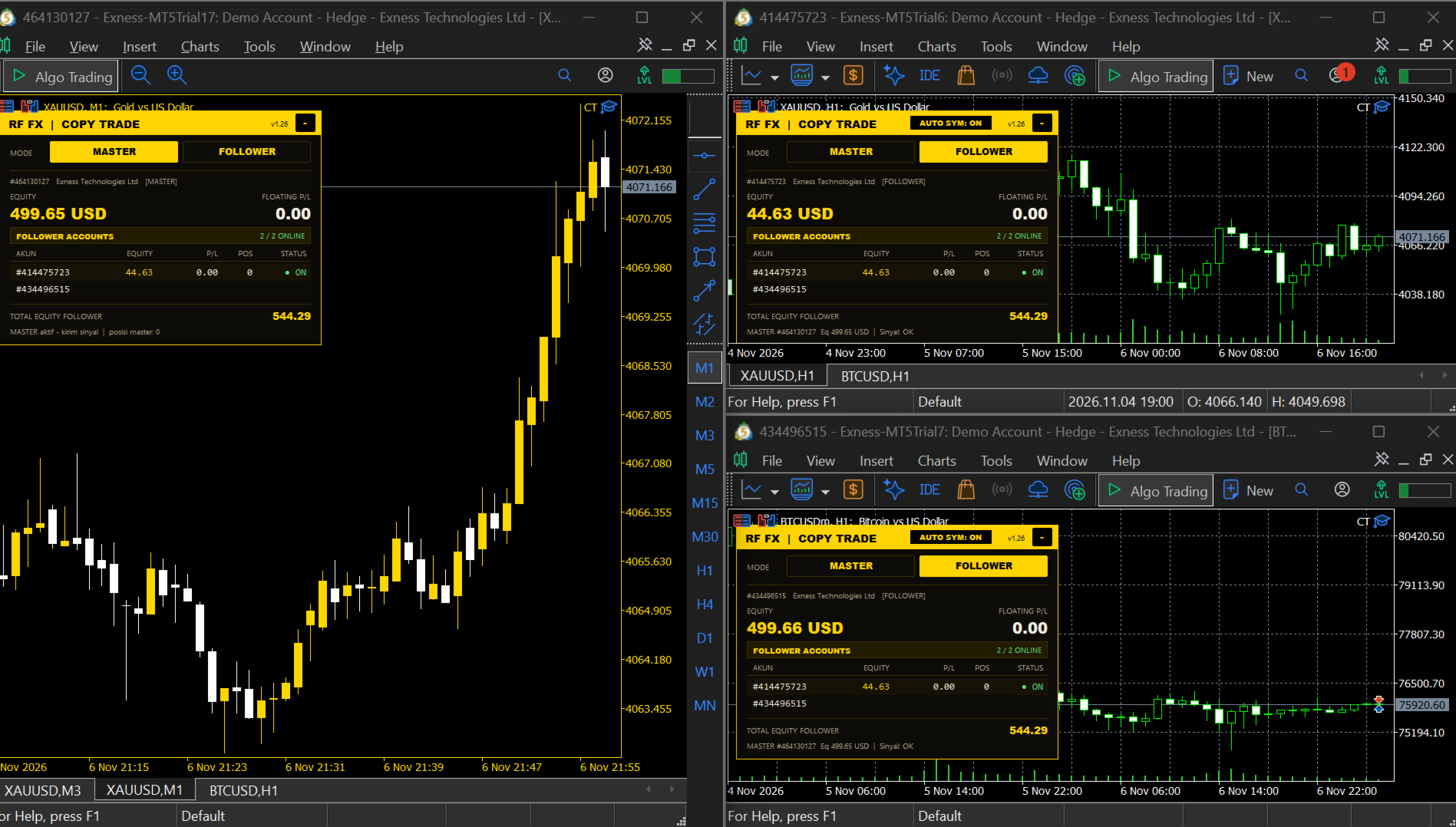
Install the EA in two or more MT5 terminals on the same PC or VPS. Set one terminal to MASTER and the others to FOLLOWER. When the Master opens or closes a position, every Follower does the same. Terminals communicate through the shared Common Files folder, so no external server or DLL is needed.
IMPORTANT
- Master and Follower terminals must run on the SAME computer or VPS.
- The product is designed for hedging accounts.
- Allow Algo Trading must be enabled in every terminal.
MAIN FEATURES
- Mode switch directly on the chart panel: MASTER or FOLLOWER.
- Chart panel in black and yellow style, with a table of connected follower accounts: login, equity, floating profit/loss, number of positions and online status.
- Total follower equity shown in the panel. The panel can be minimized.
- Follower stop loss and take profit follow the Master. If the Master moves or removes them, the Follower follows.
- When the Master closes a position, the Follower closes it too.
- Lot options for Followers: fixed lot, Master lot multiplied by a factor, or same lot as Master. A maximum lot limit is available.
- Automatic symbol detection for different broker prefixes and suffixes (for example XAUUSD and XAUUSDm). Manual suffix settings are also available.
- Optional daily profit and loss limit for Followers, with an option to close all follower positions when the limit is reached.
- Master magic number filter, to copy only selected positions.
- Follower positions use their own magic number and comment.
- Automatic retry if closing a position or setting stop levels fails.
- Positions are remembered after a terminal restart, so no position is opened twice.
SETUP
1. Attach the EA to one chart in the Master terminal. Choose MASTER in the panel.
2. Attach the EA to one chart in each Follower terminal. Choose FOLLOWER in the panel.
3. Set the lot mode and other options in the EA inputs.
4. Make sure the same symbol exists at the Follower broker. If names differ, keep AUTO SYM on, or set the suffix manually.
INPUT PARAMETERS
- Mode, signal file name, sync interval.
- Master magic filter.
- Lot mode, fixed lot, lot multiplier, maximum lot.
- Follower magic number, trade comment, slippage.
- Master and Follower symbol suffix, automatic symbol detection.
- Daily profit target, daily loss limit, close all on limit.
- Panel on/off and panel position.
NOTES
- Trading involves risk. This tool only copies trades and does not provide any trading signals or guarantee of results.
- Each Follower may open positions at slightly different prices because of broker execution and slippage.
- The EA does not use DLL files.