Grid Dynamic Range Navigator EA
- 专家
- 版本: 3.4
- 激活: 5

| Dynamic Range Navigator - grid trading that reads the room first (v3.04) |
|---|
|
Markets do not move in straight lines; they move in ranges that stretch and shrink. Grid Dynamic Range Navigator EA is built around that single observation. It watches how wide the market is really swinging, waits for the moment the range changes hands, and only then lets a grid cycle begin. The result is a grid that starts at sensible moments instead of opening trades every time price twitches.
Route 1 - The signal that decides when to begin
The navigator measures live volatility and keeps an adaptive envelope around price. When that envelope flips sides, the EA treats it as a fresh leg in the market and arms the matching side of the grid. By default it reacts only to a genuine flip, so a quiet, sideways session produces no noise. You stay in control of how sensitive it is through four simple inputs, and you can also combine the signal with a plain distance trigger so both must agree.
Route 2 - The ladder that follows
Once a cycle starts, levels are added at a distance tied to current ATR, so the grid widens automatically in fast markets and tightens in calm ones. Lots climb by a small fixed step rather than doubling, every order is capped at the smaller of your maximum and the broker's maximum, and an absolute ceiling on the number of orders per side keeps exposure finite.
Route 3 - The exit that keeps the book healthy
This is where most grids fail and where this one works hardest. A scanner continuously searches the open book for groups of old and new orders that together reach your profit target, counting swap and commission from your own history. When a whole group is out of reach it closes a slice of the oldest order instead, paid for by the newer winners, and remembers the remainder through restarts. Old exposure disappears piece by piece, and a reopen guard stops any closure from instantly re-opening the level it just cleared.
New in this release
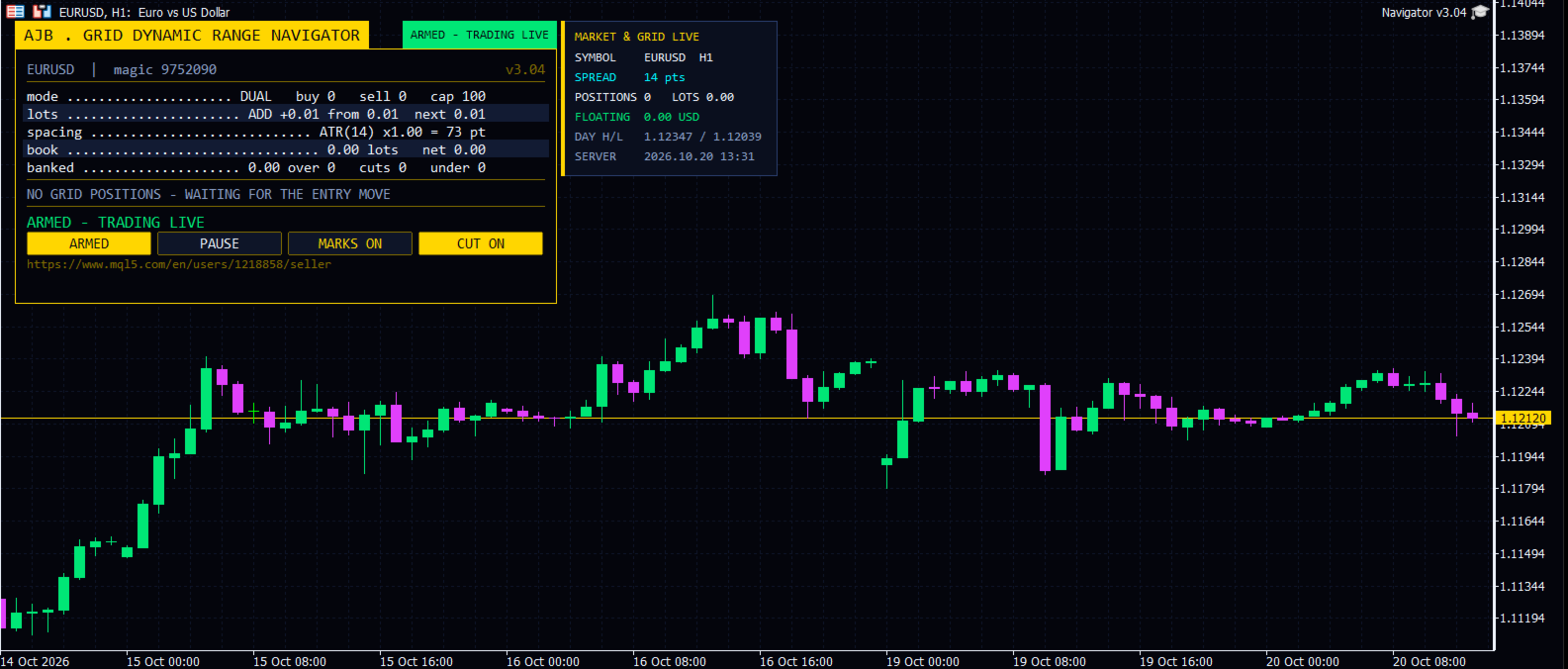
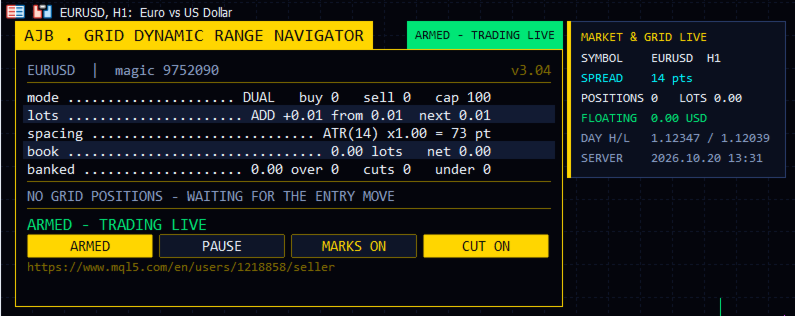
Burgundy and gold interface, top-left placement, clean header tab with a live status pill, four flat command buttons and a separate live market card showing symbol, spread, positions, lots, floating result, day high/low and server time. Every element sizes itself from the text it holds and the chart it lives on, rows drop away gracefully on small charts, and nothing is ever drawn on the right side of the chart.
Engine upgrade to 3.01 core: the false "not enough margin" warning that could appear even on very large accounts is gone; margin is checked exactly like the trade server checks it, a server funds rejection triggers a calm 60-second stand-aside instead of a retry storm, lot sizes are guarded against invalid values, and hedge repairs now check margin before acting.
Using the panel
ARMED / SCAN ONLY switches between live trading and observation mode. PAUSE / RESUME freezes new levels without touching open orders. MARKS ON / OFF draws or hides the plan lines on the chart. CUT ON / OFF enables or disables partial slicing. The panel can be dragged anywhere on the left side and minimised to its header with one click.
Complete input reference
| Group | What you can set |
|---|---|
| Grid levels | Dual or single grid mode; fixed grid space in points; per-level spacing multiplier; maximum levels per grid; which side an up move arms; magic number (9752090 by default); order comment; one new level per bar. |
| Lot ladder | Starting lot; add or multiply mode; multiplier; add step (0 = starting lot); maximum lot per order; balance-based auto-lot with reference balance and optional scale-down. |
| ATR spacing | Fixed or ATR spacing; ATR timeframe, period, factor and bar shift; spacing floor and ceiling in points; freeze spacing for the full cycle. |
| Profit target | Desired profit per closure; final multiplier 1.00-2.00; fixed or scaled target; scaled-mode volume exponent, depth bonus, maximum multiple and safety reach cap. |
| Fragment scanner | Multi-order scan on/off; maximum oldest and newest orders in one closure; ranking priority; must also beat the plain pair; minimum closing/target volume ratio. |
| Target slicing | Partial closes on/off; profit weight power; minimum slice percent; several closers per slice; prefer full closures. |
| Reopen guard | Guard mode and cushion as a fraction of one step. |
| Account protection | Minimum margin level for new levels; maximum floating loss percent for new levels; maximum orders per side. |
| Execution | Armed or scan-only start; leg order; slippage; spread limit; seconds between closures; attempts per leg; verification timeout; wait through closed markets and retry interval; auto-resume after a halt; abort if the book changed; full commission and fallback per lot; closing comment. |
| Hedge cycle (off by default) | Enable; symbols and rotation; tester symbol cap; cycle and slice lots; bonus (percent or money); money and percent safety caps; hedge magic; reopen on finish; wait for first grid trade; integrity interval; auto repair and naked-leg action; spread, slippage, attempts, verification, commission and comment. |
| Weekly cash day | Hold new cycles and slices on your withdrawal day after a chosen server hour. |
| Panel and chart | Show panel; X/Y offsets; font size; optional Arabic line; chart marks; table rows; corner. |
| Entry trigger | Strategy, distance or both; signal bar; validity window in bars; allow BUY; allow SELL; reverse. |
| Navigator signal | ATR period; envelope width factor; fire only on a genuine flip; warm-up bars used to settle the envelope. |
| Debug | Verbose logging. |
Good practice
Use a hedging account (checked automatically at start). Begin with the default 0.01 lot and the hedge cycle off, observe a week of cycles in the Strategy Tester and on a demo, then scale. Any symbol and timeframe are supported; no DLL, no extra files. Grid trading carries real risk and past tests do not guarantee future results, which is exactly why every protection in this EA is visible, adjustable and explained above.
Ready to navigate? Download the free test, run it on your favourite pair and see the range-reading logic at work for yourself.