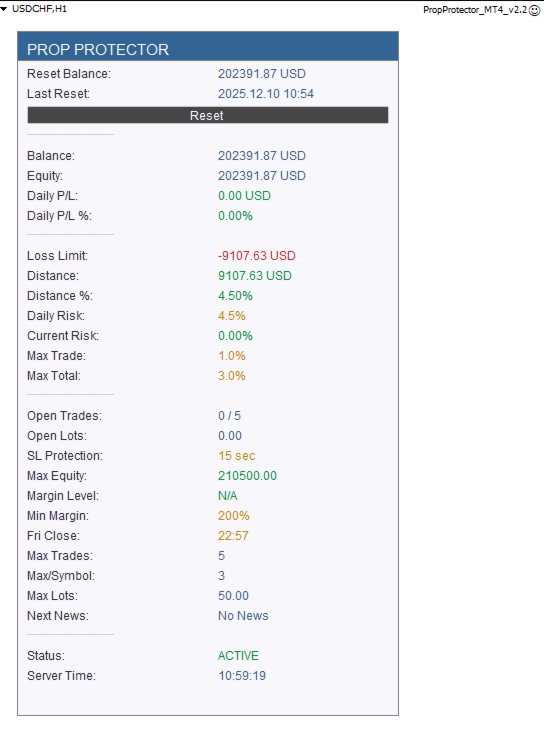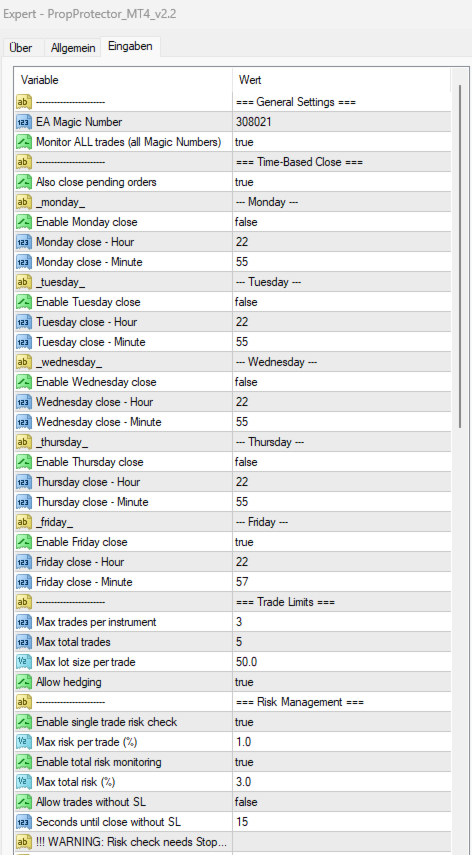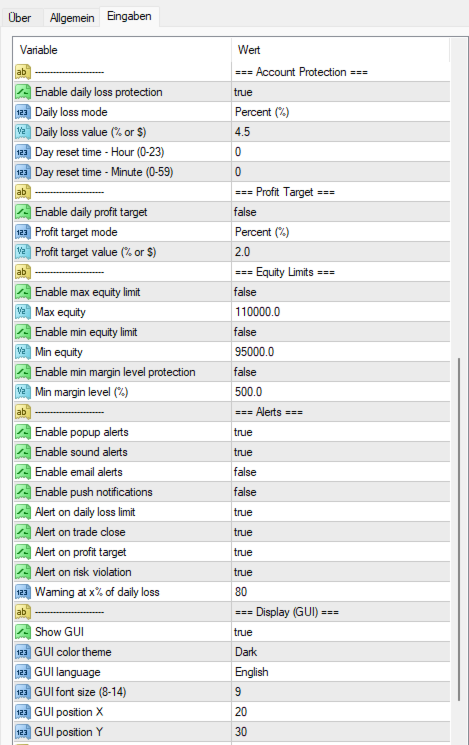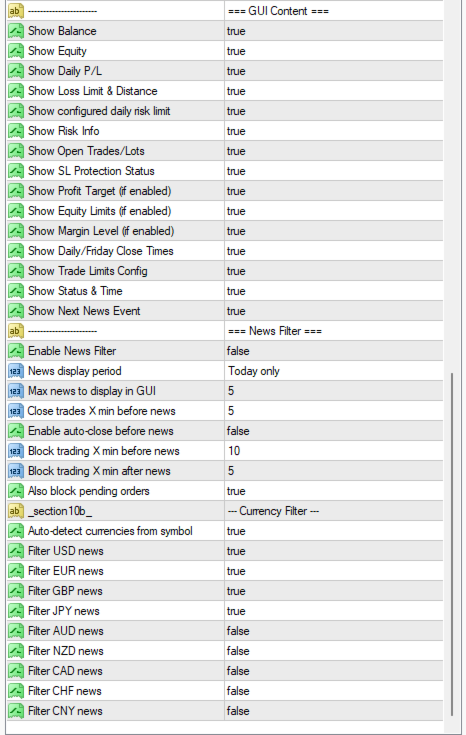
PropProtector

Automated account protection for prop trading. PropProtector monitors your trading rules in real time, closes trades when a limit is reached, and helps protect your capital on funded and challenge accounts.

Important: test on a demo account first

Never run PropProtector on a live account with open trades before verifying all settings on a demo account. Adjust min/max balance, loss limit, profit target and trade limits to match your account size and strategy. Incorrect settings can immediately close all open trades.

Why PropProtector

Prop trading firms enforce strict rules: daily loss limits, maximum drawdowns, trade-count restrictions and trading bans around news. A single violation can cost you the account. PropProtector monitors your account in real time and intervenes automatically before a rule is broken.

Daily loss limit

  • Percentage or fixed amount, measured against the start-of-day balance or equity (selectable)
  • Real-time monitoring of equity and closed profit or loss
  • Early warning at a configurable threshold
  • Automatic closure of all trades when reached
  • Configurable daily reset time

Risk management

  • Maximum risk per trade (stop-loss based)
  • Maximum total risk across all open positions
  • Close priority: newest or riskiest trade
  • Stop-loss enforcement with countdown
  • Maximum stop-loss trades per day, then block new trades
  • Margin level protection

Profit target and profit lock

  • Daily profit target in percent or money
  • Trailing profit lock for the consistency rule
  • Minimum and maximum equity limits
  • Persistent state that survives restarts

How the profit lock works

You define an activation threshold (for example 1 percent daily profit) and a lock percentage (for example 50 percent). When the threshold is reached, the lock activates and tracks your peak daily profit. Example: with activation at 1 percent and lock at 50 percent, a profit of 2,000 locks 1,000; if profit grows to 3,000 the lock rises to 1,500; if profit then falls to 1,400, all trades are closed.

Trade limits

  • Maximum trades per symbol and per magic number
  • Per-symbol override list
  • Maximum total trades and maximum lot size
  • Daily and weekly trade-count limits
  • Hedging control, pending orders included in all limits

Time-based close

  • Individual close times for Monday to Friday
  • Optional pending-order deletion, based on broker server time

Autotrading lock

  • Blocks all EAs after a limit violation
  • Three modes: off, until reset, or until manual reset
  • Robust closing with retry; the panel shows the blocked status

News filter with impact levels

Protection from volatility around news using a public economic-calendar feed. Filter high, medium and low impact events individually, set time windows before and after each event, filter by currency or auto-detect from the symbol, and see the next event in the panel. Existing pending orders can be saved before a news window, removed during it and restored afterwards, with crash-safe storage on disk.

One-time setup for the news filter

The news filter needs WebRequest access. In MetaTrader 4 open Tools, then Options, then Expert Advisors, enable Allow WebRequest for listed URL, and add these two addresses:

Crash safety and persistence

Daily balance, flags and status are saved to disk and survive terminal crashes and restarts, with automatic recovery on restart.

Reset and control

A manual reset button in the panel clears all restrictions and lifts the autotrading lock, with a confirmation dialog.

Dashboard

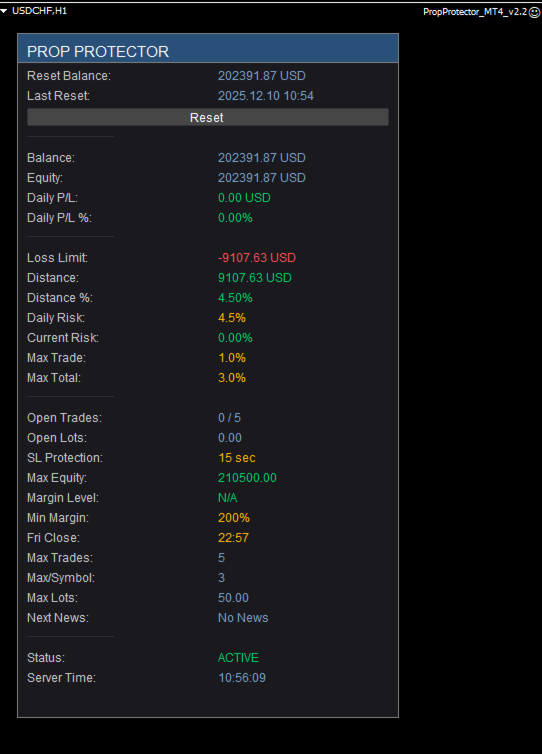
A compact, scalable on-chart panel with configurable font size and adjustable line spacing. Every section can be shown or hidden. Available in English and German.

User manual

Full documentation with all parameters and examples: User Manual (MT4)
推荐产品
Magic Grid
Aliaksandr Charkes
4.54 (28)
Magic Grid is an indicator-free advisor that uses a grid strategy. The strategy is based on automatic reopening of grid pending orders, after closing their market positions (by Take-Profit, Stop-Loss or manually). Pending orders are placed with a specified step from the initial prices, which can be entered manually or generated automatically ( one time at the beginning of the trade ). The robot can trade on any time frame, on any currency pair, on several currency pairs, and on any number of di
FREE
How the EA works (simple explanation) Trades on   M5   timeframe Uses   H1 timeframe   to analyze global market context Analyzes   2 or 3 timeframes simultaneously On each timeframe: Checks price position relative to one or two Moving Averages Evaluates MA angle and distance between price and MA Entry logic is based on   trend + volatility conditions , not on random signals The full algorithm is illustrated in the screenshots. Recommended usage Symbol:   EURUSD Timeframe:   M5 Trading
This EA will replicate active order. Using  for duplicate the orders when you copy from signals in mql5 but your balance is less than the balance of the signal of provider.  The replicated orders will close when the active orders close. PARAMETER coefficient=1; //Replicate new order with lots equal active order x 1 DisplayInfo=true; // Display information of your account Please test demo before use in real account. 
Bar Boss
Iurii Tokman
5 (1)
Bar Boss   Expert   Advisor 使用 FletBoxPush 指标来分析市场并确定交易信号。该指标内置于“EA 交易”中,不需要在图表上额外安装。交易发生在定义为平台边界的水平上。使用损失限制。 顾问设置说明 TimeFrames - 图表周期,指标设置 颜色 - 定义为平面的价格区域的颜色,为指标设置 矩形 - 显示定义为平坦的价格区域,为指标设置 手数 - 起始交易量 MagicNumber - 订单的幻数 Count_LOSS - 连续亏损交易的数量,之后将设置为零利润(退出为零) FlatPips - 以点为单位确定平台,设置指标 FlatBars - 用于确定平面的柱数限制,为指标设置 MinBarsClosedOutside - 收盘价固定在特定平面水平之上/之下的柱数 CoefficientLot - 亏损后后续交易手数的乘数 CoefficientTakeProfit - 根据确定的平台的通道宽度计算的利润乘数 PercentLoss - 损失百分比,如果顾问带来的总损失低于此值,交易停止,该值必须设置为负数,例如:-33.3 顾问如何工作
Fever ESM
Evgenii Morozov
Trading Advisor for margin currency pairs and metals. Conservative trading of 100,000 units per 0.01 lot. The standard trade is 10,000 units per 0.01 lot. Aggressive trading with high risks of 1000 units per 0.01 lot. You can always pick up your starting lot.  The EA is fully automated, you only have to put up the initial lot depending on your initial deposit. The recommended timeframe is H1. 1. Test on any steam, iron and fuel oil 2. Try starting with convenient depots 3. When going into a dra
Break Even Trailing EA
Etsushi Ishizuka
5 (1)
Break Even Trailing EA|自动化建仓保本与跟踪止损工具 Break Even Trailing EA 是一款适用于 MetaTrader 4/5 的实用型智能交易顾问(EA),专为手动交易者自动保护盈利而开发。该工具可在您手动开仓后,自动进行风控和盈利保护,让交易更加高效和省心。 本EA支持 两种可自由切换的盈利保护模式 ,可单独或组合使用,灵活满足不同交易风格。 1. 保本功能(止损自动移动到开仓价或加点) 当持仓达到预设盈利(以点为单位)时,EA会自动将止损位移动到开仓价,或者开仓价加指定点数(用于覆盖手续费、点差等)。 有效防止盈利回吐,确保不会让盈利单变为亏损。 支持自定义“保本+偏移”,让每笔交易即使止损也能锁定一定利润。 2. 跟踪止损功能 当盈利达到一定水平后,EA会自动启用跟踪止损,随着行情的有利波动自动推高止损位。 随着利润的增加,止损线也会动态跟随,让您在抓住趋势时自动锁定更多利润、及时防范回撤。 启动条件和跟踪点数均可自定义设置,实现精细化风控。 这两项功能可以 通过参数分别开启/关闭,或灵活组合使用 。例如,可先自动保本,再在盈利进一步扩大后
FREE
MACD Trading
Matthieu Jean Baptiste Wambergue
This MT4 version is no longer maintained due to the ongoing transition from MT4 to MT5 trading accounts. For the latest features, improvements, and ongoing updates, please use the MT5 version of this Expert Advisor. Get the MT5 version here ! Automate your MACD strategy! This EA alerts and/or places orders according to MACD strategies with additional filters. It means that you can use it by 2 different ways: Receive alerts based on your MACD strategy with filters on multiple symbols simultaneou
Trailing Stop Utility MT4 for automatic closing of deals by trailing stop levels.  Allows you to take the maximum from the profit. Created by a professional trader for traders.   Utility   works with any market orders opened manually by a trader or using advisors. Can filter trades by magic number. The utility can work with any number of orders simultaneously. WHAT THE UTILITY CAN DO: Set virtual   trailing stop   levels from 1 pip Set real   trailing stop   levels W ork with each order separat
Gyroscopes
Nadiya Mirosh
Gyroscope        professional forex expert   (for EURUSD, GBPUSD, USDJPY, AUDUSD, USDCHF, EURGBP, EURJPY, NZDUSD, USDCAD, EURCHF, AUDJPY, CADJPY pairs)   alyzing the market using the Elliot Wave Index. Elliott wave theory is the interpretation of processes in financial markets through a system of visual models (waves) on price charts. The author of the theory, Ralph Elliott, identified eight variants of alternating waves (of which five are in the trend and three are against the trend). The mov
The “ SG Opposit Grid ” EA works with Virtual TakeProfit(or real) - at the trader's choice. The EA looks for signals to enter the market along the trend on D1 and H1 . If the signals coincide, the EA on the working period ( М1 - М30 depends on the trader's choice) looks for a confirming pattern and opens a position in the direction of the trend. If, after opening a position, the price moves in a profitable direction, the position is closed upon reaching the virtual TProfit with a profit. If the
100% 免费 — 完整版,无限制,无需注册。 完全免费,无任何限制。如果它在您的图表上派上用场,一条简短的评价对我们帮助最大——只需30秒,这也是其他交易者发现这款工具的唯一途径。 如果 Falcon 对您的交易有帮助,请花一秒留下评价 — 这对我们帮助很大,也让工具保持免费。 MT4 上最受欢迎的一款 — Gold Viper Breakout(XAUUSD,MT4 版): https://www.mql5.com/en/market/product/182520 想让它自动交易?Megamax Donchian Trend 正是执行这一逻辑的 EA: https://www.mql5.com/en/market/product/182526 同一开发者的其他工具: - Aegis Account Protector(账户整体资金保护): https://www.mql5.com/en/market/product/188539 - Donchian Trend Engine(我们的趋势EA,同样100%免费): https://www.mql5.com/en/m
FREE
AI Advisor – 让 AI 真正看见你的交易世界 AI Advisor 会根据你的真实账户信息自动生成高质量提示词,可以直接粘贴到任意 AI 聊天中使用。 它帮你快速梳理账户状态,理解当前品种格局,识别风险点,挖掘潜在盈利机会,让 AI 以你的真实交易情况为基础来思考和交流,而不是凭空猜测。 快速链接 Download:      AI Advisor v1.02.ex4      AI Advisor   v1.02.ex5 Installation guide AI Advisor  Version Overview FAQ & troubleshooting 使用方法 – 三步搞定 在你关心的品种图表上打开 AI Advisor。 在右侧列表中选择一个合适的 “AI Advisor 模式”(AI Advisor Modes),让程序自动把账户信息、仓位、品种和结构整理进提示词。 点击「复制」,然后把生成的文本粘贴到你常用的任意 AI 聊天界面中,开始对话即可。 内置 Prompt 简要说明 AI Advisor 内置了一组常用分析场景,覆盖交易中最典型的几类问题,例如
FREE
Project Infinity
Sergey Yarmish
The Infinity Expert Advisor is a scalper. When the resistance and support levels are broken, trades are opened in the direction of the price movement. Open positions are managed by several algorithms based on the current market situation (fixed stop loss and take profit, trailing stop, holding positions in case of trend indication, etc.). Requirements for the broker The EA is sensitive to spread, slippages and execution quality. It is strongly recommended not to use the EA for currencies with s
Grid Synergy
Mazhar Ul Hassan Noorul Hassan Noor Ul Hassan
Overview Grid Synergy is an automated trading bot designed to implement a structured grid trading strategy while adapting to market conditions. It provides traders with a systematic approach to managing trades, focusing on strategic entries and controlled risk management. The EA is optimized for various currency pairs and gold, offering customizable settings to align with different trading styles. Key Features Multi-Currency Compatibility – Works with forex pairs such as EUR/USD, GBP/USD, USD/J
TrendLines And Volumes
Alexander Nikolaev
This Expert Advisor trades based on trend lines, as well as on the basis of volume analysis. Volumes are calculated using minute bars, in order to determine if they were ascending or descending. The trend lines are drawn based on High and Lows in the trade history. There are also additional indicators. Buy or sell signals depend on all those factors. This allows the EA to enter the market with more accuracy and to perform more deals. Input parameters Lots - lot size (if 0, a lot is calculated b
MacdScalper
Roman Yablonskiy
4 (1)
MacdScapler   is an automatic expert advisor with two section of martingale strateges with automation takeprofit. The MACD indicator with adjustable parameters is used as inputs. If parameters of the entry points goes wrong, the EA changes them automaticly. General recommendation The minimum recommended deposit is 1000 cents for 0.01 lot. Spread is recommended less then 2 points. The martingale parameter can be set from 0.1 to any value in two steps - the first for the four trades and the second
FREE
Ppm manager
Samuel Asrat Nadew
Whether you’re a scalper, day trader, or swing trader, this tool gives you total control   directly from your chart. you can get all this features right on your trading chart .   Everything   is   color   coded.   equity and live P&L display in  Green   if   trades in profit   and   red   if   trades in drawdown.   Moveable panel -   double click on clock label and move panel anywhere on screen with it . Displays local time + candle countdown on the chart. Shows Balance, Equity & Daily Profit/
EA RSI Pending Grid
Zafar Iqbal Sheraslam
"RSI" usually refers to the Relative Strength Index, a technical indicator used in financial markets to analyze the strength or weakness of an asset's price. "Pending Grid" may suggest a specific trading strategy that combines pending orders with grid trading techniques. RSI EA : RSI (Relative Strength Index) is a technical indicator used in trading to assess whether an asset is overbought or oversold. It measures the speed and change of price movements. RSI values range from 0 to 100. Typically
JBSar EA Robot
Jordanilo Sarili
PROMO: SPEND MORE TIME WITH YOUR FAMILY. ENJOY LIFE… DO NOTHING. We would like to share our coding skills to fellow traders and most especially to people from all walks of life to have the opportunity to trade or invest using auto-trading way to provide other source of income while letting the robot and your money works for you.  The trade strategy is based on Averaging and uses a little bit combination of martingale and grid strategy. Methodology   – Trading entails technical analysis with ma
MerkaStudent is a basic version of an expert advisor that allows us to understand part of the behavior of a chart in historical time. It uses some basic parameters in trading, which allows us to understand mathematically how a chart moves and thus know what is our mathematical expectation in the historical period analyzed. Starting from a mathematical logic, we can create a strategy to evaluate its results.
FREE
Reversepro Smartsma ea mt4
AL MOOSAWI ABDULLAH JAFFER BAQER
ReversePro SmartSMA EA – A Fully Customizable Moving Average Strategy ReversePro SmartSMA EA is an advanced yet fully customizable trading tool designed for traders who prefer to fine-tune their strategies. This Expert Advisor (EA) is not pre-optimized, allowing you the flexibility to adjust its settings to fit your trading style, risk management preferences, and market conditions. How It Works This EA is based on the well-known Simple Moving Average (SMA) crossover strategy, enhanced with addi
H4 GBPUSD Trend Scalper is a trend signal scalper The EA trades according to the trend strategy using original built-in indicator for opening and closing orders. The external inputs for limiting trading on Fridays and Mondays are available. The purpose of the strategy is to use the current trend with the most benefit. According to the results of testing and working on demo and real accounts, the best results achieved by using the Н4 timeframe on the GBP/USD pair Works on MetaTrader 4 Build 971+
Один из главных секретов успешного трейдинга - это адекватное управление рисками. Но не всегда получается следовать этому правилу, т.к. иногда эмоции берут верх над трейдером и вход в рынок случается необдуманным. Программа Optimal lot исключает такие ошибки и позволяет быстро принять решение, входить в рынок или нет. Ее уникальность в том, что Вы строите горизонтальную линию с именем "risk". При перемещении этой линии в информационном блоке отображаются следующие данные: Balance - Размер д
Proftrader Free
Alexander Nikolaev
4 (3)
This Expert Advisor analyzes the last candles and determines whether there will be a reversal or a large correction. Also, the readings of some indicators are analyzed (their parameters can be adjusted). Is a free version of Proftrader . Unlike the full version, in the free version of the adviser the initial lot cannot be higher than 0.1, trading pair only EURUSD and also it has fewer configurable parameters. Input parameters Lots - lot size (at 0, the lot will be calculated from the percentage
FREE
The Expert Advisor places pending orders at the points of the Parabolic Sar indicator. After installation, it moves the order after the indicator. You can configure to open orders only BuyStop or only SellStop, if necessary. By default, pending orders are placed for both buy and sell. In addition to the Parapolic Sar indicator, this Expert Advisor uses other indicators for a more correct solution for opening a position. For example, it identifies divergences and convergences by different indicat
Vizzion
Joel Protusada
Vizzion is a fully automated scalping Expert Advisor that can be run successfully using GBPJPY currency pair at H1 timeframe. Very Important This Expert Advisor can not run with any EAs in the same account. As part of the money management plan, it calculates and monitors the Margin Level % and assumes that all open trades are created by it. If you want an Expert Advisor that trades in a daily basis, this EA is not for you because using this requires a patience to wait for a few days or weeks on
DYJ GlobalTradeGameTheory(Power) 是基于   Bulls   与 Bears   指标的EA. 它仅仅使用一个货币对某个周期图表运行EA,就能监控全部货币对信号开仓关仓。 Power 推荐 市场进入条件: Power 试图通过使用两种不同的方法来衡量市场的看涨和看跌力量,一种是针对每种类型的方向性压力。 Power 的BearsIndex试图衡量市场对低价的偏好 Power 的BullsIndex试图衡量市场对更高价格的偏好 它还使用了 Laguerre 滤波器过滤假信号. 我们现在将对每种货币的未来应用了博弈论策略,而不是历史价格图。这是一个更高的层次。动态市场博弈理论是决定货币对开仓后结果一个关键因素,你在任何其他货币强度信号指标中都找不到的!这是一个非常独特的功能。动态市场博弈论策略是基于整个市场活动(全部35对)。 这个EA可以通过我的数学算法修正未来的损失率。 EA的新闻交易是基于经典   动态市场博弈论策略 的。您只需要从EA属性进行新闻时间和入场周期配置,其余部分由机器人自动处理。 EA默认是任何时间都能交易。3段工作时间参数是日内范围的。
GoldenGrid Scalping Pro EA - Technical Description GoldenGrid Scalping Pro is an automated Expert Advisor designed for trading XAUUSD (Gold) on lower timeframes (primarily M5). The system integrates short-term momentum scalping with a controlled Dollar-Cost Averaging (DCA) position management mechanism. Strategy & Algorithm Overview Signal Confirmation Filters: Uses Average True Range (ATR) to measure volatility and Volume analysis to confirm short-term momentum before initiating entry signals.
An excellent and fine deal copyist! Copies from one or more source terminals to one or more receiver terminals. Convenient and quick to set up. Settings: 1. Type              Select the type of Master - source or Slave - receiver. 2. Lot                  Sets the lot for the Slave type. Orders will open with the specified lot, if the lot = 0 is the same as in the source. 3.  MasterLot         Allows you to set the lot size transmitted (on the side of the MASTER) by the master. / X - the ma
The Arrow Scalper
Fawwaz Abdulmantaser Salim Albaker
1 (2)
Dear Friend..  I share with you this simple Expert Adviser .. it is full automatic  this Expert Adviser following the trend of the pair you install on or any stocks or indices , it is works like that: - when the trend on H4 chart show a start of up trend the expert will wait till the 15M & 1H charts show an up trend the EA will open a buy order directly , and do the same for down trend and open a sell order the buy or sell  order lot size and take profit and stop loss will measured manually  by
FREE
该产品的买家也购买
欢迎来到 Trade Manager EA——这是一个终极风险管理工具,旨在使交易变得更直观、精准和高效。它不仅仅是一个下单工具,而是一个用于无缝交易计划、仓位管理和风险控制的全面解决方案。不论您是新手交易员、资深交易员,还是需要快速执行的剥头皮交易员,Trade Manager EA 都可以满足您的需求,适用于外汇、指数、大宗商品、加密货币等各种市场。 借助 Trade Manager EA,复杂的计算已成过去。只需分析市场,在图表上用水平线标记入场、止损和止盈,设置您的风险水平,Trade Manager 就会立即计算出理想的头寸规模,并实时显示以点、账户货币计价的止损和止盈。每笔交易都得以轻松管理。 主要功能: 头寸规模计算器 :根据定义的风险瞬间确定交易规模。 简单的交易计划 :在图表上用可拖动的水平线直接计划交易,设置入场、止损和止盈。 实时显示 SL 和 TP :以账户货币、点或分显示止损和止盈,便于分析。 高级保护工具 盈亏平衡选项 : 基本盈亏平衡 :当您的交易达到设定水平时自动保护利润。 多级盈亏平衡 :设置多达 4 个级别以逐步保护利润。 尾随止损选项 : 基本尾随
Local Trade Copier EA MT4
Juvenille Emperor Limited
4.96 (111)
通过 Local Trade Copier EA MT4 获得非常快速的交易复制体验。它的简单1分钟设置,使您可以在同一台Windows计算机或Windows VPS上在多个MetaTrader终端之间复制交易,具有闪电般快速的复制速度,低于0.5秒。 无论您是初学者还是专业交易者, Local Trade Copier EA MT4 都提供了广泛的选项,可根据您的特定需求进行自定义。对于任何希望增加利润潜力的人来说,这都是终极解决方案。 今天就尝试一下,看看为什么它是市场上最快、最简单的贸易复印机! 提示: 您可以在您的模拟账户中下载并试用 Local Trade Copier EA MT4 模拟版: 这里 将下载的免费演示文件粘贴到您的 MT4 >> 文件 >> 打开数据文件夹 >> MQL4 >> 专家文件夹并重新启动您的终端。  免费演示版本每次可在 4 小时内发挥全部功能,仅限演示帐户。 要重置试用期,请转至 MT4 >> 工具 >> 全局变量 >> Control + A >> 删除。 请仅在非关键模拟账户上执行此操作,不要在挑战道具公司账户中执行此操作。 如果您无法在
Exp COPYLOT CLIENT for MT4
Vladislav Andruschenko
4.69 (65)
MetaTrader 4 专业交易复制器 快速、专业、可靠的 MetaTrader 4 交易复制器。 COPYLOT 可在 MetaTrader 4 与 MetaTrader 5 终端之间复制外汇交易,并为不同账户类型和交易场景提供灵活的同步方案。 COPYLOT MT4 版本支持: MetaTrader 4 → MetaTrader 4 MetaTrader 5 Hedge → MetaTrader 4 MetaTrader 5 Netting → MetaTrader 4   MT5 版本 完整说明 + DEMO + PDF 如何购买 如何安装 如何获取日志文件 如何测试与优化 Expforex 的全部产品 您也可以使用 MetaTrader 5 版本,在 MetaTrader 5 → MetaTrader 5 和 MetaTrader 4 → MetaTrader 5 之间进行复制: COPYLOT CLIENT for MT5 COPYLOT 是一款专业级交易复制器,可稳定运行于 2、3 甚至 10 个终端之间。 支持从模拟账户和投资者密码账户进行复制 可同时运行在多个终端上
Trade copier MT4
Alfiya Fazylova
4.6 (35)
Trade Copier 是一种专业实用程序,旨在复制和同步交易账户之间的交易。 复制发生从供应商的帐户/终端到收件人的帐户/终端,安装在同一台计算机或 vps 上。 促销活动 - 如果您已经购买了“Trade copier MT4”,您可以免费获取“Trade copier MT5”(用于 MT4 > MT5 和 MT4 < MT5 的复制)。欲了解更多详细条款,请通过私人消息与我们联系! 在购买之前,您可以在演示帐户上测试演示版本。 演示 这里 。 完整说明 这里 。 主要功能和优点: 支持复制MT4>MT4、MT4>MT5、MT5>MT4,包括МТ5 netting账户。 供应商和收件人模式在同一产品中实现。 简单直观的界面,允许您直接从图表中实时控制复制。 连接中断或终端重新启动时不会丢失设置和位置。 允许您选择要复制的符号,也可以替换接收者的符号,例如 EURUSD> USDJPY。 支持回拷贝。 能够仅复制某些订单。 允许您设置开仓交易价格的最大差异和最大时间延迟。 正确复制部分订单关闭的执行。 计算复制手数的几种方法。 同步止盈和止损。有几种方法可以计算它们的位置。 支持
TradePanel MT4
Alfiya Fazylova
4.84 (95)
交易面板是一款多功能交易助手。该应用包含超过50种手动交易功能,并允许您自动执行大多数交易任务。 应用程序说明 + 视频教程: https://www.mql5.com/zh/blogs/post/761102 用于模拟账户的应用程序试用版: https://www.mql5.com/zh/blogs/post/762579 如何安装应用程序: https://www.mql5.com/zh/blogs/post/762580 如何在可视化模式下测试应用程序: https://www.mql5.com/zh/blogs/post/770278 如何在VPS MetaTrader上安装应用程序: https://www.mql5.com/zh/blogs/post/770196 贸易. 只需单击一下即可执行交易操作: 打開掛單和頭寸,並自動計算風險。 一鍵打開多個訂單和頭寸。 打開訂單網格。 按組別關閉掛單和頭寸。 反轉頭寸方向(關閉買入>打開賣出,關閉賣出>打開買入)。 鎖定頭寸(通過開啟缺少的頭寸,使買入和賣出頭寸的數量相等)。 一鍵部分關閉所有頭寸。 將所有頭寸的止盈和止損設置在同
Trade Assistant MT4
Evgeniy Kravchenko
4.43 (197)
它有助于计算每笔交易的风险,容易安装新的订单,具有部分关闭功能的订单管理, 7 种类型的追踪止损和其他有用的功能。 附加材料和说明 安装说明 - 应用程序说明 - 模拟账户应用程序的试用版 线条功能  - 在图表上显示开仓线、止损线、止盈线。 有了这个功能,就可以很容易地设置一个新的订单,并在开仓前看到它的附加特性。   风险管理  - 风险计算功能在考虑到设定的风险和止损单的大小的情况下,计算新订单的成交量。它允许你设置任何大小的止损,同时观察设定的风险。 批量计算按钮 - 启用 / 禁用风险计算。 在 " 风险 " 一栏中设置必要的风险值,从 0 到 100 的百分比或存款的货币。 在 " 设置 " 选项卡上选择风险计算的变量: $ 货币, % 余额, % 资产, % 自由保证金, % 自定义, %AB 前一天, %AB 前一周, %AB 前一个月。   R/TP 和 R/SL - 设置止盈和止损的关系。 这允许你设置相对于损失的利润大小。 例如, 1 : 1 - 这决定了 TP = SL 的大小。 2 : 1 - 这意味着 TP 是 SL 的两倍。 RR - 它禁用比率。  
Telegram to MT4 Coppy
Sergey Batudayev
4.09 (11)
Telegram 到 MT4: 终极信号复制解决方案 使用 Telegram 转 MT4 简化您的交易流程,这款先进的实用程序旨在将交易信号直接从 Telegram 频道和聊天复制到您的 MetaTrader 4 平台,无需 DLL 文件。这款强大的解决方案确保信号执行的无缝衔接,拥有无与伦比的精度和丰富的自定义选项,从而节省您的时间并提高您的效率。 [ Instructions and DEMO ] 主要特点 直接 Telegram API 集成 通过电话号码和安全码进行身份验证。 使用用户友好的 EXE 桥轻松获取和管理聊天 ID。 添加、删除和刷新多个频道/聊天以同时复制信号。 使用高级过滤器进行信号解析 跳过包含自定义例外词(例如“报告”、“摘要”)的不需要的信号。 支持灵活的 SL 和 TP 格式:价格、点数或点数。 当信号指定点而不是价格时自动计算入场点。 订单定制和灵活性 使用多种模式定制订单规模:固定手数、动态手数(% 风险)或特定符号手数。 使用信号数据或自定义参数调整 SL/TP。 配置滑点、挂单到期和重试设置以实现完美执行。 综合符号管理 排除特定符号或匹配自定义
The product will copy all telegram signal to MT4   ( which you are member  ) , also it can work as remote copier.  Easy to set up, copy order instant, can work with almost signal formats, image signal, s upport to translate other language to English Work with all type of channel or group, even channel have "Restrict Saving Content", work with  multi channel, multi MT5 Work as remote copier: with signal have ticket number, it will copy exactly via ticket number. Support to backtest signal. How to
Unlimited Trade Copier Pro is a tool to copy trade remotely to multiple MT4, MT5 and cTrader accounts at different computers/locations over internet. This is an ideal solution for you if you are a signal provider and want to copy your trades to other receivers globally on your own rules. One provider can copy trades to multiple receivers and one receiver can get trade from multiple providers as well. The provider can even set the subscription expiry for each receiver, so that receiver will not b
Trade Reverse Copie4
Chukwuemeka Kingsley Anyanwu
5 (1)
Feel free to contact me for any extra features :) [SEE MT5 VERSION  https://www.mql5.com/en/market/product/128846 The Local Reverse Copier is an Expert Advisor designed to synchronize positions between a Master account and a Slave account with a twist: it reverses the trades. When a buy position is opened on the Master account, the EA opens a sell position on the Slave account, and vice versa. This allows for a unique form of trade copying where positions are mirrored in opposite directions bet
Basket EA MT4
Juvenille Emperor Limited
5 (5)
Basket EA MT4 是一款强大的盈利收割工具兼全方位账户保护系统,结合简洁易用的设计。其核心作用在于通过对所有持仓的“组合级”管理,而非单笔交易,全面掌控账户盈亏。该 EA 提供了组合级止盈、止损、保本和移动止损功能,支持设定为账户余额百分比、固定货币金额或所有管理交易的平均点数目标。这种灵活性让交易者能够依据自身需求制定风险和盈利策略。 Basket EA MT4 还支持智能交易过滤,可以根据 Magic Number、交易品种或备注选取要管理的交易,确保 EA 只影响您选择的持仓。 为进一步提升安全性,该 EA 内置先进的账户保护机制。当账户权益达到设定的止盈/止损水平,或从历史最高余额达到最大回撤时,EA 会自动平掉所有交易,删除所有挂单,并关闭所有图表,移除其上的所有 EA。这一功能有助于在市场波动或达到预设目标时保护账户资金。 提示 :您可以下载 篮子 EA MT4 演示版并在您的模拟账户上试用: 这里 将下载的免费演示文件粘贴到您的 MT4 >> 文件 >> 打开数据文件夹 >> MQL4 >> 专家文件夹并重新启动您的终端。  免费演示版本每次可在 4 小时内发
LMBFWatchlist is an interactive tool for Metatrader 4 that lets you create and manage watch lists directly on your Metatrader charts. ‌Functionality includes: ‌Add an unlimited number of watch lists with names of your choice Add different groups of watchlists for different time frames Add comments for symbols that always appear on the chart when that symbol is selected. Easily identify which symbols have comments against them. See watch lists instantly synchronise across all open charts that hav
Risk Sentinel MT4
R H Blantran De Rozari
ONE DRAG SETS THE LOT SIZE - RISK STAYS WITHIN YOUR LIMIT Risk-first position sizing for traders who protect their capital Introductory offer — first 30 copies at $35, then $45. Early buyers keep the lower price forever! Also available for MT5 :  https://www.mql5.com/en/market/product/185711 Risk Sentinel is a risk-first position sizing and risk management tool for MT4, built for discretionary traders who size every trade to the same disciplined risk limit. Drag your stop-loss and the lot si
Eagle Local Trade Copier MT4 Eagle Local Trade Copier MT4  is a local trade synchronization utility for MetaTrader terminals running on the same Windows computer or Windows VPS. The same Expert Advisor can operate as a Master or a Slave . Communication is performed locally through the shared MetaTrader Common Files folder. No external server, DLL, WebRequest, subscription, or third-party account is required. Main Features Master and Slave modes in one Expert Advisor Multiple Master and Slave ter
Lot Architect — Trade Panel & Risk-Based Position Size Calculator for MT4 Lot Architect is a one-click trade panel and risk-based position size calculator for MetaTrader 4. It works out your exact lot size from the risk you choose, shows risk, reward and risk-to-reward (R:R) before you enter, and places Market, Limit or Stop orders in a single click. In short: position sizing, risk management and fast trade execution in one clean panel on your chart. The problem every trader knows Most accounts
试用版下载 Copy Cat More (跟单猫) MT4 交易跟单器 (Trade Copier) 不仅仅是一个简单的本地交易跟单器;它是一套 完整的风险管理与执行框架 (risk management and execution framework), 专为当今的交易挑战而设计。从自营公司 (prop firm) 挑战到个人投资组合管理,它凭借 稳健的执行、资金保护、灵活的配置和先进的交易处理的结合,适应各种情况。 该跟单器同时支持   主控端 (Master,发送方) 与 受控端 (Slave,接收方)   两种模式,可实时同步市价单与挂单、交易修改、部分平仓以及对锁平仓 (Close By) 操作。它兼容模拟与真实账户、交易或投资者登录,并通过持久化交易记忆 (Persistent Trade Memory) 系统确保恢复——即使 EA、终端或 VPS 重启也不例外。可借助唯一 ID 同时管理多个主控端与受控端,跨经纪商差异则通过前缀/后缀调整或自定义品种映射自动处理。 试用版:  先试用看看 :   你可以从下方链接下载并体验   Copy Cat More (跟单猫
The News Filter
Leolouiski Gan
5 (25)
这个产品在新闻时间过滤所有的专家顾问和手动图表,因此您不必担心突然的价格波动会破坏您的手动交易设置或其他专家顾问输入的交易。此产品还带有完整的订单管理系统,可在任何新闻发布前处理您的持仓和挂单。一旦您购买了 The News Filter ,您将不再需要依赖以后的专家顾问内置的新闻过滤器,因为这个产品可以从此过滤它们所有。 新闻选择 新闻来源于Forex Factory的经济日历。 选择可以基于任何一种货币,如USD,EUR,GBP,JPY,AUD,CAD,CHF,NZD和CNY等。 选择也可以基于关键识别,例如Non-Farm (NFP),FOMC,CPI等。 能够选择新闻影响级别的筛选,从低、中、到高影响。 自动模式只选择与图表相关的新闻。 新闻来源每小时自动刷新,以确保最新的新闻数据。 为每个新闻影响级别提供单独的输入,以确定您要过滤掉的新闻发布前后的分钟数。 订单管理选项 在新闻发布前关闭未平仓头寸的选项,并在新闻发布后恢复它们。 在新闻发布前删除挂单的选项,并在新闻发布后恢复它们。 在新闻发布前移除止损和止盈水平的选项,并在新闻发布后恢复它们。 在新闻发布前移动止损和止盈
Riskless Pyramid
Snapdragon Systems Ltd
5 (1)
Introduction This powerful MT4 trade mangement EA offers a way potentially to aggressively multiply trade profits in a riskfree manner. Once a trade has been entered with a defined stoploss and take profit target then the EA will add three pyramid add-on trades in order to increase the overall level of profit. The user sets the total combined profit target to be gained if everything works out. This can be specified either as a multiple of the original trade profit or as a total dollar amount. Fo
Grid Manual MT4
Alfiya Fazylova
4.71 (17)
Grid Manual是一个交易面板,用于处理订单网格。 该实用程序是通用的,具有灵活的设置和直观的界面。 它不仅可以在亏损方向上设置订单网格,还可以在盈利方向上设置订单网格。 交易者不需要创建和维护订单网格,实用程序会这样做。 打开一个订单就足够了,Grid manual会自动为它创建一个订单网格,并伴随它直到非常关闭。 完整说明和演示版 此處 。 该实用程序的主要特性和功能: 伴隨以任何方式打開的訂單,包括從移動終端打開的訂單。 適用於兩種類型的網格:“限制”和“停止”。 使用兩種方法計算網格間距:固定和動態(基於 ATR 指標)。 允許您更改未結訂單網格的設置。 顯示圖表上每個網格的盈虧平衡水平。 顯示每個網格的利潤率。 允許您一鍵關閉網格中的盈利訂單。 讓您一鍵關閉每個訂單網格。 允許您對訂單網格應用追踪止損功能。 允許您在訂單網格上應用將訂單網格的止損轉移到盈虧平衡水平的功能。 相對於訂單網格的盈虧平衡水平自動重新排列止盈(僅在限價網格模式下,距離取決於所選的計算類型:“保守”或“激進”)。 最多可管理 20 個訂單網格,每個網格最多可包含 100 個訂單。
Trend Line Optimizer
Evgenii Aksenov
4.11 (19)
这是趋势线PRO指标的自动参数优化器 轻松快速地为您最喜爱的趋势线PRO指标选择最佳参数。  优化只需几秒钟。 优化器允许您找到每对和周期的最佳参数:振幅,TP1-TP3,止损,以及所选历史部分(天)上的时间过滤器和HTF过滤器的值  要优化不同的时间框架,您需要不同的历史范围: M5-M15设置计算范围参数(天)=60(三个月) M30-H1设置计算范围参数(天)=120(6个月) H4设置参数计算范围(天)=240(一年) D1-W1设置参数计算范围(天)=720(三年) MN1设置参数计算范围(天)=1200(五年) 优化后,参数自动保存到文件夹中的现成设置文件中:MQL4>Files>trendlineoptimizedsettings  如何使用优化器实用程序: 在需要优化的符号和时间的图形上运行优化器实用程序。 优化结束后单击保存按钮 将趋势线PRO指标添加到图表,然后将趋势线PRO扫描仪 Trend Line PRO指标面板上TP1、TP2、TP3、止损和利润指标的值将变得更好,Trend Line PRO 扫描仪中会出现一个按钮(红色或蓝色  Manual G
VirtualTradePad PRO SE MT4 — MetaTrader 4 高级交易面板和图表工作区 VirtualTradePad PRO SE 是一款适用于 MetaTrader 4 的专业交易面板和交易管理工作区。它帮助交易者通过一个基于图表的界面,更快速地开仓、管理、保护、平仓和分析交易。 该产品专为需要的不只是简单按钮集合的活跃手动交易者而创建。PRO SE 将一键执行、挂单、持仓控制、部分平仓、篮子利润/亏损逻辑、加仓均价层级、ATM 规则、信号监控、市场信息、策略测试器流程和面向 VPS 的准备整合到一个结构化工作区中。 MT5 版本 | 完整说明和截图 | 如何购买 | 如何安装 | 如何获取日志文件 | 如何测试与优化 | Expforex 的所有产品 为什么交易者会选择这套面板 图表一键交易 ,并支持键盘快速操作 快速完成开仓、平仓、修改、反转、锁仓与部分平仓 深度控制仓位、挂单、总利润与风控逻辑 自动参数计算,减少手动输入与重复劳动 相对于普通手动交易的优势 一个工作区替代多个窗口 — 交易执行、持仓控制、风险信息和管理工具都保留在图表上。 更快处理交易
VirtualTradePad mt4 Extra
Vladislav Andruschenko
4.85 (61)
一键交易的交易面板。处理头寸和订单!通过图表或键盘进行交易 交易小组进行人工交易。您可以从图表(图表窗口)或键盘进行交易。打开和关闭,反向和锁定。处理职位和订单! МetaТrader4中主要订单的交易控制面板:买入,卖出,买入,买入,卖出,卖出限制,收盘,删除,修改,追踪止损,止损,止损。 全新高级版本现已推出: 使用   VirtualTradePad PRO SE   升级您的交易流程 — 适用于   MetaTrader 5   和   MetaTrader 4   的新一代专业交易面板。 MT5版本 详细描述 +DEMO +PDF 如何购买 如何安装    如何获取日志文件    如何测试和优化    Expforex 的所有产品 从符号窗口交易并从键盘交易! 您正在为MetaTrader 4终端提供一个独特的插件 - 虚拟控制面板VirtualTradePad。 Description on English 注意!如果您想学习如何交易 策略测试器  ,请查看我们的免费 TesterPad 实用程序 VirtualTradePad在“  MQL5语言最佳图形面板  ”竞
Trading History MT4
Siarhei Vashchylka
5 (9)
Trading History - A program for trading and money management on the history of quotes in stratagy tester. It can work with pending and immediate orders, and is equipped with trailing stop, breakeven and take profit functions. Very good for training and testing different strategies. Manual (Be sure to read before purchasing) Advantages 1. Allows you to test any trading strategy in the shortest possible time 2. An excellent simulator for trading training. You can gain months of trading experience
Trade Dashboard MT4
Fatemeh Ameri
4.96 (54)
疲于复杂的订单下达和手动计算?Trade Dashboard 是您的解决方案。凭借其用户友好的界面,订单下达变得轻而易举,只需点击一下,您就可以开设交易、设置止损和止盈水平、管理交易手数,并计算风险回报比,让您只需专注于您的策略。告别手动计算,使用 Trade Dashboard 简化您的交易体验。 立即下载演示版本 。 您可以在这里找到仪表盘功能和特性的详细信息 。 加入 Telegram 频道 。 购买后请给我发消息以获取支持。如果您需要添加更多功能,可以在产品的评论区留下您的想法,我愿意听取任何建议,希望您能在使用我的产品时获得最佳体验 。 这是 MT5 版本。 风险管理:使用 Trade Dashboard,可以将您的风险设置为账户余额或权益的百分比,或将风险设置为总金额。在图表上直观地定义您的止损,让工具准确计算每个货币对的适当手数。该工具还可以根据您期望的风险回报比自动设置止盈水平。它甚至可以在手数计算中涵盖佣金和点差费用。此外,您的止损和止盈可以转变为虚拟水平,隐藏于经纪商。通过 Trade Dashboard 的高级风险管理功能,掌控风险,保护您的资本。 交易线
Custom Alerts AIO:多市场智能监控,一键启动,无需设置 概述 Custom Alerts AIO 是一款“开箱即用”的高级市场扫描工具,无需额外安装任何其他指标或进行复杂设置。它内置了 Stein Investments 的所有核心指标(FX Power、FX Volume、FX Dynamic、FX Levels 和 IX Power),可帮助您轻松监控所有主要资产类别,如外汇、黄金、指数和加密货币。如果您的经纪商支持股票,您也可以手动添加个股进行监控。 1. 为什么选择 Custom Alerts AIO? 无需额外购买任何指标 • 所有关键指标均已内置,开箱即用。 • 专注于实时预警,不包含任何图形元素,性能高效,界面简洁。 全面覆盖所有主要市场 • 支持监控外汇、金属、加密货币和指数市场。 • 无需手动输入任何交易品种,只需在设置中勾选资产类别即可启用。 • 股票并不属于默认类别,如有需要可手动通过参数输入添加。 高效、专业、便捷 • 无需图表模板和手动加载,适合自动化或远程交易环境。 • 非常适合 VPS 上长期运行,或作为后台市场预警工具使用。 2
Trade Manager MT4 DaneTrades
Levi Dane Benjamin
4.09 (11)

交易管理器可帮助您快速进入和退出交易,同时自动计算风险。 包括帮助您防止过度交易、报复性交易和情绪化交易的功能。 交易可以自动管理,账户绩效指标可以在图表中可视化。 这些功能使该面板成为所有手动交易者的理想选择,并有助于增强 MetaTrader 4 平台。多语言支持。 MT5版本  |  用户指南+演示 交易经理在策略测试器中不起作用。 如需演示,请参阅用户指南 风险管理 根据%或$自动调整风险 可选择使用固定手数或根据交易量和点自动计算手数 使用 RR、点数或价格设置盈亏平衡止损 追踪止损设置 最大每日损失百分比,在达到目标时自动平仓所有交易。 保护账户免遭过多提款并阻止您过度交易 最大每日损失(以美元为单位)在达到目标时自动关闭所有交易。 保护账户免遭过多提款并阻止您过度交易 一键实现所有交易的盈亏平衡 自动计算从手机/电话发送的交易的风险 OCO 在设置中可用 交易和头寸管理 通过设置每月、每周、每天、每小时或每分钟的最大交易次数,停止过度交易和报复性交易。 高级挂单管理。 调整何时关闭挂单的规则 追踪挂单 支持市价订单和挂单 每日最大利润目标(以美元为单位)以确保头寸并停止
MT4 至 Telegram 信号提供者 是一款易用、可完全自定义的工具,它使发送信号到 Telegram 成为可能,将您的账户变成信号提供者。 消息的格式 可以完全自定义! 但是,为了简便使用,您也可以选择一个预设模板,并能够启用或禁用消息的特定部分。 [ 演示 ]  [ 手册 ] [ MT5 版本 ] [ Discord 版本 ] [ Telegram 频道 ]  New: [ Telegram To MT5 ] 设置 可通过 用户指南 获取逐步说明。 无需了解 Telegram API;开发者提供所需的一切。 主要特性 自定义发送给订阅者的订单详情的能力 您可以创建分层订阅模型,例如铜牌、银牌、金牌。金牌订阅可获得所有信号等。 按订单号、符号或备注过滤订单 包括执行订单的图表的屏幕截图 在发送的屏幕截图上绘制已关闭的订单,以便额外验证 推迟发送新订单消息的可能性,以便在发送前对位置进行调整 订单详情的全透明度: 新的市场订单 *附带屏幕截图 订单修改(止损、获利点) 已关闭订单 *附带屏幕截图 部分关闭订单 ** 新的挂起订单 修改的挂起订单(进场价格) 挂起订单激活(
News Filter EA: Advanced Algo Trading Assistant News Filter EA is an advanced algo trading assistant designed to enhance your trading experience. By using the   News Filter EA , you can integrate a Forex economic news filter into your existing expert advisor, even if you do not have access to its source code. In addition to the news filter, you can also specify   trading days   and   hours   for your expert. The News Filter EA also includes   risk management   and   equity protection   features
CloseIfProfitorLoss with Trailing
Vladislav Andruschenko
4.88 (32)
Close If Profit or Loss with Trailing for MetaTrader 4 — 按总盈利或总亏损自动平仓 这是一款适用于 MetaTrader 4 的实用型交易管理工具。当总盈利或总亏损达到您设置的水平时,EA 可以自动关闭选定的持仓。 Expert Advisor 会监控当前交易,计算浮动盈亏,并可使用利润跟踪功能,帮助交易者比手动操作更快地管理风险和锁定结果。 MetaTrader 4 仍然被大量手动交易者、剥头皮交易者、网格交易者和 EA 用户使用。但 MT4 本身没有一个方便的内置工具,可以按一组订单的总结果来自动平仓。这个工具正是为了解决这个问题。 Close If Profit or Loss with Trailing 可用于手动交易,也可以与其他 Expert Advisors、网格系统、加仓策略、恢复策略和多品种交易一起使用。您设置规则,EA 负责监控结果,并在条件达到时执行平仓。 MT5 版本 | 完整说明 + DEMO + PDF | 如何购买 | 如何安装 | 如何获取日志文件 | Expforex 的所有产品 为什么 MT4
Exp Averager
Vladislav Andruschenko
4.82 (22)
MetaTrader 4 用 Averager —— 专业的持仓均价管理与交易篮子恢复系统 这是一款为回撤中的持仓而打造的专业 Expert Advisor,核心任务不是寻找入场点,而是通过均价管理、追加开仓和整组仓位控制,帮助交易者更从容地处理亏损仓位与价格回撤。 Averager 并不是一个独立的自动交易系统,它不会像完整策略那样自动寻找市场信号并主动交易。它的价值在于:当你已经有持仓之后,它可以按照你的设定,对整组交易进行更聪明、更系统化的管理。 如果你希望在 MetaTrader 4 中获得一套更成熟的交易恢复逻辑,让仓位管理不再只是简单补单,而是围绕平均价格、统一止盈和整组追踪进行完整控制,那么这款产品正是为此而设计。 MT5版本 | 详细描述 + DEMO + PDF | 如何购买 | 如何安装 | 如何获取日志文件 | 如何测试和优化 | Expforex 的所有产品 为什么选择 Averager 针对回撤仓位进行均价管理 支持 顺势追加开仓 与 逆势均价开仓 整组仓位统一追踪止损 自动重算平均价格与整组共同退出点 支持灵活控制距离、手数增长和最大仓位数量 非常适合配合
作者的更多信息
Automated account protection for prop trading. PropProtector monitors your trading rules in real time, closes trades when a limit is reached, and helps protect your capital on funded and challenge accounts. Important: test on a demo account first Never run PropProtector on a live account with open trades before verifying all settings on a demo account. Adjust min/max balance, loss limit, profit target and trade limits to match your account size and strategy. Incorrect settings can immediately cl
Position Limiter EA: Control Your Risk, Maximize Your Strategy Are you tired of manually managing your trades across multiple symbols? Do you want to ensure you never exceed your risk limits? Introducing the Position Limiter EA for MetaTrader 5! This powerful Expert Advisor automatically monitors all your open positions and pending orders for each symbol on your account. You set the maximum number of trades allowed per symbol, and the EA takes care of the rest. If the number of trades exceeds yo
FREE
筛选:
Andreas Grimm
326
Andreas Grimm 2026.05.04 12:22 
 

用户没有留下任何评级信息

回复评论