 MetaTrader 5
 专家
 指标
 程序库
 实用工具
 窗口小部件
 规则
MetaTrader 5 交易实用工具 - 58
 以下是可在MetaTrader 5中简化交易的交易程序。将鼠标悬停在一个工具上,阅读它的描述和用途。

The trading limiter that stops you from breaking your own daily loss and trade limits.
• Please test the product in the Strategy Tester before purchasing to understand how it works.
• If you face any issues, contact me via private message—I’m always available to help.
• After purchase, send me a screenshot of your order to receive a FREE EA as a gift.
Adjustable Chart Background Themes v2 — Chroma Studio You will stare at this chart for more hours this year than you will spend asleep with

• Please test the product in the Strategy Tester before purchasing to understand how it works.
• If you face any issues, contact me via private message—I’m always available to help.
• After purchase, send me a screenshot of your order to receive a FREE EA as a gift.
Rapid Execution One-Click Trader – The Ultimate Speed Trading Tool! Are you tired of missing opportunities in fast-moving markets? Want to execute trades instantly with precision? Rapid Execution One-Click Trader is your ultima

The trading limiter that stops you from breaking your own daily loss and trade limits.
• Please test the product in the Strategy Tester before purchasing to understand how it works.
• If you face any issues, contact me via private message—I’m always available to help.
• After purchase, send me a screenshot of your order to receive a FREE EA as a gift. Account Status Monitor — the numbers MetaTrader never puts in one place
Your terminal shows balance, equity and margin in three different c

• Please test the product in the Strategy Tester before purchasing to understand how it works.
• If you face any issues, contact me via private message—I’m always available to help.
• After purchase, send me a screenshot of your order to receive a FREE EA as a gift. Fastest Closing Utility for Scalpers – "FastClose"
Price: $30
For High-Frequency Traders & Scalpers Who Need Instant Execution! "FastClose" is the ultimate emergency trade-closing tool designed for professional scalpers and high

DragSL Pro – The Ultimate Auto Stop Loss Management Tool! DragSL Pro is an innovative trading script designed to help traders manage their Stop Loss (SL) more easily and efficiently. With its automated features, you can adjust SL for all positions , including both open and pending orders , without the hassle of manual adjustments. Key Features: Drag & Adjust SL Easily – Move Stop Loss for all positions in one execution.
Supports Open & Pending Orders – Works for both active trades and pendin

专业交易管理面板 —— 适用于手动与混合交易
更快执行。更聪明管理。锁定利润。
Fast Manager(MT5 工具)专为剥头皮和日内交易者设计,让您无需浪费时间计算手数或拖动止损线。它把您的 MT4 图表变成专业交易驾驶舱,自动完成计算和风险管理,让您专注于价格走势。
为什么选择 Fast Manager: - 速度:图表按钮一键开仓、平仓。 - 纪律:每笔交易都有止损。 - 保护:自动保本和智能移动止损。 - 灵活:手动剥头皮,或管理其他 EA 的订单。
主要功能 1. 一键交易面板:在图表上直接 Buy、Sell、Close All。高波动时一键全部平仓。 2. 自动风险管理:开仓时立即设置止损和止盈。 3. 自动保本:将止损移至开仓价(加少量偏移以覆盖佣金/隔夜费)。 4. 智能移动止损,带 "Start" 参数:只有在订单盈利后才启动。 5. 管理其他 EA:输入其 Magic Number,Fast Manager 即为其订单应用止损/止盈/移动止损。
参数说明 - Lot Size:面板固定手数。 - Take Profit / Stop Loss(点)。

"Smart Lot" 可视化交易面板
不再猜手数,精准交易。
The Super Manager(MT5 管理工具)替您完成所有计算。设置以账户货币(USD、EUR、GBP…)计的风险金额,在图表上拖动止损线,EA 即刻算出准确手数。
适合严格执行风险回报比(1:2、1:3)的交易者。
优势 1. 按风险自动计算手数:设定风险(如 50),无论止损 10 点还是 100 点,手数自动调整,亏损绝不超过设定值。 2. 可视化"拖放"交易: - 市价单:点击 [SL],拖动红线,然后点击 BUY 或 SELL。 - 挂单:点击 [LIMIT/STOP],拖动蓝线(入场)和红线(止损)。 3. 即时风险回报比:止盈按止损自动计算。例:TP = 200%,SL = 20 点 → TP = 40 点(1:2)。
控制面板 - Break-Even:将止损移至入场价。 - Close ALL:一键全部平仓。 - Delete P.O:删除所有挂单。 - Clean:清除图表上的线条。
参数说明 - Risk per Trade:每笔交易风险金额。 - Take Prof
please contact me 210zyx@gmail.com if you want a short DEMO version or shorter subscription (like 1 Month for 10 USD)
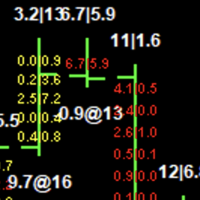
There already are some good EA's that can draw the FootPrint and Volume Profile, but they are using number of "ticks" as the unit of volume, which is not accurate. One tick sometimes can mean very large or very small volume and they should not be scaled to the same unit.
The innovation of this EA is that it is able to draw the FootPrint and Volume Profile based on real Binance
By :Rapid Growth Ea. 1.0 Positive Grid System With New Logic and The Best R/R Ratio. You Can Only lose on The First trade (The percentage That You Choose), On The Rest of The Top-ups you will BrakeEven. In

Simple Stats is utility for trades history management. (works as Expert Advisor)
Allowing you to:
see trading performance for each symbol separately , and so it helps you to find the M0ST and the W0RST profitable type of trades based on past results.
filters:
see only manual trades
see only EA trades
see only EA trades from one specific Magic Number
select time period for history
SS will distinguish reports with filename - each history report is named with account number an

TAKE PROFIT AND STOP LOSS SYNC is a utility for MetaTrader 5 that keeps the levels on the positions you already have open in step with each other. It is a take profit and stop loss tool for MetaTrader 5: it sets the take profit and the stop loss on every open trade at once, so a position opened on one chart is not left without protection while you work on another. It works on hedging and on netting accounts, it can group the positions by symbol and by direction, and it refuses to move a stop to

This programm gives an Alert on Laptop and Phone when buy setup is detected. It also provides the SL,TP and when to go break even. This only provide alerts, so you still have to trade manually, this way you can see if u like the setup first.
some variabeles are: Timeframes, i recommend H1 or H4 timebetween alerts, so it stops looking for setups for a bit after detecting one. this way u get only one alert and prevent overtrading. Bullish candles needed for confrimsignal SL and TP to set in the

该工具向 Telegram 发送包含 MetaTrader 5 账户事件信息的消息(通知)。该工具正在更新和开发中。
1) 开仓和平仓
2) 下单和删除
3) 修改仓位的止盈/止损
4) 修改止盈/止损/挂单价格
5) 按字符名称纳入/排除筛选器
6) 按魔法编号纳入/排除筛选器
7) 按评论中的文字内容纳入/排除过滤器
8) 可为消息行选择图标
+ 以及许多其他有用的警报功能。
在启动该工具之前,您需要配置 MetaTrader 5 终端:
1) 进入终端菜单的 “工具 ”选项卡,然后选择 “选项”,再选择 "智能交易系统
2) 勾选 “允许对列出的 URL 进行网络请求 ”旁边的复选框
3) 点击下方的绿色加号 “添加新 URL,如 ” https://www.mql5.com “”,然后添加字符串 https://api.telegram.org
要在 Telegram 上接收消息,您需要创建自己的频道。您还应该创建一个机器人,并将其添加到该频道,使其具有管理权限。
1) 搜索 Telegram,找到昵称为 @BotFather 的用户
2) 打开与

This utility is specially crafted for the Gold Trader Alliance Team. It will help you manage your positions really quick in the ever fast volatility of Gold. You have two functionalities Automate your trades to set BE after "x" points won (and take partial profits)
Manually manage your trades to set BE (one or all), take partials (one or all) and close all your positions. If you want to manage one position, you'll have to select it on the Control Panel shown.
You need to attach this EA to the c

Welcome to Smart Algo Trade Panel Manager MT5 - the ultimate risk management tool designed to make trading more effective based on user needs. It is a comprehensive solution for seamless trade planning, position management, and enhanced control over risk. It does not matter weather you a beginner or an advanced trader, or a scalper needing rapid executions, SmartAlgo Trade Panel adapts to your needs offering flexibility across all markets of your choice. You can put SL, Lot and TP of choice
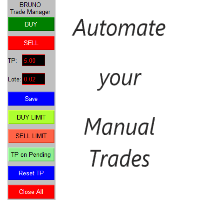
交易管理器 Bruno 可自动化您的手动交易。 注意: 参数已设置为两位小数的经纪商。如果您的经纪商使用三位小数,请不要忘记更新它们以确保正常功能。
您的持仓仍然开放,但您需要离开电脑?没问题!交易管理器将自动处理所有订单。 想要设置挂单来在市场走势不利于您的仓位时进行加仓?现在可以了!一旦触发,交易管理器会自动计算平均价格,并相应调整新的止盈目标。 通过便捷的操作,您可以在面板上直接输入新的止盈值(以点数计算)来调整订单的止盈水平。修改后,点击“保存”,然后点击“重置 TP”。交易管理器将为所有订单设定新的合并止盈目标。 在图表上特定点位放置挂单,使用 BUY LIMIT(买入限价)或 SELL LIMIT(卖出限价)订单。一旦触发,交易管理器将自动应用您的预设止盈。 更棒的是,想要增加更多挂单?完全可以!如果新的订单被触发且价格走势对您不利,您可以放心——当另一个挂单被激活时,交易管理器将自动计算平均价格,并根据预定的止盈目标一次性平仓所有订单。 使用“BUY”或“SELL”按钮立即执行市场订单。 “TP on Pending”按钮允许您在图表上放置带有预设止盈的挂单,非常适合首

Gold Adaptor – Your Ultimate Trading Edge! Tired of missing the perfect trade? Gold Adaptor does the heavy lifting for you! This powerful, precision-driven trading advisor scans the market in real-time, executing trades with unmatched accuracy. No more guesswork—just smart, adaptive strategy designed to keep you ahead of the game! Lightning-fast execution – Get in at the right moment, every time
Smart decision-making – Trades based on deep market analysis
Fully automated – Set it, fo
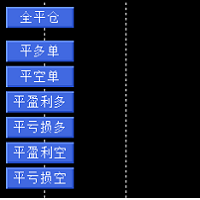
辅助交易多工能平他工具,细化管理仓位。工能有全部仓位平仓,平多仓,平空仓。平盈利多仓,平亏损多仓。平盈利空仓,平亏损空仓。 工能有全部仓位平仓,平多仓,平空仓。平盈利多仓,平亏损多仓。平盈利空仓,平亏损空仓。 工能有全部仓位平仓,平多仓,平空仓。平盈利多仓,平亏损多仓。平盈利空仓,平亏损空仓。 工能有全部仓位平仓,平多仓,平空仓。平盈利多仓,平亏损多仓。平盈利空仓,平亏损空仓。 工能有全部仓位平仓,平多仓,平空仓。平盈利多仓,平亏损多仓。平盈利空仓,平亏损空仓。 工能有全部仓位平仓,平多仓,平空仓。平盈利多仓,平亏损多仓。平盈利空仓,平亏损空仓。 工能有全部仓位平仓,平多仓,平空仓。平盈利多仓,平亏损多仓。平盈利空仓,平亏损空仓。
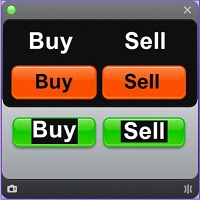
Tools to open multiple positions/trades all at once?
We've created your easy solution.
You can now enter multiple positions at one time.
You can set you Lot size,
Number of positions,
Interval every open position,
Take profit, and stop loss
and trailing stop too.
an addition button for
Close All
Close All Profit
Close All Loss
Close All Sell
Close All Buy
For example: You want to buy 2, 4, 6 or any number of positions with a certain lot size, every 10 second. You can now do so by simply

这个为MetaTrader 5设计的专家顾问(EA)旨在识别和通知交易者平均线图表上的趋势变化,为市场上的及时决策提供了一个有价值的工具。 主要特点: 平均线图表分析 :EA持续监控平均线图表,这种图表以能够平滑市场噪音和突出趋势而闻名。 趋势变化检测 :使用先进的算法来识别表明市场方向可能发生变化的蜡烛图模式。 多重警报系统 : MT5平台上的视觉和音频警报 向交易者的移动设备发送推送通知 通过Telegram发送即时消息 自定义功能 :允许调整参数,如要分析的时间框架、检测灵敏度和所需的警报类型。 低资源消耗 :经过优化,可以高效运行,不会减慢MT5平台的速度。 这个EA非常适合那些希望随时了解重大市场变化而无需不断监视屏幕的交易者。它通过多个渠道发送警报的能力确保用户永远不会错过重要的交易机会,从而提高他们的反应能力和盈利潜力。 平均线趋势变化检测器EA提供了技术分析和即时通信的无缝集成,使交易者能够根据实时市场动态做出明智的决策。无论您是日内交易者还是长期投资者,这个工具都可以通过提供有关潜在市场反转的及时洞察,显著增强您的交易策略。

DC Invest Vip Trading Monitor Ver 1.09 Busy? No time to monitor orders? Don't let risks swallow your account! Whether you are a busy office worker or a shipper who is always on the go, constantly monitoring transactions on MetaTrader 5 (MT5) is almost impossible. But don't worry, DC Invest - VIP Trading Monitor will help you control your account and manage risks automatically! Calculate optimal order volume - No more worrying about placing orders that are too large or too small, the system au

How many times have you failed a prop firm challenge, or how many real accounts have you broken? We know how painful and frustrating this problem is for traders. Emotions always force you to ignore your plan, make you want to take your anger out on the market, and your losses only increase. After so many bad experiences, you feel insecure, incapable, and afraid to try again. Yes, we've been there too. Today you've come to the right place. This is TraderLock!
How does it work?
In this Meta Trad

Ranking Scalping allows you to quickly identify the best opportunities in the market, reducing analysis time and empowering your trading decisions. It is a robust and adaptable tool, ideal for traders looking to optimize their scalping and intraday strategies. With its automated analysis and clear visualization, discover how to maximize your opportunities and trade more efficiently with this innovative tool! Serie: Daytrading: Scalping & Intraday Top Symbols Analyzer General Description:
The "R

以思维的速度交易,无需鼠标 最快的下单方式。 Magic Keyboard(MT5 工具)把普通键盘变成专业交易驾驶舱。不必再浪费时间把鼠标移到 "Buy" 按钮上,用方向键即可开仓、保护和平仓。 专为剥头皮和高频交易者设计,分秒必争。 默认快捷键 - 上箭头:立即买入(自动止损/止盈) - 下箭头:立即卖出(自动止损/止盈) - 右箭头:立即保本 - 左箭头:紧急按钮(立即平掉所有订单) 不喜欢方向键?可用按键代码把功能映射到任意键(空格、Enter、B、S 等)。 主要功能 1. 毫秒级执行:按下按键,订单即刻发送。 2. 自动保护:每笔订单立即设置止损和止盈。 3. 智能管理:自动保本和跟随价格的移动止损。 参数说明 - 按键代码(ASCII):Buy = 38(上),Sell = 40(下),Break-even = 39(右),Close All = 37(左)。空格 = 32。 - 手数、止盈和止损。 - Auto Break-even 和 Auto Trailing Stop(Stop、Step、Start)。 - Magic Number:0 = 手动订单;其他 EA

Trade Algo 是一款革命性的工具,可简化和自动化以您期望的交易价格执行买卖订单的过程。
******************请至少阅读一次,因为几乎每个交易者都需要这个实用工具。 **********
问: 是什么让这款产品如此独特,或者它的独特销售主张 (USP) 是什么?
在案例 1 中: 假设一股的市场价格为 100,您想设置一个买入订单,只有当价格上涨至 110 以上时才会激活。目前,没有办法做到这一点。
在案例 2 中: 假设一股的市场价格为 100,您想设置一个卖出订单,当价格跌至 90 以下时才会触发。同样,现在没有选择这样做。
使用 Trade Algo ,您可以完成这两项任务!一旦您下了您想要的订单,它将在系统中保持活跃,直到满足您指定的所有条件。一旦满足所有条件,它将执行列表中的待处理买入或卖出订单。
使用 Trade Algo ,设置订单毫不费力 - 只需选择交易条件,输入执行价格、手数、止损和获利,然后按买入或卖出。 这个直观的平台允许您同时管理最多 5 个订单。 通过定期使用刷新列表按钮刷新订单列表,随时了解情况并掌控一切。使用 Trad
This Ea. is very unique in his function, and not designed to be traded automatic. as the first option. It is a tool designed to be used by a mild experienced Forex trader that can: Trade manual or automated and can try to find a good entry price levels Trader that can enter the market using market or pending orders at specify price levels. Please watch the video about using the excel calculator when using the breakeven technic . The same idea used for the breakev

• Please test the product in the Strategy Tester before purchasing to understand how it works.
• If you face any issues, contact me via private message—I’m always available to help.
• After purchase, send me a screenshot of your order to receive a FREE EA as a gift. Smart Forex Session & Motivation Tracker – The Ultimate Trading Assistant
Price: $30 Are you struggling to track global trading sessions and missing out on crucial market movements? Do you sometimes feel demotivated during your
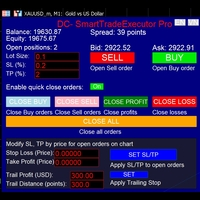
"If I had six hours to chop down a tree, I would spend the first four sharpening the axe." – Abraham Lincoln Entering the financial market means competing against the sharpest minds on the planet. As an amateur trader, what do you have besides your phone and… sheer guts? Do you think you can beat them without a powerful secret weapon? DC-SmartTradeExecutor Pro – The ultimate control center for lightning-fast and seamless trading. News trading is a speed race – You can’t afford to be

The trading limiter that stops you from breaking your own daily loss and trade limits.
• Please test the product in the Strategy Tester before purchasing to understand how it works.
• If you face any issues, contact me via private message—I’m always available to help.
• After purchase, send me a screenshot of your order to receive a FREE EA as a gift. Auto Screenshot Utility - The Ultimate Trading Session Tracker & Screenshot Tool Revolutionize Your Trading Documentation with Precision Tim

Hi Trade EA is an EA facilitating hand trading. Hi Trader EA is a trading assistant EA, not an automatic order placing EA. If you want to Backtest the functionality, please download the MT4 version for testing. Features of EAs Fix Lot will open positions based on the lot size specified by the user. Risk will calculate the lot size based on the percentage of the account balance, considering the distance from the open price to the Stop Loss. Therefore, a Stop Loss value greater than zero is requir

---
**Expert for managing manual trades**, allowing you to set a **Take Profit** and **Stop Loss** directly in the settings, expressed either in points or as a percentage. Additionally, there’s an option to immediately configure a **trailing stop** in points.
On the panel, alongside the buttons to open **long** and **short** positions, there are also buttons to **increase or decrease the lot size**. Furthermore, from the settings, you can define the **step size** for lot increase and decreas

• Please test the product in the Strategy Tester before purchasing to understand how it works.
• If you face any issues, contact me via private message—I’m always available to help.
• After purchase, send me a screenshot of your order to receive a FREE EA as a gift. Session High Low Tracker - Essential Multi-Session Price Analysis Tool
Powerful Market Session Analysis for Serious Traders
Price: $30 Product Overview
Session High Low Tracker is an advanced MetaTrader utility that automaticall

• Please test the product in the Strategy Tester before purchasing to understand how it works.
• If you face any issues, contact me via private message—I’m always available to help.
• After purchase, send me a screenshot of your order to receive a FREE EA as a gift. One-Click Trader Utility for MT5
Professional Trading at Your Fingertips
One-Click Trader Utility is a premium MT5 tool designed for active traders who need lightning-fast execution and real-time performance metrics. For just $3

• Please test the product in the Strategy Tester before purchasing to understand how it works.
• If you face any issues, contact me via private message—I’m always available to help.
• After purchase, send me a screenshot of your order to receive a FREE EA as a gift. SL-TP Manager Utility for MT5 - Professional Risk Management Tool
Advanced Position Protection & Profit Management
SL-TP Manager Utility is a powerful, intuitive tool designed for traders who want precise control over their risk
• Please test the product in the Strategy Tester before purchasing to understand how it works.
• If you face any issues, contact me via private message—I’m always available to help.
• After purchase, send me a screenshot of your order to receive a FREE EA as a gift. Hidden SL-TP Manager for MT5
Protect Your Trades from Stop Hunting with Invisible SL/TP Levels
Price: $30 USD What is Hidden SL-TP Manager?
Hidden SL-TP Manager is an advanced MetaTrader 5 utility that creates invisible stop los
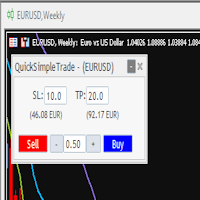
Quick Simple Trade is a very simple order panel for MT5 to quickly open a trade specifyng Stop Loss and Take Profit calculating and showing the price values. The panel can be also minimized to not interfere with the chart. When the order is open you can instantly move SL and TP directly on the chart. It makes up for one of the shortcomings of MT5, which I find most annoying.

Trending Gold is one of the straightforward tool to analysis the volatile market of Gold with demands precision, in-depth analysis, strong risk management and eliminating the need for constant market monitoring. Trending Gold will find the good trade position with precise risk management on all market conditions on Gold. Trending Gold plug-and-play functionality means you can get started with minimal effort, Simply install me and let me handle the rest. We will diligently monitor the market

Goldmine Train MT5:釋放自動化黃金交易的力量 使用 Goldmine Train MT5 徹底改變您的黃金交易。這是一款專為 MetaTrader 5 精心打造的高級專家顧問 (EA)。該強大工具利用尖端算法識別並捕捉高概率的黃金交易機會,提供穩定的業績並最大化您的獲利潛力。 為什麼選擇 Goldmine Train MT5? 精準進出場: Goldmine Train MT5 融合了獨特的技術指標和價格行為分析,精確定位最佳進出場點,確保您始終擁有交易優勢。 強大的風險管理: 內置智能風險管理功能,保護您的資金安全,自動調整手數並執行止損訂單,為您的投資保駕護航。 適應性市場策略: 我們的 EA 旨在適應不斷變化的市場環境,在趨勢和震盪的黃金市場中均能表現出色。其動態方法確保了持續的盈利能力。 經過回測驗證: Goldmine Train MT5 經過了多種歷史數據的嚴格回測,證明了其在長期運行中的可靠性和盈利能力。 用戶友好型設置: 直觀的設置流程讓您快速上手。Goldmine Train MT5 適合所有經驗水平的交易者,從新手到專業人士皆可輕鬆使用。 核心功能

EA one click innesta was born with the purpose of helping traders to be more convenient and faster in transactions. There are functions that operate like oneclick with buying or selling positions with market orders, with pending orders, setting quick stoploss for all positions, total volume, closing orders quickly Close all oneclick. Calculate risks converted to USD for all positions. EA manages the trade orders magically to be able to run for many different assets. I am running with BTCUSD
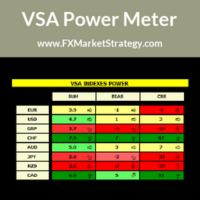
VSA Power Meter very powerful analysis method uses volume spread analysis to determine strongest currency and weakest currency and then gives signals based on it.
VSA Power Meter System Features Analyze all available instruments. Clear panel that determines stronges and weakest currencies. Clear buy and sell signals. You can use it as independent trading system or as filter. VSA Power Meter Trading Rules
You can use VSA in two ways: Enter VSA signals. Use it as filter to determine strongest
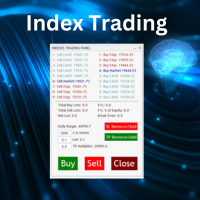
Nasdaq Future is a Semi Automated Trading Expert.
How does it work ?
Simply Identify a strong trend, Up trend on Nasdaq for Example.
Click Buy, the Expert will open 9 trades
1. Market Execution
3. Buy Stop at Higher prices distanced space 0.5X from eachother
5. Buy limits orders below the Market price distanced 1X
What is X ?
X is the distance between two orders, for example in nasdaq, recomended to use between 50-70 points.
Can I control X ?
Yes, in the control panel there is

Trading Keyboard (FastTrade Hotkeys) EA is an advanced tool designed for traders who want to execute trades quickly and efficiently using their keyboard. It allows users to place, modify, and close orders with customizable hotkeys, making trading as fast and intuitive as possible. Whether you're a scalper, day trader, or swing trader, this EA enhances your trading experience by reducing manual clicks and improving reaction time. Key Features: Hotkey-Based Trading – Execute trades, modify posit

### **ProScalpingToolEA.mq5 Analysis & Description**
**Overview:** The `ProScalpingToolEA.mq5` script is an Expert Advisor (EA) for MetaTrader 5, designed to assist with automated trading. It includes features for placing, managing, and monitoring trades.
---
### **Key Functionalities:**
1. **Trade Execution & Management:** - Uses the `CTrade` class from `Trade.mqh` to manage trading operations. - Allows placing buy and sell orders with a configurable lot size. - Trades are iden

Dear traders and investors! We present to you the MT5 Optimization Booster – an innovative product that will revolutionize your optimization experience on MetaTrader 5!
The MT5 Optimization Booster is based on the innovative Quantum Swap Protocol (QSP) algorithm – a unique proprietary optimization strategy that forms the core of the product and elevates the process of finding optimal solutions to a new level.
After the purchase , be sure to contact me . The product is designed to enhance the ca

• Please test the product in the Strategy Tester before purchasing to understand how it works.
• If you face any issues, contact me via private message—I’m always available to help.
• After purchase, send me a screenshot of your order to receive a FREE EA as a gift. MT5 Drawdown Tracker & Auto Screenshot Utility Professional Trading Session Monitor & Risk Management Tool Price: $30.00 - Lifetime license with updates Overview The MT5 Drawdown Tracker & Auto Screenshot Utility is an all-in-on

Copiador – La Mejor Herramienta para Copiar Operaciones en MetaTrader 4 Este no es un simple copiador de operaciones que únicamente permite copiar transacciones de forma local entre diferentes cuentas de MetaTrader 4 en cualquier dirección y cantidad. ¡Por supuesto que lo hace! ¡Pero Copiador hace mucho más! Descubre sus características y beneficios a continuación FUNCIONALIDADES DESTACADAS: Copiado entre brokers diferentes : Puedes copiar operaciones desde una cuenta e

Meta2Tel: Bridging MetaTrader 5 and Telegram in Real-Time
Meta2Tel is an elegant Expert Advisor for MetaTrader 5 that creates a seamless connection between your trading platform and Telegram. This powerful utility instantly relays crucial trading information directly to your specified Telegram channels or groups.
**Instant Trade Notifications** Experience real-time awareness of your trading activity with immediate notifications whenever trades are opened, modified, or closed on your MT5 plat

追踪回撤是一种风险管理工具,可设置动态损失限额,这意味着它会随着您的账户余额增长而增加,从而有效锁定利润并防止过度损失。追踪回撤监视器是一种根据公司百分比(例如 6%)记录追踪回撤的工具。它优先考虑在实时市场中剩余的资金来突破您的账户。无需刷新 propfirm 网站进行更新。实时跟踪您剩余的资金以突破,以便您能够调整手数或停止过度交易。 在开始时,根据公司调整回撤百分比。输入初始余额和最高权益。交易时,运行最大/最高权益将自动更新。 如果您的经纪商/自营公司不提供最高权益标记,请在交易退出时记录最高权益,以便在关闭 Mt5 后的下一个交易时段使用。受人尊敬的资金账户提供商,包括 Leeloo、Earn2Trade 和 UProfit 等实体,都要求遵守追踪回撤阈值作为其交易者评估协议的一部分。

"Tired of watching the charts 24/7? Missing profits because of poor risk management? Losing trades when you could’ve secured a win?" This is the ultimate automated assistant that protects your gains and limits your risks, and gives you time to focus on other important things. Key Features Break-Even Plus – Locks in your gains and moves your stop-loss automatically. Automatic Stop-Loss & TP – No more emotional trading, just smart execution. Trailing Stop – Ride the trend
• Please test the product in the Strategy Tester before purchasing to understand how it works.
• If you face any issues, contact me via private message—I’m always available to help.
• After purchase, send me a screenshot of your order to receive a FREE EA as a gift. Hedge Fragmentation Utility - Comprehensive Product Description Overview The Hedge Fragmentation Utility is a professional-grade MetaTrader 5 tool designed for forex traders who employ hedging strategies. This sophisticated util
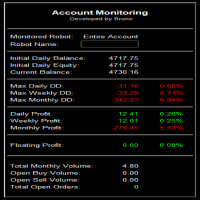
Summary of the Advanced Account Monitoring for MT5 The Advanced Account Monitoring for MT5 is a powerful tool designed for advanced account monitoring, offering traders detailed insights into their trading performance. This indicator provides a comprehensive dashboard to track drawdowns, profits, and trading volumes across different timeframes. Below is an overview of its key functions: Account and Robot Monitoring The indicator allows users to monitor either the entire account or a specific Ex

Add Magic Order EA – Smart Trade Scaling with Ease Add Magic Order EA is a sleek and efficient Expert Advisor designed to automatically add trades based on floating drawdown. Whether you're scaling into positions or enhancing an existing strategy, this tool gives you precise control and smart automation. Key Features: Optional Magic Number Filtering – Monitor a specific strategy by magic number, or apply logic to all trades. Drawdown Triggers – Automatically adds more orders when yo

LIMITED OFFER! We're having a sale to celebrate the launch of our products. This product, which normally costs $200, is on sale for $40 for a limited time. In exchange, we'd like you to try out the tool and leave us an honest review about your experience. So we want you to give it a try. It's sure to become a companion you'll never want to let go of.
Trend Line Trader – A Trading Tool Using Trend Lines ・Want to place a limit order only until a specific time ・Buy entry if the downtrend line is

Risk Properly with FXPosition Size Calculator which calculated the optimal Lot sSize based on your desired Risk Percentage and Stop-Loss, ensuring precise Risk Management. Enter your account balance, risk percentage, and Stop-Loss(either in points or price levels), and the calculator instantly determines the required lot size so that you don't risk too much. Protect your capital and trade with confidence with Accurate Position Sizing and Simplicity.

Symbol Info 指标将当前交易品种的关键信息通过可视化面板展示在图表上,方便交易者随时掌握市场信息并作出更好的交易决策。显示的内容涵盖了基本的交易数据、产品属性和交易规则等多方面信息。 主要功能: 交易品种名称与描述
指标显示当前交易品种的名称和详细描述,帮助用户识别当前的交易产品。 点差与价格信息
显示当前交易品种的点差、买入价(Bid)和卖出价(Ask),帮助交易者了解当前市场的价格情况及交易成本。 合约大小与最小/最大交易手数
面板展示了当前品种的合约大小、允许的最小和最大交易手数,并提供交易手数的步进值,便于交易者根据账户条件和策略选择合适的交易手数。 掉期信息
提供交易品种的掉期利率,包括多头和空头的掉期率,以及适用三倍掉期的详细说明。 点值与最小跳动
显示每一点波动的价值以及最小价格波动幅度(Tick Size),帮助交易者了解每次价格变动对其持仓的影响。 货币信息
包括基础货币、盈亏货币和保证金货币等信息,帮助用户更好地理解交易品种的货币构成。 交易模式与执行类型
指标展示了交易品种的交易模式(如是否允许对冲)以及订单执行类型(如市价单、限价单等

Pionex Live MT5 Data and History
-- Add the API address to Tools > Expert Advisor api.pionex.com ws.pionex.com
Steps :
Create Symbols
Select CreateSymbols = true
Restart MT5 Terminal (Most important) Select Symbols to marketwatch for which you want to load history and live data
1. Add utility to any chart and Select Mode = LiveUpdate to get trade data on chart
2. Add utility to any chart and Select Mode = History to fill history to desired date and time
Use MaxDate to add any date you wish to

Telegram Signals Hunter Bot is a Telegram bot which you can run on you PC, it's connected to your MT5 through the Expert Adviser. The main goal of this automated process is to track trading signals coming from Telegram channels/groups then execute orders on MT5. The Bot is powered by AI to analyze extract data from each signal, then execute orders automatically and safely on your MT5. We have developed the MT4 version before the MT5, you will notice that the demo video was recorded on the MT4, t
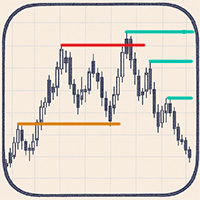
Automatic Marking of Key Price Levels
Each of you spends a huge amount of time every day manually marking and updating key price levels.
Every missed important level can lead to an unpredictable market reaction! This tool keeps your chart constantly up to date — removing outdated levels and adding new relevant ones in real time
Liquidity levels – target zones for price movement Reversal and reaction zones – break levels or likely turning points Liquidity grabs and price reversals You choose th

TradeGainViewer 工具——适用于博主的交易助手 名称: TradeGainViewer
指标类型: 信息型(图形显示)
类别: 工具 这个指标适用于谁? TradeGainViewer 适用于在 MetaTrader (MT5) 平台上进行交易的博主、直播主和内容创作者。它非常适合: 想要实时向观众展示当前盈亏情况的交易博主。 进行实时交易直播的主播,让观众可以直接在图表上看到交易结果。 制作教育视频或策略分析的内容创作者,需要清晰展示交易结果。 为什么需要 TradeGainViewer? 该指标可以帮助交易博主以直观、可视化的方式与观众分享交易结果。它会直接在图表上显示当前交易品种的盈亏情况,使内容更加透明和吸引人。TradeGainViewer 还能帮助博主与观众建立信任,展示真实的交易结果。 为什么选择这个指标? 清晰可见: 标签显示“盈利”、“亏损”或“空仓”状态,并通过颜色(蓝色-盈利,红色-亏损,灰色-空仓)直观呈现数据。 适用于直播: 标签可通过双击拖动,避免遮挡重要图表内容。 专业可信: 展示真实交易结果,让观众对你的交易更加信任。 TradeGainV

MT5 CCI Notification – Stay Ahead of Market Trends! Enhance your trading strategy with MT5 CCI Notification , a powerful tool that alerts you instantly when the Commodity Channel Index (CCI) hits key levels. No more missed opportunities—get real-time notifications on your MT5 platform or mobile device. Whether you're a scalper, day trader, or swing trader, this smart alert system keeps you informed and ready to act. Real-time alerts for overbought/oversold conditions
Customizable settings to

概述 波动统计扫描工具是专为MetaTrader 5平台开发的MQL5工具,用于对多个金融品种的价格波动进行统计分析。它专注于识别和测量单个价格柱内的价格波浪(高低范围),使交易者能够量化市场波动性并根据统计模式识别潜在的交易机会。 主要特点 -多品种扫描:分析多个交易品种的波动性 -波动性测量:使用点数或价格值量化价格范围 -波浪分类:自动将波浪分类为小、中或大 -时间过滤:允许在特定交易时段或日期进行分析 -方向分析:识别看涨、看跌或中性价格走势 -可视化表示:直接在图表上突出显示重要价格波动 -数据导出:将详细的波浪数据保存到CSV文件以供进一步分析 -频率分析:计算超过指定阈值的波浪频率 技术方法 该工具检查每个价格柱的高低范围来测量波动性,然后应用过滤标准识别统计上显著的波动。它提供波动分布的综合统计数据,帮助交易者了解不同市场条件和时间周期下的典型波动模式。
安装 1.下载WaveStatisticsScanner.ex5文件 2.打开MetaTrader 5平台 3.导航至"文件→打开数据文件夹" 4.将文件放置在MQL5/Scripts文件夹中 5.重启MetaTr

高级波动统计扫描工具
概述
高级波动统计扫描工具是MetaTrader 5平台的增强型MQL5工具,它结合了传统价格波动分析与ATR(平均真实波幅)指标分析。这一复杂工具通过比较标准价格波动测量与基于ATR的波动性指标,提供对市场波动模式的更深入见解,使交易者能够更精确地识别异常市场条件和潜在交易机会。
#主要特点
-多品种扫描:分析多个交易品种的波动性
-双重波动分析:结合高低范围分析与ATR指标
-自动ATR阈值:基于市场条件的自适应波动阈值
-高级波动分类:按大小和ATR关系对波动进行分类
-可视化进度显示:分析过程中的实时进度指示
-增强时间过滤:对分析周期和日期的精确控制
-全面可视化:不同类型波动的彩色编码识别
-详细数据导出:包含ATR相关数据的扩展CSV输出
-异常检测:识别与历史常态相比的异常波动事件
#技术方法
该工具通过整合ATR指标扩展了基础波动扫描功能,ATR指标通过考虑价格缺口和前一柱关系提供了更细微的波动视图。它基于历史ATR值计算自动阈值,允许进行更具上下文感知的波动分析,能够适应不同的市场条件。
用户操作指南
安装

趋势波幅分析工具
概述
趋势波幅分析工具是专为MetaTrader 5平台开发的MQL5工具,用于识别、分析和可视化金融市场中的价格趋势周期。通过识别价格走势中的关键转折点(峰值和谷值),它能够检测完整的上涨/下跌/震荡价格运动,为交易者提供有关市场行为模式的宝贵见解。
#主要特点
-多品种分析:同时分析多个交易品种
-趋势识别:自动检测上涨趋势、下跌趋势和震荡市场条件
-波幅测量:量化每次价格运动的大小和持续时间
-统计分析:计算每种趋势类型的平均和最大波幅
-可视化表示:直接在图表上显示带有颜色编码的趋势
-数据导出:将详细的趋势数据保存到CSV文件中以供进一步分析
-可定制参数:可调整的趋势检测灵敏度和分析条件设置
#技术方法
该工具采用系统的峰谷检测算法来识别价格序列中的潜在反转点。然后分析这些点之间的关系,确定每个趋势段的方向、强度和幅度。高级过滤选项有助于消除噪音,专注于统计上显著的价格走势。
安装
1.下载TrendWaveAnalyzer.ex5文件
2.打开MetaTrader 5平台
3.导航至"文件→打开数据文件夹"
4.将

GOLD robot4trade(FTMO 版)v1.5
由 Robot4Trade.com 提供|AI 智能增强|挑战账户全力支持 产品简介
Advanced Forex EA 是一款新一代外汇自动交易系统,专为高性能、稳定性和完全兼容 FTMO、MyForexFunds 等 prop firm 要求而设计。 本 EA 结合了经典可靠的技术指标(如 MA、RSI、ATR)与现代风险控制与资金保护功能,包括每日回撤限制、智能入场逻辑,以及实时数据显示面板,帮助用户随时掌握交易状态。 无论是挑战账户、模拟测试还是实盘资金管理,这款工具都能为您提供一体化的自动交易解决方案。 ️ 策略逻辑 均线交叉入场(快速与慢速 SMA) RSI 滤波:避免在超买/超卖区间入场 基于 ATR 的止损/止盈,动态适应市场波动 固定或按风险比例控制交易手数 阶梯再入逻辑:当价格远离时才加仓,且逐步增加手数 时间过滤器:仅在设定交易时间内执行操作 每日最大亏损保护:防止过度交易,保障挑战账户通过率 可选跟踪止损:基于 ATR 波动设定追踪距离 图表面板:实时显示资金、回撤、持仓等重要信息
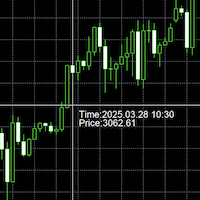
本工具是时间转换工具,会将鼠标所在柱子的时间(服务器时间),转为本机电脑所在时区的时间,并展示在光标所在位置的右下角。
如何设置: 将本程序应用到图标上,本程序有一个变量,控制时间是否显示,默认为显示。 如果暂时不想将时间显示出来,可以将变量改为 False,并移动鼠标,时间文本将会从图表中删除。
注意事项: 本指标不分夏令时与冬令时,只是差值计算。请确保计算机时间正确。
原理: 第一步:获取服务器时间 第二步:获取本机时间 第三步:本机时间与服务器时间的差值 第四步:获取鼠标所在柱子的时间 第五步:将差值应用到鼠标所在柱子时间上。 第六步:获取鼠标所在位置,并将时间展示在所在位置的右下角。
如果需要对样式或者显示位置进行定制,请留言,我会更新程序。

EA保安起源 因為EA未知的BUG,導致帳戶資金在一天內從幾萬美元變為零。為了防止此類情況,EA的最終目的是: 防止因EA的未知BUG而胡亂開關訂單,導致帳戶資金歸零。 EA保安工具使用指南
什么是baoan-gj (保安工具) 这是一款专为交易者设计的安全工具,主要目的是监控和防止EA(Expert Advisor,自动交易程序)因未知BUG而出现异常交易行为,避免账户资金被快速清零的风险。 工具的主要功能 该保安工具通过监控以下异常交易模式来保护您的账户: 异常开仓行为监控 : 当EA在短时间内(60秒)开启过多订单(10张以上) 当EA在较小价格范围内(100点以内)开启过多订单 异常关仓行为监控 : 监测持单时间异常短的交易(少于60秒) 监测负点平仓的交易 紧急措施 : 一旦检测到异常,立即强制终止EA运行 关闭所有当前订单 发送警报消息到手机 设置参数说明 参数 说明 需要监控的EA 设置您需要监控的EA名称 需要监控的品种 设置交易的货币对(如EURGBP,GBPUSD) 允许的最大订单数量 在指定时间内允许开立的最大订单数量(默认20) 监控时间窗口 监控的时间范围(

The script allows you to quickly control positions from the keyboard.: Arrow ↑ → Open BUY Arrow → Open a SELL Arrow → → Close ALL positions
Key functions: Automatic closing of opposing positions When a BUY is opened, all SALES are closed, and vice versa. Positions in the same direction remain intact (they can be accumulated).
Flexible settings: LotSize. Take Profit in points (TP_Points). Stop Loss is disabled (but can be added if necessary).
Safety: Checking the connection to the market. Sup

This is a Universal Arrow EA, that can work with different arrow indicators. The original version uses our popular ChannelSignals PRT indicator, which you can very easily change yourself with one of our arrow indicators or any other that meets the technical requirements for their use in this EA.
Please note that the indicator name and buffers must be specified correctly. You can find them in the settings of the indicator you are using. You also need to place this indicator in your MT5 Termin

Prop Assistant – Your All-in-One Trading Co-pilot for Prop Firm Success Preparing for FTMO, MyFundedFX, or any other prop firm challenge?
Prop Assistant puts everything you need directly on your chart – no hidden menus, no complex layers, no distractions. Key Features: Max Drawdown Control: Automatically stops trading or closes all positions when your maximum drawdown is reached. Daily Profit & Loss Management : Set your daily profit/loss limits and let the assistant manage your risk. Ov

EA Emotion is not a traditional Expert Advisor that places trades automatically – instead, it’s a psychological checkpoint that helps you manage trading discipline and emotional control . Designed especially for discretionary traders, prop firm challengers, and anyone serious about improving consistency, EA Emotion asks a series of custom questions right after you open a trade , such as: Did you follow your trading plan? Are you in the right mental state? Is this trade part of your set
MetaTrader市场是一个简单方便的网站,在这里开发者可以出售自己的交易应用程序。
我们将帮助您发布您的产品,并向您解释如何为市场准备您的产品描述。市场上所有的应用程序都是加密保护并且只能在买家的电脑上运行。非法拷贝是不可能的。
