 MetaTrader 5
 Experts
 지표
 라이브러리
 유틸리티
 위젯
 규칙
MetaTrader 5용 트레이딩 유틸리티 - 55
 다음은 MetaTrader 5의 거래를 단순화하는 거래 프로그램입니다. 유틸리티의 설명과 목적을 읽으려면 유틸리티 위에 마우스를 놓으십시오.

Take control of your operations efficiently at trading, mannaging by an smart way the risk of your positions. Whit this tools, you can:
Estimate the potencial profits or losses from your operations, either in money or pips. You also can visualize profits or losses by substracting the spread cost previusly configured in the tool’s input parameters. Calculate the lot size or margin required for your orders. Estimate the risk/reward ratios of your positions. Study the negative impact of the spread
TradeFlow 대시보드 MT5는 거래 관리의 패러다임 전환을 나타내며 Meta Trader 5 플랫폼 내에서 위험 관리 전략을 향상하고 의사 결정을 간소화하도록 맞춤화된 강력하고 다양한 솔루션을 제공합니다. 세련되고 사용자 친화적인 인터페이스를 갖춘 이 도구는 기존 거래 경험을 뛰어넘으며 특히 성과를 향상시키려는 수동 거래자에게 적합합니다.
TradeFlow Dashboard MT5의 주요 특징을 자세히 살펴보고 각 기능이 원활하고 강력한 거래 경험에 어떻게 기여하는지 살펴보겠습니다.
원활한 주문 실행: TradeFlow 대시보드 MT5를 사용하면 매우 쉽게 매수, 매도, 제한 및 중지 주문을 실행할 수 있습니다. 고정된 로트 크기를 선호하든, 백분율을 통해 위험을 관리하든, 이 도구는 귀하의 고유한 거래 스타일에 맞춰 조정되어 모든 거래에 정확성과 통제력을 제공합니다.
간편한 추적 중지 활성화: 원클릭으로 추적 중지를 활성화하면 시장의 역동적인 특성을 탐색하는 데 중요한

Safety Control: Your Ultimate Balance Management Solution for Prop Firm Challenges Overview Tired of manually monitoring your trading activities in prop trading challenges? Meet Safety Control, an advanced Expert Advisor for MetaTrader 5 that will change the way you trade forever. This proprietary software aims to help you manage your balance effortlessly during prop firm challenges. Features Automated Drawdown Control : Safety Control continuously monitors your account's balance and equity in r

O SupRes Master é ferramenta essencial para traders, fornecendo alertas instantâneos sempre que o preço de um ativo fecha acima de uma resistência crucial ou abaixo de um suporte vital.
Além disso, ele simplifica a análise técnica ao destacar esses níveis críticos no gráfico, usando cores distintas para identificar níveis de suporte em azul e níveis de resistência em vermelho.
Essa abordagem visual torna mais fácil para os traders identificarem oportunidades de entrada ou saída, melhorando sig
This EA will automatically close all open order when profit or loss is reached according to users setting. You need to select close by percentage or close by amount. If close by percentage or close by amount is set to true the EA will exit. When the setting is set to true, the value of profit and loss can not be 0. Please set to true the option for Close Order with Same Symbol or Close All Order.

The Wall Street Player (Master version). This EA tailored as a Discipline, Money and Risk Management tool is a powerful Trade Station utility designed for Forex, Cryptos, Commodities, Shares, Deriv synthetic pairs and any CFDs Market. It is designed to fit your strategy as a winner, and take your Edge of the market to the NEXT-LEVEL. The only thing to do is to get It on your chart and appreciate the possibilities and chart management abilities it has to offer for realizing that discipline and a
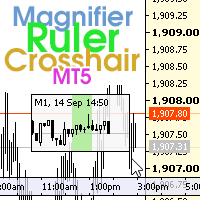
The indicator has three main tools: Magnifier (Zoom chart), Ruler ( Time and Price scales ), and Crosshair. You can move it all around with your mouse and customize different formats for displaying , customize size and color of each element.
The Magnifier (zoom chart) allows you to display candles from any time frame and at different scales.
Hotkeys: 'Q' - higher timeframe, 'A' - lower timeframe, 'W' - decrease candle size, 'S' - increase candle size, 'Z' - show/hide zoom chart. You can
TrailingTrader MT5 – Trailing Stop-Loss and Take-Profit Script Upon activation of the TrailingTrader script , open positions of specified trading instruments in the quote window will automatically implement an intelligent trailing stop strategy. This helps traders lock in profits and manage risks without the need for manual monitoring and adjustments. Core Configuration Parameters Symbol : Specify the trading instruments for which trailing stops should be applied. Use English commas (,) to sepa

This utility automatically places Stop Loss and Take Profit levels on newly opened positions. The Stop Loss and Take Profit values are specified in pips. The utility can also move Stop Loss to Break Even and trail the Stop Loss after a specified profit level is reached. Input Parameters SL and Trailing SL Stop Loss value in pips. If trailing is enabled, the same value is used as the trailing Stop Loss distance. Trailing Steps Distance in pips required before the Stop Loss is updated again while
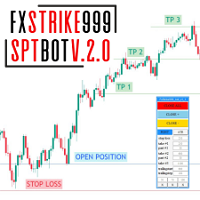
FxStrike999_SPT_bot prop helper 는 심리학에 문제가 있는 사람들, 심리학에 문제가 있는 사람들을 위해 특별히 설계된 독특한 봇입니다. 누가 멈추지 않고 이익을 취하지 않고 결국 예금을 잃습니다. 그러나 봇을 사용하면 이러한 모든 문제가 해결됩니다! FxStrike999_SPT_bot 통해 예금이 꾸준히 증가하는 새로운 수준의 거래에 도달하게 될 것입니다 그리고 당신은 당신의 포지션에 대해 걱정하지 않을 것이고, 봇 자체가 손절매를 설정하고 이익을 부분적으로 고정할 것입니다. (각 레벨에 대한 고정 비율을 설정할 수 있는 3가지 수준의 차익 실현), 또한 갑작스런 반전의 경우 손절매를 트롤링합니다. 가능한 한 많은 이익을 저장하십시오 :) 또한 한 번의 클릭으로 모든 손실 거래 또는 모든 수익성 있는 거래를 마감할 수 있습니다. 또는 한 번의 클릭으로 모든 거래가 가능합니다. 제어판에는 가장 필요한 모든 기능이 표시되며 한 번의 클릭으로 필요한 비율을
Live testing available. Please contact.
ATR Auto Stop Loss & Take Profit Manager Automatically apply volatility-based Stop Loss and Take Profit levels to every new trade using the Average True Range (ATR). Unlike fixed-pip stop losses, ATR-based levels adapt to current market conditions. During high volatility, wider stops help prevent premature exits. During low volatility, tighter stops help improve risk efficiency. The utility automatically calculates and applies Stop Loss and Take Profit le

This utility tool helps us to open trades and set orders very simply by just double-clicking on the chart. The volume of the positions and orders can be a constant lot size or determined based on a risk of equity. Take profit limit of the positions can be determined based on a Risk to Reward Ratio or simply by just a double-click.
For Positions: 1- At first, you need to double-click on the SL price. (For a buy position, you need to click on a price below the live price, and for a sell positio
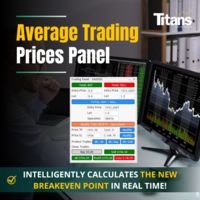
외환 시장을 보다 효율적이고 수익성 있게 거래할 수 있는 방법을 찾고 계십니까? 우리는 당신이 찾고 있는 솔루션을 가지고 있습니다! 귀하의 이익을 극대화하고 위험을 최소화하도록 설계된 혁신적인 도구인 혁신적인 진입 가격 평균 EA를 소개합니다. 우리 EA가 다른 제품보다 눈에 띄는 이유는 무엇입니까? 대답은 간단합니다. 평균 가격이 자동으로 계산됩니다. 다양한 로트와 가격 수준으로 여러 공개 거래를 관리할 수 있는 능력이 있고 EA가 모든 어려운 작업을 대신 수행한다고 상상해 보십시오. EA를 사용하면 수동 계산의 복잡성을 뒤로하고 자동화의 정확성과 효율성을 신뢰할 수 있습니다. 어떻게 작동하나요? 당사의 EA는 귀하의 모든 공개 거래를 고려하여 실시간으로 새로운 손익분기점을 지능적으로 계산합니다. 귀하의 구매, 판매 및 구매와 판매를 모두 고려한 추가 라인에 대한 평균 진입 가격에 대한 명확하고 간결한 정보를 제공합니다. 이를 통해 모든 단계에서 정보를 바탕으로 전략적인

Risk Oracle - Expert Advisor Description Risk Oracle is a sophisticated yet user-friendly Expert Advisor (EA) designed for risk management and trade execution. This utility tool is tailored to assist traders in executing orders at optimal prices while managing risk efficiently, without the need to manually calculate volumes and other parameters. By automating these critical aspects, Risk Oracle simplifies the trading process and allows traders to focus on strategy and market analysis. All Produc
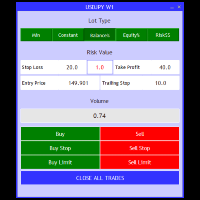
The Trade Manager is a visual trade panel that makes it simple to place and manage trades, preventing human errors and enhancing your trading activity. - Very Easy to use - Trade easily from the chart - Trade with precise risk management - Offers different risk management options to calculate appropriate lot size. - A powerful risk and position management approach

//--- indicator settings input string Custom_Symbol_SetName = "Nayuta"; Custom_Symbol_SetName 매개 변수는 사용자 정의 도표의 품종 이름으로 사용할 것입니다. 이 명칭 아래 사용자 정의 도표는 당신이 서비스를 활성화한 후 당신의 계좌 순가치 변화를 기록하는 데 도움이 될 것입니다. 당신의 거래를 분석하는 데 도움이 될 것입니다. 이미 창고 변화 통계, 촛불 도표의 방식으로 당신의 컴퓨터 도표에 나타납니다. 더 직관적이고 더 직접적으로 당신의 거래 역사, 그리고 계좌 위험 변화 등을 분석합니다. 5ms의 매번 기록 빈도는 당신의 자금 변화를 완전히 기록할 수 있습니다.남아 있는 것은 아무것도 없다. 당연히 당신이 이 서비스를 시작한 후에 세워질 것이다. 참고 사항: 이 프로그램은 실제 계정에서만 실행되며 시뮬레이션 계정은 변경 사항을 기록하지 않으며 작업 상태에 들어가지 않습니다. 더 좋은 건의가 있으면

Executor Trader Panel (Sta) - Standard Version is a multi-functional trading tool designed for traders. The trading panel integrates over 30 individual functions and more than 10 combined functions, providing traders with a highly flexible operational approach.
Adapted for DPI: 96, 192.
Main Features of the Executor: Instant Connection Status: Immediately know if the connection with the broker is lost. Time Synchronization: Instantly know the current local time and the time of the trad
This program is a GUI for issuing orders that can be done more quickly. Faster TP SL setting This program is not an automated trading platform. Trading is risky, please manage your risk. We do not accept any responsibility. It should be tried with Demo before using it with Real. Normally, the setting sets the risk to 1:1 to shift manually or to enter the risk to x:1, where x can be entered and everything can move freely. Thank you to all customers who have purchased our products. We would like t

The Trades To Telegram is a powerful and customizable trading assistant designed to bridge the gap between the MetaTrader 5 platform and the popular messaging app, Telegram. This bot serves as a crucial tool for traders, providing them with timely and accurate trading signals, alerts, and updates directly to their Telegram accounts.
Key Features: Real-Time Signals: The bot monitors the MetaTrader 5 platform continuously, detecting trading signals, such as Opening/Closing of buy/sell orders , a
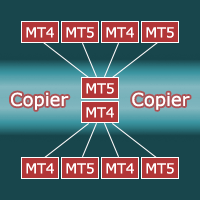
Copier for the MetaTrader5 terminal. Designed to copy trade from one terminal to another. Works both on netting and hedging accounts. Copying from a netting account can be performed simultaneously to both netting and hedging accounts. Also, from a hedging account, copying can be performed simultaneously to both netting and hedging accounts. Compatible with the version for the MetaTrader4 terminal; if available, copying can be performed between different terminals (also regardless of the type of
*** Introductory Offer! *** Ends soon - Price will increase - do not miss it!
This EA Closes ALL open trades (with the same magic number on the that pair) at a certain level of profit - either in money or in percentage of balance.
So if you have multiple trades open, you can choose to close them all as one "basket" using this EA. For spreads from a tiny 0.1 pips RAW/ECN Accounts, click here . Check out my Waka Esque EA signal here: >> High Risk Settings or Medium Risk Settings .
Setti
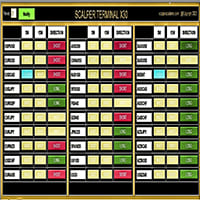
Scalper Terminal 인터페이스 소프트웨어는 지표이며 자동 구매-판매 거래에 참여하지 않습니다. 이 지표는 스캘핑 거래 기회가 발생했을 때 거래가 들어갈 수 있는 현재 거래 영역을 보여줍니다. 스캘핑 신호가 있는 경우 해당 거래 쌍의 오른쪽에 청록색 표시등이 켜지고 그 위에 정확한 거래 방향이 표시됩니다. 그런 다음 청록색 버튼을 클릭하여 거래를 입력하세요. 새 탭이 열립니다. 이후 스캘핑 거래 진입 조건인 캔들 클로징이 예상된다.
스캘퍼 터미널과 성공적인 스캘핑 거래 거래를 하기 위해서는
설명 섹션의 동영상을 꼭 시청하세요. Scalper Terminal 소프트웨어에 군인처럼 붙어보세요. 각 거래 쌍의 오른쪽에는 5M, 15M 및 DIRECTION 열이 있습니다. 먼저 알림 버튼을 클릭하고 녹색으로 만듭니다. 화면을 계속해서 볼 필요는 없습니다. 청록색 빛 신호 또는 메타 트레이더 경고 메시지 소리를 기다리십시오. 청록색 빛으로 표시된 정확한 작동 방향(DIRECTI

TrimPips MT5 (English Description) Automate Your Trading Stress with a Single Click. Designed for traders struggling with multi-position management, fast-paced execution, and strict risk control. What is TrimPips? TrimPips MT5 is a professional trading utility built to dramatically reduce the stress of complex position management and order closing, supercharging your discretionary trading. In the fast-moving world of trading where split-second decisions dictate success, TrimPips executes
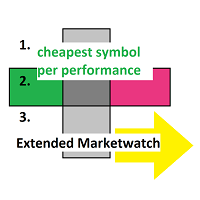
Extended MarketWatch calculates multiple numbers as a characterization of their symbols in addition to the default ones. They are often simple mathematics or just read for comparison. These are the percentual spread, also in comparison to the known daily change and with leverage, the leverage of each symbol and an example of the real profit.
BID, ASK, SPREAD, DCH: The prices, absolute spread and the last daily change of the price are repeated for overview. PRSPRED: This enables to view the spr

Apart from psychology, another thing that makes traders successful is risk management. This utility helps the trader in risk management, order management, and monitoring the profits that are made within a certain period. The utility works on the forex market. inputs: The following are inputs that are required before an order is executed · Sl- this is the stop loss in pips. · Tip: this is the take profit in pips. · Risk%: the percentage of the equity that the user wants to ri

차트상의 경제 이벤트 시각화 다기능 유틸리티: 66+ 기능 포함, 이 인디케이터 포함 | 질문이 있으면 저에게 연락하세요 | MT4 버전 이 인디케이터는 경제 뉴스가 다가오면 수직선을 그립니다.
입력 설정에서 다음 사항을 조정할 수 있습니다: 현재 심볼에 대해서만 : true일 경우, 선택한 심볼에 대한 이벤트만 표시됩니다. 과거 이벤트 표시 : true일 경우, 과거 이벤트 가 차트에 남습니다. 색상 : 3가지 이벤트 유형에 대해 별도로 설정. 브로커 시간과 GMT 간의 차이: 브로커의 시간과 그린위치 평균시(GMT) 간의 차이를 설정하세요. 대신 [자동 시간 동기화] 옵션을 사용할 수 있습니다: 시장이 열리면 시간이 동기화됩니다. 수동으로 시간을 설정할 때:
브로커 시간을 'Market watch' (View -> [Market Watch])에서 확인할 수 있습니다;
GMT = 17:30이고 브로커 시간 = 19:30일 경우: 값은 +2

Setting Up a Telegram Bot for MetaTrader 5 (MT5) MetaTrader 5 (MT5) is a powerful platform for trading, and integrating it with Telegram can help you receive trading updates and alerts efficiently. Follow these steps to set up a Telegram bot for MT5: Launch Telegram : Begin by opening the Telegram app on your device. Search for "BotFather" : In the Telegram search bar, type "BotFather" and select it from the search results. Create a New Bot : Send /start to BotFather. Next, send /newbot to initi

This EA is capable of sending transaction details to any Telegram channel passed as a parameter.
The format in which the text will be sent to the Telegram channel is shown below:
BUY EURUSD SL XXXX.XX TP XXXX.XX
In case of TP donation, it will be sent to the telegram channel after the transaction is executed in a separate message and the format will be...
SET TP XXXX.XX
To set the SL, it will be sent to the telegram channel after the transaction is executed in a separate message and the fo

***This is a MT5 version of ZigZag Breaout*** --------------------------------------------------------------------------------------------------------------------------------- ***** Unlocking the Expertise: EA Source Code for Dedicated Learners
***** Commencing from November 2021 , the "EA + source code" version is at your disposal,
***** allowing those who purchase (not rent) this EA to explore its inner workings.
*****T o acquire the source code, kindly direct your request, along with purchase
Powering Your Operations with Desk Trading - Telegram Notifier
In financial markets, timely information is often the difference between success and loss. This is why the Desk Trading Indicator stands out as an essential tool for traders looking for a competitive advantage. This smart notifier is designed to notify, via Telegram, about critical regions on charts of different time frames, making it a valuable ally in your trading journey.
Desk Trading Indicator Notifier works as a dedicated vir

Risk-o-meter is a Risk calculator Panel designed to help people who are new to trading, better understand how much they are risking for potential profit or loss.
Inputs: 1. Enter your Risk in % or currency 2. Enter your Return Ratio 3. Enter your Lot Size
Results: 1. SL line 2. TP Line
Features: 1. By moving the SL line, lot size will adjust to keep Risk fixed. 2. By moving the TP line, Risk Ration will adjust to keep Risk fixed.
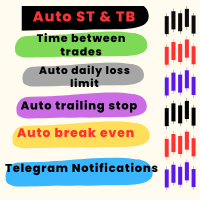
최적화된 거래 및 리스크 관리를 위한 유틸리티 도구 이 고급 유틸리티 도구는 거래 성능을 향상시키고 리스크를 최소화하는 데 목적을 둡니다. 감정적인 거래 결정을 방지하며, 복수 거래나 탐욕에 기반한 행동을 피하여 시장에서의 규율 있는 접근을 보장합니다. 주요 기능 자동 손절매 및 이익 실현 거래 실행 시 자동으로 손절매 및 이익 실현 수준을 설정하여 포지션을 효과적으로 보호합니다. 거래 간 시간 거래 간에 사용자 정의 가능한 대기 시간을 설정할 수 있습니다(예: 15분). 대기 시간 동안 거래 버튼이 비활성화되며, 경고음이 제공됩니다. 일일 손실 한도 사용자가 일일 손실 한도(예: $20)를 설정할 수 있습니다. 한도에 도달하면 알림이 발생하고 거래 기능이 비활성화됩니다. 일일 이익 한도 손실 한도와 비슷하게, 사용자는 일일 이익 목표(예: $40)를 설정할 수 있습니다. 목표를 달성하면 알림이 표시되고 거래 버튼이 비활성화됩니다. 손익분기점 조정 지정된 이익 수준에 도달하면 손절매

Telegram Risk Exposure shows the risk exposure in total, by calculating the risk value of all the open positions that have stop loss orders, so you can clearly see the value being risked in dollar($) and percent(%).
Setup
A step by step user guide is available. No knowledge of Telegram API is required; all you need is provided by the developer.
Key Features Monitoring your risk exposure in real time Automatically get notified via telegram when your risk exposure changes Customize the

Unlock the Power of Automated Trading with Cutting-Edge Moving Average Signals!
Are you looking for a reliable and efficient way to trade the markets?
Our automated trading system leverages the power of moving average signals to identify high-probability trading opportunities with precision and speed. Why Choose Our Trading Bot? Advanced Moving Average Strategies – Our algorithm dynamically adapts to market conditions using short-term and long-term moving averages to detect optimal entry and

GGP Trade Copier EA is an automatic trading bot that can help traders automatically replicate the trading strategies and operations from one trading terminal to others by experiencing exceptionally fast trade copying system. Its easy-to-use setup allows you to copy trades between multiple MetaTrader terminals on the same Windows computer or Windows VPS with lightning-fast copying speeds of under 0.5 seconds. The software supports multiple trading varieties, including Forex, commodities, stocks

Use for risk management and opening positions as per the user settings. The user is allowed to set the stop loss and take profits in pips. The user can also choose the risk percentage per trade that he/she wants to use while opening the trade. The volume of the trade that the user wants to sent shall be calculator according to the stoploss and the risk percentage that the user has selected.

한 번에 여러 포지션/거래를 열어야 합니까? 우리는 귀하의 쉬운 솔루션을 만들었습니다. 이제 한 번에 여러 직위를 입력할 수 있습니다. 로트 크기, 포지션 수, 이익 실현 및 손실 중지를 설정할 수 있습니다. 예: 특정 로트 규모로 3, 5, 10 또는 원하는 수의 포지션을 구매하려고 합니다. 이제 "구매" 버튼을 탭하기만 하면 됩니다. 또는 예: 특정 로트 규모로 3, 5, 10 또는 원하는 수의 포지션을 판매하려고 합니다. 간단히 "판매" 버튼을 클릭하시면 됩니다. han beon-e yeoleo pojisyeon/geolaeleul yeol-eoya habnikka? ulineun gwihaui swiun sollusyeon-eul mandeul-eossseubnida. ije han beon-e yeoleo jig-wileul iblyeoghal su issseubnida. loteu keugi, pojisyeon su, iig silhyeon mich sonsil jung

Clean & Readable Grid Lines: Time and Price at Perfect Intervals.
The timeline will be displayed according to the set time difference. (Time differences in 30-minute increments are not supported.) Additionally, price lines are displayed at round numbers such as 100.000, 100.010, and 100.020. The standard gridlines are displayed with the time and price by MT4, but they are very confusing as they become the broker's time and are displayed at the halfway point along with the price. It hides them an
TP SL Bot is a utility that automatically sets Stop Loss and Take Profit for newly opened orders in several ways. There is also a function for calculating the volume that you need to open the trade to get the desired amount with the specified Stop Loss / Take Profit size. There are several options for calculating the size and setting parameters: 1. Setting based on the amount specified by the user as a percentage of the current deposit balance. 2. Setting as the amount entered by the user. 3. Se
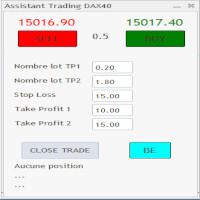
C'est un trade panel pour les indices 1 digit utilisé surtout sur le dax 40. Il y a 2 Take profit si TP1 atteint on passe en BE + 2 pt TP1 nbre lot et TP2 nbre : 2 positions sont ouverte ensemble ceci afin d'éviter si un problème connexion web. Attention c'est en nombre de points
Stop loss :15 (15 pts sur dax) Take Profit 1 : 10 Take Profit 2 : 15 Dans cet exemple si 10 pts atteint (spread prit en compte) on se met en BE + 1 pt Il y a un bouton BE qui met BE + 2 pt sur les trades et 1 bouton

This Dashboard is very useful . That will help us analyzing graph. In this dashboard has some functions. such as - Buy Stop - Sell Stop - Buy Limit Order - Sell Limit Order - Close All trade on this graph - Close All Profit - Delete Pending Order = Notify to enter an order - Percentage Calculation of chance to win an order On this strategy i calculated all Major EMA to find a higher chance and take more profits

Trade Shell, upgraded: P1 Prime Trade Manager The same product you know, rebuilt from the ground up by Denis Sotnikov, who has written trading programs for MetaTrader since 2008. A developer who stays Denis built Euronis Scalper, the example product MetaQuotes shows in the "How It Works" guide inside every MetaTrader 5 terminal (Navigator, Market, How It Works). He answers here in the comments, and he will still be here next year. Built from what traders report We read thousands of user comments

FISHERMAN'S ASSISTANT The Fisherman's Assistant is a powerful tool to assist in general operations. INTELLIGENT STOP LOSS With it, we can program the stop loss, take profit, break even, and trailing stop so that, in our manual operations, they are placed automatically. OPENING AND MANAGING POSITIONS We can use the Fisherman's Assistant to open positions within the programmed parameters, make re-entries, close positions by time, and much more. With it, we can manage all open positions of all lis

FISHERMAN'S ASSISTANT The Fisherman's Assistant is a powerful tool to assist in general operations. INTELLIGENT STOP LOSS With it, we can program the stop loss, take profit, break even, and trailing stop so that, in our manual operations, they are placed automatically. OPENING AND MANAGING POSITIONS We can use the Fisherman's Assistant to open positions within the programmed parameters, make re-entries, close positions by time, and much more. With it, we can manage all open positions of all lis

Dieser Expert Advisor unterstützt Sie bei Ihrem Handel. Er setzt für Sie automatisch, nach denen von Ihnen vordefinierten Parametern den Stopp Loss, den Take Profit. des Weiteren hat dieser Expert Advisor eine Break Even Funktion, der Ihre Positionen glattstellt, so dass Sie bei einem Rücksetzer des Kursen noch mit ein wenig Plus schliessen. Auch besitzt er eine Trailling Funktion, welche des SL für Sie automatisch nachzieht.

A Trade Manager with automatic volume calculation
Automatic Volume Calculation can be done either by percentage (from the lowest between Equity and Balance) or by value (Money amount) Market Order with drag-and-drop feature for Stop Loss and Take Profit Limit and Stop Orders drag-and-drop feature for Entry , Stop Loss and Take Profit Review Order Details before placing orders ( Entry Price , SL , TP , and Volume ) Open Positions Management with Automatic Break-Even when profit reaches predefin

MT5에서 Telegram으로 완전히 사용자 정의 가능한 신호를 보내고 신호 제공자가 되세요! 이 제품은 사용하기 쉽고 시각적으로 매력적인 그래픽 사용자 인터페이스로 제공됩니다. 설정을 사용자 정의하고 제품을 몇 분 안에 사용할 수 있습니다!
사용자 가이드 + 데모 | MT4 버전 | Discord 버전 데모를 시도하려면 사용자 가이드를 참조하십시오. MT5에서 Telegram으로 보내는 기능은 전략 테스터에서 작동하지 않습니다.
MT5에서 Telegram으로의 기능 다양한 옵션으로 신호를 완전히 사용자 정의합니다 신호 앞이나 뒤에 자체 사용자 지정 메시지를 추가합니다. 태그, 링크, 채널 또는 기타 모든 것이 될 수 있습니다 신호에 이모티콘을 추가, 제거 또는 사용자 정의합니다. 또는 모두 제거할 수도 있습니다. 심볼 또는 매직 번호로 보낼 거래를 필터링합니다 특정 심볼의 전송 제외 특정 매직 번호의 전송 제외 신호와 함께 전송할 거래 세부 정보를 사용자 정의합니다 신호와

MT5에서 Discord로 완전히 사용자 정의 가능한 신호를 보내고 Signal Provider가 되세요! 이 제품은 사용자 친화적이고 시각적으로 매력적인 그래픽 인터페이스로 제공됩니다. 설정을 사용자 정의하고 제품을 몇 분 안에 사용하기 시작하세요!
사용자 가이드 + 데모 | MT4 버전 | Telegram 버전 데모를 시도하려면 사용자 가이드로 이동하십시오. MT5에서 Discord로 보내기는 전략 테스터에서 작동하지 않습니다.
MT5에서 Discord로 기능 다양한 옵션으로 신호를 사용자 정의하세요 신호 앞이나 뒤에 사용자 정의된 메시지를 추가하세요. 태그, 링크, 채널 또는 기타 내용이 될 수 있습니다 신호에 이모티콘을 추가, 제거 또는 사용자 정의하세요. 모두 제거할 수도 있습니다. 심볼 또는 매직 번호에 따라 전송할 거래를 필터링하세요 특정 심볼의 전송 제외 특정 매직 번호의 전송 제외 신호와 함께 전송할 거래 세부 정보를 사용자 정의하세요 신호와 함께 스크린샷을

Magic News Trade Assistant는 뉴스가 나올 때 거래하기 위한 도구입니다. 이 도구는 자신만의 Stop Loss 및 Take Profit을 명확하게 설정할 수 있기 때문에 수익 창출에 매우 유용합니다. 이 도구는 XAUUSD 거래에 적합합니다. JOLTS, NFP 등 거래에 활용할 수 있는 뉴스는 매우 수익성이 높습니다. 당신은 침착하게 주문이 수익을 낼 때까지 기다릴 것입니다. 모든 것은 생성된 뉴스에 달려 있습니다. 추천 : • 통화쌍: XAUUSD • 로트 및 지분 비율: 1:1000($1000가 있으면 1랏을 사용할 수 있습니다) • 최고의 브로커: Orbitrade(슬리피지가 매우 낮기 때문에 Orbitrade 계정을 생성하려는 경우 관리자에게 문의할 수 있습니다) 사양 : • 로트 크기: 로트 수를 결정합니다. • 범위 크기: 계산 거리 범위는 가격이 2-3 스프레드이며 원하는 대로 설정할 수 있으며 자동으로 채워집니다. • Stop Loss: 일반적인

이 도구를 사용하면 한 번의 클릭으로 열려 있는 모든 주문을 닫을 수 있습니다. "모두 닫기"를 클릭하기만 하면 됩니다. 수익성 있는 주문만 청산하려면 "수익성 있는 청산" 버튼을 클릭하세요. 클릭한 후 모든 변동 주문이 청산됩니다. 변동 손실이 있는 주문만 종료하려면 "손실 가능 청산" 버튼을 클릭하세요. 클릭한 후 변동 손실이 있는 모든 주문이 종료됩니다. 이 도구는 1년 동안 테스트를 거쳤으며 원클릭 포지션 청산 기능이 매우 완벽합니다. 포지션 청산은 적시에 이루어지며 지연 범위는 작습니다. 물론 지연은 귀하가 속한 지역 및 네트워크 환경과도 관련이 있습니다. 이에 주의하시기 바랍니다. 과거 데이터의 백테스트 과정에서 도구는 더욱 완벽하게 작동했으며 100개의 주문을 모두 마감하는 데 최대 0.495초밖에 걸리지 않았습니다. 실제 거래 과정에서 나의 최대 포지션 주문 수는 26개에 불과했고, 모든 포지션이 청산되는 데 걸리는 시간은 1.28초였습니다.

이 어드바이저는 다음과 같은 기능을 제공합니다. 포지션 오픈: 가격이 추세선을 넘을 때 롱 또는 숏 주문을 오픈합니다. 청산: 가격이 추세선을 교차할 때 롱 또는 숏 포지션을 청산합니다. 추적 정지 손실 – EA는 추세선을 따라 장기 주문에 대한 정지 손실을 계속 늘리거나 단기 주문에 대한 정지 손실을 줄입니다. 선은 추세선일 수도 있고 수평선일 수도 있습니다. 추세선은 반경 또는 세그먼트일 수 있습니다. 라인은 해당 라인이 존재하는 기간에만 거래된다는 특징이 있습니다. 포지션을 개설하고 청산할 수 있는 이 라인에는 특정 이름이 있습니다. EA는 수동으로 선을 그리는 대신 선 그리기 패널을 제공합니다. 모든 오픈 및 청산 포지션의 스크린샷은 MQL5/Files/Cross Trend Line to Trade 폴더에 저장됩니다. EA는 헤징 계정에서만 작동합니다.
버전 MT4: https://www.mql5.com/ko/market/product/4439
선 그리기
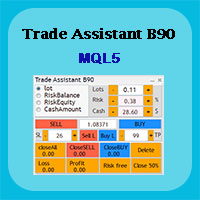
Trade Assistant B90 is designed for manual trading so that it helps us to manage capital and position well.
This expert has the ability to change the default inputs of the expert as desired before use.
You can see the expert entries in the photo below, each of which we explain below.
1. Background Color : With this entry, you can change the assistant's background
Color
2. Font size: You can change the size of the fonts used in the assistant.
3. Button color: Change the color of assis

The utility is designed to send signals from MT4 to Telegram. It has several unique features, allowing not only the sending of trade signals but also the following functionalities: Send messages directly from the terminal to Telegram Send emojis along with custom text Send text and images from Telegram All of these features enable users to manage a signal channel while focusing on trading and finding quality signals. Customizable Signal Messages You can fully customize the signal message: Specif

Rosy Trade Assistant A very easy to use EA, simple and friendly. Many features available to manage your trade. Compact panel with 4 sizes that can be selected according to your convenience. And trading in your local time has never been easier, using local timescale and clock. User Guide and Demo version Pages Trading Panel - Page to place an order and manage it's SL/TP Tools - Page to manage order: trailing, close on target, close all by categories Settings - Page to use custom time scale with s

Universal Indicator to Telegram Alerts is a smart trading tool that works seamlessly with both MT5 and Telegram, offering traders more flexibility and convenience. It connects your MT5 platform to Telegram, sending real-time alerts and chart screenshots directly to your Telegram from any indicator with buffers. This means you can stay updated on your trades even when you're not at your computer. Whether you're on your phone or tablet, you'll never miss an important trading opportunity. The aler

"스캘핑 스케일 인(Scalping Scale in)"은 스캘핑 시 매 순간이 중요하기 때문에 S/L 및 T/P 배치에 대해 걱정하지 않고 고정된 거리에서 초기 위치로 스케일링을 원하는 스캘퍼를 위해 설계된 유틸리티 도구입니다.
작동 방식:
EA의 입력 탭에서 원하는 값을 설정하고, 보다 구체적으로 T/P에 배치할 위험 대 보상, S/L(핍 단위)의 폭을 설정합니다. 또한 다음 정지 명령까지의 거리입니다(위치 조정). MT5에서 매수/매도를 수동으로 클릭하면 EA가 자동으로 SL과 TP를 설정하는 동시에 SL과 동일한 거리(핍 단위)에서 동일한 방향으로 새로운 중지 주문을 설정합니다(즉, 매수하는 경우 S/L이 5핍인 경우). , 다음 구매 중지 주문은 초기 진입 가격보다 5핍 위에 배치됩니다. 보류 중인 중지 주문이 채워지면 이전 포지션은 손익분기점까지 추적되고 S/L은 이전 거래의 진입 수준에 있는 새로운 중지 주문이 배치됩니다. 기본적으로 이 도구는 공격적인 움직임을 포
This EA help trader to manage his pending orders, when you place many Pending Orders this utility monitor them and when of them get filed (executed) the EA cancel and delete all rest of pending orders, to avoid opening of all of pending orders at the same time , and lose your risk management. this utility is very useful for trader when he /she is not available on the desk.
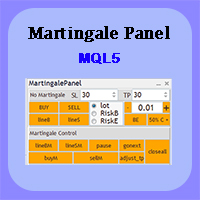
In this article, we would like to introduce the trade panel product with the Martingale panel.
This panel is made in such a way that it can meet the needs of traders to a great extent.
This trade panel actually consists of two trade panels at the same time, with the first one you can take positions with certain profit and loss limits, and with the second one, you can have positions with profit limits but without loss limits.
When positions lose, a new position will be added based on the settings

Ultimate Trade Panel MT5은 MetaTrader 5를 위해 독점적으로 설계된 강력한 유틸리티로, 초보자와 경험이 풍부한 트레이더 모두의 거래 경험을 향상시키는 것을 목표로 합니다. 직관적인 인터페이스와 강력한 기능을 제공하여 사용자가 거래를 보다 효율적이고 정확하게 관리할 수 있도록 돕습니다. 이 유틸리티는 거래 작업을 간소화하여 사용자가 수동 프로세스가 아닌 전략에 집중할 수 있게 합니다. 원클릭 거래 및 사용자 정의 알림과 같은 기능을 통해 트레이더는 시장 기회에 신속하게 대응할 수 있어 중요한 거래 설정을 놓치지 않도록 합니다. MQL 제품 설치 가이드 | MT4/MT5에서 구매한 MQL 제품 업데이트 | 일반 문제 해결 가이드 | 지표 설정 / 가이드 주요 기능 팝업 알림: 신호 이벤트에서 MetaTrader 알림 팝업을 발생시켜 거래 설정을 놓치지 않도록 합니다. 푸시 알림: 이동 중 모니터링을 위해 MetaTrader 모바일 앱으로 실시간 푸시 알림을 보

Introducing BoTutor - Simplify Candlestick Data Collection and Export! Are you tired of the hassle of manually collecting and exporting candlestick data from your charts? Look no further, because BoTutor is here to revolutionize your data mining experience . BoTutor offers a user-friendly graphical interface that is intuitive, clean, and easy to navigate. Say goodbye to complex data extraction procedures, and effortlessly gather candlestick data with just a few clicks. BoTutor lets you expo
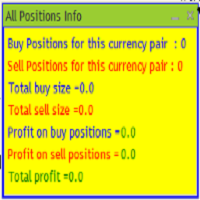
The provided MQL5 expert creates a custom information panel in the MetaTrader 5 (MT5) trading platform This panel displays information about the trading positions for the current symbol (currency pair) on the chart. It shows the number of buy and sell positions, their sizes, and profits. Provide traders with a quick overview of their trading positions for the current symbol It is very useful when you open several positions of several sizes and you want to know the exact situation of the number
안녕하세요 친구
사람들의 눈에는 투자가 어렵고 위험한 사업으로 여겨집니다. 그러나 지식과 기술을 습득하여 투자한다면 시장은 결코 당신에게 해를 끼치지 않을 것입니다. 자본 시장에서 필터 라이팅은 전문가들이 생산성을 높이고 시간을 절약하기 위해 이 분야에서 취하는 조치 중 하나입니다. 많은 수의 기호 활동으로 인해 저장된 정보 및 데이터의 양이 매우 높습니다. 이 시장에서 활동하는 사람들은 때때로 일련의 정보가 필요하며 문제의 민감성으로 인해 가능한 한 빨리 정보를 얻어야 합니다. 이 정보는 일반적으로 시장의 미래를 예측하는 데 도움이 되며 매우 중요합니다.
Fitler가 우리의 명령으로 작성하면 요청한 조건에 맞는 공유를 찾아줄 것입니다! 선택한 기능을 필터링하면 거래 가능한 모든 주식을 검색하고 적합한 주식을 표시합니다. 자본시장의 각 개인은 거래에 대한 구체적인 전략을 가지고 있으며 필터링을 통해 전략에 따라 진행하기 쉽습니다. 그 후, 그는 다양한 시간대에 걸쳐 자신의 전

안녕하세요 친구
사람들의 눈에는 투자가 어렵고 위험한 사업으로 여겨집니다. 그러나 지식과 기술을 습득하여 투자한다면 시장은 결코 당신에게 해를 끼치지 않을 것입니다. 자본 시장에서 필터 라이팅은 전문가들이 생산성을 높이고 시간을 절약하기 위해 이 분야에서 취하는 조치 중 하나입니다. 많은 수의 기호 활동으로 인해 저장된 정보 및 데이터의 양이 매우 높습니다. 이 시장에서 활동하는 사람들은 때때로 일련의 정보가 필요하며 문제의 민감성으로 인해 가능한 한 빨리 정보를 얻어야 합니다. 이 정보는 일반적으로 시장의 미래를 예측하는 데 도움이 되며 매우 중요합니다.
Fitler가 우리의 명령으로 작성하면 요청한 조건에 맞는 공유를 찾아줄 것입니다! 선택한 기능을 필터링하면 거래 가능한 모든 주식을 검색하고 적합한 주식을 표시합니다. 자본시장의 각 개인은 거래에 대한 구체적인 전략을 가지고 있으며 필터링을 통해 전략에 따라 진행하기 쉽습니다. 그 후, 그는 다양한 시간대에 걸쳐 자신의 전

"캔들스틱 패턴 거래 패널"은 캔들스틱 패턴으로 거래하고 패턴을 식별하고 거래를 실행하는 프로세스를 빠르고 쉽게 원하는 트레이더를 위한 최고의 도구입니다 . 다양하지만 핵심적인 입력 옵션을 갖춘 이 도구는 캔들스틱 패턴 수동 거래를 자동화하거나 이전보다 더 빠르게 수동으로 거래하도록 지원하거나 보고 싶은 패턴을 간단히 알려주려는 사람들에게 적합합니다.
사용하려는 기호에서 EA를 활성화하면 차트 왼쪽 상단에 나타나는 거래 패널을 살펴보겠습니다 . 실시간 거래에서는 시간이 돈이기 때문에 패널은 단순하고 거래자에게 필요할 수 있는 주요 기능만 사용하도록 세심하게 설계되었습니다. 거래 불가 : 안전상의 이유로 사전 확인됩니다. 이는 본질적으로 촛대 패턴이 나타날 때만 EA가 화살표 개체를 표시하고 그 이상은 표시하지 않기를 원한다는 것을 나타냅니다. 거래하려면 화살표를 클릭하세요 . 클릭하면 화살표 개체를 간단히 클릭하여 패턴이 나타날 때마다 반 수동으로 거
Introducing the BlackWing Signal Provider—an advanced EA designed to enhance your trading experience by facilitating seamless communication between your MetaTrader 5 platform and Telegram channels, groups, or individual users.
Key Features:
1. Real-Time Event Notifications: Receive instant alerts on new trades, modified orders, closed positions, and deleted orders. Stay informed and make well-timed decisions.
2. Interactive Chart Snapshots: Share chart snapshots along with new trades and ord

A very usefull EA helps you control Trailing Stop and Break even point for single order
it works seperately for Buy side and Sell side
the EA displays some information useful when you load to your chart
all you need to do is to change the name of the pair you want to control TP and BEP
it works with all pairs and all types of accounts
if you have any questions you can always write to us at info@auranos.me

Multi-currency trading on one chart!
Creation and management of positions with trailing and breakeven, risk management and other useful functions. To fix profits, the Target profit parameter is provided; if it is greater than zero, all positions will be closed if the set value is exceeded. All positions and orders have set Stop Loss and Take profit. For multi-currency trading, taking into account the impact of news and switching symbols on the chart, it is useful to use the News impact indicato

EquitySafe V1.0 is a powerful risk management tool designed for MetaTrader 5 . It enables traders to effectively manage their risk by setting maximum loss limits based on custom time frames. With this tool, you have the flexibility to define your own time intervals and allocate specific risk thresholds accordingly. This helps you maintain control over your trading account and minimize potential losses. By utilizing EquitySafe, you can ensure that your trading strategy aligns with your risk tole
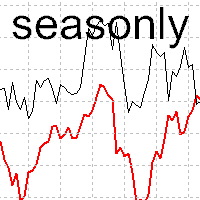
The tool for exploring seasonal patterns. It compares the chart with charts of other years and compares with the average for other years. Allows you to shift charts if necessary. Explore any year by specifying the zero point. Up to 10 charts in one tool. Works only on the daily chart ! The best for you! Enjoy your work! (It's not indicator - do not download demo it not work) for mt4 Seasonly MT4

Achieve peace of mind with our EA companion! Simply set it and let it roll. Safeguard your trades on sluggish market days and holidays. Get updates on your balance and EA status every Friday evening, for example. Stay in the loop even if your terminal or VPS decides to take a break. Trading made easy – enjoy the tranquility! This EA has several functionalities
Closing of pending or open positions during pre-configured holidays. Automatic closing and reopening of pending positions during the nig
MetaTrader 마켓은 거래 로봇과 기술 지표들의 독특한 스토어입니다.
MQL5.community 사용자 메모를 읽어보셔서 트레이더들에게 제공하는 고유한 서비스(거래 시그널 복사, 프리랜서가 개발한 맞춤형 애플리케이션, 결제 시스템 및 MQL5 클라우드 네트워크를 통한 자동 결제)에 대해 자세히 알아보십시오.
