 MetaTrader 5
 专家
专家
 指标
指标
 程序库
程序库
 实用工具
实用工具
 窗口小部件
窗口小部件
 规则
规则
MetaTrader 5 交易实用工具 - 60
 以下是可在MetaTrader 5中简化交易的交易程序。将鼠标悬停在一个工具上,阅读它的描述和用途。
新店优惠:仅限前10名。特价:$30 (原价:$40)。剩余名额:10 为了提高知名度,前10位购买者可享受此折扣。
“以实时动态再现历史图表” Chart Auto Flow 是一款支持以 可变速度 、按 蜡烛图单位 进行 回放和倒放 历史图表的验证辅助工具。 它不仅仅是查看静态图表,而是能以 更接近实时动态 的方式进行再现,从而实现 更贴近实战的训练 。
此外,通过 高速回放 ,您可以从海量的历史图表中 短时间内找寻到目标图表形态 。 适用于所有金融产品,包括外汇、股票、黄金和加密货币。 【推荐人群】
想要提高裁量交易练习和验证效率的用户
可以通过高速回放快速查找双底或头肩顶等特定形态,并通过慢速回放详细分析其形成过程。
想要研究特定形态“出现瞬间”的用户
通过反复倒放和回放(例如指标信号出现的瞬间或价格在趋势线附近的表现),您可以进一步提高入场精度。
想要在周末集中进行验证的用户
与模拟账户交易不同,即使在市场休市期间,您也可以通过移动图表进行模拟练习。 操作界面 按钮 功能 说明 [Pause / Restart] 暂停 / 继续 控制图表重放 [Reset] 重置 重

MultiChart Pro – MetaTrader 5 图表管理专业工具 MultiChart Pro 是一款为 MetaTrader 5 设计的专业级图表管理工具(智能交易顾问,EA),旨在帮助交易者自动化打开、设置和组织多个图表界面。通过此 EA,用户无需手动配置每个时间周期或模板,即可在几秒钟内建立完整的交易布局,从而显著提高分析效率与执行速度。
该系统最多支持四个图表的自动化配置,包括三个标准在线图表(例如 D1、M1、M15)以及一个离线图表(例如 10 秒图)。EA 还会自动设置当前活动图表(例如 M5),使所有时间周期的分析保持一致性。 主要功能: 图表自动打开: 可在启动时快速加载多个不同周期的图表,无需人工干预。 模板自动应用: 每个图表都会加载用户预设的模板,系统会自动检测模板是否存在,以防止错误。 时间周期选择: 用户可通过输入参数自由选择需要打开的时间周期。 离线图表支持: 可为短周期策略(如剥头皮或高频交易)创建自定义的 10 秒图。 MultiChart Pro 特别适合希望同时观察多时间框架信号的交易者,例如日线趋势配合分钟级入场点的策略。借助此 EA
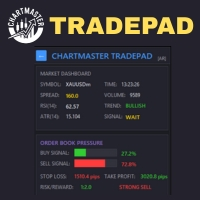
全面掌控交易!ChartMaster TradePad是一款功能强大的全能型交易面板,专为简化下单、风险管理和市场分析而设计。 无论您是剥头皮交易者、日内交易者还是波段交易者,ChartMaster TradePad都能为您提供快速、清晰和精准的操作体验,助力提升交易表现。 核心功能 市场仪表盘 实时市场数据 :交易品种、点差、RSI(14)、ATR(14)、趋势方向、成交量及交易信号一目了然。 趋势与信号提示 :自动识别市场多空趋势,实时显示买入/卖出信号。 订单压力监控 买卖力量百分比 :直观展示市场多空情绪(买/卖压力百分比)。 动态风险回报比 :自动计算止损与止盈水平,并直观显示风险/回报比。 强势交易提示 :当市场明显倾向于买入或卖出时自动发出警示。 持仓状态与风险管理 实时仓位监控 :显示当前持仓、盈亏情况以及账户风险。 手数与风险计算器 :输入风险百分比,系统自动计算合适的下单手数。 一键交易控制 快速下单 :买入、卖出、买入限价、卖出限价、买入止损、卖出止损,一键完成。 高级交易管理 :支持保本、移动止损、移动止盈,轻松锁定利润、降低风险。 紧急

PS Assistance is hybrid EA. It make trade easier than general trading. It shows necessary value real time for help to trading and has button for Buy/Sell/Close All Buy/Close All Sell/especially close remain 3 orders has profit highest. It has break event line for order buy or sell. It made you get price when you have profit or you plan to order in big lots for close all. I hope you enjoy trading with my "PS Assistance".

Cool Martingale EA – 智能对冲自动交易系统 这是一款专业级自动交易系统( Expert Advisor ),可运行于所附加的交易品种图表上, ( 例如: XAUUSD 、 EURUSD 、 GBPUSD 、 USDJPY) 等。 该 EA 基于智能对冲马丁格尔交易逻辑设计,支持 Buy / Sell 双向与单向独立运行。结合灵活的参数体系、账户级管理机制以及直观的图表控制面板,为交易者提供高效、稳定且可控的自动化交易体验。 核心功能 自动 Buy / Sell 对冲 / 单向交易,支持马丁格尔加仓机制 参数全面可配置:初始手数、加仓间距、倍数、止盈点数、交易时间等 内置 提前止盈( Early TP ) 与 均价止盈系统,提升整体交易效率 支持账户级管理与订单数量控制 设置多种止损与保护机制,有效降低交易风险 支持 Telegram 消息通知,实时同步交易与账户状态 提供 图表控制面板,无需重新加载 EA 即可进行快速参数调整与操作 使用方式 本 EA 的完整使用方法与参数说明,已在产品页面的 版本说明( Version / Descripti

OVERVIEW Transform your MT5 trading account into a professional signal broadcasting station! This Expert Advisor automatically publishes your trading activity to Telegram channels in real-time, enabling seamless copy trading operations.
SYSTEM NOTICE: This EA broadcasts trading signals TO Telegram channels. To receive and execute signals FROM Telegram, you need the companion EA: " Telegram Signal Subscriber MT5 " (sold separately).
KEY FEATURES: Real-time trade broadcasting to Telegram Support
Trades Manager Pro – Only Buy is a professional trade management tool designed to fully automate risk control and profit-taking for BUY trades only, on any symbol, pair, or instrument you apply it to . It calculates a risk-based stop loss once per position, ensuring consistent capital protection without repeated modifications. The system supports up to three customizable partial take profit levels (TP1, TP2, TP3), each closing a defined percentage of trade volume to secure profits step by step,
OVERVIEW Transform your MT5 trading account into an automated signal execution station! This Expert Advisor automatically receives and executes trading signals from Telegram channels in real-time, enabling seamless copy trading operations from master accounts.
SYSTEM NOTICE: This EA receives and executes trading signals FROM Telegram channels. To broadcast signals TO Telegram, you need the companion EA: " Telegram Signal Broadcaster MT5 " (sold separately). KEY FEATURES: Automated signal recept

Trades Manager Pro – Only Sell is a professional trade management solution built exclusively for SELL trades, giving traders full automation of risk control and profit-taking with maximum precision on any symbol, pair, or instrument you apply it to . The EA calculates a risk-based stop loss once per trade, ensuring disciplined capital protection without unnecessary modifications. It supports up to three customizable partial take profit levels (TP1, TP2, TP3) to secure profits step by step, plus

Equity Risk Manager EA is a smart tool designed to protect your trading capital by monitoring equity performance in real time. It automatically blocks new trades when your profit or loss thresholds are reached, based on your selected period — daily, weekly, or monthly. No more accidental overtrading or commission losses: once your target is hit, the EA alerts you and halts further entries. Ideal for prop trading firms traders.

基于Goodtrade/GoodX 券商推出的黄金双仓对冲套利的交易模型/策略/系统,在日常的操作遇到的问题: 1、B账户跟随A账户即刻下单。 2:A账户 下单后 B账户 自动抄写止损止盈。 3:A账户平仓B账户同时平仓。 4:B账户平仓A账户也平仓。 5:不利点差下拒绝下单。 6:增加有利点值因子。 通过解决以上问题,改变了熬夜、手工出错、长期盯盘、紧张、恐慌、担心、睡眠不足、饮食不规律、精力不足等问题 目前解决这些问题后,有效提升了工作效率和盈利比例,由原来月10%盈利率提升到月45%的最佳盈利率。 原来的一名交易员只能管理操作两组账户,通过此EA提高到操作管理高达16组交易账户,或许你可以超越我们的记录,期待你的经验交流。 此EA分为: GoodtradeGoodX Tradercropy A GoodtradeGoodX Tradercropy B 是一个组合EA,假设您购买的额 GoodtradeGoodX Tradercropy A 必须同时购买 GoodtradeGoodX Tradercropy B 两个组合使用会到最

Product Name: Magic Simulator “ Find your own 'Signature Setup ” Version: 1.0
From 'I Missed It' to 'I Took It' Transform those frustrating near misses into consistent winners. Practice each setup until your reaction becomes automatic and hesitation-free.
Full Product Description: Become a Confident, Disciplined Trader – Risk-Free Have you ever felt the sting of a bad trade and wished you could rewind time? Do you struggle with fear, greed, or hesitation? Ever spotted the perfect setup but mi
Symbol Cycler & Sync Tool - User Guide This Expert Advisor (EA) is a powerful utility designed to streamline the management of multiple charts in MetaTrader 5. It allows you to group charts together and control them simultaneously, saving you time and improving your workflow. Core Features Multi-Chart Syncing: Create "Sync Groups" by assigning the same SyncGroupID to multiple charts. All charts in a group act as one, allowing you to change their symbols and sync objects across them instantly. Cu

TradeDataLogger - Essential Data Collection Tool for Professional Trading Analytics Suite EA TradeDataLogger is a powerful MQL5 utility designed to seamlessly integrate with the Professional Trading Analytics Suite, enabling comprehensive analysis of your trading performance. This tool automatically captures and logs critical trading data from your MetaTrader 5 platform, making it ready for in-depth analysis and visualization. The logger systematically records all essential trading metrics inclu

# Scorpion 75 - Advanced Adaptive Grid Trading Robot. ## Product Overview
Scorpion 75 is a sophisticated fully automated grid trading Expert Advisor that employs adaptive algorithms to dynamically adjust trading positions based on market conditions. Unlike traditional grid systems, Scorpion 75 features intelligent repositioning, comprehensive risk management, and multiple operational modes to optimize performance across various market environments.
## Key Features
### **Adaptive Grid

# Higher-Lower Pending Bot - Advanced Multi-Pending Orders System
## Revolutionize Your Trading with Smart Pending Order Automation
Welcome to the **Higher-Lower Pending Bot** - the most sophisticated pending order management system available on MQL5. Designed for traders who want to maximize opportunities while minimizing manual effort, this EA combines intelligent order placement with comprehensive profit tracking in one powerful package.
## What Makes Our Bot Unique?
### Smart D

MT5 TradeZone Manager – Advanced Position Cluster Control EA Trade Smarter – Earn Steady Profits.
MT5 TradeZone Manager is a powerful Expert Advisor designed for traders who use high-volume or full-margin trading strategies within specific pip ranges. It automatically manages your positions inside a defined “Trade Zone,” ensuring your stop loss and take profit levels stay perfectly synchronized — saving you time and reducing risk. Key Features Zone-Based SL/TP Management
When you modi

sTrade UI is a compact, lightweight alternative for O ne-Click Trading which built-in MT5 didn't offer.
Designed for traders especially scalpers who want a clean and fast trade execution. Key features: Minimal CPU footprint Docked One-click Right Panel to Perform New Position*
One-click Close at Position's Price* Ability to Close All Position* Option to stick Position's PL info to latest candle and able to colorize it *: Tied to EA's Magic number (EA's Id), set to 0 if want Globally This is m

RiskManager is a simple yet powerful script for MetaTrader 5 that helps traders calculate the optimal lot size for every trade. By entering your desired risk amount and stop loss in pips, RiskManager instantly calculates the correct lot size using live market prices. This ensures you never risk more than you intend, making your trading safer and more consistent. Importance: Proper risk management is essential for long-term trading success. RiskManager takes the guesswork out of position sizing,
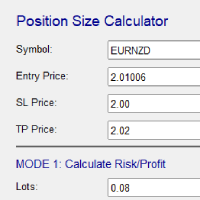
Risk and Position Size Calculator – Expert Advisor Utility A powerful and easy-to-use EA utility designed to help traders manage risk with precision. It automatically calculates the optimal position size based on your account balance, chosen risk percentage, and stop loss. In addition, it calculates potential profit and displays take profit levels directly on the chart. Fully customizable and compatible with all instruments and timeframes, it's the perfect tool for improving your risk management

TM Assistant Trade is a trading assistant tool designed for MetaTrader 5 (MT5). It helps users configure, monitor and manage trades directly on the chart through an interactive interface, minimizing manual operations and improving trading consistency. Introduction to TM Assistant Trade 1. Trading Interface
Line Function - Display on the trading screen (Entry price - Take profit - Stop loss) through icons and lines to help traders perform operations more conveniently.
Main area with screens displ

TradeMind Pro EA - Description Why TradeMind Pro EA is Essential for Your Trading Success Revolutionary LLM-Powered Trading: The world's first Expert Advisor built entirely on Large Language Model technology, bringing the power of advanced AI reasoning directly to your MetaTrader 5 platform. TradeMind Pro EA doesn't rely on traditional technical indicators or hardcoded algorithms – instead, it leverages cutting-edge Language Models (GPT-4, Claude, Gemini) to analyze market conditions with hu

Risk Panel VIP (MT5) Risk Panel VIP is a professional tool for MetaTrader 5 designed for fast, disciplined execution. It calculates position size from your balance risk and places Stop Loss / Take Profit accordingly. This is a trade management utility; it does not provide trading signals and does not guarantee any profit. Main functions Draggable Stop Line : place the stop on chart; the panel auto-calculates lot size from your configured risk % of balance (default 2%, editable). Context-aware a
MT5 → Telegram Notifier (Utility · Informers) Send trading events from MetaTrader 5 directly to Telegram. Perfect for journaling, team alerts, or remote monitoring. What it does Trade Open : posts BUY/SELL, BUY/SELL Limit, BUY/SELL Stop, lots, entry, SL/TP, local time. (Optional chart screenshot.) SL/TP Update : short message — only what changed (new SL or TP), posted as reply to the original trade message. Partial / Full Close : posts closed volume, price, Net P/L (swap + commission included),
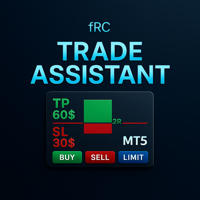
Manual trading panel — opens one test trade for validation only.
fRC Trade Assistant — Smart Manual Trading Panel fRC Trade Assistant is an intelligent trading panel designed for manual traders.
It allows you to open positions with one click, calculate lot size based on your predefined risk, and automatically place Stop Loss (SL) and Take Profit (TP) levels. For example, if your balance is $1000 and you set a 1% risk ,
the panel automatically calculates the appropriate lot size.
When the trad

PGS Trade Panel – Professional Trade Management Tool for MT5 Take full control of your trading with structured execution, real-time feedback, and customizable automation, all directly on your chart. Profit Guard System Trade Panel is an advanced on-chart trading tool designed to give you discipline, clarity, and precision in every trade. It supports manual, semi-automated, and automated workflows with multiple strategies that can be enabled, customized, or disabled at any time. Automatic Take P

Telegram Trade Notifier for MT5 is a professional notification system that sends instant messages to your Telegram group or channel every time a trade is opened or closed on your MT5 account. MAIN FEATURES Sends notifications for every trade open and close
Compatible with Telegram Groups, Channels, and Topics (threads)
️ Customizable scan frequency and filters
Persistent memory (no duplicate messages after restart)
Ignores trade history — sends only new events
️ 100% safe: no DLLs

AIX GROK FJU ASSISTANT | MetaTrader 5人工智能驱动的交易顾问 通过AIX GROK FJU ASSISTANT改变您的交易方式,这是一款先进的MetaTrader 5 (MT5) 专家顾问(EA),利用xAI开发的GROK尖端人工智能技术,提供实时技术分析和交易洞察。这款EA专为新手和经验丰富的交易者设计,将您的MT5图表连接到GROK AI,直接向您的Discord或Telegram发送数据驱动、无情绪干扰的交易信号。通过在每次K线收盘时分析图表数据,AIX GROK FJU ASSISTANT帮助您做出更明智、更快速的决策,以人工智能的精度增强您的手动交易策略。 无论您是进行超短线交易、波段交易还是管理长期头寸,这款EA提供无与伦比的灵活性和实时支持,帮助您在波动市场中保持领先。探索人工智能驱动的交易如何提升您的表现并在金融市场中开启新机遇。 为什么选择AIX GROK FJU ASSISTANT? 利用人工智能的力量,革新您的交易体验。以下是交易者信赖这款EA的原因: 实时人工智能分析:无缝连接MT5图表与GROK AI,在每次K线收盘时分析数

BTC Trading Assistant EA (MT5) Manual trading assistant that helps place and manage trades with automated risk and stop management. Overview BTC Trading Assistant EA is a utility Expert Advisor for MetaTrader 5 intended for manual traders. It provides a chart interface to execute BUY/SELL/CLOSE actions and automates selected trade management functions such as position sizing, initial SL/TP placement, break-even, trailing stop and optional partial profit taking. This EA does not generate trade si

Trade History By Magic Indicator Unlock Your Trading Insights with Trade History By Magic! Enhance your MetaTrader 5 experience with this powerful indicator designed for traders who demand precision and clarity. Trade History By Magic provides a clear, real-time display of your trading history, organized by magic numbers, directly on your chart. Perfect for both automated and manual traders, this tool helps you track performance effortlessly. Key Features: Organized Trade Tracking : Displays tra

Category: Utilities → Trade Panels
Version: 1.2 (auto-sizing buttons + adjustable font size) ClickCloserExpress is a super-lightweight panel for MetaTrader 5 that lets you close positions instantly by profit/loss, symbol, side (Buy/Sell), and magic number— without opening new trades or cluttering your chart. Perfect for manual/semi-auto management, scalping, and fast portfolio clean-ups. What it does One-click closing of: All positions. Profitable only or losing only . Symbol on chart o

【关于投资问题】
问题1: 当市场机会来临时,一般投资者都会疯狂下单。 疯狂下单,你无法知道是否会爆仓。唯一的 参考就是预付款比例,但 预付款比例无法准确判断你是否会 爆仓。 如果订单数量多,或者产品订单数量更多时,你是无法进行统计损失与盈利。如果能有一款工具能统计止损止盈及盈亏比,哪么就可以更好控制仓位及是否重仓博弈 。 哪么恭喜你,你找到了Fibo Trading Assistant MT5能帮你解决这个问题 ,并提供持订单与挂单订单的盈亏比统计。 问题2 : 如果你是一个高级的交易员,可能你会在某些关键位置进行布局挂单。通过手工挂单,图表可能没有位置给你挂单了。如果有 一款工具能帮你均匀布局订单就非常理想。 哪么恭喜你,你找到了 Fibo Trading Assistant MT5能帮你解决这个问题 ,并且是一键操作 。 问题3: 在 等 待机会时,可能你会先挂上一些挂单,同时设置好止损。手工操作这些挂单止损止盈都是不好设置的。 如果能有一款工具能帮批量挂好订单并设置好止损止盈。哪是该多好呀。 哪么恭喜你,你找到了 Fibo Trad

Followgram EA: Advanced Automated Trading Expert for MT5 Check out our Telegram or contact us for a free trial.( https://t.me/Followgram_EA )
We continue to develop the EA further.
We focus on one pair with both buy and sell trades.
We also have a test account that anyone can follow.
(This is not about profits, but about the features.)
Type: MT5 Demo ECN Number: 67167230 Password: Followgram2025! Server: RoboForex-ECN
Overview The Followgram EA is a sophisticated Expert Advisor for MetaTr

TradeVision is a simple and elegant performance indicator for MetaTrader 5. It was designed to give traders a clear and instant overview of their results. Gone are the days of digging through your account history! TradeVision displays a comprehensive and visually intuitive dashboard directly on your trading chart. At a glance, you can assess your efficiency and make more informed decisions. The widget displays your real-time performance statistics, segmented by key periods for a detailed and re

The Trade Panel Dashboard is a powerful, user-friendly interface designed to streamline and enhance your trading experience. This centralized hub provides real-time data visualization, advanced analytics, and seamless execution tools, empowering traders to make informed decisions with precision and speed. Key Features: Real-Time Market Data
Access live price feeds, market trends for multiple assets (stocks, cryptocurrencies, forex, commodities, etc.) in one consolidated view. Order Management
ATTENTION ! Utilities do not have a good functionality on backtest mode. For Having a Demo Trial, message me from message box and receive 3 days trial.
Our Team Services: If you are want to see our products click the link: LINK If you have an idea you'd like to develop into an application, click the link: LINK
Instant on-chart stop & target levels, from 1:1 up to 1:6. Trade Ratio Lines MT5 draws an open stop line and objective lines (take-profit) at fixed R-multiples relative to your entry

SFG Grid Manager MT5 – 智能网格与镜像系统 SFG Grid Manager MT5 是一款专业的自动网格管理器,它会跟随现有的仓位(手动或来自其他EA),并在每个设定的步长(GridPips)处自动开立一笔平均化订单。 当主仓位关闭或消失时,管理器所开的所有网格订单会自动关闭。
该系统兼容任何支持 Netting 或 Hedging 类型账户的经纪商,同时完全支持手动交易和外部EA协同工作。 ️ 主要功能 跟随主仓位(手动或来自其他EA)
每个网格步长只开一单——无马丁、无爆单
自动调整 Forex 与黄金的 GridPips 数值
具备点差与滑点保护机制
当主仓位关闭时,自动关闭所有网格单
兼容 Netting 与 Hedging 账户
日志清晰,参数设置简单
适用于任何经纪商与任何周期 推荐设置 • 外汇货币对(Forex): GridPips 20 – 30
• 黄金(XAUUSD): GridPips 200 – 500 提示:当 AutoAdjustGridPips = true 时,系统会自动设置安

此工具可帮助您管理交易。您可以设置目标 1、2、3(以点数为单位)以及您希望在这些目标位平仓的手数百分比。例如,您已将目标 1、2、3 设置为 5$、10$ 和 15$,大小分别为 40%、30%、30%。现在,如果您在 xauusd 4220 上入场,交易量为 0.1 手,那么它将在 5$ 目标位平仓 0.04 手,在 10$ 目标位平仓 0.03 手,剩余交易量将在 15$ 目标位平仓。
您也可以设置止损点(以点数为单位)。
止损点和目标位将在您交易时自动设置。
此外,还有追踪止损条件,因此在触及 tp1 后,止损可以移至入场点;在触及 tp2 后,止损可以移至 tp1。您可以打开或关闭此条件。
图表上会有一个面板显示所有止损和止损的详细信息,以便您轻松查看点数。 Cǐ gōngjù kě bāngzhù nín guǎnlǐ jiāoyì. Nín kěyǐ shèzhì mùbiāo 1,2,3(yǐ diǎnshù wèi dānwèi) yǐjí nín xīwàng zài zhèxiē mùbiāo wèi píng cāng de shǒushù bǎifē

RM Pro – 高级交易管理器
更聪明地交易,而不是更辛苦地交易
不再为计算手数、风险比例或止损价格而烦恼。 RM Pro 让您保持头脑清晰,专注于 交易策略与入场时机。 只需设置 风险金额 和 止损价格,然后 单击 Buy 或 Sell, EA(智能交易顾问)将立即执行订单 —— 自动计算正确的手数, 设置止损,并根据您定义的风险进行管理。 甚至挂单(Buy Limit 和 Sell Limit)也能自动精准下单与管理。
RM Pro 为那些希望摆脱过度思考和人工错误的交易者而设计, 无论您是在挑战 资金账户(Prop Firm)、管理 PAMM 账户, 还是操作 个人账户, 它都能帮助您以纪律、精确和自信的心态进行交易。
---
为什么交易者喜欢 RM Pro
自信交易 —— 无需再进行繁琐的数学计算或手动计算手数。
自动基于美元金额的风险管理。
非常适合 资金账户挑战、PAMM 管理者 和 个人交易者。
节省时间、减少错误、增强纪律性。
实时交互面板即时显示利润、亏损和风险比例。
RM Pro 不仅仅是一个 EA, 它是您的个人 智能交易助理, 负责

Operative Management Pro – Advanced Trading Utility Operative Management Pro is a smart visual tool for traders who want to analyze and simulate their trades before placing them on the market. This panel displays in real-time the most important parameters of the current symbol: Current price and minimum lot size Required margin Spread cost in USD and pips Take Profit and Stop Loss value in USD Automatic risk and reward calculation With just a click on the chart, you can simulate BUY or SELL t

Overview MAVIS Trader is a powerful one-click trading panel designed for traders who value speed, clarity, and precise control.
It lets you open multiple Buy/Sell positions instantly, automatically synchronize SL/TP levels across all open trades, and close every position on the symbol with a single click.
Perfect for scalpers, grid traders, and anyone who needs consistent, mirrored risk management without manual editing Key Features One-Click Buy/Sell: Open several trades at once with your

️ EquityShield is your automated risk management guardian for MetaTrader 5. If you've ever exceeded your daily loss limit, struggled to enforce your own trading rules during volatile markets, or wanted to automatically lock in profits when you hit your targets, EquityShield is built for you. This is not a trading strategy - it's a safety system that watches your account 24/7, automatically closes positions when your risk limits are breached, and helps you maintain consistent trading discipline

K线终结者 - 精准把握每一秒的倒计时工具 核心摘要: 还在为不确定当前K线何时结束而焦虑吗?‘K线终结者’是您交易工具箱中不可或缺的利器!它通过一个清晰、直观的倒计时器,实时显示当前活跃K线剩余的精确时间,帮助您避免在K线转换的混乱时刻做出仓促决定,从而更从容地入场、离场或管理订单。 1. 产品概述 “K线终结者”是一款轻量级、高效率辅助指标。它的核心功能是 实时计算并显示当前周期下最后一根K线的剩余时间 。无论您是短线交易者、剥头皮高手还是波段操作者,这款工具都能为您提供至关重要的时间维度信息,让您的交易决策更加精准和自信。 它不仅是一个简单的倒计时器,它是一位无声的交易助手,是您提升交易精准度和专业度的秘密武器。在瞬息万变的市场中,每一秒都至关重要。 2. 主要功能与特点 实时精准倒计时: 在主图表上以清晰的大字体动态显示当前K线剩余的分钟和秒数,让您对时间流逝一目了然。 可定制化显示 :您可以随意将倒计时放到图表上任何不碍眼的位置。自定义字体尺寸、颜色,确保其与您的交易界面风格一致。 广泛兼容性: 支持所有时间周期,从1分钟图到月线图,适用于平台上的任何交易品种包括外汇、股票
FREE
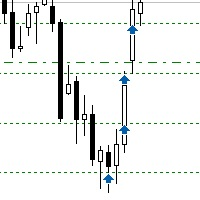
Sometimes the markets are in such a trending phase that it is impossible not to notice and it is enough to simply buy with the trend. 1) So, we scroll through the charts of different instruments, and see a good entry point, so let's specify the desired price for the first order in the Price_for_First_Order parameter and the direction in the Trend_Direction parameter, this is already enough for a good deal. (If Price_for_First_Order=0, the position will open immediately at the market price.) 2) T

Indique facilmente zonas de preço com espaçamento fixo!
O Price Steps Marker desenha linhas horizontais automáticas a cada 5 unidades. Price Steps Marker é um indicador visual simples que organiza o gráfico em zonas de preço equidistantes.
Ele marca automaticamente linhas horizontais a cada valor de 5 em 5 unidades, tanto acima quanto abaixo do preço atual — facilitando a leitura de volume.

This EA help traders close their open positions at a specific MT5 server time before news or before ending of H4 timeframe of the morning New York session to protect their profit or prevent from unexpected loss. The default setting is 19:30 (HH:MM) and you can adjust as require to fit trading strategies. It very user friendly where contain only single input parameter to specify a time that position will be closed.

Product Overview Trade with Natural Language, Let AI Execute Fully. This is a revolutionary MT5 trading program that allows you to describe trading strategies directly in natural language. AI will fully understand and automatically execute all trading operations. No programming knowledge required - simply describe your trading ideas, and the system will fully manage your trading account. It executes your strategy with creativity and optimizes trading strategies on its own! Contact me for a 15-d

Alfa for MT5您的智能交易指挥中心 告别繁琐操作,专注决策本身。 是否厌倦了在多个图表窗口间手忙脚乱?是否曾因订单管理混乱而错失良机或蒙受损失? Alfa 为您而生。它不仅仅是一个工具,更是您部署于MT5/MT5平台的 交易指挥中心 ,旨在通过自动化与智能化,将您从重复劳动中解放,让您专注于捕捉市场机遇。 核心功能,直击交易痛点 全景式持仓管理
“一眼掌握全局,一键高效平仓。”
实时聚合所有订单与持仓,盈亏状况一目了然。支持 一键全平 、 一键平盈利单 或 平亏损单 ,助您在市场异动时快速反应,牢牢锁定利润。 深度盈亏统计
“不止于统计,更在于洞察。”
提供日、周、月、年等多维度可视化报告,清晰展示您的资金曲线与交易习惯。基于数据复盘,助您优化策略,实现持续成长。 ️ 精准订单监控
“秩序井然,掌控自如。”
全面监控所有挂单与活跃订单,配合自定义警报功能,确保没有任何交易机会在混乱中被遗漏。 高效复制交易
“策略同步,一劳永逸。”
轻松实现 模拟盘与实盘 、或多个实盘账户间的交易信号同步。无论是策略验证还是资金管理,都能极大提升效

部分平仓管理器 – 交易量智能调整工具 部分平仓管理器是一款专为 MetaTrader 5 平台设计的智能交易辅助工具,帮助交易者高效地管理持仓风险和利润。通过该工具,您可以在不完全关闭订单的情况下,仅平掉部分持仓,以锁定部分收益或减少潜在损失。这对于执行复杂的资金管理策略和动态仓位控制尤为有用。 功能特点: 部分平仓操作: 允许用户通过单击一次就能关闭所选持仓的一部分,无需手动输入复杂的数量。 自动计算交易量: 系统自动计算应关闭的手数,确保精确和快速,避免输入错误。 多订单同步支持: 可同时对同一品种下的所有持仓执行部分平仓,极大提高操作效率。 灵活拖拽界面: 用户可以点击并按住表格标题,将其移动到图表任意位置,操作更直观。 无论您是进行短线交易还是中长期策略,该工具都能帮助您更精确地控制交易节奏,实现稳定的资金管理。

Description SilverEdge Trade Console is a fast, layer-based trading console for MT5 that lets you place, manage, and exit trades in a few keystrokes. It combines one-tap market orders, guided pending orders, per-layer TP/SL control, and a built-in break-even/trailing engine—wrapped in a clean dashboard that docks anywhere on your chart. Designed for scalpers and intraday traders who need speed, consistency, and clear logs. Features Layer-Based Workflow (1–9): Assign and work within layers to sep

EA Info Display Master Stop clicking through charts to find your EA configurations! Get a complete overview of all running Expert Advisors with their symbols and magic numbers in seconds. Managing multiple EAs across different symbols? Monitoring performance on FX Blue or other platforms? This tool instantly displays: All running EA names Their symbols and magic numbers Account details (number, broker, currency) Direct FX Blue statistics links (other provider will follow! Tell me what you need)

Apeiron Edge Alerts - Advanced Price Level Alert System Overview Apeiron Edge Alerts is a powerful and intuitive alert management tool designed for active traders who need reliable notifications when price reaches critical levels. Track unlimited price levels across multiple timeframes with customizable alert settings, visual feedback, and persistent session management. Key Features Flexible Alert Creation Draw Mode : Click anywhere on the chart to create instant horizontal line alerts Make M

Colors schemes powerful MetaTrader 5 script designed for traders who value speed and a personalized trading environment. With a single click, you can instantly transform your chart's appearance using one of several professional, pre-designed color schemes, including popular styles like ICT/SMC. How to Use: In your MetaTrader 5 terminal, open the Navigator window (Ctrl+N). Find the Colors schemes script under the "Scripts" section. Drag and drop the script onto the chart you want to customize. A
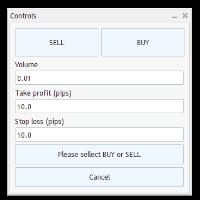
Trade Panel – Smart Order Execution Tool for MetaTrader 5 Trade Panel is a lightweight and intuitive trading assistant designed to simplify manual order execution in MetaTrader 5. It allows traders to quickly place BUY or SELL orders with custom lot size, stop loss, and take profit values — all managed through a clean, responsive interface. Key Features: Fast order placement with one-click confirmation Real-time visualization of Stop Loss and Take Profit lines Editable fields for lot size and pi

Guardian Equity PropFirm EA for MetaTrader 5 Guardian Equity PropFirm is an Expert Advisor designed to automatically enforce daily and monthly loss limits. It is especially useful for accounts subject to strict risk management rules, such as those required by proprietary trading firms. The EA continuously monitors the account and performs automated actions if predefined thresholds are exceeded. Key Features Daily loss control: Set a maximum daily loss percentage (e.g., 4%). Monthly loss c

RC Trade Helper 是一款为手动交易者设计的综合交易助手。该应用提供一套可视化工具,用于在图表上直接进行快速订单下达、高级风险管理和高效交易管理。
注意: 在购买前,您可以在模拟账户上测试该应用程序。该产品不能在策略测试器中运行。
交易操作
允许一键执行和管理交易:
* 在图表上开立市价单和挂单(止损,限价),并提供水平位视觉确认。 * 平掉所有市价仓位或删除所有挂单。 * 选择性平仓:多头仓位、空头仓位、多头挂单或空头挂单。 * 将所有制图线(入场、止损、止盈)重置到图表上的默认位置。 * 隐藏或显示所有交易线,以保持图表工作区的整洁。 * 锁定交易线以防止意外移动,或反转交易设置。
仓位大小和风险管理
提供多种交易量计算方法:
* 固定手数大小。 * 账户余额的风险百分比。 * 账户余额的利润百分比。 * 基于止损距离的固定货币风险。 * 基于止盈距离的固定货币目标。 * 实时显示风险/回报比、潜在利润和潜在亏损。
订单和风险配置
开立订单时,可应用以下功能:
* 通过动态信息标签可视化入场、止损
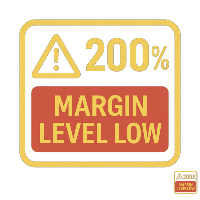
Margin Level Monitor EA Stay ahead of margin calls with real-time alerts and visual feedback. This Expert Advisor is designed for traders who prioritize risk management. It continuously monitors your account’s margin level and triggers alerts when it drops below a customizable threshold (default: 200%). Whether you're trading manually or using other EAs, this tool keeps you informed and protected. Key Features: • Continuous Monitoring: Checks your margin level every few seconds. • Mult
General Overview This Expert Advisor (EA) is a semi-automatic trading assistant for MetaTrader 5 that provides a graphical user interface (GUI) panel directly on the chart.
It allows traders to quickly place pending orders (Buy Limit, Sell Limit, Buy Stop, Sell Stop), set Stop Loss (SL) and Take Profit (TP) levels for all positions, close all open trades, and delete pending orders. Key Features Interactive Control Panel:
Displays input boxes, buttons, and labels on the chart.
You can manu

Auto SL/TP Manager (自动止损止盈管理器) 永远不要让手动交易失去保护! 您是否曾经匆忙开仓而忘记设置止损 (Stop Loss) 或止盈 (Take Profit)?"Auto SL/TP Manager" 是您必不可少的安全网。 这款 EA (智能交易系统) 24/7 全天候监控您的账户,并自动将您预设的风险 (SL) 和利润 (TP) 水平应用于任何缺少这些设置的未平仓头寸。 对于 手动交易者 、 剥头皮交易者 ,或任何希望确保 每笔 交易都按照其策略受到保护的人来说,这是一个完美的工具——即使是从移动设备上开立的交易。 主要特点 完全自动化 :持续扫描并为没有止损/止盈的未平仓交易应用 SL/TP。 高度可配置 :轻松以点数 (Pips) 定义您的止损和止盈 (例如, 5.0 = 50 点)。 强大的过滤功能 :选择将其应用于 所有 交易品种、特定交易品种,或仅应用于当前图表的交易品种。 魔术数字 (Magic Number) 过滤 :隔离来自其他 EA 的交易,或仅专注于您的手动交易 (Magic Number = 0)。 “强制”模式 (可选) :即使 S

The Performance Logger is a utility for MetaTrader 5 designed to track and report account metrics. It identifies trades based on specific criteria and provides summaries of account activity. Main Functions Automated Reporting : Generates summaries of account performance and sends them to specified communication channels (Telegram or Discord) on a weekly, monthly, or yearly basis. Strategy Analysis : Organizes performance data based on the specific Expert Advisor or strategy used for each trade.

Tired of fumbling with lot size calculations and manually managing every trade? The Visual Risk Manager (VRM) is a professional-grade trading panel designed to streamline your trading and enforce discipline. This Expert Advisor is not a strategy; it's a powerful utility that allows you to manage your risk and execute trades with unparalleled speed and precision, directly from your chart. Why You Need the Visual Risk Manager Stop letting emotions and guesswork control your trading. VRM ensures t

FJUNIVERSE | MT5 波动率与最小手数快照工具 一键强大扫描器,立即揭示您市场观察列表中每个品种的真实风险与波动率 —— 使用当前图表时间周期。 此脚本计算经纪商定义的最小手数对应的美元风险值,并基于所有已加载K线生成完整的波动率画像。结果保存为清晰的 CSV 文件,同时输出到 MetaTrader 日志,并附带分析的K线数量。 功能特性: 计算 MINPRICE:价格跌至零时的风险,使用公式 最小手数 × Ask价 × 合约规模 显示 SNAP:当前Ask价格,完整精度 展示 MINLOT:经纪商允许的最小交易手数 计算 波动率(始终为正值) 基于全部可用K线: AVGD 平均日波幅 % ( |H-L|/O ) AVGL 平均上涨幅度 % ( |H-O|/O ) AVGS 平均下跌幅度 % ( |L-O|/O ) MINL 最小非零上涨幅度 %(排除持平) MINS 最小非零下跌幅度 %(排除持平) MAXL 最大上涨幅度 % MAXS 最大下跌幅度 %(取绝对值) BARS 分析的K线数量 导出 11列CSV: PAIR,SNAP,MINPRICE,MINLOT,AVG

GUARDIAN EA PRO - SMART ACCOUNT PROTECTION "Don't let losses get out of control - Let Guardian protect you 24/7!" KEY FEATURES SMART ALERT SYSTEM Step-by-step alerts by profit/loss percentage (5%, 10%, 15%...) Real-time notifications via Telegram & Push Notifications Customizable intervals between alerts EMERGENCY PROTECTION Auto close all positions when reaching maximum loss threshold Drawdown protection - Prevent deep losses Trading time limits - Safe automatic

The follow-up feature allows you to automatically open layers.
You can configure it to open up to x layers with three different take profits. You can also set the take profits as percentages. For safer trading, you can enable the trailing option — either starting from the take profit or after a certain number of pips. You can use or test it for free — visit our Telegram and ask about the available options.
We stand behind our products and always strive for improvement.
Free use is also available

新店优惠:仅限前10名。特价:$30 (原价:$40)。剩余名额:10 为了提高知名度,前10位购买者可享受此折扣。
轻松瞬间捕捉“想要查看的时间”。为多周期分析提供极致同步。
在高周期关注的时间点,在低周期图表的什么位置?
您再也不用为了寻找它而反复滚动图表。 不仅支持单图表高速移动,更能高精度同步多个图表,实现目标时间点的一齐聚焦。
消除“寻找的压力”,将分析精度提升至极限。 这是一款能显著改变您图表分析方式的聚焦特化型工具。 产品概要
【3种可选聚焦模式】 Single Line:一键聚焦移动至一个指定的时间点 Multi Lines:设定多个时间点,按顺序进行聚焦移动 SnglSync:同步多个图表,一齐聚焦移动至一个指定的时间点 【主要使用优势】 瞬间复归:无论如何移动图表、缩放或更改周期,只需点击一下即可瞬间将焦点移回原目标点。 提高验证效率:在多个设定的时间点之间平滑地进行聚焦移动,飞速提升回测和比较分析的速度。 多角度分析:通过同步不同周期或相关货币对进行一齐聚焦,强力支撑多维度的环境识别和复盘训练。 主要按钮功能
按钮名称 功能 说明 FocusMode 切换聚

Momentum Candle Alert — 捕捉主力动向 不要错过主力的市场动作!
Momentum Candle Alert 帮助您在动能蜡烛出现时即时识别强劲行情,轻松掌握关键市场波动。 工作原理:
将警报添加到图表中,选择您想要的时间周期,并设置要提醒的点数或美元波动范围。 主要功能: 实时监控价格变化。 当蜡烛波幅超过设定的点数或美元阈值时自动提醒。 支持三种模式: 仅看涨、仅看跌或两者兼有 。 默认模式为 仅看涨 ,可轻松切换。 轻巧快速,占用资源极少。 帮助您无需盯盘即可追踪市场动能。 非常适合希望捕捉市场动能而不复杂化操作的交易者。
简洁、可靠、功能实用,是监控价格波动的理想工具。
Momentum Candle Alert — 让每一次重要的价格突破都不再被错过。

Sniper Utility Rimani sempre aggiornato sui tuoi trade, ovunque tu sia. Sniper Utility invia notifiche immediate ogni volta che uno dei tuoi ordini raggiunge il Take Profit o lo Stop Loss .
Perfetta per trader attivi che desiderano monitorare le proprie operazioni senza dover controllare costantemente il terminale. ️ Funzionalità principali Notifica istantanea alla chiusura dell’ordine (TP o SL) Compatibile con notifiche push su dispositivi mobili Supporto per ordini manuali, EA e p

## ️ Descrizione
**Margin Alert Notifier** è una utility che monitora in tempo reale il livello di **margine** del tuo conto di trading e ti **avvisa immediatamente** quando scende sotto una soglia definita. Ti aiuta a prevenire situazioni di *margin call* o *stop-out*, mantenendo il controllo del rischio in ogni momento.
---
## Funzionalità principali
- Avviso automatico quando il **Margin Level (%)** scende sotto la soglia impostata. - Messaggio personalizzabile (puoi inseri

1. Brief Description of Gina Panel Code Functionality for End User The "Gina Panel" is a customizable trading dashboard Expert Advisor (EA) for MetaTrader 5 (MT5). It provides a graphical user interface (GUI) overlay on your chart to simplify trading and account management. Key functionalities include: Account Monitoring : Displays real-time balance, equity, profit/loss, margin levels, and net positions in a compact panel. Trade Execution : Quick buttons for buying/selling at market, setting lot

HotKey Trade: Invisible and Fast Execution It is a minimalist order executor designed for scalpers and price action traders. It eliminates cumbersome panels and operates at maximum speed using only your keyboard.
Key Points:
100% Clean Chart: No panels or buttons blocking your view of the price. Instant Execution: Fires orders to the market without menus or clicks. Dynamic Lot Management: Change your volume and view it only when you need it Quick Commands:
[ C ] – Buy (BUY) [ V ] – Sell (SELL
MetaTrader市场是一个简单方便的网站,在这里开发者可以出售自己的交易应用程序。
我们将帮助您发布您的产品,并向您解释如何为市场准备您的产品描述。市场上所有的应用程序都是加密保护并且只能在买家的电脑上运行。非法拷贝是不可能的。
