 MetaTrader 5
 エキスパート
 インディケータ
 ライブラリ
 ユーティリティ
 ウィジェット
 ルール
YouTubeにあるマーケットチュートリアルビデオをご覧ください
ロボットや指標を購入する
仮想ホスティングで
EAを実行
ロボットや指標を購入前にテストする
マーケットで収入を得る
販売のためにプロダクトをプレゼンテーションする方法
MetaTrader 5用取引ユーティリティ - 55
 以下はMetaTrader5での取引を簡素化する取引プログラムです。ユーティリティにカーソルを合わせると、その説明と目的が表示されます。

Take control of your operations efficiently at trading, mannaging by an smart way the risk of your positions. Whit this tools, you can:
Estimate the potencial profits or losses from your operations, either in money or pips. You also can visualize profits or losses by substracting the spread cost previusly configured in the tool’s input parameters. Calculate the lot size or margin required for your orders. Estimate the risk/reward ratios of your positions. Study the negative impact of the spread
TradeFlow ダッシュボード MT5 は、取引管理のパラダイム シフトを表し、リスク管理戦略を強化し、Meta Trader 5 プラットフォーム内での意思決定を合理化するように調整された堅牢で多用途のソリューションを提供します。 洗練されたユーザーフレンドリーなインターフェイスを備えたこのツールは、従来の取引体験を超え、特にパフォーマンスを向上させたいと考えているマニュアルトレーダーに応えます。
TradeFlow ダッシュボード MT5 の主なハイライトを詳しく掘り下げて、各機能がシームレスで強力な取引体験にどのように貢献しているかを探ってみましょう。
シームレスな注文執行: TradeFlow ダッシュボード MT5 を使用すると、買い、売り、指値、ストップ注文を比類のない簡単に実行できます。 固定ロットサイズを好む場合でも、パーセンテージによるリスク管理を好む場合でも、このツールは独自の取引スタイルに適応し、あらゆる取引で正確さと制御を提供します。
トレーリングストップを簡単に有効化: ワンクリックでトレーリングストップを有効にすると、市場の動的な性質を乗り切るた

Safety Control: Your Ultimate Balance Management Solution for Prop Firm Challenges Overview Tired of manually monitoring your trading activities in prop trading challenges? Meet Safety Control, an advanced Expert Advisor for MetaTrader 5 that will change the way you trade forever. This proprietary software aims to help you manage your balance effortlessly during prop firm challenges. Features Automated Drawdown Control : Safety Control continuously monitors your account's balance and equity in r

O SupRes Master é ferramenta essencial para traders, fornecendo alertas instantâneos sempre que o preço de um ativo fecha acima de uma resistência crucial ou abaixo de um suporte vital.
Além disso, ele simplifica a análise técnica ao destacar esses níveis críticos no gráfico, usando cores distintas para identificar níveis de suporte em azul e níveis de resistência em vermelho.
Essa abordagem visual torna mais fácil para os traders identificarem oportunidades de entrada ou saída, melhorando sig
This EA will automatically close all open order when profit or loss is reached according to users setting. You need to select close by percentage or close by amount. If close by percentage or close by amount is set to true the EA will exit. When the setting is set to true, the value of profit and loss can not be 0. Please set to true the option for Close Order with Same Symbol or Close All Order.

The Wall Street Player (Master version). This EA tailored as a Discipline, Money and Risk Management tool is a powerful Trade Station utility designed for Forex, Cryptos, Commodities, Shares, Deriv synthetic pairs and any CFDs Market. It is designed to fit your strategy as a winner, and take your Edge of the market to the NEXT-LEVEL. The only thing to do is to get It on your chart and appreciate the possibilities and chart management abilities it has to offer for realizing that discipline and a
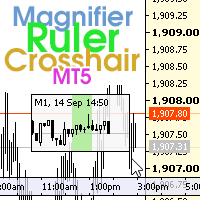
The indicator has three main tools: Magnifier (Zoom chart), Ruler ( Time and Price scales ), and Crosshair. You can move it all around with your mouse and customize different formats for displaying , customize size and color of each element.
The Magnifier (zoom chart) allows you to display candles from any time frame and at different scales.
Hotkeys: 'Q' - higher timeframe, 'A' - lower timeframe, 'W' - decrease candle size, 'S' - increase candle size, 'Z' - show/hide zoom chart. You can
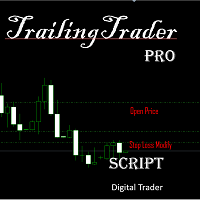
TrailingTrader MT5 – Trailing Stop-Loss and Take-Profit Script Upon activation of the TrailingTrader script , open positions of specified trading instruments in the quote window will automatically implement an intelligent trailing stop strategy. This helps traders lock in profits and manage risks without the need for manual monitoring and adjustments. Core Configuration Parameters Symbol : Specify the trading instruments for which trailing stops should be applied. Use English commas (,) to sepa

This utility automatically places Stop Loss and Take Profit levels on newly opened positions. The Stop Loss and Take Profit values are specified in pips. The utility can also move Stop Loss to Break Even and trail the Stop Loss after a specified profit level is reached. Input Parameters SL and Trailing SL Stop Loss value in pips. If trailing is enabled, the same value is used as the trailing Stop Loss distance. Trailing Steps Distance in pips required before the Stop Loss is updated again while
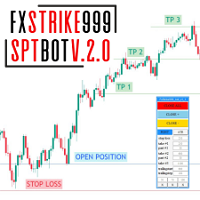
FxStrike999_SPT_bot prop helper は、心理学に問題がある人、心理学に問題がある人のために特別に設計されたユニークなボットです。 置かない人は立ち止まり、利益を得ず、最終的には預金を失います。しかし、私たちのボットを使用すると、これらすべての問題が解決されます! FxStrike999_SPT_botを使用すると、預金が着実に増加する新しいレベルの取引に到達します そして、あなたはあなたのポジションについて心配するのをやめるでしょう、ボット自体はストップロスを設定し、部分的に利益を修正します (各レベルの固定率を設定する機能を備えた3つのレベルの利益確定)、 また、突然の逆転の場合にストップロスをトロールします。 利益を可能な限り節約:)また、ワンクリックで、すべての負け取引、またはすべての収益性の高い取引を閉じることができます。 またはワンクリックですべてのトランザクション。コントロールパネルには、最も必要な機能がすべて表示され、ワンクリックで必要なパーセンテージを閉じることができます ボックスに1〜100%の値を入力して位置します(そのようなボックスは

Live testing available. Please contact.
ATR Auto Stop Loss & Take Profit Manager Automatically apply volatility-based Stop Loss and Take Profit levels to every new trade using the Average True Range (ATR). Unlike fixed-pip stop losses, ATR-based levels adapt to current market conditions. During high volatility, wider stops help prevent premature exits. During low volatility, tighter stops help improve risk efficiency. The utility automatically calculates and applies Stop Loss and Take Profit le

This utility tool helps us to open trades and set orders very simply by just double-clicking on the chart. The volume of the positions and orders can be a constant lot size or determined based on a risk of equity. Take profit limit of the positions can be determined based on a Risk to Reward Ratio or simply by just a double-click.
For Positions: 1- At first, you need to double-click on the SL price. (For a buy position, you need to click on a price below the live price, and for a sell positio

外国為替市場をより効率的かつ有利に取引する方法をお探しですか?私たちはあなたが探しているソリューションを持っています! 利益を最大化し、リスクを最小限に抑えるように設計された革新的なツールである、当社の革新的なエントリー価格平均 EA をご紹介します。 私たちの EA が他と比べて際立っている理由は何ですか? 答えは簡単です。平均価格が自動的に計算されるからです。ロットや価格レベルが異なる複数のオープン取引を管理でき、面倒な作業はすべて EA がやってくれると想像してみてください。当社の EA を使用すると、複雑な手動計算を忘れて、自動化の精度と効率を利用できます。 仕組みは? 当社の EA は、すべてのオープン取引を考慮して、新しい損益分岐点をリアルタイムでインテリジェントに計算します。購入の平均エントリー価格、販売、および購入と販売の両方を考慮した追加の線に関する明確かつ簡潔な情報が提供されます。これにより、あらゆる段階で情報に基づいた戦略的な意思決定を行うことができます。 しかし、それだけではありません。当社の EA には、取引を簡素化する追加機能も装備されています。数回クリック

Risk Oracle - Expert Advisor Description Risk Oracle is a sophisticated yet user-friendly Expert Advisor (EA) designed for risk management and trade execution. This utility tool is tailored to assist traders in executing orders at optimal prices while managing risk efficiently, without the need to manually calculate volumes and other parameters. By automating these critical aspects, Risk Oracle simplifies the trading process and allows traders to focus on strategy and market analysis. All Produc
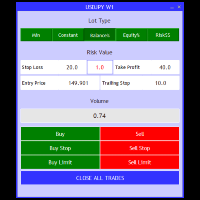
The Trade Manager is a visual trade panel that makes it simple to place and manage trades, preventing human errors and enhancing your trading activity. - Very Easy to use - Trade easily from the chart - Trade with precise risk management - Offers different risk management options to calculate appropriate lot size. - A powerful risk and position management approach

//--- indicator settings input string Custom_Symbol_SetName = "Nayuta"; Custom_Symbol_SetName パラメータはカスタマイズされたグラフの品種名として使用されます。この名前の下でカスタマイズされたグラフは、サービスを起動した後にアカウントの純価値の変化を記録し、取引を分析するのに役立ちます。すでに在庫の変化統計を分析し、ろうそく図のようにコンピュータのグラフに表示し、より直感的に、より直接的に取引履歴を分析し、アカウントのリスクの変化などを分析し、5ミリ秒ごとの記録頻度で、あなたの資金の変化を完全に記録することができます。何も残されていません。もちろん、サービスを開始した後に構築されます。 注意事項:本プログラムは実際のアカウントの下でのみ実行され、シミュレーションアカウントは変化を記録せず、仕事の状態にも入らない。 より良いアドバイスがあれば、コメントエリアにコメントしてください。私は最初に返事をします!

Executor Trader Panel (Sta) - Standard Version is a multi-functional trading tool designed for traders. The trading panel integrates over 30 individual functions and more than 10 combined functions, providing traders with a highly flexible operational approach.
Adapted for DPI: 96, 192.
Main Features of the Executor: Instant Connection Status: Immediately know if the connection with the broker is lost. Time Synchronization: Instantly know the current local time and the time of the trad
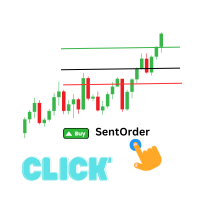
This program is a GUI for issuing orders that can be done more quickly. Faster TP SL setting This program is not an automated trading platform. Trading is risky, please manage your risk. We do not accept any responsibility. It should be tried with Demo before using it with Real. Normally, the setting sets the risk to 1:1 to shift manually or to enter the risk to x:1, where x can be entered and everything can move freely. Thank you to all customers who have purchased our products. We would like t

The Trades To Telegram is a powerful and customizable trading assistant designed to bridge the gap between the MetaTrader 5 platform and the popular messaging app, Telegram. This bot serves as a crucial tool for traders, providing them with timely and accurate trading signals, alerts, and updates directly to their Telegram accounts.
Key Features: Real-Time Signals: The bot monitors the MetaTrader 5 platform continuously, detecting trading signals, such as Opening/Closing of buy/sell orders , a
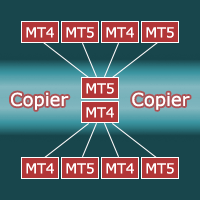
Copier for the MetaTrader5 terminal. Designed to copy trade from one terminal to another. Works both on netting and hedging accounts. Copying from a netting account can be performed simultaneously to both netting and hedging accounts. Also, from a hedging account, copying can be performed simultaneously to both netting and hedging accounts. Compatible with the version for the MetaTrader4 terminal; if available, copying can be performed between different terminals (also regardless of the type of
*** Introductory Offer! *** Ends soon - Price will increase - do not miss it!
This EA Closes ALL open trades (with the same magic number on the that pair) at a certain level of profit - either in money or in percentage of balance.
So if you have multiple trades open, you can choose to close them all as one "basket" using this EA. For spreads from a tiny 0.1 pips RAW/ECN Accounts, click here . Check out my Waka Esque EA signal here: >> High Risk Settings or Medium Risk Settings .
Setti
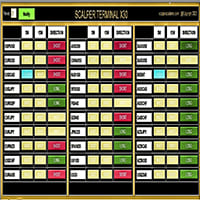
Scalper Terminal インターフェイス ソフトウェアはインジケーターであり、自動売買取引には関与しません。 このインジケーターは、スキャルピング取引機会が発生したときに取引を開始できる現在の取引ゾーンを示します。 スキャルピング シグナルがある場合、関連する取引ペアの右側にターコイズ色のライトが点灯し、その上に正確な取引方向が表示されます。 その後、「ターコイズ」ボタンをクリックしてトランザクションを入力します。 新しいタブが開きます。 その後、ローソク足の終値が予想され、これがスキャルピング取引に参加するための条件となります。
Scalper Terminal でスキャルピング取引取引を成功させるため;
説明セクションにあるビデオを必ずご覧ください。 兵士のように Scalper Terminal ソフトウェアに固執します。 各取引ペアの右側には、5M、15M、および DIRECTION 列があります。 まず、「通知」ボタンをクリックして緑色にします。 常に画面を見続ける必要はありません。 ターコイズ色の光信号またはメタトレーダー警告メッセージ音が鳴るのを待ってくだ

トレード中の「めんどくさい」「見落とした」を、すべてワンクリックで自動化。 マルチポジションの管理、 一括決済、 リスクコントロールに悩むすべてのトレーダーへ。
TrimPipsとは? TrimPips MT5 は、 日々の複雑なポジション管理や利確・損切りのストレスを劇的に軽減し、 あなたの裁量トレードを強力にサポートする プロフェッショナル向けトレーディングユーティリティ です。 チャート上から目を離さず、 一瞬の判断が生死を分ける相場の世界で、 あなたの「やりたい」を指一本で実現します。
こんなお悩みを一気に解決します 「現在のポジションの総合計や、 今触っている通貨の合計pipsをひと目で把握したい」 「プラス、 マイナス、 ショート、 ロングなど、 特定の条件ごとに合計pipsを管理したい」 「複数のポジションや特定の条件を満たしたものだけを、 一撃で一括決済 したい」 「エントリーと同時に、 あらかじめ決めたpipsで TP(利確)/ SL(損切)を自動設定 したい」 「逆指値が自動で追従する トレーリングストップ で利益を最大限に伸ばしたい」
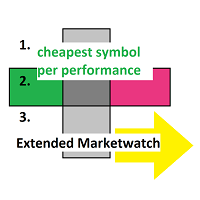
Extended MarketWatch calculates multiple numbers as a characterization of their symbols in addition to the default ones. They are often simple mathematics or just read for comparison. These are the percentual spread, also in comparison to the known daily change and with leverage, the leverage of each symbol and an example of the real profit.
BID, ASK, SPREAD, DCH: The prices, absolute spread and the last daily change of the price are repeated for overview. PRSPRED: This enables to view the spr

Apart from psychology, another thing that makes traders successful is risk management. This utility helps the trader in risk management, order management, and monitoring the profits that are made within a certain period. The utility works on the forex market. inputs: The following are inputs that are required before an order is executed · Sl- this is the stop loss in pips. · Tip: this is the take profit in pips. · Risk%: the percentage of the equity that the user wants to ri

チャート上の経済イベントの視覚化 多機能ユーティリティ: 66以上の機能を含むこのインジケーター | ご質問があればご連絡ください | MT4バージョン このインジケーターは、経済ニュースが近づいているときに垂直線を描きます。
入力設定で 調整できます: 現在のシンボルにのみ適用 :trueの場合、選択されたシンボルの イベントのみ が表示されます。 過去のイベントを表示 :trueの場合、 過去のイベント がチャートに残ります。 色 : 3種類のイベントごとに別々に設定。 ブローカー時間とGMTの差: あなたのブローカーの時間とグリニッジ標準時(GMT)の差を設定してください。 代わりに [自動時間同期] オプションを使用できます:市場が開いている場合、時間が同期されます。 手動で時間を設定する場合:
ブローカーの時間は 'Market watch' (View -> [Market Watch]) で確認できます;
GMT = 17:30、ブローカー時間 = 19:30 の場合:値は +2 (時間) です。
GMT = 17:30、ブ

Setting Up a Telegram Bot for MetaTrader 5 (MT5) MetaTrader 5 (MT5) is a powerful platform for trading, and integrating it with Telegram can help you receive trading updates and alerts efficiently. Follow these steps to set up a Telegram bot for MT5: Launch Telegram : Begin by opening the Telegram app on your device. Search for "BotFather" : In the Telegram search bar, type "BotFather" and select it from the search results. Create a New Bot : Send /start to BotFather. Next, send /newbot to initi

This EA is capable of sending transaction details to any Telegram channel passed as a parameter.
The format in which the text will be sent to the Telegram channel is shown below:
BUY EURUSD SL XXXX.XX TP XXXX.XX
In case of TP donation, it will be sent to the telegram channel after the transaction is executed in a separate message and the format will be...
SET TP XXXX.XX
To set the SL, it will be sent to the telegram channel after the transaction is executed in a separate message and the fo

***This is a MT5 version of ZigZag Breaout*** --------------------------------------------------------------------------------------------------------------------------------- ***** Unlocking the Expertise: EA Source Code for Dedicated Learners
***** Commencing from November 2021 , the "EA + source code" version is at your disposal,
***** allowing those who purchase (not rent) this EA to explore its inner workings.
*****T o acquire the source code, kindly direct your request, along with purchase

Powering Your Operations with Desk Trading - Telegram Notifier
In financial markets, timely information is often the difference between success and loss. This is why the Desk Trading Indicator stands out as an essential tool for traders looking for a competitive advantage. This smart notifier is designed to notify, via Telegram, about critical regions on charts of different time frames, making it a valuable ally in your trading journey.
Desk Trading Indicator Notifier works as a dedicated vir

Risk-o-meter is a Risk calculator Panel designed to help people who are new to trading, better understand how much they are risking for potential profit or loss.
Inputs: 1. Enter your Risk in % or currency 2. Enter your Return Ratio 3. Enter your Lot Size
Results: 1. SL line 2. TP Line
Features: 1. By moving the SL line, lot size will adjust to keep Risk fixed. 2. By moving the TP line, Risk Ration will adjust to keep Risk fixed.
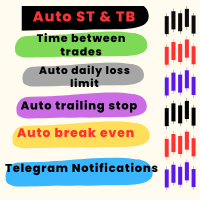
取引最適化とリスク管理のためのユーティリティツール この高度なユーティリティツールは、取引のパフォーマンスを向上させ、リスクを軽減するために設計されています。復讐取引や欲に駆られた行動などの感情的な決定を防ぎ、市場に対する規律あるアプローチを確保します。 主な機能 自動ストップロスとテイクプロフィット 取引実行時にストップロスとテイクプロフィットレベルを自動設定し、ポジションを効果的に保護します。 取引間の時間設定 取引間にクールダウン期間を設定可能(例:15分)。 クールダウン中は取引ボタンが無効化され、警告音が鳴ります。 日次損失制限 ユーザーが1日の損失制限(例:20ドル)を設定可能。 制限に達するとアラートが表示され、その日の取引機能が無効化されます。 日次利益制限 損失制限と同様に、1日の利益目標(例:40ドル)を設定可能。 目標に達するとアラートが表示され、取引ボタンが無効化されます。 損益分岐点の調整 指定された利益レベルに達すると、ストップロスをエントリープライスに自動調整し、利益を確保しながらリスクを軽減します。 トレーリングストップ 取引が設定されたレベルを超えて進

Telegram Risk Exposure shows the risk exposure in total, by calculating the risk value of all the open positions that have stop loss orders, so you can clearly see the value being risked in dollar($) and percent(%).
Setup
A step by step user guide is available. No knowledge of Telegram API is required; all you need is provided by the developer.
Key Features Monitoring your risk exposure in real time Automatically get notified via telegram when your risk exposure changes Customize the

Unlock the Power of Automated Trading with Cutting-Edge Moving Average Signals!
Are you looking for a reliable and efficient way to trade the markets?
Our automated trading system leverages the power of moving average signals to identify high-probability trading opportunities with precision and speed. Why Choose Our Trading Bot? Advanced Moving Average Strategies – Our algorithm dynamically adapts to market conditions using short-term and long-term moving averages to detect optimal entry and

GGP Trade Copier EA is an automatic trading bot that can help traders automatically replicate the trading strategies and operations from one trading terminal to others by experiencing exceptionally fast trade copying system. Its easy-to-use setup allows you to copy trades between multiple MetaTrader terminals on the same Windows computer or Windows VPS with lightning-fast copying speeds of under 0.5 seconds. The software supports multiple trading varieties, including Forex, commodities, stocks

Use for risk management and opening positions as per the user settings. The user is allowed to set the stop loss and take profits in pips. The user can also choose the risk percentage per trade that he/she wants to use while opening the trade. The volume of the trade that the user wants to sent shall be calculator according to the stoploss and the risk percentage that the user has selected.

複数のポジション/取引を一度にオープンする必要がありますか?簡単なソリューションを作成しました。一度に複数のポジションを入力できるようになりました。ロットサイズ、ポジション数、テイクプロフィット、ストップロスを設定できます。 例: 特定のロットサイズで 3、5、10 または任意の数のポジションを購入したいとします。 「購入」ボタンをタップするだけで購入できるようになりました。 または 例: 特定のロットサイズで 3、5、10、または任意の数のポジションを売りたいとします。 「販売」ボタンをクリックするだけで販売できます。
Fukusū no pojishon/ torihiki o ichido ni ōpun suru hitsuyō ga arimasu ka? Kantan'na soryūshon o sakusei shimashita. Ichido ni fukusū no pojishon o nyūryoku dekiru yō ni narimashita. Rotto saizu, pojishon-sū, teikupurofitto, sutoppuro

Clean & Readable Grid Lines: Time and Price at Perfect Intervals.
The timeline will be displayed according to the set time difference. (Time differences in 30-minute increments are not supported.) Additionally, price lines are displayed at round numbers such as 100.000, 100.010, and 100.020. The standard gridlines are displayed with the time and price by MT4, but they are very confusing as they become the broker's time and are displayed at the halfway point along with the price. It hides them an
TP SL Bot is a utility that automatically sets Stop Loss and Take Profit for newly opened orders in several ways. There is also a function for calculating the volume that you need to open the trade to get the desired amount with the specified Stop Loss / Take Profit size. There are several options for calculating the size and setting parameters: 1. Setting based on the amount specified by the user as a percentage of the current deposit balance. 2. Setting as the amount entered by the user. 3. Se
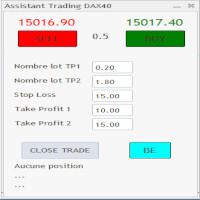
C'est un trade panel pour les indices 1 digit utilisé surtout sur le dax 40. Il y a 2 Take profit si TP1 atteint on passe en BE + 2 pt TP1 nbre lot et TP2 nbre : 2 positions sont ouverte ensemble ceci afin d'éviter si un problème connexion web. Attention c'est en nombre de points
Stop loss :15 (15 pts sur dax) Take Profit 1 : 10 Take Profit 2 : 15 Dans cet exemple si 10 pts atteint (spread prit en compte) on se met en BE + 1 pt Il y a un bouton BE qui met BE + 2 pt sur les trades et 1 bouton

This Dashboard is very useful . That will help us analyzing graph. In this dashboard has some functions. such as - Buy Stop - Sell Stop - Buy Limit Order - Sell Limit Order - Close All trade on this graph - Close All Profit - Delete Pending Order = Notify to enter an order - Percentage Calculation of chance to win an order On this strategy i calculated all Major EMA to find a higher chance and take more profits

Trade Shell, upgraded: P1 Prime Trade Manager The same product you know, rebuilt from the ground up by Denis Sotnikov, who has written trading programs for MetaTrader since 2008. A developer who stays Denis built Euronis Scalper, the example product MetaQuotes shows in the "How It Works" guide inside every MetaTrader 5 terminal (Navigator, Market, How It Works). He answers here in the comments, and he will still be here next year. Built from what traders report We read thousands of user comments

FISHERMAN'S ASSISTANT The Fisherman's Assistant is a powerful tool to assist in general operations. INTELLIGENT STOP LOSS With it, we can program the stop loss, take profit, break even, and trailing stop so that, in our manual operations, they are placed automatically. OPENING AND MANAGING POSITIONS We can use the Fisherman's Assistant to open positions within the programmed parameters, make re-entries, close positions by time, and much more. With it, we can manage all open positions of all lis

FISHERMAN'S ASSISTANT The Fisherman's Assistant is a powerful tool to assist in general operations. INTELLIGENT STOP LOSS With it, we can program the stop loss, take profit, break even, and trailing stop so that, in our manual operations, they are placed automatically. OPENING AND MANAGING POSITIONS We can use the Fisherman's Assistant to open positions within the programmed parameters, make re-entries, close positions by time, and much more. With it, we can manage all open positions of all lis

Dieser Expert Advisor unterstützt Sie bei Ihrem Handel. Er setzt für Sie automatisch, nach denen von Ihnen vordefinierten Parametern den Stopp Loss, den Take Profit. des Weiteren hat dieser Expert Advisor eine Break Even Funktion, der Ihre Positionen glattstellt, so dass Sie bei einem Rücksetzer des Kursen noch mit ein wenig Plus schliessen. Auch besitzt er eine Trailling Funktion, welche des SL für Sie automatisch nachzieht.

A Trade Manager with automatic volume calculation
Automatic Volume Calculation can be done either by percentage (from the lowest between Equity and Balance) or by value (Money amount) Market Order with drag-and-drop feature for Stop Loss and Take Profit Limit and Stop Orders drag-and-drop feature for Entry , Stop Loss and Take Profit Review Order Details before placing orders ( Entry Price , SL , TP , and Volume ) Open Positions Management with Automatic Break-Even when profit reaches predefin

MT5からTelegramに完全にカスタマイズ可能なシグナルを送信して、シグナルプロバイダーになりましょう!この製品は、使いやすく視覚的に魅力的なグラフィカルインターフェースで提供されています。設定をカスタマイズして、数分で製品を使用開始できます!
ユーザーガイド + デモ | MT4バージョン | Discordバージョン デモを試したい場合は、ユーザーガイドをご覧ください。 MT5からTelegramへの送信者は、ストラテジーテスターでは動作しません。
MT5からTelegramへの機能 多数のオプションを使用して、シグナルを完全にカスタマイズします シグナルの前後に独自のカスタムメッセージを追加します。これには、タグ、リンク、チャンネルなどが含まれます シグナル内の絵文字を追加、削除、カスタマイズします。また、すべて削除することもできます。 シンボルまたはマジックナンバーで送信する取引をフィルタリングします 特定のシンボルの送信を除外します 特定のマジックナンバーの送信を除外します シグナルと一緒に送信する取引の詳細をカスタマイズします シグナルと一緒にスクリーンショット

MT5からDiscordに完全にカスタマイズ可能なシグナルを送信して、シグナルプロバイダーになりましょう! この製品は、使いやすく視覚的に魅力的なグラフィカルインターフェースで提供されています。設定をカスタマイズして、数分で製品を使用開始できます!
ユーザーガイド+デモ | MT4バージョン | Telegramバージョン デモを試してみたい場合は、ユーザーガイドを参照してください。 MT5からDiscordへの送信者は、戦略テスターで機能しません。
MT5からDiscordへの機能 さまざまなオプションでシグナルを完全にカスタマイズします シグナルの前後に独自のカスタムメッセージを追加します。これには、タグ、リンク、チャンネルなどが含まれます シグナルで絵文字を追加、削除、カスタマイズします。また、すべて削除することもできます シンボルまたはマジックナンバーによって送信する取引をフィルタリングします 特定のシンボルの送信を除外します 特定のマジックナンバーの送信を除外します シグナルと一緒に送信する取引の詳細をカスタマイズします シグナルと一緒にスクリーンショットを送信しま

Magic News Trade Assistant は、ニュースが起こったときに取引するためのツールです。このツールは、独自のストップロスとテイクプロフィットを明確に設定できるため、利益を生み出すのに非常に役立ちます。 このツールは XAUUSD での取引に最適です。 JOLTSやNFPなどトレードに使えるニュースはとてもお得です。あなたは落ち着いて注文が利益を生むのを待ちます、それはすべて生成されるニュース次第です。 おすすめ : • 通貨ペア: XAUUSD • ロットと株式比率: 1:1000 ($1000 あれば 1 ロットを使用できます) • 最優秀ブローカー: Orbitrade (スリッページが非常に低いため、Orbitrade アカウントを作成したい場合は管理者に連絡してください) 仕様: • ロットサイズ: ロット数を決定します。 • 範囲サイズ: 計算距離範囲の価格は 2 ~ 3 スプレッドで、希望に応じて設定でき、自動的に入力されます。 • ストップロス: ストップロスの通常の距離はスプレッドの 5 倍で、希望に応じて設定でき、自動的に埋められます。 • テイ

このツールを使用すると、「すべて閉じる」をクリックするだけで、開いている注文をすべてワンクリックで閉じることができます。 収益性の高い注文のみをクローズしたい場合は、「収益性の高い注文をクローズする」ボタンをクリックすると、すべての変動注文がクローズされます。 変動損失のある注文のみを決済したい場合は、「損失可能注文を決済する」ボタンをクリックすると、変動損失のあるすべての注文が決済されます。 このツールは1年間テストされています. ワンクリックポジションクローズ機能は非常に完成しています. ポジションクローズはタイムリーであり、遅延範囲は小さいです. もちろん、遅延はあなたの地域やネットワーク環境にも関係します.ご注意ください。 履歴データのバックテスト プロセス中、このツールのパフォーマンスはさらに完璧になり、100 件の注文すべてを閉じるのに最長 0.495 秒しかかかりませんでした。 実際の取引プロセス中、私のポジション注文の最大数はわずか 26 で、すべてのポジションが決済されるまでにかかった時間は 1.28 秒でした。

このアドバイザーは次の機能を提供します。 ポジションをオープンする: 価格がトレンドラインを超えたら、ロング注文またはショートオーダーをオープンします。 クローズ: 価格がトレンドラインを超えたら、ロングポジションまたはショートポジションをクローズします。 トレーリングストップロス – EA はトレンドラインに沿って、ロング注文のストップロスを増加させたり、ショート注文のストップロスを減少させ続けます。 ラインはトレンドラインでも水平線でも構いません。 傾向線は半径または線分にすることができます。線分には、その線が存在する期間のみ取引するという特別な機能があります。 ポジションをオープンおよびクローズできるこれらのラインには、特定の名前が付いています。 EA では、手動で線を描画する代わりに、線描画パネルを提供します。 すべてのオープンポジションとクローズポジションのスクリーンショットは、MQL5/Files/Cross Trend Line to Trade フォルダーに保存されます。 EA はヘッジ口座でのみ機能します
バージョンMT4 : https://www.m
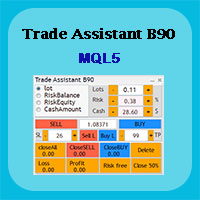
Trade Assistant B90 is designed for manual trading so that it helps us to manage capital and position well.
This expert has the ability to change the default inputs of the expert as desired before use.
You can see the expert entries in the photo below, each of which we explain below.
1. Background Color : With this entry, you can change the assistant's background
Color
2. Font size: You can change the size of the fonts used in the assistant.
3. Button color: Change the color of assis

The utility is designed to send signals from MT4 to Telegram. It has several unique features, allowing not only the sending of trade signals but also the following functionalities: Send messages directly from the terminal to Telegram Send emojis along with custom text Send text and images from Telegram All of these features enable users to manage a signal channel while focusing on trading and finding quality signals. Customizable Signal Messages You can fully customize the signal message: Specif

Rosy Trade Assistant A very easy to use EA, simple and friendly. Many features available to manage your trade. Compact panel with 4 sizes that can be selected according to your convenience. And trading in your local time has never been easier, using local timescale and clock. User Guide and Demo version Pages Trading Panel - Page to place an order and manage it's SL/TP Tools - Page to manage order: trailing, close on target, close all by categories Settings - Page to use custom time scale with s

Universal Indicator to Telegram Alerts is a smart trading tool that works seamlessly with both MT5 and Telegram, offering traders more flexibility and convenience. It connects your MT5 platform to Telegram, sending real-time alerts and chart screenshots directly to your Telegram from any indicator with buffers. This means you can stay updated on your trades even when you're not at your computer. Whether you're on your phone or tablet, you'll never miss an important trading opportunity. The aler

「スキャルピング スケールイン」は、スキャルピングでは 1 秒を争うため、S/L および T/P の配置を気にせず、固定距離の初期位置でスケーリングしたいスキャルパー向けに設計されたユーティリティ ツールです。
仕組み:
EA の入力タブで希望の値を設定します。具体的には、T/P に配置するリスク対報酬、S/L の幅 (ピップ単位) を設定します。また、次の次のストップ注文までの距離 (位置のスケール) です。 MT5 で [買い/売り] を手動でクリックすると、EA が自動的に SL と TP を設定し、同時に新しい逆指値注文を SL と等しい距離 (ピップ単位) で同じ方向に設定します (つまり、買う場合は S/L が 5 ピップス)。 、次の買いストップ注文は、最初のエントリー価格より 5 ピップス上に配置されます)。保留中のストップ注文が約定されると、前のポジションは損益分岐点まで追跡され、S/L が前の取引のエントリーレベルで新しいストップ注文が発注されます。 基本的に、このツールは、積極的な動きを捕捉する均等に分散されたスケールインを利用します。 入力パラメータの説
This EA help trader to manage his pending orders, when you place many Pending Orders this utility monitor them and when of them get filed (executed) the EA cancel and delete all rest of pending orders, to avoid opening of all of pending orders at the same time , and lose your risk management. this utility is very useful for trader when he /she is not available on the desk.
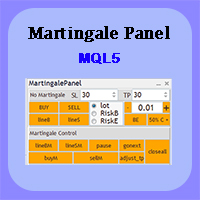
In this article, we would like to introduce the trade panel product with the Martingale panel.
This panel is made in such a way that it can meet the needs of traders to a great extent.
This trade panel actually consists of two trade panels at the same time, with the first one you can take positions with certain profit and loss limits, and with the second one, you can have positions with profit limits but without loss limits.
When positions lose, a new position will be added based on the settings

Ultimate Trade Panel MT5は、MetaTrader 5専用に設計された堅牢なユーティリティで、初心者と経験豊富なトレーダーの両方の取引体験を向上させることを目的としています。直感的なインターフェースと強力な機能を提供することで、ユーザーが取引をより効率的かつ正確に管理できるよう支援します。 このユーティリティは取引タスクを効率化し、ユーザーが手動プロセスではなく戦略に集中できるようにします。ワンクリック取引やカスタマイズ可能なアラートなどの機能を備えているため、トレーダーは市場の機会に迅速に対応でき、重要な取引セットアップを見逃すことがありません。 MQL製品のインストールガイド | MT4/MT5で購入したMQL製品の更新 | 一般的なトラブルシューティングガイド | インジケーター設定 / ガイド 主な機能 ポップアップアラート: 信号イベントでMetaTraderアラートポップアップを発生させ、取引セットアップを見逃さないようにします。 プッシュ通知: MetaTraderモバイルアプリにリアルタイムのプッシュ通知を送信し、外出先での監視を可能にします。 メ

Introducing BoTutor - Simplify Candlestick Data Collection and Export! Are you tired of the hassle of manually collecting and exporting candlestick data from your charts? Look no further, because BoTutor is here to revolutionize your data mining experience . BoTutor offers a user-friendly graphical interface that is intuitive, clean, and easy to navigate. Say goodbye to complex data extraction procedures, and effortlessly gather candlestick data with just a few clicks. BoTutor lets you expo
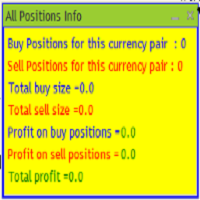
The provided MQL5 expert creates a custom information panel in the MetaTrader 5 (MT5) trading platform This panel displays information about the trading positions for the current symbol (currency pair) on the chart. It shows the number of buy and sell positions, their sizes, and profits. Provide traders with a quick overview of their trading positions for the current symbol It is very useful when you open several positions of several sizes and you want to know the exact situation of the number
皆さん、こんにちは
人々の目から見ると、投資は難しくてリスクの高いビジネスであると考えられています。 しかし、知識とスキルを身につけて投資を行えば、市場があなたに害を及ぼすことはありません。 資本市場でのフィルター書き込みは、この分野の専門家が生産性を向上させ、時間を節約するために行うアクションの 1 つです。 多数のシンボルが活動するため、保存される情報とデータの量は非常に多くなります。 この市場で活動する人々は、一連の情報を必要とする場合があり、問題の機密性を考慮して、できるだけ早く情報を入手する必要があります。 この情報は通常、市場の将来を予測するのに役立ち、非常に重要です。
コマンドによる Fitler の書き込みにより、要求された条件に一致するシェアが検索されます。 選択した機能をフィルタリングすると、すべての取引可能な株式が検索され、適切な株式が表示されます。 資本市場では各人が取引の戦略を持っており、フィルタリングすることで戦略に沿って取引を進めることが容易であり、 その後、さまざまな時間枠で戦略の結果を確認できます。
フィルタリングの利点 1- 高速: 各株式の

皆さん、こんにちは
人々の目から見ると、投資は難しくてリスクの高いビジネスであると考えられています。 しかし、知識とスキルを身につけて投資を行えば、市場があなたに害を及ぼすことはありません。 資本市場でのフィルター書き込みは、この分野の専門家が生産性を向上させ、時間を節約するために行うアクションの 1 つです。 多数のシンボルが活動するため、保存される情報とデータの量は非常に多くなります。 この市場で活動する人々は、一連の情報を必要とする場合があり、問題の機密性を考慮して、できるだけ早く情報を入手する必要があります。 この情報は通常、市場の将来を予測するのに役立ち、非常に重要です。
コマンドによる Fitler の書き込みにより、要求された条件に一致するシェアが検索されます。 選択した機能をフィルタリングすると、すべての取引可能な株式が検索され、適切な株式が表示されます。 資本市場では各人が取引の戦略を持っており、フィルタリングすることで戦略に沿って取引を進めることが容易であり、 その後、さまざまな時間枠で戦略の結果を確認できます。
フィルタリングの利点 1- 高速: 各株式の

「ローソク足パターン取引パネル」は、ローソク足パターンで取引し、パターンを特定して取引を実行するプロセスを 迅速かつ簡単にしたい トレーダーにとって究極のツールです。さまざまだが重要な入力オプションを備えたこのツールは、ローソク足パターンの手動取引を自動化したい人、手動で以前よりも早く取引できるように支援したい人、または単に見たいパターンを知らせたい人に適しています。
EA を使用したいシンボルで EA をアクティブにすると、チャートの左上隅に表示される 取引パネル を見てみましょう。 ライブ取引では時は金なりであるため、パネルはシンプルになり、トレーダーが必要とする可能性のある主要な機能のみを使用するように思慮深く設計されています。 取引禁止 : 安全上の理由から事前にチェックされています。これは基本的に、ローソク足パターンが表示されたときに EA に Arrow オブジェクトのみを表示し、それ以上は表示しないことを示します。 取引する矢印をクリックします: クリックすると、 矢印オブジェクトをクリックするだけで 、パターンが表示されるたびに半手動で取引できるようになります。 ス
Introducing the BlackWing Signal Provider—an advanced EA designed to enhance your trading experience by facilitating seamless communication between your MetaTrader 5 platform and Telegram channels, groups, or individual users.
Key Features:
1. Real-Time Event Notifications: Receive instant alerts on new trades, modified orders, closed positions, and deleted orders. Stay informed and make well-timed decisions.
2. Interactive Chart Snapshots: Share chart snapshots along with new trades and ord

A very usefull EA helps you control Trailing Stop and Break even point for single order
it works seperately for Buy side and Sell side
the EA displays some information useful when you load to your chart
all you need to do is to change the name of the pair you want to control TP and BEP
it works with all pairs and all types of accounts
if you have any questions you can always write to us at info@auranos.me

Multi-currency trading on one chart!
Creation and management of positions with trailing and breakeven, risk management and other useful functions. To fix profits, the Target profit parameter is provided; if it is greater than zero, all positions will be closed if the set value is exceeded. All positions and orders have set Stop Loss and Take profit. For multi-currency trading, taking into account the impact of news and switching symbols on the chart, it is useful to use the News impact indicato

EquitySafe V1.0 is a powerful risk management tool designed for MetaTrader 5 . It enables traders to effectively manage their risk by setting maximum loss limits based on custom time frames. With this tool, you have the flexibility to define your own time intervals and allocate specific risk thresholds accordingly. This helps you maintain control over your trading account and minimize potential losses. By utilizing EquitySafe, you can ensure that your trading strategy aligns with your risk tole
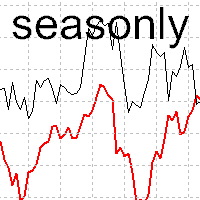
The tool for exploring seasonal patterns. It compares the chart with charts of other years and compares with the average for other years. Allows you to shift charts if necessary. Explore any year by specifying the zero point. Up to 10 charts in one tool. Works only on the daily chart ! The best for you! Enjoy your work! (It's not indicator - do not download demo it not work) for mt4 Seasonly MT4

Achieve peace of mind with our EA companion! Simply set it and let it roll. Safeguard your trades on sluggish market days and holidays. Get updates on your balance and EA status every Friday evening, for example. Stay in the loop even if your terminal or VPS decides to take a break. Trading made easy – enjoy the tranquility! This EA has several functionalities
Closing of pending or open positions during pre-configured holidays. Automatic closing and reopening of pending positions during the nig
MetaTraderマーケットは、履歴データを使ったテストと最適化のための無料のデモ自動売買ロボットをダウンロードできる唯一のストアです。
アプリ概要と他のカスタマーからのレビューをご覧になり、ターミナルにダウンロードし、購入する前に自動売買ロボットをテストしてください。完全に無料でアプリをテストできるのはMetaTraderマーケットだけです。

取引の機会を逃しています。
- 無料取引アプリ
- 8千を超えるシグナルをコピー
- 金融ニュースで金融マーケットを探索