 MetaTrader 5
 Эксперты
 Индикаторы
 Библиотеки
 Утилиты
 Виджеты
 Правила
Смотри обучающее видео по маркету на YouTube
Как купить торгового робота или индикатор
Запусти робота на
виртуальном хостинге
виртуальном хостинге
Протестируй индикатор/робота перед покупкой
Хочешь зарабатывать в Маркете?
Как подать продукт, чтобы его покупали
Торговые утилиты для MetaTrader 5 - 49
 Ниже представлены торговые программы, упрощающие трейдинг в MetaTrader 5. Наведите курсор на товар, чтобы прочесть описание товара и его предназначение.

Spread Control — компактный индикатор для MetaTrader 5, который позволяет видеть текущий спред и его динамику прямо на графике инструмента. Возможности Текущий спред в реальном времени График изменения спреда с историей последних значений Расчёт LOW / AVG / HIGH за отображаемый период Цветовая индикация состояния спреда: нормальный уровень; предупреждение; критический уровень Визуальная шкала текущего значения Отображение текущих Bid и Ask Индикатор активности рынка: LIVE — котировки изменяются;
Утилита для ручной торговли, для управления открытыми позициями. Встроенный трейлинг стоп имеет три режима и семь инструментов: по пунктам, по экстремумам баров, по MA, по фракталам, по объёмам, по Parabolic SAR и по ATR. С помощью встроенного симулятора торговли, вы можете проверить, как работает советник в тестере стратегий. Руководство к советнику UTrailingMiniMT5 можно найти в разделе "Обсуждение". Преимущества 3 режима трейлинг стопа: обычный, общий и мобильный стоп лосс; 7 инструментов для
5 EMA Scalping Strategy Multi Symbol Scanner
This EA utility will scan all symbols which are selected in marketwatch and alert when such condition is formed in chart when Candle low is above EMA 5 for Sell alert and Candle high is lower from EMA5 so you can be ready before selling or buying for scalping purpose on 5min chart For more details watch attached video Logic : When a candle closes above 5 EMA in 5 mins chart, Wait for its low to break and Sell when low is broken by wick, Your SL shou
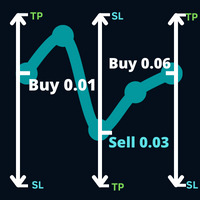
Откройте направление в сделке, за которой рынок намеревается следовать, и сделку, которая произошла в вашей сделке.
Пример: операция покупки с лотом 0,01 по цене 0,03 пункта, покупка с лотом 0,01 по цене 0,01.0930, затем будет принято решение о стоп-приказе на продажу 0,03. выставляется новый стоп-ордер на покупку с лотом 0,06 по цене 1,0930.
Параметры: Громкость -> Громкость первой операции.
Take Profit -> Гарантированная прибыль в количестве пунктов.
Max Hedge -> Контролирует количест
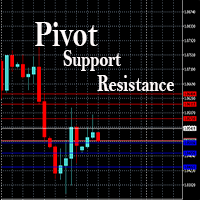
This EA is designed to calculate and draw Pivot Point, Support and Resistance for your selected time frame on the chart.
Works on all currency pair and on any time frames available on MT5.
To make sure the EA works, you need to select the pivot time frame as well as the candle shift that you want to calculate the pivot.
0 = Current candle on chart
1 = Previous 1 candle on the chart

Stack Manager is a MT5 utility that is built to help traders: manage existing stacked trades (multiple trades opened on the same symbol) copy SL / TP levels to newly opened trades update SL / TP levels for all stacked trades, if one SL or TP level is modified calculate and show global SL / TP in currency and points (for all open trades in a stack) SL / TP autocomplete from phone (if left on a VPS, traders can place orders on a phone and SL / TP levels will be copied from the existing trades)
Id
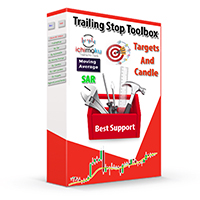
Trailing Stop toolbox MQL5, better and friendly. Trailing Stop tool box using Moving Average, Parabolic SAR, Ichimoku Kijun-sen, trailing stop normal, trailing stop by candle, trailing stop by targets and trailing stop by lowest, highest candle numbers. Manage orders by currency pairs and comments, trailing one or many orders at same time. Mql4 versition: https://www.mql5.com/en/market/product/68181
Workflow: Set your comment, profit, stoploss, lotsize, t imeframes and chose indicator for begi

Отслеживайте ваши выбранные символы на одном графике Многофункциональная утилита: 66+ функций, включая этот инструмент | Свяжитесь со мной если у вас есть вопросы | Версия MT4 Этот инструмент открывается в отдельном окне: его можно перемещать (перетаскивайте в любом месте) и сворачивать [v]. Вы можете настроить список наблюдения на панели: Нажмите [edit list], чтобы добавить / удалить символы из списка наблюдения. Рассчитанное значение: оно может быть либо последним [закрытым баром],

Good money/risk management is more than just position sizing, it's much more. Successful traders analyze your trading activities and keep an eye on your key figures. With the help of AccountMan you can also do this very conveniently, analyze your trading activities for the purpose of professional money / risk management. Evaluate your trades by trade symbol to see if trading is profitable overall with these. Would you like to keep an eye on your individual strategies? e.g. which strategy works b
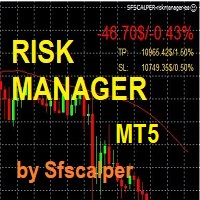
RISK CONTROL MANAGER
Now You can have the same control over risk management as big trading rooms, institutional investors and hedge funds. Managing risk is a fundamental operation for your brokerage. Choose your maximum desired risk exposure in percentage to Your account, set it on the RISK CONTROL MANAGER, the EA will check and make sure that You'll never exceed that. When You ignore the trading risk, and you leave your operations open, that potentially could lead to catastrophic trade expos
Boleta de Operação que funciona para o Mercado B3 feita para Mini Indice e Mini Dollar com Cálculo de Risco e Retorno da Operação. Características e informações: Ao colocar o EA no gráfico inicialmente serão apresentados 1 painel e 3 linhas todos com informações a respeito de operações, saldo e cálculo que facilitam o Trader a ter um operacional mais seguro e menos arriscado. O intuito desta ferramenta é fornecer dados em tempo real para que o Trader (ANTES MESMO DE ABRIR A ORDEM) consiga obter

Trade management is a system that helps you manage your operations, that is, you perform the analysis, and we manage the operations as follows: Automatic Stop Loss once the trade is opened is a short or long with a maximum risk of 1% of the account. Trailing Stop as the price moves in your favor. Risk management is handled in a 2:1 , once the operation reaches a 1:1 move Stop Loss to break even . Once the trade reaches a 2:1 closes half the lot, securing the profit and allowing the operation

Expert Advisor for Automatic Stop Loss and Take profit , calculated by Pips and cover all major pairs . you can activated the EA in your chart then place orders manually and the EA will be place TP and SL automatically for all opened orders , covered Buy market , Sell Market , Buy stop , Sell Stop , Buy limit , Sell limit . it is an easier tool that help you manage your order without effort . 10 Pips = 100 Points Pending orders SL and TP will be placed once order is activated . MT4 Version : ht
Это утилита для облегчения торговли, позволяющая в один клик или несколько кликов выполнять такие трудоемкие задачи, как управление ордерами и управление рисками.
Особенности
Управление рисками
Автоматически рассчитывает лоты на основе риска, указанного в % или $ в поле риска, и позволяет вам вводить ордера, просто размещая линии для SL TP и т.д., и отображает Risk Reward в реальном времени. TrueRisk включает комиссионные при расчете размера лота только на FX парах, так что вы рискуете 1%

This EA helps chart pattern traders to automate thier task of placing trades. All you need to do is to draw your trend lines and name your trendlines to match the object name input in the EA.
The EA is safe to turn off anytime.
The input parameters are as follows: UpperBorderline : Upper border line of chart UpperEnteryLine: For entering trades UpperTPLine: Trendline for Take profit LowerBorder: Lower border line of chart LowerTPLine: Take profit line for lower trend line BorderChannel: F
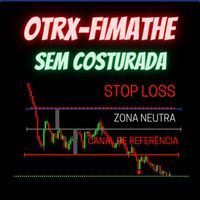
Fimathe Tool for Semi-Automatic Trading.
This tool serves as a support for trading using the Fimathe strategy, the same one used by Trader Marcelo Ferreira in his negotiations.
Features:
Button to set/change Trend chosen by Trader. Adjustment of Buy Zone and Neutral Zone Level Lines. Adjustment of Sell Zone and Neutral Zone Level Lines Subcycle Levels, R1, R2, R3, R4 and S1, S2, S3, S4.
Automatic Trailling Stop for previous level with each new (Subcycle) level reached.
Trading stop at the
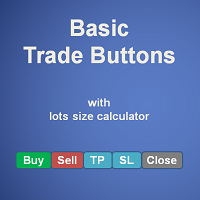
Basic Trade Buttons is a tool to help you to quickly open and close trades, place take profit and stop loss points by clicking on the button of each job that you preferred. Once you attached this tool to mt5 chart, the program will calculate a trade volume(Lots size) automatically to prepare to send to the trade server when you click on 'Buy' or 'Sell' button. Click on 'TP', 'SL' or 'Close' button to place take profit, stop loss based on the predefined levels or to close all open positions respe
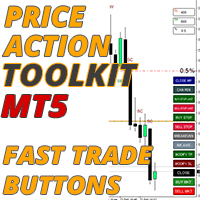
Советник Price Action Toolkit в первую очередь предназначен для скальперов, но может использоваться на всех таймфреймах для быстрого входа в рынок с правильно рассчитанным размером лота на основе уровня стопа. Он позволяет быстро открывать сделки (мгновенно или на максимумах и минимумах свечей с отложенными ордеров), а затем корректировать стопы и фиксировать прибыль по мере движения рынка.
Полный список всех функций, настроек и лучших практик можно найти здесь: https://www.mql5.com/en/blogs

The instructions for use: https://www.mql5.com/zh/blogs/post/754946 The MT4 version: https://www.mql5.com/zh/market/product/88205 The MT5 version: https://www.mql5.com/zh/market/product/88204 ---------------------------------------------- 1. Копировать заказы с 12 мастер-аккаунтов на 100 подчиненных аккаунтов. Количество подчиненных учетных записей может быть настроено от 12 до 100. 2. Поддержка MT4 до MT4, MT4 до MT5, MT5 до MT4, MT5 до MT5. 3. Определите суффиксы разновидностей торговли на ра

This EA helps to Close all Positions opened. It saves you the time of closing multiple positions manually.
Parameters: Buy: Close Buy Positions Only Sell: Close Sell Positions Only Buy & Sell: Close Buy & Sell Positions Pending: Close Pending Orders
More Advanced MT5 version available at: https://www.mql5.com/en/market/product/93301?source=Unknown%3Ahttps%3A%2F%2Fwww.mql5.com%2Fen%2Fmarket%2Fmy More Advanced MT4 version available at: https://www.mql5.com/en/market/product/93468?source=Unk

This EA is used to close all your open market positions and/or pending orders with a click of a button. The EA is ultra fast and your positions will close within a blink of an eye. It also allows you to close profit trades only or losing trades. You can also choose to close sell/short trades only or buy/long trades only. If your strategy include having many open and pending orders positions, this is a good EA to help you close your positions all at once with one click.

BETA product Recurring updates, and real-time assistance. Ea Auto is a specialist in inserting TakeProfit and StopLoss of positions, and moving them in favor of operations in an automated way, the user only needs to enter the initial TakeProfit and StopLoss value.
Recommendations on use in any asset In any period Chart So far, this utility only supports Forex
Description of input parameters Theme: set between Light (a lighter theme) and Night (a darker one) Take Profit(points): field where t

Smart Stop Manager EA – Maximize Profits, Minimize Risk!
This Expert Advisor (EA) is designed to automatically adjust your stop loss when your trades move into profit. It works on all open trades for the symbol it is attached to, ensuring maximum profit protection while letting your trades run.
How It Works
The EA uses two key inputs to manage your trades efficiently:
Stop Loss Points – The distance from the current price where the stop loss is placed. Stop Loss Trigger Points – The pro
Multi Symbol ZigZag Breakout Scanner сканирует все символы, выбранные в обзоре рынка.
Это поможет легко найти двойную вершину, двойное дно или любой уровень расширения Фибоначчи, когда цена вот-вот достигнет этих уровней.
Вы можете выбрать Timeframe и несколько Extdepths (до 3) Zigzag. Рекомендуемые зигзаги 21, 34 и 55, которые охватывают все типы зигзага и шум фильтра.
Вы можете настроить получение либо оповещения терминала, либо push-уведомления, либо и того, и другого.

Это инструмент, позволяющий узнавать информацию о счете в режиме реального времени путем отправки оповещений по электронной почте.
Оповещения функционируют следующим образом:
1. Плавающие оповещения о прибыли и убытках: как только установленные вами значения прибыли и убытков будут достигнуты, советник автоматически отправит вам электронное письмо с подробным описанием оповещения.
2. Оповещения об открытии и закрытии ордеров: как только на вашем счете появится открытая или закрытая позиция, с

The utility displays in a convenient form the historical trades made on the account. You can filter trades by magic or comcent, display only profitable or losing trades, and only buy or sell trades. Using this utility, you can see trade entry and exit points, stop loss and take profit levels, trade profit, magic number and comment, order ticket and order size - you only need to run the utility on the chart of the currency pair you want information on get and customize the input parameters. MT4
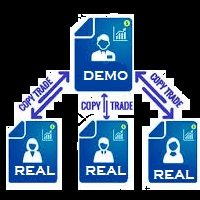
You Can Copy All the Trades from one MT5 terminal to another MT5 terminal hosting two different accounts in the same computer or VPS. It will work with same broker as well as different broker. You can also use it to copy from MT5 to MT4, then you also need to download the MT4 version and set the SEND and RECEIVE accordingly. MT4 version download- https://www.mql5.com/en/market/product/83400 Note: While Testing with demo version, do not use real account, as it will not copy. If your trades are

На ценовом графике индикатор рыночной сессии показывает часы торгов в Нью-Йорке, Лондоне, Токио и Сиднее. Время начала и окончания каждой торговой сессии можно установить вручную.
Функции:
Основные сессии шоу: Сидней, Токио, Лондон и Нью-Йорк. Выделяйте цветными линиями и рисуйте объекты. Вы можете графически определить волатильность сессий для перекрывающихся сессий. Он включает в себя восемнадцать подвижных параметров, в том числе Параметры:
Начало сиднейской сессии - час начала сиднейской

Assistant for all those who forget to set StopLoss, TakeProfit and Trailing Stop in deal parameters, or trade on a very fast market and fail to place them in time. This tool automatically tracks trades without StopLoss, TakeProfit, Trailing Stop and checks what level should be set in accordance with the settings. The tool works both with market and pending orders. The type of orders to work with can be set in the parameters. It can track either trades for the instrument it runs on, or all

!! BLACK FRIDAY !! FOR LIFETIME !! ================== == 35$ ONLY !! == ==================
BOOK YOURS NOW !!
The Position Manager Contains A Lot of Functions such as; (How to Operate) 1. Adjustable Volume per Trade (You could change the volume as you wish per trade). 2. Adjustable Risk : Reward Ratio (1RR means sacrifice 1 Risk : 1 Reward, 1.5RR, 2RR etc. as you wish) 3. Adjustable Stop Loss Points (Calculated Points as Stop Loss and Automatically adjusted the Risk Reward Ratio) 4. Buy Button
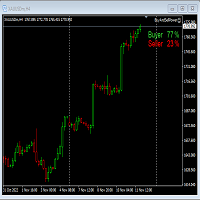
This Expert Advisor will not place any trade.
This Expert Advisor will only show the buyer and the seller power in percentage on the upper right corner of the selected chart. The percentage of the Buyer and Seller is calculated based on the Open, Close, High and Low price of the selected candle.
Candle can be selected using the shift on the Input Tab where 0 means the current candle, 1 means previous 1 candle before the current candle.
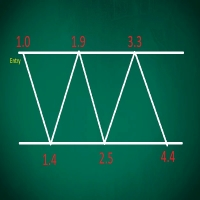
This EA performs with a Hedging strategy by which Buy and Sell signals are from the MACD indicator.... The lot sizes in the input are Custome for you to adjust as you pleased, so you are able to improve your hedging style. Inputs. Close Money- this option is basically the take profit in ($), for example if you set the close money at $20 the EA will automatically close all trades when your overall profit is $20. Nearby Hedge Pips- this basically determine the distance of pips between yo

Big News Promo 40%! From today we have added the possibility to take partials! Purchase or upgrade your autolot to use this new feature immediately. Introducing Autolot 2.0 Trade Management : The Revolutionary Trading Utility is Now Even MORE POWERFUL and EFFICIENT! We're proud to announce the launch of Autolot 2.0, the upgrade that takes your trading to a whole new level! We've listened to your feedback and improved the utility to make it even more versatile and user-friendly. Here are the key
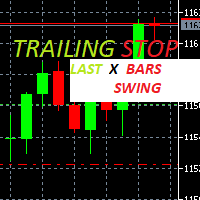
Trailing Stop loss last X candles swing high and low.
X is a value of candles you can set as an input parameter.
This Trailing stop loss moves the SL below the last X candles low(if BUY positions) or high(for SELL positions)
If we are in a trend and we open a position following the trend, the SL will be automatically placed at the low or high of the last X bars.
contact me if you need further assistence

Hello, Every one
This is "Close All Button" future 2
A script to manage order and close all market positions and/or pending orders.
----------------------------------------------------------------------------------- This is Close All Market positions and/or pending orders button
You can close all or manage orders in 1 second by one click
------------------------------------------------------------------------------------
Download for Demo Account: Demo version: Close 1s manage v1.7 DEMO
F
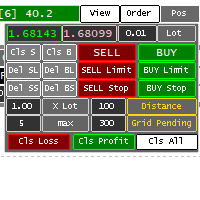
Panel for help Manual Trade if trader take order in multi Symbol/pair this will help more. this is look like hybrid dashboard in multi pair with small display
Panel have function : TP/SL, that also have funtion in Average TP/SL from BreakEvent (this will have for trader with multi trader in singgle pair) in Point can response multi Symbol
Trailing and Average Trailing from BreakEvent in Point can response multi pair. breakEvent in point Take Profit/Stop Loss in $ will detect in multi pair, an

Забудьте про написание кода! Вам больше не нужны советники! Любые индикаторы (и не только) теперь могут торговать сами где угодно чем угодно! GRat_IndiTrade — это уникальный в своем роде конструктор стратегий для автоматической торговли по сигналам ЛЮБЫХ имеющихся на графике индикаторов без ограничений (как стандартных, так и пользовательских), ЛЮБЫХ свечных паттернов, а также ЛЮБЫХ их комбинаций, без необходимости написания, генерации или компиляции какого-либо кода . Вам больше не надо

Do You Like Catching 100+, 500+ Pips In Seconds, Trading During High Impact News Like NFP, and CPI..?
I have been trading news for 2 year with my mentor Raja Banks, playing the Buy Stop, Sell Stop pending orders.
In normal news events price shots straight-down or straight-up based on the data of the event, and sometimes it whipsaws up and down.
As a manual trader, somedays I would miss out on securing big profits because price moved too quick, and retraced back to hit my Stop Loss, or even B

Binance Grid Pro offers an alternative to the built in Grid systems Binance Platform offers.
This utility let you define a grid parameters for interact with your Binance account using an Isolated Margin account. This is, similar to Spot Grid in Binance. This is not for handle with derivatives contracts, is for handle with Spot through Isolated Margin Account. But obviosly this utility offers a different approach than built in Binance Grid to handle the Grid, which I have found useful based on
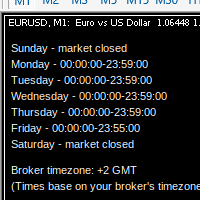
MarketSchedule displays market sessions' open/close time for each day through out the week, also broker's timezone.
It also supports instruments that have more than 1 session per day (maximum of 2 as most instruments don't have more than this)
e.g. crypto market such as BTCUSD which usually has a few hours break mid-day thus it spans into 2 market sessions. You don't have to spend time looking for such information on broker's website. It's an on-demand script that you can drop onto the chart to

This is a standalone dashboard that let the user save their entry strategies for an unlimited number of currency pairs/indexes/commodities. Strategies remain saved after closing the meta trader or removing the EA. It saves your favourite assets to trade and places your trades in an instant. You can save, your lot size, risk percentage, stop loss and take profit points and trailing stop points. You can double-entry positions or reverse trades at the click of a button. After the purchase, you

Утилита Trade By Time предназначена для автоматизации торговли для списка валютных пар в определённое время, например, во время выхода новостей. Принцип работы будет описан немного ниже. Сама утилита работает только с заранее подготовленным файлом с таймингом и списком инструментов. Сам файл нужно положить в каталоге данных в папку Files , указать название этого файла в настройках утилиты и перезапустить её. Файл должен содержать строки с данными следующей структуры: yyyy.mm.dd hh:mm; <EURUSD|

Blow Stopper EA V3 – Your Ultimate Trading Edge Ready to elevate your trading game? Introducing Blow Stopper EA V3 , the cutting-edge trading tool meticulously crafted to turn market uncertainty into opportunity. Designed by the visionary Tsietsi Gladson Nyathi , this groundbreaking Expert Advisor delivers unmatched precision, unparalleled risk management, and consistent profitability across EURUSD, NZDUSD, AUDUSD, EURJPY, GBPUSD, USDJPY, USDCHF, USDCAD, EURCHF, and XAUUSD (GOLD) . Why Blow Sto
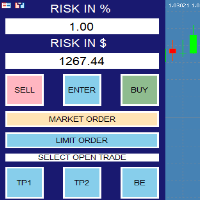
RISK CALCULATOR - TRADING PANEL - CHART OVERLAY with:
PARTIAL TAKE PROFIT ("virtual TP") % RISK LOT SIZE TRAILING STOP LOSS Fast and simple control of your trades Easy lot size calculation with easy SL/TP setting. Your trading will be much more comfortable with this tool!
Works like any EA, add it to selected chart and trade !
(this version is converted from MT4)
Features: start trade with calculated lot based on % of account balance * that you want to risk/ or based on
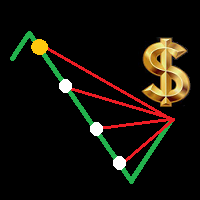
Is your trade at a loss? Does not matter ! You can use this Extra martingale tool. In the set loss of your trade or your EA's trade , this tool will open another trade at a better price. It can also open multiple trades at different distances and with different lot sizes. Each trade will be assigned a TakeProfit. This tool has a lot of settings. You can set variable lot sizes, variable trade distances, variable TakeProfit sizes, maximum total profit or loss in money. You can also close trades

Manual trading assistant focused on ICT strategies with several aids:
It establishes time slots in which we can operate, disabling any operation placed outside these zones, preventing over-trading in places where we should not, such as during the opening of markets with strong volatility, or after hours with no volatility. It marks important levels for us: the high and low of the previous day, and the high and low of the current day. If we want, we can make the current high and low adaptive, and

MyVersion Helper -утилита создана для помощи трейдеру в занятое время утилита работает по принципу работы советника!. он открывает сделки и закрывает их по своему усмотрению когта трейдер не перед пк. . работает на 19 валютных парах . . в зависимости от баланса утилита сама решает на каких валютах торговать. . если баланса достаточно штобы торговать на всех парах вы можете включать и отключать конкретные валютные пары нажав в настройках на валютную пару и выбрав True / False True -торговать Fal

Советник для, перевода позиции в безубыток + трал. Сделан специально для работы на Мосбиржи с учётом удаления позиции при клиринге и последующем её открытии по новой цене. После клиринга, советник тралит учитывая реальную цену открытия позиции, а не ту которая получилась после клиринга. Советник может работать на любых рынках. На счетах HEDGING советник будет переводить в БУ и тралить каждую позицию, отдельно.
Так как демо версию советника можно запустить только в тестере стратегий , а этот с

Product Description Bybit Charts Utility for MetaTrader 5 — a streamlined tool designed for traders who use Bybit. This utility provides you with the convenience of automatically drawing all charts of Bybit within MetaTrader 5, enabling seamless time-frame switching and efficient market visualization. MQL5 Key Features Automatically draws every timeframe (starting from M1) for charts of Bybit. MQL5 Enables smooth navigation between different time-frames, just like viewing regular charts. MQL5

This Unique Expert Advisor calculates the strength of 28 various currencies according to the percentage change in a day from the opening of the candle. This calculation is done seen as decimals. If some currency is found to be very strong or very weak, the system will check the difference between both. If the calculations work to be more than the value provided in the input's parameters, it will open a trade with that pair and set take profit as given by the user. There are several other settin

Ever took a trade and when you come back to the termainal to check on the status of the position, you realized the market has gone so far in the opposite direction or it has hit your stoploss. Well this system is here to help manage those moments price doesn't go in your desired direction. Consider this to be the insurance your account needs for your trading business. This tool manages manual trades and e.a. triggered trades. However be aware that some e.a.s are programmed to override other e.a.

This is the HFT Flame Ea....This is a complex Expert Advisor that basically pick trades from price movements, it is also a none-martingale mechanism with netting strategy that makes this Ea more interested and profitable throughout your trading journey. The HFT Flame EA can be super consistent on profits depending on the inputs selected for your style of trading. This is a hand free trading robot that can trade your way to success while you are away from the charts, another perfect advantage abo
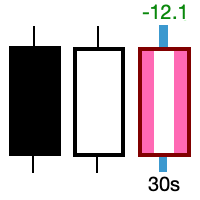
Take control of the most important candle on your chart. Customise and supercharge the active candle. "LastCandle" is a unique indicator. There is no other indicator that is so laser-focused on just the active candle. Set different colors and make it stand out from all the other candles. (This makes sure you never mistake an active candle from a closed one. Even if this happens once it could save you the cost of the software.) When you zoom out, you get a super-sized version of the candle so yo
ABOUT THE PRODUCT
Your all-in-one licensing software is now available. End users are typically granted the right to make one or more copies of software without infringing on third-party rights. The license also specifies the obligations of the parties to the license agreement and may impose limitations on how the software can be used. AIM OF THE SOFTWARE
The purpose of this system is to provide you with a one-of-a-kind piece of software that will help you license and securely track your MT4/MT5
Time saving and fast execution Whether you’re traveling or sleeping, always know that Telegram To MT5 performs the trades for you. In other words, Our Telegram MT5 Signal Trader will analyze the trading signals you receive on your selected Telegram channels and execute them to your Telegram to MT5 account. Reduce The Risk
Telegram To Mt5 defines the whole experience of copying signals from Telegram signal copier to MT5 platforms. Users not only can follow all instructions from the signal
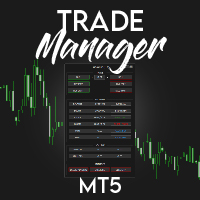
️ Discover the powerful Trade Manager for MetaTrader, a tool that will revolutionize your trading experience in the financial market. This innovative software provides you with efficiency and speed, allowing you to execute all your trades quickly and visually.
️ With just a click of a button, the Trade Manager creates three strategic lines: a blue line for order placement, a green line for take profit, and a red line for stop loss. These lines offer you a clear focus and enable you to manage
3 in 1 : Отчет+мониторинг+отправка сообщений (Телеграм,...) для оптимизации торговли и использования советников.
Мониторинг:
Панель на графике
Отправка сообщений в Телеграм Отправка сообщений на Email
Отправка Notifications
Отправка всплывающих сообщений
Подача звуковых сообщений при превышения установленных уровней Прибыли/Убытка
Мониторинг включается по нажатию кнопки Start.
Прибыль за период по валютным парам, часам и Magic number для текущего счета. Формирует четыре таблицы: по символам

You've probably heard that different brokers give different results? But what is the main problem when brokers have approximately the same trading conditions for spreads and commissions,you have the same ping.. but the results of trading on real accounts are very different. What's the matter?
There are situations when even good advisors give bad results and the point here may not be in the adviser, but in the broker and you can draw the wrong conclusion about the adviser without getting a good
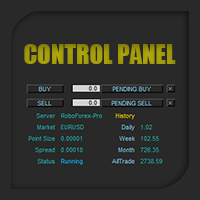
Control Panel mette a disposizione una semplificata ed avanzata gestione dedicata per ogni singolo mercato Forex, CFD, Materie Prime, Indici Azionari, Metalli Preziosi, Prodotti Energetici, Azioni & Crypto Valute, dal trade pad si posso aprire posizioni e ordini pendenti, visualizzare tutti i dati relativi alla quantità delle posizioni Buy, Sell e di tutti i trade oltre alla quantità espressa in lotti anche per i posizionamenti hedge indicando il valore espresso in lotti relativo all’esposizion

**This is a Utility so the DEMO does not work. Please leave a comment and we will reply** ‘Trader Pro – Any Broker’ is the ideal solution for beginners and professional traders who want to trade ANY Signals on MT5 with ANY broker. This unique service will complete all the technical set up, monitoring and maintenance, so you don’t have too.
This ground breaking service has been developed by experienced traders to solve real world problems and overcome Signal to Broker limitations so the user

SmartVSV Panel. Swing trade with pending orders or scalp with your keyboard . You can try this panel out with the free version SmartVSV1. https://www.mql5.com/en/market/product/91194 Chart objects. This tool will help you to find orderblocks , fair value gaps and liquidity . If you use session ranges or Sunday open in your strategy, it will draw them for you. If you are looking at another chart (such as DXY, Gold etc) while trading, SmartVSV has a minichart button for you. You can set an

Торгуйте на Binance с помощью советников и индикаторов MT5/MT4! GRat_BinanceImport — это инструмент для автоматической торговли ЛЮБЫМИ имеющимися советниками и индикаторами, ЛЮБОЙ криптовалютой на самой популярной криптобирже Binance в режиме 24/7. Возможности 1. Доступны ВСЕ инструменты Binance. 2. Им порт( автоматическое копирование) на заданную криптовалюту Binance всех сделок (совершенных вручную или ЛЮБЫМ советником) со счета MT5 (в том числе и демо) по заданному символу и/или магичес
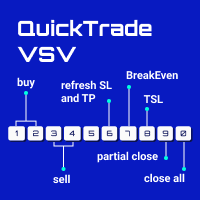
From 0 to 9... the only keyboard buttons you need to trade with this EA!
If I am wrong just write which button should I add in the comment section. I recommend you to test this tool on demo account first. This version of QuickTradeVSV can help you to: 1 - Open buy position with TakeProfit and StopLoss (Lotsize is calculated by your Account Balance and StopLoss). 2 - Open buy position with fixed LotSize. 3 - Open sell position with TakeProfit and StopLoss (Lotsize is calculated by your Account B
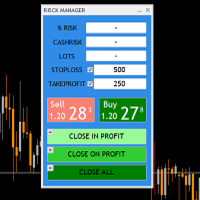
THIS RISK MANAGER WILL HELP YOU IN YOUR DAILLY TRADING, BY CALCULATING THE RISK AND THE LOTS, AND SET STOPLOSS, AND TAKE PROFIT, AND CAN CLOSE TRADES FOR YOU. RISK PERCENTAGE CASHRISK LOTS STOPLOSS TAKE PROFIT SELL AND BUY BUTTONS LOSE IN PROFIT BUTTON WICH WILL CLOSE ALL TRADES IN PROFIT SET BY THE USER CLOSE ON PROFIT BUTTON WICH WILL CLOSE ALL TRADES WHEN THE EQUALITY IS IN PROFIT SET BY THE USER AS WELL CLOSE TRADES BUTTON

Send your trades on the Metatrader 5 platform to your Telegram Group!
Simple to use, just follow the steps below:
Create a group in Telegram and enter the name in the robot parameters; Create a Bot in Telegram with the user BotFather: Send the following message-> /newbot; BotFather will ask for a name for your Bot; Send a message with the desired name; BotFather will ask for a username for your Bot; Send a message with the desired username; BotFather will send the Token; Insert the Token

Binary Trade Panel — очень полезный инструмент для торговли бинарными опционами на платформе MT4/MT5. Больше не нужно устанавливать плагины вне MT4/MT5. Это простая и удобная панель прямо на графике МТ4/МТ5. Binary Trade Panel — это полезный инструмент для трейдеров, использующих платформу MT4/MT5 для торговли бинарными опционами. Это простая и удобная панель, которая позволяет трейдерам размещать сделки бинарными опционами прямо с графика MT4/MT5, без необходимости настраивать внешние плагины
Утилита для управления открытыми позициями может работать со стопами (тейк профит и стоп лосс) в деньгах, в процентах или по пунктам. Встроенный трейлинг стоп начинает работать от прибыли, размер которой можно установить в валюте или в процентах.Трейлинг стоп может работать в трех режимах и по пяти инструментам. С помощью встроенного симулятора торговли, вы можете проверить, как работает утилита в тестере стратегий. Преимущества установка стоп лосса и тейк профита в валюте депозита, в процентах

Panel for send/modify orders/positions by handle moved levels for take profit, stop loss, open price and expire at with lot calculations in several modes. Settings: Risk management Lot calculation mode: default: Free margin, Modes: Fixed, Free margin, Equity, Balance Minimal lot size - default: 0.01 Maximal lot size - default: 0.1 Fixed lot - default: 0.01 Percents - default: 5 Trade when have free margin (0 - disabled) - default: 30 Levels Style - default: Dash Width - default: 1 Panel Position

Утилита для управления открытыми позициями и отложенными ордерами. Встроенный трейлинг стоп имеет пять режимов и семь инструментов. Есть виртуальный стоп лосс и виртуальный тейк профит, которые можно свободно передвигать по графику. С помощью встроенного симулятора торговли, вы можете проверить, как работает советник в тестере стратегий. Руководство к советнику UTralVirtualMT5 можно найти в разделе "Обсуждение". В тестере МТ5, ручное передвижение виртуальных линий SL и TP по графику не работает
The purpose of this service is to warn you when the percentage of the margin level exceeds either a threshold up or down. Notification is done by email and/or message on mobile in the metatrader app. The frequency of notifications is either at regular time intervals or by step of variation of the margin. The parameters are: - Smartphone (true or false): if true, enables mobile notifications. The default value is false. The terminal options must be configured accordingly. - email (true or false)
MetaTrader Маркет - уникальная площадка по продаже роботов и технических индикаторов, не имеющая аналогов.
Памятка пользователя MQL5.community расскажет вам и о других возможностях, доступных трейдерам только у нас: копирование торговых сигналов, заказ программ для фрилансеров, автоматические расчеты через платежную систему, аренда вычислительных мощностей в MQL5 Cloud Network.

Вы упускаете торговые возможности:
- Бесплатные приложения для трейдинга
- 8 000+ сигналов для копирования
- Экономические новости для анализа финансовых рынков
Регистрация
Вход
Вы принимаете политику сайта и условия использования
Если у вас нет учетной записи, зарегистрируйтесь