Dobiforex AI Service

  • 实用工具
  • Fazel Ghasem Rezaei
    Fazel Ghasem Rezaei
    AI外汇交易机器人及服务公司
    1.AI交易机器人
    交易中的AI奇迹:一个让您盈利的机器人!
    欢迎来到智能交易的世界,体验我们由AI驱动的交易机器人!
    通过精准的市场分析和智能预测,机器人为您找到最佳的交易入场点。
    我们的机器人独特功能:
    最佳入场点识别:借助人工智能,机器人可以预测最准确的交易入场点,具有最高的成功概率。
    智能风险管理:通过精确计算风险并确定合适的止损和止盈水平,机器人可以保护您的资金免受潜在损失。
    多时间框架和多货币对交易:我们的机器人能够在不同的货币对和时间框架下交易,寻找最佳的交易机会。
  • 版本: 1.2
  • 更新: 28 九月 2024
  • 激活: 5

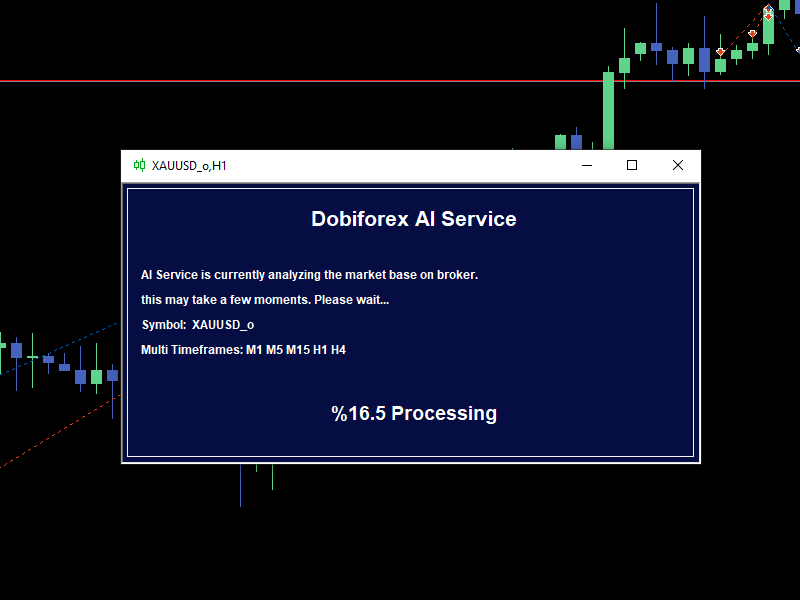
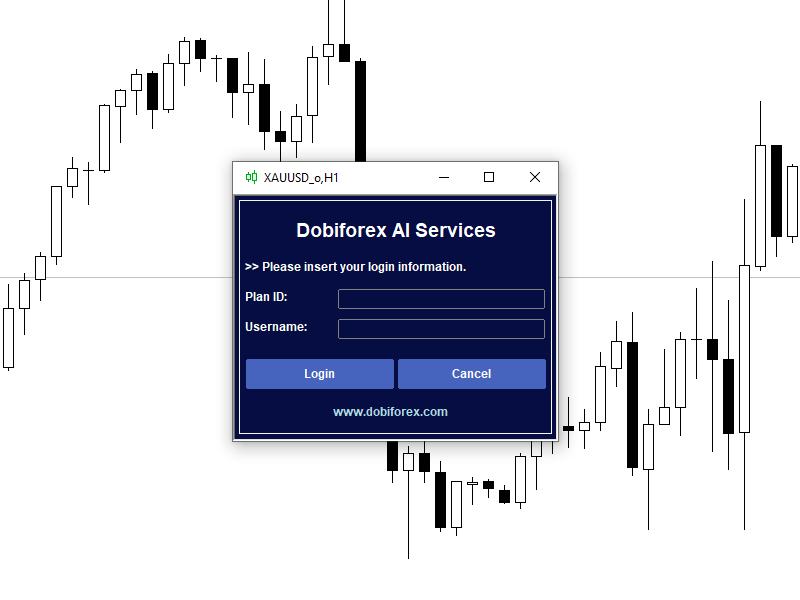
Dobiforex AI服务是一个为外汇交易者提供智能交易支持的专业平台。该助手利用先进的实时市场分析,帮助交易者在其交易策略中做出更明智的决策。用户通过注册Dobiforex网站并访问其专用面板,可以将此智能服务集成到其交易平台中。Dobiforex使用高级算法和机器学习,实时处理市场数据,提供准确可靠的交易信号。这个强大的工具使交易者能够聪明地利用市场波动,同时优化他们的交易风险。

由AWS Amazon提供支持 该交易助手利用Amazon AWS云服务的高级计算基础设施,实时处理和分析交易数据。通过AWS,工具能够以高精度和速度处理大规模的金融市场数据。此交易助手的一个突出特点是其使用的实时机器学习技术。该技术使系统能够快速识别数据中的隐藏模式,并通过复杂的算法提供极为准确的市场走势预测。随着每次新分析和数据输入,机器学习模型不断改进,优化交易信号的性能。这让交易者能够做出更智能的实时决策,并改善他们的交易策略以获得更好的结果。

什么是AI服务? 来自Dobiforex的交易助手是一种在MetaTrader 5 (MT5)平台上运行的智能顾问(EA),用户可以在其个人系统上使用。该EA包含多个菜单和子菜单,用户可以利用它进行高级市场分析并在外汇市场上执行交易。需要注意的是,Dobiforex并不是经纪商或金融服务提供商,而是一个提供先进交易工具的智能软件解决方案,帮助交易者在金融市场中做出更准确和高效的决策。

为什么要使用交易助手? 在交易中使用交易助手带来了许多有助于交易者提高绩效并降低风险的好处。使用交易助手的一些关键原因包括:

快速准确的分析 交易助手可以快速使用高级算法分析市场数据,为交易者提供可靠的信号。这不仅节省了时间,还提高了决策的准确性。

消除情绪化交易 交易者面临的最大挑战之一是让恐惧或贪婪等情绪影响决策。交易助手纯粹基于数据和预定策略进行操作,避免了情绪化的决策。

自动执行交易 通过交易助手,交易可以根据设定的策略自动执行,即使在交易者未主动监控市场时也是如此。这确保了交易的高效和及时执行。

优化风险管理 交易助手提供了先进的风险管理工具,例如设定精确的止损和获利点,帮助交易者最大限度地减少潜在损失。

访问高级策略 许多交易者缺乏时间或经验来实施复杂的策略。交易助手使用户无需具备深入的专业知识就能应用复杂的策略。

实时市场响应 市场变化迅速,交易者可能难以跟上。交易助手持续监控市场,并能够迅速对变化做出反应。

总之,使用交易助手使交易者能够更高效、准确地管理交易,且不受情绪干扰。

AI服务部分:

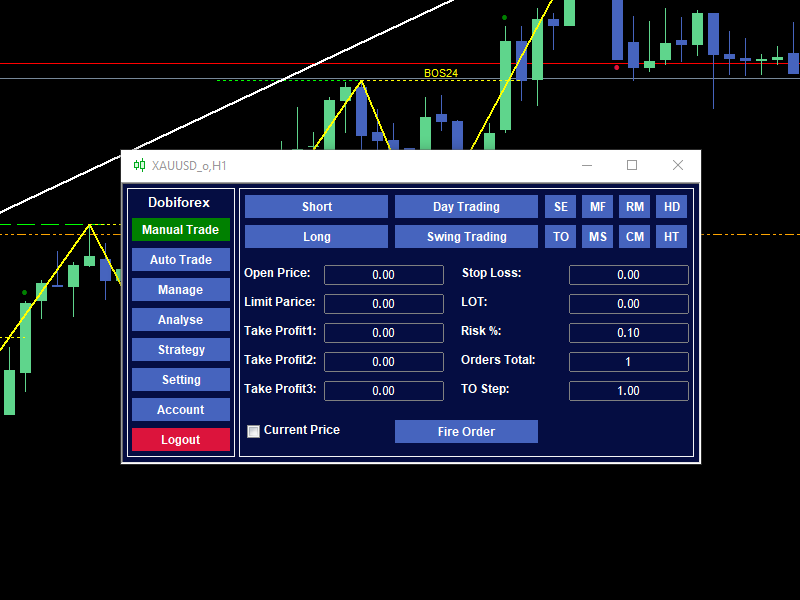
手动交易 Dobiforex助手的这一部分专为执行手动交易而设计,用户可以根据助手提供的分析数据和建议轻松下单。此外,该部分允许用户修改和自定义他们的交易设置。用户可以根据个人策略和偏好调整各种参数,例如交易量、获利点、止损点和其他设置,从而更精确地管理交易。该功能为交易者提供了更多灵活性,使他们能够结合助手的智能建议实施自己的策略。 助手提供了配置多种交易方式的能力,包括长仓和短仓、以及中期和短期策略。它还支持8种实用的高级交易方法,为多种交易风格提供专业工具。

单次入场(SE) 多次入场固定止损(MF) 反向马丁格尔(RM) 对冲(HD) 开盘跟踪(TO) 多次入场阶梯止损(MS) 连续马丁格尔(CM) 对冲开盘跟踪(HT)

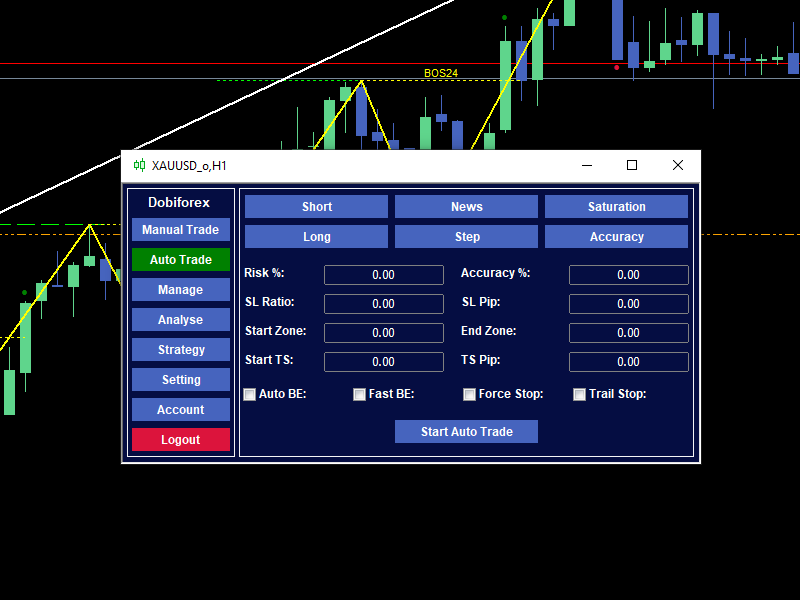
自动化交易 除了其先进的手动交易功能外,Dobiforex助手还提供了专门为短期或剥头皮交易设计的自动交易。当市场分析器提供交易建议时,助手会自动填写所需参数。用户还可以根据自己的策略和偏好自定义这些设置。此功能使经验较少的交易者也能从实时分析中受益,使他们能够更准确和快速地执行短期交易。激活自动化交易非常简单,用户只需选择几个关键设置: 交易类型:根据市场方向选择做多或做空仓位。 交易入场方式:定义入场方式,例如关键经济新闻、市场疲软、价格阶梯或精确的市场区域。

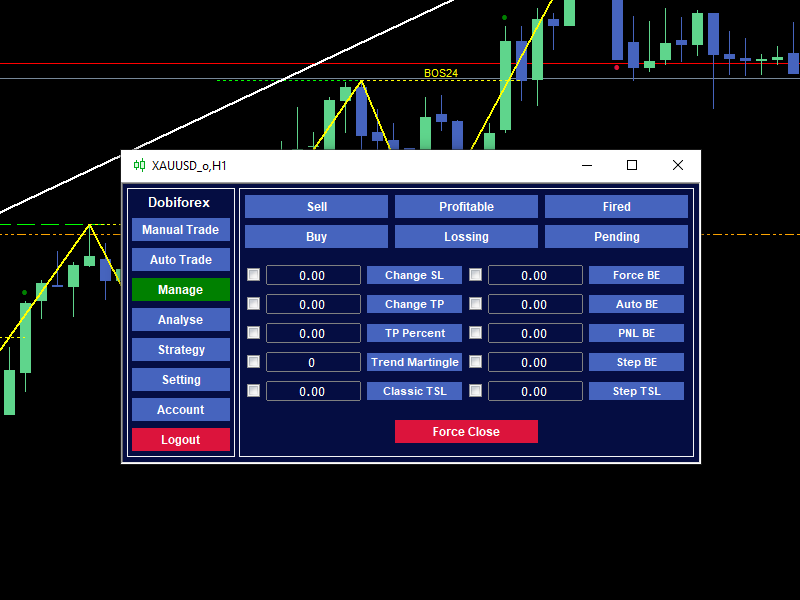
管理 这一部分专为订单或仓位的分组和手动管理而设计。在这里,您可以使用各种筛选器选择特定的订单或仓位,然后对它们应用所需的管理操作。仓位是指当前活跃的交易,而订单是尚未触发的挂单。因此,仓位涉及正在进行的交易,而订单是等待激活的指令。请注意,某些操作(如跟踪止损)只能应用于活跃仓位,不能应用于挂单。所选订单和仓位的票号会显示在MetaTrader屏幕底部工具箱中的专家选项卡中。 调整止损:调整所选交易的止损水平。 修改目标:修改活跃交易的获利目标。 设置目标百分比:根据交易规模或利润目标调整目标的百分比。 趋势马丁格尔:根据市场趋势应用马丁格尔策略。 经典跟踪止损:启用跟随价格变动的跟踪止损,并保持一定距离。 即时保本:立即将止损移至入场价,确保无损仓位。 自动保本:当达到某一利润阈值时自动将止损移至保本。 PNL保本:根据损益计算将止损设置为保本。 基于步骤的保本:根据价格变动步骤将止损移至保本。 基于步骤的跟踪止损:启用根据市场中步骤变动调整的跟踪止损。 关闭交易:立即关闭所选的开放仓位。

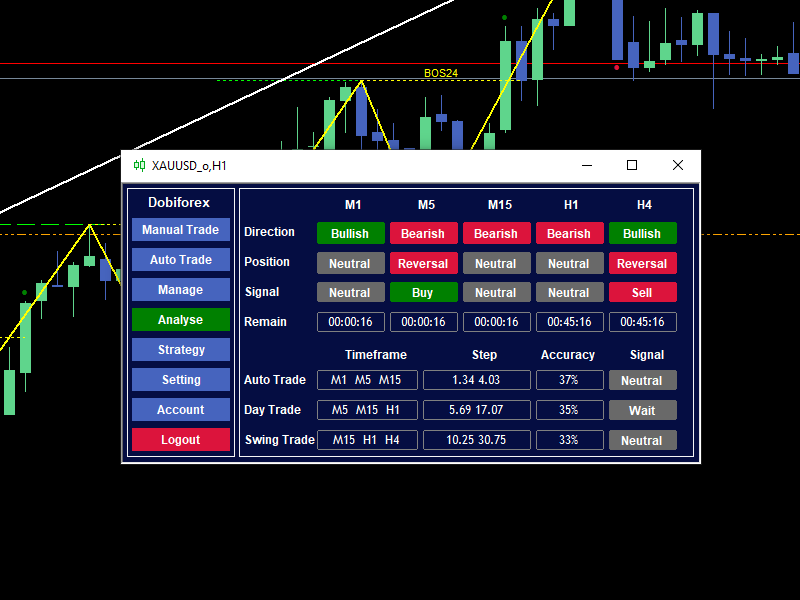
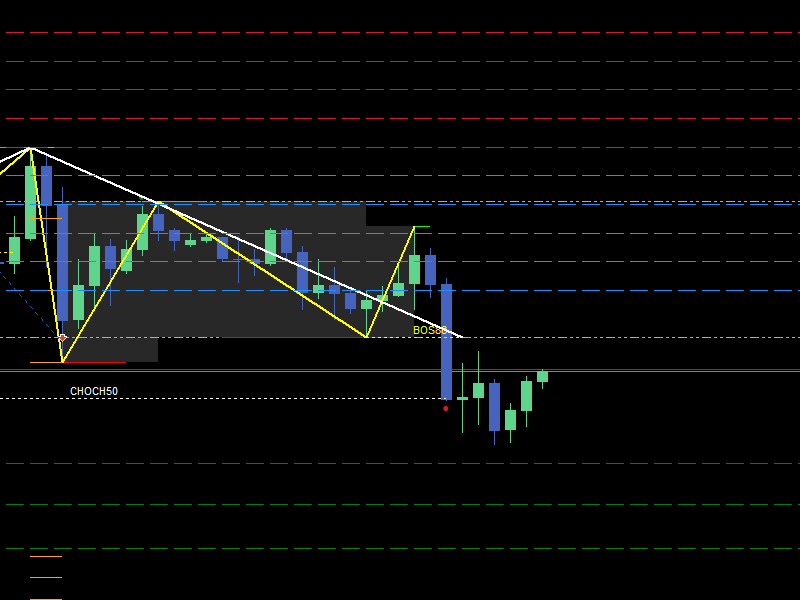
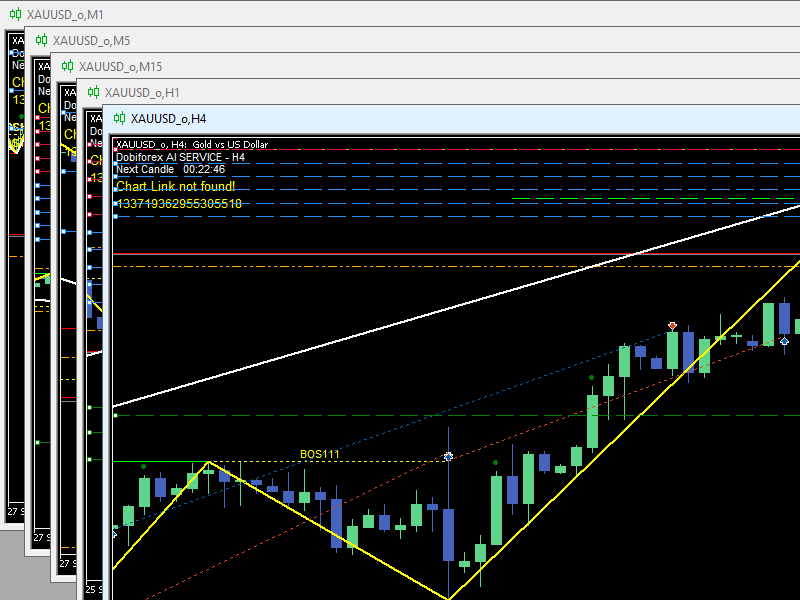
分析 此部分专为市场分析器而设,旨在通过人工智能和强大的服务器处理关键的市场数据。通过高级算法、技术模式、支撑和阻力位,Dobiforex助手识别最佳交易区域,并向用户显示当前最佳入场信号位置。分析部分包括两个主要部分: 多时间框架的独立分析:该部分分析来自不同时间框架的市场趋势和关键水平,提供市场方向(看涨、看跌或中性)、入场和出场点以及新蜡烛线形成的时间等见解。它允许交易者从多个角度评估市场,以做出明智的决策。 短期、中期和长期交易信号:信号是基于不同时间框架、市场走势和精确的价格水平生成的。这些信号使交易者能够根据不同的市场条件和时间范围调整策略。

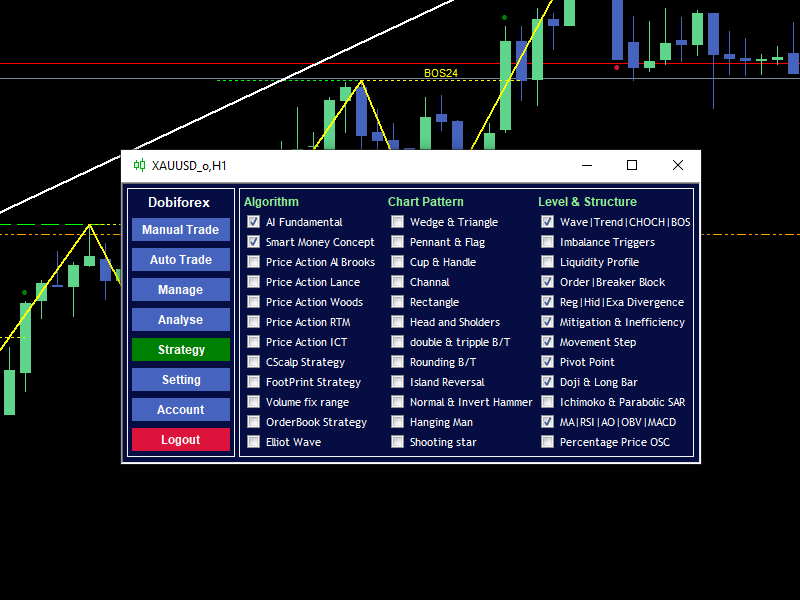
策略 此部分允许交易者自定义算法、图表模式、结构和级别,以便Dobiforex的人工智能根据这些设置分析市场。此部分的配置使交易者能够根据特定需求或个人交易风格实施其策略。一些功能设置为默认并且是强制性的,而其他功能则用于提高确认和交易管理的准确性。例如,交易者可以选择应涉及市场分析的图表模式(例如头肩顶、三角形等)和分析算法(例如移动平均线、艾略特波等)。为了在图表上直观显示这些策略,您可以通过分析期间的设置菜单激活它们的可见性。要全面了解每种方法,请参考Dobiforex网站上的教程部分。

AI基础策略 价格行为ICT策略 楔形&三角形模式 双重&三重B/T模式 波动|趋势|CHOCH|BOS区间 移动步骤水平 智能资金概念策略 Cscalp策略 旗形&旗帜模式 圆顶B/T模式 不平衡触发区间 枢轴点水平 价格行为Al Brooks策略 足迹策略 杯柄形态 岛形反转形态 流动性配置水平 十字星&长柱形区间 价格行为Lance策略 固定范围 通道形态 正常/反转锤形态 订单|阻断区间 Ichimoko&抛物线SAR区间 价格行为Woods策略 订单簿策略 矩形模式 吊人模式 常规|隐藏|扩展背离区间 MA|RSI|AO|OBV|MACD水平 价格行为RTM策略 艾略特波浪策略 头肩顶形态 射击星形态 缓解&无效区间 百分比价格振荡器区间

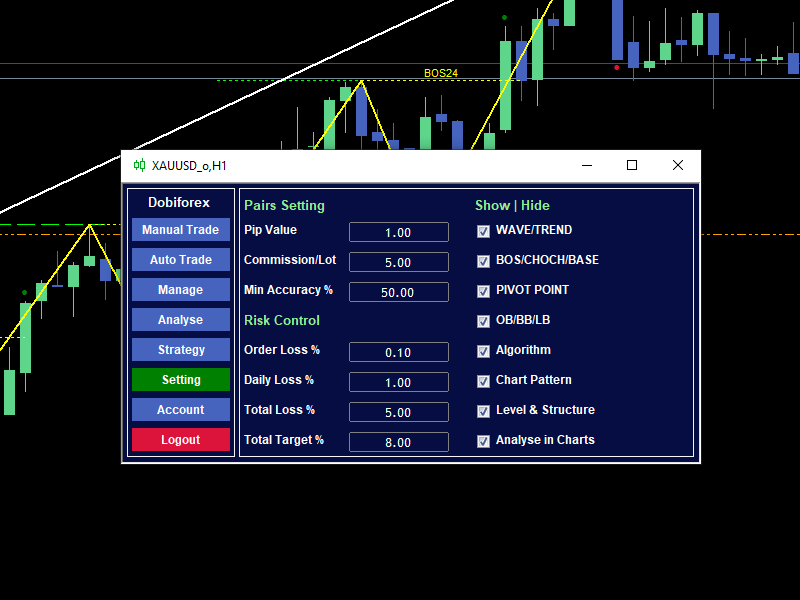
设置 此部分用于个性化和配置Dobiforex的需求。它包括用户可以根据其偏好和经纪条件调整的默认值。 货币对设置:这些设置帮助交易者根据经纪商的条件和市场动态更准确地管理交易。 风险控制:这是Dobiforex设置中的一个重要部分,提供帮助交易者准确可靠地管理交易风险的参数。 显示/隐藏:此部分包括显示在图表上的工具和指标,用户可以根据需要激活或停用其可见性。

重要提示: 必须通过官方网站下载主文件。此处列出的价格为基本计划的价格。要访问额外功能和折扣,请访问官方网站。

推荐产品
Professional Renko Chart MT5 Professional Renko Chart MT5 是一款简洁的 MetaTrader 5 Renko 图表指标,用于在独立的指标窗口中显示 Renko 砖块,并可选择直接在主价格图表上显示 Renko 方框。 该指标适合希望在 MetaTrader 5 中使用熟悉 Renko 图表风格的交易者,其视觉效果类似于 TradingView 等现代图表平台中的 Renko 图表显示方式。它可以将普通的基于时间的K线转换为 Renko 砖块,并以简单、清晰、实用的格式显示结果。 多个普通图表K线可能会形成一个 Renko 砖块。Professional Renko Chart MT5 还可以在主价格图表上显示 Renko 方框,并显示每个 Renko 砖块由多少根普通K线形成。 该指标不是智能交易系统 EA。它不会开仓、平仓或管理交易。它只是一个用于图表显示和市场分析的可视化工具。它可用于手动分析、Renko 图表阅读、趋势观察、价格波动过滤以及市场结构分析。 主要功能 在独立的 MT5 指标窗口中显示 Renko 砖块 Ren

Gino Renko EA
Stephane, Andr Valette
Here is an EA based on the Renko indicator, it can be used with currencies, commodities, and forex. Just associate it with the corresponding graph. The indicator used for the EA is available here, but it is not necessary for its operation, they are 2 independent products: https://www.mql5.com/fr/market/product/87852?source=Site +Market+MT5+Indicator+Search+Rating006%3agino+renko Personally I don't like renko like EA, and I haven't done any tests to find out which configuration is the best. Th
Swing Failure Hunter
Shingidzano Lesetedi
SFP Hunter — Swing Failure Pattern SFP Hunter is a MetaTrader 5 indicator that automatically detects Swing Failure Patterns (SFP) on any symbol and timeframe. The indicator identifies single-candle stop-hunt reversals where price wicks beyond a prior swing high or low and closes back inside on the same candle, signalling a potential reversal from that level. How the Pattern Works A Swing Failure Pattern occurs when price briefly breaches a prior swing high or swing low — triggering the stop orde
Viking Alpha DAX Ivar Edition
Valdeci Carlos Dos Passos Albuquerque
Viking Alpha DAX — Germany 40 Expert Advisor for MetaTrader 5 LAUNCH PROMO Only 10 copies at launch price. Price increases with each sale. Launch price: $297 Next price: $497 Final price: $997 Live Performance: FX Blue — Vikingtradingbots What Makes Viking Alpha DAX Different Most DAX robots fail for one simple reason: they treat the Germany 40 like a forex pair. It isn't. The DAX has a heartbeat — a specific rhythm tied to the Frankfurt Stock Exchange opening, the European session structure, an
SolarTrade Suite 金融机器人:LaunchPad 市场专家 - 专为开启交易而设计! 这是一个使用特殊创新和先进算法来计算其价值的交易机器人,是您在金融市场世界中的助手。 使用我们来自 SolarTrade Suite 系列的指标集来更好地选择启动此机器人的时机。 在描述底部查看我们来自 SolarTrade Suite 系列的其他产品。 您想自信地驾驭投资和金融市场的世界吗? SolarTrade Suite 金融机器人:LaunchPad 市场专家是一款创新软件,旨在帮助您做出明智的投资决策并增加您的利润。 SolarTrade Suite 金融机器人的优势:LaunchPad 市场专家: - 准确计算:我们的机器人使用先进的算法和分析方法来准确预测市场走势。 计算购买和出售资产的最佳时机。 - 用户友好界面:直观的界面将使您能够轻松掌握程序并在安装后立即开始享受其好处。 - 专家支持:我们的专业团队随时准备为您解答任何问题,并为您提供有关使用该程序的建议。 立即试用 SolarTrade Suite 金融机器人:LaunchPad Market
Exp5 Duplicator
Vladislav Andruschenko
4.78 (9)
Duplicator for MetaTrader 5 —— 单终端内的专业持仓复制系统 这是一款面向专业交易者的可靠 Expert Advisor,用于在 MetaTrader 5 中自动复制已经打开的持仓、放大总仓位、应用自定义手数规则,并按照明确的逻辑管理复制出来的持仓。 它非常适合手动交易者、自动化系统使用者,以及希望在同一个终端内更灵活地管理已有持仓的用户。 Duplicator for MT5 并不会依靠自己的交易策略主动开仓。它的职责是监控 MetaTrader 5 账户中已经存在的持仓,并根据你的设置创建对应副本,包括复制次数、手数、Stop Loss、Take Profit、注释以及额外的管理条件。 如果你需要的是 同一个 MetaTrader 5 终端内部 的持仓复制工具,而不是不同平台或不同终端之间的复制系统,那么 MT5 版 Duplicator 正是为这种需求而设计。 MT4 版本 详细描述 + DEMO + PDF 如何购买 如何安装 如何获取日志文件 如何测试和优化 Expforex 的所有产品 链接 如果你需要 MetaTrader 终端之间 的交易复
Gino Renko
Stephane, Andr Valette
1 (1)
Another renko-based indicator. It returns different usable values ​​for an EA, and is directly displayed on the main chart. Its setting is very simple: The size of the renko The number of bars taken into account The falling color The color on the rise Returned values: Buffer 0 : Value of the middle Buffer 1 : Value of the Top Buffer 2 : Value of the Bottom Buffer 3 : Direction of renko (0.0 for top ; 1.0 for bottom) Buffer 4 : Ratio of the renko, for example, if it is twice, 3 times, ro more of
DAILY OH/OL SDEV QUANT MODEL - STATISTICAL TRADING WITH PRECISION RISK MANAGEMENT TRADE WITH MATHEMATICAL CERTAINTY - KNOW YOUR EXACT STOP-LOSS AND TAKE-PROFIT BEFORE YOU ENTER This indicator analyzes 5,000+ days of price history to give you: Exact entry levels (sigma bands locked at daily open) Exact stop-loss distance (from M
HMA Scalper Pro EA
Vladimir Shumikhin
5 (2)
HMA Scalper Pro EA — 基于 Hull Moving Average (HMA) 指标的 MetaTrader 5 自动交易顾问 概述 HMA Scalper Pro EA 是一款专业的 MetaTrader 5 交易机器人(Expert Advisor),根据 Hull Moving Average (HMA) 的方向进行交易。HMA 指标确定当前趋势方向,顾问据此开仓,并辅以 Smart Risk 资金管理、自适应网格交易、追踪止损、保本止损和时间过滤器。 该顾问支持 Netting 和 Hedging 账户,适用于黄金(XAU/USD)、外汇货币对、原油、指数和加密货币的交易。 为什么选择 HMA SCALPER PRO EA - Hull Moving Average 信号 — 基于 HMA 方向入场,该指标对趋势变化的反应快于经典移动平均线 - 多时间框架 HMA 计算 — 方向可在独立于图表时间框架的单独时间框架上计算 - Smart Risk 替代经典马丁格尔 — 每个后续网格订单的手数都比前一个小 - 自适应网格交易 — 固定步长、订单限制、
Sonic R Pro Enhanced
Huu Thuong Nguyen
Sonic R Pro Enhanced EA - 2025 版本 $249 仅限前5名购买者! 实时信号 查看 Sonic R Pro Enhanced 的实时表现: 交易策略 Sonic R Pro Enhanced 是经典 Sonic R 策略的升级版,通过 Dragon Band(EMA 34 和 EMA 89)进行自动化交易,并结合先进算法以提高盈利能力。 时间周期:M15, M30 支持货币对:XAUUSD, BTCUSD, AUDJPY, USDJPY 交易风格:回调交易 & 反趋势交易 最低资金要求:500 USD 杠杆比例:1:200 起 用户指南 设置:只需配置一个参数 - RiskAmount 如果 RiskAmount < 0:按账户余额的百分比计算风险 如果 RiskAmount > 0:每笔交易的固定风险金额 (USD) 示例: RiskAmount = -1 : 风险为账户余额的 1% RiskAmount = -2.5 : 风险为账户余额的 2.5% RiskAmount = 50 : 每笔交易固定风险 50 USD RiskAmou
GDS Renko Pip ST Chart - Pip-Based Renko Chart Indicator for MetaTrader 5 GDS Renko Pip ST Chart is a pip-based Renko chart indicator for MetaTrader 5. It helps traders build and study cleaner Renko price movement using a practical fixed pip or point-based brick structure. This tool is designed as a Renko chart foundation for manual analysis. It does not predict the market, does not generate buy or sell signals and does not decide whether a trade should be opened. What Pip ST Chart Does Renko ch
FREE
Precision Instant
Jerson Daryl Herrera Arroyo
FREE TRY P.I.P.S FREE FOR 10 DAYS PRUEBA P.I.P.S GRATIS POR 10 DIAS EN: Download now and get a free 10-day trial license . Full features, demo account, no credit card needed. ES: Descarga ahora y obtén una licencia de prueba gratis por 10 días . Todas las funciones, cuenta demo, sin tarjeta de crédito. 10 DAYS 10 DIAS DEMO ONLY SOLO DEMO FULL ACCESS ACCESO COMPLETO NO CARD SIN TARJETA SEND A MESSAGE TO REQUEST YOUR FREE TRIAL ENVIA UN MENSAJE PARA SOLICITAR TU PRUEBA GRATIS P.I
Mine Farm
Maryna Kauzova
Mine Farm is one of the most classic and time-tested scalping strategies based on the breakdown of strong price levels. Mine Farm is the author's modification of the system for determining entry and exit points into the market... Mine Farm - is the combination of great potential with reliability and safety. Why Mine Farm?! - each order has a short dynamic Stop Loss - the advisor does not use any risky methods (averaging, martingale, grid, locking, etc.) - the advisor tries to get the most
This indicator uses a mathematical calculation algorithm . This algorithm calculates the remainder between the updated model and the actual values and produces the possible progress of the graph on the graph. It is not a super prophet in trading, but it is very good for the trader when entering the market and to analyze it before entering. Applicable for all currencies. Данный индикатор использует алгоритм математических вычислений . Данный алгоритм вычисляет остаток между обновленной моделью и
Exclusive EA for FOREX HEDGE account The EA (FuzzyLogicTrendEA) is based on fuzzy logic strategies based on the analysis of a set of 5 indicators and filters. Each indicator and filter has a weight in the calculation and, when the fuzzy logic result reaches the value defined in the EA parameter, a negotiation is opened seeking a pre-defined gain. As additional functions it is possible to define maximum spread, stop loss and so on . Recommended Symbol: EURUSD, AUDUSD, GBPUSD, NZDUSD, USDCAD, AUD
《酒田禅心EA:本间宗久³⁰⁰年K线秘术・私人波动猎手》 当江户时代的烛光穿越三个世纪,在您的图表中重燃武士之魂 这不是普通的交易工具,而是本间宗久亲传的K线炼金术 【核心引擎】 酒田战法重生 18世纪米市秘技经量化涅槃,化身永不熄灭的盈利引擎 每根K线都在诉说宗久当年的财富密码 禅意风控艺术 独创「心流熔断机制」 当市场风暴肆虐,系统如枯山水庭园般沉静精准️ 启动亏损暂停,让您如武士️收刀入鞘静待战机 【全市场征服者】 ️ 黄金・外汇・原油・股指・加密货币 ️ 无论何种战场皆可驾驭 ️ 通过深度参数雕琢,让百年战法完美适应当代市场脉搏 【您的绝对交易王国】 点差阈值自由设定 精准捕捉波动突破时刻 K线深度个性调整 定制专属形态识别精度 盈亏系数灵活配置 平衡风险与欲望的天平️ 风控模块随心定制 打造您的专属资金护甲️ 终极承诺 当您入夜安眠,宗久的交易禅心将化身最忠诚的守夜人️ ️守护账户安全,让18世纪
CosmiCLab FIBO
Kirils Subins
CosmiCLab SMC FIBO CosmiCLab SMC FIBO is a professional trading indicator designed for traders who use Smart Money Concepts (SMC), market structure analysis and Fibonacci retracement levels. The indicator automatically detects market swings and builds Fibonacci levels based on the latest impulse movement. It also identifies market structure changes such as BOS (Break of Structure) and CHOCH (Change of Character), helping traders understand the current market direction. CosmiCLab SMC FIBO also pr
GDS Renko Ghost Free Renko Market Memory Visualization Indicator for MetaTrader 5 GDS Renko Ghost is a free MetaTrader 5 indicator for traders who use Renko charts and want to study how similar Renko structures behaved in the past. The indicator visualizes historical Renko memory: similar past structures, continuation paths, consensus behavior and uncertainty zones. It does not give buy or sell signals. It does not predict price movement. It is a visual research and context tool for manual Renko
FREE
RenkoFromRealTicks
Stanislav Korotky
4.67 (3)
This non-trading expert utilizes so called custom symbols feature ( available in MQL API as well) to build renko charts based on history of real ticks of selected standard symbol. RenkoFromRealTicks generates custom symbol quotes, thus you may open many charts to apply different EAs and indicators to the renko. It also transmits real ticks to update renko charts in real time. The generated renko chart uses M1 timeframe. It makes no sense to switch the renko chart to a timeframe other than M1. T
GDS Renko Matrix - Free Multi-Scale Renko Overview Indicator for MetaTrader 5 GDS Renko Matrix is a free multi-scale Renko overview indicator for MetaTrader 5. It helps traders monitor Renko structure, direction and chart context in a compact matrix-style view. The purpose of this tool is to provide a faster visual overview of Renko behavior without turning the chart into a signal system. It does not predict the market and does not generate buy or sell signals. What Renko Matrix Shows Renko char
FREE
Bober Real MT5
Arnold Bobrinskii
4.88 (16)
Bober Real MT5 是一个全自动的外汇交易智能交易系统(EA)。该机器人创建于 2014 年 ,在此期间完成了大量盈利交易,在我的个人账户上实现了超过 7000% 的收益增长 。经过多次更新, 2019 年版本 是最稳定、最优秀的。机器人可用于任何交易品种,但在 EURGBP、GBPUSD(M5 周期) 上表现最佳。使用错误的参数会导致较差结果。 真实账户的 set 文件仅提供给购买者。 ️ 主要优势 无马丁格尔、无对冲、无加仓,始终使用 SL/TP 。 高速测试与优化。 可选 Dynamic Take-Profit ,自动适应价格通道高低点。 内置 新闻日历过滤器 ,自动避开重大事件。 自动检测 GMT 偏移 。 针对实盘交易长期优化,结果稳定。 设置后可自动运行,无需干预。 参数说明 Core / Trading type_order — 订单执行类型 (默认 ORDER_FILLING_FOK)。 ReverseTrade — 反转交易方向。 ToolEnter — 入场工具 (RSI 或 None)。 RSI304 / NoRSIbars — RSI 周期与
Smart SuperTrend Scalping Signals Pro is a MetaTrader 5 indicator designed for traders who want a clean visual trend-following system directly on the chart. Instead of displaying the traditional SuperTrend as a line, the indicator colors the actual price candles based on the current market condition. Green candles indicate bullish SuperTrend conditions, red candles indicate bearish SuperTrend conditions, and gray candles indicate sideways or weak-trend conditions. The indicator also includes a s
Inverted_Chart_EA Utility Expert Advisor Inverted_Chart_EA creates and maintains a mirror-inverted chart of any symbol and timeframe. It automatically generates a custom instrument (e.g. US30_INV ) and keeps its price history updated in real time, with bars mirrored around a chosen pivot. This utility gives traders a new way to analyze the market from a different perspective by flipping the chart upside down. Why use an inverted chart? Highlight hidden patterns – price formations that look ordin
Your Trend Friend
Luigi Nunes Labigalini
5 (1)
The trend is your friend! Look at the color of the indicator and trade on that direction. It does not  repaint. After each candle is closed, that's the color of the trend. You can focus on shorter faster trends or major trends, just test what's most suitable for the symbol and timeframe you trade. Simply change the "Length" parameter and the indicator will automatically adapt. You can also change the color, thickness and style of the lines. Download and give it a try! There are big movements w
其中一个数字序列称为“森林火灾序列”。它被公认为最美丽的新序列之一。它的主要特点是该序列避免了线性趋势,即使是最短的趋势。正是这一属性构成了该指标的基础。 在分析金融时间序列时,该指标试图拒绝所有可能的趋势选项。只有当他失败时,他才会认识到趋势的存在并给出适当的信号。这种方法可以让人们正确地确定新趋势开始的时刻。然而,误报也是可能的。为了减少它们的数量,该指标添加了一个额外的过滤器。当新柱打开时会生成信号。在任何情况下都不会发生重绘。 指标参数: Applied Price   - 应用价格常数; Period Main   - 指标的主要周期,其有效值在 5 - 60 之间; Period Additional   - 附加周期,此参数的有效值为 5 - 40; Signal Filter   - 附加信号滤波器,有效值 0 - 99; Alerts   - 启用后,指示器会在出现新信号时提醒您; Send Mail   - 允许指标向电子邮件发送消息; Push   - 允许您发送 Push 消息。
The Expert Advisor is used to create Renko chart, realtime updates, easy for technical analysis. Backtest your strategy with all indicators with Renko chart in MetaTrader 5. Parameters Box Size : input the number of box size. Show Wicks : if true , draw a candle with high/low. History Start: input the date to creat first candle. Maximum Bars: limit number of bars on renko chart How to use Attach the Expert Advisor to a chart (timeframe M1), for which you want to create a renko. Input box size a
Majd Qatuni exp
Majd Ahmad Mahmoud Qatuni
MAJD QATUNI Trend Reversal EA v1.27 A fully automated Expert Advisor tested specifically on Gold (XAUUSD) , designed to capture potential market reversals after strong momentum periods. It uses a consecutive candlestick pattern , enhanced by multi-indicator filters and advanced risk management for precise entries and profit protection. Current price is for demo use only. Key Features: Momentum-Based Reversal Strategy: Detects N consecutive bullish/bearish candles, then waits for a correction
Classic SNR EA MetaTrader 5 智能交易系统 | 多品种支撑阻力交易,基于趋势逻辑 概述 Classic SNR Breakout EA 是一款专业的交易机器人,使用日线摆动点识别结构性支撑与阻力水平(Support & Resistance),并根据 H1 价格行为相对于这些水平的表现执行交易。EA 应用 双重逻辑 :在上涨趋势中,当 H1 收盘于 SNR 水平下方(拒绝信号)时做空;在下跌趋势中,当 H1 收盘于 SNR 水平上方(拒绝信号)时做多。当 H1 收盘价果断突破水平时,也会交易突破信号。 EA 可同时扫描多达 14 个交易品种,自动解析经纪商特定的品种名称和后缀。 本策略适用于理解结构性水平可根据市场环境既充当支撑/阻力又充当突破触发器的交易者。 工作原理 EA 分析日线收盘价,在可配置的回溯期内识别高点和低点。这些摆动点成为结构性的支撑和阻力水平。然后 EA 监控 H1 K线收盘价相对于每个 SNR 水平的表现,并应用 基于趋势的逻辑 来确定交易方向。 核心交易逻辑 EA 并非简单地单向交易突破。相反,它会评估价格位置和 H1 收盘行为: 价格
KMB Smart Pattern Analyzer PRO
Karwan Msto Mohammed Mohammed
产品概述 KMB Smart Pattern Analyzer PRO 是一款高级技术分析指标,旨在用户自定义的图表区间内识别并排序高匹配度的市场形态。 该指标将多个分析引擎整合到一个专业工具中: K线形态分析 经典图表形态识别 谐波结构识别 智能市场结构 / SMC 分析 与在整个图表上显示随机信号不同,该指标允许用户专注于特定的市场区域,并获得最强形态匹配、预期方向、突破水平、失效水平以及预测目标区域的结构化分析。 这使其非常适合希望以更清晰、更专业的方式分析价格行为和形态结构的交易者。 主要功能 识别并排序 Top 3 最佳匹配形态 支持: K线形态 经典图表形态 谐波形态 市场结构 / SMC 逻辑 用户自定义区间分析 显示: 形态类型 市场方向 Score 动量 突破水平 T1 / T2 / T3 目标水平 失效水平 市场结构信息 在图表上显示所选分析区域 可拖动并移动分析区域 清晰专业的信息面板 支持浅色和深色图表主题 适用于主观交易者、形态交易者和技术分析师 工作方式 将指标添加到图表。 选择或移动分析区域。 指标扫描所选区域。 对最强的形态候选进行排序。 面板显示最佳匹
Advanced CRT Indicator MT5 — Candle Range Theory Tool Advanced CRT Indicator MT5 is a professional analysis tool that automates Candle Range Theory. It identifies consolidation ranges, breakout levels, Fair Value Gaps (FVG), and profit targets, with a real-time dashboard and alerts. Overview - Multi-timeframe candle range detection   - Automatic breakout levels with buffer settings   - Fair Value Gap identification and tracking   - Up to three customizable target levels (Risk:Reward ratios)  
该产品的买家也购买
Farmed Hedge Yield Farming | All Markets (Manual - Hybrid - Semi/Automated EA) MULTI-ASSET SUPPORT Trade any asset available on your broker - Forex: Major, Minor, Exotic pairs - Crypto: BTC, ETH, XRP, SOL, BNB - Stocks: Apple, Tesla, Amazon, Google, etc. - Commodities: Gold, Silver, Oil, Gas - Indices: US30, NAS100, SPX500, DAX40 - Any CFD your broker offers VERIFIED TRADING RESULTS - Farmed Hedge Yield Axi Copy:  https://www.mql5.com/en/signals/2356376 - Farmed Hedge Yield Exn Copy:   https:/
YuClusters
Yury Kulikov
4.93 (43)
Attention: You can view the program operation in the free version  YuClusters DEMO .  YuClusters is a professional market analysis system. The trader has unique opportunities to analyze the flow of orders, trade volumes, price movements using various charts, profiles, indicators, and graphical objects. YuClusters operates on data based on Time&Sales or ticks information, depending on what is available in the quotes of a financial instrument. YuClusters allows you to build graphs by combining da
Quant AI Agents
Ho Tuan Thang
5 (1)
Quant AI Agents are independent trading Expert Advisors. Instead of trading using a fixed strategy like other conventional EAs, Quant AI Agents   is a   multi-agent AI trading framework   that turns natural-language strategy prompts into live.  WANT THE SAME RESULTS AS MY LIVE SIGNAL?   Use the exact same brokers I do:   IC MARKETS , IC TRADING   .  Unlike the centralized stock market, Forex has no single, unified price feed.  Every broker sources liquidity from different providers, creating un
Features   With MT5 to Interactive Brokers(IB) Trader, you can: 1. Load chart data from IB to MT5, and Analyze with all standard or customer Indicators. 2. Place Orders to IB Account Directly in MT5. 3. Make your Own EAs upon IB Securities by only making minus changes of the trading function. Usage 1) Installation Copy the "Mt5ToIBTraderEn.ex4" and sample files to [MT5 Data Folder]->MQL5->Experts.  2)  MT5 Settings Add the IP Address to the MT5 Allowed URLs in 'Tools->Options->Expert Adviso
AI Agent Supervisor is NOT an Expert Advisor. AI Agent Supervisor   is a   multi-agent AI risk & portfolio supervisor   that watches every EA on your account and intervenes in real time.  WANT AN AI PORTFOLIO MANAGER WATCHING YOUR FLEET 24/7?   Run your fleet on the same brokers I do:   IC MARKETS , IC TRADING   .  Unlike the centralized stock market, Forex has no single, unified price feed.  Every broker sources liquidity from different providers, creating unique data streams. The Supervisor r
Unlimited Trade Copier Pro MT5 is a tool to copy trade remotely to multiple MT4, MT5 and cTrader accounts at different computers/locations over internet. This is an ideal solution for you if you are a signal provider and want to copy your trades to other receivers globally on your own rules. One provider can copy trades to multiple receivers and one receiver can get trade from multiple providers as well. The provider can even set the subscription expiry for each receiver, so that receiver will n
Adam FTMO MT5
Vyacheslav Izvarin
5 (2)
ADAM EA Special Version for FTMO Please use ShowInfo= false for backtesting ! Our 1st EA created using ChatGPT technology Trade only GOOD and checked PROP FIRMS  Default parameters for Challenge $100,000 Tested on EURUSD and GBPUSD only  Use 15MIN Time Frame Close all deals and Auto-trading  before Weekend at 12:00 GMT+3  Friday For Prop Firms MUST use special Protector  https://www.mql5.com/en/market/product/94362 --------------------------------------------------------------------------------
Mt5 To InterativeBrokers Copier allows you to copy deals from MT5 account to Interactive Brokers. With this, you can run your EA strategy on a MT5 Demo/Real Account, then copy all the deals to Interactive Brokers account real time. Features: 1. Copy or Invert-Copy deals Realtime from MT5 to IB Account. 2. Synchronizing positions of both accounts periodicaly, in case any missing copying. 3. You can choose only Buy position or Sell position. Symbols Setup: General Format:  {MT Symbol} -> {IB S
HINN Lazy Trader
ALGOFLOW OÜ
5 (1)
LIMITED SUMMER SALE -40% ! ONLY $470 insead of $790!  Maximum real discount! ONLY UNTIL 08/22 The core idea: using the user interface, you configure the parameters the chart must meet before entering a position (or positions), choose which entry models to use, and set the rules for when trading and planning should end. Lazy Trader  handles the rest: it  takes over all the routine chart watching and execution! full description  :: 3 key videos [1] ->  [2]   ->  [3] What can it do? - Understand
MT5 Trading Deck
Manuel Michiels
5 (2)
One button. One trade. MT5 Trading Deck is a hotkey trading panel for MetaTrader 5 that turns the platform into a keyboard-driven execution cockpit. Stop loss, take profit and lot size are pre-calculated for every key; the moment you press, a market order is live on the broker. A complete technical user manual is attached in the product Comments section. It documents every input parameter, the full hotkey map, the recommended Stream Deck XL layout, and the advanced workflows for Pre-Limit orders
QCML Assistant
Maxime Turcotte-lafreniere
QCML Assistant MT5 Your Trading. Our Assistant. Your Edge. Looking for a tool that completely transforms your experience on MetaTrader 5? QCML Assistant is the all-in-one solution built by traders, for traders. Just one tool installed on your chart, and you get access to an ultra-complete, ultra-fast, and ultra-simple trading platform. No more hours wasted setting up your workspace. No more complicated trade entries. With QCML Assistant, everything becomes simple, smooth, and efficient right fro
# 如果您有任何其他需求或對合作感興趣,請聯繫 zion.quantech.london@gmail.com。 Flash Trade (FT) 最友善的手動交易工具。 使用最直觀的操作來確保您的資金。 FT的特點 點擊任意位置快速交易 FT支持市場訂單和掛單 兩次點擊完成訂單並設置SL和TP 三次點擊完成掛單並設置SL和TP 自動將每個訂單的止損金額設置為您設置的餘額百分比或固定金額 下訂單時實時預估利潤 超簡單的界面和操作 支持拆分訂單 使用方式 市場訂單: 點擊圖表決定止損價位 點擊Buy或是Sell鈕 掛單: 點擊圖表決定入場價位 選擇掛單類型 點擊圖表決定止損價位 暫停FT: 點擊右上方的"On/Off"按鈕來切換開關 當按鈕從綠(On)變為紅(Off),代表FT已被停止 點擊"Off"按鈕再次開啟FT 如果有任何疑問、改善建議或是bug回報都可以聯繫e50310@gmail.com或留下評論 功能將持續於未來的版本推出
Hedge Trimmer EA
Michael Sipho Bhiya
Hedge Trimmer & Roll-Over EA Managing a hedged position means carrying two opposing trades simultaneously. Over time, the losing side grows while the profitable side offsets it. The standard problem is that closing the loser costs money you may not have sitting in cash — it has to come from somewhere. Hedge Trimmer EA solves this by using the floating profit on your winning trades as the funding source to progressively close down the losing side. It identifies which trades are in profit, uses a
EA Performance Logger Telegram
Abdulqudus Tomiwa Akande-owoo
The Performance Logger is a utility for MetaTrader 5 designed to track and report account metrics. It identifies trades based on specific criteria and provides summaries of account activity. Main Functions Automated Reporting : Generates summaries of account performance and sends them to specified communication channels (Telegram or Discord) on a weekly, monthly, or yearly basis. Strategy Analysis : Organizes performance data based on the specific Expert Advisor or strategy used for each trade.
Gamma Edge Pro MT5 — GexBot Classic API Integration Gamma Edge Pro   brings institutional-grade   Gamma Exposure (GEX) data   directly onto your MetaTrader 5 chart — the same data used by professional options traders to anticipate price magnets, hedging flows, and dealer positioning. Powered by the   GexBot Classic API , this indicator automatically maps options market data from US-listed instruments onto any   MT5 CFD instrument   — Forex pairs, Gold, indices, and more — with intelligent price
ENGLISH VERSION tg @eeevleee TICK CHART SERVICE - Professional Tick Ch
Trading Chaos Expert
Gennadiy Stanilevych
5 (11)
世界上没有本软件的同等产品,它代表一个覆盖交易信号的通用交易 "控制台",自动入场,设置止损和止盈,还有在单一窗口里同时进行多交易尾随终止。EA 的 "三次点击" 直观控制,确保在不同计算机上全方位使用所有功能,包括平板电脑。 与附加的信号指标交互来标记图标,给出实际市场的全貌,EA 令您做出正确的选择,以及在大多数情况下成为胜者一方。内置资金管理算法, 还有自动计算手数, 虚拟订单交易, 以及一些其它从崩溃账户里挽救交易者的 "诀窍"。它不是一个 "黑盒子"。而是一个深思熟虑的交易员的不可或缺的助理, 至少要尝试一次它的动作。 注,在面板上形成的 EA 不能在策略测试员中测试。可以在您的模拟账户里以实时模式检查它, 您可以下载本 EA 的免费版 - 混沌交易 EA 演示 。 EA 表现为一个面板,带有内置功能的交易机器人的,自动基于交易者可直观检查的交易信号入场,完全按照比尔·威廉姆斯的策略“混沌交易:第二版”和“新贸易维度”。在单独的窗口里,EA 识别价格走势的导向,用于指定品种和时间帧的全自动交易模式,也可以多品种并发。 它同时分析 MetaTrader 5“市场观察”窗口中显示
News Trader Pro is a unique robot that allows you to trade the news by your predefined strategy. It loads every piece of news from several popular Forex websites. You can choose any news and preset the strategy to trade it, and then News Trader Pro will trade that news by selected strategy automatically when the news comes. News release gives opportunity to have pips since the price usually has big move at that time. Now, with this tool, trading news becomes easier, more flexible and more exciti
Elliott Wave Counter 是一个面板,用于快速和用户友好地手动标记 Elliott 波浪。可以选择一种颜色和一个级别的标记。还有用于删除最后一个标记和工具制作的整个标记的功能。一键制作标记。点击五次 - 有五波!艾略特波浪计数器对于艾略特波浪的初学者和专业分析师来说都是一个很好的工具。 艾略特波浪计数器安装和输入指南 如果你想得到   关于 EA 添加 URL (   http://autofxhub.com   ) MT5 终端的 通知 (见截图)。 MT4版本 https://www.mql5.com/en/market/product/14016 MT5版本 https://www.mql5.com/en/market/product/15081 一般输入: 波形类型按钮: 此按钮允许用户选择他们想要在图表上突出显示的波形类型。可用的选项包括推动波、调整波和其他自定义波模式。 波级按钮: 这个按钮   允许用户选择他们想要在图表上突出显示的波形级别。可用的选项包括初级、中级和次级波级别。 波浪颜色: 这个   按钮   允许用户选择他们想要在图表上突出显示的波浪图
If you wish to draw Support and Resistance lines, view: daily market opening, classical pivot levels, Fibonacci pivot levels, trend lines, Fibonacci levels, the remaining time to candle closing, and current spread. If you seek to place your orders with the exact lot that meets your desired stop loss risk. If you wish to do all this and more with just one click, then this is the perfect tool to use. This tool will allow you to feel more relaxed when deciding to open orders, as well as predicting
如果产品有任何问题或者您需要在此产品上添加功能,请联系我 Contact/message me if you encounter any issue using the product or need extra feature to add on the base version. There is Demo version of this panel Dashboard Babon Scalping System MT5 Demo in my product list, please try it out to get familiar with all functionalities for free. Free version: LINK MT4 version: LINK This system basically utilizes TDI, Heiken Ashi Trend, Price Trend on H1 time-frame and TMA on H1&H4 time-frame to generate the trend (big picture). Then
The new version of  MirrorSoftware 2021  has been completely rewriten and optimized.  This version requires to be loaded only on a single chart because  it can detect all actions on every symbol and not only the actions of symbol where it is loaded. Even the  graphics and the configuration mode  have been completely redesigned. The MirrorSoftware is composed of two components (all components are required to work):  MirrorController  (free indicator): This component must be loaded into the MASTER
ClusterSecond
Rafil Nurmukhametov
4.78 (32)
该工具允许绘制不同类型的图表。 秒图从1秒到86400秒 从1滴答开始的滴答图 成交量图 三角洲图 仁科图 范围图 用于体积分析的内置指标。 该工具的演示版 https://www.mql5.com/ru/channels/clustersecond 每日市场概况和所选时间框架的市场概况。 集群搜索。 不平衡。 VWAP。 动态POC、VAH、VAL 价格窗口简介 具有不同表现形式的垂直体积。 δ,有不同的可视化选项。 当前的和高的时间框架极 地下室指标烛台显示 也可以从图表中进行交易。 注意:该工具是为具有真实(交换)量的市场设计的。 它不适合外汇市场。它在VPS上不起作用。它在策略测试器中不起作用。 为了控制该图表,我们使用了 鼠标左键 - 移动图表,在设置中选择不同的模式,调用位于屏幕左下角带螺丝刀的钥匙图标下的主设置窗口。 鼠标右键 - 用于输入位于屏幕左上角图标下的图形结构的设置,以及绘制垂直、水平、趋势线和矩形的单独设置。 在图表区域旋转鼠标滚轮--左右移动图表,按住Ctrl键--上下移动图表,在价格比例区域--按价格比例,在时间轴区域--按时间比例。 H键--在
The script displays info about the share's corporate reports and dividends. The data is downloaded from   investing.com : Report date Profit per share (EPS) Revenue Market capitalization Amount of dividends Date of payment of dividends Dividend income The product cannot be tested in the tester (since it is not possible to receive data from the Internet). Before launching:  Add 2   URL   https://ru.investing.com/earnings-calendar/Service/getCalendarFilteredData  and   https://ru.investing.com/di
Telegram Publisher Agent 是一个附加组件,允许交易者实时向他们的 Telegram 频道和群组发送信号。通过可定制的消息、图表截图和其他功能,该工具可以帮助交易者与他们的追随者分享他们的交易见解和策略。该工具还具有亮暗主题切换的精美设计,为用户提供美观和功能性的交易体验。 Telegram Publisher Agent 旨在将您的所有交易作为信号发布在您的频道和群组中。您所要做的就是提供交易,然后 Telegram 发布商代理将为您完成所有繁重的工作,只需单击一个按钮即可将交易信号发送到您的交易渠道或群组。 电报发布代理   安装和输入指南 如果您想获得有关 EA 添加 URL (   http://autofxhub.com   ) MT4/MT5 终端的通知(见屏幕截图)。 MT4版本 https://www.mql5.com/en/market/product/18985 MT5版本 https://www.mql5.com/en/market/product/23946 主要特点: 信号发送 - 将信号发送到用户的 Telegram 频道和组,带有可
Telegram Notify MT5 Telegram Notify MT5 is an utility tool to bridge your MetaTrader 5 activities to your Telegram chat/channel. It is useful for monitoring your MetaTrader 5 account by sending a notification to your particular Telegram chat/channel when someone/EA is placing trades, modifying order's TP/SL, closing trades and etc. This EA does not place any trade for your account. This EA also could be a convenient tool for monitoring other's EA trading activities or a tool for publishing your
Telegram ChartSnap MT5 is an utility tool to bridge your MetaTrader 5 activities to your Telegram chat/group/channel. It will screen shot your MetaTrader 5 chart and send it to your dedicated Telegram chat/group/channel through a Telegram bot. The whole process will keep repeating based on a time cycle that predetermined by the user. It is a convenient tool for those who like to get access to their favorite system/dashboard that only available at MetaTrader Desktop. Beside that, trader can easi
The  Easy Strategy Builder (ESB)  is a " Do It Yourself " solution that allows you to create a wide range of the automated trading strategies without any line of codes. This is the world’s easiest method to automate your strategies that can be used in STP, ECN and FIFO brokers. No drag and drop is needed. Just by set conditions of your trading strategy and change settings on desired values and let it work in your account. ESB has hundreds of modules to define unlimited possibilities of strategi
快捷操作,快速买,卖,清空操作。 提供三个按钮:Buy,Sell,清空。 Buy:点击后快速下多单,默认1手,盈利点和止损点都是110点,下单成功后可手动修改。 Sell:点击后快速下空单,默认1手,盈利点和止损点都是110点,下单成功后可手动修改。 清空:快速全部订单清仓,包括买,卖订单。 提供快速操作,默认大小,盈利点和止损点都可以单独找我,定制开发。    图表可以自行设定品种,时间周期。 快捷操作,快速买,卖,清空操作。 提供三个按钮:Buy,Sell,清空。 Buy:点击后快速下多单,默认1手,盈利点和止损点都是110点,下单成功后可手动修改。 Sell:点击后快速下空单,默认1手,盈利点和止损点都是110点,下单成功后可手动修改。 清空:快速全部订单清仓,包括买,卖订单。 
GoDom Depth of Market EA
Fabio Oliveira Magalhaes
Go Depth of Market   This product helps to watch the order book in a easily and friendly way, helping traders to take decisions that are more consistent with the timing of the market. Parameters: Activating EA (robot) mode   if you leave true it will become a robot, if you leave false it will become an indicator. Initial volume  VolumeDynamic   if you leave it enabled will be automatic batch Proportion:   Example: If you put 500 every 500 $ it will open a lot of 1.0 Takeprofit Stoploss Daily pr
作者的更多信息
图表链接辅助工具: 该工具充当MetaTrader中打开的图表与主图表上的专家之间的接口。许多多时间框架专家需要此文件与屏幕上的打开图表进行通信。您可以通过在图表上运行该工具,轻松将图表连接到主图表上的专家。 此文件的主要功能是将发生在打开图表上的所有事件发送到主图表上的专家。例如,如果主图表上放置了一个指导线,可能不会将这些指导线的更改反映在主面板中专家的参数上。通过拖放或运行此工具到图表上,您可以将它们连接在一起,确保图表上的更改会传达给主图表上的专家。 该工具还具有调试器和主图表专家的活动状态检查功能。如果与主图表上的专家的连接丢失,该工具将执行以下操作:首先,它会向MetaQuotes ID发送通知,然后通过Telegram提醒交易员,最后在当前图表上显示主面板上的专家已断开的警告。 要运行此专家,您需要在图表上执行或拖放它。在输入部分,您可以输入主图表ID号;如果您输入0,工具将自动处理,并且通常会在屏幕上显示。下一个参数允许您输入将警报发送到Telegram所需的信息。 如果在设置中定义了MetaQuotes ID,通知将发送到该ID
FREE
筛选:
无评论
回复评论