 MetaTrader 5
 专家
专家
 指标
指标
 程序库
程序库
 实用工具
实用工具
 窗口小部件
窗口小部件
 规则
规则
全新的MetaTrader 4 交易实用工具 - 39
 以下是可在MetaTrader 4中简化外汇交易的交易程序。将鼠标悬停在下面列表中的工具上,阅读它的描述和用途。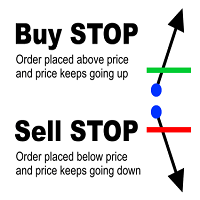
MultiStopOrder Tis Script will help us to put multiple stop order with single one click. This is a script not an EA Will place BUYSTOP and SELLSTOP with single click
Main Feature 1. Put Multiple Stop Order 2. Specify how much stop orders will make 3. Set distance from current price 4. Set distance for each stop order 5. Set Take Profit dan Stop Loss 6. Use it on MT4 7. Set lot size with minmum 0.01 lots 8. Use with single one clicks
This utility allows you to easily close positions.
You can close buy or sell positions by clicking each buttons. And also you can close whole positions by clicking one buttons.
This panel would be placed left bottom corner of the chart.
If the users want to change the placement and functions contact me.
Important: -Check allow live trading. -Enable Auto Trade trading.

The arkdc module derives its name from the Ark data collector statement. The main purpose of this module is to instantly save incoming tick data to a csv file. How does this csv file differ from any ready-made csv file found in metatrader or imported from other sites? The data obtained with this module is each tick data that comes to the metatrader program. A lot of tick data can come in per second.But does the module only record tick data raw? The arkdc module saves not only incoming tick data,

Using hotkeys, you can create graphic objects of different drawing styles and different colors on the active chart. You can change the formatting styles for graphics. You can choose default drawing styles, or set them in the advisor properties selection window. Going to the graph, when creating graphic objects, the color, line type and line thickness are selected automatically. Drawing styles for graphical objects will depend on the current timeframe where drawing will be performed. Please watch
FREE
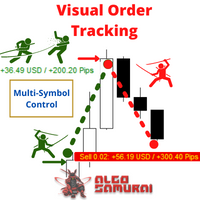
The Visual Order Tracking (VOT) indicator makes trade history and performance metrics visible on the chart in three ways: 1) Draw History of closed and open trades with arrows, lines and trade result numbers (pips, $ profit, % profit, % change); 2) Summary Trade Panel to show open and closed trade summaries by symbol, lots, pips, profit and advanced stats; and 3) Open Trades Panel to show open trades by Symbol Ticket, Type, Lots, Profit, pips, SL pips, StopLoss, TakeProfit, Spread, Magic, Comme
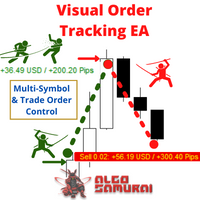
The Visual Order Tracking (VOT) EA makes trade history and performance metrics visible on the chart in four ways: 1) Draw History of closed and open trades with arrows, lines and trade result numbers (pips, $ profit, % profit, % change); 2) Trade Manager to show Open, SL and TP levels as vivid horizontal lines with dynamic specs and partial closing options; 3) Summary Trade Panel to show sortable table of open and closed trade summaries by symbol, lots, pips, profit and advanced stats; and 4)

This Expert Advisor is to assist you on Impulse's Titan method.
The expert : * Placement of SL/PE and TP in automatic mode * Automatic order taking * Automatic calculation of the Lots according to your Money management * Automatic calculation of Fibonacci levels * Tracking and closing of orders automatically * Detection of signal cancellations * Manual customisation of the PE is possible * Manual pause possible in case of event
To make the best use of the Expert you should : * follow the Impu
The script analyzes the size of the extreme closed candles of the selected timeframe (by default - W1).
If the candlestick size is higher than in the settings, the script opens the chart of this trading instrument.
In addition, the script calculates the average candle size for the number of candles specified in the settings.
An example of using the script: On Monday morning, activate the script on any trading instrument; Determine which instrument's weekly candle is above average; This week,
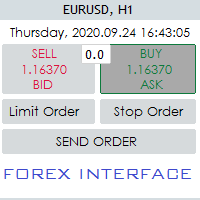
Hello Guys! I want to share with you a very useful tools. Anyone of us who has used MT4 for some time knows how impractical this platform can be for discretionary trading. That's why I created this graphical interface! Interface is very simple, all the info that you need are in the video and in the screenshot.
NB: Before to run the EA Interface, remember to copy the file in the comment in your MT4 folder "Controls". PATH: .../MQL4/INCLUDE/CONTROLS
NB: unfortunately the interface can't be test

Time Closer 可以幫助您在指定的時間“每天”關閉所有未平倉單。
主要適用於不想持單過夜, 不想持單在 不同交易時段 , 不想持單在 特定時間內 。
使用非常簡單
用法 1. 下載並拖動 Time Closer 在圖表上 (圖表符號應與您希望平倉的圖表符號相同) 2. 選中“允許自動交易”為“開” 3. 設定參數
輸入參數 Turnon True - 啟動 Time Closer False - 關閉 Time Closer Close All Open Position Time (Server Time) - 設定指定時間 (交易商平台伺服器時間) , 在 指定時間把 所有未平倉單平倉
Time Closer can help you closing all the open position at the specified time "Everyday". Mainly for Day trader that don't want to hold position overnight, or over different sessi

Open trades knowing what your risk will be. The calculator returns the lot size for the MT4 desktop terminal and the units for mobile terminals.
It works on every instrument that your broker offers (forex, gold, commodities, etc.)
It can also be used to open market and pending orders with just one click.
This system adds an improvement to MT4's user interface.

使用按键和通知进行绘图 该产品将对那些专业交易者感兴趣。更准确地说,他们在交易算法中使用干净的图表(没有指标或指标数量最少的图表)。 使用热键,可以在活动图表上创建具有不同绘图样式和不同颜色的图形对象。您可以更改图形的格式样式。 您可以选择默认的图形样式,或在顾问程序属性选择窗口中进行设置。转到图形,在创建图形对象时,会自动选择颜色,线条类型和线条粗细。图形对象的绘图样式将取决于执行绘图的当前时间范围。 请观看视频,我将尝试展示其基本功能。
键盘快捷键 键0-从所有对象上移开焦点 键1-创建一个“水平线”对象 键2-创建一个“矩形”对象 键3-创建一个“趋势线”对象 键\-从图表中删除各种对象 键]-删除“”类型的对象 键[-删除“矩形”类型的对象 键\-从图表中删除所有图形对象(仅绘制) 按键q-o-更改当前时间范围
创建水平线和趋势线 视频说明中提供了一个示例。 创建一个矩形 其他设置: -为将来自动扩展矩形; -当价格越过矩形的内部边界时,更改矩形的颜色; -选择的能力-是否用颜色填充矩形。 通知设置 通知类型: -Telegram-将通知发送到您先前在Telegram中创
FREE

Excellent dashboard for analytics. The panel helps to analyze the values of the Momentum indicator and its signals.
With this panel you can: watch the current signal from Momentum on all timeframes; watch the current signal from Momentum for different symbols; watch the current Momentum value; several types of signals for analytics.
Values in a table cell: value of Momentum
Signal type: Momentum crosses "100" line Momentum upper/lower "100" line Momentum direction
Work option: all

Alerts to Telegram The utility sends Alerts of all your indicators or advisers to a telegram channel (group or personal message). Benefits:
1. There is no need to be at the terminal waiting for an alert from your indicator or advisor; 2. Simple setup.
Currently works with terminal languages:
1.Russian; 2.English. If it is necessary to add your language please let me know. The utility works together with the AlertToFile indicator (put the indicator in the Indicators folder) Indicator: Alert
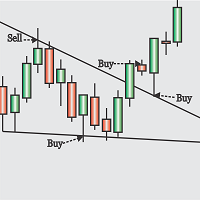
Obaforex TrendLine Trader is a tool developed to improve trading with trend lines. This tool is highly functional and yet extremely simple and safe to use. Simply draw trendlines and make them active for trading by renaming them based on what purpose you want them to serve. buy (to open a long trade based on the named line) sell (to open a short trade based on the named line) buytp (to close a buy trade at a price higher than current market price) buysl (to close a buy trade at a price lower t

LMBFWatchlist is an interactive tool for Metatrader 4 that lets you create and manage watch lists directly on your Metatrader charts. Functionality includes: Add an unlimited number of watch lists with names of your choice Add different groups of watchlists for different time frames Add comments for symbols that always appear on the chart when that symbol is selected. Easily identify which symbols have comments against them. See watch lists instantly synchronise across all open charts that hav

Note: This is EA only panel for manage Orders ------------------------- EA input inclde
- EA_Comment
------------------------
The panel include - Lot size input for BUY and SELL button
- Close ALL SELL orders (same symbol)
- Close ALL BUY orders (same symbol)
- Close ALL orders (same symbol)
-------------------------
You can use on any pair and any time frame
Thanks
FREE

DataGrabber The database creator
DataGrabber store selected instrument history to .csv files. It's purpose is to automatically create extensive history database.
DataGrabber is added to the selected instrument chart window as an indicator. It periodically check presence of bar data on the server and presence of .csv files on client PC (local database). If missing files detected in local database, it's created, filled with data and added to the database.
Range of bar history in days beeing ch

非常好用的工具8888888888888888888888888888888888888888888888888888888888888888888888888888888888888888888888888888888888888888888888888888888888888888888888888888888888888888888888888888888888888888888888888888888888888888888888888888888888888888888888888888888888888888888888888888888888888888888888888888888888888888
FREE

MT4 Alert to Telegram MT4 Alert to Telegram is tool, which sends selected trades to telegram channel. Tool sends trades when open and close with chart to telegram channel. Tool can send multiple charts and pairs from a single chart. Send information of all type of orders: Opened (including Pending Orders), and closed triggered.
functions - user can custom self-sending message text even in their native language - user can send own advertisement text periodically - attach expert in one chart an

This experts helps you with increasing your signal volume. Everytime the signal opens a trade, the experts creats a specific amount of copies of this trade. Evertime the signal closes a trade, the expert closes all the copies of the singal trade.
Input parameters: - amount_of_copies: The amount of copies the expert should create - interval_in_seconds: How often the expert should look for new orders to copy or closed orders, to close copies - lot_size_of_copies: The lot size of the new copies

What this tool does Assistant AutoClose monitors open trades and closes them when selected conditions are met. You can automatically close trades by: Profit in points Loss in points Profit in deposit currency Loss in deposit currency
It can work: On Buy and Sell trades Only Buy trades Only Sell trades
You can also: Limit by number of deals Control total profit per symbol Close trades per-trade or based on overall result Typical use cases Closing trades after fixed profit without using br

This application exports all finished operations to a text file delimited by <TAB>, comma, semicolon or any character defined by the user, also including the comments and magic number of the operations, which can be easily exported to EXCEL or Google Spreadsheets.
The files are generated in the "files" folder, individually separated by month with the name in the format: 999999-AAAA BBBB- [9-9999] where:
999999 = MT4 Trading Account Number
AAAA BBBB = Trading Account User Name
[9-9999] - Mon

Features: fast opening / closing deals the number of deals and the total profit for the Symbol
Fast open deals: set the Lot volume set StopLoss / TakeProfit in points (if you set "0", then it is not used) set slippage set Magic (if necessary) set comment (if necessary)
Fast open features: fast open Buy fast open Sell fast close ALL open orders for the current Symbol
Attention: this utility works only on the current instrument this utility works on a VPS must enable Algo trading in the termi
FREE

A bot for trading in binary options for mql4.
He can do send message in mobile of phone.
He can do work in several long time-frame.
He can modify main analize.
He do displey panel of the bot and modify her you can.
He have do display of tick grafic in 15 min and more(time of timeframe).
He can modify a small main analize.
He can modify a dimension of smal main analize.
He can modify the advanced analize.
He can modify a small advanced analize.
He can modify a dimension of smal advanc

Features: fast opening / closing deals automatic closing of trades by profit / loss the number of deals and the total profit for the Symbol
Fast open deals: set the Lot volume set StopLoss / TakeProfit in points (if you set "0", then it is not used) set slippage set Magic (if necessary) set comment (if necessary)
Fast open features: fast open Buy fast open Sell fast close ALL open orders for the current Symbol
Auto close deals by profit / loss (analogue of virtual StopLoss / TakeProfit): mo
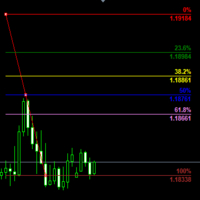
Customizable Fibonacci Lines Up to 9 Fibonacci levels Customize line color, line style and line width for each Fibonacci line Easily adjustable Fibo object is created in background so you can use with indicators and EAs How to use: Load the indicator to the chart and press "f" on keyboard and click anywhere on the chart to start drawing You can customize each line after its drawn as well as input window of the indicator

This application is now replaced by Ofir Notify Light Edition (Free) or Ofir Notify (paid).
Thank all for your positive feedbacks.
Ofir Notify is a tool which send alerts on trades to Telegram Alert on any event concerning a position : Opening, Closing, modification (SL, TP) Send alerts to Chats, Groups and Channel Alert on Equity change Display Risk, Reward and progress of profit/lost for each position Customization of alerts ( only in full edition ) Sending charts screenshots with alerts
FREE
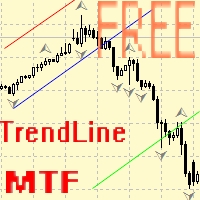
Советник для ручного построения трендовых линий и сопутствующих им стоплоссам и тейкпрофитам. После построения, советник запоминает уровни, направление и лот. При касании текущей цены с расчетной ценой, открывается ордер с заранее выбранными параметрами. Возможно построение и запоминание до 10 разнонаправленных уровней с разных таймфреймов. Можно использовать на любом торговом инструменте. Корректно работает с 4 и 5-значными ценами.
FREE

Introduction Utility informer 'Know Your Symbols' quickly and easy let you know important information about your symbol. This utility covers any symbol i guess, attach it to one chart (time frame and symbol does not matter) and select what symbols you need information about and voila...Equipped with inputs for symbol prefix/suffix if they have such. Informs about; Current price Day high price Day low price Spread points Point size Money required for 1 lot Pip value in quote currency Swap for a b
FREE

让机器人在您正常生活的同时为您扫描整个市场并发现最佳交易机会。
市场偏差扫描器以百分比为单位衡量价格与给定平均值的偏差。
建议所有平均值的设置为200每日简单移动平均值,但是任何参数都可以随意修改-扫描仪是完全可定制的。
如果违反了某个价格偏差水平,则可以设置电子邮件,MQL推送或警报通知。
在一张图表上,最多可以监视28个仪器。
通过更改工具名称并将Scanner附加到新图表,您可以监控整个市场(28、56、84、112等工具)。
注意!所有工具都必须在“市场观察”窗口中可见,以便在屏幕上接收新的报价价格。 另外请记住,MT4不支持多币种测试。 不幸的是,使用这种类型的程序进行完整的历史记录测试是不可能的。 请观看带有现场表演的演示视频 。
在使用或测试扫描仪之前,请确保要扫描的仪器具有完整的计算数据!请先更新图表!
常规设置
MQL通知已禁用/已启用-获取有关手机的偏离程度的通知。
电子邮件通知已禁用/已启用-获得有关您的电子邮件地址的偏离程度的通知。
警报通知已禁用/已启用-获取有关终端中交叉偏差水平的通知。
扫描仪刷新率(秒)-设置扫描仪的价格和刷新率。默

Excellent dashboard for analytics. The panel helps to analyze the values of the Parabolic SAR indicator and its signals.
With this panel you can: watch the current signal from Parabolic SAR on all timeframes; watch the current signal from Parabolic SAR for different symbols; watch the current Parabolic SAR value; several types of signals for analytics.
Values in a table cell: value of Parabolic SAR
Signal type: Parabolic SAR crosses Price Parabolic SAR upper/lower Price
Work opti

It is a truly useful multifunctional tool. I did it thinking about my needs as a trader some years ago although I have been modifying it for my partners to use it.
This tool allows: Directly send buy or sell orders with one click and shows where you should place the stop loss based on an algorithm using ATR and comparison with previous significant levels.
Close all profits by clicking a button.
Close all losses by clicking a button.
Close all operations by clicking a button.
Shows the

This script allows traders to easily close positions if their profit/loss reaches or exceeds a value specified in pips.
The script allows users to easily close positions if their profit/loss reaches or exceeds a value specified in pips.
Please set slippage value first. Sometimes some positions do not close due to high volatility of the market. Please set larger slippage or restart the script.
...................................................................................................

Hello Traders, This is a new Upgraded version. Money management is the key! The multiplier tells you the position of the stop loss. Additionaly do not forget to use exit indicators!
Based on this and your risk in percent (max 2%) you get the position size Calculated. You can drag the Panel on your chart by pressing the off button than press it again and hold+drag.
Enjoy=)
FREE

Dear Traders,
With this order system you can place Pending Orders amazingly quick. Quick Pending Order has the following features: The system automatically recognizes the type of order (sell stop, sell limit, buy stop, buy limit), by detecting the current price and your stop loss position. You can use its build in Money management. So you do not need to calculate the lot size. 2 Take profit targets Break even (with different pip amount) Custom button assignment Comission per Lot (default set t
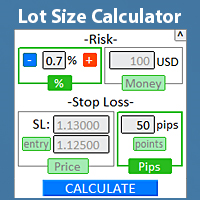
快速找到手数大小 直接在终端中 ,以遵守风险管理。 查看我的 #1 交易管理器 : 66+ 功能,包括专业风险管理 | 联系我 如有任何问题 适用于任何交易工具: 外汇、股票、期货、指数、差价合约、债券、加密货币; 界面最小化功能; 使用灵活性; 资金管理; 对于短期交易者尤其有用,当他们需要 快速 行动时。 计算需要指定2个参数:
风险大小(2种选项之一): 风险百分比 :手动设置或使用 -/+ 按钮; 风险金额 (账户货币自动确定); 止损水平(3种选项之一): 止损大小: 以点或 点数 ( 点数 切换); 止损价格: 按当前价格市价执行的计算; 止损价格 + 入场价格: 挂单的计算; 点击 "CALCULATE"按钮后,将计算手数大小。此外,还会显示风险大小和止损参数。 计算手数后,将显示交易面板用于市价执行或挂单(取决于入场价格的可用性): 当您设置止损水平时,将自动确定唯一可用的交易方向; 右上角有一个最小化计算器的按钮,这样在不需要时不会占用工作空间。 设置: 加载指标时,将显示一组选项作为输入参数。 DefaultRiskPercent

该指标显示全球交易所的交易时间。帮助您了解当前哪些市场最活跃 查看我的 #1 Pro Utility : 66+ 功能,包括此工具 | 联系我 如有任何问题 帮助选择当前波动最大的交易品种; 对日内交易者特别有用; 1) 在 1H 及以下时间框架 上使用时:线条将对应图表上实际的K线位置,移动图表时,交易时段的线条 会随图表一起移动 。 2) 在 4H 及以上时间框架 上使用时:将显示交易时段的 静态图表 ,垂直线 会在一天中移动 ,指示当前哪些市场活跃。(由于比例尺的原因)。
安装指标后,建议关闭网格 (CTRL+G) 并关闭对象描述 (F8>通用>显示对象描述)。 输入设置: 重要: 为使指标正常工作,需在初始设置中设置 经纪商时间与格林尼治标准时间的时差:
经纪商时间可在“市场报价”窗口顶部查看 (视图 > 市场报价 [或 CTRL+M])。
例如,如果经纪商时间现在是 16:30:00,而格林尼治标准时间是 14:30:00,参数值应为 [2] (相差2小时)。
如果时差为负,请勿忘记在数字前添加负号 (如果经纪商时间现在是 13:20:00,而格林尼
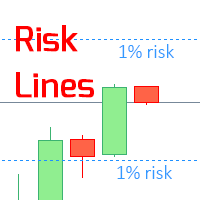
该指标在图表上显示 指定的风险水平 ,适用于多头和空头头寸。 查看我的 #1 交易管理器 :66+ 功能,包括此工具 | 联系我 如有任何问题 在设置止损水平时可能有用,其值显示在右侧价格轴上。 用于计算风险水平的是 固定 或 最后使用 的手数大小。 输入设置: 最后交易手数: 设置为 " true " 以根据您的 最后使用 交易手数进行计算; 手数大小: 设置交易手数的值: 如果第一个参数 = ' false" 时将使用此值; 当前账户 余额 / 可用 保证金 的风险; 风险水平 (从 0.1% 到 100%): 对于小数值,使用点 (.) 作为分隔符; 线条和标签的颜色 可调; 背景线条: 如果 ( true ):在背景绘制线条; 字体大小: 用于标签; 查看我的 #1 交易管理器 :66+ 功能,包括此工具 | 联系我 如有任何问题
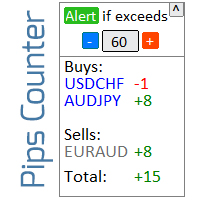
用于计算未平仓交易结果的信息器 查看我的 #1 Trade Manager : 66+ 功能,包括此工具 | 联系我 如有任何问题 信息面板将未平仓订单分为两类: 买入 卖出 对于每个类别,显示交易品种和当前点数。 下方显示所有未平仓交易的总结果。 只需点击按钮即可启用或禁用通知: 当通知启用时,您将知道任何交易品种的利润何时超过指定值。 通知的点数可以手动设置或使用+和-按钮设置(步长在设置中调整)。通知可在终端、电子邮件和移动应用中接收。 通知选项也适用于亏损仓位:当亏损超过指定值时。 具有折叠界面的功能(右上角):折叠后的面板在不需要时不会占用工作空间。 如果需要,可以在设置中更改显示颜色。
您可以配置: 1) 通知:
默认通知点数(之后您可以在界面中快速更改); 启用/禁用亏损交易的通知; 终端警报:开/关; 电子邮件通知:开/关; 推送通知(移动设备):开/关; 2) 视觉样式:
多头/空头仓位的颜色; 正/负点数的颜色;

用于跟踪每日交易结果的资讯面板 查看我的 #1 交易助手 : 66+ 功能,包括此工具 | 联系我 如有任何问题 在面板的上部,您可以设置每日盈利目标(以点数为单位): 手动输入数值; 使用 [+] 和 [-] 按钮(步长可在设置中配置); 然后,仪表板将交易分为两类: 当前浮动结果; 汇总已平仓交易; 最终结果显示在底部:是否达成每日目标,以及超出或不足的点数。
提供 折叠界面 功能(左上角):折叠后的面板在不需要时不会占用工作空间。
您可以配置(3张截图):
1) 默认 每日目标 (之后可通过界面快速修改);
2) 通知设置: 启用/禁用达成每日目标时的通知; 启用/禁用未达成每日目标时的通知; 目标检查时间(默认为每日结束时间 23:50); 启用/禁用终端通知; 启用/禁用电子邮件通知; 启用/禁用移动设备通知; 3) 视觉样式: [+] 和 [-] 按钮的步长; 盈利结果的显示颜色; 亏损结果的显示颜色; 零仓位(0 点)的显示颜色;

Excellent dashboard for analytics. The panel helps to analyze the values of the Alligator indicator and its signals.
With this panel you can: watch the current signal from Alligator on all timeframes; watch the current signal from Alligator for different symbols; watch the current Alligator value; several types of signals for analytics.
Values in a table cell: Jaw Teeths Lips Jaw - Teeth Jaw - Lips Teeth - Lips
Signal type: Lips - Teeth - green line (lips) crosses red line (tee

Screen logger with telegram - takes screenshots of all open MetaTrader 4 charts.
Why do you need
Recording incoming quotations from a broker. In case of any corrections, this moment will be fixed. Check the data of the indicator and notice cases of signal redrawing or overwriting Maintaining own accounting for changes in trading indicators on the account Creation of real trading video from the obtained snapshots
Advantages It consumes significantly less resources than any screen recording
FREE

Pro MT4 To Telegram sends text messages to a Telegram group or channel of your choice immediately when (No DLL files Needed):
+ new order + closed order + placing pending order + modified order + Delete Pending order and more in the next update... I have tested this EA with forex symbols but it should work fine with any MT4 symbol (e.g. indexes, commodities, stocks, cryptocurrencies)
How To get your Bot Token or Api Token : Before running the Telegram EA you must create your own Telegram bot

MULTI TRADER TOOL - SUPPORT / RESISTANCE, ONE CLICK CLOSE / OPEN, AUTO CLOSE, GRID ORDERS, ALERTS.
You should use this Panel on FULL SCREEN MODE (F11).
HotKeys: B - Open Market Buy Order with OneClickOpen Settings. S - Open Market Sell Order with OneClickOpen Settings. G - Open Grid Orders with Grid Panel Settings. R - Add Support/Resistance Settings to selected trend and horizontal lines. If you have any questions, ask in a private message or in the comments section.
FREE

AntiMartingale-Execution is a pyramidal Money Management system capable of increasing positions as equity increases using the positive margin of the transaction. It is possible to set the capital for each operation, the operating and maximum margins and the target level to be reached. Once the general trade settings have been made, it is possible to preview the grid of operations that will be activated by pressing the BUY / SELL button. If necessary, it is also possible to close all operations
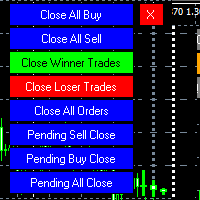
MT4 To Telegram it is available now! This Panel Allows you to : Close all buy orders. Close all sell orders. Close all winning orders. Close all losing orders. Close all orders. Close all Pending BUY orders. Close all Pending SELL orders.
Close all Pending orders.
Bonus : Grid Manager : Set the number of levels (trades). Lot size and you can do Martingale to raise the lot size for each level. Set distance between levels, and you can manage the distance for each level using Distance Q. St
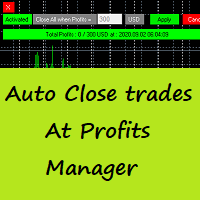
Auto Close Trades At Profits Manager is a tool that closes orders at a defined profit, very simple to use ( Panel with buttons...).
You can enable or disable the tool using buttons and edit the profit amount from the panel too.
INPUTS:
You can customize Panel graphics, Font and colors.
You can check also the The Grid Manager, closing trades Manager https://www.mql5.com/en/market/product/46365

Telegram Signals Copier is a fully automated software that reads messages from Telegram and inserts them as orders on your MT4 terminal.
It comes with an advanced risk management tool, that can risk based on a % of your balance, fixed loss, and many other options.
You can fully customize how you take the signals, change the TP and SL level.
With an advanced analytics tool, you can see where your favorite signal providers are doing the most profit, and improve the profits even more.
Contact
FREE

Product Overview
This tool is discretionary trading aid that executes a one-time entry when the conditions are set.
Action after the newest bar is fixed (opening action)
For example, there is no need to worry about being pruned by the shadow of the same price before that if you set it in the condition of when the closing price was broken.
It is not possible to set complicated conditions, and it is not designed for continuous automatic trading, but since it works after the time period is fix
FREE

Excellent dashboard for market analytics. The panel helps to analyze the values of the Stochastic indicator and its signals.
With this panel you can: watch the current signal from Stochastic on all timeframes; watch the current signal from Stochastic for different symbols; watch the current Stochastic value; several types of signals for analytics.
Values in a table cell: Stochastic - Main line Stochastic - SIgnal line Stochastic - Main line minus signal line
Signal type: Stochast

Use this indicator to ensure all your open charts are constantly displaying the same time frame. Change the time frame in any one chart and watch the others instantly change to the same time frame. Also allows scrolling of candles in one chart to be replicated in all other synchronized charts. Analyze correlation between different symbols by linking charts together on the same time frame Display a vertical marker move across all your open charts, so you can quickly compare price action at the sa
FREE

The trading panel is designed to limit the risks of working advisors on one account, it is also possible to limit the risks of manually opened transactions.
The panel provides an opportunity for each advisor to select a part of the deposit in percentage or in the account currency that you can risk. When the specified values are reached, the trading panel will close the positions of this EA or deals opened manually.
You can set full account protection in percentage or account currency, under
FREE
Public Signals using this EA:
https://www.mql5.com/en/signals/1016250 https://www.mql5.com/en/signals/1018964 The EA waits for the first executed order available and then opens a grid of pending stop-type orders in the same direction of the first one The first order that we usually call the master trade can be opened manually, on specified day and or via any other EA, indipendent from this one There is a dedicated Telegram Group with use cases and best settings, feel free to join and ask for

The LMBFPositionSize indicator is a simple way to quickly determine the position size appropriate for your prospective trade interactively on your Metatrader 4 charts. When you first add the indicator to your chart, you will be given the option to set parameters including: the account balance to use in the calculation and a percentage of the balance you are prepared to risk. Once attached to your chart, the indicator is available for you to use whenever you want and will continue to use these p

Completely change the way you use Metatrader 4 forever and give new meaning to using profiles and templates. Just attach the indicator to your open charts (e.g. include in your default template) and customised templates so you can do the following: Switch between different templates effortlessly without fear of losing any of the graphical objects (horizontal S&R, areas of supply and demand, text annotations) drawn on your charts Close a chart and then watch it remember all the graphical objects

If you like to see different time frames for the same symbol side by side on your terminal, then this is the indicator for you. Attach the indicator to all chart instances for the symbol of interest. Then see any additions, edits or deletions made on graphical objects instantly replicated to all other open charts for the same symbol. Object types replicated include: trend lines, horizontal lines, vertical lines, rectangles, triangles, ellipses, arrows, text boxes and labels.

This is a script in the entire application that records your trading logs that I created myself to practice trading skills.
The whole set includes: script, and web app: https://myfxjournal.cloud
It is very simple with only two options: Type (select dropdown) and Ticket (input).
If you choose to record open positions, please choose Type = Opening_Trade, otherwise choose Type = Closed_Trading (this is under the Account History tab)
***********This is the part used on the website**************

The professional indicator of Trading Sessions is now available in MetaTrader4.
Also the professional BROWSER of the NEWS and Trading Sessions is now available in MetaTrader5.
One dial shows the time of the 18 largest stock exchanges in the world. This makes it possible to trace the characteristic movement of the market at the appropriate time of day.
Thanks to sound and Push notifications, you will never miss the start of trading on the next exchange!
The operating time of each exchange

Strong Levels — Support & Resistance Indicator Idicator for automatic detection of strong price consolidation levels. Designed to help traders identify important support and resistance zones on the chart.This indicator is intended for market analysis , not for generating trade signals. How it works Strong Levels analyzes price behavior using: 2 Moving Averages 1 MACD a proprietary multi-factor algorithm
The same algorithm is used by the author in personal trading.
The indicator detec
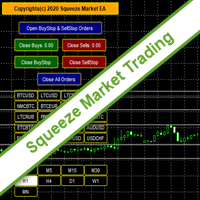
SqueezeMarket EA Utility is an Utility EA that works normally in the environment where the market direction could not be ascertained. It helps the trader to open both the Buystop and Sellstop pending orders at once.
After you see the market squeezed for a particular period on any currency pair, then, you will first of all plot an upper channel line on your chart window and do the same for the lower channel line, then open your SqueezeMarket EA Utility parameter settings by right clicking on the
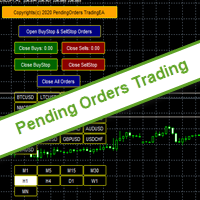
PendingOrders EA Utility is an Utility EA that works by opening both the Buystop and Sellstop pending orders at once.
When you get to a point where you can't really tell where the price will go next or after the release of a big news, what you need is simply plot your pending orders both up and down so that when the price move away from the point of stagnation, it will either move up or down, by this, you will catch most of the moves. All the default setting are defined as the System demands bu
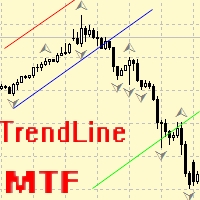
Ea交易用于手动绘制趋势线及其附带的止损和获利。 趋势线的初始构建基于分形指标。 接下来,您需要根据交易通道的方向和宽度或一些重要级别对其进行编辑。 构建后,EA会记住水平,方向和地段。 当您使用计算的价格触摸当前价格时,一个预先选择的参数的订单被打开。 您可以从不同的时间框架中构建和存储多达10个多向水平。 您可以在任何交易工具上使用它。 它与4和5位数的价格正常工作。 您可以从多个交易线创建交易策略,用于交易通道的细分和从中反弹。 您可以设置一个周期,如果市场价格未触及,交易线的所有设置将被删除。 为了方便计算趋势目标,有一个内置的Fibo标尺,设置水平和颜色,但由于事件处理的特殊性,这个功能在测试期间不起作用。

What this dashboard does The panel displays: Current Ichimoku signal per symbol Current Ichimoku signal per timeframe Key Ichimoku line values Signal direction summary
Instead of switching charts manually, you can analyze the market structure in seconds. Available Ichimoku values Each cell may display: Tenkan-Sen Kijun-Sen Senkou Span A Senkou Span B Chikou Span Span A – Span B difference
This allows detailed analysis or quick signal filtering. Signal types The dashboard can detect:

BlueDigitsFx 官方生态系统入口 获取基础设施更新、交易资源、产品发布信息以及 BlueDigitsFx 官方生态系统访问权限。 Telegram 生态系统
官方网站
BlueDigitsFx Command Center —— MT4 交易执行、风险管理与市场分析控制面板 BlueDigitsFx Command Center 是一款专业的 MT4 交易执行与工作流程管理面板,旨在帮助交易者在一个集中化环境中管理入场、风险、市场方向、动量以及交易时段分析。 作为 BlueDigitsFx 交易基础设施生态系统的一部分,Command Center 集成了订单执行工具、高级手数计算、保本管理、移动止损、K线方向、动量分析、多时间框架趋势概览以及货币强弱监测功能。 它专为希望获得更高效执行、更快速交易管理以及更结构化交易流程的 MetaTrader 4 交易者而设计,可适用于不同品种、时间周期和交易风格。 视频介绍:
https://youtu.be/rNZlrFMDHy8
核心功能 订单执行面板 —— 在同一界面执行市价单、限价单和止损单。 高级风险管理 —— 根据入

助理交易待定订单MT4 交易助理是一个专为手动交易而设计的交易面板。 该面板允许您计算风险,使用限价单管理头寸, 和其他有用的功能。
面板的主要功能 1. 它适用于任何交易工具 - 货币对,差价合约,股票,指数,期货,加密货币。 2. 将止损和止盈设置为以点表示的距离。 3. 设置并显示潜在亏损与利润比率。 4. 该面板支持挂单。 5. 在开盘前在图表上显示计算仓位交易量和利润。 6. 功能限制顺序。
Trade Assistant is a trading panel designed for manual trading. The panel allows you to calculate risk, manage positions using Limit orders, And other useful features.
Key features of the panel It works with any trading instruments - currency pairs, CFDs, stocks, indices, futures, cryptocu

Excellent dashboard for market analytics. The panel helps to analyze the values of the RSI indicator and its signals.
With this panel you can: watch the current signal from RSI on all timeframes; watch the current signal from RSI by different symbols; watch the current RSI value; several types of signals for analytics.
Values in a table cell: RIS value.
Signal type: RSI crosses level buy out/level sell out (outside); RSI crosses level buy out/level sell out (inside);
RSI is upper/l

No Nonsense Forex History News Tool
Please do not download Demo here, There is no demo version and it will not work.
Pros: Ability to adapt any GMT timezone broker News Event precision up to M5 time-frame Extremely easy to use
NNFX History News Tool is a tool dedicated to NNFX followers, it is designed to ease up the process of incorporating NNFX News Event during back-testing. History News provided by this tool starts from 2015/01/01 - 2020/08/09. The news event history provided by this t

このEAを使用することにより様々な条件で自動で決済することが可能になります。
詳細な情報はこちらにサイトがあります。
https://toushika.top/ea-takeaprofit/
条件: 条件1:利確か損切で決済 条件2:利確か損切または反転MAで決済 (ディフォルトでは20MA反転で利確) 条件3:利確か損切またはゴールデンクロス、デットクロスで決済 条件4:利確か損切またはボリンジャーバンドにタッチで決済 条件5:利確か損切またはパラボリックで決済 条件6:利確か損切または設定した水平線で決済 <- 他の通貨で設定した水平線でも決済可能
重要:水平線で決済の際、買いポジションと売りポジションは同時に持てません。 買いポジションがある時に売りポジションを持つとすぐに決済されてしまいます。 反対に売りポジションがる時に買いポジションを持つとすぐに決済されてしまいます のでご注意ください。
Multi operations script to operate manually. It is not a toy!
Warning: This script needs one to two months of utilization to achieve a proficient usage level and knowing all functions and market situations where it can be used.
THIS IS A TOOL FOR PROFESSIONALS & EXPERIENCED TRADERS!
You can save thousands of configurations to make thousands operations beyond your imagination .
Steps buy to protect steps sell, chains of take profits and stop losses, protected, martingale, progressive, inverte
FREE
您知道为什么MetaTrader市场是出售交易策略和技术指标的最佳场所吗?不需要广告或软件保护,没有支付的麻烦。一切都在MetaTrader市场提供。
