 MetaTrader 5
 Experts
 Indicadores
 Bibliotecas
 Utilitários
 Widgets
 Regras
Conheça o Mercado MQL5 no YouTube, assista aos vídeos tutoriais
Como comprar um robô de negociação ou indicador?
Execute seu EA na
hospedagem virtual
hospedagem virtual
Teste indicadores/robôs de negociação antes de comprá-los
Quer ganhar dinheiro no Mercado?
Como apresentar um produto para o consumidor final?
Novas ferramentas de negociação para MetaTrader 4 - 39
 Abaixo estão os programas de negociação que simplificam o trading no MetaTrader 4. Passe o mouse sobre um produto para ler uma descrição mostrando seu propósito.
Excellent dashboard for analytics. The panel helps to analyze the values of the Alligator indicator and its signals.
With this panel you can: watch the current signal from Alligator on all timeframes; watch the current signal from Alligator for different symbols; watch the current Alligator value; several types of signals for analytics.
Values in a table cell: Jaw Teeths Lips Jaw - Teeth Jaw - Lips Teeth - Lips
Signal type: Lips - Teeth - green line (lips) crosses red line (tee

Excellent dashboard for market analytics. The panel helps to analyze the values of the Stochastic indicator and its signals.
With this panel you can: watch the current signal from Stochastic on all timeframes; watch the current signal from Stochastic for different symbols; watch the current Stochastic value; several types of signals for analytics.
Values in a table cell: Stochastic - Main line Stochastic - SIgnal line Stochastic - Main line minus signal line
Signal type: Stochast

Use this indicator to ensure all your open charts are constantly displaying the same time frame. Change the time frame in any one chart and watch the others instantly change to the same time frame. Also allows scrolling of candles in one chart to be replicated in all other synchronized charts. Analyze correlation between different symbols by linking charts together on the same time frame Display a vertical marker move across all your open charts, so you can quickly compare price action at the sa
FREE

The trading panel is designed to limit the risks of working advisors on one account, it is also possible to limit the risks of manually opened transactions.
The panel provides an opportunity for each advisor to select a part of the deposit in percentage or in the account currency that you can risk. When the specified values are reached, the trading panel will close the positions of this EA or deals opened manually.
You can set full account protection in percentage or account currency, under
FREE

The LMBFPositionSize indicator is a simple way to quickly determine the position size appropriate for your prospective trade interactively on your Metatrader 4 charts. When you first add the indicator to your chart, you will be given the option to set parameters including: the account balance to use in the calculation and a percentage of the balance you are prepared to risk. Once attached to your chart, the indicator is available for you to use whenever you want and will continue to use these p

Completely change the way you use Metatrader 4 forever and give new meaning to using profiles and templates. Just attach the indicator to your open charts (e.g. include in your default template) and customised templates so you can do the following: Switch between different templates effortlessly without fear of losing any of the graphical objects (horizontal S&R, areas of supply and demand, text annotations) drawn on your charts Close a chart and then watch it remember all the graphical objects

If you like to see different time frames for the same symbol side by side on your terminal, then this is the indicator for you. Attach the indicator to all chart instances for the symbol of interest. Then see any additions, edits or deletions made on graphical objects instantly replicated to all other open charts for the same symbol. Object types replicated include: trend lines, horizontal lines, vertical lines, rectangles, triangles, ellipses, arrows, text boxes and labels.

Pro MT4 To Telegram sends text messages to a Telegram group or channel of your choice immediately when (No DLL files Needed):
+ new order + closed order + placing pending order + modified order + Delete Pending order and more in the next update... I have tested this EA with forex symbols but it should work fine with any MT4 symbol (e.g. indexes, commodities, stocks, cryptocurrencies)
How To get your Bot Token or Api Token : Before running the Telegram EA you must create your own Telegram bot

AntiMartingale-Execution is a pyramidal Money Management system capable of increasing positions as equity increases using the positive margin of the transaction. It is possible to set the capital for each operation, the operating and maximum margins and the target level to be reached. Once the general trade settings have been made, it is possible to preview the grid of operations that will be activated by pressing the BUY / SELL button. If necessary, it is also possible to close all operations
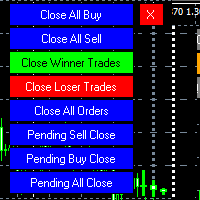
MT4 To Telegram it is available now! This Panel Allows you to : Close all buy orders. Close all sell orders. Close all winning orders. Close all losing orders. Close all orders. Close all Pending BUY orders. Close all Pending SELL orders.
Close all Pending orders.
Bonus : Grid Manager : Set the number of levels (trades). Lot size and you can do Martingale to raise the lot size for each level. Set distance between levels, and you can manage the distance for each level using Distance Q. St

This is a script in the entire application that records your trading logs that I created myself to practice trading skills.
The whole set includes: script, and web app: https://myfxjournal.cloud
It is very simple with only two options: Type (select dropdown) and Ticket (input).
If you choose to record open positions, please choose Type = Opening_Trade, otherwise choose Type = Closed_Trading (this is under the Account History tab)
***********This is the part used on the website**************

Product Overview
This tool is discretionary trading aid that executes a one-time entry when the conditions are set.
Action after the newest bar is fixed (opening action)
For example, there is no need to worry about being pruned by the shadow of the same price before that if you set it in the condition of when the closing price was broken.
It is not possible to set complicated conditions, and it is not designed for continuous automatic trading, but since it works after the time period is fix
FREE

Strong Levels — Support & Resistance Indicator Idicator for automatic detection of strong price consolidation levels. Designed to help traders identify important support and resistance zones on the chart.This indicator is intended for market analysis , not for generating trade signals. How it works Strong Levels analyzes price behavior using: 2 Moving Averages 1 MACD a proprietary multi-factor algorithm
The same algorithm is used by the author in personal trading.
The indicator detec
Public Signals using this EA:
https://www.mql5.com/en/signals/1016250 https://www.mql5.com/en/signals/1018964 The EA waits for the first executed order available and then opens a grid of pending stop-type orders in the same direction of the first one The first order that we usually call the master trade can be opened manually, on specified day and or via any other EA, indipendent from this one There is a dedicated Telegram Group with use cases and best settings, feel free to join and ask for

The professional indicator of Trading Sessions is now available in MetaTrader4.
Also the professional BROWSER of the NEWS and Trading Sessions is now available in MetaTrader5.
One dial shows the time of the 18 largest stock exchanges in the world. This makes it possible to trace the characteristic movement of the market at the appropriate time of day.
Thanks to sound and Push notifications, you will never miss the start of trading on the next exchange!
The operating time of each exchange
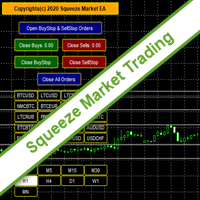
SqueezeMarket EA Utility is an Utility EA that works normally in the environment where the market direction could not be ascertained. It helps the trader to open both the Buystop and Sellstop pending orders at once.
After you see the market squeezed for a particular period on any currency pair, then, you will first of all plot an upper channel line on your chart window and do the same for the lower channel line, then open your SqueezeMarket EA Utility parameter settings by right clicking on the
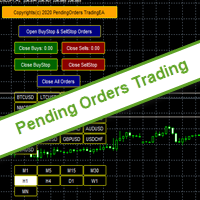
PendingOrders EA Utility is an Utility EA that works by opening both the Buystop and Sellstop pending orders at once.
When you get to a point where you can't really tell where the price will go next or after the release of a big news, what you need is simply plot your pending orders both up and down so that when the price move away from the point of stagnation, it will either move up or down, by this, you will catch most of the moves. All the default setting are defined as the System demands bu

Expert Advisor for manual construction of trend lines and their accompanying stop loss and take profit. Após a construção, a EA se lembra dos níveis, direção e lot. Quando você toca o preço atual com o preço calculado, uma ordem com parâmetros pré-selecionados é aberta. Você pode construir e armazenar até 10 níveis multidirecionais a partir de diferentes prazos. Você pode usá-lo em qualquer instrumento de negociação. Funciona corretamente com preços de 4 e 5 dígitos. Você pode criar estratégias

Comércio Assistente Pendente Encomenda MT4 Trade Assistant é um painel de negociação projetado para negociação manual. O painel permite calcular o risco, gerir posições utilizando ordens Limite, E outras características úteis.
Principais características do painel 1. Funciona com quaisquer instrumentos de negociação - pares de moedas, CFDs, ações, índices, futuros, criptomoedas. 2. Detenda a perda de paragem e leve o lucro como distância em pontos. 3. Definir e mostrar o rácio de perdas poten

Excellent dashboard for market analytics. The panel helps to analyze the values of the RSI indicator and its signals.
With this panel you can: watch the current signal from RSI on all timeframes; watch the current signal from RSI by different symbols; watch the current RSI value; several types of signals for analytics.
Values in a table cell: RIS value.
Signal type: RSI crosses level buy out/level sell out (outside); RSI crosses level buy out/level sell out (inside);
RSI is upper/l

What this dashboard does The panel displays: Current Ichimoku signal per symbol Current Ichimoku signal per timeframe Key Ichimoku line values Signal direction summary
Instead of switching charts manually, you can analyze the market structure in seconds. Available Ichimoku values Each cell may display: Tenkan-Sen Kijun-Sen Senkou Span A Senkou Span B Chikou Span Span A – Span B difference
This allows detailed analysis or quick signal filtering. Signal types The dashboard can detect:

Este é um otimizador automático de parâmetros para o indicador Trend Line PRO Com facilidade e rapidez, você selecionará os parâmetros ideais para o seu indicador favorito Trend Line PRO. A otimização leva apenas alguns segundos. O otimizador permite que você encontre os melhores parâmetros para cada par e período: Amplitude, TP1-TP3, StopLoss, bem como os valores Para Time Filter e HTF Filter na seção selecionada do histórico (Days)
Para otimizar diferentes períodos de tempo, você precisa d

Acesso Oficial ao Ecossistema BlueDigitsFx Receba atualizações de infraestrutura, recursos de trabalho, lançamentos de produtos e acesso ao ecossistema oficial BlueDigitsFx. Ecossistema Telegram
Website
BlueDigitsFx Command Center — Painel MT4 para Execução, Gestão de Risco e Análise de Mercado O BlueDigitsFx Command Center é um painel profissional de execução e fluxo de trabalho para MT4, desenvolvido para ajudar traders a gerenciar entradas, risco, direção de mercado, momentum e visão geral

No Nonsense Forex History News Tool
Please do not download Demo here, There is no demo version and it will not work.
Pros: Ability to adapt any GMT timezone broker News Event precision up to M5 time-frame Extremely easy to use
NNFX History News Tool is a tool dedicated to NNFX followers, it is designed to ease up the process of incorporating NNFX News Event during back-testing. History News provided by this tool starts from 2015/01/01 - 2020/08/09. The news event history provided by this t

Ready to save big? All items are $30 for limited period.
Fast, Reliable, and Any (broker or symbol) to Any (broker or symbol) Trade Copier Solution. The Copied trades will be having your custom comments: Its very common problem in existing copiers that if symbol names are totally different in Master (Provider) and Slave (Receiver) Account then the existing copiers doesnt work. In this copier you will not face such issue and you can copy any symbol name to any symbol name. For Example: Your

このEAを使用することにより様々な条件で自動で決済することが可能になります。
詳細な情報はこちらにサイトがあります。
https://toushika.top/ea-takeaprofit/
条件: 条件1:利確か損切で決済 条件2:利確か損切または反転MAで決済 (ディフォルトでは20MA反転で利確) 条件3:利確か損切またはゴールデンクロス、デットクロスで決済 条件4:利確か損切またはボリンジャーバンドにタッチで決済 条件5:利確か損切またはパラボリックで決済 条件6:利確か損切または設定した水平線で決済 <- 他の通貨で設定した水平線でも決済可能
重要:水平線で決済の際、買いポジションと売りポジションは同時に持てません。 買いポジションがある時に売りポジションを持つとすぐに決済されてしまいます。 反対に売りポジションがる時に買いポジションを持つとすぐに決済されてしまいます のでご注意ください。

Multi operations script to operate manually. It is not a toy!
Warning: This script needs one to two months of utilization to achieve a proficient usage level and knowing all functions and market situations where it can be used.
THIS IS A TOOL FOR PROFESSIONALS & EXPERIENCED TRADERS!
You can save thousands of configurations to make thousands operations beyond your imagination .
Steps buy to protect steps sell, chains of take profits and stop losses, protected, martingale, progressive, inverte
FREE

iCUSTOM INDICATOR TESTER é uma ferramenta para CODERS, mas não só. É um programa projetado para testar e verificar indicadores personalizados, mesmo se ou especialmente se você não tiver código-fonte como arquivo .mq4, mas apenas um arquivo .ex4 compilado.
OS OPERADORES podem testar um indicador e ver se sua ideia se conecta com os dados do indicador - se a ideia é realmente calculada e se é possível criar um EA com base neste indicador específico. Isso pode economizar o tempo de ambos - dese
FREE

Great dashboard for market analytics. The panel helps to analyze the values of the MACD indicator and Macd`s signals.
Using this panel you can: watch the current signal from Macd for all time frames; watch the current signal from Macd by different symbols; look Macd value (main line and signal line); look different between Main line and Signal Line; several types of signals for analytics.
Values in the table cell: Macd value (main line); Macd value (signal line);
main line minus signal l

Introduction
What should be the Lot Size of our next trade ? is a very common and an important question. We don't want to burn our account by placing higher lots or neither want less profit by placing small lots even when we have capacity to place a reasonable lot size. The Risk Lot Calculator is a simple and efficient small tool that will assist your trading and help you choosing lot size by risking your account balance of your own choice. It will tell you how much lot size will risk your how

Angry Bull Option Binary
Este é um robô Binary Options, que contém 7 estratégias, você podetestá-lo para verificar quais são as melhores estratégias Configurações Valor inicial do lote Investimento Dinâmico = Se ativado, utilizará um lote automático de acordo com seu capital Saldo ($) c/ backtest - Saldo inicial para backtest PorcRiscoInvestment = Será o valor de % para o lote automático se for ativado Expiração (em minutos) = Será o tempo de vencimento das ordens em Opções Binárias Magi

Smart Trendline Order is an EA to set pending orders using Trendline from your chart. Main Features: 1 . Create Invisible or Visible pending order. Visible pending order means, it will open BuyLimit/SellLimit/BuyStop/SellStop and update the OpenPrice along the Trendline. 2 . Identify BuyLimit/SellLimit/BuyStop/SellStop if you change line direction above or below running price. 3 . Delete previous pending order and open new pending order if you change line direction above or below running price.

Script to create arrows and lines on chart of history positions traded on account for the symbol where you launch the application. From inputs you can select: - Magic number (default is -1; -1 = all magics number) - "From" date and time (default is 1970.01.01 00:00; all positions) - "To" date and time (default is 1970.01.01 00:00; all positions) - Color for buy open positions (arrows and lines between open and close) - Color for buy closing positions (arrows) - Color for sell open positions (arr
FREE
Number one rule to investing is to protect your capital. Never worry about trading without stop loss or take profit with Auto S/L T/P. Auto S/L T/P will automatically add your preset default stop loss and take profit to any order on the chart it's installed. Be sure to enable auto trading in order for the EA to work.
Entering a trade on the go from your mobile is breeze with Auto S/L T/P running on the chart on your desktop. Just enter a trade and your default stop loss and take profit will be
FREE

Utility for know all informations and settings of account where the platform is connected The informations that you can know are for example:
- The difference from server time and time of your PC
- The limit orders that you can place at market
- The credit that you have
- The stopout mode of your broker
- The exact name of company of your broker
and other informations
FREE

Script to calculate equity and balance at a specific date and time.
This script makes up for a lack of MetaTrader account history, that does not show how the balance and equity changes in time.
Balance calculation includes closed orders only.
Equity calculation includes orders closed before and orders that are still open at the specified time.
Example: date and time set to 2020/07/06 00:00. If I had a Buy 1 lot EURUSD position opened at price 1.12470 on the 2020/07/02, the program would ca
FREE

Utility for know the performance of your acoount. From dialog you can filter data in this modes: - You can include or not include the open positions
- You can include or not the closed positions
- You can filter the data by date (from, to)
- You can filter the data by simbols (multi selection)
- You can filter the data by magic number (multi selection) On bottom of table, are show the total of: - Number of data
- Total size
- Total commissions paid
- Total swap paids
- Total profits
- Total net

Utility for know all informations and settings of terminal where the utility is loaded. The informations that you can know are for example:
- The path of folder where the terminal start
- The path of folder where the terminal store the indicators, experts advisors etc
- The path of common folder
- The permission to use DLL, to automated trading etc
- The permission to send email, FTP or notifications to smartphone
and many other informations
FREE

Script to load on chart the orders, starting from "Signal history report" downloaded from MQL5. If you found a good signal on "Signals" section of this site and you want to see the history orders on chart, you can do it, following this steps: - Download the csv file of history orders - Copy file in the common folder - Launch the script and set the input that are: - Report type (MT4 or MT5) - File name - Delimiter (default is ;) - Name of symbol to load (if symbol on file is for example EURUSDi,
FREE

Utility for know all informations and settings of all symbols available on your broker The informations that you can know are for example:
- Spread
- Digits
- Tick value
- Size step
- Size minimum
- Size maximum
- Swap buy and sell
- Margin required (for 1 standard lot)
- Rollover day
- Execution mode
and many other informations You can filter the symbols by group or you can also choose to see the informations only of symbols available on market watch.
FREE

By default Metatrader will show any newly created chart object on all timeframes.
This handy utility will set the visibility of any new chart object drawn to be that of the current chart only.
e.g. If the chart timeframe is H4 then a new object will only be visible on the H4 timeframe.
Each object type can be included or excluded as required and, of course you can change the timeframes setting afterwards as this only operates at the point the chart object is created.
Add to your chart and f
FREE

Esta é uma EA semi automática , não utiliza nenhum tipo de indicadores e os parâmetros são simples .
Incluindo por uma ordem mestre (primeira ordem que você carrega no gráfico de compra ou venda) e você pode usar duas ordens invertidas para hedging.
Pedido principal : Chamado de ordem inicial ( quando atingido SL a EA pára de negociar até que você reinicie no gráfico ) .
Primeira ordem reversa : É aberta ao contrário da ordem principal na distância desejada do pip .
Seg

Great smart dashboard for market analytics.
Using this dashboard you can: find signals from different indicators from all timeframes ; find signals from the Moving Average from all symbols ;
Include: 9 indicators (10 in Mt5 version); 27 signals (29 in Mt5 version); "Total" page.
Indicators and signals: MOVING AVERAGE MA cross Price - MA crosses Price; MA more/less Price - MA higher/lower Price; BOLLINGER BANDS BB crosses Price (in) - Price crosses Bollinger (upper/lower line) insid

Supported copying directions MetaTrader 4 → MetaTrader 4 MetaTrader 4 → MetaTrader 5 MetaTrader 5 → MetaTrader 4 MetaTrader 5 → MetaTrader 5 ️ For MT4 ↔ MT5 copying you need both versions (MT4 + MT5). Working modes Master mode - The terminal is the source of trades (orders are sent from it). Slave mode - The terminal receives and copies trades from the Master. “From myself” mode - Deal multiplier mode (useful if you trade via Signals). What can be copied Buy / Sell trades All symbols or onl

Great dashboard for market analytics. The panel helps to analyze the values of the Envelopes indicator and prices.
Using this panel you can: watch the current signal from Envelopes for all time frames; watch the current signal from Envelopes by different symbols; look at how far Envelopes is from the price; look at how much the value of Envelopes has changed; several types of signals for analytics.
Values in the table cell: Envelopes value upper line; Envelopes value lower line;
"the cor

This EA Utility allows you to manage (with advanced filtering) unlimited open orders (manual or EA) with 16 trailing stop methods: fixed, percent, ATR Exit, Chandelier Exit, Moving Average, Candle High Low Exit, Bollinger Bands, Parabolic, Envelope, Fractal, Ichimoku Kijun-Sen, Alligator, Exit After X Minutes or Bars, RSI and Stochastic. The trailing stop can be either real or virtual, and you can exit fully or with a partial close percent on touch or bar close.
Moreover, you can add (overrid

Introduction
This will calculate the risk taken only on EURUSD on going trades (both market order or pending) in dollar or euro. The risk is depending upon the lot size and stoploss you choose for the trade. Trades it consider
Only EURUSD Types of Trades
Direct Market order Pending Trades Please note Customization is also available for the function. For more details feel free to contact.
FREE

The utility is designed to close and delete positions when the specified loss/profit values are reached in the currency/percentage of the Deposit. The chart displays a panel with information: profit/loss on the account, the number of open positions, and total positions in lots. Parameters: SHOW THE DASHBOARD - TRUE - Yes, FALSE - No. CURRENCY PAIRS - TRUE - All, FALSE-Current. STOP PROFIT IN $ OF THE DEPOSIT - Profit value in the Deposit currency. STOP LOSS IN $ OF THE DEPOSIT - Loss value in
FREE

Ultimate No Nonsense FX Backtester - You can Run Forward Test Simulation with this tool! Do Not Download the Demo Here, Please Read Below!
Step by Step Manual Guide PDF for this backtester PDF List of Commands(Shortcuts) for this backtester
Ultimate NNFX Backtester is a powerful utility tool that significantly reduces the length of backtesting process for NNFX followers. As well as for Forex traders that operates their entries and exits at the close of a candle and manage the risk using ATR.

Introduction
News is basic requirement for trading now a days. Due to its biased impact on the market a trader should be proactive to deal such scenarios before they arises. In this news alert indicator you have multi currency option to scan news for different pairs and notify you on Telegram, email, mobile push notification and chart alert. You can turn on/off any of the alert you need. It has two different option one is alerting you X min (user input) before the news and second is alerting you

Risk Order Panel
Торговая панель для выставления отложенных ордеров при ручной торговле. Панель позволяет не задумываться о расчетах параметров ордера, типа сделки, размера лота. При необходимости выставления ордера достаточно мышью определить точки входа, Stop Loss, Take Profit, указать сумму риска и нажать на кнопку выставления ордера. Всё остальное панель сделает сама.
Основные возможности: Установка точек входа, Stop Loss, Take Profit путем перетаскивания линий прямо на графике. Автоматиче

when using EA you do not need to set SL and TP. EA will look for orders that are already running and then execute them. EA will move the SL to the entry point when price move is 30pip. after the price goes 40pip EA will move SL to 20pip. then EA will move SL every 20pip. How it works: https://msg1.mql5.com/attach/0x01D65EA5DDD93801 You can see how to install EA : HERE . You can get 70% rebate when trade with Hotforex: HERE Channel Rebate: Click Stay tuned for my next EA.

特徴: このツールはDOWやNIKKEIなど500や1000ポイントがラウンドナンバーの 指数を取引する際に表示するように開発しました。 もちろんメジャー通貨でも表示はされます。
更新頻度を制限しているのでチャート表示が遅くなるということは ありません。
XMでDOWを取引される場合、Main Levelsを10000 Sub Levelsを5000にしてください。
各パラメータの説明: Number to display lines:表示するライン数を設定します。 Main Levels:メインレベルをポイントで指定します。 Main Line Color:メインラインの色を設定します。 Main Line Style:メインラインで使用されるラインを設定します。 Show Sub Lines:サブラインを表示するか設定します。 Sub Levels:サブレベルをポイントで指定します。 Sub Line Color:サブラインの色を設定します。 Sub Line Style:サブラインで使用されるラインを設定します。 Update Frequency(600
FREE

Time Line (Traders Club)
機能: 昨日高値、安値、本日始値、高値、安値の時間から線を引きます。 時間足により表示する時間が変わります。 1分、5分足では1時間ごとの表示 15分、30分足では4時間ごとの表示 1時間、4時間は12時間ごとの表示 日足以降は時間は表示されません。 高値安値は週足より下位足で表示されます。 各ラベルを変更可能になります。 更新頻度を変更できるのでチャート表示が 重くなることはありません。
各パラメータの説明: Difference hours form Server Time: サーバとの時間差を入力します。 Yesterday High Label:昨日高値のラベルを設定します。 Yesterday Low Label:昨日安値のラベルを設定します。 Show open line:true 始値の線を表示するかどうか Today Open Label:本日始値のラベルを設定します。 Today High Label:本日高値のラベルを設定します。 Today Low Label:本日安値のラベルを設定します。 Lim

Great dashboard for market analytics. Help you to analyze the values of the Moving Average indicator and prices.
Using this dashboard you can: find signals from the Moving Average from all timeframes; find signals from the Moving Average from all symbols; check - how far the Moving Average is from the price; check - the Moving Average value has changed; 2 types of signal.
Modes of operation (switched by a button on the graph): current value of Moving Average; the difference between the
FREE

Great dashboard for market analytics. The panel helps to analyze the values of the Bollinger Bands indicator and prices.
Using this panel you can: watch the current signal from Bollinger Bands for all time frames; watch the current signal from Bollinger Bands by different symbols; look at how far Bollinger Bands is from the price; look at how much the value of Bollinger Bands has changed; several types of signals for analytics.
Values in the table cell (switched by the button on the graph

Draw your technical lines, click and received system alert on your MT4 Platform, or on your mobile phone. No longer need to sit in-front on your screen to wait for prices. Supported : 1. Support Line - alert when price is near drawn support line. Current price above drawn line. 2. Resistance Line - alert when price is near drawn resistance line. Current price below drawn line. 3. TrendLine - alert when price is near drawn trendline. 4. Breakout Lines - alert when price crosses and closed

Are you a multipair / multitimeframe chartist ? If so, this tool is specially designed for you! Squeeze the most out of your charts!
This tool allows you to quickly link your charts into groups, so that you can quickly change the symbol / timeframe of all the selected charts at once. No need for visual panels or anything to clutter your chart space anymore!
Sit back and take advantage of your keyboard when trading ! Use the Up / Down arrows to change the Symbol, and the Left / Right arrows to
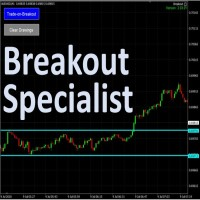
The tool is specialized in trading breakouts strategy, it is the easily way to trade breakouts. Works on Strategy Tester too. Usage: 1. Draw the two lines the price is ranging (consolidating). 2. Click on the "Trade-on=Breakout". 3. The EA will monitor for price breakouts of the drawn lines. 3. It will enter the trade automatically upon next confirmation candle. Other features: -- Either a fixed lot size or a dynamic calculated lot size based on risk percentage. -- Configurable Take-Pro

This product is based on the single indicator TREND MATE. Link: https://www.mql5.com/es/market/product/50082
The aim of this EA is to watch for all pairs in a single panel in order to have a quick view of changes or new uptrends/downtrends. It is possible to watch from your mobile by sending push notifications when changes appear. If you want to have all push notifications for even exit trends you may receive multiple messages.
FREE

Easily trade chart patterns and trendlines you draw on the chart.
You can trade :
Harmonic Patterns By using Buy the Support / Sell the Resistance
Breakout Patterns By using breakout lines
You can trade :Triangles (Symmetrical, Ascending, and Descending),Flags,Double Top and Double Bottom,Head and Shoulders and Inverse Head and Shoulders,Rising and Falling Wedges,Bullish and Bearish Rectangles,Bearish and Bullish Pennants (Symmetrical, Ascending, and Descending),Trendline breakouts,Cup with

Dashboard Trading Pro is tools to help you with manual trading.
Feature : 1. You can create an order where the lot size will be automatic calculate from the percentage balance at stake if you lose. 2. You can specify how many pips for stop loss and Take Profit. 3. You can close all trades for active pair . 4. You can close all trades for all pairs. 5. You can set alerts when the equity loss reaches a certain percentage.
6. Information for today profit/loss in percentage and value. 7. Inform

Welcome to MTS Trading Tools MTS Trading Tools are essential tools for your daily trading in Metatrader 4. MTS Trading Tools consists of: MTS Trading Panel for Metatrader MTS Trading Journal for Windows Every registered user of MTS Trading Panel gets MTS Trading Journal for Windows.
MTS Trading Panel MTS Trading Panel is the essential tool you need for your daily trading in Metatrader: Faster and safer execution of trades with an easy to use input mask. Minimize type errors with automati

With this Utility you will have the option to see trading information’s on your chart.
It will show you your Profit (Total Profit) BuyProfit/SellProfit and Count the different types of trades you made.
You can specify if its only going to count the symbol or if you use lots of EA’s you can set UseMagicnumber to true and then specify which magic number you want the information to show.
When using UseMagicnumber it filters by Symbol and Magic Number. This means if you have an EA without a Infor
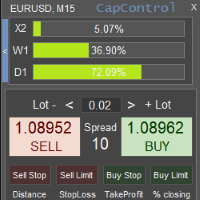
CapControl é uma abordagem profissional para gestão de capital. Cada trader tem a oportunidade de levar sua negociação a um novo patamar, pois ele elimina as barreiras psicológicas que impedem a negociação plena e a maximização dos lucros. 3 barreiras psicológicas destrutivas: 1. Medo dos riscos relativos
Um drawdown de 10% numa conta de $100 equivale a $10. No entanto, os mesmos 10% numa conta de $5000 podem desequilibrar psicologicamente um trader, pois em termos monetários já representam $

Uma série de produtos sob marca FiboPlusWave Um sistema comercial pronto baseado nas ondas de Elliott e níveis de Fibonacci . Simples e de fácil acesso. Exibição de marcação das ondas de Elliott (opção geral ou alternativa) em um gráfico. Construção dos níveis horizontais, linhas de apoio e resistência, canal. Sobreposição dos níveis de Fibonacci para as ondas 1, 3, 5, A Sistema de alerta (no ecrã, E-Mail, Push notificações). Particularidade s : sem se aprofundar na teoria das ondas de Ellio

Manual Zig-zag allows you to build a zig-zag with the mouse, to build it is necessary to turn on the zig-zag and left-click. The file must be placed in the \ MQL4 \ Indicators folder then in the terminal from the list of indicators put it on the chart.
A zigzag can be built so that this zigzag can only be seen on the current time frame or in all halves at once.
You can change the color and thickness of the line while on the chart without getting into the settings.
You can quickly remove each
FREE

The Tetris — the most famous time killer is now on MT. Game develops active logic, attention and speed of decision making. This is a classic version of the game, no frills, but you can still adjust the size of the glass, the scale of the game, the color of the figures, and the desired speed. The game is made as an indicator. Control Keys: 'WASD' or 'Cursor' or 'NUMPAD'. S — Start new game. C — Continue previous game. P — pause on / off. Space — drop a figure. Esc— exit to menu.
FREE

In the current version this filter will only work with my night scalpers and the EA Profitection Filter or with other EAs that utilize the global variables set by this EA. An MT5 version is availalble here .
Many scalpers these days have a "normal" news filter, which filters calendar news such as interest rate decisions or CPI releases. However, this breaking news filter is able to filter non-standard breaking news. It will check every minute for news and if it finds a news event, it w

The EA Protection Filter ( MT5 version here ) provides a news filter as well as a stock market crash filter, which can be used in combination with other EAs. Therefore, it serves as an additional protective layer for other EAs that do provide such filters. During backtest analysis of my own night scalpers, which already use a stock market crash filter, I noticed that the historic drawdown, especially during stock market crash phases like 2007-2008, was reduced significantly by using such a fil
Você sabe por que o mercado MetaTrader é o melhor lugar para vender as estratégias de negociação e indicadores técnicos? Não há necessidade de propaganda ou software de proteção, muito menos problemas de pagamentos. Tudo é providenciado no mercado MetaTrader.

Você está perdendo oportunidades de negociação:
- Aplicativos de negociação gratuitos
- 8 000+ sinais para cópia
- Notícias econômicas para análise dos mercados financeiros
Registro
Login
Você concorda com a política do site e com os termos de uso
Se você não tem uma conta, por favor registre-se