 MetaTrader 5
 专家
专家
 指标
指标
 程序库
程序库
 实用工具
实用工具
 窗口小部件
窗口小部件
 规则
规则
全新的MetaTrader 4 交易实用工具 - 42
 以下是可在MetaTrader 4中简化外汇交易的交易程序。将鼠标悬停在下面列表中的工具上,阅读它的描述和用途。
The Expert Advisor will help you forward all pop-up alert with screenshot from MetaTrader 4 to Telegram channel/ group, also forward all notifications to Telegram. Parameters - Telegram Bot Token - create bot on Telegram and get token. - Telegram Chat ID - input your Telegram user ID, group / channel ID - Forward Alert - default true, to forward alert. - Send message as caption of Screenshot - default false, set true to send message below Screenshot How to setup and guide - Telegram

Trading utilite (expert advisor) Global Breakeven and Trailingstop developed for: Automatic set StopLoss and TakeProfit for orders opened manually or by other expert advisers Transfer stoploss to breakeven Trailing stop You can setup utilite at any existing chart and it will manage all opened orders for all pairs, or just selected pairs from the list. Also, you can setup utilite for each trading chart separately, and apply the unique setting for each chart. Settings: StopLoss - stoploss size, p

The TradeExecutor
The „ TradeExecutor “ EA is designed to make your trading and especially the trade execution as easy as possible. It has a lot of useful features to help you execute and manage your trading strategy. This tool is immensely useful for traders who use multiple stacked orders with their strategy, because you can enter multiple orders with a single button click. Practical Buttons The TradeExecutor has four different buttons. First the “BUY” and the “SELL” buttons are used to trigg

The TargetChanger
The TargetChanger Script is the easiest way to change the takeprofits of multiple open orders . It automatically changes the takeprofit of both open orders as well as limit orders on the current pair.
To change your target you simply drag the TargetChanger on the current chart, type in the new takeprofit level and click "ok". All the takeprofits get changed within seconds now. If you only trade with one single order each time, this tool might not be super useful for you, bu

The StopChanger
The StopChanger script is the easiest way to change the takeprofits of multiple open orders . It automatically changes the stoloss of both open orders as well as limit orders on the current pair.
To change your stoploss you simply drag the TargetChanger on the current chart, type in the new stoploss level and click "ok". All the stoploses get changed within seconds now. If you only trade with one single order each time, this tool might not be super useful for you, but trad

The Target&StopChanger
The Target&StopChanger script is a great tool for order management . It is especially usefull if you like to trade with multiple orders at the same time.
This script allows you to easily change both the takeprofit and the stoploss or all open orders (including limit orders). In order to change your takeprofit or your stoploss you just drag the Target&StopChanger script on the current chart, type in the new levels and click on "ok".
The script now does all the work
Chart Carousel is a utility that helps you manage your charts and symbols. Depending on how many symbols you set, the chart will automatically browse through each symbol in the order you put in the settings. It will automatically change the symbol in the chart base on the set delay. - Press X to move forward to the next symbol. - Press Z to move backward to the previous symbol. Use comma(,) to separate each symbol.
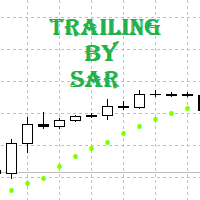
Tracking positions using trailing on the Parabolic SAR indicator. It is necessary to allow automated trading in the terminal settings. In testing mode, the utility opens Buy or Sell positions on the first ticks, which allows you to visually observe the given logic, changing the utility parameters. In real mode, the utility does not open positions. Discuss the complexities of Forex trading here: chat "Age of Expert Advisors" . Parameters Select_Magic - selection of magic numbers. Positions with
FREE

Just $30 for six months!!!. This will draw Supply & Demand zones just by clicking on a candle. It can also draw a 50% line on the zone. https://youtu.be/XeO_x7cpx8g As a drawing tool, it is not active all the time after adding it to the chart.
Activate by pressing 's' twice on the keyboard within a second. If activated but then decided not to draw, deactivate by pressing 's' once. Box color depends if candle is above or below current price.
Features: Draw the box up to the last current candl
Advanced Smart Renko and Heiken Ashi Candle Trader is ONE STOP SOLUTION based semi/fully - automated multi-currency EA carefully engineered for traders to enter the trade based on their Analysis or in fully automated mode for scalping, trend trading, candle breakout trades and also automated news trading with inbuilt trade management solution. Advantages No grid / Martingale Works on Classic Renko, Renko Heiken Ashi charts and classic Heiken Ashi charts Features Multi-Currency Ma

This EA will make all the history trades appear on the chart,,
will make it easy to track each trade in history separately , it will show each trade open price + time and closing price + time
simply download the EA to your MT4 platform, then apply it on any chart that belongs to any trades in mt4 history,
for example, if you have traded on GBPUSD in the history, open GBPUSD chart and apply the EA on it, it will automatically print all info on the chart about the trades ,,
EA works per
FREE

Indicator Profitability Check Introduction: IPC means "Indicator Profitability Check". Some features will be locked in free version. Also you cannot check result more than 1 month. For paid version, please visit: https://www.mql5.com/en/market/product/45247 Here Indicator Profitability Check is a custom script which will check the profitability of a buy-sell arrow based custom indicator’s signal profitability. So traders who are very confusing for a buy-sell arrow based custom signal indicato
FREE

Introduction: You can download free version from here: https://www.mql5.com/en/market/product/45252 Indicator Profitability Check is a custom script which will check the profitability of a buy-sell arrow based custom indicator’s signal profitability. So traders who are very confusing for a buy-sell arrow based custom signal indicator, should it test/use in live/demo account, then they now can make their decision very quickly by checking this profitability process with this script. This checking

Basket EA MT4 是一款强大的盈利收割工具兼全方位账户保护系统,结合简洁易用的设计。其核心作用在于通过对所有持仓的“组合级”管理,而非单笔交易,全面掌控账户盈亏。该 EA 提供了组合级止盈、止损、保本和移动止损功能,支持设定为账户余额百分比、固定货币金额或所有管理交易的平均点数目标。这种灵活性让交易者能够依据自身需求制定风险和盈利策略。 Basket EA MT4 还支持智能交易过滤,可以根据 Magic Number、交易品种或备注选取要管理的交易,确保 EA 只影响您选择的持仓。 为进一步提升安全性,该 EA 内置先进的账户保护机制。当账户权益达到设定的止盈/止损水平,或从历史最高余额达到最大回撤时,EA 会自动平掉所有交易,删除所有挂单,并关闭所有图表,移除其上的所有 EA。这一功能有助于在市场波动或达到预设目标时保护账户资金。 提示 :您可以下载 篮子 EA MT4 演示版并在您的模拟账户上试用: 这里 将下载的免费演示文件粘贴到您的 MT4 >> 文件 >> 打开数据文件夹 >> MQL4 >> 专家文件夹并重新启动您的终端。 免费演示版本每次可在 4 小时内发

TP SL Bot - 新开立的 订单根据您的指示自动设置止损和止盈的工具。此外,还提供了一个计算器功能,可以计算在给定止损 / 止盈大小下,需要开立交易的数量来达到所需金 额。 有几种 选项来调整大小和参数: 1. 根据用 户指定的百分比来调整止损和止盈金额,作为账户余额的百分比。 2. 根據使用者指定的止盈和停損金額進行調整。 3. 根据开 仓价格的点数( tick )来 调整。 4. 根据开 仓价格的百分比来调整。 特点: 简单易用的界面 适用于市价 订单和挂单 适用于所有品种和 时间周期 多个工作模式 风险管理系统所需正确交易量的计算器 工作原理: !工具在 订单开仓后接收到第一个 tick 时更改订单参数。 模式 1 (存款百分比)。您 设置了存款百分比以计算止损和止盈金额。计算以点数 ( tick ) 为单位进行。 模式 2 ( 金 额 ) 。您设置了期望的止损和止盈金额。工具会自动计算点数 ( tick ) 大小。 注意 ! 前两种模式可能会有小 误差 , 因为指定的金额不一定是最小 tick 值的倍数。 模式 3 ( 点数 ) 。您 设置了止损和止盈的点数 ( tick

二進制分析器是一個很好的機會,可以根據基於二進制代碼的現成計算來編寫自己的指標和交易策略。 該分析儀適用於所有5位小數位“ 0.00001”的貨幣對EUR / USD,GBP / USD ITD 推薦會議M1 包含在目錄中。 指標-“二進制參考” 和4項衡量看漲和看跌市場情緒的指標 // ------------------------------------------------ ------------------- // 指標“二進制參考” 該算法在燭台上計算公式,然後將結果合併為2個數組。 該公式計算一個會話中與價格的鏈接數。 該數組包含二進制代碼所引用的價格 數組以索引.bin保存到/ Files文件夾。 //-數組PIPS_COL_Price [99999,6]包含以下指示器--- // PIPS_COL_Price [x,0]-二進制代碼引用的價格 PIPS_COL_Price [x,1]-以該價格獲得的鏈接的最大值 PIPS_COL_Price [x,2]-電源類型布爾“ 0” /熊“ 1” PIPS_COL_Price [x,3]-子類型布爾“ 0/1” /熊“ 0
FREE

脚本会在达到某个特定水平时将所有未结订单转移到收支平衡,如果您忘记了,则会在所有订单上设置止损,以免在您打开时(包括待处理的保证金)不冻结。
此外,脚本具有在反向ATS蜡烛上关闭订单的功能,具体取决于未完成的交易,M15或M5的选择,或者根本不自动关闭。
The script transfers all open orders to breakeven when a certain level is reached, puts stops on all orders if you forget, or so as not to bathe when you open, including on pending deposits.
Also, the script has the function of closing orders, on the reverse ATS candle, depending on the open transaction, the choice of M15 or M5, or not automatically close at all.

EasyFXTrade
Trading Utility
Tool Debeloped for Manual Trading in Forex and Crypto. EasyFXTrade provides a better way for trading, it's the ultimate tool:
Watch how works video: https://youtu.be/5nyJ77IHjUc
Parameters:
1. These first 2 parameters are the TP and SL of a tool that gives the risk of an operation(see screenshots for more info)
Benefit Tool Points: points of the TP of the blue rectangle, this rectangle can be resizable.
Loss Tool Points: points of the SL of the red rectangle thi

Open by Clik is a tool that allows you to open positions with two mouse clicks.
The place of the click and the direction of clicking decide what position will be opened.
Opening of positions is quick and intuitive.
If the second click is above the first click, opened are positions Long.
If the second click is belowe the first click, opened are positions Short.
By clicking in the chart area, opened are Market Order (BUY and SELL).
By clicking in the area in front of the chart, opened are Pendin

MT 4 to MT 4 Copy Tool This is an easy to use FX Trade copy tool fo the Meta Trader 4. easy to use quick execution time unlimited slaves can be connected need to un one server Lot Multiplier option OR Equity based option This one is only made to copy from MT4 to MT 4.
I wish everyone who purchases the EA maximum sucess and good trading results
Please trade carefully and responsibly. Thank you and Happy trading everyone

This is a basic tool that displays the Pip Value and Margin required for each symbol. It displays the same information for both a standard lot and the amount based on lot amount entered in the input section. It allows you to use different colors for each line Font Size FontType (Based on what fonts are installed in the system folder on the pc. Set to Ariel by default if the font entered is not available.) Allows X &Y coordinates so you can decide where on the chart the info is displayed.
FREE

Automatic Trailing Stop Based on Take Profit Percentage with Profit Lock EA MT4 Lock in your profits and "let your winners run" past your 100% take profit target with this EA. This Expert Advisor automatically adjusts your Stop Loss based on up to 4 user-defined Take Profit Target Percentages, locking in your profit. If price pushes past your 100% take profit target, the EA will automatically trail the price by user-defined pips, so you won't miss that runaway train again. EA Features The

VisualTicks_EA is an Expert Advisor dedicated to the VisualTicks chart.
Works ONLY on the VisualTicks chart.
Is a tool that lets you open and close transactions directly on the VisualTicks chart.
There is only one parameter in EA settings:
magic - next EA number. If you use more than one VisualTicks_EA on MT4, you must enter a different magic number.
After starting VisualTicks_EA, the following buttons will appear on the chart:
Open BUY - opens one BUY transaction of a specified lot size.
Cl
FREE

This utility is a full game with a ball on a chart of a currency pair. The ball jumps along the line of the moving average, and it is controlled by arrows or the keys "w a s d". Try to keep the ball from falling out of bounds. There are several levels of difficulty, if at first it’s difficult, you can set a simple level, and when you train, increase difficulty. In this version, there are many more levels and there is an adversary who is chasing you.
When adding a game to a window with a chart,

Este Robot te permite establecer cualquier tipo de orden, ya sea pendiente o de mercad, compra o venta. Usando simpre un riesgo definido, ya sea un procentaje del dinero total de la cuenta, una cantidad fija, un volumen fijo o un número de lotes fijo por cada dolar, y ajusta el Stoploss y el Volumen de la operación. Una herramienta indispensable que te permitira controlar tus perdidas y mejorar tu rendimiento el mercado.

The utility places trailing stop, breakeven, stop loss and take profit. It is necessary to allow automated trading in the terminal settings. In testing mode, the utility opens Buy or Sell positions on the first ticks, which allows you to visually observe the given logic, changing the utility parameters. In real mode, the utility does not open positions. Discuss the complexities of Forex trading here: chat "Age of Expert Advisors" . Parameters magic - magic number. If less than 0, positions wi

"Dimea Profit" is just a little helper keeping you informed about your current profit or loss. It shows the volume, the margin and the profit/loss of all open positions on a chart. Furthermore, the percentage progress is displayed. Daily swaps are also considered. There are no parameters to set up.
It is free of charge. Please check it out and leave a rating/comment. Happy trading
FREE

Утилита Info Line представляет собой горизонтальную линию которая показывает общую прибыль (убыток) по всех ордерах открытых по валютной паре на график которой она установлена. Отображаемая информация: Количество пунктов от текущей цены до линии; Общая прибыль (убыток) по всех ордерах графика; Общее количество BUY лотов; Общее количество SELL лотов; Кроме того утилита "умеет" ставить стопы на выбранную цену (цену линии). В настройках можно выбрать: Отображать информацию только по BUY ордерам; О
FREE
Risk Manager VT
Робот - помощник, от команды VT.
О рискменеджменте в торговле:
Грамотный риск менеджмент в трейдинге – это залог успеха при решении основных Ваших задач, при активной ручной торговле, на биржевом рынке: дисциплина и контроль эмоций!
Данный помощник поможет вам с лёгкостью ограничивать риски на каждую сделку, и правильно выставить уровни прибылей.
Те кто долго торгуют, на валютном рынке, уже знают, что правильное соотношение риск/прибыль, является эффективным инструментом в

Скрипт предназначен для озвучивания торговых операций. Оповещает об открытии и закрытии ордера, а так же озвучивает суммарный профит или убыток по сделке в долларах (центах). Есть возможность выбрать язык озвучки: английский или русский. Так же можно фильтровать озвучивание только конкретных советников (по магическому номеру), либо озвучивать торговые операции по всему счету.
FREE

引入 Watermark Manager Utility ,这是一款功能强大的工具,旨在毫不费力地将个性化水印添加到您的图表背景中。凭借其独特的自定义选项,您可以使用多个文本字段和帐户信息字段创建令人惊叹的水印。无论您是 YouTuber、信号提供者、博主,还是需要水印图表的任何人,此实用程序都是您的最佳选择。 此实用程序支持多图表功能,使您可以轻松地为所有打开的图表添加水印。它提供完全可定制的水印区域,让您可以控制字体、字体大小、颜色、角位置、距离等。您可以灵活地显示重要信息,例如经纪商、客户、服务器、余额、利润、代码、时间范围和代码 + 时间范围。 由于其用户友好的参数,使用 Watermark Manager Utility 轻而易举。只需配置设置以满足您的要求,该实用程序将处理其余部分。它使您能够同时在多个图表上绘制多个水印,从而节省您的时间和精力。 有 13 个水印文本字段可用,包括两个自定义文本区域和一个帐户信息显示区域,您有足够的空间向图表添加品牌元素或个人信息。该实用程序可确保您的水印有策略地放置,允许您选择图表的角和距离。 无论您是想提升您的品牌形象、保护您的内容

該實用程序對需要自動執行某些操作的交易者很有用。它可以執行以下功能:
設置止盈水平。 設置止損水平。 將止損轉移到盈虧平衡點。 使用尾隨止損轉移止損。 該實用程序具有以下輸入參數:
TakeProfit-TP水平。 StopLoss-SL級別。 TrailingStop-如果不想使用尾隨止損,請將其設置為0。如果該值為正,則它將用於尾隨止損。如果設置負值,則當達到適當水平時,它將用於將SL轉換為收支平衡。 僅零值發生變化的跡象-僅在級別等於0時更改級別。也就是說,如果您手動傳輸級別,則顧問將不會觸摸它們。 BuyOrderColor-購買訂單級別的顏色。 SellOrderColor-賣單水平的顏色。 EA簡單易用,不消耗不必要的計算機資源,並且沒有任何額外的設置。 ______________________________________________________________________ 该实用程序对需要自动执行某些操作的交易者很有用。它可以执行以下功能:
设置止盈水平。 设置止损水平。 将止损转移到盈亏平衡点。 使用尾随止损转移止损。 该实用程序具有以下输入
FREE

Mini Assistant is a small training tool in the strategy tester. A minimal set of buttons provides ease of use. There are no external parameters; they are simply not needed here. All you need is right on the screen. Before opening a position, in the special input windows, specify the required volume, as well as Stop Loss and Take Profit levels. To close a position, select it by ticket in the lower window. The program was written quickly, and also does not have a special uniqueness, so I post it i
FREE
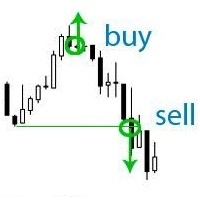
If your deposit is in a drawdown - this EA will help you get out of it!
DEPOSIT SAVER will lock your position in order to prevent the drawdown from increasing significantly, and then will close all orders to breakeven. Please note that it is not the EA task to bring you profit. The EA task is to withdraw you from the drawdown and close all positions to zero. 1. Before installing the EA on the chart, delete the stop loss of your orders, if any; 2. The EA works only with sell or buy orders. If th

EA開市後一定數量的價格變動後關閉市場訂單。如果您需要在一定時間後完成交易,請使用此顧問。
EA具有以下輸入參數:
僅當前交易品種-如果為true,EA將僅關閉所選工具的訂單;如果設置為false,它將關閉任何工具的任何訂單。 超時-EA將關閉訂單的訂單數量。 請注意,如果參數only current symbol = false,則所有訂單將同時關閉,而不管哪個訂單早先打開,哪個以後打開。
EA簡單易用,不消耗不必要的計算機資源,並且沒有任何額外的設置。建議在不重新報價的帳戶上使用。 _______________________________________________________________________________________ EA开市后一定数量的价格变动后关闭市场订单。如果您需要在一定时间后完成交易,请使用此顾问。
EA具有以下输入参数:
仅当前交易品种-如果为true,EA将仅关闭所选工具的订单;如果设置为false,它将关闭任何工具的任何订单。 超时-EA将关闭订单的订单数量。 请注意,如果参数only current symbol =
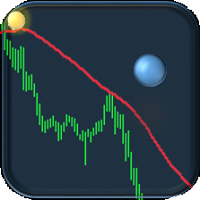
If you are tired of trading, why not have a little fun right in the MT4 terminal? Try this game, the rules are simple - you need to control the ball and take a coin. The ball jumps along the line of the moving average, and it is controlled by arrows or the keys "w a s d". Try to keep the ball from falling out of bounds. There are several levels of difficulty, if at first it’s difficult, you can set a simple level, and when you train, increase difficulty.
When adding a game to a window with a c
FREE

This EA allows you to duplicate any order coming from a signal provider with a specified lot size, opening and closing accordingly, included stop loss and take profit. The EA must be connected to a graph and works automatically on all orders, independently from the symbol. It can work also on Hosting. Please consider that duplicating signals will rise your risk! Take it into account.

This EA offers following features to automatically increase the volume of the lot received from your signal: you can manually set the multiplier using the "multiplier" parameter; Risk control is implemented. You can set the maximum lots-to-account balance ratio using the "ratio" parameter; The "stop loss" an "take profil" levels are synchronized from the corresponding signal tickets; One-to-one replication. Each signal ticket corresponds to a copied ticket; For MT5 version: https://www.mql5.c

The Quick trade report separately by symbols advisor will be useful for simultaneous trading on multiple instruments. It provides the ability to assess the effectiveness of trading on each symbol separately. It is possible to set a time period for making the reports. Frequency and time of automatic generation and sending of reports via FTP. The report visualizes the changes in the balance for deals on each symbol. Also, the following key trading parameters are calculated for each instrument: T
Automatic enumeration of input parameters of the TrendImprovement Pro indicator to find the optimal combination. Description.
A powerful tool for testing the input parameters for the TrendImprovement Pro indicator will allow you to quickly find the most profitable options for the input parameters.
Settings
DateOrBars – switch for using time or number of bars; MaxBars - the maximum number of bars for calculation; StartHistory - indicator start time; BEGINNING - the initial historical data (In-S
A script for group removal of orders of a given type. To delete, drag the script onto the chart and in the pop-up window select the type of orders to be deleted and click OK. Settings
Types of orders to delete - order types to be deleted or closed ALL_PENDING - OP_BUYLIMIT, OP_SELLLIMIT, OP_BUYSTOP, OP_SELLSTOP ALL_LIMIT - OP_BUYLIMIT, OP_SELLLIMIT ALL_STOP - OP_BUYSTOP, OP_SELLSTOP ALL_MARKET - OP_BUY, OP_SELL ALL_LIMIT_BUY - OP_BUYLIMIT ALL_LIMIT_SELL - OP_SELLLIMIT ALL_STOP_BUY - OP_BUYSTOP A
FREE

Utility, which draws buy or sell trendlines, which can also become support or resistances able to close any position on the screen Algorithm that calculates the gain of the position, at the touch closure of the line. The benefits you get: Works on forex and CFD, timeframe from M1 to Weekly. Easy to use screen control panel. Audible warning messages at the touch of the line. Easy to use.

This is script to check what is max lot allowed on a currency pair , so you need to drag this script to a currency chart and this utility will print max allowed lot with available balance. Sometimes we need know maximum allowed lot information for some purpose so this script will really help to know the lots allowed with given balance in live account for any broker . Hope explanation will help.

For Meta Trader 4. We have all experienced a situation where the market wipes out our stoploss before it turning in the direction we had anticipated. This is experience becomes more frequent when we use a trailing stoploss. If only there was a way to place and trail the stoploss just the perfect amount of pips away. Well, there is... The Average True Range (ATR) is a one of the most popular technical analysis indicator, introduced by J.Welles Wilder, that measures Market Volatility for a give

The Order Manager Script is a user-friendly designed panel on your chart that can help you to manage your opened orders by using its special tools. It calculates the breakeven price for Buy or Sell orders and can close all Buy or Sell orders instantly or in their breakeven price plus some profits (as your selection) in less than couple of seconds. Also it can close all orders in profit or all orders in loss in your account instantly. -Sometimes you opened several Buy orders (or several Sell orde

You can: observe the price chart inside the chart of a different price evaluate correlation and relationships observe the difference in charts in the form of a histogram
Opportunities: "Auto" mode - auto-adjust the chart for another chart "multiplier" - you can multiply the chart by any number shift up / down the chart by value shift the chart to the left "invert" - mirror flip of the chart
Important: only charts added to MarketWatch are used Version for MetaTrader 5 - https://www.mql5.com/e
The NNFX ALGO TESTER is an tool designed to help the NNFX (No Nonsense Forex) traders develop, improve and test algorithms in a simpler, faster and more accurate way. This software reduces backtesting time from serveral days to only a few minutes! Please download the Demo instead of this Lite version. You can sill use the Lite but this version is now discontinued and it has much less functionality than the full version. The NNFX algo Tester software is too big (in terms of complexity) to be avai
FREE
Utility, which displays all your market positions. Analyze: The clear exposure of each currency. Total orders Total lots Profit and loss for every cross. Percentage reduction of positions. Closing of the entire basket, or closing only positive or negative positions. Etc. The benefits you get: Each button will open a pop up to inform you of its usefulness Works on forex and CFD. Easy to use. Parameters
Template = Default.tpl; possibility to open your favor

Do you think it's a bit cumbersome when you need to switch symbols or timeframes with mouse click? 1. What is this? This is a program that can switch symbols and timeframes with direction keys. Fast switching, very convenient, no mouse click required. For traders, one symbol with multi-timeframe charts are usually added, you can change symbol on those charts easily. For multi-currency traders, different symbol charts are usually added, you can also change those timeframes easily. I wrote this p
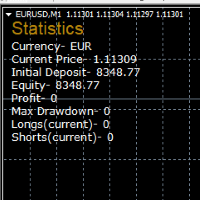
STATISTICS OSD
Statistics OSD (On Screen Display) Is very Helpful and easy to use. Download Today! ENJOY! :) On Screen Display -Currency -Current Price -Initial Deposit -Equity -Profit -Max Drawdown -Longs(Current) -Shorts(Current)
*Very useful in configuring EA's or Strategies, because you can visually see when its having a lot of shorts or longs. Then you can go back and tweak accordingly.
FREE
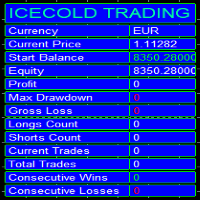
Icecold Trading OSD (On Screen Display) Is very Helpful and easy to use. Try Demo out today!
On Screen Display -Start Balance -Equity -Profit -Max Drawdown -Gross Loss -Longs count -Shorts count -Current Trades -Total Trades
*Know that in the Total Trades, Consecutive Wins & Consecutive Loss columns , those are ALL of the trades your account has done. It does not show 0 when loaded if you have completed trades already in Account History... Just note. To RESET just change Account history perio
FREE

Trade History Exporter automatically exports trade history to a CSV (comma separated values) file.
Trade History Exporter: - automatically exports trade history every time a trade is closed - allows you to manually force an export by using the "W" key on your keyboard - can use Order Comments as Magic Numbers - useful for instance when using a Trade Copier - calculates the Net Profit per trade

设置Easy Virtual Trader>输入您的规则>您可以通过移动或其他EA或任何地方进行交易了。...让机器人来管理您的交易!
这款功能强大的EA将帮助您根据您的预设规则和设置自动管理所有或特定交易
一旦设置并运行,您就不再需要监视订单,该软件将继续按照预定义的规则监视和控制您的订单
您可以从台式机MT4或从移动应用程序进行交易,也可以管理其他EA的交易
它旨在支持多重保护和尾随策略:盈亏平衡保护,百分比保护,点子保护,账户价值保护,距离尾随,指标尾随等。
Easy Virtual Trader是对已经流行的Easy Trade Manager的增强,由于许多要求提供自动版本的请求: https://www.mql5.com/en/market/product/34086
基本功能-交易和止损设置
管理交易=“特定”或“所有交易”-如果您希望EA管理所有交易,请使用“所有交易”。如果您想让EA管理特定的幻数交易,请使用“特定”
输入魔术数字=如果在上述设置中“管理交易” =“特定”,则输入魔术数字,例如“ 232334
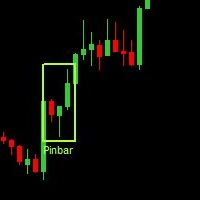
Данная утилита (эксперт который сам не открывает ордера) ищет на графике паттерны Price Action : DBLHC и DBHLC
Рельсы
CPR
Пин-бар
HR
PPR
TBH и TBL
OB где каждый паттерн имеет гибкие настройки того, как он должен выглядеть по Вашему мнению.
К примеру, возьмём пин-бар, который имеет так называемый нос а также левый и правый глаз. Так вот в настройках Вы можете указать минимальную длину этого самого носа, максимальный размер самого тела и хвоста, и минимальный размер левого глаза, по отношению

El Asesor Experto que utiliza la estrategia de acorralar el precio con una operación pendiente a una distancia determinada del primer trade, a medida que se ejecuta la orden pendiente el EA crea otra orden pendiente por mayor valor hasta localizar el sentido del mercado. Está diseñado para operaciones semi manuales . es decir, el usuario debe abrir la primera operación y de forma automática el EA asume el control y crea la siguiente orden pendiente. de igual forma monitorea el profit para que

Overview No Nonsense ATR is a tool designed to help the No Nonsense Forex Traders backtest strategies and trading in real time.
The indicator calculates the value of the Stop Loss and the Take Profit (SL/TP) based on the ATR (Average True Range) allowing to verify the historical data in a simple and practical way, showing not only the SL/TP values but also the place where they would be and if it was a gain or loss. The No Nonsense ATR also calculates the trading volume required for each trade a
FREE

Trade History Exporter automatically exports trade history to a CSV (comma separated values) file.
Trade History Exporter: - automatically exports trade history every time a trade is closed - allows you to manually force an export by using the "W" key on your keyboard - can use Order Comments as Magic Numbers - useful for instance when using a Trade Copier - calculates the Net Profit per trade

The information panel shows market information about the selected symbol, which is hidden from the eyes of the trader. You can change the color of the panel panel, the color of the text on the panel. It can be moved around the screen. Available in two languages (Russian and English). Data: Symbol - symbol names; Point - Point size in quote currency; Spread - Spread in pips; Stop Level - The minimum acceptable stop loss / take profit level in pips; Lot Size - The contract size in the base curre
FREE

Tool sends trades when open and close with chart to telegram channel. Tool can send multiple charts and magic numbers and pairs from a single chart. Send information of all type of orders: Opened (including Pending Orders), closed tiggered, and modified orders.
Telegram Setup instruction Open your Telegram APP and search for "BotFather". Type /start and click/type /newbot to create a new bot. Give your bot a nickname and username (e.g., nickname: Bestnavisignal and username: Bestnavisignal

Script to move the Takeprofit of your positions all on one level, or just a Takeprofit of one of them. Convenient and quick to use. Just drag the script to a point in your template, at the price level you want, and the utility will ask you if you want to move all the Takeprofits to that level, or just move one Takeprofit of a position. Very useful when the positions are very close or the Takeprofits are too close. We would appreciate your feedback, so we can improve ourselves. Good trading.

Close ALL Mobile is a trading tool that allow MT4 Mobile App users to close floating orders via mobile using pending order in tricking closing functions. Parameter Magic Number for Maual Trades (Defult = 0)
Magic Number for EA1 Magic Number for EA2 Magic Number for EA3 Slipage for closing order Close All BUY Positions: Type of Pending order trick Close all BUY positions function Close All SELL Positions: Type of Pending order trick Close all SELL positions function Close ALL Positions: Type of
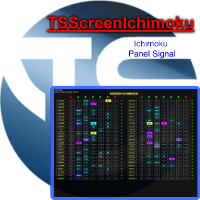
Panel designed for ichimoku traders. Intelligent algorithm that reveals signals over multiple time frames and multiple currency crosses. The benefits you get : Significantly lightens the signal search analysis. Never redesigns, does not retreat, never recalculates. Works on forex, CFD, Crypto and stocks, time frames from M5 to W1. Integrated pop-up, push notification and sound alerts. Easy to use.
Parameters :
Number_Instrument = 10; Number of instruments displayed Tenkan = 9; Kijun = 26;
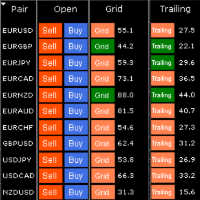
HungrySpiderMulti - is an easy-to-use multi-currency trading panel allowing you to trade 28 trading pairs in one window . The panel also allows you to use grid, and trailing stop. Using this panel trader will receive a push-notification about new events.
Opening an order: Opening an order occurs in one click. Near the required currency pair, in the Open section, click on the Sell or Buy button. Grid: Near required pair, there is a Grid button. The button has two states, green - on, orange - off

This is utility for Closing All trades or Closing All Buy Trades Or Closing All Sell Trades based on button clicked. Advantages and features of Product is as follows Closes trades very fast customised based on traders frequently encountered situation .This is very simple utility which can be used by beginner or advanced trader . Trader just need click button like "Close All" "Close Buy" Or "Close Sell" and their request is executed.

Basket trading /Basket SL TP Group Trade SL TP
This is very good utility when you want set SL TP for many open trades or portfolio
As soon your account equity reach SL or TP , This EA will close all trades . you are allowed to change SL and TP any time.
Also you need not to monitor group trades all the time you just set SL and TP in utility and relax once SL / TP situation will come all trades will be closed.
SL and TP are in $Amount like 100$ SL and 500$ TP so once your profit reaches 500

Basket trading /Basket SL TP Auto SL TP Calc
This utility will calculate SL and TP based on 2 input parameters
PerUnitTP -This means what is per .01 TP like 1 $ per .01 Lot.
SLToTP_Ratio-This what is ration SL to TP if this parameter is 3 that means if TP is 1 $ then SL will be 2$ (per .01 Lot)
so if total portfolio summing to .05 lot that that means TP will be automatically become 5 $ and SL become 10 $.
This is very good utility when you want set SL TP for many open trades or p

КopirFIFO — копировщик нетто-позиций для терминалов МТ4. Копировщик копирует на счет-клиент чистую нетто-позицию со счёта-сервера по правилу FIFO, то есть всегда первой закрывается та сделка, которая была открыта раньше всего. При копировании так же полностью исключается хеджирование позиций. Если на счёте-сервере открываются хеджирующие сделки, то на счете-клиенте происходит закрытие позиций на величину хеджа. Данный копир идеально подходит для копирования вашей не нетто-торговли на сервисы то
FREE

顾问数据说明MACD 打开MACD指标波动的订单。关闭MACD指标波动的订单。
默认值。
extern double TakeProfit = 500; extern double StopLoss = 500; extern double externalLots = 0.01; extern double TrailingStop = 10000; extern bool isAutoMoneyManagmentEnabled = false; extern int moneyManagement4And8Or12And24_4_Or_12 = 12; extern double TrailingFiboLevel = 0.236; extern double maxOrders = 30; extern double riskOnOneOrderPercent = 2; extern bool limitSinglePositionOnOpenOnHalfWaves = false; // extern bool OpenOnHalfWaveUp_M1 = fals

Just $30 for six months!!!. This will draw Supply & Demand zones just by clicking on a candle. It can also draw the mean threshold of the zone. https://youtu.be/XeO_x7cpx8g
As a drawing tool, it is not active all the time after adding it to the chart.
Activate by pressing 's' twice on the keyboard within a second. If activated but then decided not to draw, deactivate by pressing 's' once. Box color depends if candle is above or below current price.
Settings/Inputs: Number of candles the box

Just $30 for six months!!!. This will draw Order Blocks just by clicking on a candle with different colors for different timeframes. It will use the body or the wicks. It can also draw the mean threshold of the candle open/close or high/low.
As a drawing tool, it is not active all the time after adding it to the chart.
Activate by pressing 'b' twice on the keyboard within a second. If activated but then decided not to draw, deactivate by pressing 'b' once. Box color depends if candle is abov
MetaTrader市场是一个简单方便的网站,在这里开发者可以出售自己的交易应用程序。
我们将帮助您发布您的产品,并向您解释如何为市场准备您的产品描述。市场上所有的应用程序都是加密保护并且只能在买家的电脑上运行。非法拷贝是不可能的。
