 MetaTrader 5
 Эксперты
 Индикаторы
 Библиотеки
 Утилиты
 Виджеты
 Правила
Смотри обучающее видео по маркету на YouTube
Как купить торгового робота или индикатор
Запусти робота на
виртуальном хостинге
виртуальном хостинге
Протестируй индикатор/робота перед покупкой
Хочешь зарабатывать в Маркете?
Как подать продукт, чтобы его покупали
Новые торговые утилиты для MetaTrader 4 - 39
 Ниже представлены торговые программы, упрощающие торговлю на форексе в MetaTrader 4. Наведите курсором на товар из списка ниже, чтобы прочесть описание и его предназначение.
Introduction Utility informer 'Know Your Symbols' quickly and easy let you know important information about your symbol. This utility covers any symbol i guess, attach it to one chart (time frame and symbol does not matter) and select what symbols you need information about and voila...Equipped with inputs for symbol prefix/suffix if they have such. Informs about; Current price Day high price Day low price Spread points Point size Money required for 1 lot Pip value in quote currency Swap for a b
FREE

DataGrabber The database creator
DataGrabber store selected instrument history to .csv files. It's purpose is to automatically create extensive history database.
DataGrabber is added to the selected instrument chart window as an indicator. It periodically check presence of bar data on the server and presence of .csv files on client PC (local database). If missing files detected in local database, it's created, filled with data and added to the database.
Range of bar history in days beeing ch

非常好用的工具8888888888888888888888888888888888888888888888888888888888888888888888888888888888888888888888888888888888888888888888888888888888888888888888888888888888888888888888888888888888888888888888888888888888888888888888888888888888888888888888888888888888888888888888888888888888888888888888888888888888888888
FREE

Пусть робот просканирует для вас весь рынок и найдет лучшие торговые возможности, пока вы живете своей обычной жизнью. Сканер отклонения рынка измеряет отклонение цен от заданного среднего значения в процентах. Рекомендуемая настройка для всех средних значений - 200 ПРОСТЫХ ПЕРЕМЕЩЕНИЙ В ДЕНЬ СРЕДНЕГО, однако любой параметр можно изменить по желанию - Сканер полностью настраивается. Есть возможность установить e-mail, MQL push или оповещение в случае нарушения определенного уровня отклонения це

Это приложение экспортирует все завершенные операции в текстовый файл, разделенный <TAB>, запятой, точкой с запятой или любым символом, определенным пользователем, включая комментарии и магический номер операций, которые можно легко экспортировать в EXCEL или Google Spreadsheets.
Файлы создаются в папке «files», индивидуально разделенной по месяцам с именем в формате: 999999-AAAA BBBB- [9-9999] где:
999999 = номер торгового счета MT4
AAAA BBBB = имя пользователя торгового счета
[9-9999] - М

Отличная панель для аналитики рынка. Панель помогает анализировать значения индикатора Parabolic SAR и его сигналы.
С помощью данной панели вы сможете: смотреть текущий сигнал с Parabolic SAR по всем таймфреймам; смотреть текущий сигнал с Parabolic SAR по разным символам; смотреть текущее значение Parabolic SAR ; несколько типов сигналов для аналитики.
Значения в ячейке таблицы: Значение индикатора
Тип сигнала: Parabolic SAR пересекает цену Parabolic SAR выше/ниже цены
Вариант работы:

Это действительно полезный многофункциональный инструмент. Я сделал это, думая о своих потребностях в качестве трейдера несколько лет назад, хотя я был изменить его для моих партнеров, чтобы использовать его. Этот инструмент позволяет: Опосредованно отправить купить или продать заказы одним щелчком мыши и показывает, где вы должны разместить стоп-лосс на основе алгоритма использования ATR и сравнения с предыдущими значительными уровнями. Закровьте всю прибыль, нажав на кнопку. Закровь все пот

Робот для торговли бинарными опционами на mql4.
1.Функция уведомлений на телефон и отображение панели для настройки автоторговли и отображение реальных данных. А также имеет дисплей тикового графика от 15 мину и выше кратно таймфрему, и кнопки для поуавтоматической торговли по мартину.
2.Выбор торгового тайм-фрейма.
3.Настройка глубокого тех.анализа.
4.Настройка не губокого тех.анализа.
5.Размер не глубокого тех.анализа.
6.Настройка глубокого вспомогательного тех.анализа.
7.Настройка не
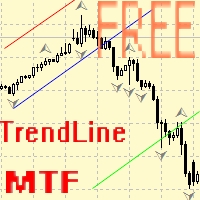
Советник для ручного построения трендовых линий и сопутствующих им стоплоссам и тейкпрофитам. После построения, советник запоминает уровни, направление и лот. При касании текущей цены с расчетной ценой, открывается ордер с заранее выбранными параметрами. Возможно построение и запоминание до 10 разнонаправленных уровней с разных таймфреймов. Можно использовать на любом торговом инструменте. Корректно работает с 4 и 5-значными ценами.
FREE

Dear Traders,
With this order system you can place Pending Orders amazingly quick. Quick Pending Order has the following features: The system automatically recognizes the type of order (sell stop, sell limit, buy stop, buy limit), by detecting the current price and your stop loss position. You can use its build in Money management. So you do not need to calculate the lot size. 2 Take profit targets Break even (with different pip amount) Custom button assignment Comission per Lot (default set t
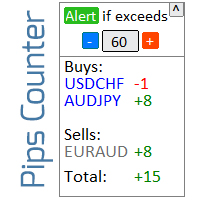
Информер для расчета результатов открытых сделок Посмотрите мою Утилиту 1 : более 66 функций, включая этот инструмент | Свяжитесь со мной если у вас есть вопросы Информационная панель группирует открытые ордера в 2 категории: Покупки Продажи Для каждой категории отображается символ и текущее количество пунктов. Общий результат для всех открытых сделок показан ниже. Уведомления можно включить или отключить простым нажатием на кнопку: Когда уведомление включено, вы будете знать, когда прибы

Информер для отслеживания ваших ежедневных торговых результатов Ознакомьтесь с моей Профессиональной утилитой : более 66 функций, включая этот инструмент | Свяжитесь со мной если у вас есть вопросы В верхней части панели вы устанавливаете дневную цель по прибыли (в пунктах): Ручной ввод значения; Использование кнопок + и - (шаг изменения можно настроить в параметрах); Затем информационная панель группирует сделки в 2 категории: Текущий плавающий результат; Суммирование закрытых сделок; Ито

Отличная панель для аналитики рынка. Панель помогает анализировать значения индикатора Alligator и его сигналы.
С помощью данной панели вы сможете: смотреть текущий сигнал с Alligator по всем таймфреймам; смотреть текущий сигнал с Alligator по разным символам; смотреть текущее значение Alligator ; несколько типов сигналов для аналитики.
Значения в ячейке таблицы: Jaw Teeths Lips Jaw - Teeth Jaw - Lips Teeth - Lips
Тип сигнала: Lips - Teeth - зеленая (lips) пересекает красную (teeth)

Screen logger with telegram — делает скриншоты всех открытых графиков MetaTrader 4. Зачем нужен Учет поступающих котировок от брокера. В случае каких-либо корректировок этот момент будет зафиксирован Проверить работу индикатора и заметить случаи перерисовки или затирния сигналов Ведение собственного учета изменения торговых показателей на счете Создание видео записей реальной торговли из полученных снимков Преимущества Потребляет значительно меньше ресурсов чем любые программы записи экрана Ум
FREE

MULTI TRADER TOOL - SUPPORT / RESISTANCE, ONE CLICK CLOSE / OPEN, AUTO CLOSE, GRID ORDERS, ALERTS.
You should use this Panel on FULL SCREEN MODE (F11).
HotKeys: B - Open Market Buy Order with OneClickOpen Settings. S - Open Market Sell Order with OneClickOpen Settings. G - Open Grid Orders with Grid Panel Settings. R - Add Support/Resistance Settings to selected trend and horizontal lines. If you have any questions, ask in a private message or in the comments section.
FREE

AntiMartingale-Execution is a pyramidal Money Management system capable of increasing positions as equity increases using the positive margin of the transaction. It is possible to set the capital for each operation, the operating and maximum margins and the target level to be reached. Once the general trade settings have been made, it is possible to preview the grid of operations that will be activated by pressing the BUY / SELL button. If necessary, it is also possible to close all operations
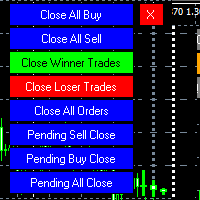
MT4 To Telegram it is available now! This Panel Allows you to : Close all buy orders. Close all sell orders. Close all winning orders. Close all losing orders. Close all orders. Close all Pending BUY orders. Close all Pending SELL orders.
Close all Pending orders.
Bonus : Grid Manager : Set the number of levels (trades). Lot size and you can do Martingale to raise the lot size for each level. Set distance between levels, and you can manage the distance for each level using Distance Q. St
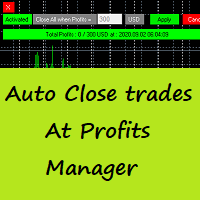
Auto Close Trades At Profits Manager is a tool that closes orders at a defined profit, very simple to use ( Panel with buttons...).
You can enable or disable the tool using buttons and edit the profit amount from the panel too.
INPUTS:
You can customize Panel graphics, Font and colors.
You can check also the The Grid Manager, closing trades Manager https://www.mql5.com/en/market/product/46365

This script allows traders to easily close positions if their profit/loss reaches or exceeds a value specified in pips.
The script allows users to easily close positions if their profit/loss reaches or exceeds a value specified in pips.
Please set slippage value first. Sometimes some positions do not close due to high volatility of the market. Please set larger slippage or restart the script.
...................................................................................................

Telegram Signals Copier is a fully automated software that reads messages from Telegram and inserts them as orders on your MT4 terminal.
It comes with an advanced risk management tool, that can risk based on a % of your balance, fixed loss, and many other options.
You can fully customize how you take the signals, change the TP and SL level.
With an advanced analytics tool, you can see where your favorite signal providers are doing the most profit, and improve the profits even more.
Contact
FREE

Product Overview
This tool is discretionary trading aid that executes a one-time entry when the conditions are set.
Action after the newest bar is fixed (opening action)
For example, there is no need to worry about being pruned by the shadow of the same price before that if you set it in the condition of when the closing price was broken.
It is not possible to set complicated conditions, and it is not designed for continuous automatic trading, but since it works after the time period is fix
FREE

Hello Traders, This is a new Upgraded version. Money management is the key! The multiplier tells you the position of the stop loss. Additionaly do not forget to use exit indicators!
Based on this and your risk in percent (max 2%) you get the position size Calculated. You can drag the Panel on your chart by pressing the off button than press it again and hold+drag.
Enjoy=)
FREE
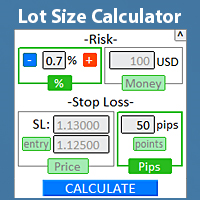
Калькулятор торгового лота
Моя утилита 1 : более 66 функций, включая профессиональное управление рисками | свяжитесь со мной если у вас есть вопрос Калькулятор позволяет быстро рассчитать размер позиции непосредственно в торговом терминале, для соблюдения риск-менеджмента. работает на всех торговых инструментах: форекс, акции, фьючерсы, индексы, CFD, облигации, криптовалюты; сворачиваемый интерфейс; Особенно удобно для краткосрочных трейдеров, когда нужно действовать быстро . Для р

Индикатор показывает время работы мировых бирж. Помогает увидеть, какие рынки в данный момент наиболее активны Посмотрите мою Многофункциональную утилиту : более 66 функций, включая этот индикатор | Свяжитесь со мной если у вас есть вопросы Помогает выбрать наиболее волатильные инструменты в данный момент; Особенно полезен для внутридневных трейдеров; 1) При использовании на таймфреймах 1H и ниже: линии будут соответствовать фактическому расположению баров на графике, и при перемещении гра
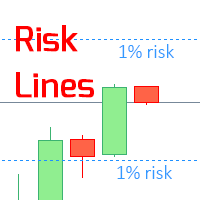
Индикатор отображает указанный уровень риска на графике для длинных и коротких трейдов. Посмотрите мой #1 торговый ассистент : 66+ функций, включая этот индикатор | Свяжитесь со мной если у вас есть вопросы Может быть полезен при установке уровня Stop Loss, значение которого видно на правой ценовой оси. Для расчета уровня риска используется Фиксированный / или Последний использованный размер лота. Настройки ввода: Последний торгуемый лот: установите " true ", чтобы расчет произв

Отличная панель для аналитики рынка. Панель помогает анализировать значения индикатора Stochastic и его сигналы.
С помощью данной панели вы сможете: смотреть текущий сигнал с Stochastic по всем таймфреймам; смотреть текущий сигнал с Stochastic по разным символам; смотреть текущее значение Stochastic ; несколько типов сигналов для аналитики.
Значения в ячейке таблицы: Stochastic - главная линия Stochastic - сигнальная линия Stochastic - Главная линия минус Сигнальная линия
Тип сигна

Use this indicator to ensure all your open charts are constantly displaying the same time frame. Change the time frame in any one chart and watch the others instantly change to the same time frame. Also allows scrolling of candles in one chart to be replicated in all other synchronized charts. Analyze correlation between different symbols by linking charts together on the same time frame Display a vertical marker move across all your open charts, so you can quickly compare price action at the sa
FREE

Торговая панель предназначенная для ограничения рисков работающих советников на одном счете, так же возможно ограничивать риски открытых в ручную сделок. Панель предоставляет возможность для каждого советника выбрать часть депозита в процентах или в валюте счета, которой вы можете рисковать.
При достижении указанных значений торговая панель закроет позиции этого советника или сделок открытых в ручную. Можно установить полную защиту счета в процентах или валюте счета при этом условии панель буде
FREE
Public Signals using this EA:
https://www.mql5.com/en/signals/1016250 https://www.mql5.com/en/signals/1018964 The EA waits for the first executed order available and then opens a grid of pending stop-type orders in the same direction of the first one The first order that we usually call the master trade can be opened manually, on specified day and or via any other EA, indipendent from this one There is a dedicated Telegram Group with use cases and best settings, feel free to join and ask for

The LMBFPositionSize indicator is a simple way to quickly determine the position size appropriate for your prospective trade interactively on your Metatrader 4 charts. When you first add the indicator to your chart, you will be given the option to set parameters including: the account balance to use in the calculation and a percentage of the balance you are prepared to risk. Once attached to your chart, the indicator is available for you to use whenever you want and will continue to use these p

Completely change the way you use Metatrader 4 forever and give new meaning to using profiles and templates. Just attach the indicator to your open charts (e.g. include in your default template) and customised templates so you can do the following: Switch between different templates effortlessly without fear of losing any of the graphical objects (horizontal S&R, areas of supply and demand, text annotations) drawn on your charts Close a chart and then watch it remember all the graphical objects

If you like to see different time frames for the same symbol side by side on your terminal, then this is the indicator for you. Attach the indicator to all chart instances for the symbol of interest. Then see any additions, edits or deletions made on graphical objects instantly replicated to all other open charts for the same symbol. Object types replicated include: trend lines, horizontal lines, vertical lines, rectangles, triangles, ellipses, arrows, text boxes and labels.

Pro MT4 To Telegram sends text messages to a Telegram group or channel of your choice immediately when (No DLL files Needed):
+ new order + closed order + placing pending order + modified order + Delete Pending order and more in the next update... I have tested this EA with forex symbols but it should work fine with any MT4 symbol (e.g. indexes, commodities, stocks, cryptocurrencies)
How To get your Bot Token or Api Token : Before running the Telegram EA you must create your own Telegram bot

This is a script in the entire application that records your trading logs that I created myself to practice trading skills.
The whole set includes: script, and web app: https://myfxjournal.cloud
It is very simple with only two options: Type (select dropdown) and Ticket (input).
If you choose to record open positions, please choose Type = Opening_Trade, otherwise choose Type = Closed_Trading (this is under the Account History tab)
***********This is the part used on the website**************
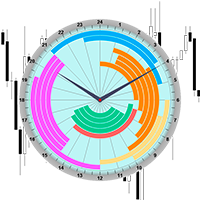
Профессиональный индикатор Торговых Сессий теперь доступен в MetaTrader4.
Профессиональный БРАУЗЕР НОВОСТЕЙ и Торговых Сессий теперь доступен в MetaTrader 5.
На одном циферблате отображено время работы 18 крупнейших фондовых бирж мира. Это даёт возможность проследить характерное движение рынка в соответствующее время суток.
Благодаря звуковым и Push-уведомлениям, вы никогда не пропустите начало торгов на очередной бирже!
Время работы каждой биржи взято с её официального сайта. В индикаторе

Индикатор рисует сильные уровни цены (уровни консолидации цены). Построение уровней происходит с помощью 2-х индикаторов МА и 1 MACD по сложному алгоритму . Алгоритм используется в эксперте, который находится в личной эксплуатации.
Данные уровни имеют 4 варианта (цвета вариантов могут быть изменены пользователем): сильный вверх, слабый вверх, сильный вниз, слабый вниз. В свою очередь, уровень появляется всегда как правило слабый, и потом может стать сильным. Сильный уровень тоже может
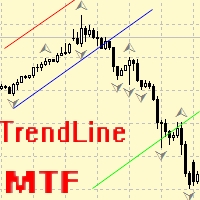
Советник для ручного построения трендовых линий и сопутствующих им стоплоссам и тейкпрофитам. После построения, советник запоминает уровни, направление и лот. При касании текущей цены с расчетной ценой, открывается ордер с заранее выбранными параметрами. Возможно построение и запоминание до 10 разнонаправленных уровней с разных таймфреймов. Можно использовать на любом торговом инструменте. Корректно работает с 4 и 5-значными ценами. Можно создавать торговые стратегии из нескольких торговых линий

Отличная панель для аналитики рынка. Панель помогает анализировать значения индикатора Ichimoku и его сигналы.
С помощью данной панели вы сможете: смотреть текущий сигнал с Ichimoku по всем таймфреймам; смотреть текущий сигнал с Ichimoku по разным символам; смотреть текущее значение Ichimoku ; несколько типов сигналов для аналитики.
Значения в ячейке таблицы: Значение Tenkan-Sen Значение Kijun-Sen Значение Senkou Span A Значение Senkou Span B Значение Chikou Span Span A - Span B.
Тип

Официальный доступ к экосистеме BlueDigitsFx Получайте обновления инфраструктуры, рабочие материалы, релизы продуктов и доступ к официальной экосистеме BlueDigitsFx. Экосистема Telegram
Веб-сайт
BlueDigitsFx Command Center — торговая панель MT4 для исполнения ордеров, управления риском и анализа рынка BlueDigitsFx Command Center — это профессиональная панель исполнения и рабочего процесса для MT4, созданная для того, чтобы помочь трейдерам управлять входами, риском, направлением рынка, импуль
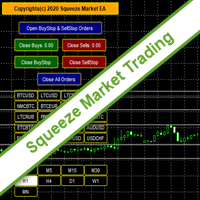
SqueezeMarket EA Utility is an Utility EA that works normally in the environment where the market direction could not be ascertained. It helps the trader to open both the Buystop and Sellstop pending orders at once.
After you see the market squeezed for a particular period on any currency pair, then, you will first of all plot an upper channel line on your chart window and do the same for the lower channel line, then open your SqueezeMarket EA Utility parameter settings by right clicking on the
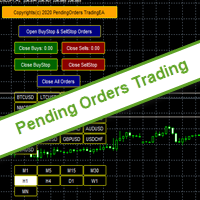
PendingOrders EA Utility is an Utility EA that works by opening both the Buystop and Sellstop pending orders at once.
When you get to a point where you can't really tell where the price will go next or after the release of a big news, what you need is simply plot your pending orders both up and down so that when the price move away from the point of stagnation, it will either move up or down, by this, you will catch most of the moves. All the default setting are defined as the System demands bu

Помощник по торговле в ожидании заказа MT4 Торговый помощник - это торговая панель, предназначенная для ручной торговли. Панель позволяет рассчитать риск, управлять позициями с помощью лимитных ордеров, И другие полезные функции.
Основные особенности панели 1. Он работает с любыми торговыми инструментами - валютными парами, CFD, акциями, индексами, фьючерсами, криптовалютами. 2. Установите стоп-лосс и возьмите прибыль в качестве расстояния в точках. 3. Установка и отображение соотношения пот

Отличная панель для аналитики рынка. Панель помогает анализировать значения индикатора RSI и его сигналы.
С помощью данной панели вы сможете: смотреть текущий сигнал с RSI по всем таймфреймам; смотреть текущий сигнал с RSI по разным символам; смотреть текущее значение RSI ; несколько типов сигналов для аналитики.
Значения в ячейке таблицы: значение RSI.
Тип сигнала: RSI пересекает уровень перекупленности/перепроданности наружу; RSI пересекает уровень перекупленности/перепроданности внут

No Nonsense Forex History News Tool
Please do not download Demo here, There is no demo version and it will not work.
Pros: Ability to adapt any GMT timezone broker News Event precision up to M5 time-frame Extremely easy to use
NNFX History News Tool is a tool dedicated to NNFX followers, it is designed to ease up the process of incorporating NNFX News Event during back-testing. History News provided by this tool starts from 2015/01/01 - 2020/08/09. The news event history provided by this t

このEAを使用することにより様々な条件で自動で決済することが可能になります。
詳細な情報はこちらにサイトがあります。
https://toushika.top/ea-takeaprofit/
条件: 条件1:利確か損切で決済 条件2:利確か損切または反転MAで決済 (ディフォルトでは20MA反転で利確) 条件3:利確か損切またはゴールデンクロス、デットクロスで決済 条件4:利確か損切またはボリンジャーバンドにタッチで決済 条件5:利確か損切またはパラボリックで決済 条件6:利確か損切または設定した水平線で決済 <- 他の通貨で設定した水平線でも決済可能
重要:水平線で決済の際、買いポジションと売りポジションは同時に持てません。 買いポジションがある時に売りポジションを持つとすぐに決済されてしまいます。 反対に売りポジションがる時に買いポジションを持つとすぐに決済されてしまいます のでご注意ください。
Multi operations script to operate manually. It is not a toy!
Warning: This script needs one to two months of utilization to achieve a proficient usage level and knowing all functions and market situations where it can be used.
THIS IS A TOOL FOR PROFESSIONALS & EXPERIENCED TRADERS!
You can save thousands of configurations to make thousands operations beyond your imagination .
Steps buy to protect steps sell, chains of take profits and stop losses, protected, martingale, progressive, inverte
FREE

Это автоматический оптимизатор параметров для индикатора Trend Line PRO
Легко и быстро вы подберете оптимальные параметры для вашего любимого индикатора Trend Line PRO. Оптимизация занимает всего несколько секунд.
Оптимизатор позволяет находит лучшие параметры для каждой пары и периода: Amplitude, TP1-TP3, StopLoss, а так же значения для Time Filter и HTF Filter на выбранном участке истории (Days) Для оптимизации разных таймфреймов вам нужен разный диапазон истории:
M5-M15 установите парам

iCUSTOM INDICATOR TESTER - это инструмент для КОДЕРОВ, но не только. Это программа, предназначенная для тестирования и проверки пользовательских индикаторов, даже если или особенно если у вас нет исходного кода в виде файла .mq4, а есть только скомпилированный файл .ex4.
ТРЕЙДЕРЫ могут протестировать индикатор и посмотреть, связана ли их идея с данными индикатора - действительно ли идея рассчитана и можно ли создать советник на основе этого конкретного индикатора. Это может сэкономить время к
FREE

Отличная панель для аналитики рынка. Панель помогает анализировать значения индикатора MACD и его сигналы.
С помощью данной панели вы сможете: смотреть текущий сигнал с MACD по всем таймфреймам; смотреть текущий сигнал с MACD по разным символам; смотреть текущее значение MACD (главная и сигнальная линия); смотреть расстояние между главной и сигнальной линией; несколько типов сигналов для аналитики.
Значения в ячейке таблицы: значение Macd главная линия; значение Macd сигнальная линия;
г

Smart Trendline Order is an EA to set pending orders using Trendline from your chart. Main Features: 1 . Create Invisible or Visible pending order. Visible pending order means, it will open BuyLimit/SellLimit/BuyStop/SellStop and update the OpenPrice along the Trendline. 2 . Identify BuyLimit/SellLimit/BuyStop/SellStop if you change line direction above or below running price. 3 . Delete previous pending order and open new pending order if you change line direction above or below running price.

Ready to save big? All items are $30 for limited period.
Fast, Reliable, and Any (broker or symbol) to Any (broker or symbol) Trade Copier Solution. The Copied trades will be having your custom comments: Its very common problem in existing copiers that if symbol names are totally different in Master (Provider) and Slave (Receiver) Account then the existing copiers doesnt work. In this copier you will not face such issue and you can copy any symbol name to any symbol name. For Example: Your

Отличный Мультиплатформенный Копировщик сделок. Сам пользуюсь регулярно на VPS (Копирую из Mt5 в Mt4).
Мультиплатформенность: копирование из MetaTrader 4 в MetaTrader 4; копирование из MetaTrader 4 в MetaTrader 5; копирование из MetaTrader 5 в MetaTrader 4; копирование из MetaTrader 5 в MetaTrader 5.
Режимы работы: master - текущий терминал - источник сделок (с него копируются сделки); slave - текущий терминал - приемник сделок (на него копируются сделки). from myself - режим "

Отличная панель для аналитики рынка. Панель помогает анализировать значения индикатора Envelopes и цены.
С помощью данной панели вы сможете: смотреть текущий сигнал с Envelopes по всем таймфреймам; смотреть текущий сигнал с Envelopes по разным символам; смотреть на каком расстоянии находится Envelopes от цены; смотреть на сколько изменилось значение Envelopes; несколько типов сигналов для аналитики.
Значения в ячейке таблицы: значение Envelopes верхняя линия; значение Envelopes нижняя лини

Introduction
What should be the Lot Size of our next trade ? is a very common and an important question. We don't want to burn our account by placing higher lots or neither want less profit by placing small lots even when we have capacity to place a reasonable lot size. The Risk Lot Calculator is a simple and efficient small tool that will assist your trading and help you choosing lot size by risking your account balance of your own choice. It will tell you how much lot size will risk your how

Angry Bull Option Binary
This is a Binary Options robot, which contains 7 strategies, you can backtest it to check what the best strategies are Settings Initial Batch Value Dynamic Investment = If activated it will use an automatic lot according to its capital Balance ($) w/ backtest = Starting balance to backtest PorcRiscoInvestment = It will be the value of % for the automatic lot if it is activated Expiration (in minutes) = It will be the expiration time of orders in Binary Options Magic

Script to create arrows and lines on chart of history positions traded on account for the symbol where you launch the application. From inputs you can select: - Magic number (default is -1; -1 = all magics number) - "From" date and time (default is 1970.01.01 00:00; all positions) - "To" date and time (default is 1970.01.01 00:00; all positions) - Color for buy open positions (arrows and lines between open and close) - Color for buy closing positions (arrows) - Color for sell open positions (arr
FREE

Script to calculate equity and balance at a specific date and time.
This script makes up for a lack of MetaTrader account history, that does not show how the balance and equity changes in time.
Balance calculation includes closed orders only.
Equity calculation includes orders closed before and orders that are still open at the specified time.
Example: date and time set to 2020/07/06 00:00. If I had a Buy 1 lot EURUSD position opened at price 1.12470 on the 2020/07/02, the program would ca
FREE

Utility for know all informations and settings of account where the platform is connected The informations that you can know are for example:
- The difference from server time and time of your PC
- The limit orders that you can place at market
- The credit that you have
- The stopout mode of your broker
- The exact name of company of your broker
and other informations
FREE

Utility for know the performance of your acoount. From dialog you can filter data in this modes: - You can include or not include the open positions
- You can include or not the closed positions
- You can filter the data by date (from, to)
- You can filter the data by simbols (multi selection)
- You can filter the data by magic number (multi selection) On bottom of table, are show the total of: - Number of data
- Total size
- Total commissions paid
- Total swap paids
- Total profits
- Total net

Utility for know all informations and settings of terminal where the utility is loaded. The informations that you can know are for example:
- The path of folder where the terminal start
- The path of folder where the terminal store the indicators, experts advisors etc
- The path of common folder
- The permission to use DLL, to automated trading etc
- The permission to send email, FTP or notifications to smartphone
and many other informations
FREE

Script to load on chart the orders, starting from "Signal history report" downloaded from MQL5. If you found a good signal on "Signals" section of this site and you want to see the history orders on chart, you can do it, following this steps: - Download the csv file of history orders - Copy file in the common folder - Launch the script and set the input that are: - Report type (MT4 or MT5) - File name - Delimiter (default is ;) - Name of symbol to load (if symbol on file is for example EURUSDi,
FREE

Utility for know all informations and settings of all symbols available on your broker The informations that you can know are for example:
- Spread
- Digits
- Tick value
- Size step
- Size minimum
- Size maximum
- Swap buy and sell
- Margin required (for 1 standard lot)
- Rollover day
- Execution mode
and many other informations You can filter the symbols by group or you can also choose to see the informations only of symbols available on market watch.
FREE
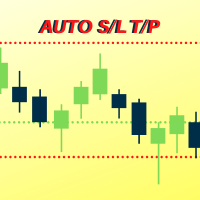
Number one rule to investing is to protect your capital. Never worry about trading without stop loss or take profit with Auto S/L T/P. Auto S/L T/P will automatically add your preset default stop loss and take profit to any order on the chart it's installed. Be sure to enable auto trading in order for the EA to work.
Entering a trade on the go from your mobile is breeze with Auto S/L T/P running on the chart on your desktop. Just enter a trade and your default stop loss and take profit will be
FREE

By default Metatrader will show any newly created chart object on all timeframes.
This handy utility will set the visibility of any new chart object drawn to be that of the current chart only.
e.g. If the chart timeframe is H4 then a new object will only be visible on the H4 timeframe.
Each object type can be included or excluded as required and, of course you can change the timeframes setting afterwards as this only operates at the point the chart object is created.
Add to your chart and f
FREE

Это полуавтоматический советник, не использующий никаких индикаторов и параметры просты.
Включает в себя мастер-ордер (первый ордер, который вы загружаете на график на покупку или продажу) и вы можете использовать два обратных ордера для хеджирования.
Главный ордер : Называется начальным ордером (при достижении SL советник останавливает торговлю, пока вы не перезапустите его на графике).
Первый обратный ордер : Открывается напротив основного ордера на желаемом расстоянии пун

Отличная удобная панель для аналитики рынка.
С помощью данной панели вы сможете: смотреть сигналы с различных индикаторов по всем таймфреймам ; смотреть сигналы с различных индикаторов по разным символам .
В данной панели: 9 индикаторов (10 в версии Mt5); 27 сигналов (29 в версии Mt5); Страница с "итогами".
Индикаторы и сигналы: MOVING AVERAGE MA cross Price - пересечения MA и цены; MA more/less Price - MA выше/ниже чем цена; BOLLINGER BANDS BB crosses Price (in) - цена пересекает Bo

This EA Utility allows you to manage (with advanced filtering) unlimited open orders (manual or EA) with 16 trailing stop methods: fixed, percent, ATR Exit, Chandelier Exit, Moving Average, Candle High Low Exit, Bollinger Bands, Parabolic, Envelope, Fractal, Ichimoku Kijun-Sen, Alligator, Exit After X Minutes or Bars, RSI and Stochastic. The trailing stop can be either real or virtual, and you can exit fully or with a partial close percent on touch or bar close.
Moreover, you can add (overrid

Ultimate No Nonsense FX Backtester - You can Run Forward Test Simulation with this tool! Do Not Download the Demo Here, Please Read Below!
Step by Step Manual Guide PDF for this backtester PDF List of Commands(Shortcuts) for this backtester
Ultimate NNFX Backtester is a powerful utility tool that significantly reduces the length of backtesting process for NNFX followers. As well as for Forex traders that operates their entries and exits at the close of a candle and manage the risk using ATR.

Introduction
This will calculate the risk taken only on EURUSD on going trades (both market order or pending) in dollar or euro. The risk is depending upon the lot size and stoploss you choose for the trade. Trades it consider
Only EURUSD Types of Trades
Direct Market order Pending Trades Please note Customization is also available for the function. For more details feel free to contact.
FREE

Introduction
News is basic requirement for trading now a days. Due to its biased impact on the market a trader should be proactive to deal such scenarios before they arises. In this news alert indicator you have multi currency option to scan news for different pairs and notify you on Telegram, email, mobile push notification and chart alert. You can turn on/off any of the alert you need. It has two different option one is alerting you X min (user input) before the news and second is alerting you
MetaTrader Маркет предлагает каждому разработчику торговых программ простую и удобную площадку для их продажи.
Мы поможем вам с оформлением и подскажем, как подготовить описание продукта для Маркета. Все продаваемые через Маркет программы защищаются дополнительным шифрованием и могут запускаться только на компьютере покупателя. Незаконное копирование исключено.

Вы упускаете торговые возможности:
- Бесплатные приложения для трейдинга
- 8 000+ сигналов для копирования
- Экономические новости для анализа финансовых рынков
Регистрация
Вход
Вы принимаете политику сайта и условия использования
Если у вас нет учетной записи, зарегистрируйтесь