 MetaTrader 5
 专家
专家
 指标
指标
 程序库
程序库
 实用工具
实用工具
 窗口小部件
窗口小部件
 规则
规则
全新的MetaTrader 4 交易实用工具 - 35
 以下是可在MetaTrader 4中简化外汇交易的交易程序。将鼠标悬停在下面列表中的工具上,阅读它的描述和用途。
Real-time spread tracking and monitoring software
Displays spread values in form of histograms on current timeframe of chart Convenient for analyzing spread changes, as well as for comparing trading conditions of different brokers By placing on desired chart, the spread changes at different trading times are displayed
Additionally Fully customizable Works on any instrument Works with any broker
FREE
Universal tool for managing positions in one click with ability to test strategies
The utility has all functions of opening, tracking and closing trade orders with additional options for reversal, averaging and position compensation Extended order modification system with possibility of correction on price chart, taking into account conditions of partial or complete fixing of positions The panel allows you to test strategies in MetaTrader tester - all panel functions are available here with ab
FREE

This MT4 EA created by me to help you test Your Manual Trading strategies.
The EA Automatically place:
SL TP
Trail SL
Break-Even
M.Basket
Trail SL based on the distance of an EMA
Lot or Lot multiplier
And the multiple possible combinations.
Once configured, you only have to hit the buttons
The EA will place the Lot, the SL, TP, Basket, or Trail automatically so that you can focus on your strategy.
The EA will work in Backtest or Live Trading, Real, or Demo.

Утилита TSim позволяет симулировать ручную торговлю в Тестере Стратегий MetaTrader 4. В панеле можно устанавливать размеры лота, тейпрофита и стоплосса. Панель имеет кнопки Sell и Buy для выставления рыночных ордеров, а также кнопки CloseSell, CloseBuy и CloseAll для быстрого закрытия ордеров. Под панелью отображается список открытых ордеров. Внимание. Панель работает только в Визуальном режиме Тестера Стратегий MetaTrader 4.
FREE
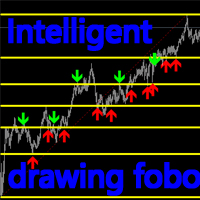
Introduction:
This product is an indicator type tool. This indicator will automatically identify and find a suitable location. FOBO is established, and all the positions of support and suppression are marked in detail. Support and suppression are shown with red and blue arrows. Switch and delete:
TAB : After pressing the TAB button on the keyboard, the indicator will identify and find the next qualified position, and redraw the support and suppression. “ ` ” : The “ ` ” key on the keyboard del
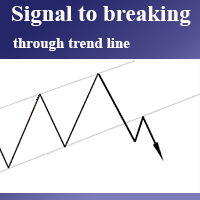
Простой помощник в торговле, информирующий о пробитии трендовой линии. Сигнал о пробитии уровня приходит на терминал и дублируется push сообщением на телефон. Удобная прога, т.к. не нужно сидеть у монитора пол дня в ожидании пробоя трендовой линии, важного уровня и т.п. Как пользоваться: 1) Строим две трендовые/горизонтальные линии. 2) Присваиваем верхней линии имя: "top", а нижней "bottom" (без кавычек). 3) У трендовых линий лучше зайти в свойства=>параметры и поставить галочку "луч" 4) Перет

Monitor floating profit of trades and close half of the lot size when profit reach target. Can monitor either all trades in whole account or by specified magic number. Can set amount of slippage and spread tolerance. Can set retry times and sleep seconds if split order was rejected Can set max split order times. Able to close trades after split when floating profit goes down and near 0, to prevent lose.

Friends, at first you may think that this tool is difficult to use, but by reading its guide, you can easily use it. Once you learn, you can test thousands of strategies in it. Dear friends, this tool can not be tested in backtest. Using this tool, you can test your strategies live.
Create strategies that are in your mind. With this tool, you can make the strategies you have in mind a reality. Create and use experts using popular indicators such as RSI, MACD, Moving Average, Bollinger Band, etc
This utility can compare simultaneously time frames of different instruments and keep under control the nine major time frames of an instrument. It is composed by two changers, a crosshair and some additional components : the multicharts time frames changer is designed to simultaneously compare time frames for up to thirty different sy th symbols with the keyboard or the button the multicharts symbols changer can link up to nine charts and control simultaneously the nine major time fra

ForexBob 1 Click Button is very impresive forex tool for scalpers: 1. Helpful in Closing multiple trades in just Single Click. 2. Scalper can benefits the most who always eager to close multiple trades in averaging and lock the profits fast. 3. It helps to avoid latency and so profits can be locked where we need. 4. Easy to Install, same as we install any expert advisor. 5. Speed of closing trades depends on your broker's server speed.
If you find any improvements we are open to your feedback
FREE

****************** ******* *******
*** FREE Trail for Demo ***
****************** ******* *******
1. Search "ShootingAlert_bot in Telegram
2. Start it
3. Enjoy it
EA Alert is using Telegram to do various actions: 1. Check Account Info 2. Check Order 3. Place Order 4. Modify Order
5. Switch user to help trade
6. Check Market Info
7. Show Chart
8. Show Chart with your template
It is very useful for order management, especially while you are Working at office or Dine out with friends . It use

STRATEGY - We use risk and reward ratio of 1:5 to maximize the profit - We use trailing stop to lock profit and minimize loss
ALERT User will get notified with alert with the following condition: - Max Spread - Max Orders
UPDATE - Free Update and Support
COMPATIBILITY - MT4 and MT5 - M1 Timeframe - All Currency Pair
WHAT YOU GET 1) Free Online Forex Training (Normal Price: USD 299) 2) Free Expert Advisor (EA) (Normal Price: USD 288) 3) Free Copy Trading (CT) (Normal Service Fee: 20%) *Aft

This script allows you to toggle the "Show Trade Levels" option, but for the current chart only. Normally, you can only change the setting using the Options -> Chart menu for ALL charts, but this script allows you to do it for a SINGLE chart. I'm using it when I take screenshots, because most of the time I'm not trying to show the trades, just some functionality of one of my other tools. Iif you need that functionality, then this script is very helpful!
If the script helps you, please let me k
FREE

The Expert Advisor will help you forward all alert from MetaTrader 4 to discord channel. Parameters Discord url webhook - create webhook on your discord channel. Use multi webhook url - use file to input multi webhook url, with each line, input one link, input symbol before link to send only alert from the symbol to the channel. Example: EURUSD=link1 Forward alert - default true, to forward alert. Send message as caption of screenshot - default true, one message include alert and screenshot For

简介
本产品是迈达量化全系列产品中的一款风控系统。 本风控可实现手机挂单,专家Bug,净值,盈亏,手数,单数,价格,时间,纪律等多方面风险控制功能。 可灵活的实现魔术编号组,货币组,订单注释组等组合特定风控功能。 屏幕显示开启了哪些风控功能,让使用更便利。
开启此每个风控功能后,当市场时间满足以下条件时,执行相应的交易行为 ,赋值为用户输入的设定值 注意,该应用程序在策略测试器中不起作用。 您可以下载演示版 Risk Mgmt MT4-demo-V1.66 功能说明 软件界面可自由切换中英文显示,也可以选择加载或者不加载面板,以及是否显示屏幕信息。 用户可以自由选择对指定魔术编号组、订单注释及产品符号执行风控,不填写默认所有仓位与订单 手机挂单风控,可以随时随地制定风控策略,如果默认参数任意货币挂单0.11手,可以实现停止EA操作,利用手机实现指定盈利与亏损平仓。 手机挂单的手数作为风控类别,挂单价格作为风控条件,当账户净值大于或者小于挂单价格时候,执行对应的风控命令 专家Bug风控,连续秒开秒平,连续无限开仓,连续无限挂单,突增巨量手数等一系列BUG专家,执行停止并平仓。

This is the Pro version, which replaces the first Rsi version of Rsi I posted, which has great multipliers, average prices and entry points for all currency pairs. Most importantly, it has the ability to preserve capital for you. I wish you a favorable transaction, reaping many profits
Tutorial : Instruction for RSI Pro v1.0 1. Lot 1 st trade: volume for 1 st trade. 2. Max lot: Maximum volume for each trade. 3. DCA Step: Step between 2 trades 4. TP: Example: You have X orders with DCA step -1

This Price Action Signal will help you scan the 28 major currency pair to identify potential reversal trend in Daily Chart using Engulfing and Pin bar candle stick pattern. Plus it will notify you to your phone if potential setup have found, you don't need to stare on your screen all day!. Plus if you don't have the strategy yet I have a strategy cheat sheet bonus so you can get started. This strategy requires only 10 mins a day! this can help you a lot, if you have a busy lifestyle or have a bu
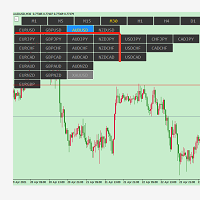
symbolchanger, It is a necessary analysis tool for manual transaction, which can find out the motive currency through different and interrelated currency pairs for better transaction. MT4 chart switching parameters
This is the index of MT4,
Chart quick switch,
Time cycle switching,
Currency pair selection,
Currency suffix,
K line remaining time display
Chart background color protection color on Selection
試想一下,在Metatrader 4圖表上有10個或更多指標窗口,並且只需單擊即可顯示或隱藏它們。
使用此有用的工具,您可以自動組織所有指標子窗口,從而使圖表盡可能保持乾淨。現在,只需單擊幾下,您就可以在需要時僅查看真正需要的指標!如果您已完成指示器的操作,只需單擊一下即可將它們全部隱藏起來,不要再浪費時間了,立即使用!
概括
使用管理器,您可以添加任意數量的指示器,然後單擊顯示或隱藏這些窗口,僅在需要時使用它們。永久顯示1或2或您想要的任何內容,並隨時顯示其餘部分,或者使用完全乾淨的圖表進行價格操作,並查看指標以查看差異或超賣/超買區域。您將能夠選擇每個子窗口的大小,也可以為所有子窗口使用單個大小,這取決於您...您將如何使用它?

這個出色的工具將使您能夠輕鬆快捷地管理每次操作的風險。其創新的界面使您能夠以秒為單位計算手數和風險收益率,使您的操作保持在所需的風險範圍內,並避免交易中的不良情況。
打開操作後,面板將顯示一個部分,其中包含每個操作的詳細信息以及所有指定高度相關數據的摘要。不要通過打開許多窗口來使自己複雜化,我們的面板具有快速導航按鈕,可讓您訪問所需的符號,只需在參數中對其進行配置即可享受體驗。
這個有用的工具使您可以一目了然地查看以下信息:
符號信息
- 傳播
-每手點值
-交換長
-換短
風險計算器
-基本金額
- 風險
-很多(自動計算)
-比例(自動計算)
訂單信息
-未結訂單頭寸(1、2、3 ...)
-訂單類型(買|賣)
-訂單大小(手數)
-損益(以帳戶貨幣顯示)
-距離(開盤價和當前價之間)
訂單摘要
-總計購買手數
-總共賣出很多
- 毛利
- 花費
- 淨利

LINE TRADER是一種通用的半自動Expert Advisor,用於交易垂直和水平水平交易。
EA交易實際上包含4個用於繪製線條的按鈕。
EA交易自動在交易者選擇的任何行上工作。線可以以任何角度繪製。您只需要畫一條線:
-OPEN-開單;
-止損-止損;
-接受-完全完成交易並確定所有利潤;
-關閉-關閉訂單(越線時);
線條是標準繪製的,因此可以是射線或線段(可選)的形式。
此EA交易適合在以下交易中使用的交易者:
-交易的水平水平和方法(突破,回調,錯誤突破);
-模式(三角形,通道等);
-垂直(傾斜,趨勢)水平;
-交易趨勢,突破或趨勢反轉(所有類型的水平);
-嵌套線;
-使用水平或傾斜方法的任何其他類型的交易。
好處
EA簡單易懂; 適合新手交易者; EA交易適用於MetaTrader 4中可用的任何金融工具; 預選批次的類型/大小;
LINE TRADER MT4顧問程序的功能
具有在任何工具和時間框架上使用的能力; 追踪未平倉頭寸的能力; 基本設置
-輸入線顏色是輸入線的顏色,默認情況下為綠色(Yellow

Position Manager
管理职位从未如此简单! 现在您可以从屏幕上休息,头寸管理器将负责获利,移动止损并确保您的利润。 允许您设置3个获利套现,以点为单位设置距离和要关闭的手数百分比。 每个图表最多管理10个头寸。 它允许您以图形方式查看每个头寸的获利水平。 它允许管理其他EA输入的操作或手动进行的操作。 在职位管理器中睡觉时赚钱!
.................................................................... ....................................................................

It is an expert advisor that scans the last patterns on defined symbols and timeframes . Multi Symbols /pairs , Multi timeframes . There are 2 ways to specify symbols : Automatically scan all symbols available on the market watch (true/false) Type any symbols ,separated by comma. There are also 2 ways to specify timeframes : Automatically scan all timeframes available on mt4 (true/false) Type any timeframes,separated by comma.
Unlimited symbols available in an account and unlimited timefra

Fast Position Copier - Reciver Tool This is Fast and Simple position copier from MT4-----> MT4.
Copying positions requires two bots : Master/Slave. Master ( Sender Position ) Slave ( Reciver Position) This is a Master version (Sender) and you need to download a Slave version from HERE . This tool is suitable for using to copy positions and manage them from a MetaTrader on one or more MetaTraders located on a server or computer. MetaTraders must be installed side by side.
FREE

Fast Position Copier - Reciver Tool This is Fast and Simple position copier from MT4-----> MT4. Copying positions requires two bots : Master/Slave. Master ( Sender Position ) Slave ( Reciver Position) This is a Slave version (reciver) and you need to download a Master version from HERE . This tool is suitable for using to copy positions and manage them from a MetaTrader on one or more MetaTraders located on a server or computer. MetaTraders must be installed side by side.

Australia Bank Functions: Navigates movements in the AUDUSD, a highly traded currency pair. Facilitates risk management and order adjustments based on your settings. Trades within specified hours with the AUDUSD pair, reducing noise. Please note: Trading involves risks. The Australia Bank expert advisor provides tools for analysis; however, results may vary. Use at your own discretion. The Australia Bank expert advisor is a user-friendly tool designed to assist you in your trading experience. Do
FREE

That indicator shows on chart actual amount of lots currently opened position and Take Profit pips numnber and pips left to get. All objects can be placed at any place of chart by user choice. Objects text can be set by user also by writing new text in indicator's parameters window. Each object color can ve set to any color from the palette of colors delivered by MT4 editor.
FREE

If you are looking for a U tility can Auto Trading and send Signals to yours Telegram Chanel . DON'T MISS IT!
BLUE FOREX EA works on a linear regression channel. The utility trades from the channel borders, stop-loss and 2 take-profit levels with partial closing of orders are used for closing. The chart displays information about profit and draws the regression channel itself. The channel values are recalculated only when a new bar is formed.
- Min deposit: 100$
- Recommend ECN broker with L

The Ichimoku Kinko Hyo, or Ichimoku for short, is a technical indicator used to gauge momentum along with future areas of support and resistance. Ichimoku technical indicators include five lines called Tenkan-sen, Kijun-sen, Senkou Span A, Senkou Span B, Chickou Span. Rent EA, buy EA Connect via Skype link to exchange details: https://join.skype.com/invite/X1Y3At5EwsvY
Support email: sealteamhn@gmail.com Hotline: Mr.Tu 0971678888
Data History Export to Excel with Automated export for new bars. ALL forex pair ALL TimeFrames Export in .csv or .txt, you can manage the Time Bars, Open, Low, High, Close *********************************************************************************************************************************************************************************************************************************************** Have fun! If you like this Script take a look to my other product: Forex Graphical Inter
Special Trailing Sl is a automatic trailing stop_loss. first It will try to free risk your trade then save the profits. first step is to move the SL 50 points below current price for long trades , and 50 points above current price for short trades.First step will happen when the trade get to minimum profit per point. second step : SL will follow the current price with a dynamic distance. This trailing stoploss has been used in my products.
FREE
此脚本允许您将任何类型的绘图对象(如趋势线、斐波那契回撤等)复制到一个或多个其他图表。
默认情况下,脚本会将当前图表(即应用脚本的图表)上的所有对象复制到当前加载的相同交易品种的任何其他图表。
设置
目的地时间表 当设置为除 PERIOD_CURRENT 以外的任何值时,它会将对象复制到与应用脚本的图表具有相同交易品种的任何打开图表。 如果您将值设置为特定的时间范围,例如 PERIOD_D1,则只会更新具有相同交易品种和周期的图表。 复制对象类型 您可以将其设置为您希望复制的特定类型的对象,然后只有该类型的对象将被复制到其他图表。 复制指标窗口对象 当设置为 True 时,指示器窗口上的对象也将被复制。这依赖于第二张图表具有与源图表相同的指标,并且顺序相同。
在图表之间复制对象让您满意!
FREE
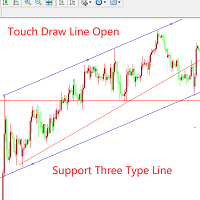
如果对该产品感兴趣或者有疑问,以及需要任何帮助,可以添加作者微信或者whatsapp:17317545896 这个EA是一个辅助交易工具。 第一次触碰到手动画的线会自动开单入场,支持3钟线:1.趋势线 2.横线 3.通道线。试用的时候,请将描述字段改成“1”,触摸一次后,线将会失效,变成白色。 使用教程请看图片!!!!!!!!!!!!!!!!!!!!
订单管理功能:1.逆势加仓 2.顺势加仓 3.移动止损 4.移动止盈 5.特殊时间段关闭所有订单。 使用者可以根据自己的需求,灵活的设置参数。下面是所有参数的介绍。
extern string TouchTrendLineTrade = "------Open an order when touch the lines-----";
extern bool UsingTouchTrendLineOpen = true; //是否开启触碰趋势线入入场
input bool UsingTouchChannelLineOpen = true; //是否开启触碰通道线入场
extern int PointsAwayFromLin
"One Click Trade" is the most faster risk manager of times! With Auto Mode, I don't even need clicks, only TWO keys to activate trades and send my order. Mouse movement does it ALL, with Auto Mode enabled!
Basic instruccions: ''Tools/Options/Experts Advisor/Allow automated trading'' box should be checked In ''Common'' tab, check ''Allow live trading'' box
In ''Inputs'' tab, set ''Money Risk'', set ''Risk/Reward Ratio'', click on ''Accept''
Press ''A'' and move the mouse on chart (to have Sto

A simple script that can delete all the drawing objects on a chart, or just the objects of a specific type.
Settings:
DeleteObjectsOfType By default the value will be blank which means ALL drawing objects on the chart will be deleted. If you only wish to delete specific types of drawing object, change this setting to the type of object to delete. For example, Fibonacci Retracement, Text, Label or Trend Line.
Please see the demonstration video for more information.
FREE

One-Click Strategy
One-Click Strategy is designed to make your life easier when placing trades. It is suited to be used with common strategies where you place your stop loss over the recent high or below the recent low. This is very common when you trade support and resistance for a bounce or break out. Want to sell or buy? Press "sell" or "buy" and the SL is placed above/below the recent high/low with a target of your choice. Lot size is calculated based on your settings. Taking trades takes
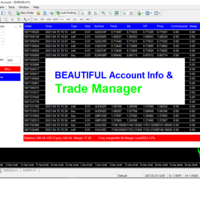
Trade Manager and Account Info helps you to manage your orders and watch the progress of open trades within one chart. All open orders are displayed on the right side.
How to use This dashboard reads all the Market watch symbols and displays them in a dropdown menu, therefore you should ensure your desire symbols are on the Market watch. You can select any pair of choice and any order type without the need to keep switching between charts. You can close individual trades by clicking the "X" bu

For more info join to http://discord.io/reitakfx where you can get info how to set, how to trade or for your questions -------------------------------- If you want this panel and all my other products for FREE , create account here http://bit.ly/reitakfxroboforex and then write me and I will send you all my actual and future product for FREE + VIP on my DISCORD --------------------------------------
Set in panel what margin will use to trade. When you ready to trade, just click to buy or sel

Trend line Trader Ultimate EA
A "Professional Trading Panel" that every experienced and beginner manual trader needs it.
"Trend Line Trader Ultimate EA" makes it easy to never miss an opportunity of a good point to open positions. Demo version doesn't work due to programmatic limitations. Please watch videos and images for more information.
Key Features of Trend line Trader Ultimate EA:
Fully graphical interface. Extremely precise and reliable. Risk Manager , Lot calculator , Trailing Stop . Mu

Utility Description This is a useful utility that can help traders to Stay in touch with their Accounts and hear about account critical conditions. With this utility, traders will receive notifications of broker server connectivity status. Different forms of notifications are supported such as Android or IOS phone notifications, Email messages or Popup Alerts. Also any changes on positions can be sent as a notification based on user settings. All above features can be customized using the EA inp

Auto trade V20 is a trading tool like Robot or Expert Advisor that is used for automatic trading, this type is Martingale EA, the recommended broker is FBS, EU Pair, default setting. If you want to find the best setting, please look for it by backtesting it, so that you find the best setting and help your trading become more profitable, please try this tool to help you trade. minimum deposit 200 $ cen lot 0.01, pipstep in points.

This utility allows creating any amount of grid orders with 2 mouse clicks.
Inputs 1. Number of trades to create 2. Spacing factor: Exactly 1 = Evenly spaced grid Less than 1 = grid is weighted towards end More than 1 = grid is weighted towards start 3. First lot: Lot size for 1st grid trade 4. Add lots in grid: Add lots for each new grid level 5. Add lot percents in grid: Add lots exponentially for each grid level
6. Stop loss points 7. Take profit points
If you have any feedback or i
FREE

无忧外汇方法的完整交易面板。这个面板囊括了你执行自己的NNFX算法所需的几乎所有东西,帮助你更快、更容易地进行交易。它有3个部分。 符号面板
按下图表中的任何符号名称,即可快速切换到该符号。 额外的信息可以显示在面板上:当前打开的交易,这些交易与其他符号的相关性(除了他们的止损是在收支平衡或正数)和即将到来的消息(下一个每日蜡烛,当在蜡烛收盘时交易)。 这些新闻是从Forex Factory导入的,默认的过滤新闻是VP在No Nonsense Forex中推荐的。如果你想改变新闻,考虑到任何包含你完整的自定义新闻(区分大小写)的新闻将被显示。 时区是EET/EEST(与Metatrader相同),显示的新闻在12:00(下午)改变。那么,在中午之前,新闻对应的是同一根蜡烛,而在中午之后,它们对应的是第二天的新闻。 NNFX交易小组 交易面板执行NNFX系统中的典型操作:买入/卖出按钮打开2个相同手数的订单,以最佳方式调整到您想要的风险(账户的百分比),止损为1. 5*ATR,其中一个订单的获利为1*ATR;收支平衡按钮将订单的止损设置为开盘价(如果可能),追踪止损按钮按照VP的规则移
Hello Traders! I share with you today a tool that I use on a daily basis. For those of you like me who do the analysis on the trading view and then enter the trades on the MT4, it's known that can be problems. This tool is for just that.
MAIN FUNCTION: 1 - Candle Close Timer: for those who do scalping or short-term operations, you need to know the exact moment of the closing and opening of a new candle; 2 - Trading View Interface: Check on your broker if your analysis in therm of Risk Reward Ra

Fundamental Scanner is a Non-Repaint, Multi Symbol and Multi Time Frame Dashboard based on Fundamental Signals Indicator . Fundamental Signals Indicator has a powerful calculation engine that can predict market movement over 3000 pips (30000 points). The indicator is named fundamental because it can predict trends with large movements, no complicated inputs and low risk.
Features :
Multi-Symbol Support (Support automatic listing of market watch symbols) Multi-TimeFrame Support (Over 7 custo

It is a tool to create TRAILING STOP ORDERS. Either BUY and/or SELL After creating stop orders, it will start to trail stop orders step by step. After stop order open, this time it will folllow the buy and/or sell order with TStop with TStep from the TStop Start point. It can help you to catch the perfect price to enter the market. Inputs are Stop Type : Buy Stop - Sell Stop - Both Repeat : How many times to create stop orders after closing opened one. Points Multiplyer : Multiply all point
FREE

For more details, join with www.telegramtradecopier.com
TelegramTradeCopier is the world's first lifetime licensed telegram trade copier software for forex, crypto and commodity trading. Any signal format can be converted to a trading action by TTC. The system has two components Desktop app EA file You need to install and login to the desktop app with your telegram details. Then it will listen to channels configured by you and decode all messages into trading actions with proper validat
FREE

Telegram Notifier is a simple and powerful utility which sends notification, news from MT4 to Telegram channel and group. WHO WILL NEED THIS UTILITY 1. EA Sellers who want to manage automatically their private channel and chat group.
2. Signal Providers who want to send the signals, reports and news to the channel or chat group. CORE FEATURES
1. Can use with View Account and not need to enable the Auto Trading button.
2. Track orders by the second interval instead of the market tick to optimize

VR Assistant Charts 是交易者在 MetaTrader 交易终端窗口中处理图形对象的便捷工具。该程序允许您一键单击鼠标即可更改 MetaTrader 终端中趋势线、斐波那契水平、江恩扇形和其他图形元素的颜色、样式、粗细和其他特征。 设置、设置文件、演示版本、说明、问题解决,可以从以下位置获取 [博客]
您可以在以下位置阅读或撰写评论 [关联]
版本为 [MetaTrader 5] 该实用程序极大地简化了交易者使用图形对象分析金融工具的单调工作。所有操作均使用计算机鼠标直接在图表上执行。该程序以 MetaTrader 4 和 MetaTrader 5 交易平台的技术指标的形式实现,这使得它可以与其他指标、顾问和脚本同时使用。 使用计算机鼠标进行控制: 通过点击趋势线可以打开属性,点击图表则隐藏图形对象的属性。使用对象属性,交易者可以将光束设置为左侧或右侧,更改颜色、样式、宽度,添加或删除多级对象(例如斐波那契和江恩)中的级别。 该指标的开发是为了减少交易者在标记图表时的操作次数。该实用程序对于初学者和专业人士都很有用。 由于交易平台 MetaTrader 4 和 M

你的籃子
您能做的最好的事情就是保護您的訂單免於虧損。 您現在可以放心,讓 UR Basket 來處理它。
使用 UR 籃子的優勢:
所有參數都可以在圖表的圖形面板中動態更改 - 您無需重新啟動 EA 即可更改參數或調用您使用的設置! 您可以通過以下方式跟踪您的訂單: - 幻數 - EA評論 - 以上兩者 -一次完成所有交易 UR Basket 可以通過您的貨幣價值、PIPS 或您的餘額或淨值的百分比來跟踪您的利潤。 圖形面板始終顯示您在這三種方法中的利潤,並刷新您告訴他的頻率。 最大優勢:鎖定利潤,不虧本! 下面詳細介紹它。 有一個特殊的電報聊天,您可以在其中了解最新的工具更新,如果您覺得缺少什麼,也可以發送請求!
為什麼選擇 UR 籃子?
有很多 EA 可以自行交易,或者需要您盡可能多地關注獲利的優秀手動策略,但這些都不是防彈的突然變化或經常發生的“鯨魚攻擊”。 因此,這個籃子讓您可以跟踪所有交易,鎖定您的利潤,這樣您就不會失去您已經建立的東西,並儘快關閉交易並確保您不會陷入負值。 圖表上的設置也由用戶動態更改,因此您無需在每次要更改值時進入 EA

EXTERNAL EA MANAGER是旨在帮助管理交易的程序。 例如,如果您希望任何EA在某一点停止交易 在晚上的星期五,您想远程自动执行此操作... EXTERNAL EA MANAGER是适合您的程序。 它将初始化整个终端和所有正在运行的EA。 在取消初始化过程中,可以选择终止所有交易和未平仓订单。 您最多可以使用20个幻数。
EXTERNAL EA MANAGER是旨在帮助管理交易的程序。 例如,如果您希望任何EA在某一点停止交易 在晚上的星期五,您想远程自动执行此操作... EXTERNAL EA MANAGER是适合您的程序。 它将初始化整个终端和所有正在运行的EA。 在取消初始化过程中,可以选择终止所有交易和未平仓订单。 您最多可以使用20个幻数。
FREE

"Support or Resistance Alert Broken" is a simple and very intuitive tool that allows you to create or eliminate horizontal and trend supports and / or resistances with a simple click.
When the support or resistance line is broken by the closing price at the end of the current candle, the "Support or Resistance Alert Broken" tool will send an alert with sound, as well as a notification to the MT4 or MT5 mobile application. This tool can send alerts from multiple pairs at the same time. Utility

The VR Object Delete All script solves the problem of garbage on the chart. it is often necessary to completely clear the chart of everything that is put on it, comments, lines, objects. The script completely deletes everything, even those objects that are not visible. When working, VR Object Delete All writes everything it does in the terminal log, as well as the names of objects to delete. Displays the number of deleted objects as a separate line. in case of any errors, it will display an erro
FREE
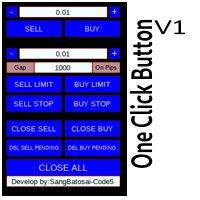
Simple button panel of trade on your chart with OneClick V1 Trial version. This trade panel will make it easier for you.
Equipped with several functions that make it very easy for you. More tools on OneClick VZ version, see here.
This version includes: Open Order Buy Open Order Sell Open Pending Order [Buy Limit - Buy Stop - Sell Limit-Sell Stop] Close ALL orders
Close Order Buy Close Order Sell Delete Pending Order [Buy Limit - Buy Stop - Sell Limit-Sell Stop] ENJOY IT!!! ONE CLICK V1 [TRIAL
FREE
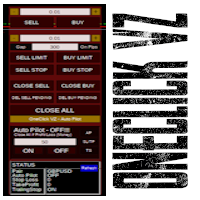
Simple button panel of trade on your chart with OneClick VZ . This trade panel will make it easier for you.
Equipped with several functions that make it very easy for you. You can try Trial Version OneClick V1 in here .
This version includes: Open Order Buy Open Order Sell Open Pending Order [Buy Limit - Buy Stop - Sell Limit-Sell Stop] Close ALL orders
Close Order Buy Close Order Sell Delete Pending Order [Buy Limit - Buy Stop - Sell Limit-Sell Stop] Order Management: Stop Loss Take Profit Tra

Automatically closes orders when profit per lot or total profit reaches your specified level Per a lot : The amount of wins per lot in the selected symbol. Each orders is calculated as 1 lot. Example: If EURUSD total lot is 2.05 and earnings per lot is $ 100, then 100 * 2.05 = 205 $.
Orders will be closed when EURUSD has a total profit of $ 205. When the total of all orders on the selected symbol reaches the specified amount, it closes all orders belonging to the symbol.
For example: There are 3

MT4 至 Telegram 信号提供者 是一款易用、可完全自定义的工具,它使发送信号到 Telegram 成为可能,将您的账户变成信号提供者。 消息的格式 可以完全自定义! 但是,为了简便使用,您也可以选择一个预设模板,并能够启用或禁用消息的特定部分。 [ 演示 ] [ 手册 ] [ MT5 版本 ] [ Discord 版本 ] [ Telegram 频道 ] New: [ Telegram To MT5 ]
设置
可通过 用户指南 获取逐步说明。 无需了解 Telegram API;开发者提供所需的一切。
主要特性 自定义发送给订阅者的订单详情的能力 您可以创建分层订阅模型,例如铜牌、银牌、金牌。金牌订阅可获得所有信号等。
按订单号、符号或备注过滤订单
包括执行订单的图表的屏幕截图 在发送的屏幕截图上绘制已关闭的订单,以便额外验证 推迟发送新订单消息的可能性,以便在发送前对位置进行调整
订单详情的全透明度:
新的市场订单 *附带屏幕截图 订单修改(止损、获利点) 已关闭订单 *附带屏幕截图 部分关闭订单 ** 新的挂起订单 修改的挂起订单(进场价格) 挂起订单激活(

分析整個市場所有符號的利潤可能性的簡單腳本。 您可以指定每個期間的最小和最大利潤百分比和步驟數。 腳本會根據您的配置找到最有趣的符號。
您將獲得對整個市場的快速和當前分析,這可以幫助您做出正確的交易選擇,您再也不會錯過機會。
分析整個市場所有符號的利潤可能性的簡單腳本。 您可以指定每個期間的最小和最大利潤百分比和步驟數。 腳本會根據您的配置找到最有趣的符號。
您將獲得對整個市場的快速和當前分析,這可以幫助您做出正確的交易選擇,您再也不會錯過機會。
分析整個市場所有符號的利潤可能性的簡單腳本。 您可以指定每個期間的最小和最大利潤百分比和步驟數。 腳本會根據您的配置找到最有趣的符號。
您將獲得對整個市場的快速和當前分析,這可以幫助您做出正確的交易選擇,您再也不會錯過機會。
FREE

在沒有任何意義的相關符號上進行交易。 那麼,如果我們可以檢查,哪些符號彼此不相關並且在當前趨勢中是對立的呢?
對於這種簡單快速的分析,您可以使用此實用程序。 只需運行並查看彼此相反的符號對列表。 分析結果將打印在策略日誌中。
Duplicity A -> B == B -> A 不顯示。
您可以指定計算趨勢的時間段(每日、每小時、每月),選擇取決於您的時間管理和投資策略,默認 ID 為一天。
當前價格與步長價格之間的最小差異百分比,默認為 2%。
用於計算最小差異的步數。
在沒有任何意義的相關符號上進行交易。 那麼,如果我們可以檢查,哪些符號彼此不相關並且在當前趨勢中是對立的呢?
對於這種簡單快速的分析,您可以使用此實用程序。 只需運行並查看彼此相反的符號對列表。 分析結果將打印在策略日誌中。
Duplicity A -> B == B -> A 不顯示。
您可以指定計算趨勢的時間段(每日、每小時、每月),選擇取決於您的時間管理和投資策略,默認 ID 為一天。
當前價格與步長價格之間的最小差異百分比,默認為 2%。
用於計算最小差異的步數。
FREE

The professional utilities "Ichimoku Waves Meter" to analyse graphs using the correct interpretation of Ichimoku kinkōhyō!
Is a graphic program that allows traders to quickly and easily measure the proportions between the indicated points on the price graph. This time and price indicator is a basic tool for analysing the chart according to the Ichimoku strategy on the MT4 platform. Using this tool allows an insightful and complete analysis of time waves as well as price waves in a very short ti
FREE

The professional utilities "Ichimoku Waves Meter" to analyse graphs using the correct interpretation of Ichimoku kinkōhyō!
Is a graphic program that allows traders to quickly and easily measure the proportions between the indicated points on the price graph. This time and price indicator is a basic tool for analysing the chart according to the Ichimoku strategy on the MT4 platform. Using this tool allows an insightful and complete analysis of time waves as well as price waves in a very short ti

The professional utilities "Ichimoku Waves Meter" to analyse graphs using the correct interpretation of Ichimoku kinkōhyō!
The indicator allows us to use Time Theory and Target Price Theory at the same time. The obtained image shows the convergence of waves, which confirms the accuracy of the analysis. It is possible to hide the graphical or numerical informations that are notinteresting at the moment. The indicator uses numerical values of Hosoda, which it recognizes on the chart and then emph

The professional utilities "Ichimoku Waves Meter" to analyse graphs using the correct interpretation of Ichimoku kinkōhyō!
Is a graphic program that allows traders to quickly and easily measure the proportions between the indicated points on the price graph. This time and price indicator is a basic tool for analysing the chart according to the Ichimoku strategy on the MT4 platform. Using this tool allows an insightful and complete analysis of time waves as well as price waves in a very short ti

The professional utilities "Ichimoku Waves Meter" to analyse graphs using the correct interpretation of Ichimoku kinkōhyō!
Is a graphic program that allows traders to quickly and easily measure the proportions between the indicated points on the price graph. This time and price indicator is a basic tool for analysing the chart according to the Ichimoku strategy on the MT4 platform. Using this tool allows an insightful and complete analysis of time waves as well as price waves in a very short ti

Giant Trade Panel comes as a whole package with functionalities that will satisfy all your needs as a manual trader. I created this utility to help you manage your trades from a single chart with just a few clicks . It has a smooth interface which is very responsive. The utility has sub panels each with different functions: Symbols panel - This will help you open chart of any symbol with just one click. Timeframes panel - With this you can navigate from M1 timeframe to MN1 timeframe with jus
Enhance Your Trading with the Exit Manager Elevate your trading strategy with the Exit Manager, designed to ensure optimal closure of your trades at precisely the right moments. Once you've placed an order, our Exit Manager steps in and starts monitoring the order based on YOUR predetermined conditions, and can even trail your stop loss to mitigate risk.
Key Features: Set & Forget Functionality
With the Exit Manager, simply place your trade and let the tool do the rest. It continuously monitor

Capital protector is an Expert Advisor who works based on the profit and loss of your account. Its functions include: Closing of all orders when a certain profit or loss is reached. Remove any other Expert Advisor installed on a secondary chart when a certain profit or loss is reached. Send a notification to the mobile when a certain loss or profit is reached. To configure the Expert Advisor you will only have to program the loss limit that you are willing to lose or the profit limit that you

EA Saving Money will help you save your accumulated profit on trades and protect your deposit from negative trades. This utility allows you to manage an unlimited number of orders opened manually or by an Expert Advisor. It helps to save profits and increase the account balance both when trading manually and when trading with various Expert Advisors that use Stoploss. The utility also has a built-in panel for the convenience of opening orders. When opening orders through the panel, the Expert A
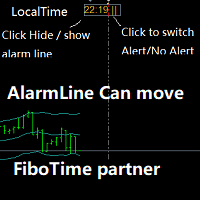
闹钟 配合FiboTime或新闻日历的搭档。当您确定了重要的交易时间后,直接在您的主图表上移动闹钟线,然后在设置的时间上会为您预警提醒这个时刻的到来! 1. 当你使用fibo时间或有重要的市场新闻发布时,你需要一个闹钟来确保你不会错过一个好交易!这个闹钟非常贴心地直接放在您的MT4主图 上,不需要您浪费时间在电脑或手机上设置闹钟! 2.自动切换闹钟线的时间来显示你电脑的本地时间,这样你就不用担心切换时差了!保护你不过度思考。 3.移动闹钟线,即自动显示该线的电脑时间! 4.可以点击切换 报警或报警! 5.可以点击 隐藏或显示 闹钟线! 6.可以在闹钟报警时选择发送或不发送邮件提醒! 7.您可以指定一个您自己的声音报警文件名。此文件为wav格式。
学习如何在MetaTrader AppStore上购买EA交易,MetaTrader平台的应用程序商店。
MQL5.community支付系统支持通过PayPay、银行卡和热门付款系统进行交易。为更好的客户体验我们强烈建议您在购买前测试EA交易。
