Deal multiplier Mt5

4.5

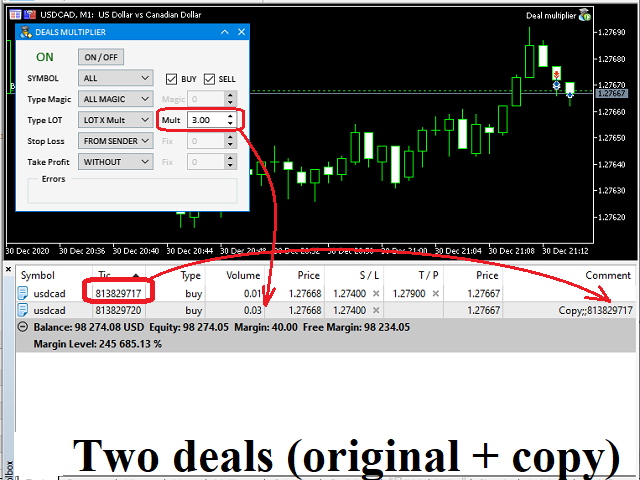
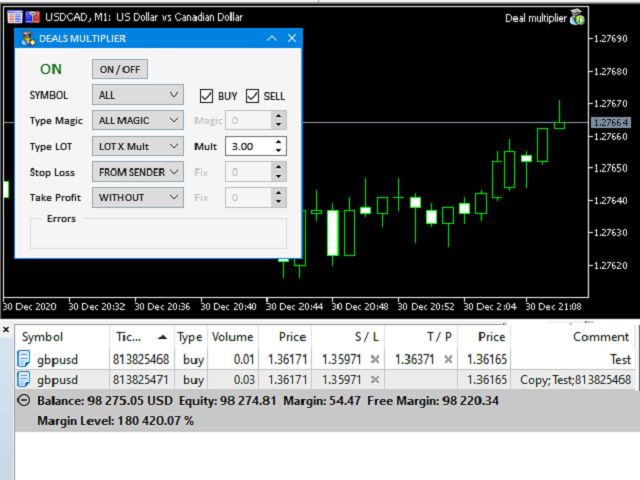
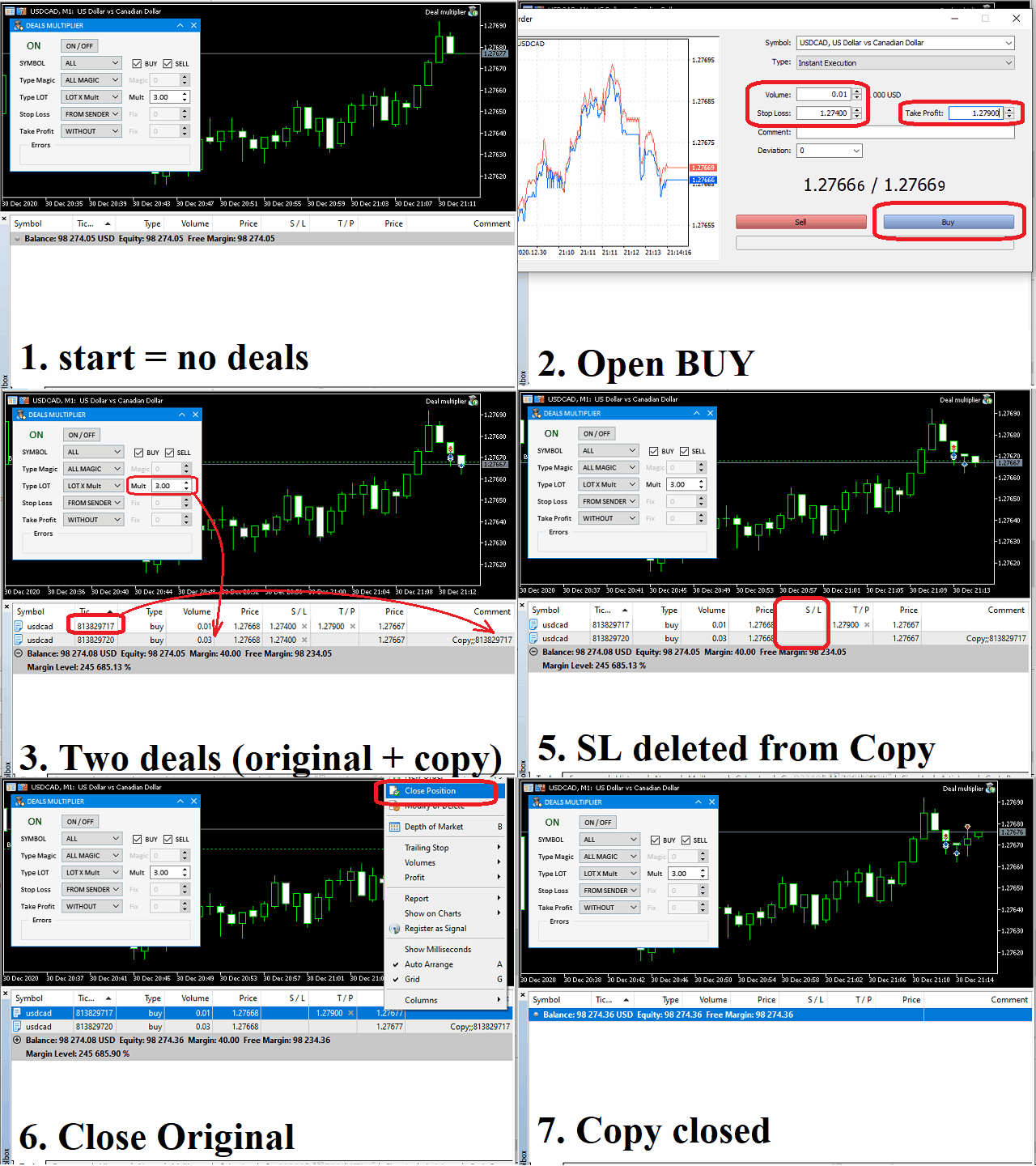
The utility opens copies of open trades.

It is very convenient if you use the Signals service and want to increase the volume of transactions.


Settings:

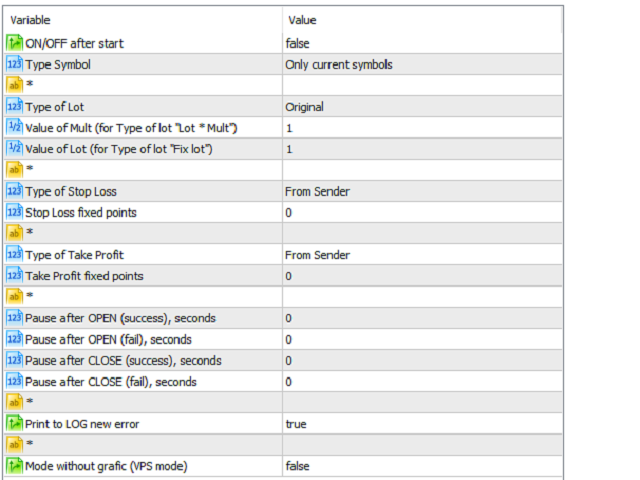
  1. Symbols:
    1. all symbols
    2. only current symbol
  2. Orders:
    1. Buy
    2. Sell
  3. Magic
    1. Any Magic
    2. Input Magic
  4. Lot size
    1. Original - lot size from original order;
    2. Fix Lot - fix lot size (input);
    3. Lot X Mult - lot size X koef;
  5. Stop Loss
    1. From sender - Stop Loss from original;
    2. Without - without Stop Loss;
    3. Plus Fix - Stop Loss from original order + fix points;
    4. Fix Point - fix Stop Loss in points.
  6. Take Profit
    1. From sender  - Take Profit from Original;
    2. Without - Without Take Profit;
    3. Plus Fix - Take Profit from original order + fix points;
    4. Fix Point - fix Take Profit in points
  7. VPS Mode

MT4 - https://www.mql5.com/en/market/product/59933

MT5 - https://www.mql5.com/en/market/product/59932


Değerlendirmeler 10
waryaa
732

waryaa 2023.12.14 16:51 
 

I didn't experience any major error. So far it is working well. Thanks to you Mr. Mikhail Mitin

Антон Литвиненко
575
Антон Литвиненко 2022.12.30 19:44 
 

Отлично все работало, но на 30.12.22 в метатредере 5 не работает. Сделки копирует, но не закрывает. Надеюсь автор увидит отзыв и допилит. В любом случае, спасибо большое за программу.

Nicolas Angelo Willeit
386
Nicolas Angelo Willeit 2022.05.31 09:39 
 

it works like a charm - thanks for developing this tool and for providing it for free!

Önerilen ürünler
Total Closed Trades – MT5 Indicator The Total Closed Trades indicator for MetaTrader 5 provides a quick, visual overview of your trading performance by displaying a simple and intuitive 3-value breakdown : Total Trades – The total number of closed trades. Winning Trades – Number of profitable trades. Losing Trades – Number of losing trades. Instead of digging through reports, traders can instantly monitor their historical performance with a compact and elegant pie chart-style widget. Key
FREE
Double Correlation indicator (free) plots two windowed correlations in a separate window.  the size of window is taken as input before the two symbols to correlate to. Two symbols are taken as an input parameters as well as period length. and the two correlations are computed with the currently shown symbol ex: input GBPJPY and AUDNZD.  current symbol EURUSD then the following will be computed corr(EURUSD,GBPJPY) and corr(EURUSD,AUDNZD) The indicator can be useful to run a multi-symbol pair trad
FREE
This indicator draw a watermark on the chart, with the timeframe and symbol name. You can change everything, including add a aditional watermark. Functions: Symbol watermark: Size -  text size. Font -  text font. Color -  text color. Background text -  watermark at foreground or background mode. Horizontal correction -  x correction in pixels. Vertical correction -  y correction in pixels. Separator period X symbol -  what will separate the period from symbol. Aditional watermark: Enable custom
FREE
The   "InfoBox"   utility is designed to display the presence of open orders, the number of lots, current profit and much more in one window. The version for the MT4 platform is here . You've probably encountered a situation where you have an advisor that works on a currency pair, but information about its operation: - orders and their number, the size of the spread for the instrument, the volume of lots on the market, drawdown and much more - are scattered in different places of the terminal an
FREE
Mevcut Semboldeki Pozisyonları Kapat Mevcut semboldeki tüm pozisyonları kapatmak için basit ve güvenilir bir script. Rutin işleri ortadan kaldırır ve değerli zaman kazandırır. Avantajlar: Yalnızca mevcut varlığa odaklanır: Yalnızca seçilen semboldeki işlemleri kapatır, diğer pozisyonlara dokunmaz. Hızlı ve kullanışlı: Bir tıklama ile tüm pozisyonları saniyeler içinde kapatır. Her stratejiye uygun: Birden fazla pozisyonla çalışanlar veya tek bir varlığa odaklananlar için idealdir. Güvenlik: Her p
FREE
Breakeven Bot
Gabriel Paul Ange Perrin
Optimize your trading management with Breakeven Bot, the essential tool for active traders managing multiple positions at once. No more wasting time manually adjusting your stops—one click is all it takes to secure your profits! Main Feature: ️ "BREAKEVEN" Button – Instantly set all profitable positions to breakeven and protect your gains quickly. ️ Customization Options: Set breakeven in pips or currency, depending on your preference. Choose whether breakeven should be at the entr
FREE
Regua MT5
Edgar Lima Uggioni
5 (3)
Convenient tool for measuring the number of points between the prices directly on the chart. Displays in the measurement between points in percentage, points (financial) and time (bars ). Compatible with all graphical timeframes. When fixed on the chart is displayed in all timeframes. Press Ctrl, click the first point, move the mouse and will now display the measurement. Click again and fix. Very fast tool that does not occupy much space. Input Parameters Line Color Line Style Text Color Text Si
FREE
Smart Lot-Size Calculator And Trade Assistant for Mobile Trading Overview: This is the tool every trader in the market must have no matter if you are scalper, swing traders, day trader, or long term trader. This On-The-Go trading tool will help you stay disciplined and also stay free from daily trade management chores, Most traders face common problems like   1. Calculation of proper lot-size of a position to take controlled risk  2. Managing every trade and trailing stop-loss if trades goes in
FREE
This tool is designed to visualize the position and trades history and its information, such as the entry and exit points, sizes of the trades, Reward to risk ratio, Risk percent, Profit, Target and stop-loss on the chart. it makes showing trades on the chart more informative and easier to use. it's a strategic tool that enhances your trading experience on MT5 platforms. By providing a clear visual representation of your trades and customizable settings, it empowers traders to make informed deci
FREE
GIT Chart SYNC
Hlomohang John Borotho
What is the Chart Sync Indicator? This custom MQL5 tool enables multi-timeframe chart synchronization, addressing a common pain point in technical analysis: the inconsistencies when switching between chart windows or timeframes. Instead of managing each chart separately, this indicator links them so actions such as panning, zooming, drawing objects, or changing symbols are mirrored across all synced charts of the same symbol. The result is a smoother, unified analysis experience. Key Advantages:
FREE
AZ ATR indicator (with volume correlation bonus) Standard ATR indicator, you can enable ignoring abnormally large candles. It is possible to change the location of the displayed text in 4 corners of the chart. You can change the calculation period (days ago). Bonus - the indicator has a correlation with volumes. Can be enabled to display a possible priority at the current moment in the market. What do the values ​​mean: Positive correlation (0.3 - 1.0): 0.3-0.7 - moderate connection
FREE
Axilgo PipPiper CoPilot
Theory Y Technologies Pty Ltd
5 (2)
Axilgo Pip Piper CoPilot Elevate your trading game with the Axilgo Pip Piper CoPilot, the first in our revolutionary Pip Piper Series. This all-inclusive toolset is meticulously crafted for serious traders, focusing on key areas such as Risk Management, Trade Management, Prop Firm Rule Compliance, and Advanced Account Management . With CoPilot, you’re not just investing in a tool—you’re gaining a strategic partner in the intricate world of trading. Important Notice: To ensure you receive the fu
FREE
https://youtu.be/KHhg88fXWTk?si=ZoVtpc-wpfTVImSL 5-Minute Trading Strategy | Quick & Effective for Beginners Welcome to our trading channel- the deepak trading In this video, we'll be exploring a simple 5-minute trading strategy that can help you capture quick market movements and make profitable trades. Whether you're a beginner or an experienced trader, this strategy is designed to give you clear entry and exit points using technical indicators like EMA, RSI, and Stochastic Oscillator.
FREE
Displays the countdown to the current candle’s close and shows the live server time clearly on your chart, including the GMT. It is a fuss-free indicator, plug and play. Accurate Candle Timer is a simple and practical tool for traders who want to monitor candle timing without unnecessary clutter. It shows how much time is left before the current candle closes, helping you stay aware of when the next candle will begin. This is useful for traders who prefer to wait for candle close confirmation be
FREE
Bu ticaret aracı, aktif traderlar için evrensel bir çözüm sunarak grafik üzerinde çalışma sürecini maksimum düzeyde basitleştirip otomatikleştirir. Temel özellikleri şunlardır: TP ve SL'nin önceden ayarlanması: Grafikte işlem yapmadan önce, Take Profit ve Stop Loss parametrelerini önceden belirleyebilirsiniz. Bu sayede işlemden çıkış seviyelerini önceden tespit ederek sermayenizi beklenmedik piyasa hareketlerinden koruyabilirsiniz. Her iki yönde işlem açma: Araç, hem uzun (alım) hem de kısa (sa
FREE
This Small tool allows you to define a time counter in minutes for the closing of your positions according to the number of minutes you have set. For example if you set it to 30 Min, the tool will close each open position after 30 minutes from its opening. The settings ACTIVE: It is to activate the tool and use it to close your positions after the number of minutes defined. MANAGE: you to choose with the symbols managed by the tool. Choose "ALL CURENCY" if you want the system to apply to
FREE
Position Selective Close MT5
Francisco Manuel Vicente Berardo
The Position Selective Close is a multi-symbol multi-timeframe script used to close simultaneously various positions.  General Description   The Position Selective Close   possesses   three operation modes (Intersection,   Union   and All) that control the way   as   four position features (symbol, magic number,   type   and profit) are used. The modes, available through the Selection Mode input parameter, relate to the features, available through the “Select by Feature” and “Feature” input pa
FREE
The Martinware Eye Rest Reminder serves to periodically remind traders to rest their eyes without the need for a tool outside MT5. Input parameters: Periodicity: play the alert every n minutes Alert with sound: define if the alert should include playing a sound Custom sound file: name of the custom sound file to be used instead of the default. It must be inside a folder named "Sounds", this one inside the "Files" folder in the Terminal's MQL5 directory tree. Alert with Alert message: informs
FREE
TradeConsole — On-Chart Trading Dashboard with Smart Alerts TradeConsole is a lightweight on-chart utility designed to help traders keep essential market context in one place. It combines session tracking, an upcoming economic news panel, a currency strength view, a quick technical bias summary, trade statistics, and one-click control tools. The purpose of the dashboard is to improve chart awareness, reduce screen clutter, and support faster decision-making during live trading. Main Features On
FREE
RoundNum Readme (Traders Club) 特徴: このツールはDOWやNIKKEIなど500や1000ポイントがラウンドナンバーの 指数を取引する際に表示するように開発しました。 もちろんメジャー通貨でも表示はされます。 更新頻度を制限しているのでチャート表示が遅くなるということは ありません。 XMでDOWを取引される場合、Main Levelsを10000 Sub Levelsを5000にしてください。 各パラメータの説明: Number to display lines:表示するライン数を設定します。 Main Levels:メインレベルをポイントで指定します。 Main Line Color:メインラインの色を設定します。 Main Line Style:メインラインで使用されるラインを設定します。 Show Sub Lines:サブラインを表示するか設定します。 Sub Levels:サブレベルをポイントで指定します。 Sub Line Color:サブラインの色を設定します。 Sub Line Style:サブラインで使用され
FREE
Aegis Gold Dashboard is a free, lightweight visual indicator created to help traders monitor key market conditions in a clean and professional way. This indicator is designed as a visual companion to automated or discretionary trading systems and does not execute any trades. Features: • Informational signal overview (non-executable) • ATR-based volatility display • Market session open / closed status • Real-time spread monitoring • Last closed trade overview • Simple market condition tips De
FREE
The ZoomIN MT5 indicator is designed for quickly viewing the selected bar on the smaller timeframes in a pop-up window. Once launched, the indicator works in the background, does not take up space on the chart and does not consume system resources. When the indicator is activated by the Shift + i combination (can be changed in the settings), a pop-up window with a chart of a smaller timeframe is created. The displayed timeframe can be changed by a left-click on the magnifying glass icon. To hide
FREE
Show Pips for MT5
Roman Podpora
4.55 (29)
Bu bilgi göstergesi her zaman hesaptaki güncel durumdan haberdar olmak isteyenler için faydalı olacaktır. VERSION MT 4 -   More useful indicators Gösterge, puan cinsinden kâr, yüzde ve para birimi gibi verilerin yanı sıra mevcut çiftin spreadini ve mevcut zaman diliminde çubuğun kapanmasına kadar geçen süreyi görüntüler. Bilgi satırını grafiğe yerleştirmek için birkaç seçenek vardır: Fiyatın sağında (fiyatın arkasında); Yorum olarak (grafiğin sol üst köşesinde); Ekranın seçilen köşesinde. Bilgi
FREE
Script for quickly selecting a tool with high correlation. The script is placed on the tool to which you need to select the second correlating one. Then you can change the number of bars to calculate and the timeframe. The script iterates through all available symbols in the market overview and returns the 20 most correlated ones. You can use the selected pairs to trade with THE new SH expert Advisor
FREE
FWS Tide Clock — Session Clock & Activity Monitor Know when to trade — at a glance. FWS Tide Clock is a real-time session clock that shows you exactly what's happening across global forex markets. See which sessions are active, when they overlap, and whether conditions favour trading — all from a compact on-chart panel with a stunning browser-based web dashboard. Part of the Forex Weather Station suite. This free module gives you instant market timing awareness — right where you need it. W
FREE
Price live on the Chart Description: The Real-Time Price Display is a powerful tool for MetaTrader 5 users that provides continuous updates of the current bid (SELL) and ask (BUY) prices directly on your trading chart. This script is ideal for traders who need to stay updated on market prices at a glance. Key Features: Live Price Updates : Displays the latest bid and ask prices for your selected trading symbol in real-time. Customizable Display : Adjust the horizontal and vertical position of th
FREE
Know the Candle Close Time
Benbyaanda Silvere Henri Sedric Kabore
This indicator allows to know the remaining time before the closing of the candle. It works on every timeframe. It is very usefull when your trading strategy depend of the close or the open of a specific candle. So use it like you want. Don't forget to leave a comment or a request for a EA or an indicator. Also spread it to your friends and don't hesitate to visit my profile to see others tools.
FREE
Haunted Risk Calculator is a visual risk management panel for MT5 that calculates the correct lot size in real time based on your account balance, risk percentage, and stop-loss distance. HOW IT WORKS Set your risk percentage or dollar amount, drag the SL and TP lines to your desired levels on the chart, and the panel instantly shows the calculated lot size, risk in dollars, reward-to-risk ratio, and expected profit. Execute with one click or a keyboard shortcut. FEATURES Draggable panel — grab
FREE
Introduction: The RosMaFin Trading Panel is not just a standard order execution tool. It is a comprehensive, professional assistant designed for manual and price-action traders who want to save time, manage risk with mathematical precision, and maintain full market awareness. Say goodbye to manual lot size calculations and tedious Stop Loss adjustments. This panel streamlines your entire trading workflow from analysis to trade exit. KEY FEATURES & BENEFITS: Advanced Risk Management & Exec
FREE
Presentation The URL html and xml to csv is designed to get contents from URLs with html or xml content, and to download it to an output format as a txt or as a csv file. It enables to get the whole web sites page, starting with the http protocol, in a document for a further use and in additional with downloading directly on the MetaTrader applications and on the desktop. It is a good advantage for taking the most data from events and economic calendars, and also publications related to the inst
FREE
Bu ürünün alıcıları ayrıca şunları da satın alıyor
Trade Assistant MT5
Evgeniy Kravchenko
4.42 (210)
It helps to calculate the risk per trade, the easy installation of a new order, order management with partial closing functions, trailing stop of 7 types and other useful functions. Additional materials and instructions Installation instructions - Application instructions - Trial version of the application for a demo account Line function -   shows on the chart the Opening line, Stop Loss, Take Profit. With this function it is easy to set a new order and see its additional characteristics bef
Trade Manager EA’ye hoş geldiniz! Ticaretin daha sezgisel, hassas ve verimli hale gelmesi için tasarlanmış nihai risk yönetim aracı ile tanışın. Bu sadece bir emir verme aracı değil; ticaret planlaması, pozisyon yönetimi ve risk kontrolü için kapsamlı bir çözüm. İster yeni başlayan bir yatırımcı olun, ister deneyimli bir trader ya da hızlı emir gerektiren bir scalper, Trade Manager EA ihtiyaçlarınıza uyum sağlar ve forex, endeksler, emtialar ve kripto paralar dahil tüm piyasalarda esneklik sunar
Local Trade Copier EA MT5
Juvenille Emperor Limited
4.96 (138)
Local Trade Copier EA MT5   ile olağanüstü hızlı işlem kopyalama deneyimi yaşayın. Kolay 1 dakikalık kurulumuyla bu işlem kopyalayıcısı, aynı Windows bilgisayarda veya Windows VPS'te birden fazla MetaTrader terminali arasında işlemleri kopyalamanıza olanak tanır ve 0.5 saniyenin altındaki şimşek hızında kopyalama hızları sunar. Başlangıç seviyesinde veya profesyonel bir tüccar olsanız da,   Local Trade Copier EA MT5 , spesifik ihtiyaçlarınıza göre özelleştirmek için geniş bir seçenek yelpazesi s
TradePanel MT5
Alfiya Fazylova
4.87 (154)
Trade Panel, çok işlevli bir ticaret asistanıdır. Uygulama, manuel ticaret için 50'den fazla ticaret fonksiyonu içerir ve çoğu ticaret görevini otomatikleştirmeyi mümkün kılar. Satın almadan önce demo hesapta demo sürümü test edebilirsiniz. Demo hesap için uygulamanın deneme sürümünü indirin: https://www.mql5.com/en/blogs/post/750865 . Talimatların tamamı buraya . Ticaret. Tek tıklamayla ticaret işlemleri yapmayı sağlar: Risk otomatik hesaplaması ile bekleyen emirleri ve pozisyonları açmak. Bird
Beta Sürümü Telegram to MT5 Signal Trader resmi alfa sürümüne neredeyse hazır. Bazı özellikler hâlâ geliştirilmekte olup küçük hatalarla karşılaşabilirsiniz. Sorun yaşarsanız lütfen bildirin, geri bildiriminiz yazılımın herkes için gelişmesine yardımcı olur. Telegram to MT5 Signal Trader , Telegram kanallarından veya gruplarından gelen işlem sinyallerini otomatik olarak MetaTrader 5 hesabınıza kopyalayan güçlü bir araçtır. Herkese açık ve özel kanalları destekler ve birden fazla sinyal sağlayıc
Farmed Hedge Yield Farming | All Markets (Manual - Hybrid - Semi/Automated EA) MULTI-ASSET SUPPORT Trade any asset available on your broker - Forex: Major, Minor, Exotic pairs - Crypto: BTC, ETH, XRP, SOL, BNB - Stocks: Apple, Tesla, Amazon, Google, etc. - Commodities: Gold, Silver, Oil, Gas - Indices: US30, NAS100, SPX500, DAX40 - Any CFD your broker offers VERIFIED TRADING RESULTS - Farmed Hedge Yield Axi Copy:  https://www.mql5.com/en/signals/2356376 - Farmed Hedge Yield Exn Copy:   https:/
Power Candles Strateji Tarayıcısı - Kendi Kendini Optimize Eden Çoklu Sembol Kurulum Bulucu Power Candles Strateji Tarayıcısı , Power Candles göstergesini çalıştıran aynı kendinden optimize edici motoru, Piyasa İzleyicinizdeki her sembol üzerinde yan yana çalıştırır. Tek bir panel, şu anda istatistiksel olarak hangi sembollerin işlem yapılabilir olduğunu, her birinde hangi stratejinin kazandığını, en uygun Stop Loss / Take Profit çiftini gösterir ve yeni bir sinyal geldiği anda size bildirim gön
Exp COPYLOT CLIENT for MT5
Vladislav Andruschenko
3.91 (33)
MetaTrader 5 için profesyonel işlem kopyalayıcı MetaTrader için hızlı, profesyonel ve güvenilir bir işlem kopyalayıcı . COPYLOT , MT4 ve MT5 terminalleri arasında Forex işlemlerini kopyalamanıza olanak tanır ve Hedge ile Netting hesaplarını destekler. COPYLOT MT5 sürümü şunları destekler: - MT5 Hedge → MT5 Hedge - MT5 Hedge → MT5 Netting - MT5 Netting → MT5 Hedge - MT5 Netting → MT5 Netting - MT4 → MT5 Hedge - MT4 → MT5 Netting MT4 sürümü Tam açıklama + DEMO + PDF Nasıl satın alınır Nasıl kurul
Trade Dashboard simplifies how you open, manage, and control your trades, with built-in lot size calculation. It allows you to execute trades, manage risk, and control positions directly on the chart, with tools such as partial close, breakeven, and trailing stop. Designed to reduce manual work and help you stay focused on your trading decisions. A demo version is available for testing. Detailed explanations of features are provided within the MQL5 platform. Installation instructions are include
Trade copier MT5
Alfiya Fazylova
4.53 (43)
Trade Copier, ticaret hesapları arasındaki işlemleri kopyalamak ve senkronize etmek için tasarlanmış profesyonel bir yardımcı programdır. Kopyalama, tedarikçinin hesabından/terminalinden alıcının aynı bilgisayarda veya vps'de kurulu olan hesabına/terminaline gerçekleşir. KAMPANYA - Eğer zaten "Trade copier MT5" aldıysanız, "Trade copier MT4"ü ücretsiz olarak alabilirsiniz (MT4 > MT5 ve MT4 < MT5 kopyalamalar için). Koşullar hakkında daha fazla bilgi almak için lütfen bizimle özel mesaj yoluyla i
YuClusters
Yury Kulikov
4.93 (43)
Attention: You can view the program operation in the free version  YuClusters DEMO .  YuClusters is a professional market analysis system. The trader has unique opportunities to analyze the flow of orders, trade volumes, price movements using various charts, profiles, indicators, and graphical objects. YuClusters operates on data based on Time&Sales or ticks information, depending on what is available in the quotes of a financial instrument. YuClusters allows you to build graphs by combining da
AXR Prop Guard AXR Prop Guard , MetaTrader 5 için hesap genelinde risk koruma utility aracıdır. Prop firm traderları, funded-account challenges ve ciddi özel hesap koruması için tasarlanmıştır. AXR araç serisinin bir parçasıdır. Güncellemeler ve iletişim seçenekleri için resmi MQL5 sayfalarını kullanın: AXR MQL5 Channel: ürün güncellemeleri, sürüm notları ve yeni AXR araçları Telegram: satıcı profilini açın ; Telegram iletişimi profil açıklamasında yer alır. Satın aldıktan sonra kullanıcı kılavu
Seconds Chart - MetaTrader 5 için saniye bazlı grafikler oluşturmanıza olanak sağlayan eşsiz bir araçtır. Seconds Chart sayesinde saniye cinsinden zaman dilimleriyle grafik oluşturabilir, standart dakika veya saatlik grafiklerde mümkün olmayan esneklik ve analiz hassasiyetine ulaşabilirsiniz. Örneğin, S15 zaman dilimi 15 saniyelik mum çubuklarını ifade eder. Desteklenen özel sembollerle herhangi bir gösterge ve danışman kullanabilirsiniz. Onlarla çalışmak, standart grafiklerde işlem yapmak kadar
Premium Trade Manager - MetaTrader 5 için Hızlı ve Disiplinli İşlem Yönetimi Premium Trade Manager , MetaTrader 5 için her işlemdeki mekanik yükü üstlenen hızlı bir grafik üzeri paneldir. Yönü, sembolü ve zamanlamayı siz belirlersiniz - panel riskinize göre pozisyon büyüklüğünü hesaplar, stop ve hedefle birlikte emri açar, kısmi çıkışlarla ölçeklendirme yapar, stop'u takip eder ve ekonomik takvimi sizin adınıza izler. Dahili haber zekası bir adım daha ileriye gider: önümüzdeki olayları sabit bir
Bir EA satın almadan önce, gerçekten dayanıklı mı yoksa sadece backtestte şanslı mı göründü, önce bunu kontrol edin. Çoğu robot güzel görünen bir backtest ile satılır. Yukarı giden bir eğri. İyi bir profit factor. Çok az şüphe. Yine de bu EA’lerin çoğu, piyasa o geçmişteki gibi hareket etmeyi bıraktığı anda dağılmaya başlar. Neden? Çünkü bir backtest yalnızca tek bir şeyi kanıtlar: o stratejinin fiyatın belirli bir yolunu izlediği durumda işe yaradığını. Başka yollarda da dayanacağını kanıtlamaz
The product will copy all telegram signal to MT5 ( which you are member) , also it can work as remote copier.  Easy to set up, copy order instant, can work with almost signal formats, image signal,  s upport to translate other language to English Work with all type of channel or group, even channel have "Restrict Saving Content", work with  multi channel, multi MT5 Work as remote copier: with signal have ticket number, it will copy exactly via ticket number. Support to backtest signal. How to s
Anchor: The EA Manager Run your full EA portfolio without conflicts, without stacked risk, and without watching every chart yourself. Anchor coordinates up to 64 Expert Advisors on a single account so only one trades at a time. Attach Anchor to any chart. Type your EA names and magic numbers in one line. Anchor handles the rest. Built for portfolios. Built for discipline. Built for prop firms. The Problem Running multiple EAs on the same account creates risk. Two gold EAs can open opposite posit
The Ultimate TradingView to MT5 Bridge Automation Manuel işlemleri ve gecikme sorunlarını durdurun. TradingView to MT5 Copier PRO , TradingView alarmlarınızı doğrudan MetaTrader 5 üzerinde yürütmek için en hızlı ve en güvenilir köprüdür (bridge). İster özel göstergeler, ister Strateji Test Komut Dosyaları veya manuel çizimler kullanın, bu Uzman Danışman (EA), Yüksek Hızlı WebSocket teknolojisini kullanarak işlemlerinizi anında gerçekleştirir. Basit kopyalayıcıların aksine, bu PRO sürüm Arena Sta
HINN MAGIC ENTRY – the ultimate tool for entry and position management! Place orders by selecting a level directly on the chart! full description   ::  demo-version  :: 60-sec-video-description Key features: - Market, limit, and pending orders - Automatic lot size calculation - Automatic spread and commission accounting - Unlimited partitial take-profits  - Breakeven and trailing stop-loss and take-profit  functions - Invalidation leves - Intuitive, adaptive, and customizable interface - Works
Copy Cat More Trade Copier MT5 (Kopyalayıcı Kedi MT5) , günümüzün ticaret zorluklarına yönelik tasarlanmış yerel bir ticaret kopyalayıcısı ve eksiksiz risk yönetimi ve yürütme çerçevesidir. Prop firması zorluklarından kişisel portföy yönetimine kadar, sağlam yürütme, sermaye koruması, esnek yapılandırma ve gelişmiş ticaret işleme kombinasyonu ile her duruma uyum sağlar. Kopyalayıcı hem Master (gönderici) hem de Slave (alıcı) modunda çalışır, piyasa ve bekleyen emirlerin, ticaret değişikliklerini
Footprint Chart Pro — Professional OrderFlow EA for MetaTrader 5 Version 6.34 | Professional tool for real traders | Institutional-Grade Visualization DEMO USERS - PLEASE SELECT EVERY TICK / REAL TICK WHEN TESTING AND YOU HAVE DOWNLOADED HISTORICAL DATA. IF YOU SEE A WAITING SCREEN AND IT IS NOT DOWNLOADING, IT MEANS YOU HAVE LOW HISTORICAL DATA. TRY 1 MIN AND 5 MIN FIRST ON 1 DAY DATA. ONE DAY DATA SHOULD BE THE NEWEST AND MOST CURRENT DATE. PLEASE WAIT UNTIL THE MARKET HAS ROLLED OVER PERIOD.
MT5 to Telegram Signal Provider , hesabınızı bir sinyal sağlayıcı haline getirerek belirtilen sinyalleri Telegram'ın sohbetine, kanalına veya grubuna göndermeyi sağlayan kullanımı kolay, tamamen özelleştirilebilir bir araçtır. Rakip ürünlerin çoğunun aksine, DLL içe aktarması yapmaz. [ Demo ] [ Kılavuz ] [ MT4 Versiyonu ] [ Discord Versiyonu ] [ Telegram Kanalı ]  New: [ Telegram To MT5 ] Kurulum Adım adım bir kullanıcı kılavuzu mevcuttur. Telegram API'si hakkında bilgi gerekmemektedir; ihtiyac
Telegram'dan MT5'e:   Nihai Sinyal Kopyalama Çözümü Telegram'dan MT5'e işlemlerinizi basitleştirin, DLL'lere ihtiyaç duymadan işlem sinyallerini doğrudan Telegram kanallarından ve sohbetlerinden MetaTrader 5 platformunuza kopyalayan modern araç. Bu güçlü çözüm hassas sinyal yürütme, kapsamlı özelleştirme seçenekleri sağlar, zamandan tasarruf sağlar ve verimliliğinizi artırır. [ Instructions and DEMO ] Temel Özellikler Doğrudan Telegram API Entegrasyonu Telefon numarası ve güvenli kod ile kimlik
This is exactly what the name says. Visual strategy builder . One of a kind. Turn your trading strategies and ideas into Expert Advisors without writing single line of code. Generate mql source code files with a few clicks and get your fully functional Expert Advisors, which are ready for live execution, strategy tester and cloud optimization. There are very few options for those who have no programming skills and can not create their trading solutions in the MQL language. Now, with Bots Builde
Timeless Charts
Samuel Manoel De Souza
5 (5)
Timeless Charts, profesyonel yatırımcılar için hepsi bir arada bir trading aracıdır. Saniye Grafikleri ve Renko gibi özel grafik türlerini, Footprints , Clusters , Hacim Profilleri , VWAP çalışmaları ve gelişmiş piyasa analizi sağlayan sabitlenmiş analiz araçlarıyla gelişmiş emir akışı analiziyle birleştirir. İşlem ve pozisyon yönetimi, entegre işlem yönetim paneli aracılığıyla doğrudan grafik üzerinden gerçekleştirilirken, Market Replay ve Sanal Hesaplar trading becerileri ve stratejileri üzeri
MT4 için Expert Advisor Risk Manager çok önemli ve bence her yatırımcı için gerekli bir program. Bu Uzman Danışman ile ticaret hesabınızdaki riski kontrol edebileceksiniz. Risk ve kar kontrolü hem parasal hem de yüzdesel olarak yapılabilir. [Instruction for Risk Manager parameters] Danışman işlevleri Bu risk yöneticisi, riskleri kontrol etmenize yardımcı olacaktır: - bir anlaşma için - günlük - bir hafta için - Bir ay için Ayrıca kontrol edebilirsiniz 1) Ticaret yaparken izin verilen ma
News filter, equity guard & session control for all your EAs — one tool, full protection Take a Break has evolved from a basic news filter into a comprehensive account protection solution . It pauses your other Expert Advisors during news events or based on custom filters. When trading resumes, it automatically restores your entire chart setup , including all EA settings. Why traders choose Take a Break One news filter for all your EAs — no more relying on individual built-in filters that may o
MT5 için Stats Dashboard & Journal ULTRA Tam Kapsamlı Ticaret Komuta Merkezi: Analitik, Otomasyon ve Haber İstihbaratı. Stats Dashboard ULTRA, Pro analiz aracının nihai evrimidir. MetaTrader 5'i, kurumsal düzeyde performans analizini otomatik haber koruması ve gelişmiş psikolojik metriklerle birleştiren profesyonel bir ticaret istasyonuna dönüştürür. Tam kontrol talep eden manuel işlemciler (traderlar) ve EA portföy yöneticileri için tasarlanmıştır. ULTRA VERSİYONDAKİ YENİLİKLER Haber İstihbarat
Riskinizi otomatik olarak hesaplarken işlemlere hızlı bir şekilde girip çıkmanıza yardımcı olacak Ticaret Yöneticisi. Aşırı Ticaret, İntikam Ticareti ve Duygusal Ticaretten korunmanıza yardımcı olacak özellikler içerir. İşlemler otomatik olarak yönetilebilir ve hesap performans ölçümleri bir grafikte görselleştirilebilir. Bu özellikler, bu paneli tüm manuel yatırımcılar için ideal kılar ve MetaTrader 5 platformunun geliştirilmesine yardımcı olur. Çoklu Dil desteği. MT4 Sürümü  |  Kullanım Kılavu
DrawDown Limiter
Haidar Lionel Haj Ali
5 (20)
Drawdown Limiter EA You are in the right place if you were searching for Drawdown control, Drawdown limiter, Balance protection, Equity Protection or Daily Drawdown Limit related to Prop Firm, FTMO, or Funded account trading, or if you want to protect your trading account. Have you suffered from controlling your drawdown when trading funded accounts? This EA is meant for you. Prop firms usually set a rule called “Trader Daily Drawdown”, and if it is not respected, you are disqualified.  I am an
Yazarın diğer ürünleri
Why use virtual SL / TP? Broker stop/freeze level limitations Hidden exits for scalping strategies Advanced trailing logic not available in standard MT tools Additional safety layer for EAs and manual trading Stop Loss modes (4 types): Fixed Stop Loss -  Classic fixed SL defined in points. Trailing Stop Loss -  Standard trailing following the price. Trailing to Breakeven -  Stop Loss moves to the trade open price once profit conditions are met. Trailing by jumps (advanced mode) -  A multi-step t
Lusaka mt5
Mikhail Mitin
4 (3)
Main: Not martingale, not a grid; Working on all symbols; Signals: There is a good rational algorithm. Work of two indicators: Envelopes and Moving Average (you can set a separate Timeframe for each indicator) Stop Loss/Take Profit: There is a good money management system (there are several type for trailing stop loss); There is virtual levels of Stop Loss / Take Profit; There is smart lot (percent by risk) or fix lot Important: EA can work on closed candles, and on current candles; Quickly
FREE
Jakarta mt5
Mikhail Mitin
3 (2)
Main: Not martingale, not a grid; Working on all symbols; Signals: There is a good rational algorithm. Work of two indicators:  Stochastic   and  OsMA  (you can set a separate Timeframe for each indicator) Stop Loss/Take Profit: There is a good money management system (there are several type for trailing stop loss); There is virtual levels of Stop Loss / Take Profit; There is smart lot (percent by risk) or fix lot Important: EA can work on closed candles, and on current candles; Quickly opti
FREE
Great   smart dashboard   for market analytics. Using this dashboard you can: find signals from different indicators from   all timeframes ; find signals from the Moving Average from   all symbols ; Include: 9 indicators (10 in Mt5 version); 27 signals (29 in Mt5 version); "Total" page. Indicators and signals: MOVING AVERAGE MA cross Price  - MA crosses Price; MA more/less Price  - MA higher/lower Price; BOLLINGER BANDS BB crosses Price (in) - Price crosses Bollinger (upper/lower line) insid
Great   smart dashboard   for market analytics. Using this dashboard you can: find signals from different indicators from     all timeframes ; find signals from the Moving Average from     all symbols ; Include: 9 indicators (10 in Mt5 version); 27 signals (29 in Mt5 version); "Total" page. Indicators and signals: MOVING AVERAGE MA cross Price  - MA crosses Price; MA more/less Price  - MA higher/lower Price; BOLLINGER BANDS BB crosses Price (in) - Price crosses Bollinger (upper/lower line) i
Great dashboard for market analytics. Help you to analyze the values ​​of the Moving Average indicator and prices. Using this dashboard you can: find signals from the Moving Average from all timeframes; find signals from the Moving Average from all symbols; check - how far the Moving Average is from the price; check - the Moving Average value has changed; 2 types of signal. Modes of operation (switched by a button on the graph): current value of Moving Average; the difference between the curr
FREE
Jakarta
Mikhail Mitin
4.5 (2)
Main: Not martingale, not a grid; Working on all symbols; Signals: There is a good rational algorithm. Work of two indicators:  Stochastic   and  OsMA  (you can set a separate Timeframe for each indicator) Stop Loss/Take Profit: There is a good money management system (there are several type for trailing stop loss); There is virtual levels of Stop Loss / Take Profit; There is smart lot (percent by risk) or fix lot Important: EA can work on closed candles, and on current candles; Quickly opti
FREE
Lusaka
Mikhail Mitin
4.5 (2)
Main: Not martingale, not a grid; Working on all symbols; Signals: There is a good rational algorithm. Work of two indicators: Envelopes and Moving Average (you can set a separate Timeframe for each indicator) Stop Loss/Take Profit: There is a good money management system (there are several type for trailing stop loss); There is virtual levels of Stop Loss / Take Profit; There is smart lot (percent by risk) or fix lot Important: EA can work on closed candles, and on current candles; Quickly
FREE
"All in One" panel. You can simultaneously control: up to 3 symbols; up to 6 periods; up to 31 popular signals. You can see the sum for all signals taking into account the weight of the signal Version for MetaTrader 4: https://www.mql5.com/ru/market/product/27880 Version for MetaTrader 5: https://www.mql5.com/ru/market/product/27830 Parameters NUM_BAR - number of the bar to analyze (set a value greater than 0 to work on closed bars). timeframe_1....timeframe_6 - working timeframes (if set to "c
FREE
Conversion of ".set" files created in the MT5 terminal for use in the MT4 terminal. The script is great for cross platform experts. How to work: place the source files ".set" in the local terminal folder\MQL5\Files run the script the ".set" files for the MT4 terminal appeared in the local terminal folder (the end of the file name "* -MT4.set") Created on MT5 build 1755 from 18/01/18 Please leave your feedback after using.
FREE
You can: observe the price chart inside the chart of a different price evaluate correlation and relationships observe the difference in charts in the form of a histogram Opportunities: "Auto" mode - auto-adjust the chart for another chart "multiplier" - you can multiply the chart by any number shift up / down the chart by value shift the chart to the left "invert" - mirror flip of the chart Important: only charts added to MarketWatch are used Version for MetaTrader 4 -  https://www.mql5.com/e
Excellent dashboard for analytics. The panel helps to analyze the values of the   Momentum  indicator and its signals. With this panel you can: watch the current signal from  Momentum  on all timeframes; watch the current signal from  Momentum  for different symbols; watch the current Momentum   value; several types of signals for analytics. Values in a table cell: value of Momentum Signal type: Momentum crosses "100" line Momentum upper/lower "100" line Momentum direction Work option: all
Excellent dashboard for market analytics. The panel helps to analyze the values of the  RSI  indicator and its signals. With this panel you can: watch the current signal from RSI on all timeframes; watch the current signal from  RSI   by different symbols; watch the current   RSI   value; several types of signals for analytics. Values in a table cell: RIS value. Signal type: RSI crosses level buy out/level sell out (outside); RSI crosses level buy out/level sell out (inside);   RSI is upper
Great dashboard for market analytics. The panel helps to analyze the values of the   Envelopes   indicator and prices. Using this panel you can: watch the current signal from Envelopes for all time frames; watch the current signal from Envelopes by different symbols; look at how far Envelopes is from the price; look at how much the value of Envelopes has changed; several types of signals for analytics. Values in the table cell: Envelopes value upper line; Envelopes value lower line; "the cor
Great dashboard for market analytics. Help you to analyze the values ​​of the   Moving Average   indicator and prices. Using this dashboard you can: find signals from the Moving Average from all timeframes; find signals from the Moving Average from all symbols; check - how far the Moving Average is from the price; check - the Moving Average value has changed; 2 types of signal. Modes of operation (switched by a button on the graph): current value of Moving Average; the difference between the
FREE
"All in One" Expert Advisor. The EA collects information from different signals (listed below) on the selected timeframes. Each signal has its own weight. The weight of all signals is summed. If the total weight of signals for a timeframe is greater than the minimum weight, a deal is opened. Operation on each selected timeframe is performed independently. After that, the deal is managed according to the Money Management conditions. It can work simultaneously on: up to 6 periods; up to 31 popula
FREE
Medellin
Mikhail Mitin
4 (1)
Genaral: Not martingale, not a grid; Use on EURUSD Use on M5 Signals: There is a good rational algorithm. Work of two indicators:   2 DeMarker (from 2 timeframes)   (you can set a separate Timeframe for each indicator) Stop Loss/Take Profit: There is a good money management system (there are several type for trailing stop loss); There is virtual levels of Stop Loss / Take Profit; There is smart lot (percent by risk) or fix lot Important: EA can work on closed candles, and on current candles;
FREE
This panel shows the price position and the selected MAs for the selected timeframes and symbols. You can control up to 3 symbols; up to 6 timeframes; up to 10 different Moving Averages. Version for MetaTrader 4: https://www.mql5.com/ru/market/product/28281 Version for MetaTrader 5: https://www.mql5.com/ru/market/product/28096 Parameters NUM_BAR - bar number for analysis; timeframe_1....timeframe_6 - names of used timeframes (if set to "current", the timeframe will not be used); symbol_1 ....
FREE
"All in One" panel. You can simultaneously control: up to 3 symbols; up to 6 periods; up to 31 popular signals. You can see the sum for all signals taking into account the weight of the signal Version for MetaTrader 4: https://www.mql5.com/ru/market/product/27880 Version for MetaTrader 5: https://www.mql5.com/ru/market/product/27830 Parameters NUM_BAR - number of the bar to analyze (set a value greater than 0 to work on closed bars). timeframe_1....timeframe_6 - working timeframes (if set to "c
FREE
The panel shows the relative position of the price and the selected moving averages (MA) for the selected timeframes and symbols. You can simultaneously control: up to 3 symbols; up to 6 periods; up to 10 different Moving Averages. Version for MetaTrader 4: https://www.mql5.com/ru/market/product/28281 Version for MetaTrader 5: https://www.mql5.com/ru/market/product/28096 Parameters NUM_BAR - number of the bar to analyze (set a value greater than 0 to work on closed bars). timeframe_1....timefr
FREE
Why use virtual SL / TP? Broker stop/freeze level limitations Hidden exits for scalping strategies Advanced trailing logic not available in standard MT tools Additional safety layer for EAs and manual trading Stop Loss modes (4 types): Fixed Stop Loss -  Classic fixed SL defined in points. Trailing Stop Loss -  Standard trailing following the price. Trailing to Breakeven -  Stop Loss moves to the trade open price once profit conditions are met. Trailing by jumps (advanced mode) -  A multi-step
Raptor MT4
Mikhail Mitin
use on EURUSD use on M5 price and indicator analysis. Deals is in the direction of the trend. analysis 4 TimeFrame. Price and MovingAvarage (MA) are analyzed at TF EA. Market conditions in each TF are analyzed separately, then the overall picture. The algorithm shown in the screenshot below Sets is in Comments Advantages Advisor is optimized well for any instrument Can work on accounts with any spread, commissions, delays in the execution of orders Flexible settings specifically for your needs
How the EA works (simple explanation) Trades on   M5   timeframe Uses   H1 timeframe   to analyze global market context Analyzes   2 or 3 timeframes simultaneously On each timeframe: Checks price position relative to one or two Moving Averages Evaluates MA angle and distance between price and MA Entry logic is based on   trend + volatility conditions , not on random signals The full algorithm is illustrated in the screenshots. Recommended usage Symbol:   EURUSD Timeframe:   M5 Trading
Strong Levels — Support & Resistance Indicator Idicator for automatic detection of strong price consolidation levels. Designed to help traders identify important   support and resistance zones   on the chart.This indicator is intended for   market analysis , not for generating trade signals. How it works Strong Levels analyzes price behavior using: 2 Moving Averages 1 MACD a proprietary multi-factor algorithm The same algorithm is used by the author in personal trading. The indicator detec
Main: Not martingale, not a grid, working on all symbols; a good rational algorithm; Work of two indicators:  Parabolic Sar  and  Moving Average  (you can set a separate Timeframe for each indicator); There is a good money management system (there are several type for trailing stop loss); EA can work on closed candles, and on current candles; Quickly optimized (the work is maximally accelerated). Very well optimized for  EURUSD . Current sets after optimization are in comments. was optimized on
Main: Not martingale, not a grid, working on all symbols; a good rational algorithm; Work of two indicators:  RSI (from older timeframe - it works as a signal filter) and RSI (from junior timeframe - it works as a signal) ; There is a good money management system (there are several type for trailing stop loss); EA can work on closed candles, and on current candles; Quickly optimized (the work is maximally accelerated). Current sets after optimization are in comments. MetaTrader 4:  https://www.m
Create your own trading expert without programming skills! It is easy and simple. This panel is a    designer of Expert Advisors (like Wizard). This Wizard contains: 57 signals (regularly add new) several Trailing Stop systems (including Trailing by Bollinger Bands) How create EA easy: Choose 1 signal Choose no more than 3 filters Choose the Trailing system Save the ".set" file - by one button Ready. Run this expert with the desired set. Interesting: "invisible" (virtual) levels StopLoss and
You can: observe the price chart inside the chart of a different price evaluate correlation and relationships observe the difference in charts in the form of a histogram Opportunities: "Auto" mode - auto-adjust the chart for another chart "multiplier" - you can multiply the chart by any number shift up / down the chart by value shift the chart to the left "invert" - mirror flip of the chart Important: only charts added to MarketWatch are used Version for MetaTrader 5 -  https://www.mql5.com/e
Nairobi
Mikhail Mitin
Main: Not martingale, not a grid; Working on all symbols; Use on EURUSD Use on M5 Signals: There is a good rational algorithm. Work of two indicators: Bollinger Bands and Moving Average (you can set a separate Timeframe for each indicator) Stop Loss/Take Profit: There is a good money management system (there are several type for trailing stop loss); There is virtual levels of Stop Loss / Take Profit; There is smart lot (percent by risk) or fix lot Important: EA can work on closed candles, an
Makkasar
Mikhail Mitin
Main: Not martingale, not a grid; Use on EURUSD; Use on M5. Signals: There is a good rational algorithm. Work of two indicators: Moving Avarage and Parabolic SAR (you can set a separate Timeframe for each indicator) Stop Loss/Take Profit: There is a good money management system (there are several type for trailing stop loss); There is virtual levels of Stop Loss / Take Profit; There is smart lot (percent by risk) or fix lot Important: EA can work on closed candles, and on current candles; Qu
Filtrele:
waryaa
732
waryaa 2023.12.14 16:51 
 

I didn't experience any major error. So far it is working well. Thanks to you Mr. Mikhail Mitin

Mohamed Mostafa Mohamed Sonbol
437
Mohamed Mostafa Mohamed Sonbol 2023.01.07 21:37 
 

the EA sometimes keeps multiplying even its own copied trades not only the original ones, not reliable, take care!

Антон Литвиненко
575
Антон Литвиненко 2022.12.30 19:44 
 

Отлично все работало, но на 30.12.22 в метатредере 5 не работает. Сделки копирует, но не закрывает. Надеюсь автор увидит отзыв и допилит. В любом случае, спасибо большое за программу.

Nicolas Angelo Willeit
386
Nicolas Angelo Willeit 2022.05.31 09:39 
 

it works like a charm - thanks for developing this tool and for providing it for free!

arimbisub
64
arimbisub 2021.12.15 14:49 
 

Hello The positions open correctly but do not close until I close them manually

I use the signal and this tool to increase the lot size

dancsy76
864
dancsy76 2021.06.03 05:00 
 

This pdt works great

Mikhail Mitin
38227
Geliştiriciden yanıt Mikhail Mitin 2021.06.13 19:58
Thanl you very much
Dicas123
178
Dicas123 2021.02.23 06:59 
 

HI Mikhail thank you for your help, i even bought other products from you. just a quick question once i upload the software to multiply in Metatrader VPS, i need to turn off the software from my pc so it doesnt copy duble....I understood that My question is, what if i want to update the copier lot size now its 0.20 but want to reduce to 0.01? how can i do it? Do i open again in chart and put new settings and then upload in VPS? correct? I already have open trades, that were opened when i had diferent lot size...will they close or something will happen? please help. thank you so much.

Mikhail Mitin
38227
Geliştiriciden yanıt Mikhail Mitin 2021.03.29 15:46
Hello. Thank you. Reply in "Comments".
Please ask you questions in "Comments"
Goldfish
443
Goldfish 2021.02.09 14:39 
 

Hi Mitin, just to check if i enable this tool, it will auto multiplier the original signal? including open/close?

Mikhail Mitin
38227
Geliştiriciden yanıt Mikhail Mitin 2021.02.09 20:11
Hello. Thank you.
"it will auto multiplier the original signal?" - yes, you can set Lot Multiplier (for exemple X2 or X3). Or you can set Fix lot.
"including open/close?" - yes, corse.
your_spetsnazi
45
your_spetsnazi 2021.02.08 07:25 
 

Very useful tool. Good job!!! Thanx!

Mikhail Mitin
38227
Geliştiriciden yanıt Mikhail Mitin 2021.02.08 17:44
Thanx!)
saint_stephan
44
saint_stephan 2021.01.19 06:19 
 

Thank you!

Mikhail Mitin
38227
Geliştiriciden yanıt Mikhail Mitin 2021.01.20 05:54
Thank you. I~m so glad!
Değerlendirmeye yanıt