IC Risk Management

IC Risk Manager: Risk Calculator and Trade Manager for MT4

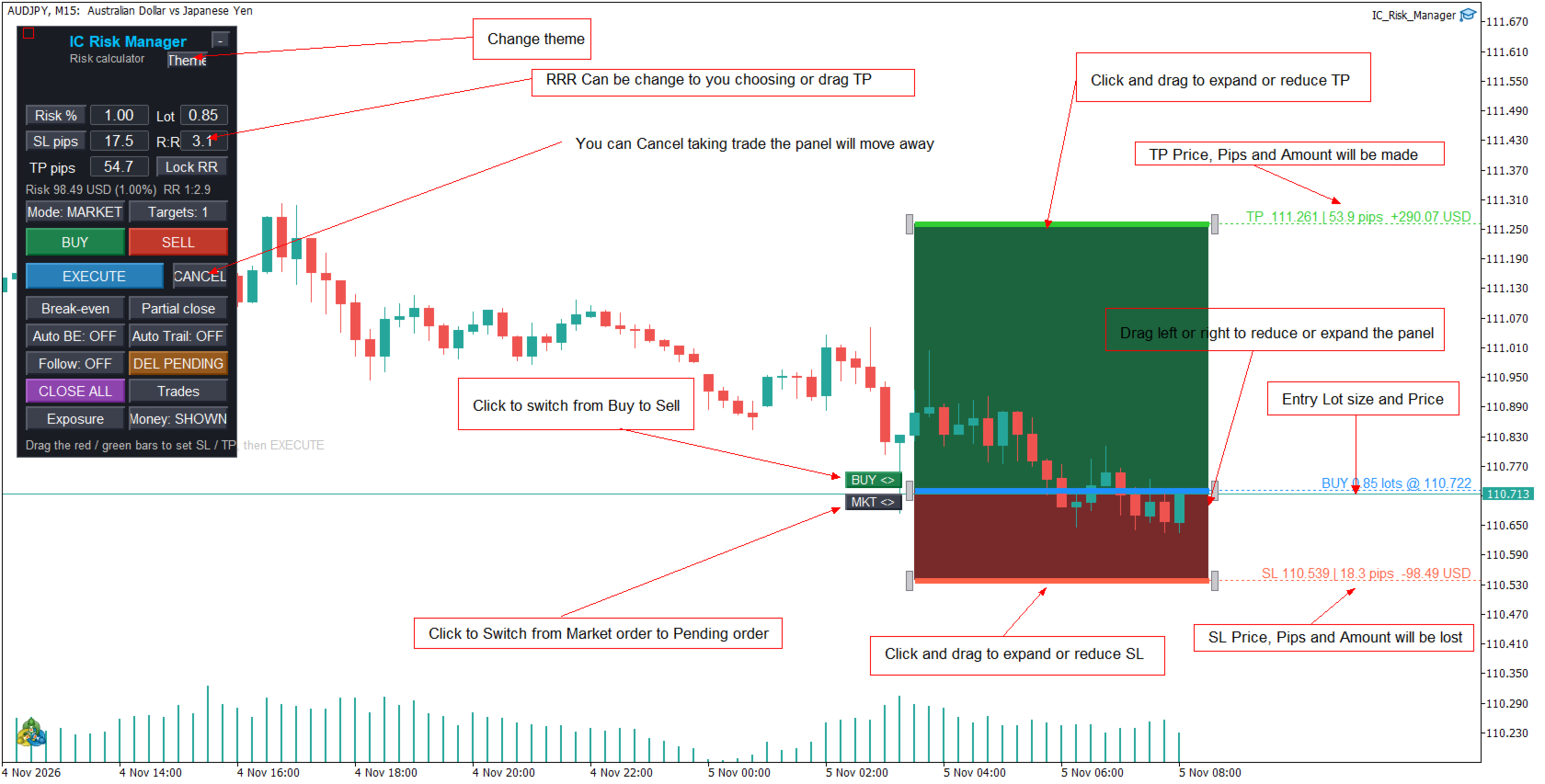
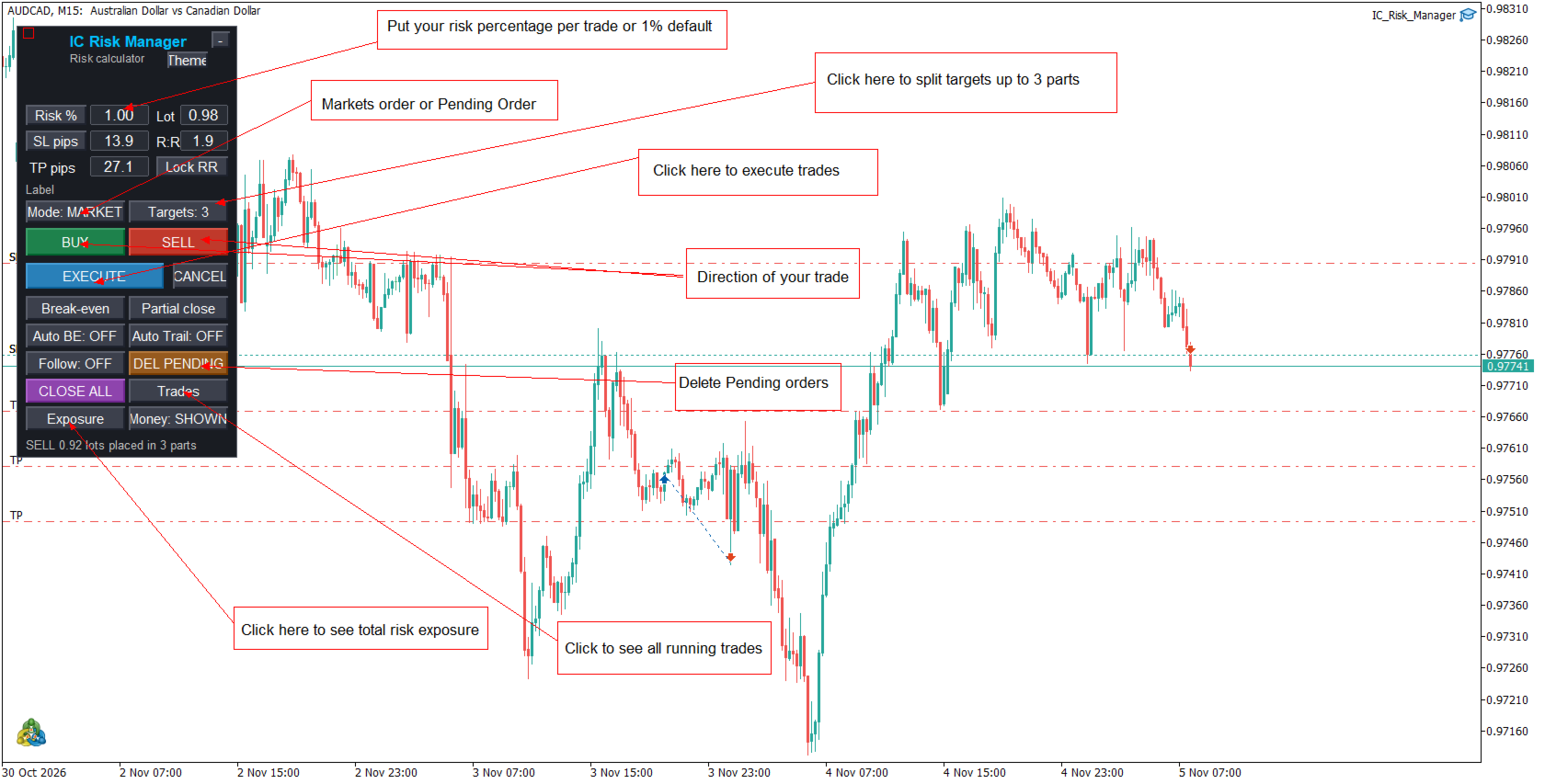
IC Risk Manager lets you plan a trade on the chart before you place it. You drag a colored box to set your stop loss and take profit, and the lot size is calculated for you from your risk. Nothing is sent to the broker until you press EXECUTE.

How it works

  1. Set your risk. Enter a risk percentage of your balance, or switch to a money amount by clicking the “Risk %” button. You can also type a fixed lot size and the panel will show the risk it implies.
  2. Click BUY or SELL. A trade plan appears at the latest candle: a green box for the take-profit zone, a red box for the stop-loss zone, and a blue bar at the entry price.
  3. Adjust it. Drag the red or green bar up or down to move SL or TP. The lot size, money at risk, money to gain and the reward-to-risk ratio update as you drag, and tags on the chart show the figures.
  4. Press EXECUTE. The EA sends the order at the exact levels you set. Use CANCEL to discard the plan.

Order types

  • Market mode: the entry follows the live price.
  • Pending mode: the entry stays where you put it, and the EA automatically picks a buy limit, buy stop, sell limit or sell stop from where it sits relative to the price. You can set an expiry time.
  • The BUY/SELL and MKT/PEND switches next to the entry price flip the plan without losing your SL and TP distances.
  • Follow keeps SL and TP at the same distance as the live price moves.

Moving and resizing the plan

  • The red, green and blue bars are always flat and exactly as wide as the boxes.
  • Drag the strip beside either side edge to widen or narrow the whole plan. Everything resizes together, so the two boxes never overlap.
  • In pending mode, press and drag anywhere inside the boxes to move the whole plan to any price and any candle.
  • Thin dotted price lines run from the panel to the right side of the chart at entry, SL and TP.

Risk tools

  • Lot size from risk, or risk from a typed lot.
  • A reward-to-risk field, with a Lock button that keeps the ratio fixed as you drag.
  • Distances in pips or points.
  • Up to 3 targets: the take profit is split into stages, and your lot is divided between them using percentages you choose. This needs a hedging account.
  • The EA warns you if the smallest lot your broker allows would risk more than you asked for, or if SL or TP is on the wrong side.

Managing open trades

  • Break-even and partial close buttons.
  • Auto Break-Even: moves SL to entry after a set amount of profit.
  • Auto Trail: trailing stop with its own start and distance.
  • Close All and Delete Pending buttons.
  • A Trades window lists open trades with a Close and a partial-close button for each.
  • An Exposure window shows long, short, net, profit and loss, and the amount you’d lose if every SL is hit, per symbol.

Hotkeys (click on the chart first)

Key

Action

Esc

Show or hide the plan

Shift+Esc

Flip buy and sell

Ctrl+1 / 2 / 3

Set the number of targets

Shift+E

Execute

Shift+M

Open the Trades window

Shift+X

Open the Exposure window

Interface

Dark and light themes, a compact mode, a hide-money option, and windows you can move by dragging their background.

Main settings

Magic number, default risk, default SL, TP and R:R, number of targets and lot split, break-even and trailing values, partial-close percentage, slippage, pip size override (for example 10 points per pip on gold), pending-order distance and expiry, box width, and panel position.

Important notes

  • Test on a demo account first.
  • Trading involves risk. The panel helps you size and place trades but does not predict the market or guarantee results.
  • Enable Algo Trading on the toolbar and tick “Allow Algo Trading” in the EA’s settings.
  • Hotkeys only work while the chart has focus.


Önerilen ürünler
ATC Position Tool and Trade Manager MT4, MetaTrader 4'e sürükle-bırak pozisyon aracı getirir ve onu gerçek emir yürütmeye bağlar. İşlemi grafikte çizin, giriş, stop loss ve take-profit seviyelerini istediğiniz yere sürükleyin ve lot boyutu riskinizden hesaplanır. Emir yerleştirildikten sonra aynı kutu grafikte kalır, böylece işlemi planladığınız yerde yönetirsiniz. İşlem planlama: New Long veya New Short'a tıklayın ve girişi grafiğe yerleştirin. Risk, ödül ve R:R oranı çizgileri sürüklerken günc
For MT5: TP SL Calculator This tool helps you to automatically calculate profit at Take - Profit price and loss at Stop - Loss price. Feature: - Calculate profit at TP price. Apply to all operators (BUY / BUY LIMIT / BUY STOP / SELL / SELL LIMIT / SELL STOP), with TP price is greater than 0. Profit is expressed in money and points. - Calculate loss at SL price. Apply to all operators (BUY / BUY LIMIT / BUY STOP / SELL / SELL LIMIT / SELL STOP), with SL price is greater than 0. Loss is express

**Multi-Function Trading Assistant EA - Complete User Manual** **Program Overview**   Multi-Function Trading Assistant is an advanced trading panel EA developed based on MQL4, specifically designed for the MetaTrader 4 platform. This program provides a one-stop order management solution with an intuitive visual interface and powerful batch operation capabilities. **Detailed Explanation of Core Functions** **1. Batch Order Management Functions** **1.1 One-Click Close All Orders of Current Tr
Symbol Information The   Symbol Info   indicator provides an intuitive panel on the chart that displays essential information about the current trading symbol. This includes basic trading data, instrument properties, and trading rules, all designed to give traders a clear view of the market conditions and product specifications. Key Features: Symbol Name and Description: The indicator displays the name and a detailed description of the current trading symbol, helping users identify the instrume
Complete SMC/ICT Indicator MT5 — Smart Money Concepts Aracı    Complete SMC/ICT Indicator, doğrudan grafik penceresinde çalışan bağımsız bir Smart Money Concepts analiz aracıdır. Piyasa yapıları, dengesizlikler ve likidite bölgelerinin kurumsal seviyede tespitini sağlar; tam özelleştirme ve uyarı özellikleriyle birlikte gelir.   Özellikler   İndikatör on temel SMC öğesini algılar: swing zirve ve dipleri, fair value gaps (FVG), order blocks (OB), yapı kırılmaları (BOS), karakter değişimleri (CHo
Tradingscenes Trading Panel     How will Trading Panel work ? Trading Panel is created as an Expert Advisor, which will enable traders to set pending orders, or mass pending orders in different types Limit orders with additional functions for taking profit as partial, trailing stop and also taking profit with differences price levels; let’s explain in every single functions for you as following parts: Read the full description here:   https://drive.google.com/file/d/10O10dBLLUcdT3MdPvKqO7L3CIFR
Partial Close EA
Rimantas Petrauskas
3.25 (4)
The most simple and easy to use Partial Close EA (by Rimantas Petrauskas ) The main idea of this EA is to apply partial close to your positions. EA will automatically find your open market positions and apply partial close according to your settings. For those who do not know what Partial Close is: it is simply an action to close only a part of your position. For example, if your trade lot size is 1.2 and you close 25% of it (which is 0.3) you will still have 0.9 lot size trade running and exist
TradeHam Manager is a trade panel for manual traders. You decide when and where to trade. The panel takes care of the lot size, the order and the clean-up. It does not open trades on its own. It has no entry logic and does not promise any profit. Main features Risk-based lot size. Set the risk as a percent of balance, a fixed amount of money or a fixed lot. Drag the stop-loss line on the chart and the lot is recalculated. One-click orders. BUY / SELL buttons place the order with stop loss and ta
MT4 için Expert Advisor Risk Manager çok önemli ve bence her yatırımcı için gerekli bir program. Bu Uzman Danışman ile ticaret hesabınızdaki riski kontrol edebileceksiniz. Risk ve kar kontrolü hem parasal hem de yüzdesel olarak yapılabilir. Danışman işlevleri Bu risk yöneticisi, riskleri kontrol etmenize yardımcı olacaktır: - bir anlaşma için - günlük - bir hafta için - Bir ay için Ayrıca kontrol edebilirsiniz 1) Ticaret yaparken izin verilen maksimum lot 2) günlük maksimum sipariş sayısı
MTSBSPanel is a multifunctional trading panel with an integrated risk manager. Main features of the trading panel Placement of pending orders directly from the chart with the ability to divide a position into multiple orders Opening by market in one click with the ability to divide a position into multiple orders Risk management: risk per trade and per day Dynamically calculated lot depending on the specified risk per trade Brief information on the account, result of trades for the day, week, m
This indicator is a plug-in for Controladora Expert Adviser , which allows you to set a specific area, and the Controladora will open a buy or a sell, if the candle closes inside this area. To make it work in a chart with the Controladora installed, add the Act Inside indicator, then add a rectangle shape into the chart and re-size it to cover only the area where the close of a candle should be in order to send the buy or sell order. Rename the rectangle as AI and in it's description write buy,
FREE
This utility provides the ability to use hot keys in manual trading instantly responding to the current market situation. You can assign hot keys to open/close positions by their type, close all positions on the current chart and remove all orders on the current chart. You can also assign hot keys for five predefined trade volumes and switch between them if necessary with no need to change the volume manually from time to time. It is also possible to set the auto calculation of a trade volume in
Bu panel uzman danışmanlardan oluşur ve altı ticaret paneli grubu sunar. MT5 sürümü:   Hızlı panel kapsamı özellikler Çoğu alım satım işlemi bu paneldeki düğmelere tıklanarak hızlı bir şekilde gerçekleştirilebilir. Panelleri değiştirmek yeşil düğmeye tıklamak kadar kolaydır. EA, Strateji Test Cihazının görsel grafikleri üzerinde çalıştırılabilir ve geçmiş verilere dayalı ticaret pratiği yapmanın kolay bir yolunu sunar. Tek bir fare tıklamasıyla zararı durdurmayı değiştirin ve kar alın (geriye d
* Super Assistant   is an useful management tool that helps traders perform management tasks on MT4/MT5 account remotely via  Telegram  such as: - Get info (account, details of positions, pending orders, floating PL, price, economic news, etc) - Open trade (open instantly with preset parameters) - Manage trade (set SLTP automatically, break-even mode, max risk, close time every day, etc) - Close trade (close all, buy, sell, win positions by one click, set awaiting close by PL, time) - Set up no
Do you over trade???  Do you lose your account by adjusting the stop loss or not putting stop loss?? Do you cross your daily loss limit and closed your account??? Do you breach your funded account??? Do you fail frequently because of emotion??   So you have to control your emotion in trading. And this EA will do the job for you. You can not repeat those mistake even if you try hard. Just set the EA and relax. This will do major role in funded account. This EA will not open orders/positions. It j
Lot calculator tool
Ernestas Kvedaras
3.22 (9)
MetaTrader 5 ported version is available here:  Lot Calculator Tool MT5 . This tool helps you to automatically calculate and manage risk, conveniently place orders visually, schedule orders, trail stops, move them to break-even, manually test strategies and more. Features Place market or pending orders using draggable lines Schedule orders Calculate and limit risk using various methods See current spread See time till next candle Set custom order comments Trail stops Move stops to break-even S
A Utility used for accounts with multiple open positions with Magic numbers added via Expert Advisors or manually. The Utility closes specific Magic number open positions when a certain profit in currency $ has been reached. The Utility also closes specific Magic numbers open positions with a break-even feature when the Expert Advisors or manually a certain amount of open positions has been placed. The Utility also closes all buy stops and sell stops when the "Take profit sum $" has been reache
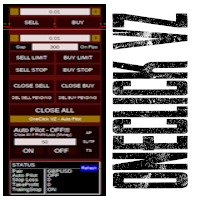
Simple panel of trade on your chart with OneClick VZ . This trade panel will make it easier for you. Equipped with several functions that make it very easy for you. You can try Trial Version OneClick V1 in here . This version includes: Open Order Buy Open Order Sell Open Pending Order [Buy Limit - Buy Stop - Sell Limit-Sell Stop] Close ALL orders Close Order Buy Close Order Sell Delete Pending Order [Buy Limit - Buy Stop - Sell Limit-Sell Stop] Order Management: Stop Loss Take Profit Trailing S
All In One Trade Manager is a trade manager and one-click trading panel for manual traders on MetaTrader 4. It works as a trading assistant, risk manager and position size calculator in one dashboard. It brings together everything below in one panel: order entry with risk sizing automatic trade management advanced order types account protection statistics Its entry checks run in the background and tell you, before you click BUY or SELL, when something speaks against the trade. Also available
IMPORTANT NOTE : This is a dashboard indicator and will not work on strategy tester. Multi-Symbol Trend Scanner - Professional Market Analysis Tool Overview The   Multi-Symbol Trend Scanner   is a sophisticated trading dashboard that provides real-time market analysis across multiple financial instruments simultaneously. Designed for both novice and professional traders, this powerful indicator displays crucial market data in an intuitive, table-aligned format that's easy to interpret at a glan
Exit Area Ultimate
Thushara Dissanayake
3 (1)
O       Çıkış Alanı Nihai       Bu, pratik bir grafik aracıdır ve görüntüleri gösterir.       günlük ATR (Ortalama Gerçek Aralık)       Ve       ADR (Ortalama Günlük Aralık)       Bu seviyeleri doğrudan grafiğinize yansıtarak, yatırımcıların bir varlığın tek bir günde tipik olarak ne kadar hareket ettiğini anlamalarına yardımcı olur.       Volatiliteye dayalı hedef bölgelerle   , gösterge önemli bir soruyu yanıtlıyor: Fiyat bugün gerçekçi olarak ne kadar yükselebilir? Sistem, tarihsel fiyat har
Bu EA, esnek risk yönetimini ve 6 set ticaret panelini birleştiren profesyonel bir ticaret aracıdır. MT5 sürümü:   Quick Panel Pro Hedging özellikler Toplu hesaplamalar hızlı ve basittir. Durdurma çizgisini hareket ettirdiğinizde hesaplamalar anında gerçekleştirilir. Çoğu ticari işlem bu panele tıklanarak hızlı bir şekilde tamamlanabilir. Yeşil düğmelere tıklayarak paneller arasında hızlı bir şekilde geçiş yapabilirsiniz. EA, Strateji Test Aracı'nda çalıştırılabilir. Bu özellik stratejilerinizi
Crypto_Forex Göstergesi "CCI FLAT Detector" - alım satımda etkili bir yardımcı araçtır! Yeniden boyama gerektirmez. MT4 için bu harika göstergeyle alım satım yöntemlerinizi geliştirmenizi öneriyorum. - Gösterge, grafikteki fiyatın düz alanlarını gösterir. "Düz duyarlılık" parametresi, düz alanların tespitinden sorumludur. - "CCI FLAT Detector", Fiyat Hareketi girişlerinin onaylanması için veya diğer göstergelerle birlikte kullanılabilir. - Trend takip sistemlerinde düz bölgeleri tespit etmek ve
Magic Point Calculation System Support, resistance, target position... Use scientific calculations to help your trades Find the corresponding and low points Through our observation of the current chart, find the corresponding high and low points Enter the high and low points and calculate Enter the high and low point at the corresponding positions and click calculate to get the support, resistance, target, etc. Pre-order and wait for the result Pre-order at the price calculatedthe risk of ext
Bu danışman aşağıdaki özellikleri sunar: Açık Pozisyon: Fiyat trend çizgisini geçtiğinde uzun veya kısa emir açın. Tasfiye: Fiyat trend çizgisini geçtiğinde uzun veya kısa pozisyonları tasfiye edin. İzleyen Zarar Durdurma – EA, trend çizgisini takip eder ve uzun vadeli emirler için zararı durdurmayı artırmaya veya kısa vadeli emirler için zararı durdurmayı azaltmaya devam eder. Çizgi bir trend çizgisi veya yatay bir çizgi olabilir.       Trend çizgileri radyal veya segmental olabilir. Bir hat an
EasyTrade
Vitaly Muzichenko
2.33 (6)
Small trading panel for managing orders and positions in 1 click for MetaTrader 4 Version for MetaTrader 5 here Set hidden TakeProfit, StopLoss and pending orders at lines placed on the chart Work on time on the news Backtesting manual strategies in the tester Placing virtual orders Playing a sound signal when the price reaches a level Automatic closing of all positions on the account or symbol by the total take profit in the deposit currency Description Can be dragged to any part of the chart
TPSpro Risk Yöneticisi       her türlü eğitim ve sermayeye sahip yatırımcılar için benzersiz bir profesyonel risk kontrol sistemidir. Ticarette kayıplardan ve işlemlerde ciddi hatalardan kaçınmanızı sağlar. TPSpro Risk Yöneticisi, öncelikle scalper'lar ve günlük yatırımcılar için risk yönetimi için gereklidir, ancak her türlü alım satım tarzındaki yatırımcılar tarafından başarıyla kullanılır. Panelde her biri yararlı bilgiler içeren 3 sütun bulunur. İlk sütun, içinde bulunulan ayın başı itibar
Signal Finding
Maryna Shulzhenko
Signal Finding is a trend indicator, a technical analysis tool that helps to determine the exact direction of a trend: either an upward or a downward movement of the price of a trading instrument. Although these indicators are a little late, they are still the most reliable signal that a trader can safely rely on. Determining the market trend is an important task for traders. With this indicator, you can predict future values. But the main application of the indicator is to generate buy and sel
This utility tool help you to close all orders having profit immediatly with only ONE CLICK, its work is very fast. You can choose which symbol you want or close all symbols so it will helpful for you in your trading to manage trading faster. If you want it work on all symbols, you just need to leave symbol parameter blank (like in default setting). If you want it work on 1 symbol only (for example EURUSD orders) you need to put symbol =EURUSD (see screenshot below). This is a script, so its wil
Trailing Stop Manager MT4 Trailing Stop Manager MT4 is a flexible trade management utility for MetaTrader 5 that automatically moves the Stop Loss as price moves in your favor. It is designed for traders who want to protect profits and manage open positions automatically while keeping control over how and which positions are managed. The manager currently includes two trailing methods: • Standard Trailing Stop • Fractals Trailing Stop It also includes a compact trading panel for opening, managi
Bu ürünün alıcıları ayrıca şunları da satın alıyor
Trade Manager EA’ye hoş geldiniz! Ticaretin daha sezgisel, hassas ve verimli hale gelmesi için tasarlanmış nihai risk yönetim aracı ile tanışın. Bu sadece bir emir verme aracı değil; ticaret planlaması, pozisyon yönetimi ve risk kontrolü için kapsamlı bir çözüm. İster yeni başlayan bir yatırımcı olun, ister deneyimli bir trader ya da hızlı emir gerektiren bir scalper, Trade Manager EA ihtiyaçlarınıza uyum sağlar ve forex, endeksler, emtialar ve kripto paralar dahil tüm piyasalarda esneklik sunar
Exp COPYLOT CLIENT for MT4
Vladislav Andruschenko
4.69 (65)
MetaTrader 4 için profesyonel işlem kopyalayıcı MetaTrader 4 için hızlı, güvenilir ve profesyonel bir işlem kopyalayıcı. COPYLOT , MetaTrader 4 ve MetaTrader 5 terminalleri arasında Forex işlemlerinin kopyalanmasını sağlar ve farklı hesap türleri ile işlem senaryoları için esnek senkronizasyon sunar. COPYLOT MT4 sürümü şunları destekler: MetaTrader 4 → MetaTrader 4 MetaTrader 5 Hedge → MetaTrader 4 MetaTrader 5 Netting → MetaTrader 4   MT5 sürümü Tam açıklama + DEMO + PDF Nasıl satın alınır Nası
Trade Assistant MT4
Evgeniy Kravchenko
4.43 (197)
It helps to calculate the risk per trade, the easy installation of a new order, order management with partial closing functions, trailing stop of 7 types and other useful functions. Additional materials and instructions Installation instructions   -   Application instructions   Line function -   shows on the chart the Opening line, Stop Loss, Take Profit. With this function it is easy to set a new order and see its additional characteristics before opening.   Risk management  - The risk calcu
Local Trade Copier EA MT4
Juvenille Emperor Limited
4.96 (111)
Local Trade Copier EA MT4, aynı Windows bilgisayarı veya Windows VPS üzerinde çalışan birden fazla MetaTrader 4 hesabı arasında işlemleri kopyalamak ve yönetmek için hızlı ve esnek bir işlem kopyalayıcıdır. Yerel işlem senkronizasyonunu, Receiver tarafında lot büyüklüğü, risk yönetimi, işlem filtreleme, sembol eşleştirme, işlem yönetimi ve hesap koruması kontrolleriyle birleştirir. Transmitter ve Receiver terminallerinizi yaklaşık 1 dakika içinde ayarlayın ve aynı veya farklı brokerlardaki hesa
The product will copy all telegram signal to MT4   ( which you are member  ) , also it can work as remote copier.  Easy to set up, copy order instant, can work with almost signal formats, image signal, s upport to translate other language to English Work with all type of channel or group, even channel have "Restrict Saving Content", work with  multi channel, multi MT5 Work as remote copier: with signal have ticket number, it will copy exactly via ticket number. Support to backtest signal. How to
News Filter EA: Advanced Algo Trading Assistant News Filter EA is an advanced algo trading assistant designed to enhance your trading experience. By using the   News Filter EA , you can integrate a Forex economic news filter into your existing expert advisor, even if you do not have access to its source code. In addition to the news filter, you can also specify   trading days   and   hours   for your expert. The News Filter EA also includes   risk management   and   equity protection   features
RS Trade Copier - gerçek grafik arayüze sahip, ultra hızlı yerel işlem kopyalayıcı. Hesap numaralarını elle girmeyi bırakın. Artık 200'den fazla anlaşılmaz giriş parametresiyle uğraşmak yok. Birden fazla MT4 ve MT5 terminali arasında işlem operasyonlarını kopyalamak için güvenilir ve esnek bir araçtır. Hem profesyonel yatırımcılar, sinyal hizmetleri hem de bireysel yatırımcılar için uygundur. Bir veya birden fazla Sağlayıcıdan bir veya birden fazla Alıcıya ticareti senkronize eder ve bunu yüksek
Telegram'dan MT4'e:   Nihai Sinyal Kopyalama Çözümü Telegram ile MT4'e   işlemlerinizi kolaylaştırın, DLL'lere ihtiyaç duymadan doğrudan Telegram kanallarından ve sohbetlerinden MetaTrader 4 platformunuza işlem sinyallerini kopyalamak için tasarlanmış son teknoloji yardımcı program. Bu sağlam çözüm, sinyallerin benzersiz hassasiyet ve özelleştirme seçenekleriyle sorunsuz bir şekilde yürütülmesini sağlayarak size zaman kazandırır ve verimliliğinizi artırır. [ Instructions and DEMO ] Temel Özellik
Trade copier MT4
Alfiya Fazylova
4.62 (37)
Trade Copier, ticaret hesapları arasındaki işlemleri kopyalamak ve senkronize etmek için tasarlanmış profesyonel bir yardımcı programdır. Kopyalama, tedarikçinin hesabından/terminalinden alıcının aynı bilgisayarda veya vps'de kurulu olan hesabına/terminaline gerçekleşir. Satın almadan önce demo sürümünü bir demo hesabında test edebilirsiniz. Demo versiyonu burada . Tüm talimatlar burada . Ana işlevler ve avantajlar: Emirlerin kopyalanmasını destekler: МТ4> МТ4, МТ4> МТ5, МТ5> МТ4. Emirlerin kopy
Exit Manager
Victor Christiaanse
5 (2)
Close every trade at the right moment, automatically. Most traders spend their energy on the entry and then close too early, too late, or on a feeling. Exit Manager takes the exit off your hands. Open a trade the way you always do, by hand or with any Expert Advisor, and Exit Manager watches it and closes it, fully or partly, when the indicator signal you chose appears. You can see it working on the chart. A clean panel on your chart shows, for every open trade, which rule will close it next, ho
Telegram to MT4 Multi-Channel Copier   , Telegram ve Discord kanallarınızdaki alım-satım sinyallerini doğrudan MetaTrader 4'e otomatik kopyalar. Bot yok, tarayıcı uzantısı yok, elle kopyalama yok. Sinyal Telegram'a veya Discord'a düşer ve EA birkaç saniye içinde terminalinizde işlemi açar. Ve bir kanalı kopyalamadan önce, yerleşik backtester o kanalın hesabınızda ne yapmış olacağını gösterir. Ürün iki bileşenden oluşur: Telegram kanallarınızı dinleyen bir Windows uygulaması ve sinyalleri MT4 ter
Effortlessly calculate lot sizes and manage trades to save time and avoid costly errors The Trade Pad Pro EA is a tool for the Metatrader Platform that aims to help traders manage their trades more efficiently and effectively. It has a user-friendly visual interface that allows users to easily place and manage an unlimited number of trades, helping to avoid human errors and enhance their trading activity. [ Installation Guide | Update Guide | Troubleshooting | FAQ | All Products ] One of the k
TradePanel MT4
Alfiya Fazylova
4.84 (95)
Trade Panel, çok işlevli bir ticaret asistanıdır. Uygulama, manuel ticaret için 50'den fazla ticaret fonksiyonu içerir ve çoğu ticaret görevini otomatikleştirmeyi mümkün kılar. Uygulama talimatları : https://www.mql5.com/en/blogs/post/756482 Demo hesabı için uygulamanın deneme sürümü: https://www.mql5.com/en/blogs/post/750865 Uygulamayı nasıl kurulur: https://www.mql5.com/en/blogs/post/756239 Uygulamayı görsel modda nasıl test edilir: https://www.mql5.com/en/blogs/post/770277 Uygulamayı VPS Meta
Trade Indicator Assistant is a powerful MT4 utility designed to turn indicators into automated trading systems. Its main feature is the ability to automatically detect an indicator’s   BUY and SELL signal buffers , without requiring you to know the buffer numbers, search through indicator settings, or modify the indicator source code. Bonus Indicator: After purchasing Trade Indicator Assistant, contact me to receive Trade Signal Pro completely free as a bonus indicator. [Download Demo Version]
Trading History - A program for trading and money management on the history of quotes in stratagy tester. It can work with pending and immediate orders, and is equipped with trailing stop, breakeven and take profit functions. Very good for training and testing different strategies. Manual (Be sure to read before purchasing) Advantages 1. Allows you to test any trading strategy in the shortest possible time 2. An excellent simulator for trading training. You can gain months of trading experience
Bu, emir yönetimi ve risk yönetimi gibi zaman alan görevleri tek bir tıklamayla veya birkaç tıklamayla gerçekleştirerek ticaretinizi kolaylaştıran bir Yardımcı Programdır. Özellikler Risk Yönetimi  Risk alanında % veya $ olarak belirtilen riske göre lotları otomatik olarak hesaplar ve sadece SL TP vb. için çizgiler yerleştirerek girmenize ve gerçek zamanlı Risk Ödülünü görüntülemenize izin verir. TrueRisk, yalnızca FX çiftlerinde lot büyüklüğünü hesaplarken komisyonları içerir, böylece örne
Shepherd Safety EA
AW Trading Software Limited
4.92 (13)
AW Shepherd Safety EA, açık pozisyonları yönetmek için tasarlanmış bir Uzman Danışmandır. İlk emri yatırımcı panelden açar, sepeti bundan sonra EA kendisi yönetir: trend filtresiyle kurtarma emirleri ekler, tarafı TakeProfit, trailing veya stop ile kapatır ve kapanış seviyelerini grafikte gösterir. Alımlar ve satımlar ayrı ayrı yönetilir, iki taraf aynı anda açık olabilir. Kurtarma emri yalnızca fiyat adımına göre değil, Parabolic SAR, iki MA veya mum rengine göre pozisyon yönünde bir dönüş gerç
Çok İşlevli Ticaret Aracı: Lot Hesaplayıcı, Grid Emirleri, R/R Oranı, Ticaret Yöneticisi, Arz ve Talep Bölgeleri, Fiyat Hareketi ve Daha Fazlası Demo Sürüm   |   Kullanım Kılavuzu Ticaret Asistanı strateji test cihazında çalışmaz: bu yardımcı programı test etmek için Demo Sürümünü BURADAN indirebilirsiniz. Herhangi bir soru /iyileştirme fikri/hatalar için benimle iletişime geçin MT5 sürümüne ihtiyacınız varsa, burada mevcuttur Ticaret sürecinizi basitleştirin, hızlandırın ve otomatikleştirin. St
Rhino Chart Drawing Tools , MetaTrader 4 için TradingView tarzı bir çizim çalışma ortamı sunar. 54 çizim aracı , özelleştirilebilir araç çubuğu, Favoriler, hızlı stil ayarları, nesne ayarları, şablonlar ve nesne yöneticisi içerir. Kullanıcı kılavuzu: Ürün nasıl kullanılır Ücretsiz demo sürümü: Demoyu indir MetaTrader 5 sürümü: MT5 için Rhino Drawing Tools Çizim Araçları Grup Nesne Listesi Çizgiler Trend çizgisi, ışın, uzatılmış çizgi, yatay çizgi, dikey çizgi, yatay ışın, çapraz çizgi, trend a
Trade Dashboard simplifies how you open, manage, and control your trades, with built-in lot size calculation. It allows you to execute trades, manage risk, and control positions directly on the chart, with tools such as partial close, breakeven, and trailing stop. Designed to reduce manual work and help you stay focused on your trading decisions. A demo version is available for testing. Detailed explanations of features are provided within the MQL5 platform. Installation instructions are include
MT4 to Telegram Signal Provider , Telegram'a sinyal göndermeyi sağlayan ve hesabınızı bir sinyal sağlayıcısına dönüştüren kullanımı kolay ve tamamen özelleştirilebilir bir araçtır. Mesajların formatı tamamen özelleştirilebilir! Ancak basit kullanım için, önceden tanımlanmış bir şablonu seçebilir ve mesajın belirli kısımlarını etkinleştirebilir veya devre dışı bırakabilirsiniz. [ Demo ]  [ Kullanım Kılavuzu ] [ MT5 Sürümü ] [ Discord Sürümü ] [ Telegram Kanalı ]  New: [ Telegram To MT5 ] Kurulum
Multi Account Local Trade Copier , MetaTrader için hızlı bir yerel işlem kopyalayıcıdır: aynı Windows PC veya VPS üzerindeki MT4/MT5 terminalleri arasında, tek bir master hesaptan birden fazla alıcı hesaba işlem kopyalayın — kendi gerçek, demo ve prop firm hesaplarınıza, aynı brokerde veya farklı brokerlerde. Olay tabanlı çalışır: master her işlemi gerçekleştiği anda yayınlar ve alıcı, her bir kopyanın gerçek kopyalama gecikmesini ölçer ve kaydeder — genellikle 50-150 ms . DLL yok, internet köpr
Göstergenin üç ana aracı vardır: Büyüteç (Yakınlaştırma grafiği), Cetvel (Zaman ve Fiyat ölçekleri) ve Artı İşareti. Farenizle her yeri hareket ettirebilir ve farklı görüntüleme formatlarını özelleştirebilir, her öğenin boyutunu ve rengini özelleştirebilirsiniz. Büyüteç (yakınlaştırma tablosu), mumları herhangi bir zaman diliminde ve farklı ölçeklerde görüntülemenizi sağlar. Varsayılan kısayol tuşları: 'Q' - daha yüksek zaman aralığı, 'A' - daha düşük zaman aralığı, 'W' - mum boyutunu azalt, '
Automatic Trailing Stop Based on Take Profit Percentage with Profit Lock EA MT4   Lock in your profits and "let your winners run" past your 100% take profit target with this EA.  This Expert Advisor automatically adjusts your Stop Loss based on up to 4 user-defined Take Profit Target Percentages, locking in your profit.  If price pushes past your 100% take profit target, the EA will automatically trail the price by user-defined pips, so you won't miss that runaway train again.   EA Features The
TradeMirror, MT4/MT5 platformları için geliştirilmiş, gerçek zamanlı işlem senkronizasyonu destekleyen yerel bir emir kopyalama aracıdır. Eğitim Daha fazla eğitim görmek için lütfen Trademirror Eğitimi bağlantısına tıklayın. Ürün Avantajları Finansal yazılımlar için güvenlik, istikrar ve gizlilik standartlarına uygun olarak üç temel alanda iyileştirme yapılmıştır: Kullanıcı dostu arayüz ile kolay kullanım Finansal senaryolarda hassas veri izolasyonu için gelişmiş gizlilik koruması Milisanlık emi
EchoTrade Telegram Signal Backtester VALIDATE TELEGRAM SIGNALS IN MINUTES - STOP GUESSING, START BACKTESTING Stop blowing accounts on "VIP" signals that don't deliver. The EchoTrade Telegram Signal Backtester is the professional solution to audit, verify, and optimize any Telegram signal provider's performance on historical data. Most signal providers show you their wins but hide their losses. This tool reveals the naked truth. By combining a powerful Data Manager (included) with an advanced MT4
Unlimited Trade Copier Pro is a tool to copy trade remotely to multiple MT4, MT5 and cTrader accounts at different computers/locations over internet. This is an ideal solution for you if you are a signal provider and want to copy your trades to other receivers globally on your own rules. One provider can copy trades to multiple receivers and one receiver can get trade from multiple providers as well. The provider can even set the subscription expiry for each receiver, so that receiver will not b
King Trade Copier MT4
Mohammed Maher Al-sayed Mohammed Ahmed Saleh
5 (1)
King Trade Copier, aynı bilgisayarda veya VPS'te çalışan MetaTrader terminallerini birbirine bağlar. Bir hesapta açılan işlemler diğerlerinde de görünür. Dosya her iki rolü de taşır, bu yüzden aynı indirme, Mode'u neye ayarladığınıza bağlı olarak gönderici ya da alıcı olur. Her grafikte panel, bu terminalin gönderip göndermediğini ya da alıp almadığını gösterir, karşı taraftaki hesabın adını verir, yanıt veren alıcıları sayar ve son sinyalin yaşını bildirir. Kopyalanmayan bir emir, kaybolmak ye
Take a Break pauses your Expert Advisors when trading is a bad idea: before news, after a daily loss, outside your trading hours, or when a rule you wrote yourself says so. When the pause is over, your EAs simply continue. Account protection for all your EAs in one tool: news filter, drawdown and equity protection, time filter and custom rules. One EA on one chart protects the whole account, the free indicator gives every chart its own rules on top. Free demo | What is new in 26.09 | Support Ass
Fotokopi->Kullanışlı ve hızlı arayüz etkileşimi, kullanıcılar hemen kullanabilir       ->>>> Windows bilgisayarlarda veya VPS Windows'ta kullanılması önerilir Özellikler: Çeşitlendirilmiş ve kişiselleştirilmiş kopyalama ticareti ayarları: 1. Farklı sinyal kaynakları için farklı lot modları ayarlanabilir 2. İleri ve geri kopyalama ticareti için farklı sinyal kaynakları ayarlanabilir 3. Sinyaller yorumlarla ayarlanabilir 4. Lotun sözleşme lotuna göre kalibre edilip edilmeyeceği Çeşitlendirilmiş v
Yazarın diğer ürünleri
IC Trade Manager
Tholinhlanhla Thanda Makhoba
IC Risk Manager: Risk Calculator and Trade Manager for MT5 IC Risk Manager lets you plan a trade on the chart before you place it. You drag a colored box to set your stop loss and take profit, and the lot size is calculated for you from your risk. Nothing is sent to the broker until you press EXECUTE. How it works Set your risk. Enter a risk percentage of your balance, or switch to a money amount by clicking the “Risk %” button. You can also type a fixed lot size and the panel will show the risk
Filtrele:
Değerlendirme yok
Değerlendirmeye yanıt