IC Risk Management

IC Risk Manager: Risk Calculator and Trade Manager for MT4

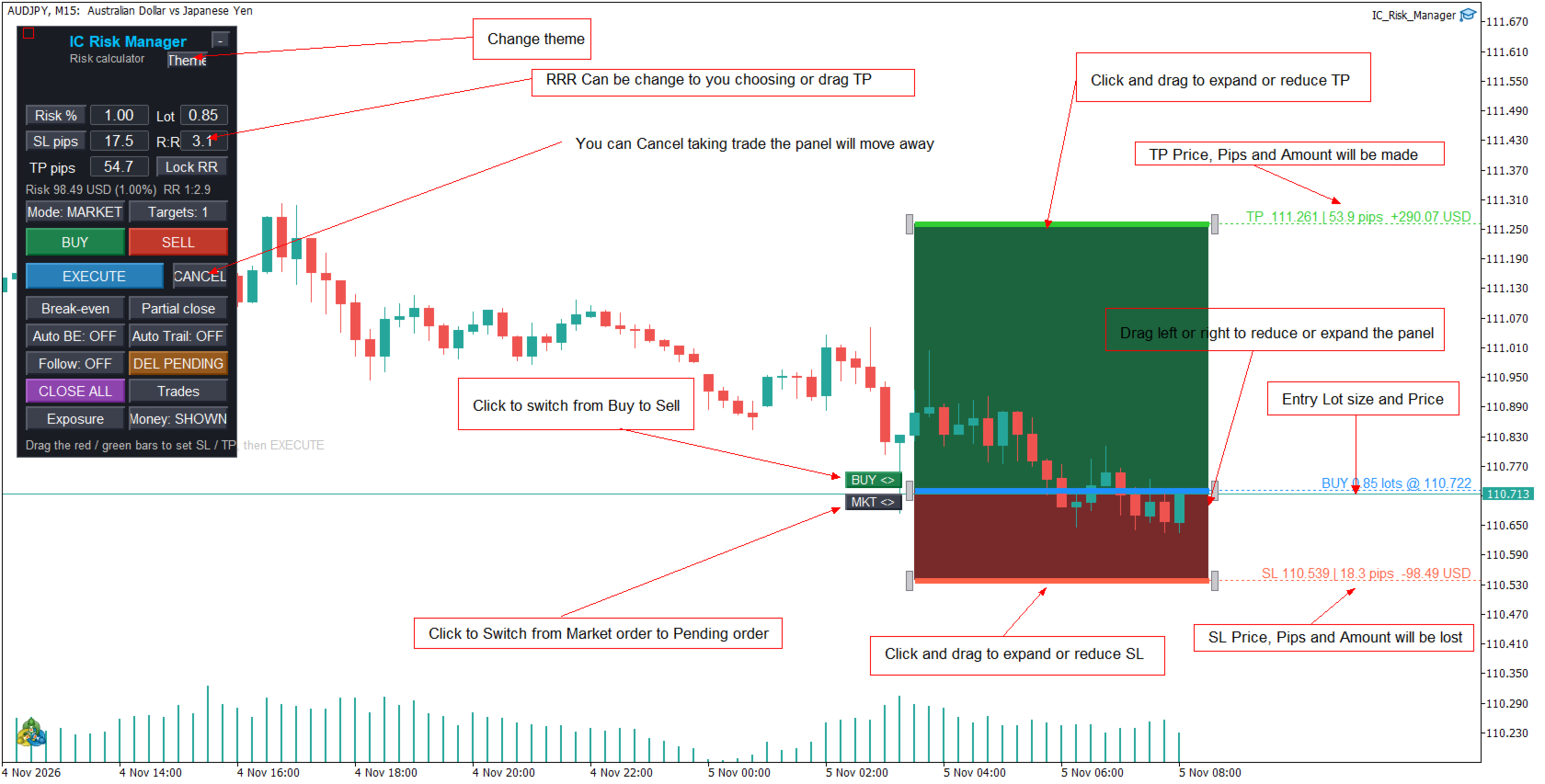
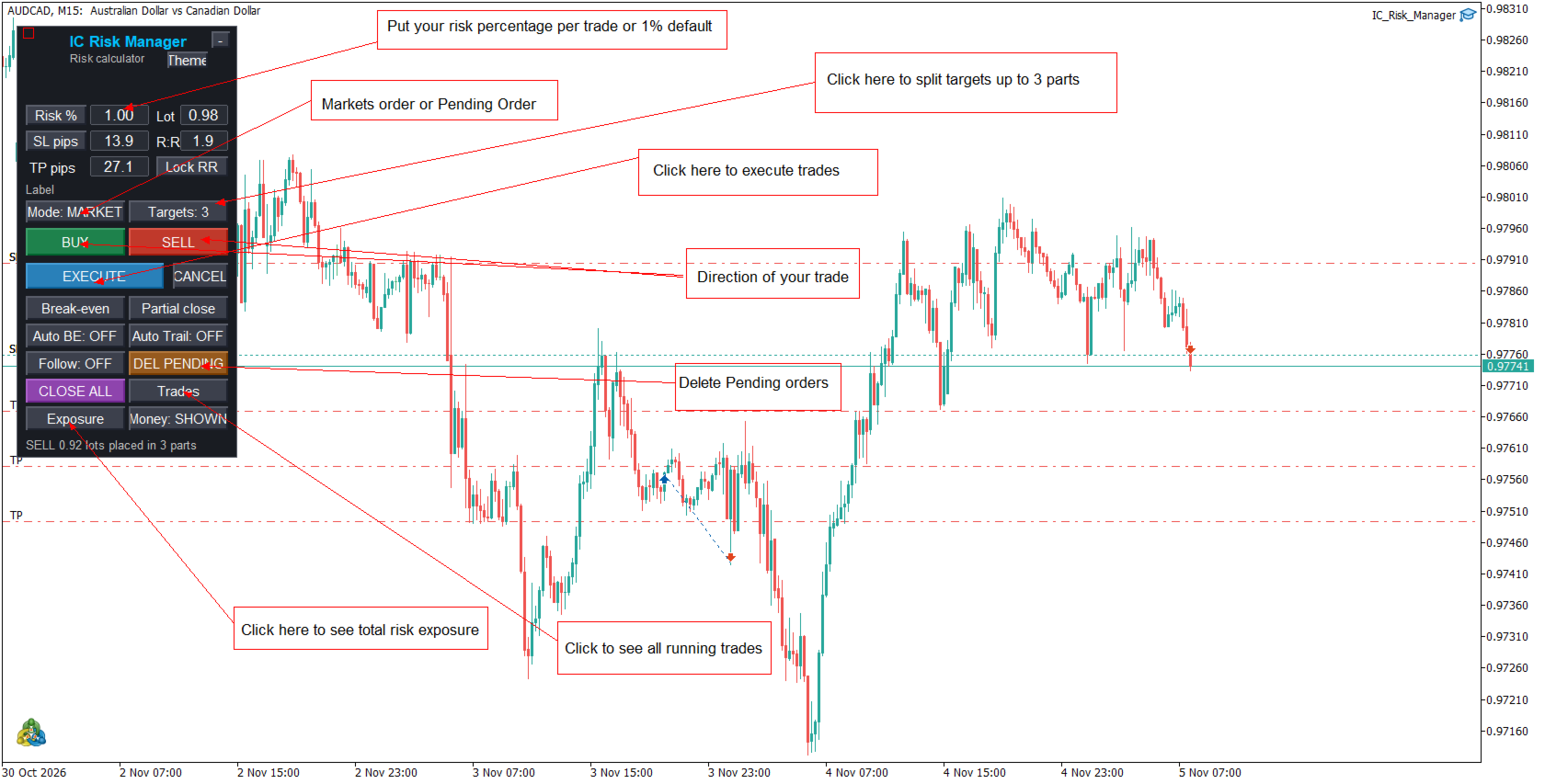
IC Risk Manager lets you plan a trade on the chart before you place it. You drag a colored box to set your stop loss and take profit, and the lot size is calculated for you from your risk. Nothing is sent to the broker until you press EXECUTE.

How it works

  1. Set your risk. Enter a risk percentage of your balance, or switch to a money amount by clicking the “Risk %” button. You can also type a fixed lot size and the panel will show the risk it implies.
  2. Click BUY or SELL. A trade plan appears at the latest candle: a green box for the take-profit zone, a red box for the stop-loss zone, and a blue bar at the entry price.
  3. Adjust it. Drag the red or green bar up or down to move SL or TP. The lot size, money at risk, money to gain and the reward-to-risk ratio update as you drag, and tags on the chart show the figures.
  4. Press EXECUTE. The EA sends the order at the exact levels you set. Use CANCEL to discard the plan.

Order types

  • Market mode: the entry follows the live price.
  • Pending mode: the entry stays where you put it, and the EA automatically picks a buy limit, buy stop, sell limit or sell stop from where it sits relative to the price. You can set an expiry time.
  • The BUY/SELL and MKT/PEND switches next to the entry price flip the plan without losing your SL and TP distances.
  • Follow keeps SL and TP at the same distance as the live price moves.

Moving and resizing the plan

  • The red, green and blue bars are always flat and exactly as wide as the boxes.
  • Drag the strip beside either side edge to widen or narrow the whole plan. Everything resizes together, so the two boxes never overlap.
  • In pending mode, press and drag anywhere inside the boxes to move the whole plan to any price and any candle.
  • Thin dotted price lines run from the panel to the right side of the chart at entry, SL and TP.

Risk tools

  • Lot size from risk, or risk from a typed lot.
  • A reward-to-risk field, with a Lock button that keeps the ratio fixed as you drag.
  • Distances in pips or points.
  • Up to 3 targets: the take profit is split into stages, and your lot is divided between them using percentages you choose. This needs a hedging account.
  • The EA warns you if the smallest lot your broker allows would risk more than you asked for, or if SL or TP is on the wrong side.

Managing open trades

  • Break-even and partial close buttons.
  • Auto Break-Even: moves SL to entry after a set amount of profit.
  • Auto Trail: trailing stop with its own start and distance.
  • Close All and Delete Pending buttons.
  • A Trades window lists open trades with a Close and a partial-close button for each.
  • An Exposure window shows long, short, net, profit and loss, and the amount you’d lose if every SL is hit, per symbol.

Hotkeys (click on the chart first)

Key

Action

Esc

Show or hide the plan

Shift+Esc

Flip buy and sell

Ctrl+1 / 2 / 3

Set the number of targets

Shift+E

Execute

Shift+M

Open the Trades window

Shift+X

Open the Exposure window

Interface

Dark and light themes, a compact mode, a hide-money option, and windows you can move by dragging their background.

Main settings

Magic number, default risk, default SL, TP and R:R, number of targets and lot split, break-even and trailing values, partial-close percentage, slippage, pip size override (for example 10 points per pip on gold), pending-order distance and expiry, box width, and panel position.

Important notes

  • Test on a demo account first.
  • Trading involves risk. The panel helps you size and place trades but does not predict the market or guarantee results.
  • Enable Algo Trading on the toolbar and tick “Allow Algo Trading” in the EA’s settings.
  • Hotkeys only work while the chart has focus.


Produits recommandés
ATC Position Tool and Trade Manager MT4 apporte un outil de position par glisser-déposer à MetaTrader 4 et le connecte à l'exécution réelle des ordres. Dessinez le trade sur le graphique, faites glisser les niveaux d'entrée, de stop loss et de take-profit où vous les voulez, et la taille du lot est calculée à partir de votre risque. Une fois l'ordre placé, la même boîte reste sur le graphique, afin que vous gériez le trade là où vous l'avez planifié. Planifier un trade : Cliquez sur New Long ou

For MT5: TP SL Calculator This tool helps you to automatically calculate profit at Take - Profit price and loss at Stop - Loss price. Feature: - Calculate profit at TP price. Apply to all operators (BUY / BUY LIMIT / BUY STOP / SELL / SELL LIMIT / SELL STOP), with TP price is greater than 0. Profit is expressed in money and points. - Calculate loss at SL price. Apply to all operators (BUY / BUY LIMIT / BUY STOP / SELL / SELL LIMIT / SELL STOP), with SL price is greater than 0. Loss is express
**Multi-Function Trading Assistant EA - Complete User Manual** **Program Overview**   Multi-Function Trading Assistant is an advanced trading panel EA developed based on MQL4, specifically designed for the MetaTrader 4 platform. This program provides a one-stop order management solution with an intuitive visual interface and powerful batch operation capabilities. **Detailed Explanation of Core Functions** **1. Batch Order Management Functions** **1.1 One-Click Close All Orders of Current Tr
Symbol Information The   Symbol Info   indicator provides an intuitive panel on the chart that displays essential information about the current trading symbol. This includes basic trading data, instrument properties, and trading rules, all designed to give traders a clear view of the market conditions and product specifications. Key Features: Symbol Name and Description: The indicator displays the name and a detailed description of the current trading symbol, helping users identify the instrume
Complete SMC/ICT Indicator MT5 — Outil Smart Money Concepts   Le Complete SMC/ICT Indicator est un outil d’analyse Smart Money Concepts autonome qui fonctionne directement dans la fenêtre du graphique. Il offre une détection de niveau institutionnel des structures de marché, des déséquilibres et des zones de liquidité, avec une personnalisation complète et des alertes.   Fonctionnalités   L’indicateur détecte dix éléments clés du SMC : sommets et creux de swing, fair value gaps, order blocks, c
Tradingscenes Trading Panel     How will Trading Panel work ? Trading Panel is created as an Expert Advisor, which will enable traders to set pending orders, or mass pending orders in different types Limit orders with additional functions for taking profit as partial, trailing stop and also taking profit with differences price levels; let’s explain in every single functions for you as following parts: Read the full description here:   https://drive.google.com/file/d/10O10dBLLUcdT3MdPvKqO7L3CIFR
Partial Close EA
Rimantas Petrauskas
3.25 (4)
The most simple and easy to use Partial Close EA (by Rimantas Petrauskas ) The main idea of this EA is to apply partial close to your positions. EA will automatically find your open market positions and apply partial close according to your settings. For those who do not know what Partial Close is: it is simply an action to close only a part of your position. For example, if your trade lot size is 1.2 and you close 25% of it (which is 0.3) you will still have 0.9 lot size trade running and exist
TradeHam Manager is a trade panel for manual traders. You decide when and where to trade. The panel takes care of the lot size, the order and the clean-up. It does not open trades on its own. It has no entry logic and does not promise any profit. Main features Risk-based lot size. Set the risk as a percent of balance, a fixed amount of money or a fixed lot. Drag the stop-loss line on the chart and the lot is recalculated. One-click orders. BUY / SELL buttons place the order with stop loss and ta
Risk Manager for MT4
Sergey Batudayev
4.6 (10)
Expert Advisor Risk Manager pour MT4 est un programme très important et, à mon avis, nécessaire pour chaque commerçant. Avec cet Expert Advisor, vous pourrez contrôler le risque de votre compte de trading. Le contrôle des risques et des bénéfices peut être effectué à la fois en termes monétaires et en termes de pourcentage. Pour que l'Expert Advisor fonctionne, attachez-le simplement au tableau des paires de devises et définissez les valeurs de risque acceptables dans la devise du dépôt ou en
MTSBSPanel
Andrei Kossarev
MTSBSPanel is a multifunctional trading panel with an integrated risk manager. Main features of the trading panel Placement of pending orders directly from the chart with the ability to divide a position into multiple orders Opening by market in one click with the ability to divide a position into multiple orders Risk management: risk per trade and per day Dynamically calculated lot depending on the specified risk per trade Brief information on the account, result of trades for the day, week, m
ActInside
Sergio D. Rocha
This indicator is a plug-in for Controladora Expert Adviser , which allows you to set a specific area, and the Controladora will open a buy or a sell, if the candle closes inside this area. To make it work in a chart with the Controladora installed, add the Act Inside indicator, then add a rectangle shape into the chart and re-size it to cover only the area where the close of a candle should be in order to send the buy or sell order. Rename the rectangle as AI and in it's description write buy,
FREE
HotKeys MT4
Alexey Valeev
3 (1)
This utility provides the ability to use hot keys in manual trading instantly responding to the current market situation. You can assign hot keys to open/close positions by their type, close all positions on the current chart and remove all orders on the current chart. You can also assign hot keys for five predefined trade volumes and switch between them if necessary with no need to change the volume manually from time to time. It is also possible to set the auto calculation of a trade volume in
Ce panel est composé de conseillers experts et propose six groupes de panels de trading. Version MT5 :   cache panneau rapide caractéristiques La plupart des opérations de trading peuvent être effectuées rapidement en cliquant sur les boutons de ce panneau. Changer de panneau est aussi simple que de cliquer sur le bouton vert. EA peut être exécuté sur les graphiques visuels de Strategy Tester et fournit un moyen simple de s'entraîner au trading sur la base de données historiques. Modifiez le st
* Super Assistant   is an useful management tool that helps traders perform management tasks on MT4/MT5 account remotely via  Telegram  such as: - Get info (account, details of positions, pending orders, floating PL, price, economic news, etc) - Open trade (open instantly with preset parameters) - Manage trade (set SLTP automatically, break-even mode, max risk, close time every day, etc) - Close trade (close all, buy, sell, win positions by one click, set awaiting close by PL, time) - Set up no
Do you over trade???  Do you lose your account by adjusting the stop loss or not putting stop loss?? Do you cross your daily loss limit and closed your account??? Do you breach your funded account??? Do you fail frequently because of emotion??   So you have to control your emotion in trading. And this EA will do the job for you. You can not repeat those mistake even if you try hard. Just set the EA and relax. This will do major role in funded account. This EA will not open orders/positions. It j
Lot calculator tool
Ernestas Kvedaras
3.22 (9)
MetaTrader 5 ported version is available here:  Lot Calculator Tool MT5 . This tool helps you to automatically calculate and manage risk, conveniently place orders visually, schedule orders, trail stops, move them to break-even, manually test strategies and more. Features Place market or pending orders using draggable lines Schedule orders Calculate and limit risk using various methods See current spread See time till next candle Set custom order comments Trail stops Move stops to break-even S
A Utility used for accounts with multiple open positions with Magic numbers added via Expert Advisors or manually. The Utility closes specific Magic number open positions when a certain profit in currency $ has been reached. The Utility also closes specific Magic numbers open positions with a break-even feature when the Expert Advisors or manually a certain amount of open positions has been placed. The Utility also closes all buy stops and sell stops when the "Take profit sum $" has been reache
OneClick VZ
Kusuma Nungki S
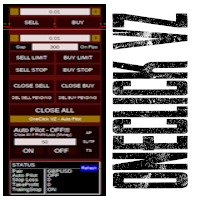
Simple panel of trade on your chart with OneClick VZ . This trade panel will make it easier for you. Equipped with several functions that make it very easy for you. You can try Trial Version OneClick V1 in here . This version includes: Open Order Buy Open Order Sell Open Pending Order [Buy Limit - Buy Stop - Sell Limit-Sell Stop] Close ALL orders Close Order Buy Close Order Sell Delete Pending Order [Buy Limit - Buy Stop - Sell Limit-Sell Stop] Order Management: Stop Loss Take Profit Trailing S
All In One Trade Manager is a trade manager and one-click trading panel for manual traders on MetaTrader 4. It works as a trading assistant, risk manager and position size calculator in one dashboard. It brings together everything below in one panel: order entry with risk sizing automatic trade management advanced order types account protection statistics Its entry checks run in the background and tell you, before you click BUY or SELL, when something speaks against the trade. Also available
IMPORTANT NOTE : This is a dashboard indicator and will not work on strategy tester. Multi-Symbol Trend Scanner - Professional Market Analysis Tool Overview The   Multi-Symbol Trend Scanner   is a sophisticated trading dashboard that provides real-time market analysis across multiple financial instruments simultaneously. Designed for both novice and professional traders, this powerful indicator displays crucial market data in an intuitive, table-aligned format that's easy to interpret at a glan
Exit Area Ultimate
Thushara Dissanayake
3 (1)
Le       Zone de sortie ultime       est un outil graphique pratique qui affiche       ATR quotidien (Average True Range)       et       ADR (Variation quotidienne moyenne)       Les niveaux directement sur votre graphique aident les traders à comprendre l'amplitude des variations quotidiennes d'un actif. En affichant ces       L'indicateur,   basé sur des zones cibles de volatilité   , répond à une question essentielle : jusqu'où le prix peut-il raisonnablement aller aujourd'hui ? En se basant
Quick Panel Pro
Ziheng Zhuang
5 (1)
Cet EA est un outil de trading professionnel qui intègre une gestion flexible des risques et 6 ensembles de panneaux de trading. Version MT5 :  Quick Panel Pro Hedging caractéristiques Les calculs par lots sont rapides et faciles. Lorsque vous déplacez la ligne d'arrêt, les calculs s'effectuent immédiatement. La plupart des transactions commerciales peuvent être effectuées rapidement en cliquant simplement sur ce panneau. Vous pouvez rapidement basculer entre les panneaux en cliquant simplement
L'indicateur Crypto_Forex « Détecteur CCI FLAT » est un outil auxiliaire efficace pour le trading ! Pas de refonte. Je vous propose d'améliorer vos méthodes de trading avec cet excellent indicateur pour MT4. - L'indicateur affiche les zones de prix plates sur le graphique. Il dispose d'un paramètre « Sensibilité plate », qui permet de détecter les zones plates. - Le « Détecteur CCI FLAT » peut être utilisé pour confirmer les entrées d'action de prix ou en combinaison avec d'autres indicateurs.
Magic Point Calculation System Support, resistance, target position... Use scientific calculations to help your trades Find the corresponding and low points Through our observation of the current chart, find the corresponding high and low points Enter the high and low points and calculate Enter the high and low point at the corresponding positions and click calculate to get the support, resistance, target, etc. Pre-order and wait for the result Pre-order at the price calculatedthe risk of ext
Ce conseiller offre les fonctionnalités suivantes : Position ouverte : ouvrez un ordre long ou court lorsque le prix franchit la ligne de tendance. Liquidation : Liquidez les positions longues ou courtes lorsque le prix franchit la ligne de tendance. Trailing Stop Loss – L'EA suit la ligne de tendance et continue d'augmenter le stop loss pour les ordres à long terme ou de réduire le stop loss pour les ordres à court terme. La ligne peut être une ligne de tendance ou une ligne horizontale.      
EasyTrade
Vitaly Muzichenko
2.33 (6)
Small trading panel for managing orders and positions in 1 click for MetaTrader 4 Version for MetaTrader 5 here Set hidden TakeProfit, StopLoss and pending orders at lines placed on the chart Work on time on the news Backtesting manual strategies in the tester Placing virtual orders Playing a sound signal when the price reaches a level Automatic closing of all positions on the account or symbol by the total take profit in the deposit currency Description Can be dragged to any part of the chart
TPSpro Risk Manager
Roman Podpora
3.67 (3)
Gestionnaire des risques TPSpro       est un système unique de contrôle professionnel des risques pour les traders de toute formation et de tout capital. Vous permet d'éviter les pertes dans les échanges et les erreurs graves dans les transactions. TPSpro Risk Manager est nécessaire à la gestion des risques, principalement pour les scalpers et les day traders, mais il est utilisé avec succès par les traders de tout style de trading. Le panneau comporte 3 colonnes, chacune contenant des informat
Signal Finding
Maryna Shulzhenko
Signal Finding is a trend indicator, a technical analysis tool that helps to determine the exact direction of a trend: either an upward or a downward movement of the price of a trading instrument. Although these indicators are a little late, they are still the most reliable signal that a trader can safely rely on. Determining the market trend is an important task for traders. With this indicator, you can predict future values. But the main application of the indicator is to generate buy and sel
This utility tool help you to close all orders having profit immediatly with only ONE CLICK, its work is very fast. You can choose which symbol you want or close all symbols so it will helpful for you in your trading to manage trading faster. If you want it work on all symbols, you just need to leave symbol parameter blank (like in default setting). If you want it work on 1 symbol only (for example EURUSD orders) you need to put symbol =EURUSD (see screenshot below). This is a script, so its wil
Trailing Stop Manager MT4 Trailing Stop Manager MT4 is a flexible trade management utility for MetaTrader 5 that automatically moves the Stop Loss as price moves in your favor. It is designed for traders who want to protect profits and manage open positions automatically while keeping control over how and which positions are managed. The manager currently includes two trailing methods: • Standard Trailing Stop • Fractals Trailing Stop It also includes a compact trading panel for opening, managi
Les acheteurs de ce produit ont également acheté
Bienvenue sur Trade Manager EA, l’outil ultime de gestion des risques conçu pour rendre le trading plus intuitif, précis et efficace. Ce n’est pas seulement un outil d’exécution d’ordres ; c’est une solution complète pour la planification des trades, la gestion des positions et le contrôle des risques. Que vous soyez débutant, trader expérimenté ou scalpeur ayant besoin d’une exécution rapide, Trade Manager EA s’adapte à vos besoins, offrant une flexibilité sur tous les marchés, des devises et i
Exp COPYLOT CLIENT for MT4
Vladislav Andruschenko
4.69 (65)
Copieur de trades professionnel pour MetaTrader 4 Un copieur de trades rapide, fiable et professionnel pour MetaTrader 4 . COPYLOT permet de copier des opérations Forex entre les terminaux MetaTrader 4 et MetaTrader 5 , avec une synchronisation flexible adaptée à différents types de comptes et styles de trading. La version COPYLOT MT4 prend en charge : MetaTrader 4 → MetaTrader 4 MetaTrader 5 Hedge → MetaTrader 4 MetaTrader 5 Netting → MetaTrader 4   Version MT5 Description complète + DEMO + PDF
Trade Assistant MT4
Evgeniy Kravchenko
4.43 (197)
It helps to calculate the risk per trade, the easy installation of a new order, order management with partial closing functions, trailing stop of 7 types and other useful functions. Additional materials and instructions Installation instructions   -   Application instructions   Line function -   shows on the chart the Opening line, Stop Loss, Take Profit. With this function it is easy to set a new order and see its additional characteristics before opening.   Risk management  - The risk calcu
Local Trade Copier EA MT4
Juvenille Emperor Limited
4.96 (111)
Local Trade Copier EA MT4 est un copieur de trades rapide et flexible permettant de copier et de gérer des trades entre plusieurs comptes MetaTrader 4 sur le même ordinateur Windows ou Windows VPS. Il combine la synchronisation locale des trades avec des contrôles côté Receiver pour la taille des lots, la gestion du risque, le filtrage des trades, le mappage des symboles, la gestion des trades et la protection du compte. Configurez vos terminaux Transmitter et Receiver en environ 1 minute et co
The product will copy all telegram signal to MT4   ( which you are member  ) , also it can work as remote copier.  Easy to set up, copy order instant, can work with almost signal formats, image signal, s upport to translate other language to English Work with all type of channel or group, even channel have "Restrict Saving Content", work with  multi channel, multi MT5 Work as remote copier: with signal have ticket number, it will copy exactly via ticket number. Support to backtest signal. How to
News Filter EA MT4
Rashed Samir
5 (10)
News Filter EA: Advanced Algo Trading Assistant News Filter EA is an advanced algo trading assistant designed to enhance your trading experience. By using the   News Filter EA , you can integrate a Forex economic news filter into your existing expert advisor, even if you do not have access to its source code. In addition to the news filter, you can also specify   trading days   and   hours   for your expert. The News Filter EA also includes   risk management   and   equity protection   features
TradePanel MT4
Alfiya Fazylova
4.84 (95)
Trade Panel est un assistant commercial multifonction. L'application contient plus de 50 fonctions de trading pour le trading manuel et permet d'automatiser la plupart des tâches commerciales. Instructions d'utilisation : https://www.mql5.com/fr/blogs/post/762589 Version d'essai de l'application pour un compte démo : https://www.mql5.com/fr/blogs/post/762644 Comment installer l'application : https://www.mql5.com/fr/blogs/post/762645 Comment tester l'application en mode visuel : https://www.mql5.
Telegram to MT4 Coppy
Sergey Batudayev
4.09 (11)
Télégramme vers MT4 :   la solution ultime pour copier des signaux Simplifiez votre trading avec   Telegram vers MT4   , l'utilitaire de pointe conçu pour copier les signaux de trading directement depuis les canaux et chats Telegram vers votre plateforme MetaTrader 4, sans DLL. Cette solution robuste garantit une exécution fluide des signaux avec une précision et des options de personnalisation inégalées, vous faisant gagner du temps et optimisant votre efficacité. [ Instructions and DEMO ] Cara
Trade copier MT4
Alfiya Fazylova
4.62 (37)
Trade Copier est un utilitaire professionnel conçu pour copier et synchroniser les commandesentre les comptes de trading. Les commandes sont copiées du compte/terminal du fournisseur vers le compte/terminal du destinataire, qui sont installés sur le même ordinateur ou vps. Avant d'acheter, vous pouvez tester la version démo sur un compte démo. Version démo ici . Instructions complètes ici . Principales fonctionnalités et avantages: Prend en charge la copie des commandes MT4> MT4, MT4> MT5, MT5>
Telegram to MT4 Multi-Channel Copier   copie automatiquement les signaux de trading de vos canaux Telegram et Discord directement vers MetaTrader 4. Pas de bots, pas d'extensions de navigateur, pas de copie manuelle. Un signal arrive sur Telegram ou Discord et l'EA ouvre le trade dans votre terminal en quelques secondes. Et avant de copier un canal, le backtester intégré vous montre ce que ce canal aurait fait sur votre compte. Le produit comprend deux composants : une application Windows qui éc
DoIt Trade Manager - Risk Panel and EA Position Manager for MT4 Finding an entry is only half the job. Many execution mistakes happen in position sizing, partial exits, breakeven, trailing and account protection. DoIt Trade Manager puts the complete workflow on the chart. Plan the risk before entry, execute the order and apply consistent management rules to your manual trades and selected positions opened by other EAs. Full setup guide + how the free version works and where PRO starts :  https:/
Trade Indicator Assistant is a powerful MT4 utility designed to turn indicators into automated trading systems. Its main feature is the ability to automatically detect an indicator’s   BUY and SELL signal buffers , without requiring you to know the buffer numbers, search through indicator settings, or modify the indicator source code. Bonus Indicator: After purchasing Trade Indicator Assistant, contact me to receive Trade Signal Pro completely free as a bonus indicator. [Download Demo Version]
PZ Trade Pad Pro MT4
PZ TRADING SLU
3.67 (3)
Effortlessly calculate lot sizes and manage trades to save time and avoid costly errors The Trade Pad Pro EA is a tool for the Metatrader Platform that aims to help traders manage their trades more efficiently and effectively. It has a user-friendly visual interface that allows users to easily place and manage an unlimited number of trades, helping to avoid human errors and enhance their trading activity. [ Installation Guide | Update Guide | Troubleshooting | FAQ | All Products ] One of the k
Trading History MT4
Siarhei Vashchylka
5 (9)
Trading History - A program for trading and money management on the history of quotes in stratagy tester. It can work with pending and immediate orders, and is equipped with trailing stop, breakeven and take profit functions. Very good for training and testing different strategies. Manual (Be sure to read before purchasing) Advantages 1. Allows you to test any trading strategy in the shortest possible time 2. An excellent simulator for trading training. You can gain months of trading experience
Trade Manager Pro MT4
Bryan Djoufack Nguessong
Il s'agit d'un utilitaire pour faciliter votre trading en mettant en un ou quelques clics des tâches fastidieuses comme la gestion des ordres et la gestion des risques. Caractéristiques Gestion du risque  Calcule automatiquement les lots en fonction du risque spécifié en % ou en $ (paramètre d'entrée MoneyBasedRisk) dans le champ risque et vous laisse entrer en plaçant des lignes pour SL TP etc. et affiche le Risk Reward en temps réel. TrueRisk inclut les commissions lors du calcul de la ta
Shepherd Safety EA
AW Trading Software Limited
4.92 (13)
AW Shepherd Safety EA est un Expert Advisor qui accompagne les positions ouvertes. Le trader ouvre le premier ordre depuis le panneau, puis l'EA gère lui-même le panier : il ajoute des ordres de récupération filtrés par la tendance, clôture le côté par TakeProfit, trailing ou stop et affiche les niveaux de clôture sur le graphique. Les achats et les ventes sont gérés séparément, les deux côtés peuvent être ouverts simultanément. Un ordre de récupération ne s'ouvre pas simplement au pas de prix,
Trade Assistant Pro 36 in 1
Makarii Gubaydullin
4.76 (21)
Outil Multifonction : Calculatrice de Lots, Ordres Grid, Ratio R/R, Gestionnaire de Trades, Zones d'Offre et de Demande, Price Action et bien plus Version Démo   |   Manuel d'utilisation L'Assistant de Trading ne fonctionne pas dans le testeur de stratégies : vous pouvez télécharger la Version Démo ICI pour tester l' utilitaire . Contactez-moi pour toute question / idées d'amélioration / en cas de bug trouvé Si vous avez besoin d'une version MT5, elle est disponible ici Simplifiez, accélérez et
RS Trade Copier
Boris Sedov
5 (1)
RS Trade Copier - le copieur de trades local ultra-rapide avec une véritable interface graphique. Arrêtez de saisir les numéros de compte manuellement. Fini les listes interminables de 200+ paramètres dans l'onglet Inputs. Un outil fiable et flexible pour copier les opérations de trading entre plusieurs terminaux MT4 et MT5. Il convient aux traders expérimentés, aux services de signaux ainsi qu'aux investisseurs privés. Il permet la synchronisation du trading d'un ou plusieurs Providers vers un
Rhino Chart Drawing Tools fournit un flux de travail de dessin de type TradingView pour MetaTrader 4. Il comprend 54 outils de dessin , une barre d'outils personnalisable, les Favoris, des styles rapides, les paramètres des objets, des modèles et un gestionnaire d'objets. Manuel utilisateur : Comment utiliser le produit Version démo gratuite : Télécharger la démo Version MetaTrader 5 : Rhino Drawing Tools pour MT5 Outils de dessin Groupe Liste des objets Lignes Ligne de tendance, rayon, ligne
Trade Dashboard MT4
Fatemeh Ameri
4.96 (55)
Trade Dashboard simplifies how you open, manage, and control your trades, with built-in lot size calculation. It allows you to execute trades, manage risk, and control positions directly on the chart, with tools such as partial close, breakeven, and trailing stop. Designed to reduce manual work and help you stay focused on your trading decisions. A demo version is available for testing. Detailed explanations of features are provided within the MQL5 platform. Installation instructions are include
Le MT4 to Telegram Signal Provider est un outil facile à utiliser et entièrement personnalisable qui permet d'envoyer des signaux à Telegram, transformant ainsi votre compte en fournisseur de signaux. Le format des messages est entièrement personnalisable ! Cependant, pour une utilisation simple, vous pouvez également opter pour un modèle prédéfini et activer ou désactiver des parties spécifiques du message. [ Démonstration ]   [ Manuel ] [ Version MT5 ] [ Version Discord ] [ Canal Telegram ]  N
Multi Account Local Trade Copier est un copieur de trades local rapide pour MetaTrader : copiez les trades entre terminaux MT4/MT5 sur le même PC ou VPS Windows, d'un compte master vers plusieurs comptes récepteurs — vos propres comptes réels, démo ou prop firm, chez le même courtier ou chez plusieurs. Il est piloté par événements : le master publie chaque trade à l'instant où il se produit, et le récepteur mesure et enregistre la latence de copie réelle de chaque trade — typiquement 50-150 ms .
The indicator has three main tools: Magnifier (Zoom chart), Ruler  ( Time and Price scales ),   and Crosshair. You can move it all around with your mouse and customize different formats for  displaying , customize   size and color of each element. The Magnifier (zoom chart) allows you to display candles from any time frame and at different scales. Hotkeys: 'Q' - higher timeframe, 'A' - lower timeframe, 'W' - decrease candle size, 'S' - increase candle size, 'Z' - show/hide zoom chart You can
Automatic Trailing Stop Based on Take Profit Percentage with Profit Lock EA MT4   Lock in your profits and "let your winners run" past your 100% take profit target with this EA.  This Expert Advisor automatically adjusts your Stop Loss based on up to 4 user-defined Take Profit Target Percentages, locking in your profit.  If price pushes past your 100% take profit target, the EA will automatically trail the price by user-defined pips, so you won't miss that runaway train again.   EA Features The
Exit Manager
Victor Christiaanse
5 (2)
Close every trade at the right moment, automatically. Most traders spend their energy on the entry and then close too early, too late, or on a feeling. Exit Manager takes the exit off your hands. Open a trade the way you always do, by hand or with any Expert Advisor, and Exit Manager watches it and closes it, fully or partly, when the indicator signal you chose appears. You can see it working on the chart. A clean panel on your chart shows, for every open trade, which rule will close it next, ho
TradeMirror est un outil de copie d'ordres localisé, spécialement conçu pour les plateformes MT4/MT5, qui synchronise les opérations de trading en temps réel. Tutoriel Veuillez cliquer sur le lien Tutoriel Trademirror pour voir plus de tutoriels. Avantages du produit En se basant sur les normes élevées des logiciels financiers en matière de sécurité, de stabilité et de protection de la vie privée, nous avons procédé à des optimisations en profondeur sur trois dimensions principales : Une interfa
Unlimited Trade Copier Pro is a tool to copy trade remotely to multiple MT4, MT5 and cTrader accounts at different computers/locations over internet. This is an ideal solution for you if you are a signal provider and want to copy your trades to other receivers globally on your own rules. One provider can copy trades to multiple receivers and one receiver can get trade from multiple providers as well. The provider can even set the subscription expiry for each receiver, so that receiver will not b
King Trade Copier MT4
Mohammed Maher Al-sayed Mohammed Ahmed Saleh
5 (1)
King Trade Copier relie des terminaux MetaTrader qui tournent sur le même ordinateur ou le même VPS. Les trades ouverts sur un compte apparaissent sur les autres. Le fichier contient les deux rôles, de sorte que le même téléchargement devient l'émetteur ou un récepteur selon la valeur que vous donnez à Mode. Sur chaque graphique, le panneau indique si ce terminal envoie ou reçoit, nomme le compte de l'autre côté, compte les récepteurs qui ont répondu et donne l'ancienneté du dernier signal. Un
Take a Break
Eric Emmrich
5 (31)
Take a Break pauses your Expert Advisors when trading is a bad idea: before news, after a daily loss, outside your trading hours, or when a rule you wrote yourself says so. When the pause is over, your EAs simply continue. Account protection for all your EAs in one tool: news filter, drawdown and equity protection, time filter and custom rules. One EA on one chart protects the whole account, the free indicator gives every chart its own rules on top. Free demo | What is new in 26.09 | Support Ass
Copieur ->Interaction d'interface pratique et rapide, les utilisateurs peuvent l'utiliser immédiatement       ->>>> Recommandé pour une utilisation sur des ordinateurs Windows ou VPS Windows Caractéristiques: Paramètres de copy trading diversifiés et personnalisés : 1. Différents modes de lot peuvent être définis pour différentes sources de signaux 2. Différentes sources de signaux peuvent être définies pour le copy trading avant et arrière 3. Les signaux peuvent être définis avec des commentai
Plus de l'auteur
IC Trade Manager
Tholinhlanhla Thanda Makhoba
IC Risk Manager: Risk Calculator and Trade Manager for MT5 IC Risk Manager lets you plan a trade on the chart before you place it. You drag a colored box to set your stop loss and take profit, and the lot size is calculated for you from your risk. Nothing is sent to the broker until you press EXECUTE. How it works Set your risk. Enter a risk percentage of your balance, or switch to a money amount by clicking the “Risk %” button. You can also type a fixed lot size and the panel will show the risk
Filtrer:
Aucun avis
Répondre à l'avis