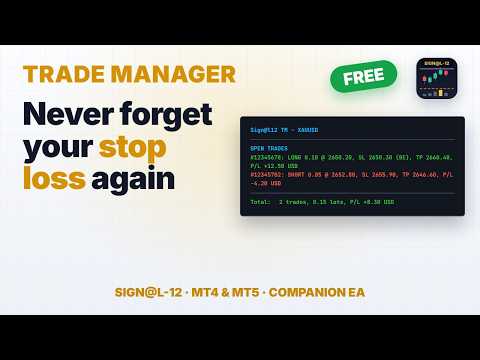
Signal12 Trade Manager MT4

Sign@l12 Trade Manager: protect your manual trades without watching every tick.


Sign@l12 Trade Manager is a small Expert Advisor that looks after the trades you open yourself. It does four jobs:
- it adds a stop loss and / or take profit when a trade has none
- it moves the stop loss to break even once the trade is far enough in profit
- it shows all your open trades on a clean dashboard, with SL, TP and profit or loss

- it logs every trade to a CSV file when it closes, so you can review your trading


Requests accepted - pls message the developer, the more requests for a specific feature the more likely the change will be implemented.


IT ONLY MANAGES TRADES. IT NEVER OPENS OR CLOSES A TRADE.


The EA only changes the stop loss and take profit of positions that are already open. Every entry and every exit is your decision. It never places orders, never closes positions and never changes your lot size.


It is built as the companion to the Sign@l12 indicator (see below), but it works on its own on any symbol and any timeframe.


ADVANTAGES
- Never trade without a stop again: if you forget the SL or TP, or open a trade in a hurry, it is added for you.
- Distances that fit the market: SL, TP and break even are based on ATR, so they adapt to how much the symbol is moving.
- Stable levels: the ATR is taken from the last closed candle before the trade opened, so the distances stay fixed for the whole trade.
- Break even that covers your costs: the stop is placed a few points past the open price, so spread and commission are covered.
- Safe by design: it only ever moves the stop loss in your favour, and it never sets a level that would close the trade at once.
- Your trades only: by default it manages manual trades only, so it never touches positions opened by other EAs.
- See every trade at a glance: the dashboard lists each open trade with its SL, TP and profit or loss, in green when it is in profit and red when it is in a loss.
- A full trade journal: every closed trade is written to a CSV file with its SL / TP history, break even details, best and worst move, and result.

- Every action explained: each change is written to the Experts tab with the reason, and you can get a pop-up or push alert.


**** WORKS BEST WITH THE SIGN@L12 INDICATOR ****


Sign@l12 is a smart money indicator for MT5 and MT4 that puts the levels traders usually mark by hand onto one clean chart:
- liquidity: buy-side and sell-side levels, equal highs and lows, previous day, week and 6-week highs and lows
- liquidity sweeps, and how much untouched liquidity is left above and below price
- market structure: break of structure (BOS) and change of character (CHoCH)
- fair value gaps and supply and demand zones
- Asian, London and New York sessions

- VWAP, the 9 EMA and a fast and slow EMA


A compact dashboard shows what is lining up, and OPPORTUNITY alerts go to a pop-up, your phone or email when enough signals agree. Each alert shows the reasons behind it, so you can judge it in seconds.


The indicator finds the setups and you take the trade. The Trade Manager then makes sure the trade has a stop loss and take profit, and moves the stop to break even. Like the Trade Manager, the indicator never opens or closes trades.


Sign@l12 Indicator for MT5: https://www.mql5.com/en/market/product/203978

Sign@l12 Indicator for MT4: https://www.mql5.com/en/market/product/204455


HOW IT WORKS


Missing stop loss / take profit
- When a position has no SL (or no TP), the EA sets one at ATR x your multiplier from the open price.
- The SL and the TP each have their own on/off switch.
- If price has already moved past the level, the level is not set, because that would close the trade at once. A note is written in the log.

- If you remove a SL or TP by hand later, it is set again. Turn the switch off if you want to trade without one.


Break even
- Once price has moved ATR x your multiplier in profit from the open price, the stop loss is moved to the open price plus your offset in points.
- It only ever moves the stop loss in your favour. If your stop is already better, it is left alone.
- It waits if the new stop would be too close to price for your broker's stop or freeze level.

- Each trade is moved to break even once. After that the stop is yours to manage.


Dashboard
- A compact panel in the top right corner shows the EA name and symbol, whether Algo Trading is on, and your SL / TP and break even settings.
- Below that, every open trade on the symbol gets its own row: direction, lots, open price, SL, TP and profit or loss. "(BE)" shows once the stop is at break even.
- A total row adds up the trades, lots and profit or loss.
- Trades in profit are shown in green and trades in a loss in red. You can change both colours.

- It has the same look and the same settings as the Sign@l12 indicator dashboard. If both run on the same chart, switch the Trade Manager dashboard off so the panels do not overlap.


Trade log
- Each managed trade is tracked from the moment the EA sees it. The details are saved to a file, so nothing is lost if the EA, chart or terminal restarts.
- When a trade closes, one line is added to a daily CSV file in the terminal's common Files folder.
- Each line holds: ticket, direction, lots, open and close time and price, duration, and how it closed (SL, TP, by hand, stop out).
- It also holds the SL and TP at open, the final SL and TP, and how many times each was changed.
- It records the ATR stop loss and take profit the EA added (time, price, ATR value and rule) and the break even move (time, new SL, trigger price and ATR).
- It records the best and worst move while the trade was open, the result in points, and profit, swap, commission and net profit.

- A trade that closed while the EA was off is logged the next time the EA starts.


Safety
- If the broker refuses a change, the error is written to the log and the change is tried again after 30 seconds.

- If Algo Trading is switched off, the EA writes one line in the log and does nothing until it is switched back on.


HOW TO SET IT UP
- Open a chart of the symbol you trade. The EA manages the positions of that chart's symbol only.
- Drag Sign@l12 Trade Manager onto the chart. The Sign@l12 indicator can stay on the same chart.
- In the settings window, tick "Allow Algo Trading".
- Switch Algo Trading on in the toolbar. Without it the EA cannot change your stops.
- Open trades as usual. Check the Experts tab to see every change the EA makes.

Use one copy of the EA per symbol. To manage trades on several symbols, attach it to one chart of each symbol.


NOTES
- Manual trades are trades with magic number 0. Set "Manage" to false only if you want the EA to manage every position on the symbol, including those from other EAs.
- The EA works on open positions only. Pending orders are not changed.
- Push alerts need your MetaQuotes ID in Tools > Options > Notifications.
- No DLLs and no web requests. The trade log writes small text files to the terminal's common Files folder. You can turn it off.

- The EA is a trade management tool, not a trading strategy. Stops can slip in fast markets or over gaps, and no setting guarantees a result.


INPUT PARAMETERS
General
- Name: the name used in the log and alerts. Default "Sign@l12 TM".
- Manage, manual only: true = only manual positions (magic number 0), false = every position on the chart symbol. Default true.

- Manage, ATR period: the ATR period used for all distances. Default 12.


Stop loss / take profit
- Add a SL when a position has none: on/off. Default on.
- Add a TP when a position has none: on/off. Default on.
- ATR timeframe: the timeframe of the ATR used for the SL and TP. Default M15.
- SL distance: ATR x this, from the open price. 0 = leave the SL alone. Default 1.5.

- TP distance: ATR x this, from the open price. 0 = leave the TP alone. Default 3.0.


Break even
- Move SL to break even: on/off. Default on.
- ATR timeframe: the timeframe of the ATR used for break even. Default M15.
- Trigger: move when price is ATR x this in profit from the open price. Default 1.0.

- Offset (points): the SL is placed this many points past the open price, to lock in costs. 0 = exactly at the open price. Default 10.


Alerts
- Pop-up alert when a SL / TP is set or moved: on/off. Default on.

- Push alert to the MT5 mobile app: on/off. Default off.


Trade log

- Write each closed trade to a daily CSV: on/off. Default on.


Dashboard
- Show the dashboard: on/off. Default on. Switch it off when the Sign@l12 indicator dashboard is on the same chart.
- Font size: 6 to 12. Default 7.
- Value column width: in characters. Longer text drops to the next line. Default 80.
- Background, border, label and section title colours.
- Profit colour (default green) and loss colour (default red).

Önerilen ürünler
DF Fib Trader Pro DF Fib Trader Pro, MetaTrader 4 için tasarlanmış otomatik bir işlem sistemidir. Giriş ve çıkış noktalarını tanımlamak için Fibonacci tabanlı fiyat seviyelerini trend ve yapı analiziyle birleştirir. EA hem uzun hem de kısa pozisyonları destekler ve yerleşik risk yönetimi parametreleri içerir. Temel Özellikler: • Giriş, SL ve TP noktalarını çizmek için Fibonacci geri çekilme ve uzatma mantığını kullanır. • Yapılandırılabilir lot büyüklüğü ve zarar durdurma/kâr alma seviyeleri •
FREE
Algorithmic FREE
Vladimir Gorbachev
5 (4)
Medium-term trading system that tries to profit during the price rollbacks after significant movements. The system automatically determines the current trading range, the price rollback levels. This is a demonstration version of the Algorithmic EA, which is optimized over the year 2016 for trading the EURUSD currency pair. It is possible to trade in manual mode using a simple on-screen panel or in fully automatic mode. Amount of trades per month is from 5 to 18 in automatic mode. The recommended
FREE
A "simple design" trading panel, which is characterized by small byte size, low CPU usage, simple steps, and quick operation, 1 to 2 clicks to complete a functional operation, saving time and increasing efficiency . The panel is easy to use, and it is not complicated to set parameters, which is in line with traders' habits. At the same time, its compact- design, clear at a glance, and comprehensive functions are a powerful tool for manual trading! Key features of the panel:   Click "Bid Price"
FREE
一键平仓小工具,可以针对买单、卖单和挂单进行批量操作,可以操作当前图表订单和所有订单,简单高效。 第一行第一个按钮是关闭当前图表 品种 所有买单,第二个按钮是关闭当前图表品种的所有卖单,第三个按钮是关闭当前图表 品种 的所有订单; 第二行 第一个按钮是删除当前图表 品种 所有买单挂单,第二个按钮是 删除 当前图表品种的所有卖单 挂单 ,第三个按钮是 删除 当前图表 品种 的所有 挂单 ; 第三行第一个按钮是关闭所有 品种的全部买单,第二个按钮是关闭所有 品种的全 卖单,第三个按钮是关闭所有 品种的全部订单; 第四行第一个按钮是删除所有 品种全部买单挂单 ,第二个按钮是 删除 全部品种 的全部卖单挂单 ,第三个按钮是删除 全部品种 的全部挂单 。 希望此程序能对您有用
FREE
Macd Martin
Roman Yablonskiy
2.5 (2)
Double Breakout   is an automatic expert advisor with two separate strateges that uses martingale. The MACD indicator with adjustable parameters is used as inputs for each flow of orders. The specified takeprofit and stoploss levels are used to exit the position.  General recommendation The minimum recommended deposit is 1000 cents. Spread is recommended not more than 3 points. It is better to use trend currency pairs. The martingale parameter can be set from 0.1 to any value. When martingale i
FREE
Grid Assistant Pro – Utility for Managing Grid Strategies on MetaTrader 4 Grid Assistant Pro is a professional utility that helps traders manage and monitor unidirectional grid strategies directly from the MT4 chart. It provides a visual dashboard , clear controls, and automated risk protection features for precise and efficient grid operation. Key Features Visual Dashboard Real-time metrics: Balance, Equity, Floating P/L, Drawdown %, Free Margin Grid status: active and pending or
FREE
Smart Trade Monitor — Real-Time Position Tracking, P&L Analysis & Alert System   Real-Time Monitoring : Auto-tracks open/closed positions, displays yesterday’s & previous day’s P&L—no manual calculations!   Smart Alerts (Premium Only) : Instant push notifications + sound alerts for position changes—never miss a trading opportunity!   User-Friendly : One-click setup, key data displayed directly on charts for faster decisions.   Cross-Platform : Supports both MT4 & MT5, compatible with
FREE
Update:ver1.53 (2023/08/16) ・概要と必要環境 手動発注もしくは他ツール等からの発注に対し、指値発注予約の複製を生成します。こちらは「発注操作の簡易化」に特化したものになります。発注判断となる分析は、資料を漁る、経験則を導く、他の分析ツールやEAを併用する等、利用者ご自身で頑張ってください。なお、ver1.28より、「決済後、自動で再発注する」機能が実装されました。(有償版でのみ有効化できます) ・導入と導入後の操作 導入そのものは簡単です。「自動売買可能なEA」として、適当なチャートにて動作させるだけです。(チャートの対象相場は問いません。このEAは、チャートを見ていません)。あとは、「このEAでのローカルコピー以外の発注」があれば、それに応じて「損失が出た場合に備えての追加取引の予約」という形で、指値発注が自動生成されます。 導入操作上の注意として、「本EAを、複数のチャートで動作」はできません。EAがチャート自体を見ておらず、注文状況だけを見ているため、複数のチャートで動かす意味もありません。また、ターミナルとEAの設定として「自動売買」を許可しない
FREE
FxTT News Feed FxTT News Feed, ChartDeck PRO için ücretsiz bir yardımcı Uzman Danışmandır. İşlem mantığı içermez, emir açmaz, pozisyon yönetmez ve piyasa fiyatlarını okumaz. Ekonomik takvim verilerini bir zamanlayıcıyla alır ve yerel bir dosyaya yazar, çünkü MetaTrader 4 göstergeleri ağ isteği yapamaz. Terminaldeki herhangi bir grafiğe bir kez ekleyin. Tek bir örnek, oradaki her ChartDeck PRO grafiğine hizmet verir. Bu, ChartDeck PRO'nun Günlük haberler satırı için bir ön koşuldur, genel amaçlı
FREE
Real-time spread tracking and monitoring software Displays spread values in form of histograms on current timeframe of chart Convenient for analyzing spread changes, as well as for comparing trading conditions of different brokers By placing on desired chart, the spread changes at different trading times are displayed Additionally Fully customizable Works on any instrument Works with any broker
FREE
Simple RSI Forex Trading Strategy
Victor Manuel Valderrama Zamora
2.5 (2)
Diversify the risk in your trading account by combining our Expert Advisors. Build your own custom trading system here:   Simple Forex Trading Strategies The expert advisor opens trades when RSI indicator enter in oversold or overbought areas. The Stop Loss, Take Profit, and Trailing Stop are calculated based on the ATR indicator. The recommended currency pair is EURGBP and the recommended timeframe to operate and to do backtests is H4. This Expert Advisor can be profitable in any TimeFrame an
FREE
This panel is a part of the SupDem-Pro trading system and is used to search for the best opportunities for any available instruments. Which can be selected manually in the Market Watch (open it with CTRL + M). Using this trading panel in combination with ShvedSupDem-Pro_Zone allows to analyze multiple currency pairs with a single click. The panel allows to load any instruments from the Market Watch, from 6 major currency pairs up to all instruments (480). The indicator parameters Button Width -
FREE
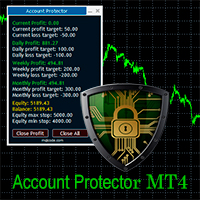
Account Protector MT4
Vladimir Mametov
4.5 (10)
The Expert Advisor is designed to protect the account, fix profit (loss) and display current information about the account. Trading account protection is carried out by closing all open orders in the terminal and/or closing all charts. When running the Expert Advisor with default parameters, it will only display your account information and will be reduced in size. Next, you can set the conditions under which your trading account will be protected. Profit and loss limits can be set for daily pro
FREE
MerkaStudent is a basic version of an expert advisor that allows us to understand part of the behavior of a chart in historical time. It uses some basic parameters in trading, which allows us to understand mathematically how a chart moves and thus know what is our mathematical expectation in the historical period analyzed. Starting from a mathematical logic, we can create a strategy to evaluate its results.
FREE
MT4 için NAS100 Auto SL ve TP Maker ile tanışın: MetaTrader 4'te Nasdaq 100 piyasasında gezinen yatırımcılar için vazgeçilmez bir yardımcı olan NAS100 Auto SL ve TP Maker ile StopLoss ve TakeProfit ayarlarını bir daha asla kaçırmayın. Bu araç, StopLoss ve TakeProfit seviyelerinin yönetimini otomatikleştirmek için sorunsuz bir çözüm arayanlar için tasarlanmıştır. Temel Özellikler: Zahmetsiz Otomasyon: StopLoss ve/veya TakeProfit olmadan Nasdaq 100 işlemlerini otomatik olarak izler. Kullanıcı tar
FREE
This is an Expert Adviser use for manual trading as a background EA or combine with external EA to open orders. Loss Recovery Trading is one of your options to handle the lose positions instead of using stop loss by setting a zone recovery area and target to exit the turn rounds sequence. How It Work? If the market goes against your first positions direction at the specific of losing points, the EA will open an opposite direction position with calculated larger lot size and also keep the first
FREE
Buffer Finder Tool
Afsal Meerankutty
4.75 (4)
CyberZingFx Buffer Finder Tool Developed for Finding Buffers of Indicator to use in Universal Indicator EA . This is Not an Indicator or EA CyberZingFx Buffer Finder Tool is utility tool designed specifically for MetaTrader 4 (MT4) users. It is a standalone application that helps you easily find the buffers of any MT4 indicator, allowing you to use them in your Universal Indicator EA. With the Buffer Finder Tool, you no longer have to search through the data window to find the buffers you need.
FREE
Free. A picture of every trade, saved for you, without lifting a finger. TrueRisk Trade Journal takes a picture of the chart the moment a trade opens and again when it closes, writes the trade's numbers on the picture (side, lots, entry, stop, target, profit, R, how long you held it) and adds one row per closed trade to a journal file you can open in Excel or Google Sheets. It works for every trade on the account: trades from your panel, from an Expert Advisor, or from the MetaTrader app on your
FREE
AI Advisor – Yapay Zekânın Gerçek Hesabınızı Görmesini Sağlayın AI Advisor, gerçek hesap bilgilerinizden otomatik olarak yüksek kaliteli komut metinleri (prompt) üretir ve bunları doğrudan istediğiniz herhangi bir yapay zekâ sohbetine yapıştırarak kullanabilirsiniz. Hesap durumunuzu hızlıca özetlemenize, enstrümanın mevcut yapısını anlamanıza, riskleri fark etmenize ve potansiyel kâr fırsatlarını keşfetmenize yardım eder; böylece yapay zekâ, hayali bir senaryoya değil,   gerçek işlem durumunuza
FREE
EA Master Version any Follow Copy Account  (Acc. Number)  need a open MT Terminal, download multiple times Step1:   Open Master MT5 Terminal    =  install master- Version   (on any Symbol just one Time) Step2:   Open Follower MT5 Terminal = install follower- Version  (on any Symbol just one Time) Step3:   all Trades from any Symbol or any Robot are copy now to follow- Terminal immediately for simple copy set on Chart and   Start   no optimization. This Robot is a Trade Copier for MT5 that automa
FREE
Proftrader Free
Alexander Nikolaev
4 (3)
This Expert Advisor analyzes the last candles and determines whether there will be a reversal or a large correction. Also, the readings of some indicators are analyzed (their parameters can be adjusted). Is a free version of Proftrader . Unlike the full version, in the free version of the adviser the initial lot cannot be higher than 0.1, trading pair only EURUSD and also it has fewer configurable parameters. Input parameters Lots - lot size (at 0, the lot will be calculated from the percentage
FREE
Vik Standart
Ivan Kopchuk
4.43 (7)
Features: 1. Your constructor strategies. 2. Large selection of standard indicators. 3. Exact market entry according to your strategy. 4. Slip filter. 5. Support for four and five characters. 6. Trend trading. 7. Trading in flat. 8. Minimum deposit. 9. Aggressive or quiet trade. 10. Limit the lot. 11. Position tracking. 12. Restoring balance after loss. Input parameters    Lot - fixed lot size.    StopLot - lot restriction.    UseVxod - enable / disable login pattern.    UseStop -
FREE
Free automatic Fibonacci is an indicator that automatically plots a Fibonacci retracement based on the number of bars you select on the BarsToScan setting in the indicator. The Fibonacci is automatically updated in real time as new highest and lowest values appears amongst the selected bars. You can select which level values to be displayed in the indicator settings. You can also select the color of the levels thus enabling the trader to be able to attach the indicator several times with differe
FREE
MT4持仓助手 由于限制 上传的版本是很老的版本  加载后 看EA的 " 关于 " 说明   PS: MT4持仓助手最新版 单文件 只能实现 部分功能  需要大量的指标辅助运行   使用前先打印EA快捷键说明文件 文件在网盘或Q群中 一般会在 助手安装包 的文件夹里 辅助性EA 订单半自动管理 自动设置止盈止损移动止损 分批平仓 划线模式 横线模式 布林带平仓 定时器追踪止盈止损等 同时有大量快捷键处理下单 改止盈止损 挂单等 省时省力。 新增了 副面板 有大量的指标 辅助订单管理  自动化相关的 程序 主要功能 1.6版本 加入了 复盘 测试模式下 可以模拟下单的功能 辅助性EA 订单半自动管理 自动设置止盈止损 移动止损 分批平仓   定时器追踪止盈止损等 划线模式   横线模式 短线追单 参考各种指标 执行一些操作 有大量快捷键处理下单 改止盈止损 挂单等 省时省力。 主要是解放双手,不用长时间盯盘 EA可以半自动的处理一些 订单 以后可能会增加自动化的功能 此代码是在GPL-3.0许可下发布的。 This code is released under the GPL
FREE
This indicator help to mark the high and low of the session Asian,London,Newyork , with custom hour setting This indicator is set to count from minute candle so it will move with the current market and stop at the designated hour and create a accurate line for the day. below is the customization that you can adjust : Input Descriptions EnableAsian Enables or disables the display of Asian session high and low levels. EnableLondon Enables or disables the display of London session high and
FREE
Indicator Test Report MT4
Narayanan Mohanan Mohanan Krishnan
MetaTrader 4 için Indicator Test Report — herhangi bir göstergenin gerçekte nasıl davrandığını gösteren bir MT4 repaint denetleyicisi ve gösterge test cihazı Derlenmiş bir göstergenin içini göremezsiniz. Indicator Test Report, satın alınmış, yazılmış veya MetaTrader'a yerleştirilmiş herhangi bir göstergeyi yükler ve bir açıklamanın yapamayacağı soruyu yanıtlar: repaint yapıyor mu, ne kadar geçmişe ihtiyacı var ve gerçekte ne yayınlıyor? Davranışı bildirir. Derecelendirme yapmıyor. Herhangi bir g
FREE
Rainbow MT4 is a technical indicator based on Moving average with period 34 and very easy to use. When price crosses above MA and MA changes color to green, it’s a signal to buy. When price crosses below MA and MA changes color to red, it’s a signal to sell. The Expert advisor ( Rainbow EA MT4) based on Rainbow MT4 indicator, as you can see in the short video below is now available here .
FREE
Orders Manager  is a simple and indispensable assistant for managing all your orders.   Inputs: Magic = 999;                          // Magic  TakeProfit = 1000;                 // Take Profit. If = 0 the level is not setts. StopLoss = 0;                         // Stop Loss. If = 0 the level is not setts. Slippage = 10;                       // Slippage GeneralProfit = false;            // Closing all orders based on total profit. If false the function is disabled and works according to TakePr
FREE
EA Follower Version any Follow Copy Account  (Acc. Number)  need a open MT Terminal, download multiple times Step1:   Open Master MT5 Terminal    =  install master- Version   (on any Symbol just one Time) Step2:   Open Follower MT5 Terminal = install follower- Version  (on any Symbol just one Time) Step3:   all Trades from any Symbol or any Robot are copy now to follow- Terminal immediately for simple copy set on Chart and   Start   no optimization. This Robot is a Trade Copier for MT5 that auto
FREE
PZ Bollinger Bands EA
PZ TRADING SLU
4.6 (5)
This EA trades using the Bollinger Bands indicator. It offers many trading behaviors and flexible position management settings, plus many useful features like customizable trading sessions and a martingale mode. [ Installation Guide | Update Guide | Troubleshooting | FAQ | All Products  |  Get Help ] Easy to use and supervise Fully customizable indicator settings Customizable break-even, SL, TP and trailing-stop Works for ECN/Non-ECN brokers Works for 2-3-4-5 digit symbols Trading can be NFA/
FREE
Bu ürünün alıcıları ayrıca şunları da satın alıyor
Local Trade Copier EA MT4
Juvenille Emperor Limited
4.96 (111)
Local Trade Copier EA MT4, aynı Windows bilgisayarı veya Windows VPS üzerinde çalışan birden fazla MetaTrader 4 hesabı arasında işlemleri kopyalamak ve yönetmek için hızlı ve esnek bir işlem kopyalayıcıdır. Yerel işlem senkronizasyonunu, Receiver tarafında lot büyüklüğü, risk yönetimi, işlem filtreleme, sembol eşleştirme, işlem yönetimi ve hesap koruması kontrolleriyle birleştirir. Transmitter ve Receiver terminallerinizi yaklaşık 1 dakika içinde ayarlayın ve aynı veya farklı brokerlardaki hesa
Exp COPYLOT CLIENT for MT4
Vladislav Andruschenko
4.69 (65)
MetaTrader 4 için profesyonel işlem kopyalayıcı MetaTrader 4 için hızlı, güvenilir ve profesyonel bir işlem kopyalayıcı. COPYLOT , MetaTrader 4 ve MetaTrader 5 terminalleri arasında Forex işlemlerinin kopyalanmasını sağlar ve farklı hesap türleri ile işlem senaryoları için esnek senkronizasyon sunar. COPYLOT MT4 sürümü şunları destekler: MetaTrader 4 → MetaTrader 4 MetaTrader 5 Hedge → MetaTrader 4 MetaTrader 5 Netting → MetaTrader 4   MT5 sürümü Tam açıklama + DEMO + PDF Nasıl satın alınır Nası
Trade Manager EA’ye hoş geldiniz! Ticaretin daha sezgisel, hassas ve verimli hale gelmesi için tasarlanmış nihai risk yönetim aracı ile tanışın. Bu sadece bir emir verme aracı değil; ticaret planlaması, pozisyon yönetimi ve risk kontrolü için kapsamlı bir çözüm. İster yeni başlayan bir yatırımcı olun, ister deneyimli bir trader ya da hızlı emir gerektiren bir scalper, Trade Manager EA ihtiyaçlarınıza uyum sağlar ve forex, endeksler, emtialar ve kripto paralar dahil tüm piyasalarda esneklik sunar
Trade Assistant MT4
Evgeniy Kravchenko
4.43 (197)
It helps to calculate the risk per trade, the easy installation of a new order, order management with partial closing functions, trailing stop of 7 types and other useful functions. Additional materials and instructions Installation instructions   -   Application instructions   Line function -   shows on the chart the Opening line, Stop Loss, Take Profit. With this function it is easy to set a new order and see its additional characteristics before opening.   Risk management  - The risk calcu
Trade copier MT4
Alfiya Fazylova
4.62 (37)
Trade Copier, ticaret hesapları arasındaki işlemleri kopyalamak ve senkronize etmek için tasarlanmış profesyonel bir yardımcı programdır. Kopyalama, tedarikçinin hesabından/terminalinden alıcının aynı bilgisayarda veya vps'de kurulu olan hesabına/terminaline gerçekleşir. Satın almadan önce demo sürümünü bir demo hesabında test edebilirsiniz. Demo versiyonu burada . Tüm talimatlar burada . Ana işlevler ve avantajlar: Emirlerin kopyalanmasını destekler: МТ4> МТ4, МТ4> МТ5, МТ5> МТ4. Emirlerin kopy
TradePanel MT4
Alfiya Fazylova
4.84 (95)
Trade Panel, çok işlevli bir ticaret asistanıdır. Uygulama, manuel ticaret için 50'den fazla ticaret fonksiyonu içerir ve çoğu ticaret görevini otomatikleştirmeyi mümkün kılar. Uygulama talimatları : https://www.mql5.com/en/blogs/post/756482 Demo hesabı için uygulamanın deneme sürümü: https://www.mql5.com/en/blogs/post/750865 Uygulamayı nasıl kurulur: https://www.mql5.com/en/blogs/post/756239 Uygulamayı görsel modda nasıl test edilir: https://www.mql5.com/en/blogs/post/770277 Uygulamayı VPS Meta
Telegram'dan MT4'e:   Nihai Sinyal Kopyalama Çözümü Telegram ile MT4'e   işlemlerinizi kolaylaştırın, DLL'lere ihtiyaç duymadan doğrudan Telegram kanallarından ve sohbetlerinden MetaTrader 4 platformunuza işlem sinyallerini kopyalamak için tasarlanmış son teknoloji yardımcı program. Bu sağlam çözüm, sinyallerin benzersiz hassasiyet ve özelleştirme seçenekleriyle sorunsuz bir şekilde yürütülmesini sağlayarak size zaman kazandırır ve verimliliğinizi artırır. [ Instructions and DEMO ] Temel Özellik
News Filter EA: Advanced Algo Trading Assistant News Filter EA is an advanced algo trading assistant designed to enhance your trading experience. By using the   News Filter EA , you can integrate a Forex economic news filter into your existing expert advisor, even if you do not have access to its source code. In addition to the news filter, you can also specify   trading days   and   hours   for your expert. The News Filter EA also includes   risk management   and   equity protection   features
Rhino Chart Drawing Tools , MetaTrader 4 için TradingView tarzı bir çizim çalışma ortamı sunar. 54 çizim aracı , özelleştirilebilir araç çubuğu, Favoriler, hızlı stil ayarları, nesne ayarları, şablonlar ve nesne yöneticisi içerir. Kullanıcı kılavuzu: Ürün nasıl kullanılır Ücretsiz demo sürümü: Demoyu indir MetaTrader 5 sürümü: MT5 için Rhino Drawing Tools Çizim Araçları Grup Nesne Listesi Çizgiler Trend çizgisi, ışın, uzatılmış çizgi, yatay çizgi, dikey çizgi, yatay ışın, çapraz çizgi, trend a
MT4 to Telegram Signal Provider , Telegram'a sinyal göndermeyi sağlayan ve hesabınızı bir sinyal sağlayıcısına dönüştüren kullanımı kolay ve tamamen özelleştirilebilir bir araçtır. Mesajların formatı tamamen özelleştirilebilir! Ancak basit kullanım için, önceden tanımlanmış bir şablonu seçebilir ve mesajın belirli kısımlarını etkinleştirebilir veya devre dışı bırakabilirsiniz. [ Demo ]  [ Kullanım Kılavuzu ] [ MT5 Sürümü ] [ Discord Sürümü ] [ Telegram Kanalı ]  New: [ Telegram To MT5 ] Kurulum
Automatic Trailing Stop Based on Take Profit Percentage with Profit Lock EA MT4   Lock in your profits and "let your winners run" past your 100% take profit target with this EA.  This Expert Advisor automatically adjusts your Stop Loss based on up to 4 user-defined Take Profit Target Percentages, locking in your profit.  If price pushes past your 100% take profit target, the EA will automatically trail the price by user-defined pips, so you won't miss that runaway train again.   EA Features The
Telegram to MT4 Multi-Channel Copier   , Telegram ve Discord kanallarınızdaki alım-satım sinyallerini doğrudan MetaTrader 4'e otomatik kopyalar. Bot yok, tarayıcı uzantısı yok, elle kopyalama yok. Sinyal Telegram'a veya Discord'a düşer ve EA birkaç saniye içinde terminalinizde işlemi açar. Ve bir kanalı kopyalamadan önce, yerleşik backtester o kanalın hesabınızda ne yapmış olacağını gösterir. Ürün iki bileşenden oluşur: Telegram kanallarınızı dinleyen bir Windows uygulaması ve sinyalleri MT4 ter
TradeMirror, MT4/MT5 platformları için geliştirilmiş, gerçek zamanlı işlem senkronizasyonu destekleyen yerel bir emir kopyalama aracıdır. Eğitim Daha fazla eğitim görmek için lütfen Trademirror Eğitimi bağlantısına tıklayın. Ürün Avantajları Finansal yazılımlar için güvenlik, istikrar ve gizlilik standartlarına uygun olarak üç temel alanda iyileştirme yapılmıştır: Kullanıcı dostu arayüz ile kolay kullanım Finansal senaryolarda hassas veri izolasyonu için gelişmiş gizlilik koruması Milisanlık emi
Equity Protect Pro: Endişesiz İşlem İçin Kapsamlı Hesap Koruma Uzmanınız Hesap koruması, öz sermaye koruması, portföy koruması, çoklu strateji koruması, kar koruması, kar toplama, işlem güvenliği, risk kontrol programları, otomatik risk kontrolü, otomatik tasfiye, koşullu tasfiye, planlı tasfiye, dinamik tasfiye, iz süren stop loss, tek tıklamayla kapatma, tek tıklamayla tasfiye ve tek tıklamayla geri yükleme gibi özellikler arıyorsanız, Equity Protect Pro ihtiyacınız olan programdır. Kurulumu
Exp Averager
Vladislav Andruschenko
4.82 (22)
Averager for MetaTrader 4 — profesyonel pozisyon kurtarma ve işlem sepeti yönetim sistemi Drawdown'a giren açık işlemleri daha kontrollü yönetmek, ortalama giriş fiyatını iyileştirmek ve tüm pozisyon serisini tek bir mantık altında toparlamak isteyen yatırımcılar için geliştirilmiş profesyonel bir Expert Advisor. Averager yalnızca yeni işlemler ekleyen basit bir ortalama alma aracı değildir. Mevcut pozisyonları yeniden yapılandıran, zarar baskısını azaltan ve tüm sepeti daha verimli bir çıkış n
Desteğe mi ihtiyacınız var? Nasıl kurulur? Sorunuz mu var? Buradan kendi dilinizde sorun, hızlı yanıt: https://www.mql5.com/en/market/product/139089/comments Çalışan Deneme Sürümünü İndir Copy Cat More (Taklitçi Kedi) — İşlem Kopyalayıcı (Trade Copier) MT4 sadece basit bir yerel işlem kopyalayıcı değildir; bugünün ticaret zorlukları için tasarlanmış eksiksiz bir risk yönetimi ve yürütme çerçevesidir (risk management and execution framework). Prop firm challenge'larından kişisel portföy yöneti
Effortlessly calculate lot sizes and manage trades to save time and avoid costly errors The Trade Pad Pro EA is a tool for the Metatrader Platform that aims to help traders manage their trades more efficiently and effectively. It has a user-friendly visual interface that allows users to easily place and manage an unlimited number of trades, helping to avoid human errors and enhance their trading activity. [ Installation Guide | Update Guide | Troubleshooting | FAQ | All Products ] One of the k
Trade Manager FX – MT4 için Risk Hesaplayıcı, İşlem Paneli ve İşlem Yönetimi Trade Manager FX, manuel yatırımcılar için hepsi bir arada bir işlem panelidir. İşleminizi grafikte planlayın, panelin riskinize uygun doğru lotu hesaplamasına izin verin ve tek tıkla gönderin. Girişten sonra pozisyonu sizin yerinize başa baş, trailing stop, kısmi kapatma ve varlık korumasıyla yönetir. Ek materyaller ve talimatlar Kurulum talimatları - Kullanım kılavuzu  - MT5 sürümü Giriş, Stop Loss ve Take Profit
Trade Indicator Assistant is a powerful MT4 utility designed to turn indicators into automated trading systems. Its main feature is the ability to automatically detect an indicator’s   BUY and SELL signal buffers , without requiring you to know the buffer numbers, search through indicator settings, or modify the indicator source code. Bonus Indicator: After purchasing Trade Indicator Assistant, contact me to receive Trade Signal Pro completely free as a bonus indicator. [Download Demo Version]
Trading History - A program for trading and money management on the history of quotes in stratagy tester. It can work with pending and immediate orders, and is equipped with trailing stop, breakeven and take profit functions. Very good for training and testing different strategies. Manual (Be sure to read before purchasing) Advantages 1. Allows you to test any trading strategy in the shortest possible time 2. An excellent simulator for trading training. You can gain months of trading experience
Bu, emir yönetimi ve risk yönetimi gibi zaman alan görevleri tek bir tıklamayla veya birkaç tıklamayla gerçekleştirerek ticaretinizi kolaylaştıran bir Yardımcı Programdır. Özellikler Risk Yönetimi  Risk alanında % veya $ olarak belirtilen riske göre lotları otomatik olarak hesaplar ve sadece SL TP vb. için çizgiler yerleştirerek girmenize ve gerçek zamanlı Risk Ödülünü görüntülemenize izin verir. TrueRisk, yalnızca FX çiftlerinde lot büyüklüğünü hesaplarken komisyonları içerir, böylece örne
The product will copy all telegram signal to MT4   ( which you are member  ) , also it can work as remote copier.  Easy to set up, copy order instant, can work with almost signal formats, image signal, s upport to translate other language to English Work with all type of channel or group, even channel have "Restrict Saving Content", work with  multi channel, multi MT5 Work as remote copier: with signal have ticket number, it will copy exactly via ticket number. Support to backtest signal. How to
Fotokopi->Kullanışlı ve hızlı arayüz etkileşimi, kullanıcılar hemen kullanabilir       ->>>> Windows bilgisayarlarda veya VPS Windows'ta kullanılması önerilir Özellikler: Çeşitlendirilmiş ve kişiselleştirilmiş kopyalama ticareti ayarları: 1. Farklı sinyal kaynakları için farklı lot modları ayarlanabilir 2. İleri ve geri kopyalama ticareti için farklı sinyal kaynakları ayarlanabilir 3. Sinyaller yorumlarla ayarlanabilir 4. Lotun sözleşme lotuna göre kalibre edilip edilmeyeceği Çeşitlendirilmiş v
FCK CurrencyStrength Pro
Patel Hitendrakumar Mahendrabhai
Hi Friends, " FCK Currency Strength Pro " is a auto & semi auto trading expert with direction of pair. Buy-Sell separate or multi currency in one click. The strategy of  FCK Currency Strength Pro  is a combination of custom indicator, Trendlines, Support & Resistance levels ( Price Action ) and most important secretive trading algorithm mentioned above. Download News Ex4 and csv file You need the following SDSnews.ex4 in MQL4/Libraries and the daylightsavings.csv in MQL4/Files. Only 4 of 5 copi
Shepherd Safety EA
AW Trading Software Limited
4.92 (13)
AW Shepherd Safety EA, açık pozisyonları yönetmek için tasarlanmış bir Uzman Danışmandır. İlk emri yatırımcı panelden açar, sepeti bundan sonra EA kendisi yönetir: trend filtresiyle kurtarma emirleri ekler, tarafı TakeProfit, trailing veya stop ile kapatır ve kapanış seviyelerini grafikte gösterir. Alımlar ve satımlar ayrı ayrı yönetilir, iki taraf aynı anda açık olabilir. Kurtarma emri yalnızca fiyat adımına göre değil, Parabolic SAR, iki MA veya mum rengine göre pozisyon yönünde bir dönüş gerç
Çok İşlevli Ticaret Aracı: Lot Hesaplayıcı, Grid Emirleri, R/R Oranı, Ticaret Yöneticisi, Arz ve Talep Bölgeleri, Fiyat Hareketi ve Daha Fazlası Demo Sürüm   |   Kullanım Kılavuzu Ticaret Asistanı strateji test cihazında çalışmaz: bu yardımcı programı test etmek için Demo Sürümünü BURADAN indirebilirsiniz. Herhangi bir soru /iyileştirme fikri/hatalar için benimle iletişime geçin MT5 sürümüne ihtiyacınız varsa, burada mevcuttur Ticaret sürecinizi basitleştirin, hızlandırın ve otomatikleştirin. St
Trade Dashboard simplifies how you open, manage, and control your trades, with built-in lot size calculation. It allows you to execute trades, manage risk, and control positions directly on the chart, with tools such as partial close, breakeven, and trailing stop. Designed to reduce manual work and help you stay focused on your trading decisions. A demo version is available for testing. Detailed explanations of features are provided within the MQL5 platform. Installation instructions are include
Multi Account Local Trade Copier , MetaTrader için hızlı bir yerel işlem kopyalayıcıdır: aynı Windows PC veya VPS üzerindeki MT4/MT5 terminalleri arasında, tek bir master hesaptan birden fazla alıcı hesaba işlem kopyalayın — kendi gerçek, demo ve prop firm hesaplarınıza, aynı brokerde veya farklı brokerlerde. Olay tabanlı çalışır: master her işlemi gerçekleştiği anda yayınlar ve alıcı, her bir kopyanın gerçek kopyalama gecikmesini ölçer ve kaydeder — genellikle 50-150 ms . DLL yok, internet köpr
Göstergenin üç ana aracı vardır: Büyüteç (Yakınlaştırma grafiği), Cetvel (Zaman ve Fiyat ölçekleri) ve Artı İşareti. Farenizle her yeri hareket ettirebilir ve farklı görüntüleme formatlarını özelleştirebilir, her öğenin boyutunu ve rengini özelleştirebilirsiniz. Büyüteç (yakınlaştırma tablosu), mumları herhangi bir zaman diliminde ve farklı ölçeklerde görüntülemenizi sağlar. Varsayılan kısayol tuşları: 'Q' - daha yüksek zaman aralığı, 'A' - daha düşük zaman aralığı, 'W' - mum boyutunu azalt, '
Tek bir PC veya VPS üzerinde MetaTrader terminalleri arasında yerel işlem kopyalayıcı. Kopyalama, MT5 ve MT4 arasında her iki yönde de çalışır. Kopyanın hacmi, öz sermayenin yüzdesi olarak, hesap para biriminde veya ana hesabın risk payını yansıtarak hesaplanır; işlemler sembol, sihirli numara, yorum ve boyut filtreleri ile seçilir. Panel, açık bir kopyanın ömrünü yönetir: sanal SL/TP, başabaş noktası, takip eden stop, sepet kapatma ve planlanmış kapatma. Günlük, toplam ve hacim limitleri hesab
Yazarın diğer ürünleri
Sign@l12 Trade Manager: protect your manual trades without watching every tick. Sign@l12 Trade Manager is a small Expert Advisor that looks after the trades you open yourself. It does four jobs: - it adds a stop loss and / or take profit when a trade has none - it moves the stop loss to break even once the trade is far enough in profit - it shows all your open trades on a clean dashboard, with SL, TP and profit or loss - it logs every trade to a CSV file when it closes, so you can review your
FREE
Sign@l12  : one indicator, many signals, your settings. Sign@l12 puts the levels smart money traders usually mark by hand on one clean MT4 chart: liquidity, market structure, fair value gaps, supply and demand, sessions and VWAP. It keeps them on the chart while they matter, shows clearly when one is filled or swept, and alerts you when enough of them line up. It has many signals, and each one can be switched on or off and fine tuned to the way you trade. The default settings are built for sc
Signal12
Eloise Marais
Sign@l12: one indicator, many signals, your settings. Sign@l12 puts the levels smart money traders usually mark by hand on one clean MT5 chart: liquidity, market structure, fair value gaps, supply and demand, sessions and VWAP. It keeps them on the chart while they matter, shows clearly when one is filled or swept, and alerts you when enough of them line up. Every signal can be switched on or off and fine tuned to the way you trade. The default settings are built for scalpers and day traders
Filtrele:
Değerlendirme yok
Değerlendirmeye yanıt