Hedgehog Pro
- Uzmanlar
-
Alex Amuyunzu Raymond
 I’m an experienced MQL5 developer and software engineer specializing in building robust, high-performance algorithmic trading systems for MetaTrader 5. My work goes beyond standard EA development — I design intelligent, scalable solutions that combine market logic, automation, and external
 - Sürüm: 2.0
- Etkinleştirmeler: 5
Hedgehog Pro: Roll Up. Stay Safe. The Automated Hedge Shield for Your MT5 Account
A hedgehog does not run from danger. It curls into a ball and lets nothing through. Hedgehog Pro does the same for your account. When a trade moves against you, it opens an opposite position at the moment you choose and holds the damage there, instead of letting one bad trade eat your balance.
What Hedgehog Pro is
Hedgehog Pro is a capital protection engine for MetaTrader 5. It does not generate entry signals and it does not open trades on its own. It watches the positions you already have, whether they come from your manual trading, another Expert Advisor, a signal service or a copy trader. When a position loses more than you allow, it steps in with a hedge and manages it under rules you set. Because it is separate from your strategy, you can put it on top of almost any system.
Important requirement: Hedgehog Pro needs a hedging account, where you can hold a buy and a sell on the same symbol at the same time. On a netting account, an opposite order would close your original trade instead of protecting it. If the EA detects a netting account, it disables hedge orders automatically and shows a warning on the dashboard, and the maximum loss protection stays active.
Two hedging engines
1. Full Hedge System
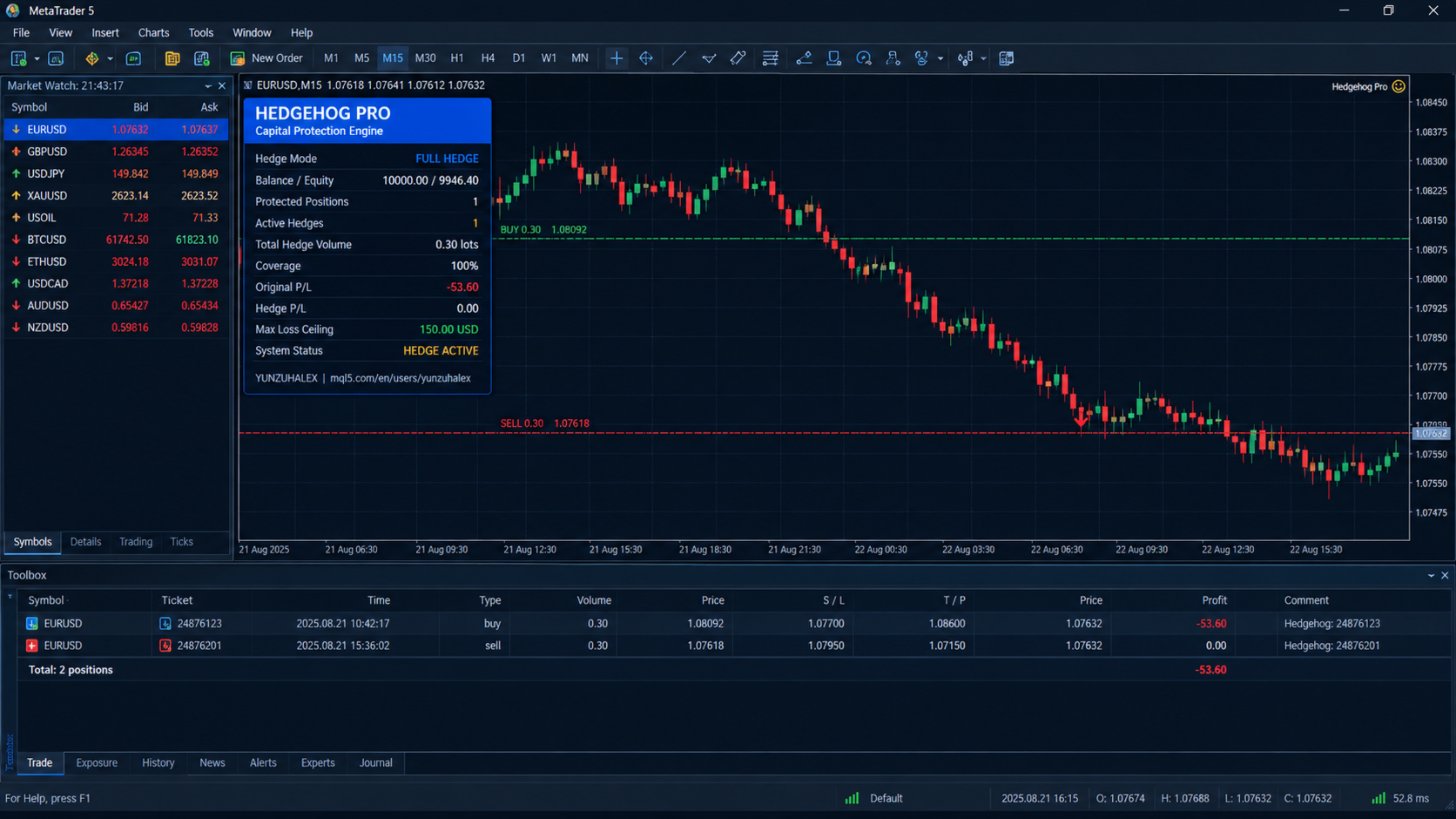
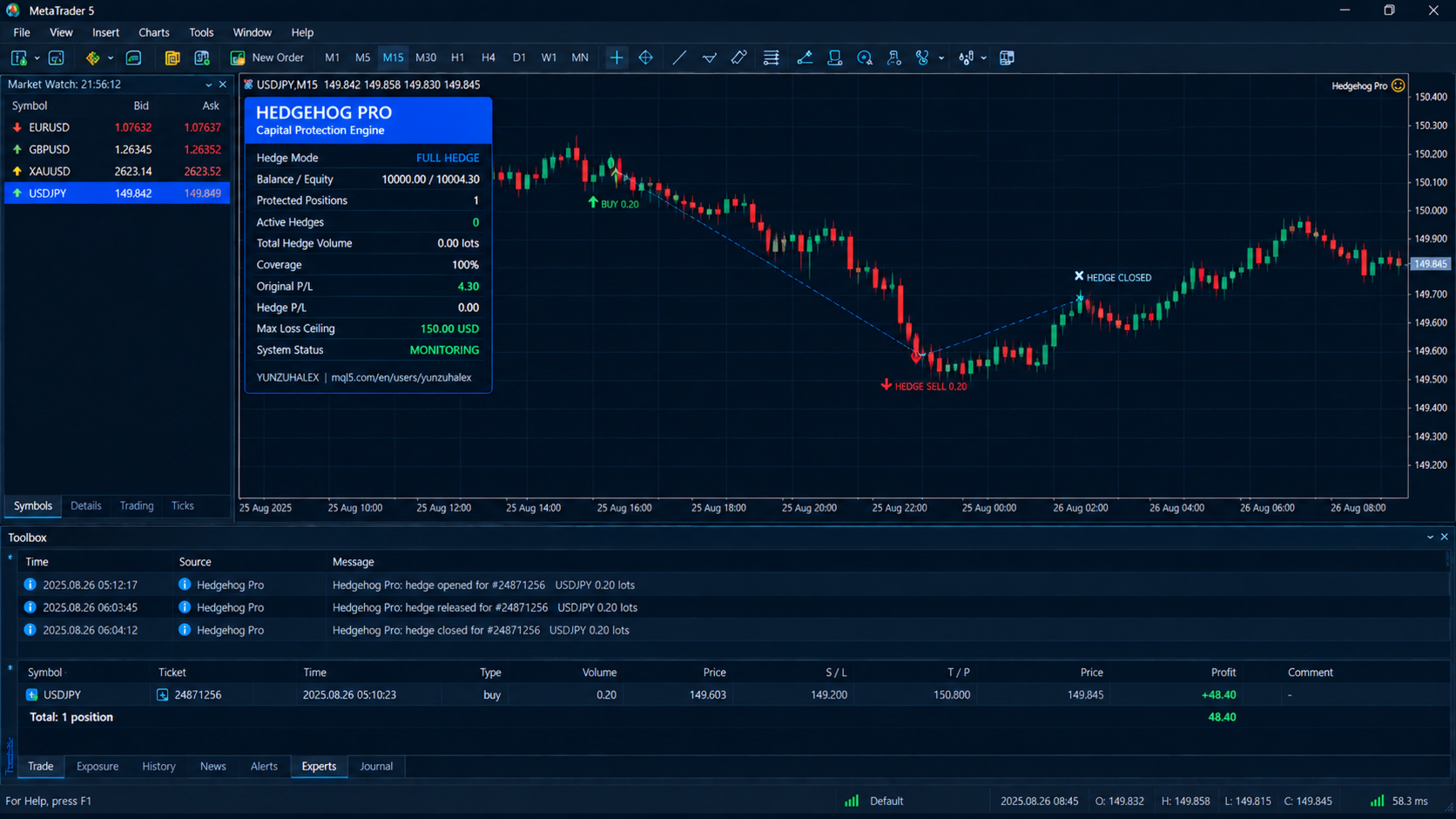
When the floating loss of a position reaches your trigger (default 50 in account currency), Hedgehog Pro opens an opposite position sized to a percentage of the original volume (default 100%). At 100% the hedge freezes the position's exposure, so further price movement no longer changes your combined result much. You choose the trigger and the coverage. A hedge is opened once per position, so the EA does not keep stacking hedges.
2. Dynamic Hedge System
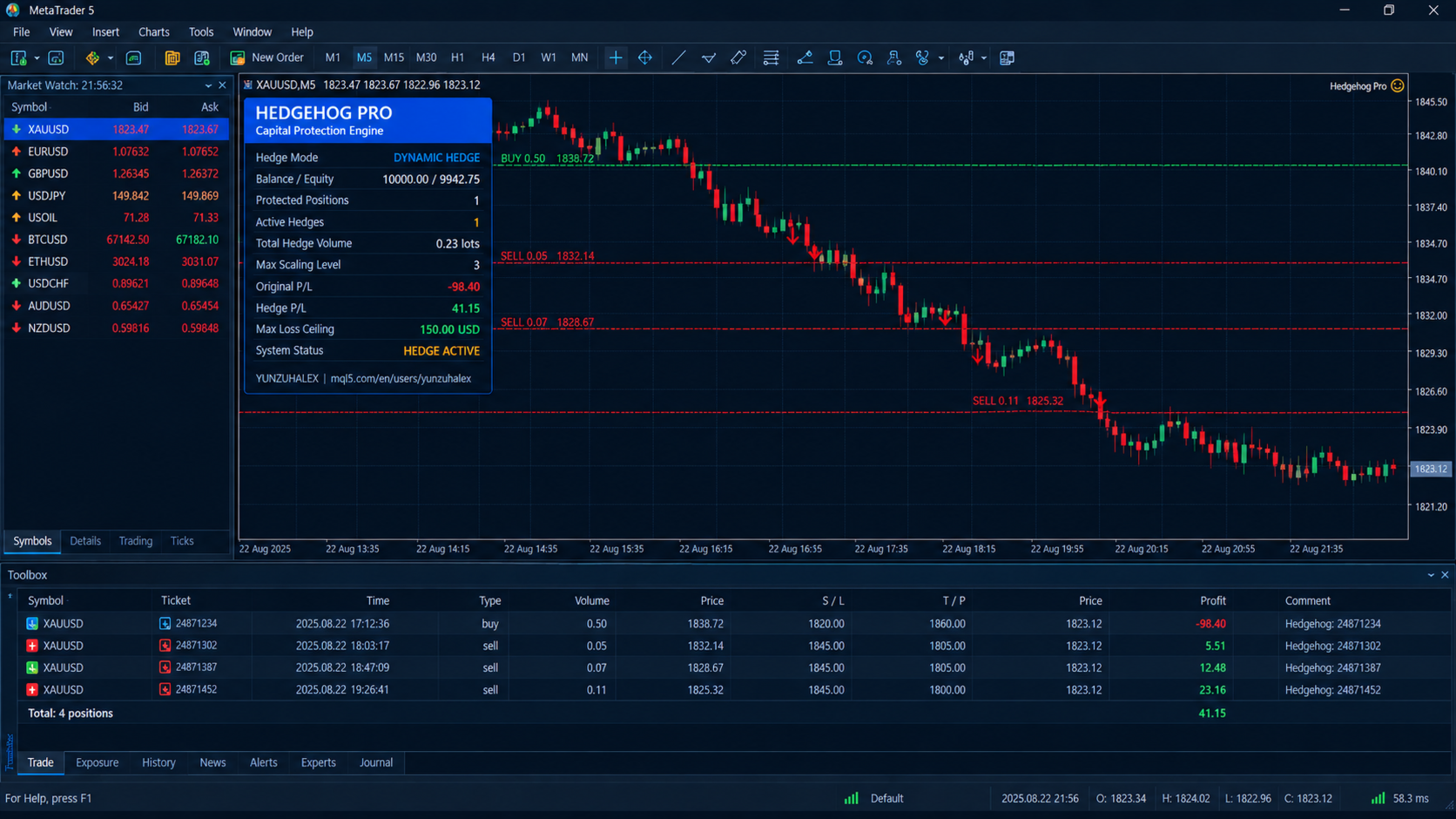
For traders who want protection to scale with the drawdown rather than lock everything at once. The first hedge opens at your initial trigger (default 30). After that, a further hedge level is added for every extra step of loss (default every 30). Each level uses a larger hedge lot, controlled by a multiplier (default 1.5). Hedge sizes start at 10% of the original position volume. A coverage cap (default 100%) stops the total hedge volume from exceeding the original position. The result is a hedge that grows as the trade gets worse.
Layered safety and profit controls
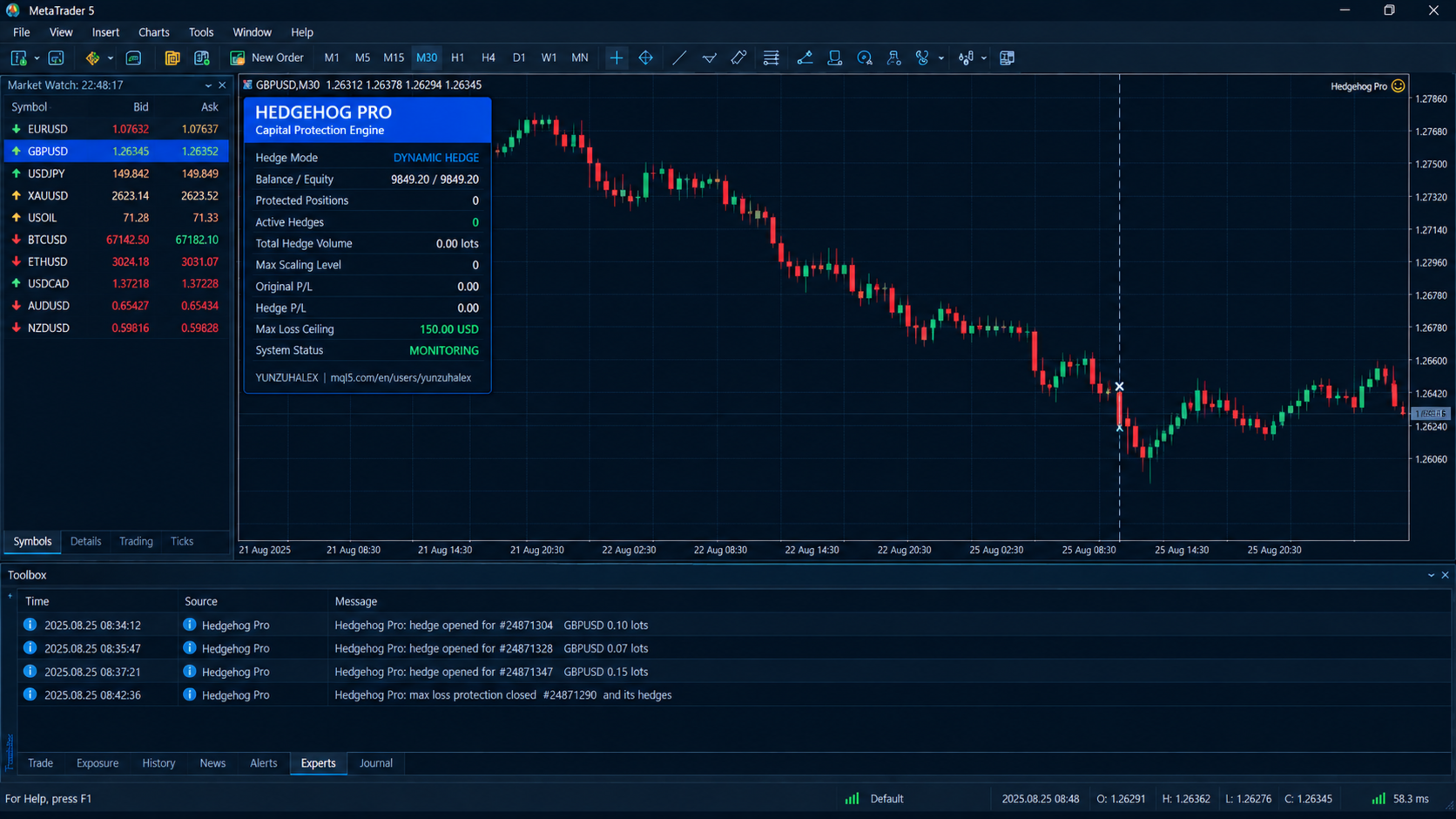
Maximum Loss Protection. You set a ceiling (default 150). If the combined floating result of the original position and all its hedges reaches it, Hedgehog Pro closes the whole group. A position that has no hedge but has already breached the ceiling is closed too.
Account Equity Stop. An optional stop measured as a percentage of drawdown from balance. If it is reached, every position Hedgehog Pro manages is closed. It is off by default.
Basket Take Profit. An optional target. When a position and its hedges reach your combined profit level, the whole group is closed and the profit is banked.
Hedge Release with Cooldown. An optional recovery feature. If the original position recovers to a loss below your release level, the hedges are closed so the trade can keep working. A cooldown timer prevents the EA from hedging again immediately, which avoids rapid open-and-close cycles in choppy markets.
Built for real broker conditions
- Spread filter: hedges are not opened when the spread is wider than your limit.
- Margin check: before opening a hedge, the EA checks that you have enough free margin. You can also require a minimum margin level after the hedge.
- Retry throttle: if an order is rejected, the EA waits a few seconds before trying again, so it does not flood the server or your log.
- Correct lot handling: volumes follow each symbol's minimum, maximum and step, including brokers that use 0.001 lot steps.
- Restart recovery: hedges are linked to their original position through the order comment and magic number. If you restart the terminal, recompile the EA or switch timeframes, Hedgehog Pro rebuilds its state from the open positions and carries on. Hedges whose original position has closed are cleaned up automatically.
Flexible targeting
- All positions or one magic number: protect everything on the account, or only the trades of one specific EA.
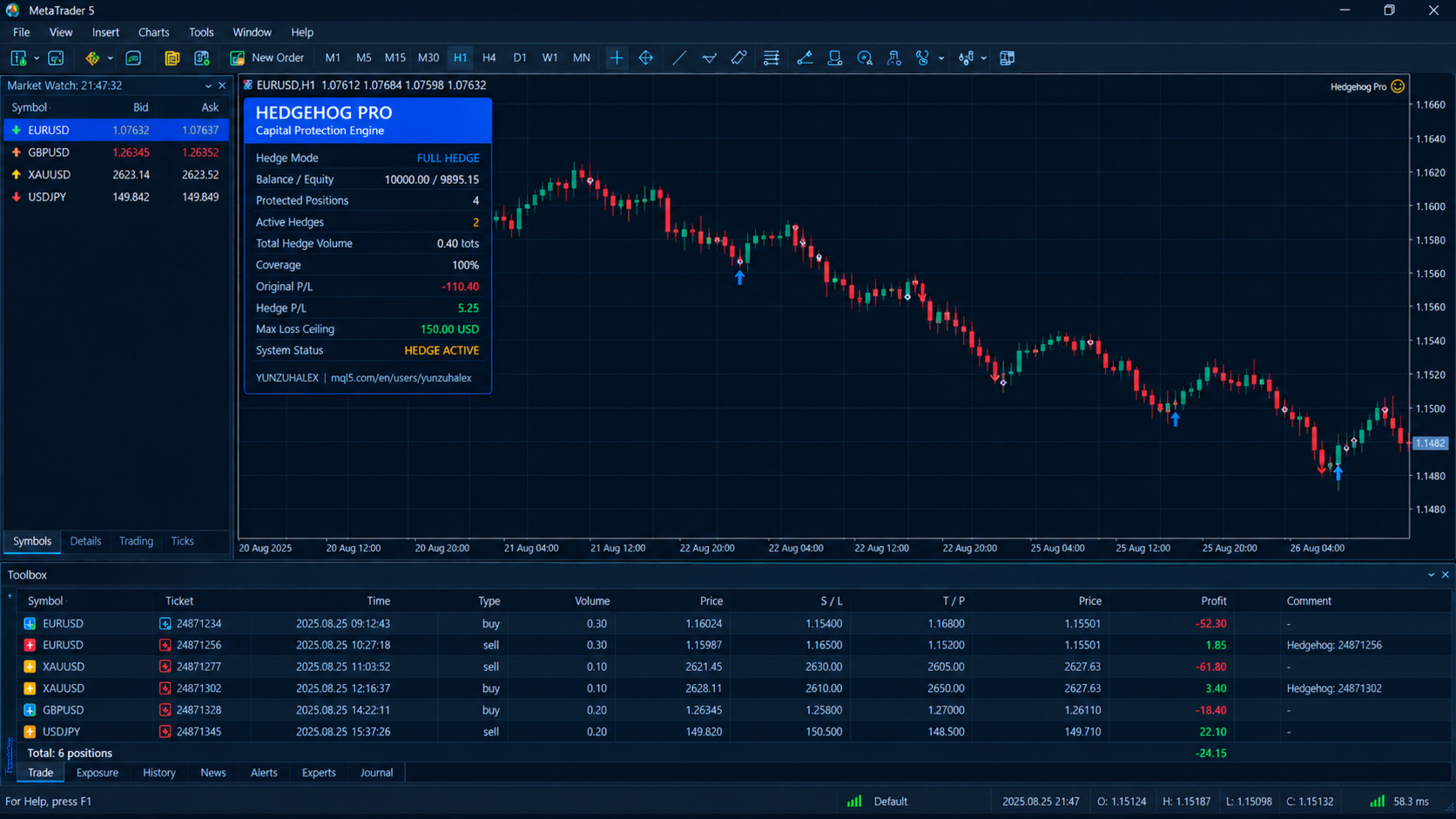
- Chart symbol or all symbols: run it on a single chart to protect one symbol, or enable the all-symbols option to protect every symbol on the account from one chart.
- Its own magic number: hedge orders use a separate magic number, so they never mix with your strategy's trades.
Live dashboard
A clean panel on your chart shows the active hedge mode, balance and equity, the number of protected positions, the number of active hedges, total hedge volume, the current scaling level or coverage, the floating profit or loss of the original trades and of the hedges shown separately, the loss ceiling, and the system status (Monitoring, Hedge Active, or Netting - Hedge Off). You can choose which corner it sits in and where it is offset from the edge.
Notifications
Every important event is written to the Experts log: hedge opened, hedge released, basket profit taken, maximum loss triggered, equity stop triggered. You can also enable popup alerts and push notifications to your phone in live trading.
How to use it
- Use a hedging account.
- Attach Hedgehog Pro to the chart of the symbol you want to protect. Enable the all-symbols option if you want it to cover the whole account.
- Choose Full or Dynamic mode.
- Set the trigger, the maximum loss ceiling and, if you wish, the optional features.
- Allow automated trading. Hedgehog Pro takes it from there.
Default settings at a glance
Full Hedge trigger 50, coverage 100%. Dynamic trigger 30, step 30, multiplier 1.5, coverage cap 100%. Maximum loss 150. Hedge magic number 990099. All monetary values are in your account currency, even though the input labels say USD. Basket take profit, hedge release, equity stop, spread filter and minimum margin level are all off until you set them.
Who it is for
Traders who want a safety net under manual trading. Grid and martingale users who need a hard limit on a runaway basket. Traders running several EAs who want one shared protection layer. Anyone who has watched a single position turn a good week into a bad one.
Please read
Hedging reduces or freezes exposure, but it does not remove risk and it does not guarantee profit. A hedge can lose money, hedged positions still pay spread, swap and commission, and hedging locks in the loss that exists when the hedge is opened. Hedge positions also use margin. Test on a demo account and in the Strategy Tester before using real money, and choose loss limits that fit your account size. Past performance is not a guarantee of future results.