AT MM Pro mt5
- Uzmanlar
- Sürüm: 3.21
- Güncellendi: 17 Eylül 2026
- Etkinleştirmeler: 5

AT MM Pro — Multi-Symbol Expert Advisor for MetaTrader 5
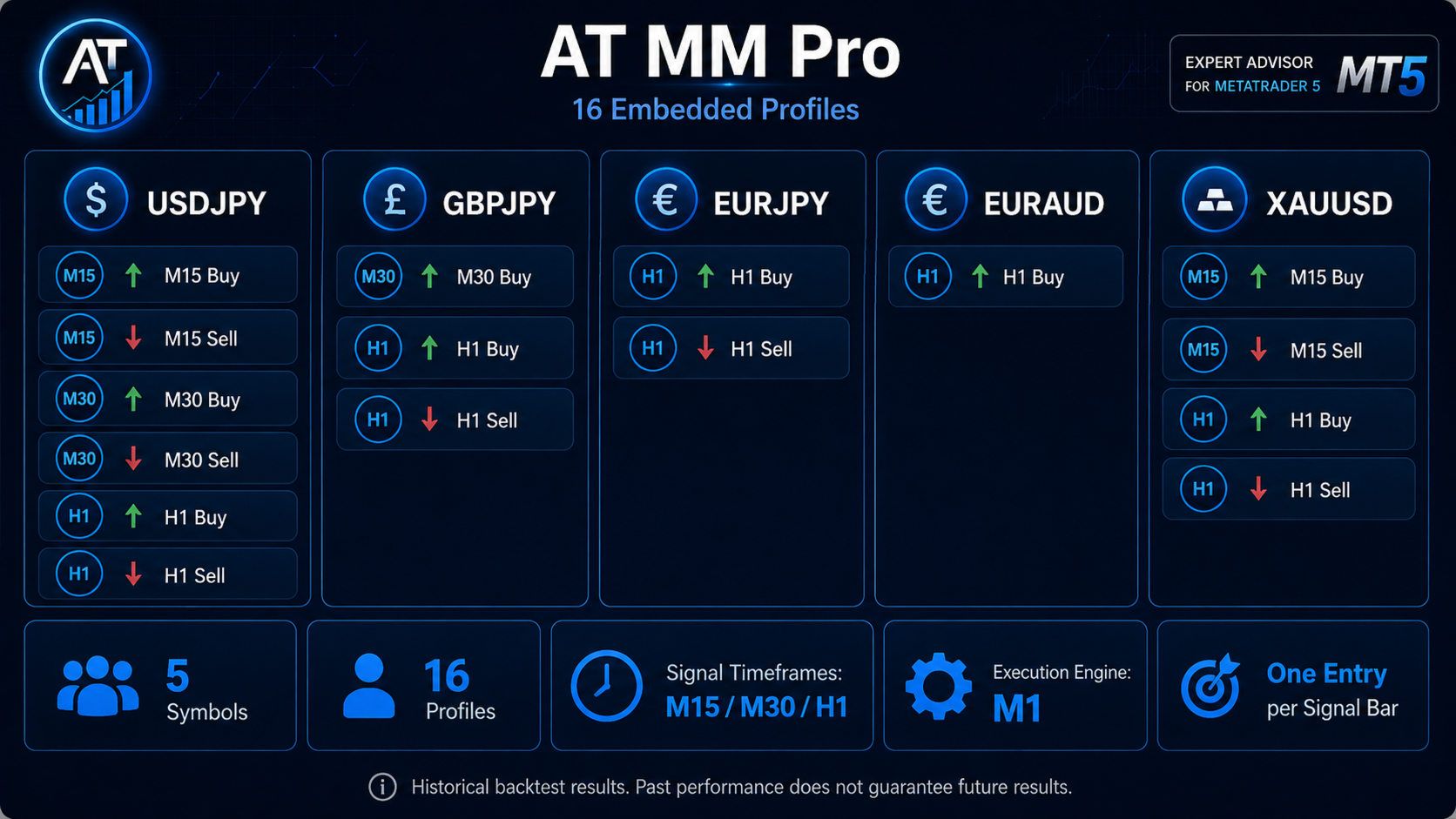
AT MM Pro is an automated multi-symbol trading system with 16 embedded trading profiles operating across 5 instruments: USDJPY, GBPJPY, EURJPY, EURAUD and XAUUSD.
All trading configurations are already built into the EA. No external set files are required.
One instance of AT MM Pro can manage the complete portfolio from a single chart.
The EA uses an M1 execution engine, while trading signals are generated on M15, M30 and H1. Each profile is limited to one new entry per current signal bar.
No Grid. No Martingale. Stop Loss on every trade.
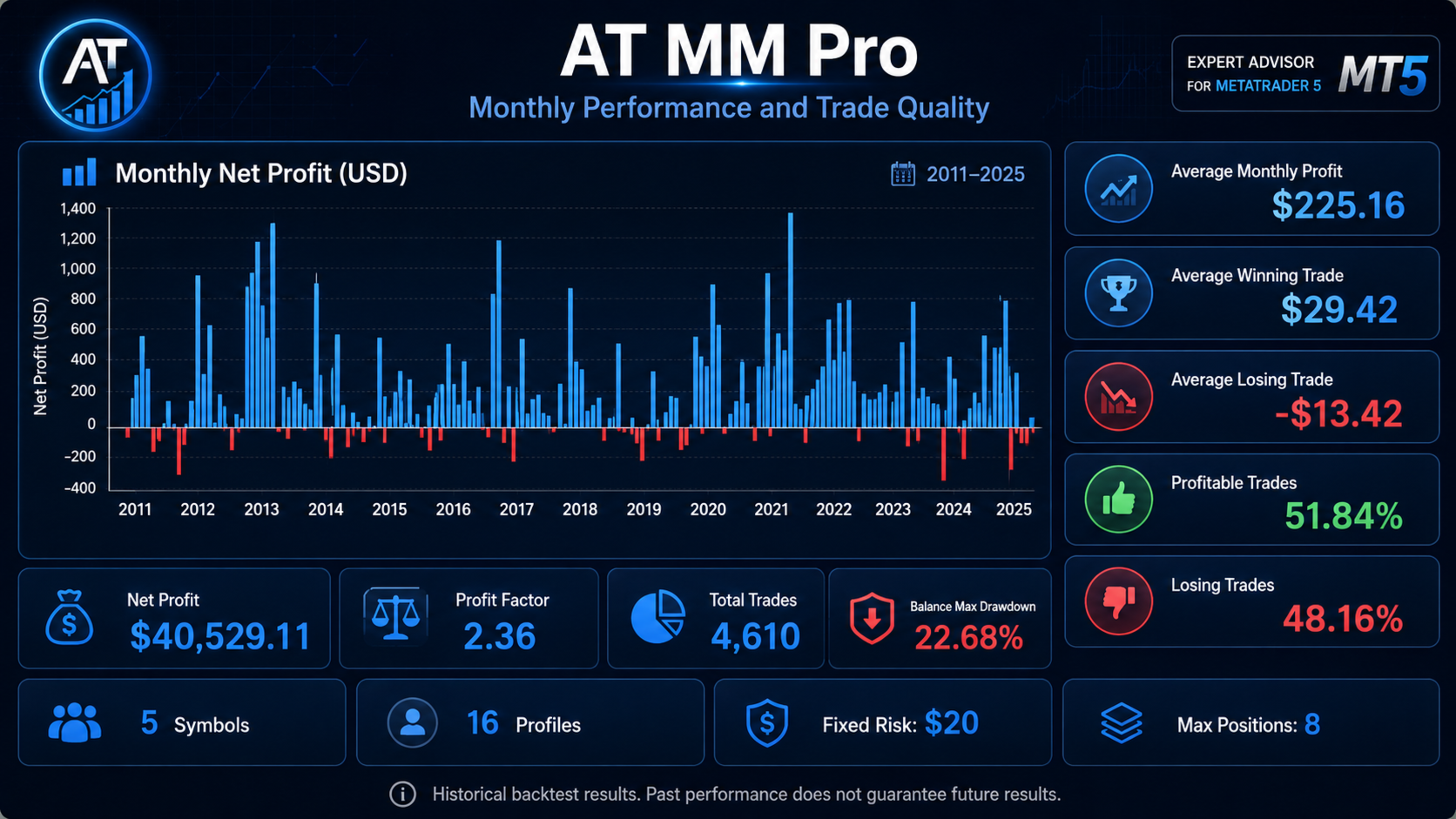
PRIMARY COMBINED METATRADER 5 BACKTEST
The main test was performed with all symbols and all 16 profiles operating together as one portfolio, rather than by simply adding the results of separate individual backtests.
Period: 2011–2025
Initial Deposit: $1,000
Symbols: 5
Embedded Profiles: 16
Total Trades: 4,610
Net Profit: $40,529.11
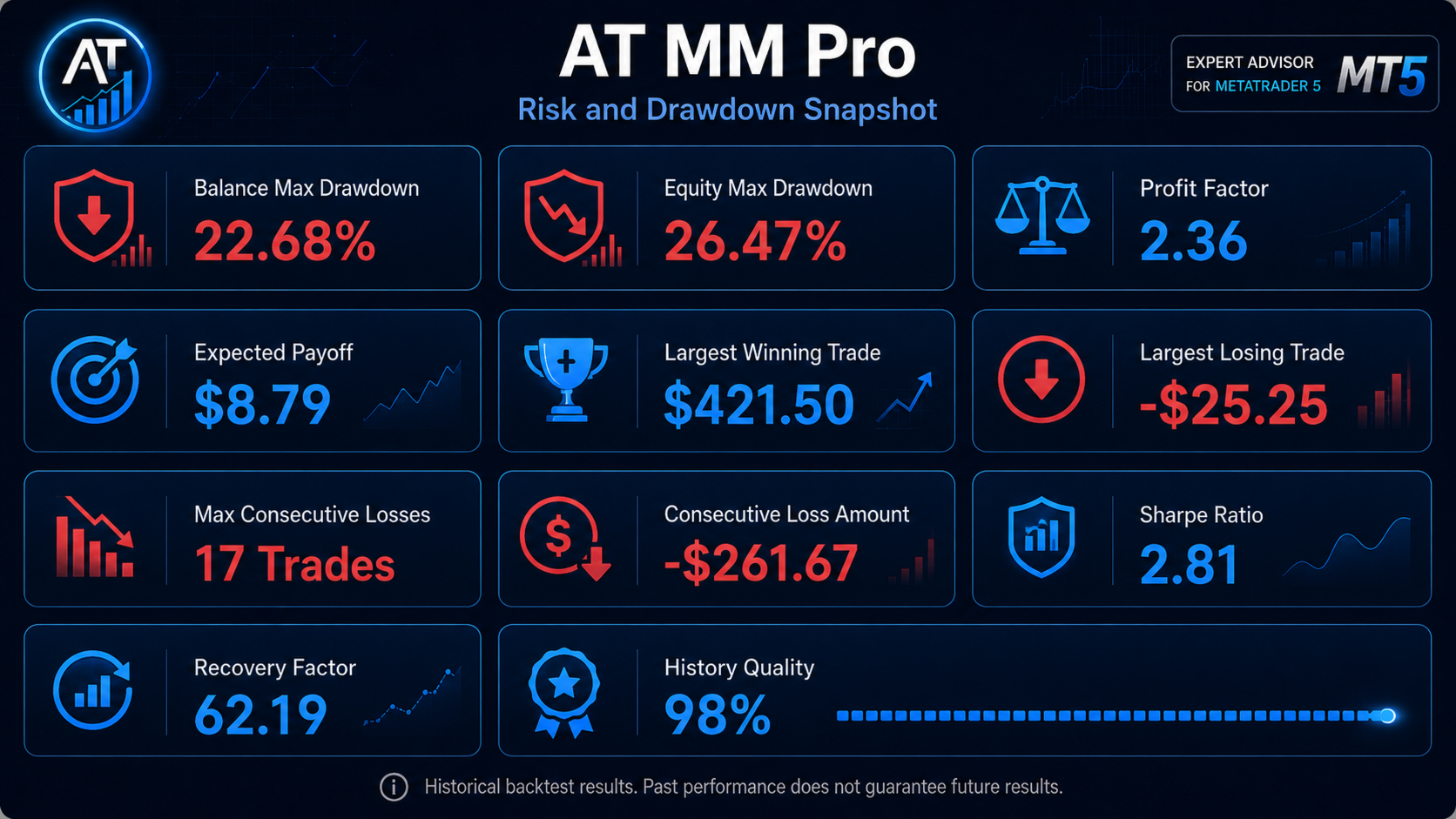
Profit Factor: 2.36
Balance Maximum Drawdown: 22.68%
Equity Maximum Drawdown: 26.47%
Sharpe Ratio: 2.81
Recovery Factor: 62.19
History Quality: 98%
Backtest Risk Mode: Fixed Money
Risk: $20 per trade
Maximum Simultaneous Account Positions: 8
A separate validation test was performed with the account position limit increased from 8 to 32.
Over the complete 2011–2025 period, this produced only:
+3 trades
+$24.70 additional Net Profit
Therefore, 8 simultaneous positions remains the standard portfolio limit.
16 EMBEDDED TRADING PROFILES
USDJPY
• M15 Buy
• M15 Sell
• M30 Buy
• M30 Sell
• H1 Buy
• H1 Sell
GBPJPY
• M30 Buy
• H1 Buy
• H1 Sell
EURJPY
• H1 Buy
• H1 Sell
EURAUD
• H1 Buy
XAUUSD
• M15 Buy
• M15 Sell
• H1 Buy
• H1 Sell
MAIN FEATURES
• Multi-symbol trading from one chart
• 5 trading instruments
• 16 embedded trading profiles
• No external set files required
• M1 execution engine
• M15 / M30 / H1 signal timeframes
• One new entry per signal bar for each profile
• Independent Magic Numbers
• Market orders only
• Stop Loss on every trade
• Take Profit
• ATR-based Trailing Stop
• Break Even
• Automatic position management
• Account-wide maximum position control
• Individual symbol selection
• Individual profile selection
• Fixed Money risk mode
• Percent Balance risk mode
• No Grid
• No Martingale
HOW AT MM PRO WORKS
AT MM Pro uses M1 as its execution engine.
M1 itself is not the trading signal timeframe.
Trading signals are generated on:
M15
M30
H1
depending on the individual embedded profile.
This architecture allows the EA to evaluate trading opportunities during the current signal bar instead of checking conditions only once at the beginning of an M15, M30 or H1 bar.
At the same time, each profile is protected against repeated entries:
only one new position can be opened by the same profile during the current signal bar.
For example, if an M15 profile has already opened a trade during the current M15 bar, another entry from that profile is blocked until the next M15 bar — even if the previous trade has already closed.
RISK MANAGEMENT
AT MM Pro provides two position-sizing modes.
1. Fixed Money
A fixed amount of account currency is used as the calculated risk for every new trade.
Example:
Fixed Risk = $20
Position size is calculated according to the distance to Stop Loss and the selected monetary risk.
As account balance changes, the nominal amount at risk remains approximately constant.
The primary combined 2011–2025 backtest used:
Fixed Money = $20 per trade
2. Percent Balance
Position size is calculated as a percentage of the current account balance.
As balance increases, position size automatically increases.
If balance decreases, position size automatically decreases.
RECOMMENDED PERCENTAGE RISK LEVELS
0.5% — CONSERVATIVE
Recommended starting level for live trading.
Designed for users who prefer more conservative capital management and lower portfolio exposure.
This is the recommended starting point when moving from demo testing to a live account.
1.0% — BALANCED
A balanced level between potential return and portfolio risk.
Recommended after testing AT MM Pro on your broker's demo account and evaluating actual spreads, execution and portfolio behavior.
2.0% — AGGRESSIVE
An aggressive risk level.
Position sizes and the financial impact of losing sequences will be significantly higher.
This setting should only be used by traders who fully understand percentage-based position sizing and possible portfolio drawdown.
Important: the selected percentage represents the calculated risk of one individual new trade.
It is not a maximum account drawdown limit.
AT MM Pro can hold several positions from different embedded profiles at the same time, so total portfolio exposure may be higher than the risk of one individual trade.
TRADING ACCOUNT REQUIREMENTS
For normal portfolio operation, the following environment is recommended:
MetaTrader 5
Hedging Account
ECN / Raw Spread Account or another account type offering low floating spreads.
Also recommended:
• Fast market execution
• Low trading costs
• Stable broker connection
• Reliable price feed
• VPS for continuous automated operation
HEDGING ACCOUNT
A Hedging account is recommended for full AT MM Pro portfolio operation.
AT MM Pro uses independent trading profiles, and different profiles may need to maintain separate positions simultaneously.
A Netting account is not recommended for normal portfolio operation.
SPREAD AND EXECUTION
An ECN / Raw Spread account with low floating spreads is recommended.
Execution quality is particularly important for:
XAUUSD
GBPJPY
EURJPY
High spreads, slippage or poor execution may materially affect live trading results compared with historical testing.
AT MM Pro is not tied to one specific broker.
However, results may differ between brokers because of:
• Price feeds
• Historical data
• Spreads
• Commissions
• Swaps
• Slippage
• Execution speed
• Symbol specifications
• Contract size
• Minimum Stop Level
For this reason, testing the EA on your broker's demo account before live trading is strongly recommended.
INSTALLATION
1. Install AT MM Pro in MetaTrader 5.
2. Make sure the required instruments are available in Market Watch:
USDJPY
GBPJPY
EURJPY
EURAUD
XAUUSD
Some brokers may use prefixes or suffixes in symbol names. Make sure the required instruments are available and correctly recognized before starting the EA.
3. Open one chart of any supported instrument.
For example:
USDJPY
4. Set the chart timeframe to M1.
M1 is used as the AT MM Pro execution engine.
5. Attach AT MM Pro to the chart.
6. Enable Algo Trading.
7. Select Portfolio Mode for complete portfolio operation.
8. Enable the required symbols and trading profiles.
For standard operation, the complete embedded portfolio of 16 profiles can be used.
9. Select your risk mode:
Fixed Money
or
Percent Balance
10. For the first live launch, the recommended percentage setting is:
Percent Balance = 0.5%
11. Confirm that AT MM Pro has initialized successfully and Algo Trading is enabled.
ONE EA — ONE CHART
You do not need to open a separate chart for every trading instrument.
You also do not need separate M15, M30 or H1 charts.
A single AT MM Pro instance running on one M1 chart can obtain the required market data and manage all enabled symbols and embedded profiles.
MetaTrader 5 must remain running for the EA to operate.
For uninterrupted automated trading, a VPS is recommended.
RECOMMENDED FIRST LAUNCH
Before using AT MM Pro on a live account:
1. Run the EA on your broker's demo account.
2. Verify that all required trading instruments are correctly recognized.
3. Check trade opening and position management.
4. If using Percent Balance, start with 0.5% risk.
5. Evaluate your broker's actual spreads, commissions and execution quality.
6. Consider increasing the risk to 1.0% only after evaluating actual EA behavior.
2.0% should be treated as an aggressive risk setting.
IMPORTANT RISK NOTICE
AT MM Pro is an automated trading algorithm and does not guarantee profit.
Historical backtest results do not guarantee future performance.
Live trading results may differ from historical testing because of changing market conditions, broker price feeds, spreads, commissions, swaps, slippage, execution delays and trading account specifications.
Use a risk level appropriate for your account size and acceptable drawdown.