Dashboard Premium Pro
- Yardımcı programlar
- Sürüm: 1.0
- Etkinleştirmeler: 5

Dashboard Premium Pro – Account Dashboard & Close All Panel for MT5
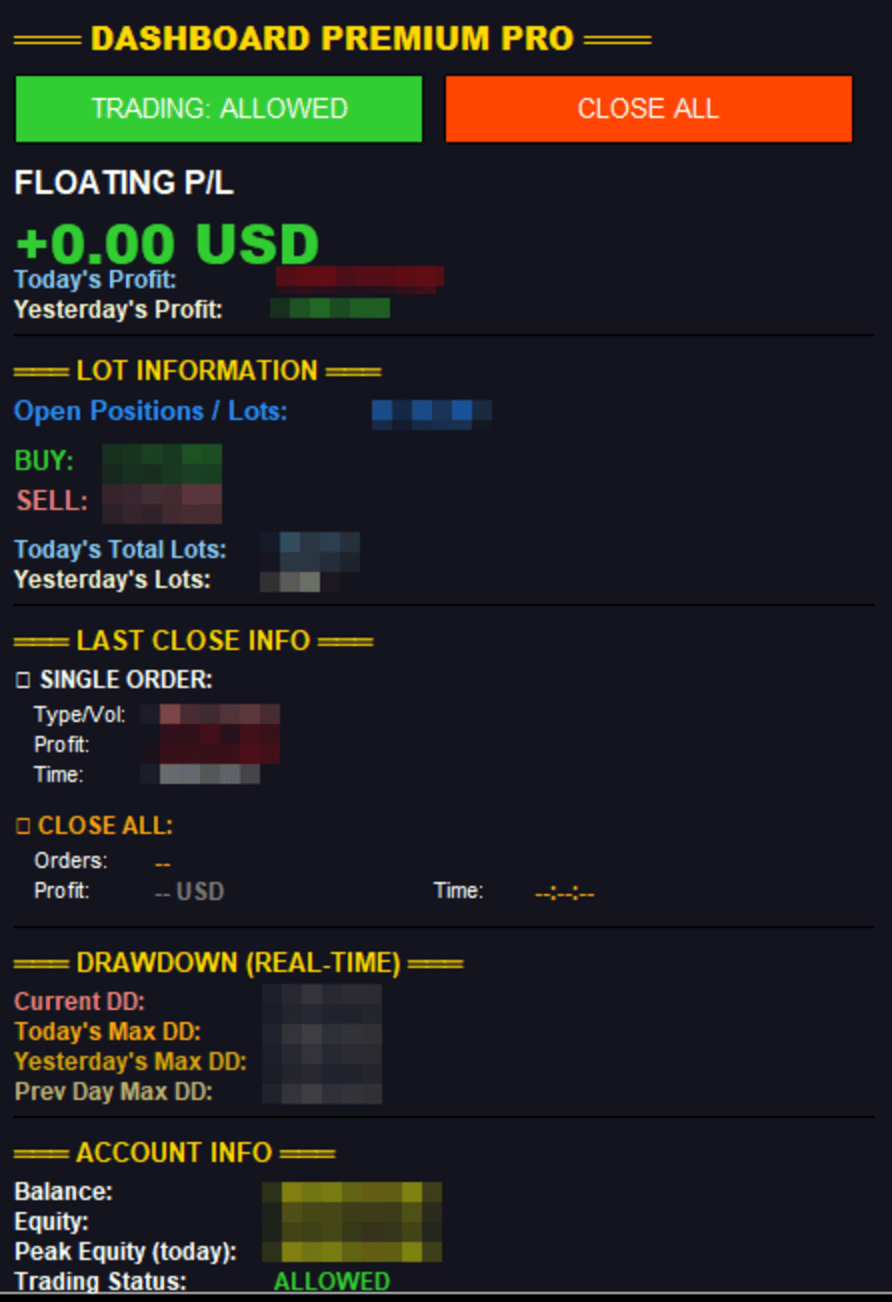
Dashboard Premium Pro puts everything you need to monitor your account in one clean panel on your chart: floating profit, daily results, buy/sell exposure, your last closed trade and real-time drawdown. One click closes every position, and a pause switch lets your own Expert Advisors know when to stop opening new trades.
What the dashboard shows
Floating P/L
- Current open profit or loss for the whole account, in large green or red text
Daily profit
- Today's profit: realized net result for today, including commission, swap and fees
- Yesterday's profit: the same figure for the previous day
Lot information
- Open positions / lots: total number of open positions and their combined volume
- BUY: number of buy positions and their volume
- SELL: number of sell positions and their volume
- Today's total lots: lots closed today plus lots currently open
- Yesterday's lots: lots closed yesterday
Last close info
- Single order: the most recently closed position, with its type, volume, net profit and close time
- Close All: the result of your last Close All, with the number of positions closed, total profit and time
- Both stay on screen until the next close, so you always know how your last exit went
Real-time drawdown
- Current DD: how far equity is below today's peak
- Today's max DD: the deepest drawdown so far today
- Yesterday's max DD and previous day's max DD, for comparison
Account info
- Balance, equity and today's peak equity
- Trading status: Allowed, Paused or Closed All
Buttons
CLOSE ALL
Closes every open position and deletes every pending order on the account, across all symbols. A confirmation dialog appears first to prevent accidental clicks (can be turned off). Uses the correct order-filling mode for each symbol and retries on requotes. If any position cannot be closed, you get an alert and the details are written to the Experts journal.
TRADING: ALLOWED / PAUSED
Switches a trading flag stored in the terminal Global Variable DPP_TradingAllowed (1 = allowed, 0 = paused). Pressing Close All also sets the flag to paused.
Important: MetaTrader 5 does not allow one program to switch off another Expert Advisor. This button works only with EAs that read the flag. Add this one line at the start of your EA's trade logic to make it respect the switch:
if(GlobalVariableCheck("DPP_TradingAllowed") && GlobalVariableGet("DPP_TradingAllowed")==0.0) return;
The flag is removed when the dashboard is taken off the chart, so no EA is left paused by mistake.
Inputs
- Colors: background, text, profit, loss, button colors
- Dashboard X/Y position
- Confirm before Close All
- Refresh rate (milliseconds)
Notes
- Works on any account currency, any symbol and any broker.
- Monitors the whole account, not only the chart symbol.
- Does not open trades by itself.
- Attach it to any chart, preferably one you do not trade on, so it stays visible.