Pattern Scanner Fox Wave
- Göstergeler
- Sürüm: 1.0
- Etkinleştirmeler: 5

SHORT DESCRIPTION
Multi-timeframe candlestick pattern scanner: 24 patterns across M5-D1, live dashboard, on-chart markers, one-click TF toggles, alerts.
FULL DESCRIPTION
Fox Wave Pattern Scanner continuously reads your chart's symbol across six timeframes at once and reports every candlestick pattern it finds in a clean dark dashboard — so you never have to manually flip through timeframes looking for a setup again.
Instead of scrolling between M5, M15, M30, H1, H4 and D1 hoping to spot a Hammer or an Engulfing pattern before it's too late, the scanner does it for you in the background, refreshing every few seconds and listing each hit with its timeframe and direction.
What it does
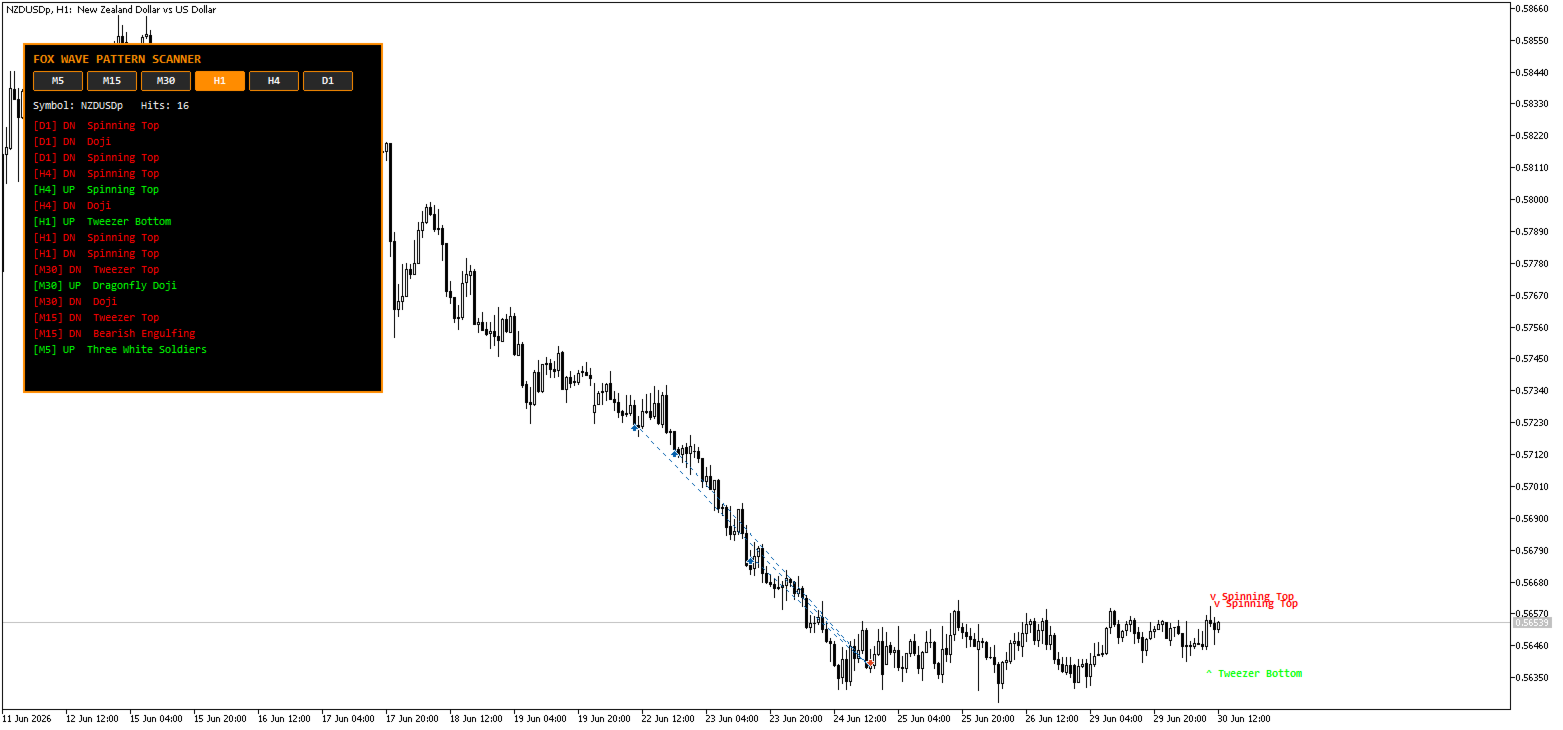
► Multi-Timeframe Scanning The indicator scans the current chart symbol on up to six timeframes simultaneously — M5, M15, M30, H1, H4 and D1. Each timeframe can be switched on or off independently, either from the input settings or directly from clickable buttons on the chart itself.
The timeframe that matches your currently open chart is automatically highlighted on the button row in orange, so you always know which one you're looking at versus which ones are being scanned in the background.
► Complete Pattern Library A full library of 24 candlestick patterns is checked on every active timeframe: Doji, Dragonfly Doji, Gravestone Doji, Hammer, Inverted Hammer, Hanging Man, Shooting Star, Bullish Engulfing, Bearish Engulfing, Piercing Line, Dark Cloud Cover, Morning Star, Evening Star, Three White Soldiers, Three Black Crows, Bullish Harami, Bearish Harami, Tweezer Top, Tweezer Bottom, Bullish Marubozu, Bearish Marubozu, Spinning Top, Rising Three Methods and Falling Three Methods.
► On-Chart Markers Patterns detected on the same timeframe as your open chart are plotted directly on the candle where they occurred — a green upward marker for bullish patterns, a red downward marker for bearish ones — so you can see the exact setup without cross-referencing the panel. Patterns from other timeframes remain visible in the dashboard, since plotting a different timeframe's candle on the current chart axis would be misleading.
► One-Click Timeframe Toggles Every scanned timeframe has its own on/off button rendered directly on the chart. Click a button to instantly include or exclude that timeframe from the scan — no need to open the indicator's input settings. The scanner re-evaluates and redraws immediately after every toggle.
► Fox Wave Info Panel A compact dark dashboard lists the most recent pattern hits across all active timeframes, newest first, color-coded green for bullish and red for bearish, along with the symbol name and a live hit counter.
► Built-In Alerts Optional popup alerts and push notifications fire the moment a new pattern is confirmed on a closed candle, with automatic duplicate filtering so the same pattern on the same candle never triggers twice.
Key Features
- Covers a complete library of 24 candlestick patterns
- Scans the current symbol across six timeframes simultaneously (M5, M15, M30, H1, H4, D1)
- Independent on/off toggle for every timeframe, clickable directly on the chart
- Automatic highlight of whichever timeframe matches your open chart
- On-chart pattern markers placed precisely on the triggering candle for the active chart timeframe
- Clean dark dashboard panel with orange highlights and color-coded bullish/bearish hits
- Configurable number of closed bars checked per timeframe
- Popup and push notification alerts with automatic duplicate filtering
- Full color and font customization for the panel
- Lightweight: runs on a timer in the background without slowing down charting
Inputs Reference
Scan Settings
| Parameter | Default | Description |
|---|---|---|
| InpUseM5 | true | Include M5 in the scan |
| InpUseM15 | true | Include M15 in the scan |
| InpUseM30 | true | Include M30 in the scan |
| InpUseH1 | true | Include H1 in the scan |
| InpUseH4 | true | Include H4 in the scan |
| InpUseD1 | true | Include D1 in the scan |
| InpBarsBack | 3 | Number of closed bars checked per timeframe |
| InpAlertsOn | true | Enable popup alerts on new pattern detection |
| InpPushOn | false | Enable push notifications to mobile app |
Panel Settings
| Parameter | Default | Description |
|---|---|---|
| InpPanelX | 20 | Horizontal offset from chart edge |
| InpPanelY | 40 | Vertical offset from chart edge |
| InpBgColor | Black | Panel background color |
| InpBorderColor | Orange | Panel border and active-timeframe highlight color |
| InpTextColor | White Smoke | General panel text color |
| InpBullColor | Lime | Color for bullish pattern hits and markers |
| InpBearColor | Red | Color for bearish pattern hits and markers |
| InpFont | Consolas | Panel and marker font |
How to set up push notifications
- Open MetaTrader 5 on your mobile device
- Go to Settings → Messages and copy your MetaQuotes ID
- In MT5 desktop: Tools → Options → Notifications
- Paste your MetaQuotes ID and enable notifications
- Set InpPushOn = true in the indicator inputs
A note on methodology
Candlestick pattern definitions (Hammer, Engulfing, Harami, Marubozu and others) are widely taught but not perfectly standardized — different sources apply slightly different body and wick ratio thresholds. This indicator uses commonly accepted ratio-based definitions for each pattern. As with any technical tool, pattern hits should be used as part of a complete trading plan and confirmed with context such as trend, support/resistance or volume, not as standalone signals.
Who is it for?
- Price action traders who time entries and exits around candlestick formations
- Scalpers and swing traders who need to monitor several timeframes at once without manually switching charts
- Multi-timeframe traders who want top-down confirmation before acting on a signal
- Anyone who wants automated candlestick recognition instead of scanning charts by eye
Compatibility
- Platform: MetaTrader 5
- Works on all symbols: Forex pairs, indices, commodities, crypto, metals
- Works on any chart timeframe
- No DLL imports required