Quick Scalper Pro MT5
- Uzmanlar
- Sürüm: 1.10
- Etkinleştirmeler: 19

Quick Scalper Pro MT5 is an automated Expert Advisor for short-term trading in MetaTrader 5. It checks trend, momentum, volatility and optional market-structure conditions before placing an order. If the configured conditions do not agree, the EA remains inactive.
Trading approach
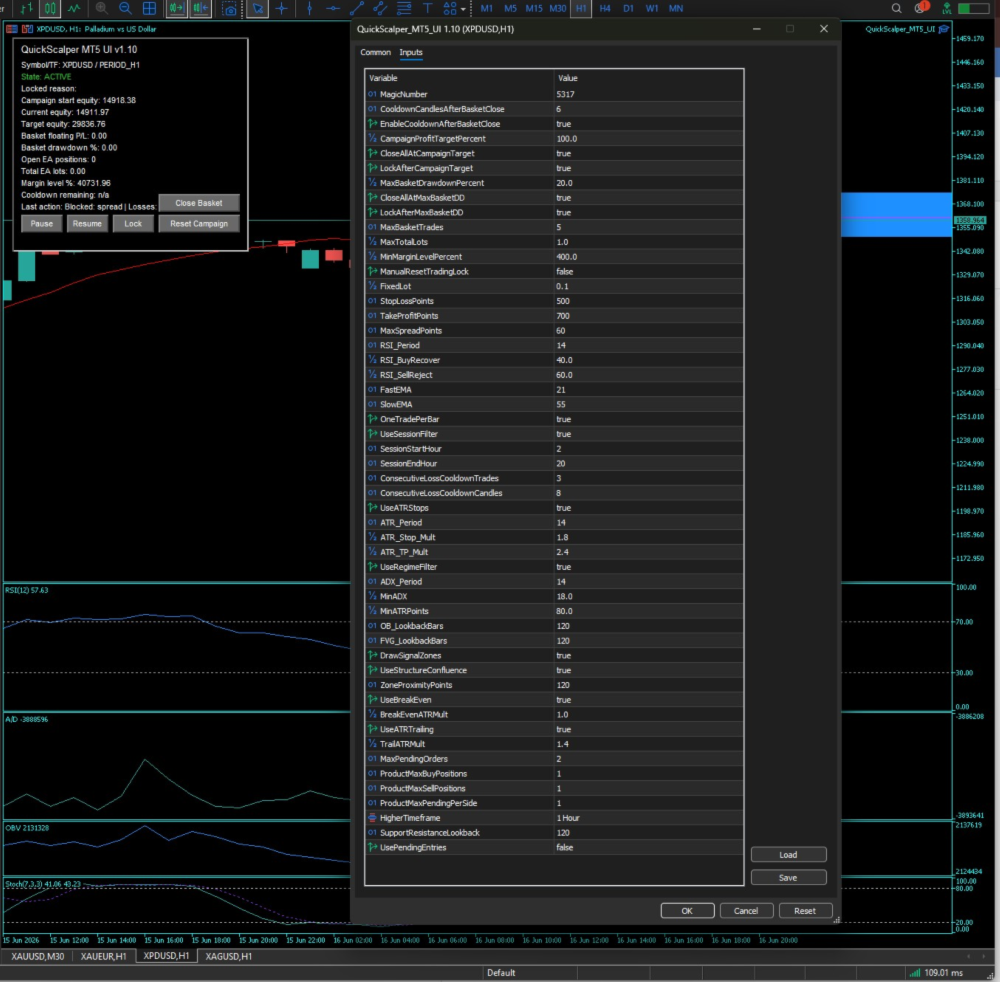
A Fast EMA and Slow EMA determine directional bias. RSI recovery or rejection provides momentum confirmation. ADX and ATR filters can prevent entries during quiet conditions. Optional Order Block and Fair Value Gap analysis can add higher-timeframe structure to the decision process.
Trade management
The EA supports ATR-based or fixed stop-loss and take-profit levels, break-even management and ATR trailing. It also includes session-hour controls, one-trade-per-bar logic, a cooldown after consecutive losses and optional pending-order entries. The chart panel provides Pause, Resume, Lock, Reset Campaign and Close Basket controls.
Risk controls
Available protections include a maximum-spread filter, minimum margin-level requirement, limits on basket positions and total lots, a basket drawdown limit and an optional campaign target. Quick Scalper Pro MT5 does not use martingale, grid or averaging logic.
Recommended setup
The intended chart periods are M15 and M30. EURUSD, GBPUSD and XAUUSD can be used for initial testing, together with other liquid instruments that have reasonable spreads. Hedging and netting accounts are supported. Test the EA in the Strategy Tester and on a demo account before choosing a lot size for live conditions.
Main defaults
Fast EMA: 21. Slow EMA: 55. RSI period: 14. ATR period: 14. ATR stop-loss multiplier: 1.8. ATR take-profit multiplier: 2.4. ADX period: 14. Minimum ADX: 18. Fixed lot: 0.01. Maximum basket trades: 5. Session: 02:00 to 20:00 UTC. All settings can be adjusted in the EA inputs.
Important information
This EA does not guarantee trading results. Historical tests do not predict future performance. Results can vary with the symbol, spread, execution, broker specifications and selected settings. Avoid using the EA on instruments with unsuitable spreads or during market conditions that exceed the configured risk limits. Use a position size appropriate for the risk you can accept.