
SignalForge One
- Göstergeler
- Sürüm: 1.2
- Güncellendi: 16 Haziran 2026

SignalForge One
MetaTrader 5 için 11 göstergeli bir konfluans sistemi; birden fazla teknik filtreyi net giriş sinyallerine dönüştürür, ATR tabanlı yerleşik risk yönetimi ve çift panel görüntüleme özelliğine sahiptir.
SignalForge One, MetaTrader 5 için geliştirilmiş çok göstergeli bir konfluans aracıdır. Sinyal üretmeden önce birden fazla bağımsız göstergenin uyumunu şart koşarak giriş noktalarını belirlemenize yardımcı olur. Tek bir yönteme bağlı kalmak yerine, gösterge on bir teknik koşulu eş zamanlı olarak değerlendirir ve bunları AND mantığı (etkin tüm göstergeler uyumlu olmalı) ya da OR mantığı (etkin herhangi bir gösterge sinyali tetikler) ile birleştirir. Her sinyal, Average True Range'den hesaplanan dinamik Stop Loss, Take Profit ve Trailing Stop seviyeleriyle birlikte gelir; böylece risk parametreleri güncel piyasa oynaklığına otomatik olarak uyum sağlar.
Genel Bakış
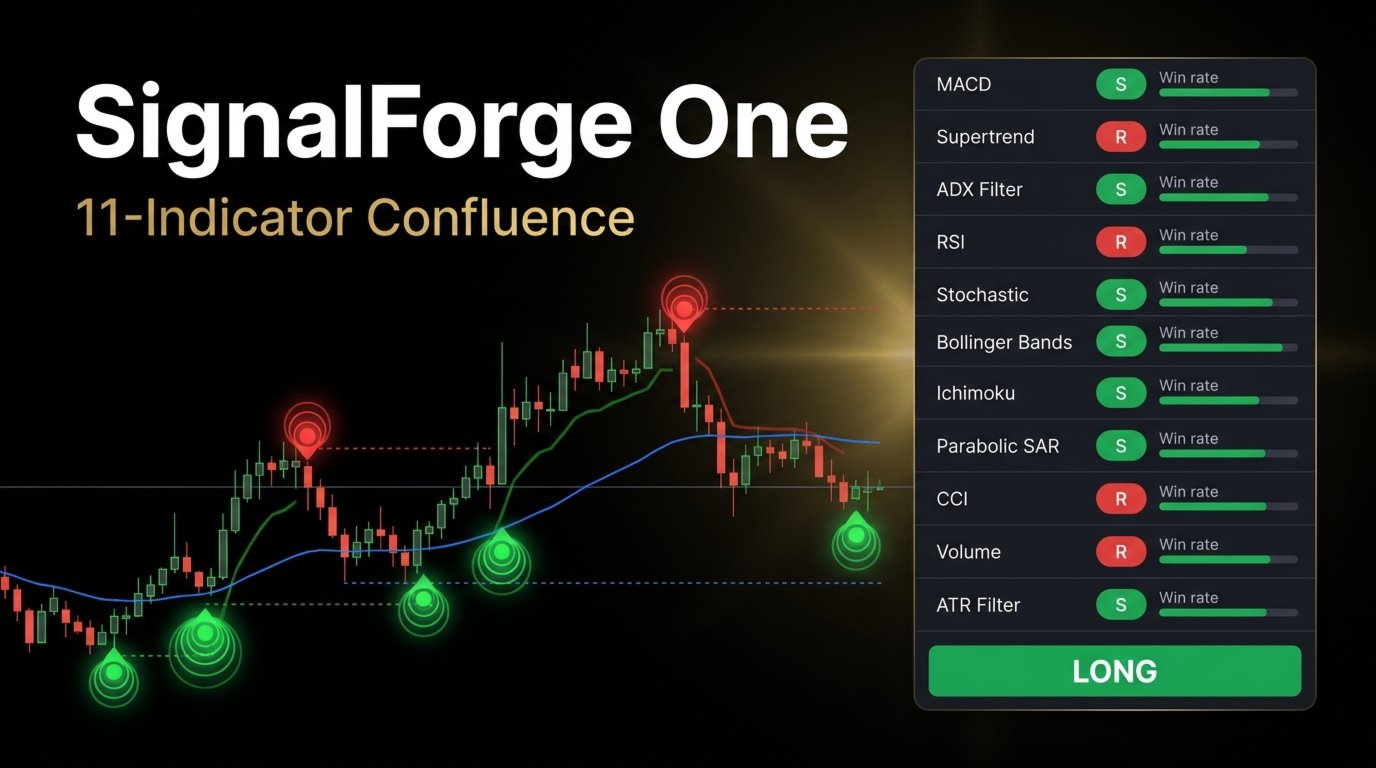
SignalForge One, kapalı her çubukta on bir göstergeyi paralel olarak işler: SMA Crossover, RSI filter, MACD Crossover, Supertrend, Stochastic, Bollinger Bands trend bias, EMA Crossover, Awesome Oscillator, Parabolic SAR, CCI filter ve ADX directional filter. Her gösterge, giriş ayarları aracılığıyla bağımsız olarak etkinleştirilebilir veya devre dışı bırakılabilir. Yeni bir sinyal onaylandığında, gösterge sinyal çubuğunun altına (long) veya üstüne (short) görsel derinlik efekti oluşturan üç iç içe çemberden oluşan katmanlı bir parlama işaretçisi çizer. Bir pozisyon Stop Loss, Take Profit veya Trailing Stop seviyelerine ulaştığında ya da sinyal yönü tersine döndüğünde çıkış sinyalleri çarpı işaretçileri olarak görüntülenir.
Yerleşik geri test motoru, ilk yüklemede tam geçmişi çubuk çubuk oynatır. On bir göstergenin her biri için bağımsız modda giriş ve çıkış sonuçlarını ayrı ayrı takip eder; aynı zamanda birleşik sinyali de birleşik bir sistem olarak izler. Kazanma oranı istatistikleri gerçek zamanlı olarak hesaplanır ve panelde görüntülenir. Trailing stop dinamiktir: fiyat ilerledikçe işlem lehine hareket eder ve ATR çarpanı kullanılarak her çubukta yeniden hesaplanır.
Göstergeyi Okuma
Bir çubuğun altındaki katmanlı yeşil daire, uzun giriş sinyalini gösterir. Bir çubuğun üstündeki katmanlı kırmızı daire, kısa giriş sinyalini gösterir. Parlama katmanlarının boyutu ve yoğunluğu, yapılandırılan küre boyutu ayarını yansıtır. Çubuğun üzerindeki küçük çarpı işaretçisi uzun pozisyondan çıkışı; altındaki çarpı ise kısa pozisyondan çıkışı işaret eder.
Girişten sonra fiyatı üç noktalı çizgi takip eder: kırmızı çizgi Stop Loss seviyesi, yeşil çizgi Take Profit seviyesi ve mavi düz çizgi Trailing Stop'tur. Her giriş işaretçisinin yanındaki yüzde etiketi, geçmişin o noktasındaki birleşik sinyalin birikimli kazanma oranını gösterir.
Grafik üzerindeki panel, on bir göstergenin tamamını güncel yön eğilimiyle (yükseliş, düşüş veya nötr), geçmiş geri testteki bireysel kazanma oranıyla ve her göstergenin etkin olup olmadığıyla listeler. Panelin alt satırı güncel birleşik sinyali gösterir: Long, Short veya Neutral.
Temel Özellikler
- 11 göstergeli konfluans motoru: SMA, RSI, MACD, Supertrend, Stochastic, Bollinger Bands, EMA, Awesome Oscillator, Parabolic SAR, CCI ve ADX'i eş zamanlı olarak değerlendirir. Her gösterge bağımsız olarak yapılandırılabilir ve yeniden yüklemeye gerek kalmadan açılıp kapatılabilir.
- AND / OR sinyal mantığı: AND modunda, sinyal üretilmeden önce etkin tüm göstergeler yön konusunda uyumlu olmalıdır; bu durum yatay piyasalardaki hatalı girişleri azaltır. OR modunda, etkin herhangi bir gösterge sinyali tetikleyebilir; bu da erken trend tespiti için hassasiyeti artırır.
- Dinamik ATR risk yönetimi: Stop Loss, Take Profit ve Trailing Stop mesafeleri ATR'nin katları olarak hesaplanır ve piyasa oynaklığına otomatik olarak ölçeklenir. Her çarpan, giriş parametreleri aracılığıyla bağımsız olarak ayarlanır.
- Gösterge başına bağımsız geri test: Yerleşik oynatma motoru, on bir göstergenin her birinin işlem sonuçlarını ayrı ayrı takip ederek bireysel performansın doğrudan karşılaştırılmasına olanak tanır. Kazanma oranı ve işlem sayısı, oynatma sırasında her çubukta güncellenir.
- Katmanlı parlama sinyal işaretçileri: Giriş sinyalleri, yoğunluğu azalan üç iç içe ok katmanıyla oluşturulur ve standart fiyat hareketinden net bir görsel ayrım sağlar. İşaretçi boyutu ve çubuktan uzaklığı ayarlanabilir.
- Gerçek zamanlı konfluans paneli: Canvas tabanlı bir kaplama, her göstergenin güncel yön durumunu ve kazanma oranını yapılandırılmış bir tabloda görüntüler. Panelin sabitleme konumu ve ekran koordinatları yapılandırılabilir.
- Özel Parabolic SAR ve ADX motorları: Her iki gösterge de Wilder düzleştirmesi kullanılarak araç içinde yerel olarak hesaplanır; platform standart davranışıyla tutarlıdır ve ek harici gösterge tanıtıcılarına bağımlı değildir.
Önerilen Kullanım
SignalForge One, MetaTrader 5'te mevcut herhangi bir döviz çifti, endeks veya emtia üzerinde kullanım için tasarlanmıştır. Gösterge sinyallerinin daha fazla ağırlık taşıdığı ve sahte kesişimlerin daha az görüldüğü M15 ve üzeri zaman dilimlerinde test edilmiştir. Trend takibi stratejilerine odaklanan yatırımcılar AND modunu daha uygun bulacaktır; zira etkin tüm göstergelerin tam uyumunu gerektirir. Erken dönüşler veya momentum değişikliklerinin teyidini arayan yatırımcılar, daha az sayıda etkin göstergeyle OR modunu tercih edebilir.
Trend piyasalarında en iyi sonuçlar için AND modunda MACD, Supertrend ve ADX'in birlikte etkinleştirilmesi güçlü bir yönsel filtre sağlar. Yatay veya ortalamaya dönüş kurulumlarında, trend filtrelerinin RSI, Stochastic ve Bollinger Bands ile değiştirilmesi sinyal uygunluğunu artırabilir. Gösterge işlem gerçekleştirmez ve yatırımcının kendi analizinin yanında bir karar destek aracı olarak tasarlanmıştır.
Parametreler
Sinyal Mantığı
- Require all enabled indicators — etkinleştirildiğinde AND modu, devre dışı bırakıldığında OR modu — Varsayılan: true
Risk Yönetimi
- ATR length — ATR hesaplama dönemi — Varsayılan: 14
- Enable Take Profit — Take Profit seviyesini etkinleştir — Varsayılan: true
- Take Profit multiplier — Take Profit mesafesi için ATR çarpanı — Varsayılan: 2.5
- Enable Stop Loss — Stop Loss seviyesini etkinleştir — Varsayılan: true
- Stop Loss multiplier — Stop Loss mesafesi için ATR çarpanı — Varsayılan: 1.5
- Enable Trailing Stop — Dinamik Trailing Stop'u etkinleştir — Varsayılan: true
- Trailing Stop multiplier — Trailing Stop mesafesi için ATR çarpanı — Varsayılan: 1.2
Görsel
- Orb distance — Çubuğun yüksek/düşük noktasından sinyal işaretçisine mesafe, ATR çarpanı olarak — Varsayılan: 1.2
- Orb base size — Dış parlama katmanının piksel genişliği (1 ile 50 arasında) — Varsayılan: 8
Bireysel Göstergeler
Her birinin etkinleştirme geçişi ile ilgili dönem veya eşik girişleri bulunur.
- SMA Crossover — Fast period: 10, Slow period: 20
- RSI — Period: 14, Long threshold: 50, Short threshold: 50
- MACD — Fast: 12, Slow: 26, Signal: 9
- Supertrend — Factor: 2.5, Period: 10
- Stochastic — K period: 14, D period: 3, Smoothing: 3
- Bollinger Bands — Period: 20, Multiplier: 2.0
- EMA Crossover — Fast period: 10, Slow period: 20
- Awesome Oscillator — Fixed periods 5 and 34
- Parabolic SAR — Start: 0.02, Increment: 0.02, Maximum: 0.2
- CCI — Period: 20, Long threshold: 0, Short threshold: 0
- ADX Filter — ADX smoothing: 14, DI period: 14, Threshold: 25
Panel
- Show dashboard — Grafik üzerinde gösterge panelini görüntüle — Varsayılan: true
- Dashboard X position — Sabitleme köşesinden yatay uzaklık — Varsayılan: 10
- Dashboard Y position — Sabitleme köşesinden dikey uzaklık — Varsayılan: 30
- Dashboard anchor corner — Panel yerleşimi için ekran köşesi — Varsayılan: upper left
Performans
- Maximum history bars — İlk geri test oynatmasına dahil edilecek çubuk sayısı (0 = tüm mevcut çubuklar) — Varsayılan: 2000
Bu gösterge, görsel analiz ve sinyal görüntüleme aracıdır. Hesapta işlem açmaz, değiştirmez veya kapatmaz. Tüm işlem kararları kullanıcıya aittir. Panelde görüntülenen geçmiş sinyal istatistikleri, tarihsel çubuk hesaplamalarını yansıtır ve gelecekteki sonuçları garanti etmez.






































Excelente, perfecto para tendencias!!