Object Sync MultiTF MT4
- Yardımcı programlar
- Sürüm: 1.1
- Etkinleştirmeler: 5

Product Name: Object Sync MultiTF (MT4)
Headline: effortless Multi-Timeframe Analysis. Synchronize your drawings instantly across all charts.
Description: Are you a price action or multi-timeframe trader? Tired of drawing the same Support & Resistance zones manually on your M15, H1, and H4 charts?
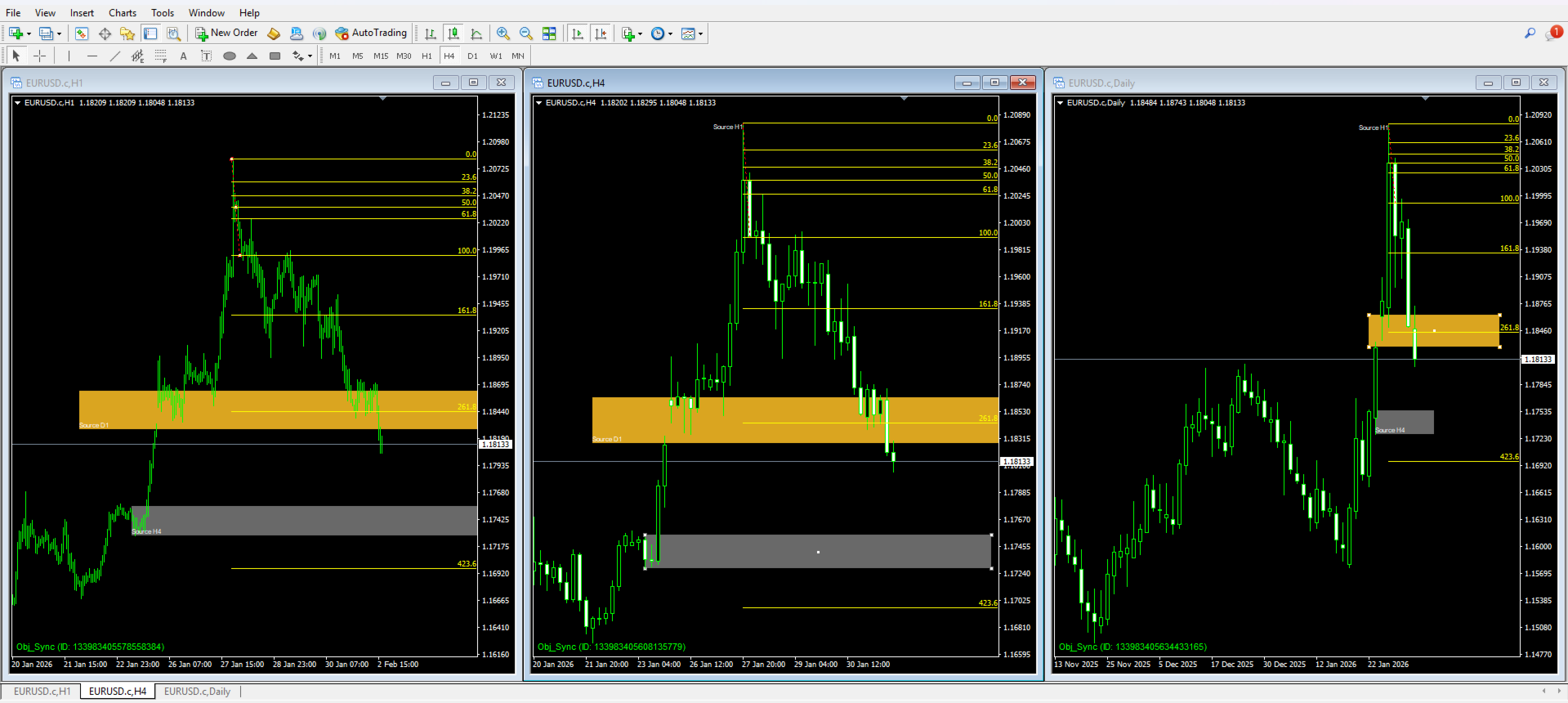
Object Sync MultiTF is the ultimate utility designed to streamline your technical analysis. It automatically synchronizes your chart objects (lines, shapes, and tools) across all open charts of the same symbol, regardless of the timeframe. Draw a trendline on H1, and watch it appear instantly on M1, M5, and D1 charts with precise coordinates.
Key Features:
-
Real-Time Synchronization: Updates instantly as you draw, move, or modify objects.
-
2-Way Sync: Works in all directions. Draw on a lower timeframe to see details, or on a higher timeframe for the big picture. All charts remain identical.
-
Smart Labeling System:
-
Adds a non-intrusive text label indicating the "Source Timeframe" (e.g., "Source H1").
-
Intelligent Positioning: Labels for Trendlines appear at the start point (Ray Left logic), while labels for Rectangles appear neatly at the bottom-left corner to avoid clutter.
-
Auto-Color: Labels automatically adapt to the chart's foreground color for maximum visibility.
-
-
Garbage Collector: Automatically deletes synchronized objects if the original object is removed, keeping your charts clean.
-
Supported Objects:
-
Trendlines
-
Horizontal & Vertical Lines
-
Rectangles (Support/Resistance Zones)
-
Fibonacci Retracement
-
Triangles, Regression Channels, Pitchforks, and more.
-
How It Works:
-
Attach the indicator to all charts of the currency pair you are analyzing (e.g., EURUSD H1, H4, Daily).
-
Start drawing! Any supported object created on one chart will be cloned to the others.
-
Delete an object, and its clones will disappear automatically.
Parameters:
-
InpPrefix: Unique identifier string. (Default: "Obj_Sync"). Useful if you want to separate groups of objects.
-
InpStatusColor: Color of the small status indicator in the bottom-left corner.
-
InpFontSize: Font size for the status indicator.
Optimize your trading workflow and never miss a key level again with Object Sync MultiTF.