Advanced Market Maker Dashboard by G Labs mt5
- Göstergeler
- Garry James Goodchild
- Sürüm: 1.3
- Güncellendi: 6 Mart 2026
- Etkinleştirmeler: 5
G-Labs Advanced Market Maker Dashboard MT5 | BTMM Cycle Engine + Multi-Pair Scanner Get the user guide here https://g-labs.software/guides/Advanced_Market_Maker_MT5_UserGuide.html
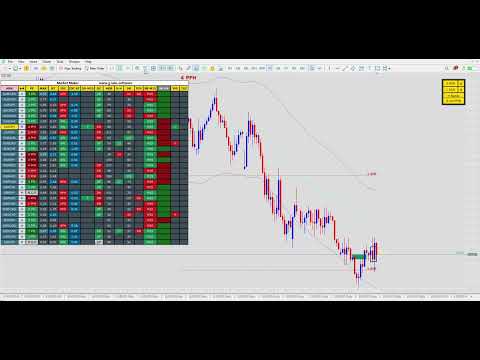
Professional BTMM (Beat The Market Maker) multi-symbol cycle analysis dashboard for MetaTrader 5. Tracks Market Maker intent, cycle progression, peak formations, stop hunts, order blocks, and structural behavior across 28+ pairs from a single chart.
This is not a simple scanner. It is a full cycle-aware BTMM engine combining higher-timeframe directional bias, intraday structure, ADR range expansion, manipulation detection, adaptive breaker block logic, currency strength ranking, and Shark Fin momentum confirmation into one complete trading workflow.
━━━ KEY FEATURES ━━━
Multi-symbol BTMM dashboard — 28 pairs default, expandable to any Market Watch symbol One-click symbol selector — instantly loads any pair onto your chart Full BTMM cycle tracking — H1 Peak Lock direction, Peak Formation status, intraday cycle alignment ADR expansion monitoring — see which pairs are early, mid, or over-extended in their cycle Breaker Block / Order Block detection — source blocks and continuation blocks with directional flip logic Stop Hunt detection — M15 manipulation relative to early-session consolidation range Shark Fin momentum signal — RSI-based volatility band reversal detection with confirmation lookback Currency Strength ranking — 8 major currencies sorted strongest to weakest in real time Divergence detection — triggers only beyond 2.7x ADR for high-probability reversal setups Multi-timeframe chart references — H1, H4 cycle levels plotted directly on chart Full alert system — push notifications, popups, and on-chart alerts for all key events
━━━ DASHBOARD COLUMNS EXPLAINED ━━━
Direction Arrows (H1 Cycle Lock) Shows which direction the BTMM cycle is currently locked. Based on EMA crossover on H1. Represents the Market Maker directional bias for each pair.
PF (Peak Formation) PFH = Peak Formation High | PFL = Peak Formation Low Number = days since peak was confirmed | N.C.P = No Confirmed Peak Defines where each pair sits within its Market Maker cycle. Essential for identifying cycle stage.
MAX (Cycle Expansion) Furthest expansion price has reached in the current cycle, measured in ADR multiples. Example: 3.3 means price has expanded 3.3x the Average Daily Range. Identifies over-extended pairs to avoid or fade.
RT (Real-Time ADR Position) Where price is currently trading relative to the cycle swing point, measured as an ADR multiple. Updates dynamically. Identifies early-cycle opportunities vs late-cycle risk.
IDC (Intraday Cycle) Intraday cycle state based on M15 EMA crossover. APL = Active Pivot Low (bullish M15 structure). APH = Active Pivot High (bearish M15 structure). Aligns intraday structure with the higher-timeframe H1 cycle. Essential for precise BTMM entry timing.
IDC RT (Intraday Real-Time) Real-time ADR multiple for the M15 intraday leg. Shows how far the intraday move has progressed.
50-M15 (50 EMA Touch) Detects when the current M15 candle touches the 50 EMA. Ideal for intraday continuation setups, pullback entries, and mean-reversion trades.
DC (Daily Close Context) Analyses the previous daily candle close position within its range. Upper close in a bullish cycle = continuation confirmation. Lower close in a bearish cycle = continuation confirmation. Opposing close = potential counter-trend warning.

ADR (Average Daily Range) Displays the ADR value in pips for each pair. Reference for target expectations, cycle expansion measurement, and position scaling.
SH (Stop Hunt) Detects stop-hunting behavior relative to the early-session consolidation range. Displayed in pips. Green = stop hunt low in an uptrend. Red = stop hunt high in a downtrend. Highlights Market Maker manipulation and liquidity grabs.
DR (Daily Range) Current day range in pips for quick comparison against ADR. Background changes to green or red when the daily range reaches 1x ADR, with color indicating whether the high or low was made first.
DIV (Divergence) Detects regular and hidden RSI divergence on H1. Only triggers when the real-time ADR multiple exceeds 2.7x to filter noise. RD = Regular Divergence. HD = Hidden Divergence. Useful for early reversal detection on over-extended pairs.
SF (Shark Fin Momentum) RSI-based momentum reversal signal calculated from internal volatility band analysis. Detects sharp momentum turns where RSI crosses through dynamic oversold/overbought boundaries. UP = bullish recovery from oversold extreme. DN = bearish collapse from overbought to oversold. Signals are filtered through a confirmation lookback to eliminate false triggers. Optional trend filter requires confluence with PF and IDC direction before displaying.
YHL (Yesterday High / Low) Indicates when the current M15 candle is interacting with yesterday's high (H) or low (L). Key reference for BTMM stop hunt and breakout analysis.
━━━ CURRENCY STRENGTH ━━━
A dedicated row at the bottom of the dashboard ranks all 8 major currencies (USD, EUR, GBP, JPY, AUD, NZD, CAD, CHF) from strongest to weakest in real time.
Scoring is derived from the H1 cycle direction across all watched pairs. If a pair trends up, the base currency scores positively and the quote currency scores negatively. Scores are normalized to a -1.0 to +1.0 range.
Cells are sorted left to right, strongest to weakest, and color-coded: Green = strong (above 0.5) | Dark Green = moderately strong (above 0.2) Grey = neutral | Dark Red = moderately weak (below -0.2) | Red = weak (below -0.5)
Pair the strongest currency against the weakest for the highest-conviction directional setups. Avoid pairs where both currencies score similarly, as those tend to be choppy and directionless.
━━━ BREAKER BLOCK / ORDER BLOCK LOGIC ━━━
Tracks institutional order flow using two structures on each of two configurable timeframes (default M15 and H4):
Source Order Block (Solid Rectangle) The first valid order block that initiated the directional move. Represents the origin of institutional intent. Solid green = bullish source. Solid red = bearish source. Remains fixed once established.
Current / Breaker Block (Filled Rectangle) The order block currently being respected by price. Updates dynamically as price continues closing in the trend direction. When price closes beyond it, a new block is promoted.

Continuation: Source block stays fixed. Breaker block advances forward tracking the move.
Directional Flip: When price closes back through the breaker block, continuation fails. The breaker block becomes the new source block. Color flips to the new directional bias. A new breaker block begins tracking the opposite direction.
Read it as: Source block = where the move started. Breaker block = where the move is currently progressing.
Retest alerts fire when price returns to either the breaker or source zone, identifying high-probability entry areas.
━━━ CHART FEATURES ━━━
ADR markers at 1x, 2x, and 3x ADR levels from the confirmed Peak Formation point Peak Formation markers (PFH / PFL) with days since confirmation H1 cycle references visible up to 3x ADR H4 cycle references visible up to 9x ADR Historical PFH/PFL labels across previous cycle swings Breaker block and source block rectangles with horizontal price level lines RSI divergence trendlines connecting swing points Candle countdown timer showing time remaining until next bar
Chart Buttons: 1 ADR Box — creates movable ADR rectangles for box stacking analysis 3 ADR Box — measures full H1 and H4 cycle expansions Show/Hide Old PFH/PFL — review previous historical cycle peaks Show/Hide Bands — toggle ATR-based volatility channel (LWMA + ATR envelope)
━━━ ALERTS AND NOTIFICATIONS ━━━
Breaker block retest alerts (source and breaker zones) New Peak Formation alerts Cycle reaching ADR MAX expansion alerts Stop hunt detection alerts Shark Fin momentum reversal alerts On-chart visual alerts Push notifications to mobile
━━━ SETUP AND TROUBLESHOOTING ━━━
Broker Symbol Suffixes: Some brokers use suffixes like .a, m, or #. Symbols in dashboard settings must exactly match your broker Market Watch names. Examples: EURUSD.a, GBPUSDm, XAUUSD#
Symbol Format: Pairs must be separated by commas. The correct format is shown inside the settings panel.
Windows Display Scaling: If the dashboard appears misaligned: Right-click platform shortcut > Properties > Compatibility > Change high DPI settings > Enable Override high DPI scaling behavior > Set to System (Enhanced) > Restart platform. Dashboard size can also be adjusted using Cell Width and Cell Height in indicator settings.
━━━ REQUIREMENTS ━━━
MetaTrader 5. Works on any instrument and timeframe. Recommended for forex majors, crosses, and gold (XAUUSD). Compatible with all brokers.


Kullanıcı incelemeye herhangi bir yorum bırakmadı