 MetaTrader 5
 Uzmanlar
 Göstergeler
 Kütüphaneler
 Yardımcı programlar
 Widget'lar
 Kurallar
YouTube'dan Mağaza ile ilgili öğretici videoları izleyin
Bir alım-satım robotu veya gösterge nasıl satın alınır?
Uzman Danışmanınızı
sanal sunucuda çalıştırın
sanal sunucuda çalıştırın
Satın almadan önce göstergeyi/alım-satım robotunu test edin
Mağazada kazanç sağlamak ister misiniz?
Satış için bir ürün nasıl sunulur?
MetaTrader 5 için Uzman Danışmanlar ve Göstergeler - 44
 Forex alım-satımını daha karlı hale getirmek için alım-satım robotları ve göstergeler kullanın. Alım-satım robotları, işlem açma ve kapatma sürecini otomatikleştirmenize olanak tanırken, göstergeler piyasa davranışını daha doğru bir şekilde tahmin etmenize yardımcı olur.
Bu sayfa, MetaTrader 5 uygulamalarının kataloğunu içermektedir.

**Experience Smarter Trading with FVG Super Signal**
Unlock simpler, more decisive trading with **FVG Super Signal**, an advanced MT5 indicator from the WinWiFi Robot Series. This powerful tool uniquely combines the Fair Value Gap (FVG) technique with robust trend-following logic.
* **Clear Signals:** Delivers intuitive Buy/Sell alerts, simplifying your trading decisions. * **Universal Compatibility:** Works seamlessly across all assets and timeframes. * **Highly Versatile:** Ideal for all tr
FREE

Trade Copier Master and Follower in 1 is a local expert advisor for copying trades between master and follower accounts on different terminals on the same device. It supports master/follower modes, configurable symbol mapping for different brokers, multiple money management options, risk-based sizing, stop loss/take profit copying, partial close copying, and deviation handling. The follower can close positions independently, invert trades, and adjust symbols with prefixes, suffixes, or explicit
FREE

Product Name: QuickStep Trader – Customizable Manual Trading Panel
Version: 2.0
Compatibility: MetaTrader 5
Product Type: Utility Description:
QuickStep Trader is a powerful yet intuitive manual trading panel designed for traders who prefer hands‑on execution. With a clean, fully customizable interface, it streamlines the process of opening and closing positions, letting you focus on your trading decisions. Key Features: One‑Click Lot Presets: Three preset lot buttons (user‑configu
FREE

This EA uses local chart fluctuations as a trigger to enter a position.
It does not use the martingale method or grid.
Entry trigger:
[level1]
1. Fall → Fall → Appears to be higher than the specified difference at this time = BUY entry
2. Rise → Rise → Appears to be lower than the specified difference at this time = SELL entry
[level2]
1. Fall → Fall → Rise after a gap → Rise higher than the specified difference = BUY entry
2. Rise → Rise → Fall after a gap → Fall lower than the specifi
FREE

Her saniyenin önemli olduğu anlar için hızlı işlemler Bu işlem paneli, baştan itibaren özel grafiklerle çalışmak üzere tasarlanmıştır;
saniyelik zaman dilimleri de buna dahildir.
Özel grafiğin arkasındaki gerçek işlem sembolünü otomatik olarak doğru şekilde algılar
ve işlemleri doğrudan bu sembol üzerinden gerçekleştirir — manuel eşleştirme veya ek adımlar gerekmez . Bu panelin çözdüğü tek temel konu şudur:
karar ile uygulama arasındaki mesafeyi en aza indirmek. Gereksiz pencereler yok.
Onay ku
FREE

Overview Advanced MT5 EA that automatically detects, scores, and visualizes support/resistance levels with integrated trading panel, risk management, and multi-channel alerts. Installation (3 Steps) Copy EA File : Place Saturno_Smart_SR_PRO_EA.ex5 in MQL5\Experts\ folder Refresh : Right-click "Expert Advisors" in Navigator → "Refresh" Attach : Drag EA to chart → Click "OK" → Enable AutoTrading button Note : Ensure "Allow Automated Trading" is checked and the EA shows a smiley face Qu
FREE

️ SMART PANEL TESTER — STRATEJİNİZİ TEST EDİN. RİSKİNİZİ KONTROL EDİN. SMART PANEL TESTER , ana SMART PANEL ürününün sadeleştirilmiş bir sürümüdür ve Strategy Tester içinde işlem stratejilerini kolay ve verimli şekilde test etmek için özel olarak tasarlanmıştır. Panelin ana odağı Risk Yönetimi dir. Bir işlem stratejisi yalnızca iyi giriş noktalarından ibaret değildir; uzun vadeli performansı, her işlemde riski ne kadar doğru kontrol ettiğinize de bağlıdır. ️ YERLEŞİK RISK MANAGER Riskinizi h
FREE

TradeLens Lite - Risk Calculator for MT5
The free version of TradeLens: a simple position size calculator on your chart. It never opens, modifies or closes trades.
- Type your risk in % of the balance in the panel. - Press BUY setup or SELL setup: draggable stop loss (red) and take profit (green) lines appear, the initial stop based on the ATR. - Drag the lines: lot size, risk in money, reward in money and R:R update in real time, calculated with your broker's contract values. - Panel in the t
FREE

SSACD - Singular Spectrum Average Convergence/Divergence This is an analogue of the MACD indicator based on the Caterpillar-SSA ( Singular Spectrum Analysis ) method. Limited version of the SSACD Forecast indicator. Limitations include the set of parameters and their range.
Specificity of the method The Caterpillar-SSA is an effective method to handle non-stationary time series with unknown internal structure. The method allows to find the previously unknown periodicities of the series and make
FREE
Reverse TradeCopier for Followers can copy trades from an account that is running Reverse TradeCopier for Source . Features: Copies trades from one source (master) account to multiple following (slave) accounts. Allow investor (read only) password for source (master) account. There are no complicated settings and input parameters, everything is easy. Works with different brokers. Works with different quotes symbols (EURUSD_FX, eurusd_m, etc.). Can copy orders from 4-digit quotes platform to 5-
FREE

PropFirm Copilot Trade Risk Management EA: The Ultimate Prop Firm Copilot The Trade Risk Management Copilot EA is an automated trading utility designed to assist manual traders and proprietary firm traders in managing their open positions and risk parameters. The tool automates the process of stop-loss and take-profit calculations, position trailing, and account drawdown monitoring. Managing multiple positions across various symbols requires continuous calculation of stops, break-even points, a
FREE

Order Entry Panel is a trade panel that sends a market order in one click from the chart, with the stop already attached. I built it for the trader who executes by hand and wants the decision on the chart. FEATURES See the order before you send it: each request line prints price, volume, stop and any target. Every entry carries a stop, built from your distance and attached before it is sent. Know the margin before the click: the terminal's figure for that line, or the shortfall. One click sends
FREE

786 AUREX EXPERT ADVISOR Contact for Set files or see the Screen Shots
WhatsApp: Text only +447716409196
Best for XAUUSD on All Brokers
Minimum and Safest Balance is 500$ at medium Risk
What it does Automatic daily levels — At a chosen time, the EA scans a configurable look-back window (e.g. 180 minutes) and draws the highest high and lowest low as clean horizontal lines, with an optional visual range box. Two entry modes — Choose between a straightforward Level Breaker (trade any candle clos
FREE

Pulse Trade Dashboard is an interactive trade management panel for MetaTrader 5, built for traders who want full control of their account without leaving the chart. Attach it to any chart and get a real-time overview of your balance, equity, open positions, and floating P&L — all updating live. Place market orders instantly with the one-click BUY and SELL buttons, adjusting your lot size, stop loss, and take profit directly on the dashboard without opening a single settings menu. What's included
FREE
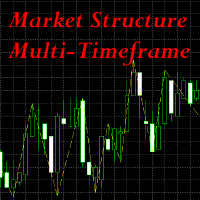
This indicator is extremely useful for traders who want to keep an eye on the market structure without wasting time drawing it manually. It also adds an important optional feature, which is MTF (Multi-Timeframe) analysis . Multi-Timeframe (MTF) analysis is a trading technique that consists of analysing the same financial instrument on different time intervals (charts) simultaneously, in order to gain a more complete view of the market. Starting with the analysis of higher timeframe charts to i
FREE
TradeManagerEA — Full Trade Management Solution Overview (Short Description) The TradeManagerEA is a specialized Expert Advisor designed to manage open trades across all symbols. It provides automatic breakeven rules, trailing stops, and additional settings optimized for Gold (XAU/GOLD). This tool requires minimal user intervention and can enhance the consistency of your trading approach. Detailed Description 1. Core Features Breakeven Management : Automatically moves Stop Loss to entry price p
FREE

Plan it on structure. Size it to the cent. Protect it like a funded account. PQ Trade Assistant is a free trade planner and manager with a market-structure engine built in. You decide the trade. The assistant places the stop and target on real structure, sizes the position from your risk, checks it against your account rules, and manages it once it is live. It never trades on its own. No other product is needed. Plan on structure PLAN BUY / PLAN SELL draws entry, stop and target lines with risk
FREE

A fully automated, zero-input trailing stop-loss management utility designed specifically for Gold (XAUUSD) to lock in profits using dynamic milestones. Full Description Smart Trail SL is a specialized algorithmic trade-management utility designed for Gold (XAUUSD) traders who want automated, disciplined, and strict protective stop-loss enforcement without manual intervention. This utility features a hardcoded "Attack Mode" trailing engine. It completely removes the need for configuring complex
FREE

Dingji Risk Manager MT5
Formal Version V2.00
Author: Dingji [Download and Installation]
Download and install the current version from this product's MQL5 Market page or the MetaTrader 5 terminal. If the Market download is temporarily unavailable, retry from the terminal later. Do not obtain executable files from unofficial links. [Product Description]
Dingji Risk Manager MT5 is a MetaTrader 5 EA for trade planning, risk-based position sizing, order management and visual chart assistance. Enter
FREE

News Guard & Slippage Shield Overview This Expert Advisor is a protective utility for MetaTrader 5 accounts. It pauses trading around high-impact news releases and automatically closes any position that fills with excessive slippage. It runs at account level, so it can protect every Expert Advisor and Magic Number on the same account, not only trades it opens itself. The EA does not place any trades of its own. It is designed to run alongside your existing trading robots as a risk-control layer.
FREE

Easy Signal Multiplier MT5 Easy Signal Multiplier is a utility Expert Advisor designed to automatically scale up trade volumes from Trade Signals, external EAs, or manual trades. By continuously monitoring active account positions, it dynamically opens supplementary orders, synchronizes Stop Loss and Take Profit levels, and manages position exits in real time to achieve your exact target position size multiplier. Product Features Custom Exposure Multiplier: Specify your target total exposure fac
FREE
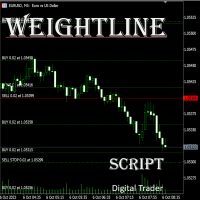
In multi-asset, multi-position trading environments—such as those involving forex, stocks, gold, and other instruments—traders often face a critical pain point: when holding multiple positions in the same instrument, it’s difficult to quickly and intuitively assess the current market price relative to all long and short positions. This makes it challenging to accurately determine the overall average entry cost, leading to delayed stop-loss and take-profit decisions. The problem worsens with mixe
FREE

Copy Trade Local ALIEN PRO MT5 Local Trade Copier with Master and Slave Account Synchronization Copy Trade Local ALIEN PRO MT5 is a trade copying system designed to synchronize trading activity between multiple MetaTrader 5 accounts running on the same computer or Windows VPS. The system uses a MASTER and SLAVE architecture. The MASTER monitors trading activity across an entire MT5 account, while SLAVE instances reproduce selected trading operations on other connected accounts. One MASTER can pr
FREE

Advanced Trade Mirror is a powerful Forex tool designed for traders who need instant, seamless trade replication across multiple terminals on the same machine. With lightning-fast execution, it ensures zero lag in copying trades, maintaining precision and efficiency in high-speed trading environments.
Get the Trade Mirror Follower here: https://www.mql5.com/en/market/product/133890 Specification:
Master ID: Identity value of master terminal, please use a unique value to prevent duplicated mas
FREE

Propfirm Buddy - Your Ultimate Equity Protector [ TG group Propfirm experience sharing]
Are you tired of losing funded accounts or failing evaluations due to sudden market spikes or emotional revenge trading? Propfirm Buddy is an advanced, lightweight utility Expert Advisor designed to be your personal risk manager. Whether you are trading a prop firm challenge or protecting a live funded account, Propfirm Buddy runs quietly in the background, monitoring your equity 24/5. The moment a critica
FREE
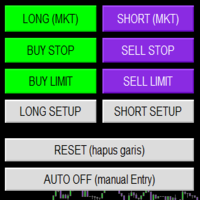
Smart Trade Panel
Trading Assistant is a powerful and elegant one-click trading panel for MetaTrader 5 — designed for professional traders who value speed, precision, and clarity.
Whether you scalp XAUUSD, swing trade indices, or run tight risk management, this tool gives you complete control with a clean visual layout, automatic ATR-based setups, and adaptive risk calculation.
️ Main Features One-Click Execution
Instant Buy/Sell Market Orders with pre-defined SL/TP
Supports Buy Stop
FREE
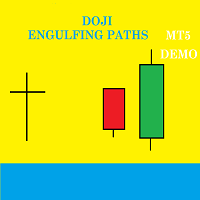
Doji Engulfing Paths enables to get signals and data about the doji and the engulfing patterns on charts. It makes it possible to get opportunities from trends, and to follow the directional moves to get some profits on the forex and stocks markets. It is a good advantage to take all the appearing opportunities with reversal signals and direct signals in order to obtain some profits on the forex market. With the demo version, only the signals starting with the 20th candle or bar are available.
FREE
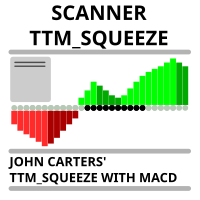
Market scanner based on the indicator published here Download the 'John Carters TTM Squeeze with MACD' Technical Indicator for MetaTrader 5 in MetaTrader Market (mql5.com) . Only the instruments that are in the Market Watch window are scanned. Maximum number of scanning tools up to 5000. The scan timeframe is selected from the timeframe panel of the terminal. To use it, open any chart and attach the Expert Advisor to the chart, the 'Search' button will appear in the upper left corner. When you
FREE

KF Partial Close Manager — Automated Multi-Tier Position Scaling & Protection for MetaTrader 5
KF Partial Close Manager is an automated trade management utility for MetaTrader 5 that helps discretionary and algorithmic traders systematically secure profits. Instead of prematurely closing winning positions or exposing floating gains to sudden market reversals, this utility executes multi-stage partial closures, moves your Stop Loss to Breakeven, and maintains strict broker volume compliance.
T
FREE

MTM Manual Trade Manager is a professional trading dashboard designed for manual traders who want better control over risk and trade management.
This Expert Advisor does NOT open trades automatically. All trading decisions and order executions are fully controlled by the trader.
Main Features: - Manual Buy and Sell execution from the dashboard - Visual Stop Loss and Take Profit using drag & drop lines - Fixed Lot and Risk Percentage position sizing - Automatic Break Even management - Multiple
FREE

KF Hidden SL TP is a professional risk-management utility for MetaTrader 5 designed to keep your Stop Loss and Take Profit levels completely invisible to brokers.
By holding your exit levels locally in the terminal and off the broker server (orders remain with SL=0 and TP=0), KF Hidden SL TP protects your positions from artificial spread widening, stop-hunting spikes, and broker-held stop transparency.
When market price touches or crosses your virtual stop level, the utility instantly execute
FREE

Birden fazla siparişinizi kolayca yönetmenizi sağlayan asistan
1. “Tek Tıklamayla Çoklu Sipariş Yönetiminde Ustalaşın – Riske Dayalı Parti Büyüklüğü, Kısmi Kapanışlar. Yardımcı programın temel güçlü yönlerini vurgular: otomatik hacim/risk kontrolü, çoklu sipariş gözetimi
2. “Daha Akıllı Ticaret Yapın, Daha Zor Değil – Eşzamanlı Ticaret Yönetimi için Eksiksiz Bir Kontrol Paneli” Birden fazla işlemde verimliliği ölçeklendirmek için EA'yı hepsi bir arada kontrol paneli olarak çerçeveler
3. “Tü
FREE

It's demo version of Auto StopLoss Defender , you can buy on page - https://www.mql5.com/ru/market/product/33106 or extended version of the program is Auto StopLoss Premium , you can set stoploss and takeprofit - https://www.mql5.com/ru/market/product/33111
Demo restrictions: Stop-loss 0.10% for new order.
While you are trading, Auto StopLoss Defender doing all the routine work. "Must have" for scalping. Best way to save account balance in case of force majeure.(Internet connection loss
FREE
Introduction to Order Risk Management EA ORM EA is specially designed for fast and accurate market order execution to be used with our Price Action and Econometric Trading strategies listed below. ORM EA is fully automatic and ORM EA is also very easy to use. ORM EA is totally free of charge. You can also use this robust order execution feature of this ORM EA for any other your own trading strategy.
Trading Strategy Guide Order Risk Management EA provides the guide for the risk management for y
FREE

You place the stop where structure says it belongs. The panel decides the size , enforces your firm's limits, and refuses to hand the broker a level it is not allowed to act on yet. The panel, as it opens. Every figure on the panel is derived, not entered: the day's peak, the floor that binds, and the room between them. 01. What a funded account actually asks of you A funded programme hands you the firm's capital and a short list of limits. Breach one and the account is gone — not reduced, gone
FREE

AdnanEdge is a technical signal indicator for MetaTrader 5. It analyzes market conditions using five independent strategies and displays BUY or SELL arrows on the chart when a valid signal appears. The indicator is read-only and does not place trades. The built-in dashboard shows the current signal direction, strategy name, quality score, market regime, and relative volume. An adaptive mode automatically selects the best strategy for current conditions. Key Features Five signal strategies: MA C
FREE

Multichart Dashboard — Your Central Command Center for Trading
The **Multichart Dashboard** Expert Advisor transforms your MetaTrader interface into a clean, professional trading hub. Manage up to **6 charts simultaneously** , switch between symbols in an instant and always stay in control — all within one compact, fully configurable panel.
What does Multichart Dashboard do?
**Up to 6 charts in parallel** — Set the desired number of charts (1–6) with a single input. All associated charts are
FREE

RangePower Index is an MT5 indicator that accurately measures the strength of currencies, indices, gold and oil based on their daily range. Thanks to this, you will immediately know which assets have real momentum and which, on the contrary, are losing strength.
Daily range analysis (high–low) for currencies, indices, gold and oil Quick visualization of the strongest and weakest assets With RangePower Index you will gain a clear competitive advantage - trade only where there is real market
FREE

using this tool you can manage risk by via app this is massionolo calculator i have built this fro free i have give video tutorial watch that and seting this in your computer so this automatic sysytem only you have to drag and drop rr that and place order by phone app so now it is very easy and stree free automatated sysytem so once download and parctice on it we provided https://play.google.com/store/apps/details?id=com.lotcalculator.app https://www.youtube.com/playlist?list=PLuslfv5r6apUZ0p-a
FREE

Trend Entropy – Adaptive Chaos & Order Detector
Entropy is the scientific measure of disorder or uncertainty in a system. In physics, it shows how energy disperses and why systems move toward chaos. In information theory, it measures unpredictability in data. Low entropy means order and predictability, while high entropy reflects randomness, complexity, and reduced clarity of outcomes.
Trend Entropy is a next‑generation trading indicator designed for MetaTrader 5. Unlike conventional oscillat
FREE
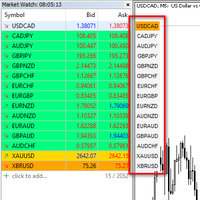
I want to quickly view the chart, so I created a small tool. I hope it can help you. Functions:
Use up/down arrow keys or mouse clicks to quickly open charts for currency pairs. Use left/right arrow keys to change the timeframe of the current chart. Automatically update the order based on the Market Watch
If you have any request or errors please tell me to help it better.
Donate us , Thank u!
Telegram: 0388894014
FREE

The Manual Adjust SL/TP EA streamlines your risk management by enabling you to manually specify new SL and TP price levels for your open positions. The Levels is Price value and is NOT a pips or points distance from the Entry Levels. The EA automatically validates your inputs against the broker’s stop-level requirements (minimum distance) to prevent order adjustment rejections. It offers filtering options so you can choose to apply adjustments only to Buy orders, Sell orders, or both. Key Featur
FREE

MT4 MT5 Trade Bridge for MetaTrader 5 is the MetaTrader 5 component of the MT4 MT5 Trade Bridge system. It allows a MetaTrader 5 terminal to work either as a Master or as a Slave in a local bridge connection with MetaTrader 4. When configured as Master , the MT5 component reads trading activity from the MetaTrader 5 terminal and writes structured trade data into a local bridge file. The connected MT4 component can then read this data and mirror the trading activity according to its selecte
FREE

Trade. Allows you to perform basic trading operations in one click directly from the chart. Trading operations: Open Buy and Sell market positions with one click. Specify lot size manually before opening a trade. Set Stop Loss and Take Profit as price levels . Stop Loss and Take Profit are automatically initialized at a fixed distance from the current market price (default: ±50 pips , symbol-aware). Fully supports Forex, Metals (XAUUSD), Indices, and other MT5 symbols with correct price formatti
FREE
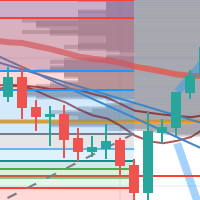
每次一忙都會錯過訊號下單,或不想一直花時間盯盤下單,可以用這個工具掛單,讓MT5 自動 盯盤並在滿足條件後下單 。
demo : https://www.youtube.com/watch?v=JBPiFkixqT4 configuration: https://www.youtube.com/watch?v=D7xESKKD26o #############################################
使用場景:
一般交易可以分為2種,分別是: 左側交易: 價格到達關鍵位置時就下單交易,想要自動下單,可以使用buy limit和sell limit掛單 右側交易: 價格到達關鍵位置, 同時出現做多或做空訊號 時下單交易, 想要自動下單, 就 可以用本工具自動掛單 本工具會 在你指定的阻力區域偵測到做空訊號時,建空單 ; 並在你指定的支撐區域偵測到做多訊號時,建多單。 demo影片: https://www.youtube.com/watch?v=JBPiFkixqT4
########################################
FREE

Manual trading panel for MetaTrader 5. This tool enables you to open a trade in a single step. You can set the risk and levels directly on the chart and the position size will be calculated automatically. The tool does the following: You simply drag the stop-loss (SL), entry, and take-profit (TP) lines directly onto the chart. The position size is then calculated automatically, based on the specified risk as a percentage of the deposit or in the account currency. If necessary, you can specify a
FREE

# MiniBull Board
**Version 1.14 — MetaTrader 5 indicator (separate window)**
**11 languages: English, Turkish, Russian, Chinese, Spanish, Portuguese, Japanese, German, French, Italian, Korean** — automatically in the language of your MetaTrader terminal, or chosen with a single input.
MiniBull Board is a compact watch-list dashboard for MetaTrader 5. For every symbol you choose it shows where the price stands today, this week and this month: the current price, the day / week / month opening
FREE

Actively developed: new features and improvements are added regularly. Found an issue or have a suggestion? Leave a comment and it will be fixed quickly.
Plan every trade like on TradingView: drag a Risk:Reward box on your MetaTrader 5 chart and see your exact lot size, risk and target instantly. Free. PLAN
- Click BUY or SELL, then click the chart - or double-click for a box at market price.
- Drag the stop loss, take profit, entry and box width directly on the chart.
- Lot size is calculat
FREE

This is a utility panel to assist closing of open Deals. The panel has input filters to assist one select the right trades. The tool displays the number of trades to be closed as well as profits to be realized. One click close, Filter trades to be closed by: symbol, (Filter by a particular symbol in the trade terminal). magic number (If your orders are from particular EA with unique magic numbers). whether in profit, loss or All. (P/L=all trades, profiting = trades in profit, loosing = trades
FREE
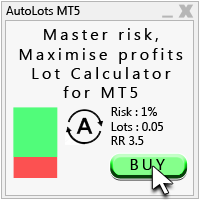
Auto Lots MT5
Auto Lots MT5 is an innovative and powerful application designed for traders on the MetaTrader 5 (MT5) platform. The application offers a user-friendly and intuitive interface, allowing traders to efficiently manage their positions, set precise entry levels and apply advanced risk management.
Key features: 1. Creation of SL/TP zones on the chart: The application allows users to create two customisable rectangles directly on the chart, making it easy to adjust entry points, take
FREE

OVERVIEW
Tanin EA17 Second Chart is a professional-grade utility EA built specifically for ultra-scalpers. Since MetaTrader 5 does not natively support second timeframes (like S10, S15), scalpers often face execution delays when analyzing external platforms and executing on MT5. EA17 bridges this gap by generating smooth, real-time custom second charts directly within your terminal. THE STORY BEHIND THE TOOL
As a scalper myself, I needed absolute speed and precision. I built this tool to elimin
FREE

Risk Pilot MT5 — Fast Trade Execution and Risk Management Panel Take absolute control of your trading risk with Risk Pilot , the ultimate interactive assistant for manual traders on MetaTrader 5. Designed for precision and built for speed, Risk Pilot eliminates manual lot calculations so you can enter trades instantly before the market moves.
️ IMPORTANT NOTICE: This is a manual trading UTILITY TOOL, not an automated trading robot (EA). This tool WILL NOT auto-trade or execute trades based
FREE

EA Risk Commander is the central risk manager of the From Learn to Earn EA System for MetaTrader 5. The EAs of the system send every trade proposal to it; EA Risk Commander executes it, executes it with an adjusted lot, or rejects it, and writes the reason in its journal. It does not open trades by itself.
Important: it works only together with the EAs of the From Learn to Earn EA System (BoS CHoCH Engulfing, Engulfing In Engulfing, Manual Trader) in their versions with the input group "0. EA R
FREE

This is a tool created for scalping. it can generate pending orders with 4 input: 1. Volume : Lot for the Pending Orders 2. Distance : Distance within the Orders in Points 3. Total Order : Total Generated Orders 4. Take Profit : TP for the generated Orders in Points 5. Stop Loss : SL for the generated Orders in Points It also have another tools which can monitor the floating and close at defined profit using Closed at Profit Input What's new: - Stop Loss in Pip
FREE

Overview Copy Trades Master is a high-performance local signal broadcaster for MetaTrader 5. It tracks active positions on your master account in real time and streams execution data directly to one or multiple SlaveCopier terminals running on the same PC or local network via ultra-fast local file IPC ( FILE_COMMON ). https://www.mql5.com/en/market/product/189485 Key Features Local Common-File IPC: Uses local file streaming ( MQL5\Files ) for near-zero latency execution without requiring externa
FREE

AI Smart Risk Trade Manager is a professional trade-management utility panel for MetaTrader 5. It does not open trades on its own signal - instead it gives you a one-click, risk-based way to enter the market and then automatically manages every open position (yours or from any other EA) with breakeven, trailing and partial-close logic. Key features: One-click BUY / SELL panel buttons that size the position automatically from your chosen risk percent of account balance Automatic Stop Loss and Tak
FREE

OrderBook Utilities is a script, which performs several service operations on order book hob-files, created by OrderBook Recorder . The script processes a file for work symbol of the current chart. The file date is selected by means of the input parameter CustomDate (if it's filled in) or by the point where the script is dropped on the chart. Depending from the operation, useful information is written into the log, and optionally new file is created. The operation is selected by the input parame
FREE

TradeBridge EA — Automated Trade Execution for the MyFXRoom Community Important: TradeBridge EA is part of a 2-stage system built specifically for the MyFXRoom trading community. It will not function as a standalone EA. It works in conjunction with the MyFXRoom Bridge application to receive and execute trade alerts automatically. For information on accessing the Bridge, please visit the author's MQL5 profile. Overview TradeBridge EA is a professional automated execution layer for MetaTrader 5.
FREE

TRADE PANEL MASTER — Know Your Risk Before You Click
Open your chart. See your panel. Trade with confidence.
Before you click Buy or Sell, Trade Panel Master shows you exactly what you risk, what you gain, and your R:R ratio — in real time. No mental math. No surprises.
FEATURES
- Lot sizing with real-time margin display - SL & TP in 3 modes: Points / Money / Price - Au
FREE

Symbol Spec Auditor, bir sembolün sözleşme spesifikasyonunun pozisyon büyüklüğünü ve işlem maliyetini belirleyen kısmını grafikte tek bir panelde toplar: puan değeri, spread maliyeti, teminat, swap, emir gerçekleştirme kuralları ve işlem seansları. Ham spesifikasyon değerleri hesap para biriminde 1,00 lot başına paraya çevrilir ve lot büyüklüğü kodunu sessizce bozan broker ayarları uyarı olarak listelenir. Tek bir düğme aynı denetimi Piyasa Gözlemi'ndeki her sembol için bir CSV dosyasına aktarır
FREE

Bu yardımcı program, mum manuel olarak yerleştirilen trend çizgisine dokunduğunda, sanki daha belirgin bir bekleyen emirmiş gibi emirleri açar. Herhangi bir varlık üzerinde kullanılabilir, emri açtığında dokunduğu çizgiyi ortadan kaldırır ve Arrow'u oluşturur. Bu durumda, fiyat tersine çevirme işlemleri için kullanılır; yükseliş mumu alt çizgiye dokunduğunda bir satış emri açar ve düşüş mumu yukarıdan aşağıya çizgiye dokunduğunda bir satın alma emri açar.
Zararı durdurma ve kar almayı ayarla
FREE

Mobile-EA is an Android-first trading companion for MetaTrader 5 , bringing market tools and connected account management together on your phone. This product is the companion MT5 Expert Advisor that links your terminal to the Mobile-EA Android app. The mobile app is available for Android; iPhone/iOS is not currently supported. The Android app is now available on Google Play , and new users receive a free 14-day Ultimate trial starting at registration . Watch the app introduction here: https://y
FREE

Sign@l12 Trade Manager: protect your manual trades without watching every tick.
Sign@l12 Trade Manager is a small Expert Advisor that looks after the trades you open yourself. It does four jobs: - it adds a stop loss and / or take profit when a trade has none - it moves the stop loss to break even once the trade is far enough in profit - it shows all your open trades on a clean dashboard, with SL, TP and profit or loss - it logs every trade to a CSV file when it closes, so you can review your
FREE

Titan Dual Mode Utility is a high-performance trading assistant designed for traders who require speed, precision, and flexibility in the MetaTrader 5 terminal. This utility was developed to solve the delay of manual order entry, providing a professional interface for modern scalpers and intraday traders. The main innovation of this tool is the Dual Mode System , which allows the user to switch between two different execution strategies instantly: Protected Mode: This mode is designed for conser
FREE

Algorithm Update: Grid Assistant (Version v3.1) 1. Description of the Fixed Issue (Bug Fix): In previous versions, the grid level auto-recovery module ( CheckAndRestoreKnees ) scanned trade history using a fixed lookback window (the last 3 days). When a grid cycle fully closed and profit was taken, the memory cleanup mechanism wiped the stored position IDs as intended. However, upon starting a new grid cycle, the assistant queried historical deals from the past 72 hours, pulled closed profitable
FREE

Auto Position Manager is a unique services application of its kind across the entire MQL5 market, setting new standards for applications of this type. The Services app is a compact but powerful tool that significantly impacts the entire system. Its user-friendly interface and start-stop system make it excellent for automating repetitive tasks. Once it's set up, the service can be toggled on or off with a single click. Crucially, the configuration persists even if the platform is turned off and
FREE

Close All 1 Sec. for MT5 Close All 1 Sec. is a professional trade management Expert Advisor for MetaTrader 5 designed to help traders manage positions quickly and efficiently. The EA provides real-time visualization of important trading levels, including Break-Even and Margin Call estimates, directly on the chart. It also features a powerful Close All button that allows traders to instantly close open positions and remove pending orders with a single click. Whether you are a scalper, day trader
FREE

Netting Strategy: Implements a netting strategy for managing multiple positions, optimizing trade efficiency. Flexible Order Distances: Allows users to customize order distances in pips, providing adaptability to various market conditions. Dynamic Take Profit Method: Utilizes a dynamic take profit mechanism, adjusting profit targets based on evolving market dynamics. Adaptive Take Profit Ratio: Users can customize take profit ratios in accordance with the lot size, allowing for precise profit o
FREE

IndiSig by Buffer
Detect Signals from a Custom Indicator by Buffer & Send notifications to Telegram Channel or Open orders
* Buy/Sell Buffer: You may get this info on MT4/5 Data Window (CTRL + D)
* MT5 version: Add the indicator first, then the EA
* MT4 version: Only works properly with default settings of the indicator Join https://t.me/fxassistant_vn for more useful EAs!
FREE

Project Overview Totz Visual Risk Calculator EA is an interactive, on-chart Risk Management panel for MetaTrader 5 (MT5). It replaces manual position size calculations by automatically computing appropriate lot sizes based on visual, draggable Entry, Stop Loss (SL), and Take Profit (TP) lines. Key Features Automated Risk Calculation: Lot sizing automatically adjusts to target a specific percentage of account balance or equity. Interactive Visual Lines: Drag-and-drop horizontal lines directly
FREE
MetaTrader platformunun uygulama mağazası olan MetaTrader Mağazasından bir alım-satım robotunun nasıl satın alınacağını öğrenin.
MQL5.community Ödeme Sistemi, PayPal, banka kartları ve popüler ödeme sistemleri aracılığıyla yapılan işlemleri destekler. Daha iyi bir müşteri deneyimi için satın almadan önce alım-satım robotunu test etmenizi şiddetle tavsiye ederiz.

Alım-satım fırsatlarını kaçırıyorsunuz:
- Ücretsiz alım-satım uygulamaları
- İşlem kopyalama için 8.000'den fazla sinyal
- Finansal piyasaları keşfetmek için ekonomik haberler
Kayıt
Giriş yap
Web sitesi politikasını ve kullanım şartlarını kabul edersiniz
Hesabınız yoksa, lütfen kaydolun