 MetaTrader 5
 Uzmanlar
 Göstergeler
 Komut dosyaları
 Kütüphaneler
 Depo
Depo
Fan sayfamıza katılın

Session Range Boxes with Killzones, Breakout Alerts and Stats - MetaTrader 5 için gösterge

- Görüntülemeler:
- 166
- Derecelendirme:
- Yayınlandı:
-
 Alım-satım fırsatlarını kaçırıyorsunuz:
- Ücretsiz alım-satım uygulamaları
- İşlem kopyalama için 8.000'den fazla sinyal
- Finansal piyasaları keşfetmek için ekonomik haberler
Kayıt Giriş yapWeb sitesi politikasını ve kullanım şartlarını kabul edersiniz
Hesabınız yoksa, lütfen kaydolun -
 Bu koda dayalı bir robota veya göstergeye mi ihtiyacınız var? Freelance üzerinden sipariş edin
Freelance'e git
Bu koda dayalı bir robota veya göstergeye mi ihtiyacınız var? Freelance üzerinden sipariş edin
Freelance'e git

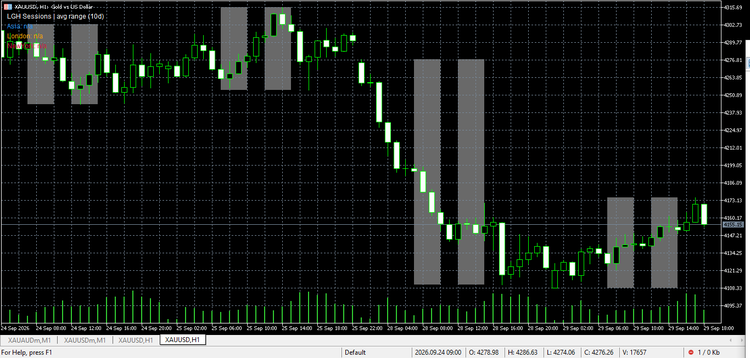
Asian, London and New York session high/low boxes with ICT killzone shading, breakout alerts and average-range statistics panel.
OVERVIEW
Draws clean high/low boxes for the Asian, London and New York sessions in your broker's server time. Shades the ICT killzones in the background, marks liquidity sweeps of the Asian range, alerts you when a session box breaks, and shows a small panel with each session's average range in pips.
KEY FEATURES
- Asian / London / New York boxes with 50% midlines, fully customizable server-time inputs
- ICT killzone shading (London 07:00-10:00, New York 12:00-15:00 by default)
- Breakout alerts (popup + push), once per session per side - no spam
- Statistics panel: average session range in pips over N days
- Liquidity sweep markers: wick through the Asian high/low that closes back inside
- Works on all symbols and timeframes; overnight sessions supported
HOW TO USE
- Attach to any chart. Default times: Asia 00:00-09:00, London 07:00-12:00, New York 12:00-17:00 (server time).
- If your broker's server is offset, shift all session times by the same offset.
- Watch price react at box highs/lows and midlines during killzones; sweeps often precede the real move.
NOTES
- Times are server time, not local time - adjust inputs to your broker.
- Boxes need M1 history; on a fresh terminal let history download first.
- This is an analytical tool, not a trading signal - it does not predict direction.
 GridPro Panel — open-source grid trading EA with on-chart control panel
open-source grid trading EA with on-chart control panel
Margin Risk Simulator
Shows the prices of the current symbol at which the account reaches margin call and stop out, with a what-if mode for extra volume, the maximum volume you can add and pending orders that trigger on the way.
 Buffer Inspector Kb
Shows what every buffer of an indicator holds - arrows, a line or a colour index - and labels the arrows on the chart with their buffer numbers. Works with compiled indicators without source code.
StopDistance - bar range in points with a suggested stop level
Shows the range of every bar in points, its moving average (SMA or EMA) and a suggested stop distance (average x factor). A stop tighter than the typical bar range gets taken out by ordinary noise; the indicator makes that threshold visible in points, the same unit a stop loss is set in.