 MetaTrader 5
 Uzmanlar
 Göstergeler
 Komut dosyaları
 Kütüphaneler
 Depo
Depo
Fan sayfamıza katılın

- Görüntülemeler:
- 77
- Derecelendirme:
- Yayınlandı:
-
 Alım-satım fırsatlarını kaçırıyorsunuz:
- Ücretsiz alım-satım uygulamaları
- İşlem kopyalama için 8.000'den fazla sinyal
- Finansal piyasaları keşfetmek için ekonomik haberler
Kayıt Giriş yapWeb sitesi politikasını ve kullanım şartlarını kabul edersiniz
Hesabınız yoksa, lütfen kaydolun -
 Bu koda dayalı bir robota veya göstergeye mi ihtiyacınız var? Freelance üzerinden sipariş edin
Freelance'e git
Bu koda dayalı bir robota veya göstergeye mi ihtiyacınız var? Freelance üzerinden sipariş edin
Freelance'e git
Margin Risk Simulator draws the prices of the current symbol at which your account would reach the broker's margin call and stop out levels, and answers two questions before you add to a position: what happens to the margin level if I add X lots, and how many lots can I add without falling below a safety level. It is meant for traders who scale in, average down or keep grids of pending orders. It is an analysis tool only: it never sends, modifies or closes orders. It runs as an Expert Advisor because the terminal does not allow OrderCalcProfit and OrderCalcMargin in indicators; Algo Trading does not need to be enabled.
Features
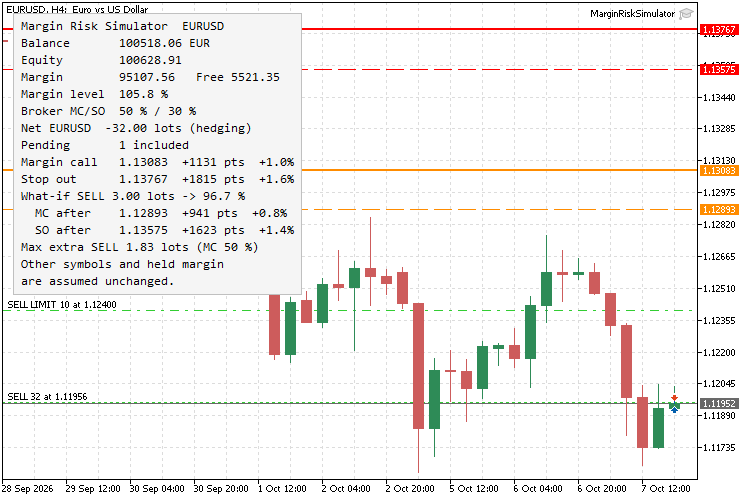
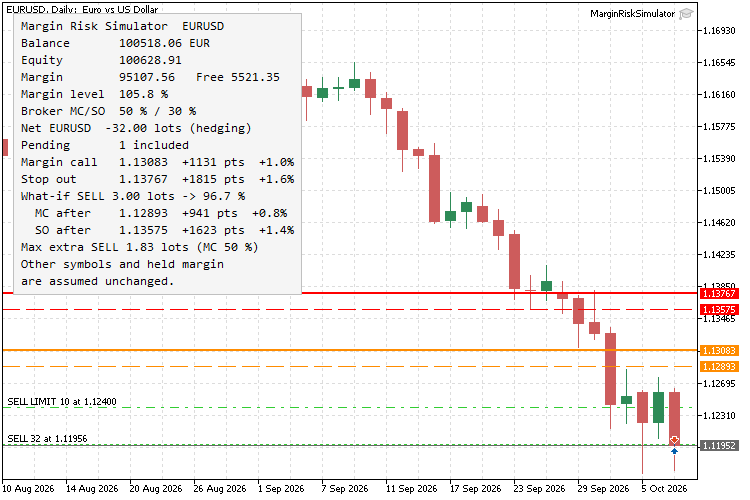
- Margin call and stop out lines — two horizontal lines (orange and red) at the price of this symbol where the broker's levels would be reached; the panel shows the price, the distance in points and in percent. Both directions are searched, so hedged or mixed exposure is handled.
- Broker rules read from the account — margin call and stop out levels and their mode (percent or money) come from the account properties; netting and hedging accounts are both supported.
- What-if mode — Hypothetical extra volume and Hypothetical position side add a position at the current price; the panel shows the margin level right after opening and dashed lines show the new margin call and stop out prices.
- Max extra volume — the largest volume (rounded to the broker's volume step and limits) that can be added in the chosen direction while the margin level stays at or above the safety level and free margin stays non-negative. The safety level is the broker's margin call by default or any percentage you enter.
- Pending orders on the way — limit and stop orders of this symbol whose prices lie between the current price and the level are treated as filled at their own price, adding exposure and margin. This shows how a grid of buy limits can bring the stop out much closer.
- Native calculation — profit uses OrderCalcProfit and margin uses OrderCalcMargin for the total volume of each side, so contract size, profit currency conversion and volume-tiered leverage (where 10 lots can cost more than 10 times one lot) are taken from the terminal.
- Light on resources — refreshes on ticks and on a timer, at most five times per second, and skips the calculation when quotes, account and orders have not changed.
How to use
- Attach the Expert Advisor to a chart of the symbol you want to check. If another Expert Advisor already runs on that chart, open a second chart of the same symbol.
- Read the panel: account state, broker levels, net volume on this symbol and the nearest margin call and stop out prices.
- To test an idea, set Hypothetical extra volume and the side. The dashed lines and the panel show the account after that trade.
- Check Max extra before scaling in. Set Safety margin level if you want a buffer above the broker's margin call.
Inputs
Input | Default | Description |
|---|---|---|
| Hypothetical extra volume, lots | 0 | Volume of the what-if position; 0 turns the mode off. |
| Hypothetical position side | Buy | Direction of the what-if position and of the max volume calculation. |
| Safety margin level for max volume, % | 0 | Margin level the max volume must keep; 0 uses the broker's margin call level. |
| Include pending orders that trigger on the way | true | Treat limit and stop orders of this symbol as filled when the price passes them. |
| Search range around current price, % | 50 | How far from the current price the levels are searched. |
| Show margin call line / Show stop out line | true | Turn each line on or off. |
| Margin call line color / Stop out line color | DarkOrange / Red | Line colors; what-if lines use the same colors, dashed. |
| Panel corner | Left upper | Chart corner of the panel. |
| Panel font size | 9 | Font size of the panel text. |
| Panel text color / Panel background color | Black / WhiteSmoke | Panel colors; the light background keeps the text readable on dark charts. |
| Refresh interval, seconds | 1 | Timer refresh, so changes on other symbols update the panel without a tick here. |
Notes
- The levels are an estimate for this symbol only: positions on other symbols are assumed to stay where they are and the margin already held is assumed unchanged. Gaps, swaps, commissions and changes of conversion rates move the real level.
- The current spread is assumed for short positions. When the profit of this symbol is converted at its own rate (for example EURUSD on a EUR account), the conversion follows the simulated price.
- Margin is evaluated at current prices. Hedging accounts: both sides of this symbol are charged in full, without the reduced margin for hedged positions, which keeps the estimate on the safe side. Exchange accounts: margin rules can differ and the result is a rough estimate.
- Stop out in money mode is compared with free margin (equity minus margin).
- Stop-limit orders are not simulated, because their fill depends on the path of the price.
- When even the minimum volume would break the safety level, Max extra shows n/a.
- Single file, no external dependencies. Compiles with 0 errors and 0 warnings.
Screenshots
 VelaMayor MTF - Higher Timeframe Candle Overlay
Overlay higher timeframe candles directly onto your lower timeframe charts with customizable body fills, independent borders, and precise wicks. Effortlessly spot macro bias, session openings, and liquidity ranges without switching screens. Ultra-lightweight engine featuring separated box bounds and rock-solid chart change auto-recovery.
 Risk-Based Lot Size Calculator Script with On-Chart Panel
Calculates the lot size for a chosen risk percent and stop loss distance, and shows the result in a clean panel on the chart.
 GridPro Panel — open-source grid trading EA with on-chart control panel
open-source grid trading EA with on-chart control panel
MACD Signals
Indicator edition for new platform.