Alım-satım robotlarını ücretsiz olarak nasıl indirebileceğinizi izleyin
Bizi Twitter üzerinde bulun!
Fan sayfamıza katılın
Kodu ilginç mi buldunuz?
Öyleyse bir link gönderin -
başkalarının da faydalanmasını sağlayın
Kodu beğendiniz mi? MetaTrader 5 terminalinde deneyin
Uzmanlar

GridPro Panel — open-source grid trading EA with on-chart control panel - MetaTrader 5 için uzman

Görüntülemeler:
71
Derecelendirme:
(1)
Yayınlandı:
MQL5 Freelance Bu koda dayalı bir robota veya göstergeye mi ihtiyacınız var? Freelance üzerinden sipariş edin Freelance'e git
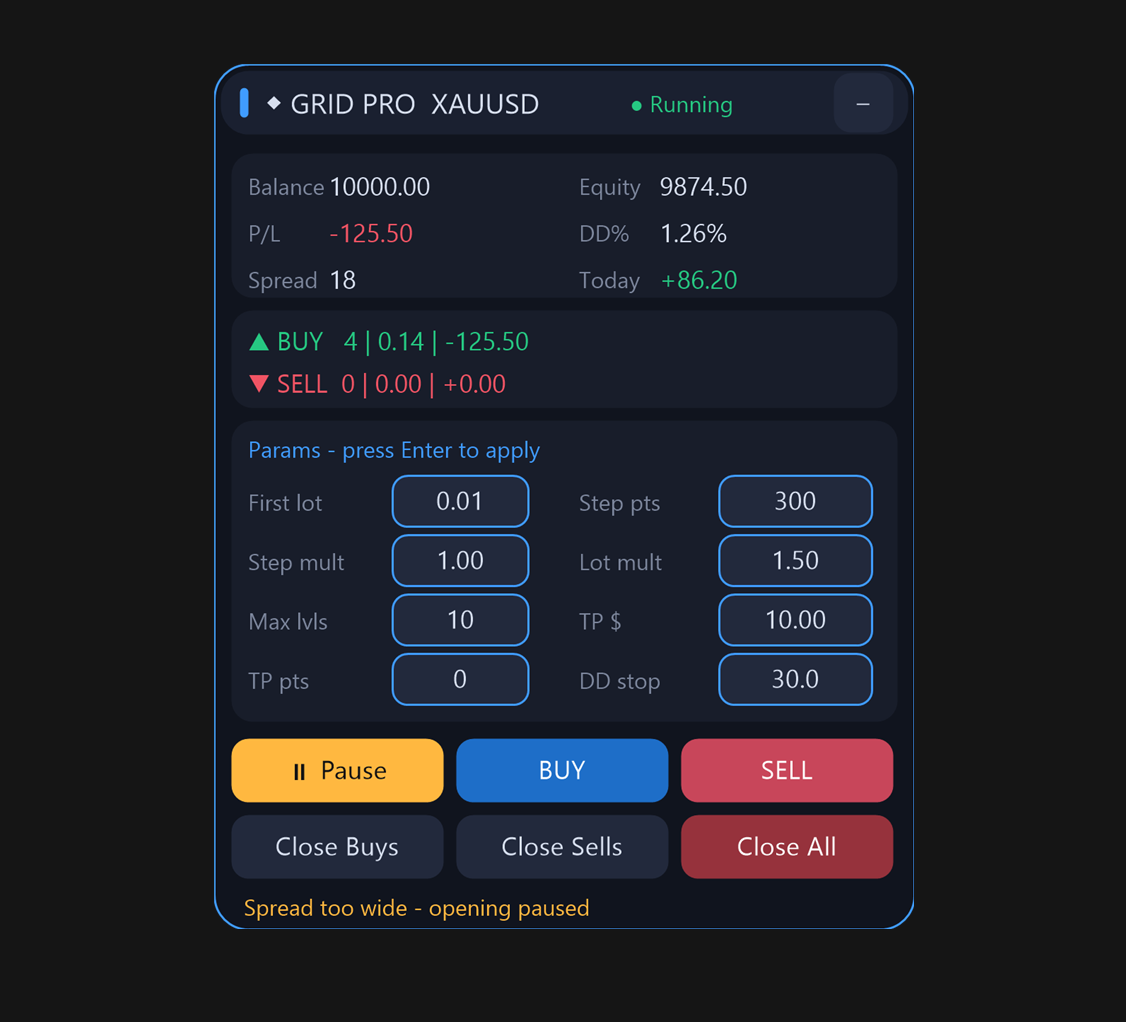


GridPro Panel is an open-source grid trading Expert Advisor for MetaTrader 5 with a built-in on-chart control panel. The full MQL5 source code is included, so every entry, averaging and exit rule is transparent - nothing is hidden inside a compiled ex5. It is intended as a readable, customizable grid framework with hard risk limits on top.


Requirements:
- MetaTrader 5, hedging account (the EA checks the account margin mode at startup and refuses to run on netting accounts)
- Any symbol; liquid low-spread symbols are recommended

Grid engine:
- Direction: both / buy only / sell only; the two sides are managed as independent baskets
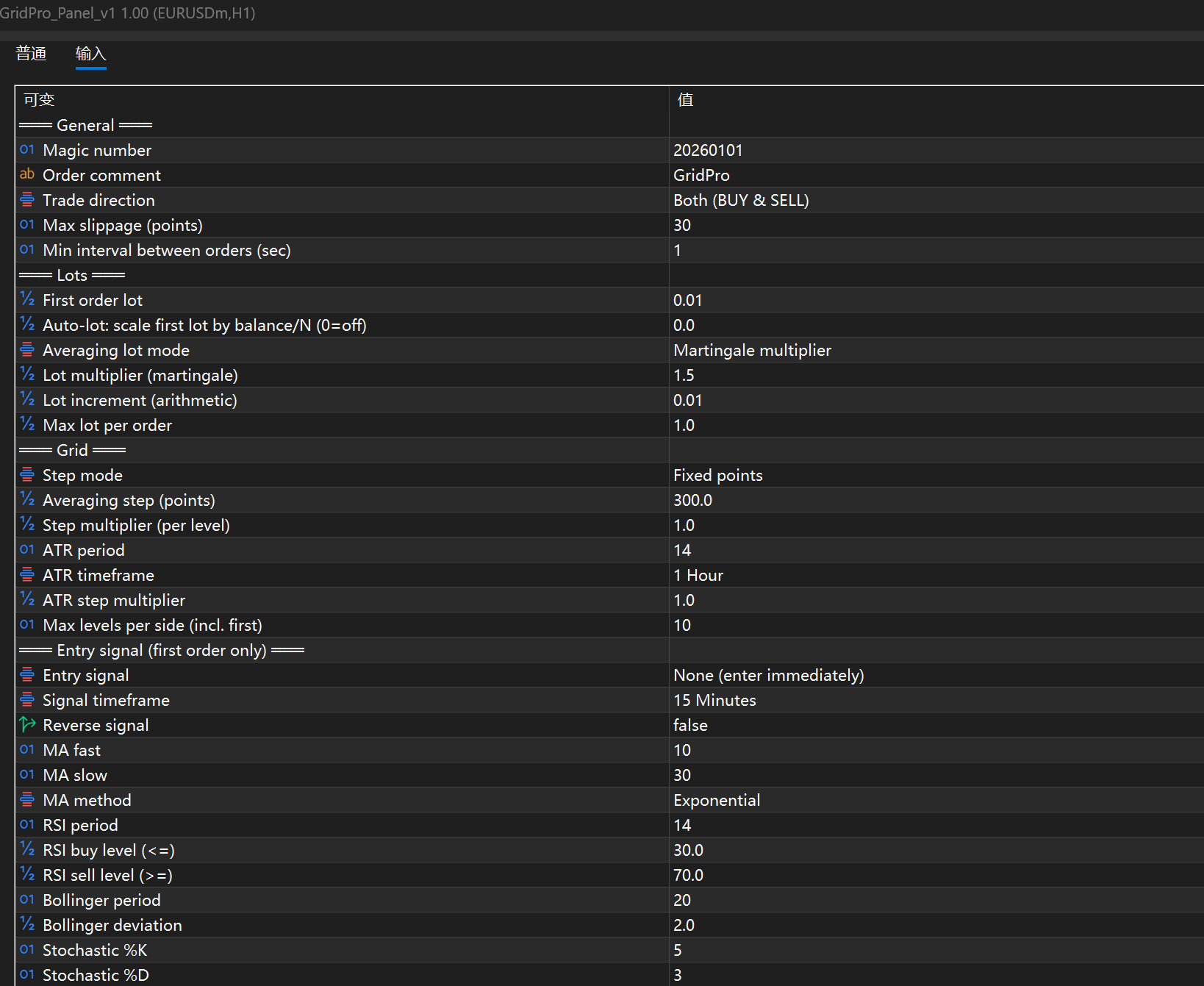
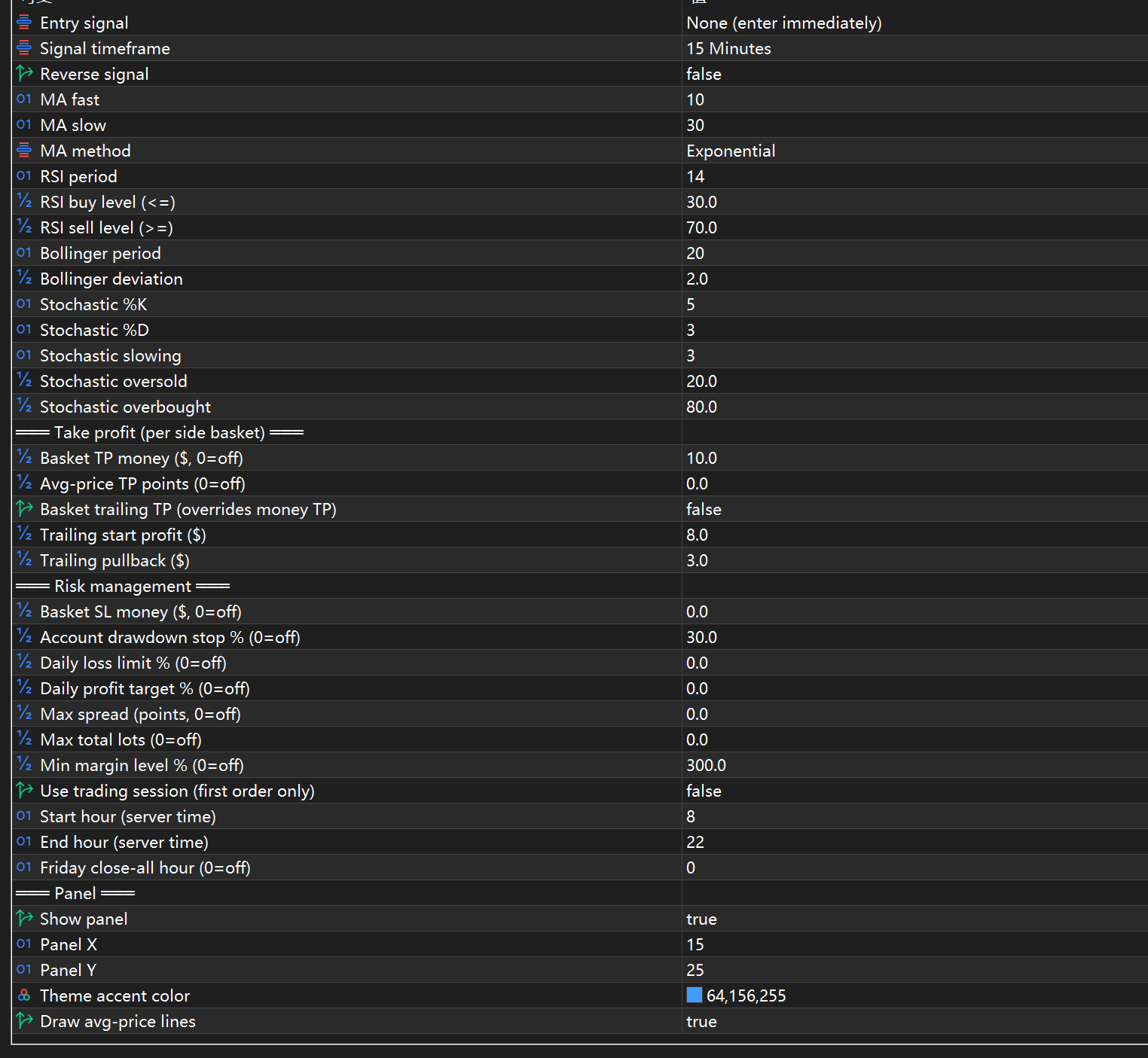
- First order: immediate entry, or filtered by an optional signal - MA cross, RSI oversold/overbought, Bollinger Bands return, or Stochastic cross (the signal affects the first order only; further levels are added by the grid step)
- Averaging lots: fixed, martingale multiplier (default x1.5) or arithmetic increment (+0.01 per level), with a per-order lot cap and optional balance-based auto scaling of the initial lot
- Grid step: fixed points (default 300) or ATR-based dynamic step (H1, ATR 14, multiplier adjustable), with optional per-level step expansion (step grows every level)
- Maximum levels per side: 10 by default

Basket exit (each side is closed as a whole):
- Take profit in money (close the whole side at +$10 by default)
- Take profit in points from the average price
- Trailing take profit (activates at +$8, closes on a $3 pullback; takes over money TP when enabled)
- Optional basket stop-loss in money

Risk management (each limit can be enabled independently; the account drawdown stop at 30% and the minimum margin level at 300% are active by default):
- Account drawdown stop: close all positions and halt the EA
- Daily loss limit and daily profit target (auto-reset the next day)
- Basket stop-loss in money
- Maximum total lots cap
- Minimum margin level: stop opening new positions below the threshold
- Maximum spread filter
- Trading session filter for the first order (supports overnight sessions)
- Friday scheduled close-all (no weekend holding)
- Minimum interval between orders (protects against bursts of fills)

On-chart panel (dark theme, minimizable):
- Account card: balance, equity, floating P/L, drawdown %, spread, daily P/L
- Basket card: order count, lots and floating P/L per side; dashed average-price lines are drawn on the chart
- Runtime-editable parameters: first lot, grid step, step multiplier, lot multiplier, max levels, money TP, point TP, drawdown stop - type a new value and press Enter, no need to remove and reload the EA
- Buttons: pause/resume, buy now, sell now, close buys, close sells, close all
- Status line shows the exact reason whenever a risk rule blocks trading

Technical notes:
- The rounded-corner panel is rendered with per-pixel anti-aliased bitmap resources (see RoundRes() in the source), because native MT5 chart objects do not support rounded rectangles - the code can also serve as a reference for custom UI in MQL5
- Positions are filtered by magic number, so several instances can run on the same account without conflicts

Installation:
1. Open the .mq5 file in MetaEditor and compile (F7)
2. Attach the EA to a chart and enable Algo Trading
3. Test on a demo account first with the default 0.01 initial lot

Disclaimer: this EA is a trading framework for study and personal use, not a profit guarantee. Martingale-style averaging increases exposure during one-sided trends - understand every parameter and test on a demo account before any live use.
Margin Risk Simulator Margin Risk Simulator

Shows the prices of the current symbol at which the account reaches margin call and stop out, with a what-if mode for extra volume, the maximum volume you can add and pending orders that trigger on the way.

VelaMayor MTF - Higher Timeframe Candle Overlay VelaMayor MTF - Higher Timeframe Candle Overlay

Overlay higher timeframe candles directly onto your lower timeframe charts with customizable body fills, independent borders, and precise wicks. Effortlessly spot macro bias, session openings, and liquidity ranges without switching screens. Ultra-lightweight engine featuring separated box bounds and rock-solid chart change auto-recovery.

Accelerator Oscillator (AC) Accelerator Oscillator (AC)

The Acceleration/Deceleration Indicator (AC) measures acceleration and deceleration of the current driving force.

MACD Signals MACD Signals

Indicator edition for new platform.