IndicatorLab MT4 Standard

When your indicator changes direction, do you know what price does next? Does your indicator tend to move before price, after it, or within the same observation window? Do you know how responsive your indicator is across symbols, timeframes, and market periods?

IndicatorLab MT4 can help with that! IndicatorLab MT4 is a utility that samples indicator values alongside price and analyzes their movement and timing relationships, presenting the results in clear HTML reports built from CSV data checked for integrity and consistency.

It was developed for indicator-based traders who want to explore and compare a variety of indicators, understand how they relate to price across symbols and changing market activity, and evaluate them conveniently before putting real money at risk.

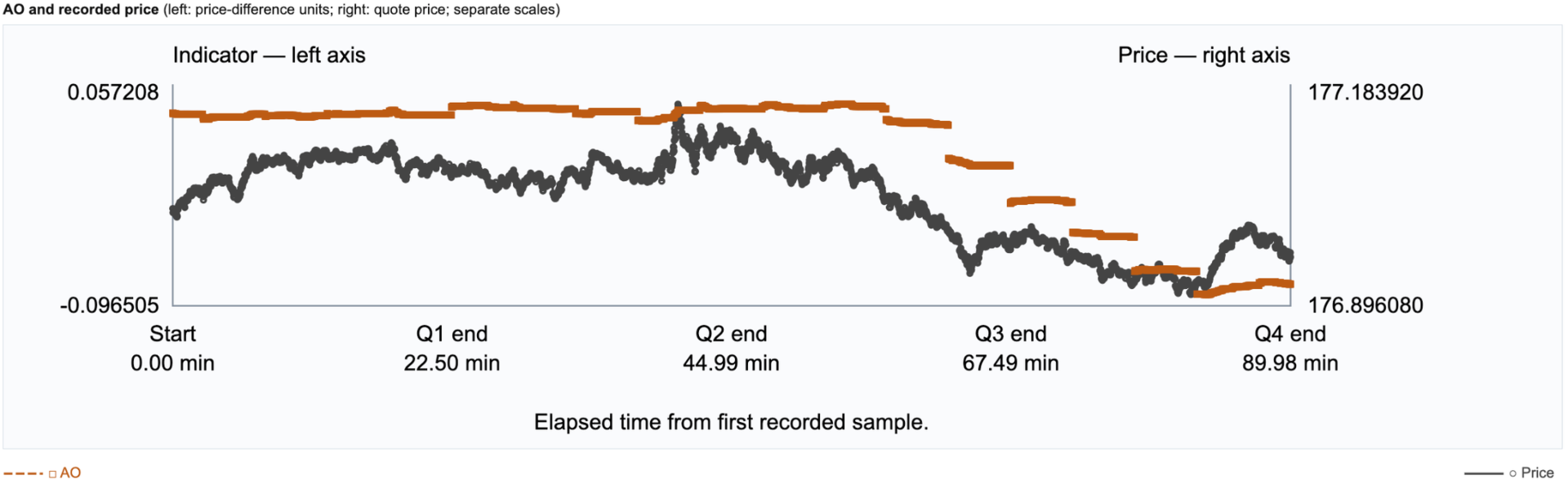
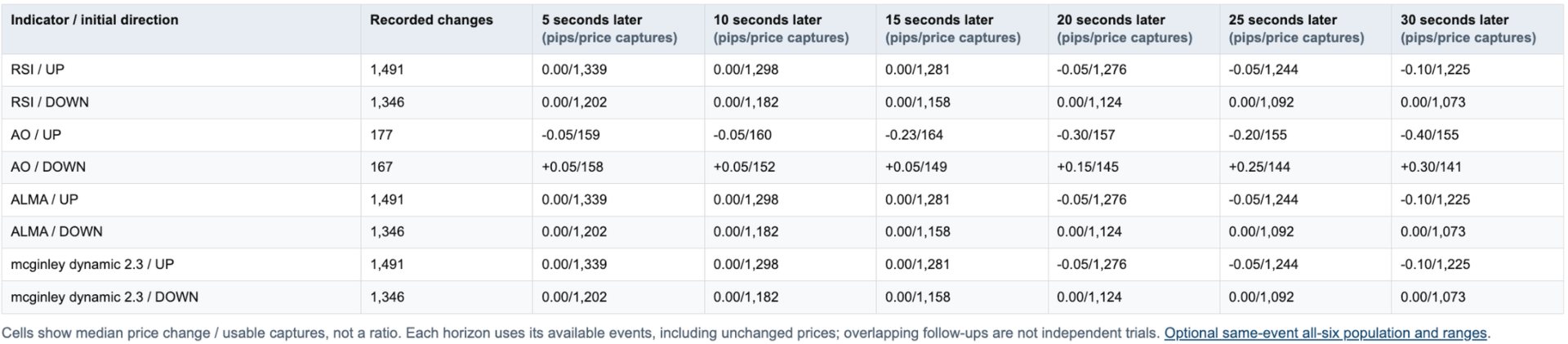
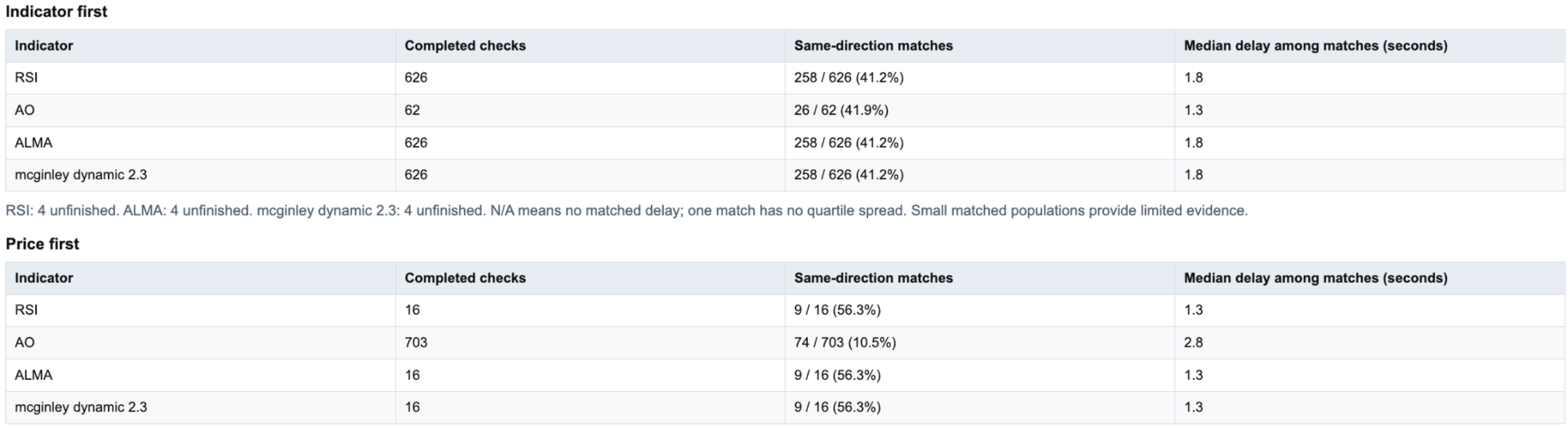
See how your indicators behaved on your chosen symbol and timeframe, through an HTML report and supporting CSV data.

HOW IT WORKS

IndicatorLab MT4 has two test modes: Buffer Probe and Main.

1. Check outputs if needed. If you’re unsure which indicator buffers to use or whether they provide readable values, configure your indicators in Buffer Probe and run it. Review the results before selecting buffers for Main.

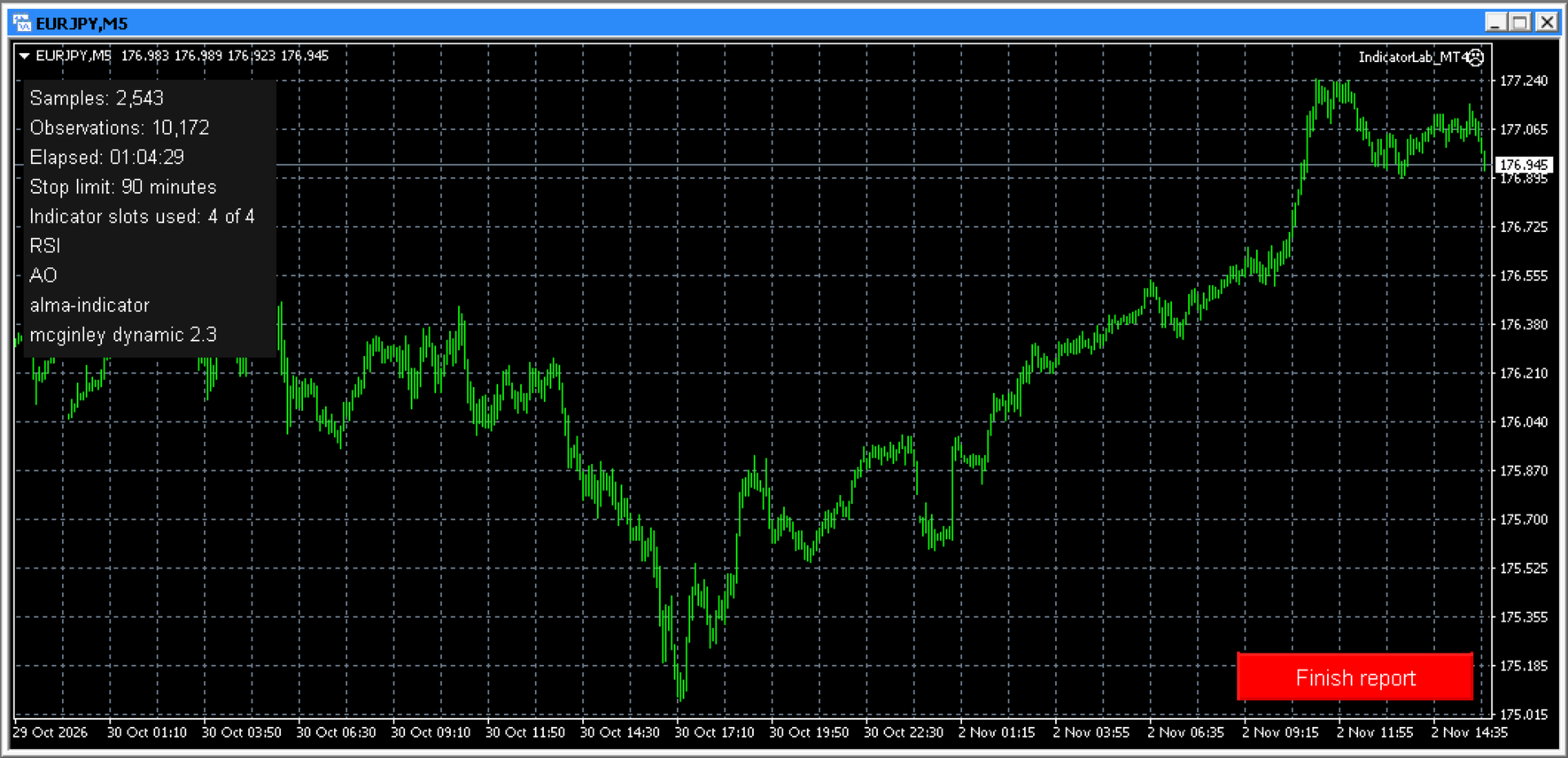
2. Configure and run Main. Choose a symbol, timeframe, and one to four built-in or compatible installed custom indicators, including mixed combinations. Select their output buffers, test duration, and maximum indicator read time. Run on a chart or in the local Strategy Tester. Collection stops automatically when the selected duration elapses; on a chart, you can also stop early with Finish report. Allow finalization to complete before opening the report.

3. Review the results. After finalization, open the HTML report to examine indicator-to-price movement, response timing, and data coverage. Supporting CSV files are available for reference or further analysis in spreadsheets and other tools.

4. Build and refine your own strategy. Use what you learn to select indicators, define your trading rules, and test your ideas across symbols, timeframes, and market conditions. You decide what fits your approach, then evaluate it in strategy testing and demo trading before risking real money.

IndicatorLab MT4 helps you move from chart impressions to recorded evidence:

• See what follows an indicator change: examine subsequent price movement and observed response timing.
• Compare indicators on common ground: evaluate built-in and compatible custom indicators over the same recorded period.
• Explore different market conditions: compare behavior across the symbols, timeframes, and periods you test.
• Know what supports your conclusions: distinguish usable observations from missing data and limited coverage.
• Keep the evidence: revisit HTML reports or explore the supporting CSV data in Excel, Google Sheets, Python, and other tools.
• Make the strategy your own: use your findings to choose indicators and refine your trading ideas before putting money at risk.

Don’t just watch your indicators. Understand their behavior—and decide how they fit your strategy.

COMPATIBILITY AND LIMITS

• Indicator access: Custom indicators must be installed, licensed where required, and provide readable buffer values. Chart drawings alone may not be readable. Required dependencies must also be installed.
• Settings: IndicatorLab uses indicator defaults with supported Period / Length adjustments. Arbitrary custom parameter lists and Parameter Probe are not available.
• Markets and testing: Tested examples include currencies. Symbols and history depend on your broker; local Strategy Tester support depends on the indicator. Remote/cloud use with custom indicators and Market-demo exports are not guaranteed.
• Interpretation: Sampling can miss activity between observations. Results describe recorded behavior, not predictions, trading signals, or proof of simultaneous movement.

Runs directly in MT4. No separate launcher or Python required.
Support: Product comments or MQL5 messaging.


INDICATORLAB MT4 USER GUIDE

Record indicator and price activity, then explore their relationships in an HTML report with supporting CSV data. IndicatorLab observes; it does not place or manage trades.

1. INSTALL AND PREPARE

Install IndicatorLab through your Market purchase, or place an authorized EX4 file in MQL4/Experts. Install custom indicators and their required dependencies according to the supplier’s instructions.

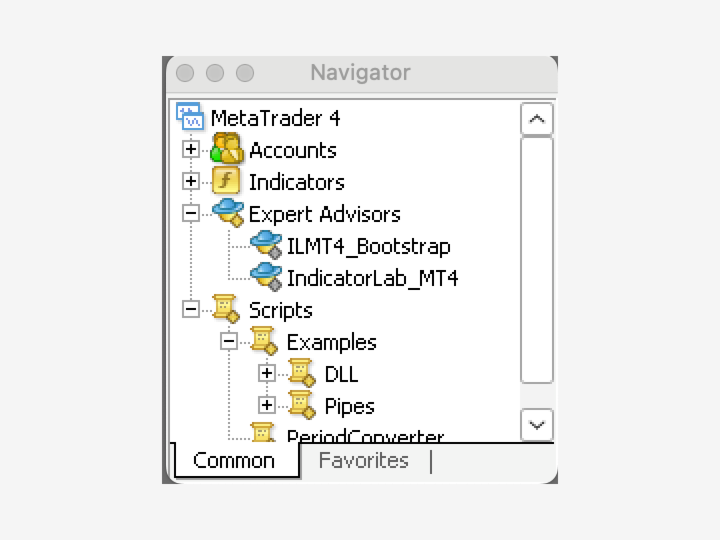
Open your chosen symbol and timeframe, then attach IndicatorLab from Navigator → Expert Advisors. Load a preset or enter your settings in Inputs. A preset does not change the chart’s symbol or timeframe. Review your settings and capture any screenshots before clicking OK.

No separate launcher, Python, or configuration file is needed. Do not enable DLL access or trading permissions just to run IndicatorLab.

2. CHECK BUFFERS IF NEEDED

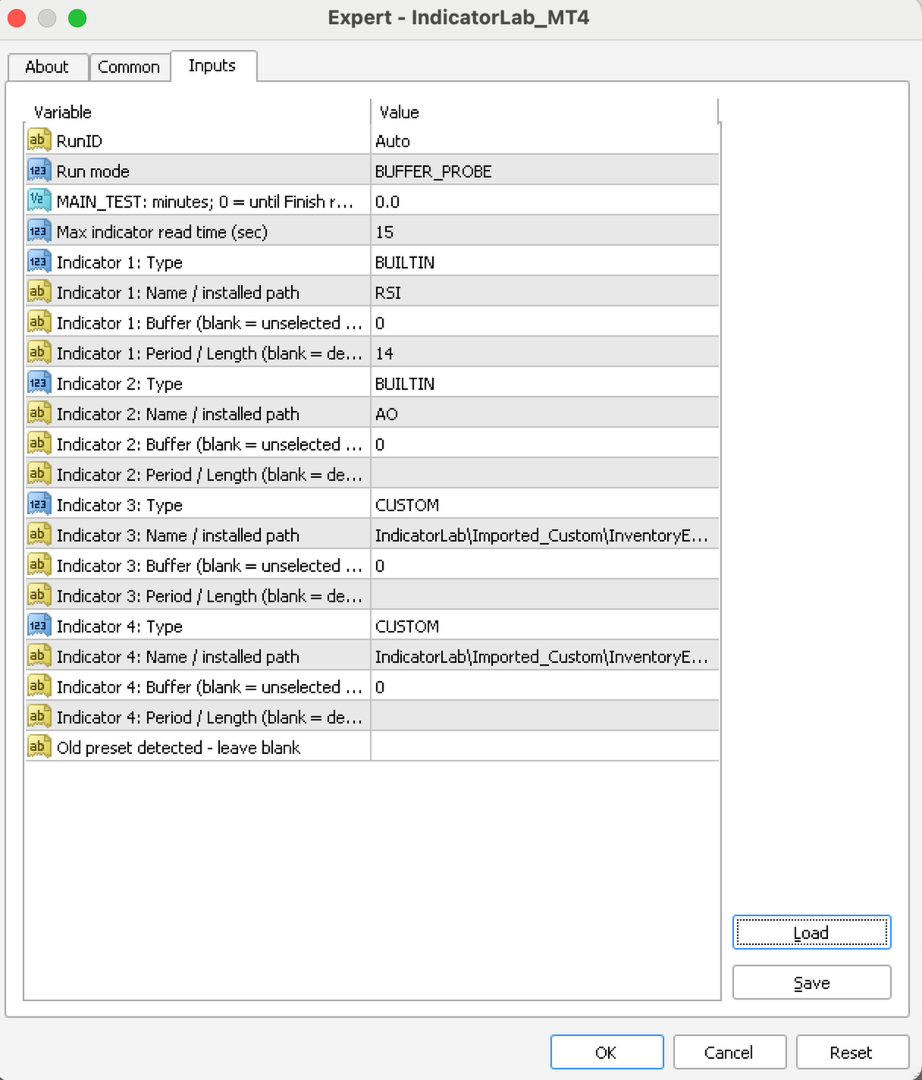
Choose BUFFER_PROBE in Run mode if you’re unsure which outputs to read. Configure up to four indicators using their Type, Name / installed path, Buffer and Period / Length fields; set unused slots to OFF. For a custom indicator, leave Buffer blank to inspect buffers 0 through 7, or enter one buffer to check that output. Built-ins check their configured supported output. The probe checks ten bar positions, shifts 0 through 9, for each enabled indicator sequentially, saves its findings, and finishes automatically. These scan bounds are fixed in the current interface.

A zero can be a valid value; an empty buffer does not necessarily mean an indicator is broken. Review the findings, then select the intended custom buffer in Main yourself. Probe does not transfer settings automatically.

3. CONFIGURE AND RUN MAIN

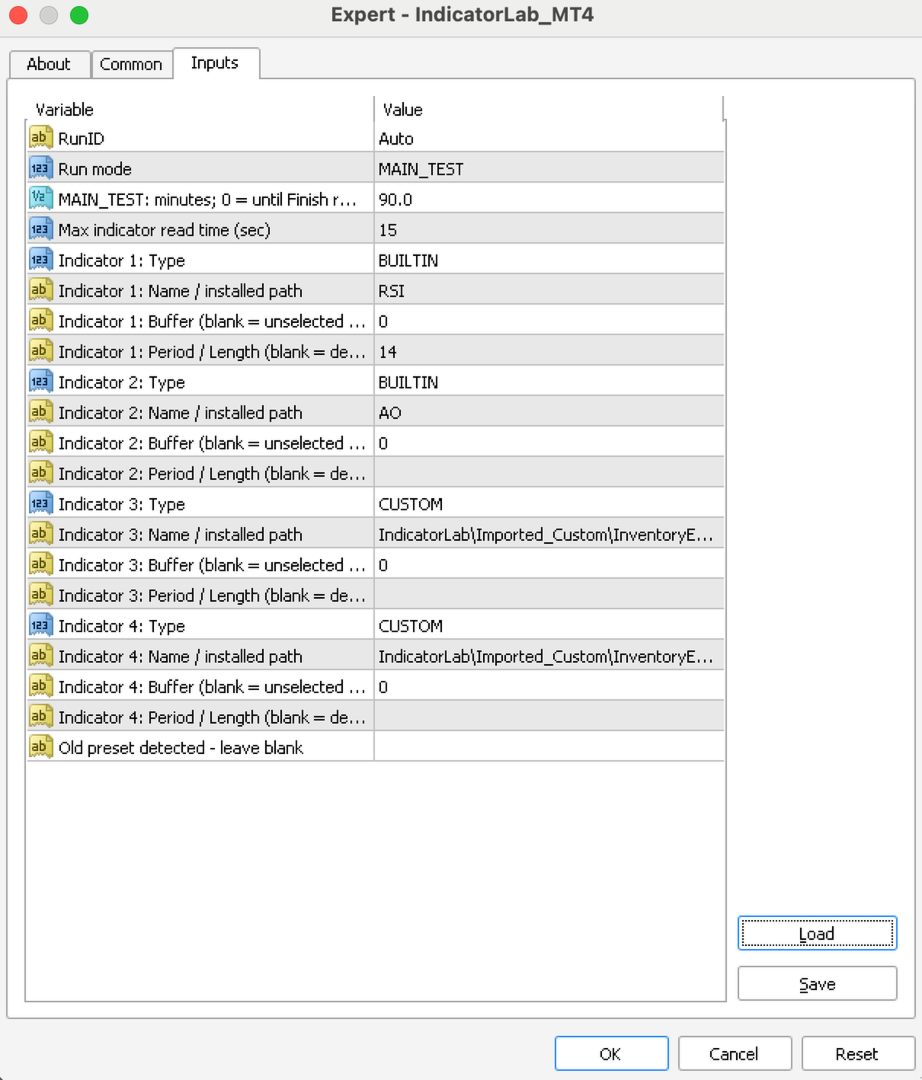
Select MAIN_TEST in Run mode and configure one to four built-in or compatible custom indicators. Leave “Old preset detected - leave blank” blank:

• Type: Choose BUILTIN or CUSTOM for each indicator; set unused slots to OFF. The default slots are OFF.
• Name/path: Enter a built-in name, such as RSI, or a custom path relative to MQL4/Indicators. An enabled slot needs a name; a blank name does not turn it off.
• Period/Length: Leave blank for defaults. Supported built-ins accept mapped Period adjustments; custom Length editing is limited to the supported LWPI mapping. Other customs use their defaults. This is not a general custom-parameter editor.
• Buffer: Select the custom output you want to examine. A blank custom buffer is unselected. Built-ins can use their supported primary output when left blank.
• Duration: The default is 8 minutes. Choose another positive duration, or 0 to continue until you select Finish report on a chart.
• Run ID: Leave Auto selected to keep each run’s results separate.
• Maximum read time: The default is 15 seconds.

For a simple first test, choose BUILTIN, RSI, Period 14 and Buffer 0, and set the other slots to OFF. Settings on a separate chart indicator do not configure IndicatorLab’s reads.

4. FINISH AND REVIEW

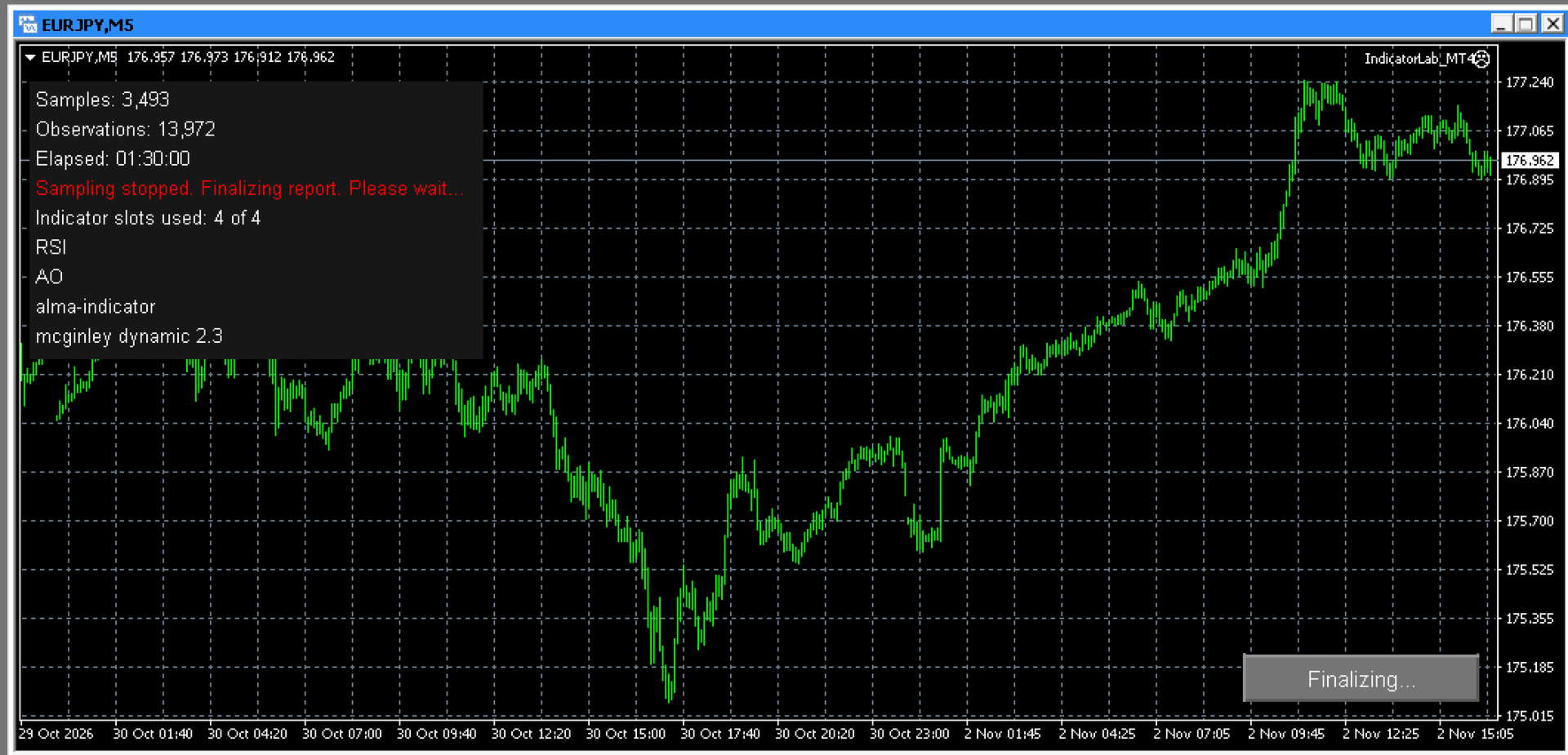
Let the duration expire or click Finish report. Wait for finalization before closing the terminal or removing IndicatorLab. Saving may take several minutes; check Experts for confirmation. Normal completed closeout removes IndicatorLab from the chart.

For chart results, open File → Open Data Folder → MQL4 → Files → IndicatorLab, then the run folder shown in Experts. Open IndicatorLab_Report.html and keep its companion CSV files. You can export a PDF through your browser.

Start with the outcome, stopping reason, duration, and data health:

• PASS: The run met its success requirements; this is not a trading recommendation.
• Completed with limited coverage: Useful results are available, with stated limitations.
• FAIL: Review the reported cause before drawing conclusions.

Finishing early or a sample-size advisory does not, by itself, reduce an otherwise successful result. Actual missing or unusable evidence is assessed separately.

Read chart labels carefully: indicators may share price units or use separate scales. Coverage notes explain overlapping lines and missing comparisons. Results describe sampled behavior, not predictions or trading signals.

USING STRATEGY TESTER

Select IndicatorLab as the Expert Advisor, choose the symbol, timeframe, historical dates, and tick model, then configure Main. Custom indicators and their dependencies must work in that local Tester environment.

Let the test finish by duration or available history; do not rely on an interactive Finish button in a nonvisual test. Local Main testing is supported. Remote/cloud custom delivery, protected third-party indicator compatibility, and Market-demo exports are not guaranteed.

IMPORTANT LIMITS

• Sampling has a one-second minimum interval, but ticks, data availability, and read time affect the actual rate. Activity between samples can be missed.
• Reads are sequential. The read-time limit detects an overrun only when the call returns; it cannot interrupt a frozen indicator.
• Supported Period/Length edits are limited to mapped indicators. Arbitrary custom parameter lists and Parameter Probe are unavailable.
• Symbols, history, indicator access, and Tester compatibility depend on your broker and indicator supplier.

TROUBLESHOOTING AND SUPPORT

If a run does not start or save, check Experts/Journal and retain its diagnostics. Do not restart over an unfinished run.

Contact support through product comments or MQL5 messaging. Include the version, mode, symbol/timeframe, Run ID, exact message, and relevant files, with private account information removed.
Рекомендуем также
SymbolSwitcherPro2
Nnamdi Kennedy Ifeorah
SymbolSwitcher Pro2 "The Upgrade": The Ultimate Multi-Interface Trading Command Center  Are you tired of clogging your MT4 charts with four or five different indicators just to manage your workspace? Frustrated by legacy MT4 crashes when switching between your heavily customized templates? Meet SymbolSwitcher Pro2  "The Upgrade" — a first-of-its-kind, unified trading dashboard that consolidates five mechanical charting operations into a single, lightning-fast control panel . Built with an advanc
Forex Diamond EA
Lachezar Krastev
5 (6)
BLACK FRIDAY SPECIAL: 70% OFF + FREE GIFT! Massive savings on our top automated systems: Buy Forex Diamond EA: Only $197 (Save 70% — Regular price: $547) BONUS EA: Get Crypto Master EA 100% FREE (Regular price: $497) Total Value: $1044 — Yours today for just $197! How to claim: Direct message (DM) us your purchase confirmation to unlock your free Crypto Master EA license! Full offer details & live performance stats: https://www.mql5.com/en/blogs/post/778315 Live Results:   https://www.mql5.com/
Советник   Five Minutes Strategy   предназначен для торговли бинарными опционами. Строго рекомендуется торговать EURUSD на пятиминутном интервале. Торговля ведется по ценам открытия на основе сигналов индикатора   Five Minutes . Для работы системы требуется не менее 100 баров в истории. Входные параметры Initial Deposit - Первоначальный депозит. Lot Value - Величина лота. Lot Type - Тип лота: Fixed - Фиксированный. Variable - Переменный. Last Lot Value - Последнее значение лота (применяется на
What is it? Think about it, you can send all the orders/positions info to your telegram channel or group to create your community or VIP signals on telegram. Position info means this EA forward all of your new positions open details (Open price, Open time, Position Type, position Symbol and volume), positions changes ( SL or TP modifying or pending price changes) and position close (Close price, profit or loss, position duration time) and also EA Send NEWS alert (Economic calendar event) on you
MRPHN Overdosed EA
Affifuddin Bin Mohd Hazam
MRPHN Overdosed is a trend-following Expert Advisor built for XAUUSD , powered by a custom Supertrend indicator : iMRPHN (included for free). It combines simplicity and flexibility, offering optional Martingale logic, configurable risk settings, and time-based trading filters — ideal for traders who prefer a set-and-forget approach. Tested on :  XAUUSD Strategy : Trend-following using iMRPHN indicator Trade Timing Control : User-defined trade start & end time Take Profit / Stop Loss : Fully con
RewardsTaker Expert
Opengates Success International
Rewards Taker Utility EA Rewards Taker Utility EA is a portable semi-automated utility expert advisor which can close profitable trades when the amount set as a profit target by the user is reached on a single currency pair. The idea comes from the fact that, forex profit does not stay forever in the account, your trade(s) many be in profits now and be in losses in the next minutes or hour but by this method, you will detain already made profits by closing the profitable trades to increase
Описание  Fibo Retracement  - индикатор автоматической разметки системы уровней  Фибоначчи в окне основного графика на ценах закрытия, что отличает его от индикатора Fibo Levels , строящего уровни по ценам High/Low. Таким образом, при использовании обоих индикаторов трейдер получает возможность определить зоны поддержки и сопротивления по Фибоначчи! Индикатор рассчитывает и строит уровни   на определенном отрезке по количеству задаваемых пользователем баров . Пользователю предоставляется возможн
Хватит действовать наугад. Знайте, когда входить, где выходить и в какую сторону склоняется рынок, всё на одном графике. RelicusRoad Pro собирает почти двадцать инструментов в один индикатор, а вы включаете те, которые подходят вашему стилю торговли. Чёткие входы. Чёткие выходы. План на каждом графике. Знакомо? Вы покупаете, а через минуту цена разворачивается против вас. Вы закрываете сделку слишком рано, а потом смотрите, как движение продолжается без вас. Пять индикаторов на графике, пять раз
FIBO Price Calculator  Brief Description 1. Automated Fibonacci Retracement Drawing This indicator automatically draws Fibonacci Retracement lines on the MT4 chart, assisting traders in quickly identifying potential support and resistance levels. 2. Customizable Fibonacci Sequence Users can customize the Fibonacci sequence values, and the indicator automatically converts them into corresponding price levels based on the current market price. 3. Adjustable Indicator Window Position The indicator
Защитите свой счет от Margin Call, когда рынок идет вразрез с вашими сделками. Управляйте своим риском, когда вы используете Мартингейл, Сетка, Среднее . Они больше не опасны, но управляемы Используйте эти утилиты EA, чтобы сопровождать каждую установку MT4 Этот советник является утилитой для защиты вашего капитала, когда ваша торговля неблагоприятна: Максимальная потеря денег, Максимальная просадка / потеря капитала в процентах, Ваш минимальный эквити достигнут Те, которые достигли первыми
FREE
Если вы хотите рисовать линии Поддержки и Сопротивления, просматривать: дневные уровни открытия рынка, классические уровни разворота, уровни разворота Фибоначчи, трендовые линии, уровни Фибоначчи, время до закрытия свечи, а также текущий спред. Если вы хотите выставлять ваши ордера с точным лотом, который отвечает вашему желаемому риску стоп-лосса. Если вы хотите делать все это и много другое всего одним кликом, тогда это идеальный инструмент для вас. Этот инструмент позволит вам чувствовать себ
This indicator is a great utilities tools for Fibonacci Trader that draw their chart manually. This indicator do not draw any Fibonacci Retracement or Fibonacci Expansion. It is a utilities tool for modifying the Fibonacci level for Fibonacci object manually drawn on the chart. Just draw using the Fibonacci Retracement or other Fibonacci tool in MT4 as per normal. The select the Fibonacci you have just drawn. Make sure you have only 1 object selected. Then open up this Fibonacci Level Management
QuantumGuard Pro - Intelligent Quantum Risk Management Trading System Core Features Five independent fund management groups for smart risk diversification Triple protection mechanism: profit target + drawdown protection + global risk control Professional trading panel for one-stop trade execution 24/7 real-time risk monitoring and protection Automatic display of average price lines for each group One-click close single group orders for precise control Order group highlighting for clear status o
Harvest GOLD USES THE TREND WAVE INDICATOR AND IT CAN IDENTIFY THE BEGINNING AND THE END OF A NEW WAVE TREND MOVEMENT. AS AN OSCILLATOR, THE INDICATOR IDENTIFIES THE OVERBOUGHT AND OVERSOLD ZONES. IT WORKS GREAT TO CATCH THE SHORT TERM PRICE REVERSALS AND USES A MARTINGALE STRATEGY TO CLOSE ALL TRADES IN PROFIT. USE DEFAULT SETTINGS ON H1 OR HIGHER TIME FRAME ON ANY PAIR FOR MORE ACCURATE TRADES WHY THIS EA : Smart entries calculated by 3 great strategies The EA can be run on even a $30000
TradePilot
Hossein Khalil Alishir
Советник TradePilot для MetaTrader 4 TradePilot — это мощный и удобный в использовании советник для MetaTrader 4 , созданный для упрощения торговли и управления рисками. Благодаря профессиональной графической панели, автоматическому расчету лота по риску и интеллектуальным функциям управления сделками, TradePilot позволяет трейдерам сосредоточиться на стратегии, а советник берет на себя точность исполнения. Преимущества Простой интерфейс : Чистая графическая панель с кнопками и горячими кл
ZonePulse Smart Trader – AI-Powered Daily Zone Detection EA Next-Generation Zone & Fibonacci Precision Trading ZonePulse Smart Trader is a professional, AI-inspired MetaTrader 4 Expert Advisor designed to automate the detection and trading of high-probability daily support and resistance zones. Built with Fibonacci precision, intelligent risk management, and a smart trailing system, it offers both discretionary traders and fully automated systems a reliable edge in trending and ranging markets.
Introducing Your New Go-To Trading EA! Boost your trading performance with this Bollinger Bands-based Expert Advisor, specially designed for XAU (Gold) and various Forex pairs. Why this EA is a must-have: Clean, user-friendly interface – perfect for all trader levels Built-in Hidden Take Profit & Stop Loss for added strategy security Ideal for both beginners and experienced traders Ready to use out of the box – no complex setup required. Trade smarter, not harder!

Mr. Beast Indicator Supertrend para MT4: Potencia y Simplicidad en una Herramienta de Trading Experimenta la combinación perfecta de potencia y simplicidad con el indicador Mr. Beast Indicator Supertrend para MT4. Diseñado específicamente para la plataforma MetaTrader 4, este indicador te proporciona una visión clara y concisa de las tendencias del mercado, ayudándote a tomar decisiones informadas en tus operaciones financieras. Características Destacadas: Supertendencia Definida : Basado en el
Partial Close Wizard Script
Opengates Success International
Partial Close Wizard Script is a script created to execute a partial close on any already profitable order in order to permanently lock in some part of the profits and reduce the lot size in the process. It can also be used to reduce the loss presently incurring on a trading account by cutting part of the loss and reduce the lot size to save the account from being wiped out. How to use: It is easy to use; just attach it to the chart of the same currency pair you intend to close the part of the p
VR Cub
Vladimir Pastushak
VR Cub это индикатор что бы получать качественные точки входа. Индикатор разрабатывался с целью облегчить математические расчеты и упростить поиск точек входа в позицию. Торговая стратегия, для которой писался индикатор, уже много лет доказывает свою эффективность. Простота торговой стратегии является ее большим преимуществом, что позволяет успешно торговать по ней даже начинающим трейдерам. VR Cub рассчитывает точки открытия позиций и целевые уровни Take Profit и Stop Loss, что значительно повы
GOLD BLESSINGS EA MT4    Trading system that masters the complexity of financial markets with a unique combination of AI-driven analyses and data-based algorithms. Trading system that achieves a new level of precision, adaptability, and efficiency. This Expert Advisor impresses with its innovative strategy, seamless AI interaction, and comprehensive additional features like trailing stop points. Equity required range $1k-$10k Developed for constant profit and slow grow also can be used for compo
Новый король на рынке — Индикатор + Управление ордерами (TP1 + TP2 + TP3) (ПОЛНАЯ ТОРГОВАЯ СИСТЕМА) Этот индикатор включает в себя продвинутую торговую стратегию, полноценную торговую систему с настраиваемым управлением ордерами и систему возврата к среднему (Mean Reversion), основанную на расширениях Envelopes и усиленную несколькими интеллектуальными фильтрами подтверждения, такими как RSI, для поиска высоковероятностных разворотных точек входа с сигналами BUY и SELL. Индикатор НЕ перерисовыва
Apex Fibo Tracer — Умный инструмент авто-Фибоначчи Apex Fibo Tracer — профессиональный аналитический индикатор, автоматизирующий один из самых эффективных методов технического анализа — уровни коррекции Фибоначчи. Инструмент сочетает высокоточный алгоритм ZigZag и динамическое построение сетки Фибо, обеспечивая мгновенную и точную визуализацию структуры рынка прямо на графике. Большинство трейдеров тратят драгоценные секунды на ручную настройку уровней Фибоначчи во время высокой волатильности. A
Индикатор Crypto_Forex "Индекс силы и 2 скользящие средние" для MT4. Не перерисовывается. - Этот индикатор отлично подходит для импульсной торговли в направлении тренда. - Индикатор "Индекс силы и 2 скользящие средние" позволяет отображать быстрые и медленные скользящие средние индекса силы. - Индекс силы — один из лучших индикаторов, объединяющих данные о цене и объёме в единое значение. - Индекс силы сам по себе является мощным осциллятором, измеряющим силу, движущую цену. - Индикатор позволя
This trading system requires the user to manually add Fibonacci, trend lines, horizontal lines, channel to perform semi-automatic or manual trading. The trading system can also be used in the tester. Trading panel provides: spread information margin information free marging Information The swap information to order for lots (requires your dealer support)
Индикатор TSO Bollinger Bandit Strategy основан на торговой стратегии Bollinger Bandit, описанной в книге Дж. Прюитта и Дж. Р. Хилла Построение выигрышных торговых систем с TradeStation . Особенности Полноценная стратегия с входами и выходами для трендового рынка. При появлении сигнала на вход отправляет уведомления по email/push-уведомления. Индикатор не перерисовывается. Можно использовать в составе советника (смотрите раздел Для разработчиков ) Условия входа Стратегия использует полосы Болл
Requirements Optimized to work with   EURUSD-EURCHF-USDJPY, AUDUSD-CADJPY-AUDNZD, CHFJPY-NZDJPY-NZDUSD For timeframe 4H. *(Minimum recommended deposit is $300 for each Pair) for initial lot set to 0.10, My favorite Pair are (CHFJPY-NZDJPY-EURUSD-AUDNZD-USDJPY) Warning it will be SALE only 5 Copys at 60$ Then it will be update up to 200$  You can use it the way it is, For new Set Files will be add on (Comments) ECN broker with low spread is recommended to get better results. Setup is very e
Close by percentage MT4
Konstantin Kulikov
5 (1)
Привет, друзья. Эту утилиту я написал специально для использования в своем профиле с большим количеством экспертов и сетов ("Joint_profiles_from_grid_sets" https://www.mql5.com/en/blogs/post/747929 ).  Теперь, чтобы ограничить убытки на счёте, нет необходимости менять параметр "Close_positions_at_percentage_of_loss" на каждом чарте. Просто откройте один дополнительный чарт, прикрепите данную утилиту и настройте желаемый процент по закрытию всех сделок на счёте. Утилита имеет следующий функциона
DoubleUp System
Opengates Success International
DoubleUp System is created as trade assistance, manager and profit-enhancing Utility. It is NOT to trade for you but helps you maximize your trading. It has 10 On-Chart Buttons for various trading operations and setting parameters to manage your orders. like its name, it doubles and increases your profit targets with just a few pips distance by opening 4 pending orders or 1 Instant orders with 3 pending orders (depending on the situation of the market at the time) If your trading system can gu
This TraderMaster EA is super helpful for professional trader.  Input Parameter Section: 1) Allow trader to set different line style, such as color, width; 2) Apply our chart style, if set false, it will not change the chart style; 3) Select different panel mode 3.a) Simple Mode, for trader immediately place a market order, pending order, delete and close orders; 3.b) Draw Line Mode, for price action traders who want to trade for trend and reverse in his trading plan; 3.c) Advanced Mode, includ
С этим продуктом покупают
Добро пожаловать в Trade Manager EA — лучший инструмент для управления рисками, предназначенный для упрощения, точности и эффективности торговли. Это не просто инструмент для размещения ордеров; это комплексное решение для удобного планирования торгов, управления позициями и усиленного контроля над рисками. Независимо от того, начинающий вы трейдер, опытный специалист или скальпер, нуждающийся в быстром исполнении, Trade Manager EA адаптируется к вашим потребностям и работает с любыми активами:
TradePanel MT4
Alfiya Fazylova
4.84 (95)
Trade Panel — это многофункциональный торговый помощник. Приложение содержит более 50 торговых функций для ручной торговли и позволяет автоматизировать большинство торговых операций. Инструкция к приложению: https://www.mql5.com/ru/blogs/post/756476 Пробная версия приложения для демо-счета: https://www.mql5.com/ru/blogs/post/750864 Как установить приложение: https://www.mql5.com/ru/blogs/post/750096 Как тестировать приложение в визуальном режиме: https://www.mql5.com/ru/blogs/post/770274 Как уст
Telegram to MT4 Multi-Channel Copier   автоматически копирует торговые сигналы из ваших Telegram- и Discord -каналов прямо в MetaTrader 4. Без ботов, без браузерных расширений, без ручного копирования. Сигнал приходит в Telegram или Discord — и советник открывает сделку в вашем терминале за считанные секунды. А перед тем как копировать канал, встроенный бэктестер покажет, что этот канал сделал бы на вашем счёте. Продукт состоит из двух компонентов: приложения для Windows, которое слушает ваши Te
TradeMirror - это советник-копировщик для платформы MT4/MT5. Руководство по использованию Нажмите на ссылку Руководство по Trademirror , чтобы посмотреть больше инструкций. Почему TradeMirror Мы понимаем важность безопасности, стабильности и конфиденциальности для финансового программного обеспечения, поэтому мы приложили максимум усилий для детального укрепления этих трех элементов: Предоставляет удобный графический интерфейс, которым легко управлять Фокус на конфиденциальности и безопасности,
PZ Trade Pad Pro MT4
PZ TRADING SLU
3.67 (3)
Это визуальная торговая панель, которая помогает вам легко размещать сделки и управлять ими, избегая человеческих ошибок и повышая вашу торговую активность. Он сочетает в себе простой в использовании визуальный интерфейс с надежным подходом к управлению рисками и положением [ Руководство по установке | Руководство по обновлению | Устранение неполадок | FAQ | Все продукты ] Удивительно простой в использовании Торгуйте легко с графика Торгуйте с точным управлением рисками, без проблем Сохранение
Нужна поддержка? Как настроить? Есть вопросы? Спрашивайте здесь на своём языке, быстрый ответ: https://www.mql5.com/en/market/product/139089/comments Скачать рабочую пробную версию Copy Cat More (Копи Кэт Мор) — копировщик сделок (Trade Copier) MT4 — это не просто локальный копировщик сделок; это полноценная система управления рисками и исполнения (risk management and execution framework), созданная для современных торговых задач. От челленджей проп-фирм (prop firm) до управления личным портф
Trade Indicator Assistant is a powerful MT4 utility designed to turn indicators into automated trading systems. Its main feature is the ability to automatically detect an indicator’s   BUY and SELL signal buffers , without requiring you to know the buffer numbers, search through indicator settings, or modify the indicator source code. Bonus Indicator: After purchasing Trade Indicator Assistant, contact me to receive Trade Signal Pro completely free as a bonus indicator. [Download Demo Version]
Trade Manager Pro MT4
Bryan Djoufack Nguessong
Это утилита для облегчения торговли, позволяющая в один клик или несколько кликов выполнять такие трудоемкие задачи, как управление ордерами и управление рисками. Особенности Управление рисками   Автоматически рассчитывает лоты на основе риска, указанного в % или $ в поле риска, и позволяет вам вводить ордера, просто размещая линии для SL TP и т.д., и отображает Risk Reward в реальном времени. TrueRisk включает комиссионные при расчете размера лота только на FX парах, так что вы рискуете 1%
MT4 к Telegram Signal Provider - это простой в использовании и полностью настраиваемый инструмент, который позволяет отправлять сигналы в Telegram, превращая ваш аккаунт в поставщика сигналов. Формат сообщений полностью настраиваем! Однако для простого использования вы также можете выбрать предопределенный шаблон и включать или отключать определенные части сообщения. [ Демо ]  [ Руководство ] [ Версия для MT5 ] [ Версия для Discord ] [ Телеграм-канал ]  New: [ Telegram To MT5 ] Настройка Шаг за
The product will copy all telegram signal to MT4   ( which you are member  ) , also it can work as remote copier.  Easy to set up, copy order instant, can work with almost signal formats, image signal, s upport to translate other language to English Work with all type of channel or group, even channel have "Restrict Saving Content", work with  multi channel, multi MT5 Work as remote copier: with signal have ticket number, it will copy exactly via ticket number. Support to backtest signal. How to
Unlimited Trade Copier Pro - это мощный инструмент для удаленного копирования сделок между несколькими счетами MetaTrader 4/MetaTrader 5, расположенными удаленно друг от друга, по сети интернет. Это идеальное решение для провайдеров сигналов, которые хотят поделиться своей торговлей с другими трейдерами по всему миру. Один поставщик может копировать сделки на неограниченное количество счетов-получателей, а один получатель также может копировать сделки неограниченного количества провайдеров. Пост
Strategy Builder offers an incredible amount of functionality. It combines a trade panel with configurable automation (covert indicators into an EA), real-time statistics (profit & draw down) plus automatic optimization of SL, TP/exit, trading hours, indicator inputs. Multiple indicators can be combined into an single alert/trade signal and can include custom indicators, even if just have ex4 file or purchased from Market. The system is easily configured via a CONFIG button and associated pop-up
Take a Break
Eric Emmrich
5 (31)
Take a Break pauses your Expert Advisors when trading is a bad idea: before news, after a daily loss, outside your trading hours, or when a rule you wrote yourself says so. When the pause is over, your EAs simply continue. Account protection for all your EAs in one tool: news filter, drawdown and equity protection, time filter and custom rules. One EA on one chart protects the whole account, the free indicator gives every chart its own rules on top. Free demo | What is new in 26.09 | Support Ass
Trade Manager MT4 DaneTrades
Levi Dane Benjamin
4.09 (11)
Trade Manager, который поможет вам быстро входить и выходить из сделок, автоматически рассчитывая риск. Включает функции, которые помогут предотвратить чрезмерную торговлю, торговлю из мести и эмоциональную торговлю. Сделками можно управлять автоматически, а показатели эффективности счета можно визуализировать в виде графика. Эти функции делают эту панель идеальной для всех трейдеров, занимающихся ручной торговлей, и помогают улучшить платформу MetaTrader 4. Многоязычная поддержка. Версия MT5  |
Автоматически торгуйте зонами поддержки и сопротивления или спроса и предложения, как только вы определите ключевые области, из которых хотите торговать. Этот советник позволяет вам рисовать зоны покупки и продажи одним щелчком мыши, а затем размещать их именно там, где вы ожидаете разворота цены. Затем советник отслеживает эти зоны и автоматически совершает сделки на основе ценового действия, которое вы указываете для зон. После совершения первоначальной сделки советник выйдет с прибылью в про
Riskless Pyramid
Snapdragon Systems Ltd
5 (1)
Introduction This powerful MT4 trade mangement EA offers a way potentially to aggressively multiply trade profits in a riskfree manner. Once a trade has been entered with a defined stoploss and take profit target then the EA will add three pyramid add-on trades in order to increase the overall level of profit. The user sets the total combined profit target to be gained if everything works out. This can be specified either as a multiple of the original trade profit or as a total dollar amount. Fo
Prop Guardian Risk Manager MT4 – Drawdown, Risk & Hedge Protection for Prop Firm and Managed Accounts Prop Guardian Risk Manager is a professional risk-control utility for MetaTrader 4, designed for prop firm traders, money managers and anyone who wants strict account-level risk protection. It does not generate trading signals, strategy entries or trading decisions. Instead, it runs in the background, monitors your account risk and can automatically block new exposure, close managed trades or ac
FCK CurrencyStrength Pro
Patel Hitendrakumar Mahendrabhai
Hi Friends, " FCK Currency Strength Pro " is a auto & semi auto trading expert with direction of pair. Buy-Sell separate or multi currency in one click. The strategy of  FCK Currency Strength Pro  is a combination of custom indicator, Trendlines, Support & Resistance levels ( Price Action ) and most important secretive trading algorithm mentioned above. Download News Ex4 and csv file You need the following SDSnews.ex4 in MQL4/Libraries and the daylightsavings.csv in MQL4/Files. Only 4 of 5 copi
Grid Manual MT4
Alfiya Fazylova
4.71 (17)
Grid Manual — это торговая панель для работы с сеточными стратегиями. Утилита универсальная, имеет гибкие настройки и понятный интерфейс. Работает с сеткой ордеров не только в сторону усреднения убытков, но и в сторону наращивания прибыли. Трейдеру не нужно создавать и сопровождать сетку ордеров, это сделает утилита. Достаточно открыть ордер и Grid manual автоматически создаст ему сетку ордеров и будет сопровождать его до самого закрытия. Полная инструкция и демо-версия здесь . Основные особенно
DrawDown Limiter MT4
Haidar Lionel Haj Ali
5 (8)
DrawDown Limiter v5.0 — Расширенный контроллер защиты торгового счёта DrawDown Limiter v5.0 — это клиентский контроллер защиты торгового счёта, предназначенный для мониторинга вашей торговли и автоматической реакции при достижении настроенных лимитов риска, прибыли, новостей, расписания, ролловера или количества позиций. Он может контролировать ручные сделки, автоматические стратегии, несколько советников, отложенные ордера и открытые позиции с одного отдельного графика. Он может защищать весь т
VirtualTradePad PRO SE MT4 — расширенная торговая панель и рабочее пространство на графике для MetaTrader 4 VirtualTradePad PRO SE — это профессиональная торговая панель и рабочая среда управления сделками для MetaTrader 4 . Она помогает трейдерам быстрее открывать, сопровождать, защищать, закрывать и анализировать сделки из одного интерфейса на графике. Продукт создан для активных ручных трейдеров, которым нужно больше, чем простой набор кнопок. PRO SE объединяет исполнение в один клик, отложен
Ultimate Partial Profit EA
BLAKE STEVEN RODGER
4.67 (3)
This EA Utility delivers a robust solution for managing an unlimited array of open orders, both manual and automated. It enables customizable partial profit levels utilizing metrics such as pips, ratios, ATR (Average True Range), and profit amounts for precise trade management. The utility features an advanced on-screen display, offering clear visualization of all orders and their profit levels to enhance strategic decision-making and control. To evaluate its performance and interface, the EA s
Менеджер соотношения риска и прибыли — это визуальный инструмент управления ордерами и калькулятор размера позиции, разработанный для поддержки дисциплинированной торговли и профессионального управления рисками. Он позволяет трейдерам визуально устанавливать уровни входа, стоп-лосса и тейк-профита непосредственно на графике, автоматически рассчитывая размер лота и соотношение риска и прибыли перед отправкой ордера. Инструмент помогает стандартизировать подготовку к торговле и гарантирует, что ка
Trade Copier Global: The name speaks for itself. This copier allows you to copy orders between MT4 terminals even if they are not installed on the same computer. Features Copying trades between MT4 terminals around the world with a short delay. Automatically recognizes symbol prefixes. Can connect many Slaves to the same Master. Supports pending and market orders. Supports partial order close (with limitations, see below) Can send messages and notifications to the Slaves from the Master Several
Trade Signal Pro (MT4) — Telegram Signal Provider (Utility) A lightweight utility that sends trade notifications from your MT4 account to Telegram. It does NOT open/close trades. It only reads positions/deals and sends messages. What it sends Entry signal (BUY/SELL) with Entry, SL, TP, pips + Risk:Reward   Updates when SL/TP is modified (reply/tag to the original signal)   Close notifications: TP hit / SL hit / Breakeven / Manual close   Optional Daily & Weekly performance summary (win
Auto Trade Driver
Vu Trung Kien
4.6 (15)
Auto Trade Driver - мощный автоматический инструмент (работает как советник), который поможет вам управлять рисками и контролировать ордера для максимизации прибыли с правилами мультизащиты и трейлинг-стопа. Этот инструмент будет очень полезен как для скальперов, так и трейдеров, торгующих по тренду. Он не только вычисляет точный торговый риск, но также защищает и увеличивает прибыль в реальном времени. Работая с этим инструментом, единственное, что вам нужно сделать, это открывать сделки в соот
Панель FFx Hidden Manager предназначена для управления ордерами прямо на графике. Особенности: Уровни тейк-профит, стоп-лосс и трейлинг-стоп скрыты Для каждого ордера на графике есть отдельная линия Перетащите необходимую линию, чтобы изменить уровни тейк-профит/стоп-лосс Функция автоматического перетаскивания уровня стоп-лосс в безубыток, когда достигнут йровень тейк-профит 1 Возможность выбора типа тейк-профита/стоп-лосса (в пунктах или по цене) Возможность выбора типа трейлинг-стопа (в пунк
Auto Trade Copier
Vu Trung Kien
4.77 (86)
Auto Trade Copier предназначен для копирования сделок между несколькими счетами / терминалами MT4 / MT5 со 100% точностью. С помощью этого инструмента вы можете действовать как поставщик (источник) или получатель (пункт назначения). Все торговые действия будут скопированы от поставщика к получателю без задержки. Этот копир можно использовать только на счетах MT4. Для счетов MT5 вы должны использовать Auto Trade Copier для MT5 или Trade Receiver Free для MT5. Демо-версия : Демо-версию для тести
Панель FFx Risk Calculator поможет вам легко рассчитать размер ваших трейдов, стоп-лоссов или риска прямо на графике. Особенности продукта: Параметры для расчета: Risk (риск), Stop Loss (стоп-лосс) или Lot Size (размер лота) Панель показывает, допустимо ли использовать данный размер лота при текущем значении свободной маржи на счете Кнопка для свертывания/развертывания панели Возможность перетащить панель в любое место на графике Применение Выберите параметр для расчета. Расчет будет основан на
Панель Trade Controller обеспечивает несколько способов для защиты и максимизации возможной прибыли. Это мощное орудие поможет вам установить правила автоматической защиты торговли и трейлинг-стопа несколькими эффективными способами. Установите и включите панель, и вам больше не придется следить за вашими ордерами, эта программа сама будет наблюдать и контролировать ваши ордера на основе заданных вами правил. Панель создана для поддержки стратегии мульти-защиты и трейлинга: защита выводом в безу
Другие продукты этого автора
When your indicator changes direction, do you know what price does next?  Does your indicator tend to move before price, after it, or within the same observation window?  Do you know how responsive your indicator is across symbols, timeframes, and market periods? I ndicatorLab MT5 can help with that!  IndicatorLab MT5 is a utility that samples indicator values alongside price and analyzes their movement and timing relationships, presenting the results in clear HTML reports built from CSV data c
Фильтр:
Нет отзывов
Ответ на отзыв