RiskGuard MT4

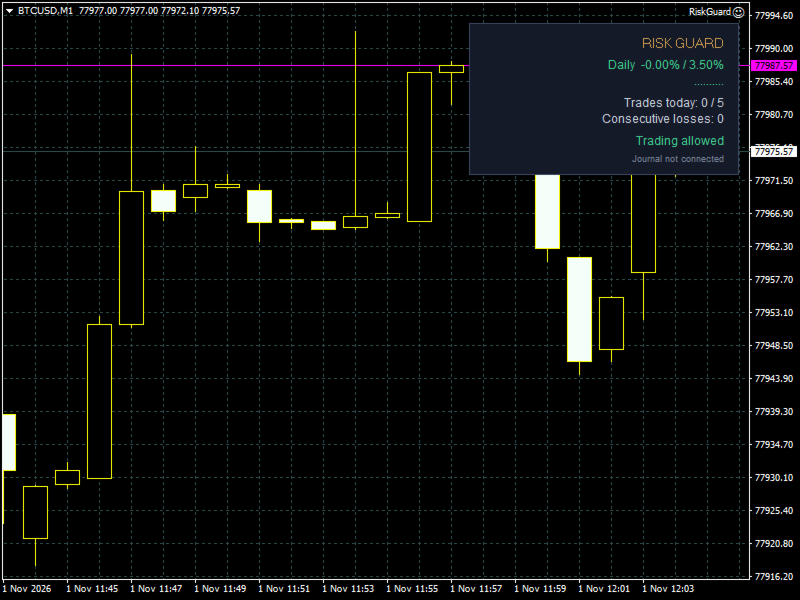
RiskGuard protects your account while you trade manually. It enforces the rules you set, so a bad day cannot turn into a blown account.

Account limits
- Maximum daily loss (percent of the start-of-day balance, closed and open trades together).
- Optional profit target: when reached, all positions are closed and trading stops for the day.
- When a limit is reached the account is locked until the next day: any new position is closed immediately.

Discipline
- Maximum number of trades per day.
- Maximum consecutive losses.
- Cooldown pause after a losing trade: positions opened during the pause are closed.

Position control
- Maximum risk per trade: if you open a lot that is too large, only the excess is closed (or the whole position, if you prefer).
- Mandatory stop loss: positions without a stop loss are closed after a grace period you choose.

On lock
- Close open positions and delete pending orders.
- Push notifications to your phone.

Ideal for prop-firm challenges: set the limits with a safety margin below the firm's rules.

Important
- RiskGuard does not open trades by itself.
- In the Strategy Tester there is no manual trader, so the EA opens minimum-lot demonstration trades (comment "Riskly demo") to show how the protection works. This can be disabled with the input "Strategy Tester: open demonstration trades". On a live or demo account it never opens trades on its own.
Рекомендуем также
Grid Trading
Waseem Raza
5 (3)
Grid Trading - полуавтоматический советник для ручной торговли по сетке в один клик. Обычный режим Вы нажимаете на кнопку Sell или Buy на графике, затем эксперт добавит уровни стоп-лосс, тейк-профит для сделки, а функции трейлинг-стопа и безубытка позаботятся о сделке, если она не сможет достичь цели профита. Хеджирование При выборе торговли с использованием хеджирования, советник начнет торговлю по сетке, которая начинается с противоположного входа и продолжается, пока все сделки не будут зак
Details of each condition Type 1. Set no use Hedging Martingale, to open the order by yourself only through the push button. TP and SL follow setting. Set Setting_Hedging =false; Set Setting_TrailingStop =false; if not use. Type 2. Semi Auto Recovery Zone You have to open the order by yourself only through the push button. If in the wrong direction and Set true on Hedging Martingale, EA will fix the order with the zone system by use Hedging Martingale Set Setting_Hedging =true; Set Setting_Tra

Details of each condition Type 1. Set no use Hedging Martingale, to open the order by yourself only through the push button. TP and SL follow setting. Set Setting_Hedging =false;     Use_Signal =false;  Type 2. Semi Auto Recovery Zone You have to open the order by yourself only through the push button. If in the wrong direction and Set true on Hedging Martingale, EA will fix the order with the zone system by use Hedging Martingale Set Setting_Hedging =true;     Use_Signal =false;  Type 3. Use
Account Profit & Loss Killer Full Account-Level Intelligent Risk Management EA (MT4) ⸻ Product Introduction Account Profit & Loss Killer is a true "overall account control and risk management tool". It does not participate in any trading strategy; it focuses on only one thing: When the total floating profit or total floating loss of all positions in the account reaches your set amount, it immediately and within milliseconds forcibly closes all orders in the account. This is a true "
FREE
Riskly Pro is a risk and trade management utility for manual traders. It combines account protection, position management and scale-in entries in one Expert Advisor. Trading panel - On-chart BUY and SELL buttons. The lot is calculated from the risk you set (percent of the account) and the stop loss distance. - Automatic stop loss and take profit on every position, including positions you open manually. Account protection - Maximum daily loss, maximum number of trades per day and maximum conse
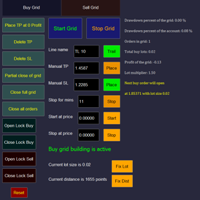
Virtual Collider Manual   – торговый робот-помощник со встроенной панелью для ручной торговли, осуществляющий автоматический вывод открываемой трейдером позиции в профит, используя инновационный адаптивный сеточный алгоритм усреднения и адаптивный пирамидинг. Ноу-хау используемого сеточного алгоритма усреднения и пирамидинга торгового робота   Virtual Collider Manual   базируется на полной автоматической адаптации всех характеристик динамически выстраиваемой сетки и пирамиды ордеров под актуальн
Its best to have Money and Risk management strategy than not to have any. Those strategy helps to risk low amount in any trade and helps to manage money so that few loosing trade wont have significant impact in your trading balance. The best part is it does all the calculations and places order accordingly. Other things that it does are: Makes sure that only 2% of total balance is risked per trade. Manges money by investing high in low volatile pairs and invest less in high volatile pairs Places
Zirk Trading Management Zirk Trading Management is a powerful trade management utility for MetaTrader that helps traders execute trades with consistent risk management. It is designed to simplify position sizing by automatically calculating the correct lot size based on your chosen risk percentage and stop-loss distance. Instead of manually calculating lot sizes, simply set your desired account risk (e.g., 1%), place your stop loss, and the utility instantly determines the appropriate trade vol
Recovery Assistant Pro for MT4 Manual Recovery Trading Assistant Recovery Assistant Pro is a Manual Trading Assistant EA for Recovery trade calculations and management. Helps calculate the appropriate Lot Size. Designed to calculate Recovery trade parameters based on floating loss and the selected Target USD. Simplifies Recovery calculations that would otherwise require manual calculation. The trading panel provides direct access to the main Recovery functions from the chart. Includes a Recov
Торговая панель Overall Grid Assistant является полноценным инструментом для построения сеток ордеров и полуавтоматического управления ими. Панель имеет гибкие настройки множителя лота и расстояния между ордерами, а также множество функций защиты депозита от больших убытков. Панель имеет отдельные независимые вкладки для сеток ордеров на покупку и на продажу. Сетка строится для убыточных сделок, открытых вручную, либо другим советником, которые могут быть выбраны по магическому номеру, комментар
Caelion Gold Pro — это корзинный советник для XAUUSD на хеджинг-счёте, график H1. Восемь семейств стратегий работают параллельно; позиции добавляются с фиксированным шагом без умножения лота, и каждая корзина закрывается по общей цели. Встроены четыре пресета, они выбираются вводом Preset. Strategy Tester, IC Markets XAUUSD, 2025, USD 5,000, 1:100: максимальная просадка по эквити 46.8% на пресете по умолчанию и 19.8% на трёх остальных; ни один пресет не закончился стоп-аутом. Это симуляция за од
The "Lot Size" button toggles between fixed and auto lot size modes. Fixed mode uses a predetermined lot size, while auto mode calculates lot size based on a customizable percentage of the account balance, displayed at the bottom. The "Trailing Stop" button enables the activation or deactivation of the trailing stop feature. Initially set to "No Trailing," clicking the button changes it to "Trailing ON" when the trailing stop is active, and "Trailing OFF" when it is inactive. Below the button,
Extra Martingale
Vladimir Pokora
5 (1)
Is your trade at a loss? Does not matter ! You can use this Extra martingale tool.  In the set loss of your trade or your EA's trade , this tool will open another trade at a better price. It can also open multiple trades at different distances and with different lot sizes. Each trade will be assigned a TakeProfit. This tool has a lot of settings. You can set variable lot sizes, variable trade distances, variable TakeProfit sizes, maximum total profit or loss in money. You can also close trades
ScaleIn splits one manual entry into several positions. Open a trade as usual: ScaleIn adds the extra positions you choose, each with its own take profit, while keeping the total risk of the whole trade under control. Positions to open - Number of additional positions. - Same volume as your original trade, or custom volumes for each position. Entries - Market orders (all positions open immediately), or pending orders placed at a set distance between levels. Stop loss and take profit - Stop l
EAsy ClickTrade позволяет: Мгновенно совершать сделки с учетом риска от эквити (Equity Risk) и уровня стоп-лосс (StopLoss Level) на любой валютной паре . Рассчитать риск с учетом эквити и направления. Рассчитать, насколько целесообразна потенциальная сделка с точки зрения риска и спреда ( Spread Cost ), что особенно полезно для скальперов и краткосрочных трейдеров. Входные параметры Select Risk for Lots Calculation [% Equity] - значение риска для расчета лотов. По умолчанию 1%. Начальное значен
MartexPO
Viktor Shpakovskiy
MartexPO - умеренно агрессивный советник, работающий по стратегии мартингейл и с возможностью хеджирования убыточных позиций. Использует отложенные ордера для открытия первого ордера и для хеджирования. При асимметричном "замке"- советник способен самостоятельно выходить из "замка" с прибылью. Советник MartexPO может усреднять ордера открытые трейдером вручную и ордера открытые другим советником. Советник будет интересен как начинающим так и опытным трейдерам. Руководство к советнику MartexPO мо
Position Cloner (PC) is a helpful utility that can be used like an EA to duplicate specific positions within the same MT4 instance. This is valuable e.g. to increase the risk when copying a signal to your account. When trading big capital you can also decrease the original risk of your EAs or manually opened positions and then let PC duplicate them. This way you avoid negative slippage due to inordinate lot sizes. You can choose between different, fully customizable options of how PC must clone
SmartTrader Pro — Advanced Order Management Panel Type: Order Management Platform: MetaTrader 4 Version: 1.0 Created by: HANI MABAD * 2025  --- Overview SmartTrader Pro is a professional multi-order launcher and manager designed for traders who want precise USD-based control over profits and losses. It enables you to open, manage, and close trades with a single click — across market and pending orders — while keeping full visibility through an integrated smart panel. Whether you tra
Защитите свой капитал с помощью Equity Protector. Специально созданный советник для тех, кто использует ботов на своих финансируемых счетах. Поместите этого бота на график, введите целевую сумму общего капитала и успокойтесь, зная, что ваши боты прекратят торговать, когда эта цель будет достигнута. Вы можете быть уверены в том, что ваши активы в безопасности, даже когда вы спите! Попробуйте Equity Protector сегодня!
The Simple Lot Size Calculator can help you with risk management. Just type risk percentage, stop loss points and click calculate to get required lot size. The Simple Lot Size Calculator calculates a current chart's instrument. It's lightweight. Just load it to your chart then The Simple Lot Size Calculator will apper in the left upper corner of your chart.
Очень разочаровывает, когда цена разворачивается, не достигнув нескольких пунктов до уровня Take Profit. Этот советник устанавливает виртуальные уровни рядом с уровнями TakeProfit. Если эти уровни достигнуты ценой, то ордер будет переведен в безубыток или к нему применяется трейлинг-стоп. Особенности Советник самостоятельно не устанавливает ордера. Его работа заключается в управлении уровнями стоп-лосс существующих ордеров, установленных другим советником или вручную (с магическим числом 0). Дл
CRIFLOW SCALPER PRO  Advanced Trade Management & Smart Scaling System CRIFLOW SCALPER PRO is an Expert Advisor designed to transform any manual operation into an advanced professional management system, automating scaling, capital protection and profit maximization. It's not just an input EA: is an intelligent order management engine designed for serious traders, scalpers and professionals. ⸻ Smart Trade Detection • Automatically detect manual trades • Intervenes in real time witho
Easy Trade Executor — инструмент для быстрого расчета лота, открытия и сопровождения сделок в MT5. Размещайте уровни Open Price, Stop Loss и Take Profit прямо на графике, получайте автоматический расчет объема позиции и открывайте сделки с контролируемым риском всего за несколько кликов. Почему Easy Trade Executor? Easy Trade Executor создан для трейдеров, которые хотят не только рассчитывать риск, но и быстро управлять сделками на графике. Инструмент объединяет расчет позиции, открытие ордеро
North Star EA is a trend EA, not  a Martin  EA,  non optimized EA.  just use fix lot size, auto get fix stop loss and take profit value, Max 3 open positions.EA has passed multiple platform tests.  Small capital withdrawal and no risk of exposure !        North Star EA is a complex algorithm that uses Artificial Intelligence in combination with traditional technical analysis to predict market movements. This Expert Advisor makes use of Combination of Vector calculus and trend indicators an
Equity Trailing Stop Manager EA The Equity Trailing Stop Manager EA is a powerful risk-management tool for MetaTrader. Instead of trailing the stop loss of individual trades, this EA trails your entire account equity . When your account equity increases, the EA records the highest equity reached . If equity later drops by the trailing amount you set, the EA closes all open trades automatically to protect your profits. The EA does not open trades . It simply manages existing positions. This ma
One Click Trades Panel Premium
Opengates Success International
OneClick Trades Panel - Premium Version 1.0 OneClick Trades Panel - Premium Version 1.0 is an higher grade of the 3 Trades Panels created. This version includes a lot of features that makes trading an exciting experience. Although It has same features on the interface as that of the Standard version but it also has almost 30 features behind the window chart. Interface Buttons Features: Buy button: This is a button used to open a buy trades Buy-Stop button: This is a button used to open buy stop
Обзор Prop Risk Guard (MT4) — это утилита управления риском и соблюдения правил, предназначенная для контроля и автоматического соблюдения дневного лимита убытка и общего максимального убытка (drawdown) с помощью настраиваемых защитных действий: предупреждения, блокировка торговли, очистка отложенных ордеров и экстренное закрытие позиций. Этот продукт НЕ является торговой стратегией , НЕ генерирует торговые сигналы и НЕ обещает прибыль . Его цель — снизить риск нарушения ограничений по просадке
Multi instrument and multi time frame EA, with the best indicators.  The MSD EA can be used for automated and manual trading. Click on the '?' button on the dashboard to obtain information about the various elements of the MSD EA. Uses ATR Take Profits, ATR Stop Losses and ATR Trailing Stops. Comes with an FX Currency Strength meter and a Market Sessions indicator. Has the option to place Trade Lines (Buy, Sell, Close, Alarm). When the price reaches the trendline, the EA will perform the approp
Защитите свой счет от Margin Call, когда рынок идет вразрез с вашими сделками. Управляйте своим риском, когда вы используете Мартингейл, Сетка, Среднее . Они больше не опасны, но управляемы Используйте эти утилиты EA, чтобы сопровождать каждую установку MT4 Этот советник является утилитой для защиты вашего капитала, когда ваша торговля неблагоприятна: Максимальная потеря денег, Максимальная просадка / потеря капитала в процентах, Ваш минимальный эквити достигнут Те, которые достигли первыми
FREE
Expert Advisor for MT4 Useful utility MUST have for all traders.  With 1 click button, you're able to close all your open positions. Its come with a warning pop up notification when you click to close all your trades, to avoid an accident press the button. Just press 'Yes' to confirm or 'No' to cancel it. The expert will close all your open positions no matter what pairs you currently open or directions. Just attach the expert on 1 of your chart, and you're good to go.
С этим продуктом покупают
Добро пожаловать в Trade Manager EA — лучший инструмент для управления рисками, предназначенный для упрощения, точности и эффективности торговли. Это не просто инструмент для размещения ордеров; это комплексное решение для удобного планирования торгов, управления позициями и усиленного контроля над рисками. Независимо от того, начинающий вы трейдер, опытный специалист или скальпер, нуждающийся в быстром исполнении, Trade Manager EA адаптируется к вашим потребностям и работает с любыми активами:
TradePanel MT4
Alfiya Fazylova
4.84 (95)
Trade Panel — это многофункциональный торговый помощник. Приложение содержит более 50 торговых функций для ручной торговли и позволяет автоматизировать большинство торговых операций. Инструкция к приложению: https://www.mql5.com/ru/blogs/post/756476 Пробная версия приложения для демо-счета: https://www.mql5.com/ru/blogs/post/750864 Как установить приложение: https://www.mql5.com/ru/blogs/post/750096 Как тестировать приложение в визуальном режиме: https://www.mql5.com/ru/blogs/post/770274 Как уст
MT4 к Telegram Signal Provider - это простой в использовании и полностью настраиваемый инструмент, который позволяет отправлять сигналы в Telegram, превращая ваш аккаунт в поставщика сигналов. Формат сообщений полностью настраиваем! Однако для простого использования вы также можете выбрать предопределенный шаблон и включать или отключать определенные части сообщения. [ Демо ]  [ Руководство ] [ Версия для MT5 ] [ Версия для Discord ] [ Телеграм-канал ]  New: [ Telegram To MT5 ] Настройка Шаг за
Telegram to MT4 Multi-Channel Copier   автоматически копирует торговые сигналы из ваших Telegram- и Discord -каналов прямо в MetaTrader 4. Без ботов, без браузерных расширений, без ручного копирования. Сигнал приходит в Telegram или Discord — и советник открывает сделку в вашем терминале за считанные секунды. А перед тем как копировать канал, встроенный бэктестер покажет, что этот канал сделал бы на вашем счёте. Продукт состоит из двух компонентов: приложения для Windows, которое слушает ваши Te
TradeMirror - это советник-копировщик для платформы MT4/MT5. Руководство по использованию Нажмите на ссылку Руководство по Trademirror , чтобы посмотреть больше инструкций. Почему TradeMirror Мы понимаем важность безопасности, стабильности и конфиденциальности для финансового программного обеспечения, поэтому мы приложили максимум усилий для детального укрепления этих трех элементов: Предоставляет удобный графический интерфейс, которым легко управлять Фокус на конфиденциальности и безопасности,
PZ Trade Pad Pro MT4
PZ TRADING SLU
3.67 (3)
Это визуальная торговая панель, которая помогает вам легко размещать сделки и управлять ими, избегая человеческих ошибок и повышая вашу торговую активность. Он сочетает в себе простой в использовании визуальный интерфейс с надежным подходом к управлению рисками и положением [ Руководство по установке | Руководство по обновлению | Устранение неполадок | FAQ | Все продукты ] Удивительно простой в использовании Торгуйте легко с графика Торгуйте с точным управлением рисками, без проблем Сохранение
Нужна поддержка? Как настроить? Есть вопросы? Спрашивайте здесь на своём языке, быстрый ответ: https://www.mql5.com/en/market/product/139089/comments Скачать рабочую пробную версию Copy Cat More (Копи Кэт Мор) — копировщик сделок (Trade Copier) MT4 — это не просто локальный копировщик сделок; это полноценная система управления рисками и исполнения (risk management and execution framework), созданная для современных торговых задач. От челленджей проп-фирм (prop firm) до управления личным портф
Trade Indicator Assistant is a powerful MT4 utility designed to turn indicators into automated trading systems. Its main feature is the ability to automatically detect an indicator’s   BUY and SELL signal buffers , without requiring you to know the buffer numbers, search through indicator settings, or modify the indicator source code. Bonus Indicator: After purchasing Trade Indicator Assistant, contact me to receive Trade Signal Pro completely free as a bonus indicator. [Download Demo Version]
Trade Manager Pro MT4
Bryan Djoufack Nguessong
Это утилита для облегчения торговли, позволяющая в один клик или несколько кликов выполнять такие трудоемкие задачи, как управление ордерами и управление рисками. Особенности Управление рисками   Автоматически рассчитывает лоты на основе риска, указанного в % или $ в поле риска, и позволяет вам вводить ордера, просто размещая линии для SL TP и т.д., и отображает Risk Reward в реальном времени. TrueRisk включает комиссионные при расчете размера лота только на FX парах, так что вы рискуете 1%
The product will copy all telegram signal to MT4   ( which you are member  ) , also it can work as remote copier.  Easy to set up, copy order instant, can work with almost signal formats, image signal, s upport to translate other language to English Work with all type of channel or group, even channel have "Restrict Saving Content", work with  multi channel, multi MT5 Work as remote copier: with signal have ticket number, it will copy exactly via ticket number. Support to backtest signal. How to
Trade Copier Global: The name speaks for itself. This copier allows you to copy orders between MT4 terminals even if they are not installed on the same computer. Features Copying trades between MT4 terminals around the world with a short delay. Automatically recognizes symbol prefixes. Can connect many Slaves to the same Master. Supports pending and market orders. Supports partial order close (with limitations, see below) Can send messages and notifications to the Slaves from the Master Several
Unlimited Trade Copier Pro - это мощный инструмент для удаленного копирования сделок между несколькими счетами MetaTrader 4/MetaTrader 5, расположенными удаленно друг от друга, по сети интернет. Это идеальное решение для провайдеров сигналов, которые хотят поделиться своей торговлей с другими трейдерами по всему миру. Один поставщик может копировать сделки на неограниченное количество счетов-получателей, а один получатель также может копировать сделки неограниченного количества провайдеров. Пост
Strategy Builder offers an incredible amount of functionality. It combines a trade panel with configurable automation (covert indicators into an EA), real-time statistics (profit & draw down) plus automatic optimization of SL, TP/exit, trading hours, indicator inputs. Multiple indicators can be combined into an single alert/trade signal and can include custom indicators, even if just have ex4 file or purchased from Market. The system is easily configured via a CONFIG button and associated pop-up
Take a Break
Eric Emmrich
5 (31)
Take a Break pauses your Expert Advisors when trading is a bad idea: before news, after a daily loss, outside your trading hours, or when a rule you wrote yourself says so. When the pause is over, your EAs simply continue. Account protection for all your EAs in one tool: news filter, drawdown and equity protection, time filter and custom rules. One EA on one chart protects the whole account, the free indicator gives every chart its own rules on top. Free demo | What is new in 26.09 | Support Ass
Trade Manager MT4 DaneTrades
Levi Dane Benjamin
4.09 (11)
Trade Manager, который поможет вам быстро входить и выходить из сделок, автоматически рассчитывая риск. Включает функции, которые помогут предотвратить чрезмерную торговлю, торговлю из мести и эмоциональную торговлю. Сделками можно управлять автоматически, а показатели эффективности счета можно визуализировать в виде графика. Эти функции делают эту панель идеальной для всех трейдеров, занимающихся ручной торговлей, и помогают улучшить платформу MetaTrader 4. Многоязычная поддержка. Версия MT5  |
Автоматически торгуйте зонами поддержки и сопротивления или спроса и предложения, как только вы определите ключевые области, из которых хотите торговать. Этот советник позволяет вам рисовать зоны покупки и продажи одним щелчком мыши, а затем размещать их именно там, где вы ожидаете разворота цены. Затем советник отслеживает эти зоны и автоматически совершает сделки на основе ценового действия, которое вы указываете для зон. После совершения первоначальной сделки советник выйдет с прибылью в про
Riskless Pyramid
Snapdragon Systems Ltd
5 (1)
Introduction This powerful MT4 trade mangement EA offers a way potentially to aggressively multiply trade profits in a riskfree manner. Once a trade has been entered with a defined stoploss and take profit target then the EA will add three pyramid add-on trades in order to increase the overall level of profit. The user sets the total combined profit target to be gained if everything works out. This can be specified either as a multiple of the original trade profit or as a total dollar amount. Fo
The News Filter
Leolouiski Gan
5 (25)
Этот продукт фильтрует всех экспертных советников и ручные графики во время новостей, так что вам не нужно беспокоиться о внезапных скачках цены, которые могут разрушить ваши ручные торговые настройки или сделки, введенные другими экспертными советниками. Этот продукт также поставляется с полной системой управления ордерами, которая может обрабатывать ваши открытые позиции и ордера на ожидание перед выпуском новостей. После покупки The News Filter вам больше не придется полагаться на встроенные
Prop Guardian Risk Manager MT4 – Drawdown, Risk & Hedge Protection for Prop Firm and Managed Accounts Prop Guardian Risk Manager is a professional risk-control utility for MetaTrader 4, designed for prop firm traders, money managers and anyone who wants strict account-level risk protection. It does not generate trading signals, strategy entries or trading decisions. Instead, it runs in the background, monitors your account risk and can automatically block new exposure, close managed trades or ac
FCK CurrencyStrength Pro
Patel Hitendrakumar Mahendrabhai
Hi Friends, " FCK Currency Strength Pro " is a auto & semi auto trading expert with direction of pair. Buy-Sell separate or multi currency in one click. The strategy of  FCK Currency Strength Pro  is a combination of custom indicator, Trendlines, Support & Resistance levels ( Price Action ) and most important secretive trading algorithm mentioned above. Download News Ex4 and csv file You need the following SDSnews.ex4 in MQL4/Libraries and the daylightsavings.csv in MQL4/Files. Only 4 of 5 copi
Grid Manual MT4
Alfiya Fazylova
4.71 (17)
Grid Manual — это торговая панель для работы с сеточными стратегиями. Утилита универсальная, имеет гибкие настройки и понятный интерфейс. Работает с сеткой ордеров не только в сторону усреднения убытков, но и в сторону наращивания прибыли. Трейдеру не нужно создавать и сопровождать сетку ордеров, это сделает утилита. Достаточно открыть ордер и Grid manual автоматически создаст ему сетку ордеров и будет сопровождать его до самого закрытия. Полная инструкция и демо-версия здесь . Основные особенно
DrawDown Limiter MT4
Haidar Lionel Haj Ali
5 (8)
DrawDown Limiter v5.0 — Расширенный контроллер защиты торгового счёта DrawDown Limiter v5.0 — это клиентский контроллер защиты торгового счёта, предназначенный для мониторинга вашей торговли и автоматической реакции при достижении настроенных лимитов риска, прибыли, новостей, расписания, ролловера или количества позиций. Он может контролировать ручные сделки, автоматические стратегии, несколько советников, отложенные ордера и открытые позиции с одного отдельного графика. Он может защищать весь т
Риск менеджер Риск менеджер - упростит отслеживание просадки и оповестит при критическом достижении указанного риска, а также закроет ордера при достижении критического (указанного) уровня риска. При превышении указанной просадки, можно выбрать два варианта событий Все ордера закрываются и фиксируется убыток. Терминал также полностью закрывается Вместо фиксирования убытка открывается противоположный ордер - и происходит локирование. Ни один ордер не закрывается. Логику раскрытия локов можно п
VirtualTradePad PRO SE MT4 — расширенная торговая панель и рабочее пространство на графике для MetaTrader 4 VirtualTradePad PRO SE — это профессиональная торговая панель и рабочая среда управления сделками для MetaTrader 4 . Она помогает трейдерам быстрее открывать, сопровождать, защищать, закрывать и анализировать сделки из одного интерфейса на графике. Продукт создан для активных ручных трейдеров, которым нужно больше, чем простой набор кнопок. PRO SE объединяет исполнение в один клик, отложен
Ultimate Partial Profit EA
BLAKE STEVEN RODGER
4.67 (3)
This EA Utility delivers a robust solution for managing an unlimited array of open orders, both manual and automated. It enables customizable partial profit levels utilizing metrics such as pips, ratios, ATR (Average True Range), and profit amounts for precise trade management. The utility features an advanced on-screen display, offering clear visualization of all orders and their profit levels to enhance strategic decision-making and control. To evaluate its performance and interface, the EA s
Менеджер соотношения риска и прибыли — это визуальный инструмент управления ордерами и калькулятор размера позиции, разработанный для поддержки дисциплинированной торговли и профессионального управления рисками. Он позволяет трейдерам визуально устанавливать уровни входа, стоп-лосса и тейк-профита непосредственно на графике, автоматически рассчитывая размер лота и соотношение риска и прибыли перед отправкой ордера. Инструмент помогает стандартизировать подготовку к торговле и гарантирует, что ка
Trade Signal Pro (MT4) — Telegram Signal Provider (Utility) A lightweight utility that sends trade notifications from your MT4 account to Telegram. It does NOT open/close trades. It only reads positions/deals and sends messages. What it sends Entry signal (BUY/SELL) with Entry, SL, TP, pips + Risk:Reward   Updates when SL/TP is modified (reply/tag to the original signal)   Close notifications: TP hit / SL hit / Breakeven / Manual close   Optional Daily & Weekly performance summary (win
Auto Trade Driver
Vu Trung Kien
4.6 (15)
Auto Trade Driver - мощный автоматический инструмент (работает как советник), который поможет вам управлять рисками и контролировать ордера для максимизации прибыли с правилами мультизащиты и трейлинг-стопа. Этот инструмент будет очень полезен как для скальперов, так и трейдеров, торгующих по тренду. Он не только вычисляет точный торговый риск, но также защищает и увеличивает прибыль в реальном времени. Работая с этим инструментом, единственное, что вам нужно сделать, это открывать сделки в соот
Панель FFx Hidden Manager предназначена для управления ордерами прямо на графике. Особенности: Уровни тейк-профит, стоп-лосс и трейлинг-стоп скрыты Для каждого ордера на графике есть отдельная линия Перетащите необходимую линию, чтобы изменить уровни тейк-профит/стоп-лосс Функция автоматического перетаскивания уровня стоп-лосс в безубыток, когда достигнут йровень тейк-профит 1 Возможность выбора типа тейк-профита/стоп-лосса (в пунктах или по цене) Возможность выбора типа трейлинг-стопа (в пунк
Auto Trade Copier
Vu Trung Kien
4.77 (86)
Auto Trade Copier предназначен для копирования сделок между несколькими счетами / терминалами MT4 / MT5 со 100% точностью. С помощью этого инструмента вы можете действовать как поставщик (источник) или получатель (пункт назначения). Все торговые действия будут скопированы от поставщика к получателю без задержки. Этот копир можно использовать только на счетах MT4. Для счетов MT5 вы должны использовать Auto Trade Copier для MT5 или Trade Receiver Free для MT5. Демо-версия : Демо-версию для тести
Другие продукты этого автора
Riskly Pro is a risk and trade management utility for manual traders. It combines account protection, position management and scale-in entries in one Expert Advisor. Trading panel - On-chart BUY and SELL buttons. The lot is calculated from the risk you set (percent of the account) and the stop loss distance. - Automatic stop loss and take profit on every position, including positions you open manually. Account protection - Maximum daily loss, maximum number of trades per day and maximum conse
RisklyCopy copies trades from a master account to one or more receiving accounts running on the same computer or VPS. It works between MT5 terminals, between MT4 terminals, and between MT4 and MT5, also with different brokers. How it works - Attach RisklyCopy in SEND mode on the master account and in RECEIVE mode on each receiving account, using the same channel name. - New trades, stop loss and take profit changes, partial closes and closes are copied. Lot calculation on the receiving accoun
RisklyTrailing turns one manual entry into a group of positions without take profit and manages each of them with a step stop, so the first positions lock profit early and the last ones stay in the market for long moves. How it works - Open a position manually: RisklyTrailing opens the additional positions you choose, all with the same stop loss and no take profit. - After a set profit, all positions move to break-even (with a small margin beyond the entry). - Step stop: at +1 step the first p
ScaleIn splits one manual entry into several positions. Open a trade as usual: ScaleIn adds the extra positions you choose, each with its own take profit, while keeping the total risk of the whole trade under control. Positions to open - Number of additional positions. - Same volume as your original trade, or custom volumes for each position. Entries - Market orders (all positions open immediately), or pending orders placed at a set distance between levels. Stop loss and take profit - Stop l
TradeManager manages the positions you open manually, so every trade gets a stop loss, a take profit, break-even and trailing without you having to watch the chart. Stop loss and take profit - Adds a stop loss and a take profit to any position that does not have them. Break-even - Moves the stop loss to break-even after a set profit, with a small margin beyond the entry. Trailing stop - Starts trailing after a set profit, at the distance you choose. - Updates the stop only every N pips, to a
RisklyPro
Gabriele Liberto
Riskly Pro is a risk and trade management utility for manual traders. It combines account protection, position management and scale-in entries in one Expert Advisor. Trading panel - On-chart BUY and SELL buttons. The lot is calculated from the risk you set (percent of the account) and the stop loss distance. - Automatic stop loss and take profit on every position, including positions opened from the phone or another terminal. Account protection - Maximum daily loss, maximum number of trades p
RiskGuard protects your account while you trade manually. It enforces the rules you set, so a bad day cannot turn into a blown account. Account limits - Maximum daily loss (percent of the start-of-day balance, closed and open trades together). - Optional profit target: when reached, all positions are closed and trading stops for the day. - When a limit is reached the account is locked until the next day: any new position is closed immediately. Discipline - Maximum number of trades per day. -
RisklyCopy copies trades from a master account to one or more receiving accounts running on the same computer or VPS. It works between MT5 terminals, between MT4 terminals, and between MT4 and MT5, also with different brokers. How it works - Attach RisklyCopy in SEND mode on the master account and in RECEIVE mode on each receiving account, using the same channel name. - New trades, stop loss and take profit changes, partial closes and closes are copied. Lot calculation on the receiving accoun
RisklyTrailing turns one manual entry into a group of positions without take profit and manages each of them with a step stop, so the first positions lock profit early and the last ones stay in the market for long moves. How it works - Open a position manually: RisklyTrailing opens the additional positions you choose, all with the same stop loss and no take profit. - After a set profit, all positions move to break-even (with a small margin beyond the entry). - Step stop: at +1 step the first p
ScaleIn splits one manual entry into several positions. Open a trade as usual: ScaleIn adds the extra positions you choose, each with its own take profit, while keeping the total risk of the whole trade under control. Positions to open - Number of additional positions. - Same volume as your original trade, or custom volumes for each position. Entries - Market orders (all positions open immediately), or pending orders placed at a set distance between levels. Stop loss and take profit - Stop l
TradeManager manages the positions you open manually, so every trade gets a stop loss, a take profit, break-even and trailing without you having to watch the chart. Stop loss and take profit - Adds a stop loss and a take profit to any position that does not have them. Break-even - Moves the stop loss to break-even after a set profit, with a small margin beyond the entry. Trailing stop - Starts trailing after a set profit, at the distance you choose. - Updates the stop only every N pips, to a
Фильтр:
Нет отзывов
Ответ на отзыв