RiskGuard MT5

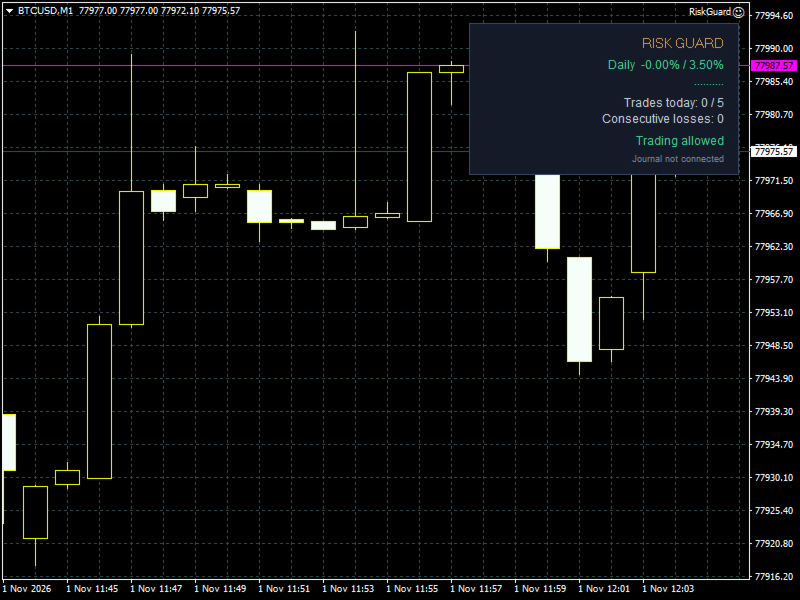
RiskGuard protects your account while you trade manually. It enforces the rules you set, so a bad day cannot turn into a blown account.

Account limits
- Maximum daily loss (percent of the start-of-day balance, closed and open trades together).
- Optional profit target: when reached, all positions are closed and trading stops for the day.
- When a limit is reached the account is locked until the next day: any new position is closed immediately.

Discipline
- Maximum number of trades per day.
- Maximum consecutive losses.
- Cooldown pause after a losing trade: positions opened during the pause are closed.

Position control
- Maximum risk per trade: if you open a lot that is too large, only the excess is closed (or the whole position, if you prefer).
- Mandatory stop loss: positions without a stop loss are closed after a grace period you choose.

On lock
- Close open positions and delete pending orders.
- Push notifications to your phone.

Ideal for prop-firm challenges: set the limits with a safety margin below the firm's rules.

Important
- RiskGuard does not open trades by itself.
- In the Strategy Tester there is no manual trader, so the EA opens minimum-lot demonstration trades (comment "Riskly demo") to show how the protection works. This can be disabled with the input "Strategy Tester: open demonstration trades". On a live or demo account it never opens trades on its own.
Рекомендуем также
Данный продукт — советник для управления позициями и поддержки закрытия сделок, предназначенный для трейдеров, торгующих по собственному усмотрению. Из одного советника вы можете пакетно устанавливать TP/SL для нескольких позиций, проверять точку безубыточности (BE) и предполагаемую прибыль/убыток, автоматически закрывать сделки по заданным правилам, отображать MA старших таймфреймов и мгновенно закрывать все позиции клавишей Enter. Это не продукт, автоматизирующий торговые решения или открытие
Plan, execute and protect every trade in MetaTrader 5: exact risk-based lot size, automatic management, baskets and Prop Firm rules in a single panel. Manzano Trade Manager Pro is a professional trade manager for MetaTrader 5, designed especially for traders who trade funded accounts (Prop Firms) and need advanced control over risk, execution and position management. It brings together in one tool visual trade planning, automatic lot size calculation, individual, collective and basket managemen
Grid Trading - полуавтоматический советник для торговли по сетке в один клик на хеджевых счетах. Также доступна версия для MetaTrader 4 . *Данный советник предназначен только для счетов с хеджинговой системой учета позиций Обычный режим Вы нажимаете на кнопку Sell или Buy на графике, затем эксперт добавит уровни стоп-лосс, тейк-профит для сделки, а функции трейлинг-стопа и безубытка позаботятся о сделке, если она не сможет достичь цели профита. Хеджирование При выборе торговли с использованием
Talents ATR Scalper Utility (MT5) The Talents ATR Scalper Utility is a professional-grade trade execution and management tool built for MetaTrader 5. Inspired by the Biblical Parable of the Talents , this utility is designed to help traders multiply their potential with precision risk control, one-click simplicity, and advanced automation. Whether you’re scalping forex, gold, or indices, this tool delivers speed, consistency, and confidence. Key Features One-Click Trade Preview Click below price
Northline Prop Copier
Geoffrey Pierre Manuel Gonzalez
Копируйте свои сделки с одного счета MetaTrader 5 на счета проп-фирм - и удерживайте каждый счет в рамках его собственных правил. Перед каждой копией slave суммирует худший сценарий по всем открытым стоп-лоссам и сверяет его с лимитами дневного и максимального убытка своей программы. Копия, которая может нарушить правило, уменьшается до безопасного лота или отклоняется - с указанием причины на экране и на вашем телефоне. ОБЗОР Копировать одну стратегию на несколько проп-счетов кажется простым, п
Lightning Hotkeys  Trade Faster, Smarter & Safer Ever felt like you missed a great trade because you couldn't execute fast enough? Lightning Hotkeys turns your keyboard into a powerful trading command center, helping you trade in mili-seconds instead of minutes. Speed Up Your Trading Game Trade with the press of a key. No more clicking through menus or missing opportunities. Lightning Hotkeys lets you: Open buy/sell positions instantly Manage stop losses on the fly Close trades when you need to
Account Profit & Loss Killer Full Account-Level Intelligent Risk Management EA (MT5) ⸻ Product Introduction Account Profit & Loss Killer is a true "overall account control and risk management tool". It does not participate in any trading strategy; it focuses on only one thing: When the total floating profit or total floating loss of all positions in the account reaches your set amount, it immediately and within milliseconds forcibly closes all orders in the account. This is a true "
FREE
RisklyPro
Gabriele Liberto
Riskly Pro is a risk and trade management utility for manual traders. It combines account protection, position management and scale-in entries in one Expert Advisor. Trading panel - On-chart BUY and SELL buttons. The lot is calculated from the risk you set (percent of the account) and the stop loss distance. - Automatic stop loss and take profit on every position, including positions opened from the phone or another terminal. Account protection - Maximum daily loss, maximum number of trades p
Secura Trade Manager
KINGSLEY IFEANYI IWUFRED
Secura Trade Manager Risk Management, Position Sizing, All Markets, Trailing Stops, Break Even, Forex-Gold-Crypto-Indices Overview Secura Trade Manager  is the most complete risk management and trade execution panel available for MetaTrader 5. Designed for serious traders who refuse to leave money on the table, it transforms the way you plan, enter, manage, and close trades — across every asset class from Forex and Gold to Indices, Commodities, and Cryptocurrency. Stop guessing lot sizes. Stop m
Boost your forex profits with Blues Protector, an advanced MQL5 Expert Advisor designed for MetaTrader 5. This automated trading bot dynamically manages your stop-loss levels to secure gains and reduce risks. Blues Protector EA - User Manual   (For MT5 - Ready-to-Use EX5 File)   1. What This EA Does    The Blues Protector EA automatically secures your profits by smartly adjusting stop-loss levels when your trade reaches a predefined profit level. It works silently in the background, protecting
Protect your equity and trade stress-free with the Smart Risk Manager EA ! Designed as an all-in-one risk management and account protection utility, this EA guarantees that no trade is ever left unprotected . Whether you trade manually or run multiple EAs simultaneously, this tool automatically manages your Risk-to-Reward, secures profits, and protects your capital from bad entries, market spikes, slippage, and high-impact news events. It is the ultimate solution for Prop Firm traders (FundedNex
BossFXTradePanelEA (MT5)  [First 10 copies sold at 50 USD price will increase to 99USD] BossFXTradePanelEA is a fully interactive trade management panel designed for MetaTrader 5, providing traders with an easy-to-use, one-click interface to execute and manage trades. This EA simplifies trade execution , risk management, and position control by combining market orders, stop loss, take profit, trailing stops, and breakeven functionalities into a single, intuitive panel.  Key features include: On
Chart Order Trade Manager MT5
Juergen Marcus Wolfgang Rosswinkel
Trade Manager — Professional Order and Position Management Panel for MetaTrader 5 Automatic lot, Stop Loss and Take Profit calculation, entry by chart click, draggable SL and TP lines, trailing stop, auto break-even, partial close and a complete CSV export of your trading history — all from one interactive chart panel. OVERVIEW Trade Manager is a professional order and position management panel for MetaTrader 5. It significantly simplifies manual order entry, automatically calculates lot siz
Kyora MT5
Mauro Augello
5 (6)
Kyora — это советник (Expert Advisor), предназначенный для торговли на пробоях USDJPY. Он объединяет несколько встроенных торговых стратегий в одном советнике и предлагает два выбираемых режима, независимый расчёт объёма лотов для BUY и SELL, а также дополнительные фильтры защиты и экономических новостей. Все стратегии работают на одном графике USDJPY. Kyora использует отложенные ордера Buy Stop и Sell Stop для входа в рынок на уровнях пробоя, определяемых стратегией. Каждый ордер имеет собствен
Automatic TP and SL
Dushshantha Rajkumar Jayaraman
TradeGuard    by Chart Walker TradeGuard is a MT5 Expert Advisor (EA) designed to enhance your trading experience by automating key aspects of trade management. This EA excels in efficiently managing Take Profit (TP) and Stop Loss (SL) levels, offering a seamless and intelligent approach to trailing stops. One of TradeGuard's standout features is its Smart Trailing Stop, which dynamically adjusts the trailing distance based on market conditions. This adaptive approach helps maximize profits dur
Manually enter the price for Buy position or Sell position. This EA will automatically open 3 orders and also 3 Pending (In deposited position) = Total 6 orders per one click Please see Screenshot or Videos for more explanation. - Easy to manage your different order. - Fast in modification for SL and TP. - Can modified the SL and TP depends on individual techniques.
Apex StopLoss Manager
Muhammad Hassan Muhammad Ahmad Atiyah
Apex StopLoss Manager Скрипт MT5 – Управление Stop Loss Описание Apex StopLoss Manager — это скрипт для MetaTrader 5, обеспечивающий точный контроль за поведением Stop Loss на существующих открытых позициях . Скрипт выполняется один раз при запуске и управляется только через настройки пользователя. Он не использует автоматическую торговую логику, не открывает сделки и не генерирует сигналы. Функциональность Регулировка Breakeven Скрипт может перемещать Stop Loss на расчетный уровень безубыточн
Recovery Assistant Pro for MT5 Manual Recovery Trading Assistant Recovery Assistant Pro is a Manual Trading Assistant EA for Recovery trade calculations and management. Helps calculate the appropriate Lot Size. Designed to calculate Recovery trade parameters based on floating loss and the selected Target USD. Simplifies Recovery calculations that would otherwise require manual calculation. The trading panel provides direct access to the main Recovery functions from the chart. Includes a Recov
Bneu Smart Money Concepts Pro — All-in-One ICT/SMC Analysis An automated Smart Money Concepts indicator that marks BOS, CHoCH, Order Blocks, Fair Value Gaps, Liquidity Sweeps, OTE Zone, Kill Zones, Asian Range, and Premium/Discount zones in real time. All signals use closed-bar data only. Non-repainting. WHAT IT DRAWS - BOS (Break of Structure) and CHoCH (Change of Character) labels - HH / HL / LH / LL swing point labels - Order Block zones (supply and demand) with midpoint lines - Fair Val
Изначально скрипт был сделан для скальпинга на BTCUSD.  Скрипт позволяет быстро управлять позициями с клавиатуры: Стрелка ↑ → Открыть BUY (покупка) Стрелка ↓ → Открыть SELL (продажа) Стрелка → → Закрыть ВСЕ позиции Ключевые функции: Автоматическое закрытие противоположных позиций При открытии BUY закрываются все SELL, и наоборот. Позиции в том же направлении остаются нетронутыми (можно накапливать). Гибкие настройки: Размер лота (LotSize). Take Profit в пунктах (TP_Points).  Stop Loss отключе
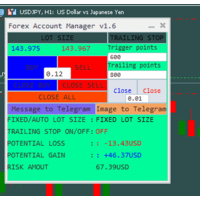
The "Lot Size" button toggles between fixed and auto lot size modes. Fixed mode uses a predetermined lot size, while auto mode calculates lot size based on a customizable percentage of the account balance, displayed at the bottom. The "Trailing Stop" button enables the activation or deactivation of the trailing stop feature. Initially set to "No Trailing," clicking the button changes it to "Trailing ON" when the trailing stop is active, and "Trailing OFF" when it is inactive. Below the button,
Zirk Trading Management Zirk Trading Management is a powerful trade management utility for MetaTrader that helps traders execute trades with consistent risk management. It is designed to simplify position sizing by automatically calculating the correct lot size based on your chosen risk percentage and stop-loss distance. Instead of manually calculating lot sizes, simply set your desired account risk (e.g., 1%), place your stop loss, and the utility instantly determines the appropriate trade volu
Advanced Risk/Reward Trade Manager for MT5 with 15 Independent Management Levels, Automated Partial Closes and Progressive Stop Loss Control. Manual entries. Rule-based trade management. SmartTrail is a trade-management utility for MetaTrader 5. You choose when to enter a trade and where to place the initial Stop Loss. SmartTrail then manages the open position according to your risk/reward (R) levels: moving Stop Loss, applying optional partial closes and closing the position at a defined fin
Is your trade at a loss? Does not matter ! You can use this Extra martingale tool.  In the set loss of your trade or your EA's trade , this tool will open another trade at a better price. It can also open multiple trades at different distances and with different lot sizes. Each trade will be assigned a TakeProfit. This tool has a lot of settings. You can set variable lot sizes, variable trade distances, variable TakeProfit sizes, maximum total profit or loss in money. You can also close trades
Watch SMC Structure EA
Sinmiloluwa Daniel Ogunmola
Rule-based smart money concepts EA: break of structure, order blocks, fair value gaps, fixed risk per trade, daily loss limit and news filter. Many traders who use smart money concepts mark structure by hand and then hesitate, enter late, or keep trading after a bad morning. The setup is clear on the chart, but turning it into consistent entries, a fixed risk per trade and a firm stop for the day is where most manual trading breaks down. Most SMC tools only draw zones; they leave the entry, the
ZenEntry Risk Manager MT5
Constant Xorsenyo Tamekloe
Take Control of Your Risk with ZenEntry ZenEntry is a premium, interactive graphical panel designed for MetaTrader 5 that eliminates manual lot-size calculations. By syncing live chart lines directly with a beautiful HUD, ZenEntry allows you to execute mathematically perfect, risk-managed trades in milliseconds. Whether you risk a fixed dollar amount or a percentage of your account equity, ZenEntry automatically shifts your lot sizing dynamically as you drag your Stop Loss and Take Profit lin
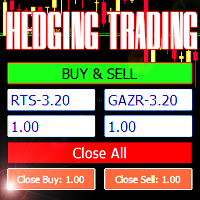
Советник для хеджинговой торговли или парного трейдинга. Удобная панель позволяет открывать позиции по нужным торговым инструментам и лотам. Автоматически определяет тип торгового счета - неттинг ли хеджинг. Советник может закрывать все свои позиции при достижении профита или убытка (определяется в настройках). Для контроля убытков необходимо отрицательное значение (например, -100, -500 и т.п.). Если в соответствующих полях стоит 0 - советник не будет использовать эту функцию. Настройки: Close
TraderOS | PropGuard Защита от ежедневных потерь и превышения максимальной просадки в рамках проп-трейдинга Больше никаких провалов в проп-трейдинге из-за превышения ежедневной просадки или максимального убытка. TraderOS | PropGuard — это профессиональный инструмент управления рисками, разработанный специально для трейдеров, работающих в проп-трейдинге. Он отслеживает ваш торговый счет в режиме реального времени и автоматически защищает вас от превышения ежедневных лимитов потерь и правил ма
ScaleIn splits one manual entry into several positions. Open a trade as usual: ScaleIn adds the extra positions you choose, each with its own take profit, while keeping the total risk of the whole trade under control. Positions to open - Number of additional positions. - Same volume as your original trade, or custom volumes for each position. Entries - Market orders (all positions open immediately), or pending orders placed at a set distance between levels. Stop loss and take profit - Stop l
Ultimate Zone Recovery Quantitative
Luigi Salvatores Buigues Morillo
Ultimate Zone Recovery Quantitative is an advanced trading management tool designed for MetaTrader 5 (Hedging Accounts). It transforms losing trades into winning cycles using a sophisticated quantitative directional hedging algorithm. This Expert Advisor (EA) does not rely on technical indicators for initial entries. Instead, it acts as a mathematical shield for your existing strategies (whether manual or from other EAs) or for manual entries executed via its integrated panel. When a trade moves
С этим продуктом покупают
Trade Assistant MT5
Evgeniy Kravchenko
4.43 (216)
Помогает рассчитать риск на сделку, простая установка нового ордера с помощью линий, управление ордерами с функциями частичного закрытия, 7 типов трейлинг-стопа и другие полезные функции. Дополнительные материалы и инструкции Инструкция по установке - Инструкция к приложению Функция Линии   - отображает на графике линию открытия, стоп-лосс, тейк-профит. С помощью этой функции легко установить новый ордер и увидеть его дополнительные характеристики перед открытием. Управление риском   -   функ
Добро пожаловать в Trade Manager EA — лучший инструмент для управления рисками, предназначенный для упрощения, точности и эффективности торговли. Это не просто инструмент для размещения ордеров; это комплексное решение для удобного планирования торгов, управления позициями и усиленного контроля над рисками. Независимо от того, начинающий вы трейдер, опытный специалист или скальпер, нуждающийся в быстром исполнении, Trade Manager EA адаптируется к вашим потребностям и работает с любыми активами:
Farmed Hedge Yield Farming | All Markets (Manual - Hybrid - Semi/Automated EA) VERIFIED TRADING RESULTS - Farmed Hedge Yield Axi Copy:  https://www.mql5.com/en/signals/2356376 - Farmed Hedge Yield Exn Copy:   https://www.mql5.com/en/signals/2356404 - Farmed Hedge Yield V Copy:  https://www.mql5.com/en/signals/2357156 IMPORTANT NOTICE: FarmedHedge is a MANUAL-FOCUSED TRADING UTILITY ,not a fully automated EA. Results shown on this Signal include manual trades and overall strategic management.
Telegram to MT5 Multi-Channel Copier   автоматически копирует торговые сигналы из ваших Telegram- и Discord -каналов прямо в MetaTrader 5. Без ботов, без браузерных расширений, без ручного копирования. Сигнал приходит в Telegram или Discord — и советник открывает сделку в вашем терминале за считанные секунды. А перед тем как копировать канал, встроенный бэктестер покажет, что этот канал сделал бы на вашем счёте. Продукт состоит из двух компонентов: приложения для Windows, которое слушает ваши Te
Копируйте сигналы из Telegram по своим торговым правилам Telegram to MT5 Signal Trader автоматически копирует текстовые торговые сигналы из открытых и закрытых каналов и групп Telegram в MetaTrader 5. Управляйте несколькими поставщиками сигналов и счетами MT5 из одного приложения для компьютера, задавая индивидуальные параметры риска и торговли для каждого поставщика . Для копирования не нужны бот Telegram и настройка API. Просто войдите в свой аккаунт Telegram по номеру телефона или QR-коду и в
TradePanel MT5
Alfiya Fazylova
4.88 (170)
Trade Panel — это многофункциональный торговый помощник. Приложение содержит более 50 торговых функций для ручной торговли и позволяет автоматизировать большинство торговых операций. Инструкция к приложению: https://www.mql5.com/ru/blogs/post/756476 Пробная версия приложения для демо-счета: https://www.mql5.com/ru/blogs/post/750864 Как установить приложение: https://www.mql5.com/ru/blogs/post/750096 Как тестировать приложение в визуальном режиме: https://www.mql5.com/ru/blogs/post/770274 Как уст
================================================================================ POC BREAKOUT - V20.72. Full Professional Grade Toolkit ================================================================================ POC Breakout is a full MetaTrader 5 trading dashboard for discretionary traders who want breakout signals, Point of Control (POC) context, volume profiles, order flow, market structure, news, alerts, and advanced trade planning in one professional workspace. Attached directly to you
MT5 to Telegram Signal Provider — это простой в использовании полностью настраиваемый инструмент, который позволяет отправлять определённые сигналы в чат, канал или группу Telegram, превращая вашу учётную запись в провайдера сигналов . В отличие от большинства конкурирующих продуктов, он не использует импорт DLL. [ Демо ]   [ Руководство ] [ Версия MT4 ] [ Версия для Discord ] [ Канал в Telegram ]  New: [ Telegram To MT5 ] Настройка Доступно пошаговое руководство пользователя . Никаких знаний A
VirtualTradePad PRO SE MT5 — профессиональный торговый центр управления для MetaTrader 5 VirtualTradePad PRO SE — это премиальная торговая панель и рабочая среда управления сделками на графике для MetaTrader 5 . Она создана для трейдеров, которым нужны более быстрое исполнение, более понятный контроль позиций, структурированное управление сделками, визуальное планирование уровней и профессиональный рабочий процесс прямо с графика. Это не просто панель BUY / SELL. PRO SE объединяет ручную торговл
REVDEN AI Desk: ведите свою торговлю в одном разговоре с собственным ИИ на рыночном контексте REVDEN Представьте, что вся ваша торговля ведётся в одном разговоре. REVDEN AI Desk переносит это в MetaTrader 5: вы спрашиваете собственный ИИ, как он читает рынок, и он отвечает на основе полного контекста REVDEN по символам, которыми вы торгуете, с их состоянием, картиной риска и предстоящими релизами. Его предложения приходят с входом, стопом, целью и риском, и вы одобряете те, что вам подходят. Ваш
News Trade EA MT5
Konstantin Kulikov
4.55 (11)
Представляю полезного робота, которым пользуюсь сам уже несколько лет. Может использоваться как в полуавтоматическом, так и в полностью автоматическом режиме. >>> Chat <<< Программа содержит гибкие настройки торговли на новостях экономического календаря. В тестере стратегий проверить нельзя. Только реальная работа. Скачайте последний архив настроек: https://www.mql5.com/en/blogs/post/747929 Мониторинг сигналов: https://www.mql5.com/ru/signals/author/test-standart При создании своих собственных
RETAILBERG FOOTPRINT CHART PRO — Order-Flow Workspace for MetaTrader 5 Version 7.00  |  Professional System  |  31 tools  |  One chart A full 150-page illustrated User Manual is included. Please read the full manual to understand this feature packed footprint chart elements and ui. https://www.mql5.com/en/blogs/post/777982 DEMO / STRATEGY TESTER — PLEASE READ FIRST
The Patch
Mian Rameez Ali
The Patch It never opens a trade. It walks behind the ones that did. Every open position, every pending order — checked twice a second for the one thing that's easy to forget: a stop, a target. Found bare, it doesn't ask. It writes the missing number in, measured in points from wherever the position began, and moves on to the next. No strategy, no opinion on direction. Just the quiet assumption that nothing should ever sit on the market unprotected — not because someone decided it shouldn't,
Следующее обновление — версия 2.52 уже скоро! [НОВОЕ] Приготовьтесь к 4 новым важным функциям, призванным улучшить ваш анализ рынка и торговый процесс. Мы выводим анализ рынка на новый уровень с помощью 4 новых функций, разработанных с учётом ваших потребностей в трейдинге. Представляем: 1. TRADE OVERVIEW DASHBOARD 2. CONFLUENCE AT ZONE 3. STRONG & WEAK HIGH/LOW 4. OTE 1. TRADE OVERVIEW DASHBOARD Панель, которая помогает легче понимать общую картину рынка, предоставляя рекомендации для поддержк
Grid Manual MT5
Alfiya Fazylova
4.73 (22)
Grid Manual — это торговая панель для работы с сеточными стратегиями. Утилита универсальная, имеет гибкие настройки и понятный интерфейс. Работает с сеткой ордеров не только в сторону усреднения убытков, но и в сторону наращивания прибыли. Трейдеру не нужно создавать и сопровождать сетку ордеров, это сделает утилита. Достаточно открыть ордер и Grid manual автоматически создаст ему сетку ордеров и будет сопровождать его до самого закрытия. Полная инструкция и демо-версия здесь . Основные особенно
Anchor Trade Manager
Kalinskie Gilliam
5 (8)
Your EAs cannot see each other, but Anchor can. Anchor gives you one place to coordinate your EAs, manage risk, and decide when trading is allowed. It works alongside the trading bots you already use without any changes to them. The Problem One EA opens a trade. Then another starts trading. The next thing you know, you wake up to multiple grids built across your account. Each EA may be doing exactly what it was designed to do, but together they can place far more risk on your account than you in
EA Portfolio Control & Cloud Monitoring for MetaTrader 5 Your EAs manage trades. KONTROL_01 manages your EAs. A control system for traders running multiple Expert Advisors on the same account. Coordinate EA activity, manage trading risks and monitor your setup remotely. A detailed User Manual is available via DM after purchase. IN PRACTICE Multiple EAs. No coordination. Your EAs trade independently, unaware of each other's activity. KONTROL_01 coordinates them, limits simultaneous activity a
The product will copy all telegram signal to MT5 ( which you are member) , also it can work as remote copier.  Easy to set up, copy order instant, can work with almost signal formats, image signal,  s upport to translate other language to English Work with all type of channel or group, even channel have "Restrict Saving Content", work with  multi channel, multi MT5 Work as remote copier: with signal have ticket number, it will copy exactly via ticket number. Support to backtest signal. How to s
Astro Trade MT5
Indra Maulana
5 (8)
25% discount on the release of the tool: only for the next 3 buyers Send a message to receive a demo version. AstroTrade Trading Assistant AstroTrade is a comprehensive multi-functional trading utility developed for the MetaTrader 5 platform. It integrates essential tools for trade execution, risk management, and technical monitoring into a single unified interface. The application is designed to assist traders in managing their daily operations through a visual and structured environment. Vi
Floor Watch
Syed Tauqeer Hussain Shah
Floor Watch One number, watched every thirty seconds: how far equity has fallen since the day began — or since its highest point, if it's told to trail the peak instead of the open. Cross the line and it doesn't argue. Every open position closes, every pending order vanishes, and anything that slips through afterward gets shut the moment it appears. Not asked. Removed. The floor holds until the clock turns 5 AM Pakistan time — then, and only then, does the day start over. One rule. No except
Power Candles Strategy Scanner — самооптимизирующийся инструмент для поиска настроек по нескольким инструментам Power Candles Strategy Scanner использует тот же самооптимизирующийся движок, что и индикатор Power Candles — для всех символов в вашем Market Watch, одновременно. На одной панели отображается информация о том, какие символы в данный момент являются статистически торгуемыми, какая стратегия выигрывает на каждом из них, оптимальная пара Stop Loss / Take Profit, а также отправляется увед
Trader Evolution
Siarhei Vashchylka
5 (7)
"Trader Evolution" - Утилита, предназначенная для трейдеров, которые используют в своей работе волновой и технический анализ. Одна вкладка утилиты способна управлять капиталом и открывать ордера, а другая - помогать в построении волн Эллиотта, уровней поддержки и сопротивления, а также линий тренда. Инструкция/Мануал ( Обязательно читайте перед приобретением ) | Версия для МТ4 Преимущества 1. Торговля в несколько кликов. В панели доступны немедленные и отложенные ордера 2. Управление капиталом
MT5 Professional Copy Trading System (Версия MT5) MT5 Professional Copy Trading System — это промышленный сверхбыстрый LOCAL копировщик сделок , разработанный для профессиональных трейдеров, поставщиков сигналов и институционального управления несколькими счетами. В отличие от типичных розничных или облачных решений, данная система построена на LOCAL-архитектуре, оптимизированной для работы нескольких терминалов в одной среде Windows. Промышленная LOCAL-архитектура LOCAL-дизайн позволяет термин
Trade Manager DaneTrades
Levi Dane Benjamin
4.13 (31)
Trade Manager, который поможет вам быстро входить и выходить из сделок, автоматически рассчитывая риск. Включает функции, которые помогут предотвратить чрезмерную торговлю, торговлю из мести и эмоциональную торговлю. Сделками можно управлять автоматически, а показатели эффективности счета можно визуализировать в виде графика. Эти функции делают эту панель идеальной для всех трейдеров, занимающихся ручной торговлей, и помогают улучшить платформу MetaTrader 5. Многоязычная поддержка. Версия для МТ
Trade Manager DashPlus
Henry Lyubomir Wallace
4.85 (13)
DashPlus – это продвинутое средство для управления торговлей, разработанное для повышения эффективности и результативности торговли на платформе MetaTrader 5. Оно предлагает широкий набор функций, включая расчет рисков, управление ордерами, продвинутые системы сеток, инструменты на основе графиков и аналитику производительности. Основные функции Восстановительная Сетка Внедряет систему усреднения и гибкую сетку для управления сделками в неблагоприятных рыночных условиях. Позволяет стратегически
EA Auditor
Stephen J Martret
5 (6)
EA Auditor is an independent analysis tool for traders evaluating Expert Advisors and trading signals on MetaTrader 5. It audits backtest reports, reviews posted developer signals, and cross-verifies the two against each other to help traders assess strategies before committing capital. The MQL5 market offers a wide range of Expert Advisors from many developers, with varying approaches, quality, and transparency. EA Auditor provides a consistent, data-driven framework for reviewing them, answer
YuClusters
Yury Kulikov
4.93 (43)
Внимание: Ознакомиться с работой программы можно с помощью бесплатной версии  YuClusters DEMO . YuClusters это профессиональная система анализа рынка. Для трейдера открываются уникальные возможности анализа потока ордеров, объемов торговли, движения цены используя различные графики, профили, индикаторы, графические объекты. YuClusters оперирует данными на основе ленты сделок или тиковой информации, в зависимости от того, что доступно в котировках финансового инструмента.  YuClusters позволяет с
DrawDown Limiter
Haidar Lionel Haj Ali
5 (23)
DrawDown Limiter v5.0 — Расширенный контроллер защиты торгового счёта DrawDown Limiter v5.0 — это клиентский контроллер защиты торгового счёта, предназначенный для мониторинга вашей торговли и автоматической реакции при достижении настроенных лимитов риска, прибыли, новостей, расписания, ролловера или количества позиций. Он может контролировать ручные сделки, автоматические стратегии, несколько советников, отложенные ордера и открытые позиции с одного отдельного графика. Он может защищать весь т
Master Your Trading Discipline   Stop losing your hard-earned gains to overtrading and emotional decisions. The Discipline Tool is your ultimate trading assistant, ensuring strict risk management in real-time. Key Protection Features: Advanced Drawdown Defense : Automatically halts trading if your daily drawdown exceeds a preset threshold (percentage or dollar amount). Real-Time Equity Lock : Safeguard profits by referencing peak equity, ensuring drawdown stays within control. Hard Profit Target
Dealer's Panel No signal decides anything here — a hand does. One click, and the panel calculates what's underneath: lot size from risk, target from a 30-step balance ladder that remembers exactly how far an account has climbed. Toggle between market and pending without touching an input field. Set a stop, and the take-profit can write itself — a fixed share of the balance, translated into price with no arithmetic left for the trader to get wrong. One trade live at a time; it won't let a seco
Другие продукты этого автора
Riskly Pro is a risk and trade management utility for manual traders. It combines account protection, position management and scale-in entries in one Expert Advisor. Trading panel - On-chart BUY and SELL buttons. The lot is calculated from the risk you set (percent of the account) and the stop loss distance. - Automatic stop loss and take profit on every position, including positions you open manually. Account protection - Maximum daily loss, maximum number of trades per day and maximum conse
RiskGuard protects your account while you trade manually. It enforces the rules you set, so a bad day cannot turn into a blown account. Account limits - Maximum daily loss (percent of the start-of-day balance, closed and open trades together). - Optional profit target: when reached, all positions are closed and trading stops for the day. - When a limit is reached the account is locked until the next day: any new position is closed immediately. Discipline - Maximum number of trades per day. -
RisklyCopy copies trades from a master account to one or more receiving accounts running on the same computer or VPS. It works between MT5 terminals, between MT4 terminals, and between MT4 and MT5, also with different brokers. How it works - Attach RisklyCopy in SEND mode on the master account and in RECEIVE mode on each receiving account, using the same channel name. - New trades, stop loss and take profit changes, partial closes and closes are copied. Lot calculation on the receiving accoun
RisklyTrailing turns one manual entry into a group of positions without take profit and manages each of them with a step stop, so the first positions lock profit early and the last ones stay in the market for long moves. How it works - Open a position manually: RisklyTrailing opens the additional positions you choose, all with the same stop loss and no take profit. - After a set profit, all positions move to break-even (with a small margin beyond the entry). - Step stop: at +1 step the first p
ScaleIn splits one manual entry into several positions. Open a trade as usual: ScaleIn adds the extra positions you choose, each with its own take profit, while keeping the total risk of the whole trade under control. Positions to open - Number of additional positions. - Same volume as your original trade, or custom volumes for each position. Entries - Market orders (all positions open immediately), or pending orders placed at a set distance between levels. Stop loss and take profit - Stop l
TradeManager manages the positions you open manually, so every trade gets a stop loss, a take profit, break-even and trailing without you having to watch the chart. Stop loss and take profit - Adds a stop loss and a take profit to any position that does not have them. Break-even - Moves the stop loss to break-even after a set profit, with a small margin beyond the entry. Trailing stop - Starts trailing after a set profit, at the distance you choose. - Updates the stop only every N pips, to a
RisklyPro
Gabriele Liberto
Riskly Pro is a risk and trade management utility for manual traders. It combines account protection, position management and scale-in entries in one Expert Advisor. Trading panel - On-chart BUY and SELL buttons. The lot is calculated from the risk you set (percent of the account) and the stop loss distance. - Automatic stop loss and take profit on every position, including positions opened from the phone or another terminal. Account protection - Maximum daily loss, maximum number of trades p
RisklyCopy copies trades from a master account to one or more receiving accounts running on the same computer or VPS. It works between MT5 terminals, between MT4 terminals, and between MT4 and MT5, also with different brokers. How it works - Attach RisklyCopy in SEND mode on the master account and in RECEIVE mode on each receiving account, using the same channel name. - New trades, stop loss and take profit changes, partial closes and closes are copied. Lot calculation on the receiving accoun
RisklyTrailing turns one manual entry into a group of positions without take profit and manages each of them with a step stop, so the first positions lock profit early and the last ones stay in the market for long moves. How it works - Open a position manually: RisklyTrailing opens the additional positions you choose, all with the same stop loss and no take profit. - After a set profit, all positions move to break-even (with a small margin beyond the entry). - Step stop: at +1 step the first p
ScaleIn splits one manual entry into several positions. Open a trade as usual: ScaleIn adds the extra positions you choose, each with its own take profit, while keeping the total risk of the whole trade under control. Positions to open - Number of additional positions. - Same volume as your original trade, or custom volumes for each position. Entries - Market orders (all positions open immediately), or pending orders placed at a set distance between levels. Stop loss and take profit - Stop l
TradeManager manages the positions you open manually, so every trade gets a stop loss, a take profit, break-even and trailing without you having to watch the chart. Stop loss and take profit - Adds a stop loss and a take profit to any position that does not have them. Break-even - Moves the stop loss to break-even after a set profit, with a small margin beyond the entry. Trailing stop - Starts trailing after a set profit, at the distance you choose. - Updates the stop only every N pips, to a
Фильтр:
Нет отзывов
Ответ на отзыв