Centucode Technical Ai Analysis EA
- Эксперты
- Версия: 1.2
- Активации: 7

Centucode Technical AI Analysis is a multi-factor Expert Advisor developed for MetaTrader 5. It is designed to automate forex market analysis, opportunity selection, entry confirmation, risk calculation, trade execution and position management.
The EA does not rely on a single technical indicator. It combines currency-strength analysis, multiple timeframes, technical indicators, price and market structure, liquidity concepts and MetaTrader 5 economic-calendar information to evaluate potential trading opportunities.
The system is primarily designed for intraday and day-trading operation.
How the EA Works
Centucode Technical AI Analysis follows a structured analysis-to-execution process.
The EA:
-
Analyses the eight major currencies: USD, EUR, GBP, JPY, CHF, AUD, NZD and CAD.
-
Calculates and compares currency strength.
-
Searches for potential strong-currency versus weak-currency opportunities.
-
Analyses qualifying pairs using technical, structural and fundamental factors.
-
Places suitable opportunities on a persistent candidate watch list.
-
Monitors candidates until sufficient entry confirmation develops.
-
Applies spread, news, trend, exposure and account-risk checks.
-
Calculates the required position size, Stop Loss and Take Profit.
-
Executes a trade only after the configured requirements are satisfied.
-
Automatically manages qualifying open positions.
A high initial market score does not automatically cause an immediate trade. The EA can continue monitoring the opportunity until its entry requirements are satisfied or the candidate expires.
Multi-Timeframe Analysis
The current strategy architecture uses three principal timeframes:
-
H4 — higher-timeframe market context
-
H1 — directional and trend confirmation
-
M15 — entry timing and confirmation
This allows the EA to separate broader market direction from lower-timeframe entry conditions.
Supported Forex Pairs
The EA analyses a 28-pair forex universe formed from the eight major currencies.
Supported pairs are:
EURUSD, GBPUSD, AUDUSD, NZDUSD, USDJPY, USDCHF, USDCAD,
EURGBP, EURJPY, EURCHF, EURAUD, EURNZD, EURCAD,
GBPJPY, GBPCHF, GBPAUD, GBPNZD, GBPCAD,
AUDJPY, AUDCHF, AUDNZD, AUDCAD,
NZDJPY, NZDCHF, NZDCAD,
CADJPY, CADCHF and CHFJPY.
Actual symbol availability depends on the broker. The EA includes handling for common broker symbol prefixes and suffixes.
Currency Strength Analysis
The EA calculates individual strength values for:
-
USD
-
EUR
-
GBP
-
JPY
-
CHF
-
AUD
-
NZD
-
CAD
These values are ranked to help identify relatively strong and weak currencies.
The resulting strength relationship forms part of the opportunity-selection process.
Technical Analysis
Centucode Technical AI Analysis incorporates several technical and market-structure tools.
Exponential Moving Averages
EMA analysis is used for trend assessment and includes logic based on:
-
EMA 20
-
EMA 50
-
EMA 200
Relative Strength Index
RSI contributes to momentum and currency-strength analysis.
Average Directional Index
ADX is used to assess trend strength and distinguish stronger directional conditions from weaker or ranging conditions.
Average True Range
ATR is used for volatility analysis and contributes to Stop Loss calculation, position-risk calculation and trailing-stop management.
Break of Structure
Break of Structure, or BOS, is used as part of the EA's market-structure analysis.
Market Structure Shift
MSS is used to identify structural changes that can support a potential entry.
The current entry engine can evaluate a liquidity event followed by a subsequent structural break over multiple M15 candles rather than requiring both conditions to occur on one candle.
Fair Value Gaps
The EA detects Fair Value Gap conditions and can evaluate:
-
FVG presence
-
Multi-timeframe FVG conditions
-
FVG retests
Order Blocks
Bullish and bearish Order Block conditions form part of the entry-confirmation model.
Liquidity Sweeps
The EA evaluates liquidity-sweep behaviour as another potential confirmation of an entry setup.
Premium and Discount Zones
Fibonacci-based value zones are used to evaluate entry location.
The system can look for BUY opportunities in an appropriate discount area and SELL opportunities in an appropriate premium area.
Confirmation Candles
Bullish and bearish confirmation-candle logic contributes to the final entry decision.
Weighted Entry Confirmation
Potential opportunities are monitored using a weighted entry-confirmation model.
The entry factors include:
-
Value Zone
-
Liquidity Sweep
-
Order Block
-
Market Structure Shift
-
Fair Value Gap
-
FVG Retest
-
Confirmation Candle
Together these conditions produce an entry score from 0 to 100.
The minimum required confirmation score can be configured in the EA inputs.
This approach allows several independent forms of confirmation to contribute to an entry instead of relying on a single indicator.
Fundamental and Economic Calendar Analysis
Centucode Technical AI Analysis also includes a fundamental-analysis layer based on information available through the MetaTrader 5 Economic Calendar.
The EA maintains fundamental information for the eight currencies in its trading universe.
The fundamental engine can use available:
-
Actual economic values
-
Forecast values
-
Previous values
-
Event importance
This information contributes to the overall currency and pair analysis.
Economic News Protection
The EA includes configurable protection around relevant economic events.
The user can configure a blackout period before and after applicable news.
News protection is pair-specific. For example, an EURUSD opportunity is primarily affected by relevant EUR and USD calendar events rather than automatically being blocked because an unrelated currency has an economic release.
Economic-calendar functionality depends on the data available in the MetaTrader 5 environment.
Risk Management
Risk management is integrated into the trade-execution process.
The EA supports:
-
Automatic percentage-risk position sizing
-
Fixed lot sizing
-
Custom lot sizing
-
Configurable normal risk
-
Reduced-risk mode after consecutive losses
-
Maximum projected account-risk control
-
Maximum number of open trades
-
Currency-exposure control
-
USD exposure control
-
Duplicate-position protection
-
One-trade-per-pair control
-
Spread filtering
-
Daily equity-loss protection
-
Daily profit protection
-
Trading-hours control
-
Session control
-
Friday trading protection
-
Minimum Reward-to-Risk validation
Before an order is sent, the EA can calculate the projected monetary risk and reject the trade if it would exceed the configured account-risk limit.
Automatic Lot Calculation
When automatic risk mode is selected, position size is calculated using factors including:
-
Account balance
-
Configured risk percentage
-
Stop Loss distance
-
Symbol tick size
-
Tick value
-
Broker minimum volume
-
Broker maximum volume
-
Volume step
If the broker's minimum lot size would require more risk than permitted by the configured risk policy, the EA can reject the trade rather than silently increasing the intended risk.
Stop Loss and Take Profit
The EA calculates Stop Loss and Take Profit levels as part of the execution process.
ATR-based volatility information can be used when determining Stop Loss distance.
Take Profit is calculated according to the configured Reward-to-Risk relationship.
Before execution, the EA validates the proposed Stop Loss, Take Profit and Reward-to-Risk relationship against its trading rules and applicable symbol conditions.
Automatic Trade Management
The EA continues managing its positions after entry.
Trade-management functions include:
Break-Even
The Stop Loss can automatically be moved toward break-even after the position reaches a configurable profit level.
An optional amount of profit can be locked beyond the original entry.
Partial Close
A configurable percentage of the position can be closed automatically after a specified R-multiple has been reached.
ATR Trailing Stop
The EA supports volatility-based trailing-stop management using ATR.
Trailing can begin only after a configurable profit threshold has been reached.
Trade Health Review
Open positions can be periodically reviewed using current market information and structural conditions.
Maximum Trade Age
A configurable maximum trade age can be used to prevent an intraday position from remaining open indefinitely after its original setup becomes stale.
Account Protection
The EA includes controls intended to limit excessive account exposure.
These include:
-
Maximum open trades
-
Maximum account risk
-
Currency exposure limits
-
Daily equity-loss limits
-
Daily profit lock
-
Losing-streak risk reduction
-
Spread protection
-
News protection
These controls are configurable and do not eliminate trading risk.
Trading Hours and Sessions
Users can configure analysis and trading hours.
The EA can also work with London and New York session definitions.
The current execution policy allows explicitly configured trading hours to serve as the authoritative execution window when the corresponding setting is enabled.
Candidate Monitoring
Potential trades are maintained in a candidate-monitoring system.
Candidate states include conditions such as:
-
WATCHING
-
READY
-
TRADED
The EA can monitor several candidates simultaneously.
If entry confirmation deteriorates before execution, a READY candidate can return to WATCHING rather than forcing a trade from an outdated signal.
On-Chart Dashboard
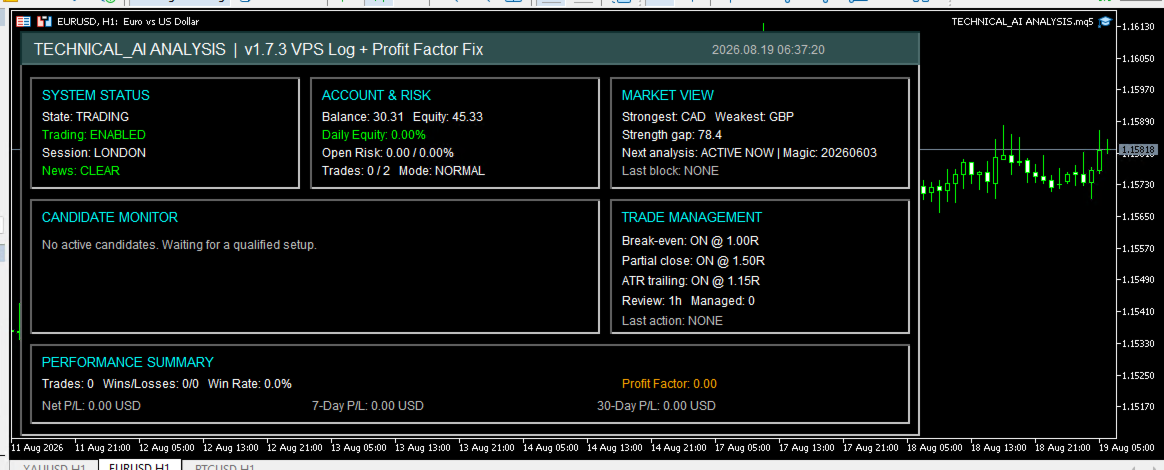
Centucode Technical AI Analysis includes an operational dashboard for monitoring the EA.
Depending on current operating conditions, the dashboard provides information covering:
-
EA status
-
Trading status
-
Account balance and equity
-
Current account risk
-
Open EA trades
-
Current risk mode
-
Strongest currency
-
Weakest currency
-
Currency-strength gap
-
Candidate opportunities
-
Candidate direction
-
Discovery score
-
Entry-confirmation score
-
Candidate status
-
Last execution gate
-
Trade-management status
The dashboard also includes trading-performance information such as:
-
Completed trades
-
Winning trades
-
Losing trades
-
Win rate
-
Net P/L
-
Profit Factor
-
Rolling 7-day P/L
-
Rolling 30-day P/L
Performance statistics are associated with the EA's Magic Number so that unrelated manual or Expert Advisor trades do not intentionally form part of its statistics.
VPS Operation
The EA is designed to support continuous MetaTrader 5 operation on a suitable computer or VPS.
VPS-oriented functionality includes:
-
Timer-based trade management
-
Separate full-analysis intervals
-
Controlled routine logging
-
Repeated-error throttling
-
Market-data freshness checks
-
Historical-data checks
-
Position synchronisation after restart
-
Operational heartbeat functionality
Important trade execution errors remain available in the terminal logs while repetitive diagnostic information can be reduced during normal operation.
Main Configurable Parameters
Important user-configurable areas include:
-
Minimum trade score
-
Minimum entry-confirmation score
-
Risk percentage
-
Reduced-risk percentage
-
Maximum account risk
-
Lot-sizing mode
-
Fixed lot size
-
Maximum open trades
-
Reward-to-Risk ratio
-
Trading hours
-
Analysis hours
-
Session filters
-
News blackout periods
-
Spread limit
-
Candidate lifetime
-
Maximum watched candidates
-
Value Zone parameters
-
MSS lookback
-
Break-even settings
-
Partial-close settings
-
ATR trailing settings
-
Maximum trade age
-
Daily risk limits
-
Currency-exposure limits
Users should understand the effect of the parameters before changing the supplied configuration.
Installation
-
Install the EA through the MetaTrader 5 Market.
-
Open MetaTrader 5.
-
Locate the product under the Market/Purchased section.
-
Install and activate the product.
-
Open a chart for a supported forex symbol.
-
Attach Centucode Technical AI Analysis to the chart.
-
Enable algorithmic trading.
-
Review the EA input parameters before trading.
-
Confirm that the dashboard shows the EA operating normally.
For continuous automated operation, MetaTrader 5 must remain running and connected, or the EA should be deployed to a suitable VPS.
Recommended Use
Users should first become familiar with the EA on a demo account and review its settings before using it on a live trading account.
Trading conditions vary between brokers. Spread, commission, slippage, symbol specifications, leverage, minimum volume and available economic-calendar data can affect operation and results.
The EA is primarily designed around an intraday/day-trading workflow using higher-timeframe context and lower-timeframe entry confirmation.
Important Risk Information
Forex and leveraged trading involve substantial risk and can result in partial or total loss of trading capital.
Centucode Technical AI Analysis does not guarantee profits, a particular win rate, a minimum number of trades or protection from loss.
Results can vary according to market conditions, broker execution, spreads, slippage, leverage, liquidity, account size and user-selected parameters.
Backtests, historical results, screenshots and demo results should not be interpreted as guarantees of future performance.