Tradevantage Performance Tracker

Track Your Trading Performance in Real Time

Stop guessing your win rate or profit factor. TradeVantage shows all key metrics directly on your chart, updated automatically whenever your trade history changes.

Perfect for traders who want to evaluate their strategy performance without opening the Statement tab.

Key Features:

  • Automatic Updates - dashboard refreshes instantly when new trades close or history changes.
  • Win Rate Percentage - with dynamic color coding (Green ≥ 50%, Orange 40-49%, Red < 40%).
  • Profit Factor - instant health indicator (Green ≥ 1.5, Orange ≥ 1.0, Red < 1.0).
  • Net Profit - includes profit, swap, and commission with automatic color (Green for positive, Red for negative).
  • Actual Risk-to-Reward Ratio - shows your real realized performance (format: 1 : X).
  • Expectancy Value - average profit/loss you can expect for every trade taken.
  • Max Drawdown & Recovery Factor - essential metrics to monitor account safety and recovery strength.
  • Max Loss Streak - identifies your highest number of consecutive losing trades based on net profit.
  • Average Trade Duration - shows how long your trades typically last (seconds to days).
  • Smart Filtering - toggle between Current Symbol or All Symbols, and filter by Magic Number.
  • Lightweight & Optimized - updates only when trade history changes, saving CPU resources.

Time Filters:

Choose which trades to analyze:

  • All History - complete trading record
  • Today - only current day trades (from 00:00)
  • This Week - from Monday to current time
  • This Month - from day 1 to current time

Filter Options:

  • Filter by Current Symbol - when enabled, only shows trades from the current chart symbol
  • Magic Number - set to -1 for all trades, 0 for manual trades, or any number for specific EA trades

Input Parameters:

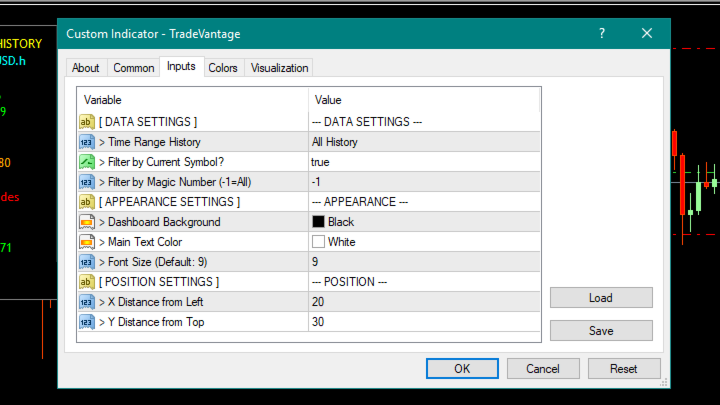
  • Time Range History - choose period: ALL HISTORY, TODAY, THIS WEEK, THIS MONTH
  • Filter by Current Symbol? - YES to show only current pair, NO to show all pairs
  • Filter by Magic Number - -1 = all trades, 0 = manual trades, other = specific EA
  • Dashboard Background - background color (default: Black)
  • Main Text Color - text color for standard labels (default: White)
  • Font Size - text size (default: 9, recommended 8-12)
  • X Distance from Left - horizontal position on chart (default: 20)
  • Y Distance from Top - vertical position on chart (default: 30)

Dashboard Display:

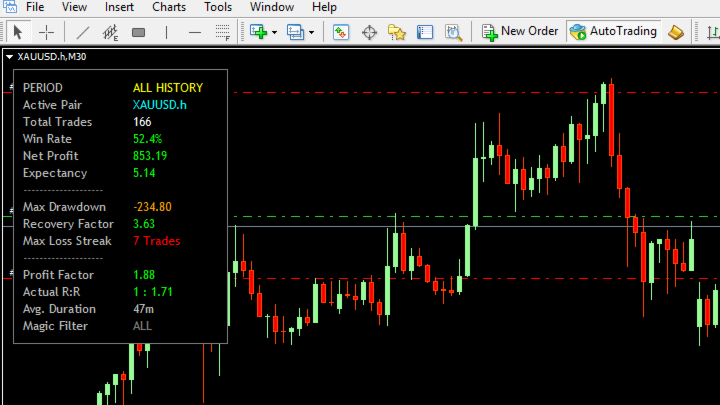
The dashboard shows 15 rows of essential information:

  • PERIOD - your selected time filter
  • Active Pair - current symbol or "ALL SYMBOLS"
  • Total Trades - number of trades in filtered period
  • Win Rate (%) - colored by performance
  • Net Profit - with swap & commission included
  • Expectancy - average profit per trade
  • Max Drawdown - peak to trough decline
  • Recovery Factor - net profit divided by max drawdown
  • Max Loss Streak - longest losing streak
  • Profit Factor - gross profit / gross loss
  • Actual R:R - realized risk-reward ratio
  • Avg. Duration - average trade length
  • Magic Filter - active magic number filter

How to Use:

  1. Attach TradeVantage indicator to any chart (M1 to MN)
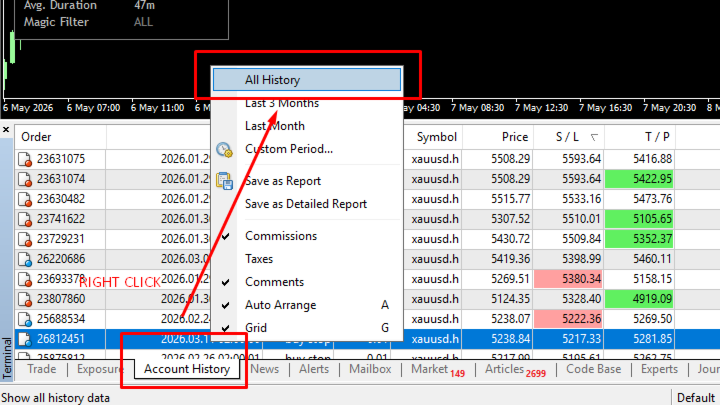
  2. IMPORTANT: In MT4, go to Terminal → Account History → Right-click → Select "All History" (This ensures all past trades are loaded)
  3. Dashboard appears automatically at your specified position
  4. Adjust position using X Offset and Y Offset inputs
  5. Change time filter to see different periods
  6. Enable "Filter by Current Symbol" to focus on one pair
  7. Set Magic Number to filter specific EA trades

The dashboard works with both demo and real accounts. No DLL or additional files needed.

Why TradeVantage?

Most trade statistics tools only show numbers. TradeVantage adds color coding so you instantly know if your performance is good or needs improvement:

  • Green = good performance (profitable, high win rate, strong profit factor)
  • Orange = average / needs monitoring
  • Red = needs attention (losing, low win rate, negative expectancy)

No more manual calculations. No more opening the Statement tab every 5 minutes.

Technical Specifications:

  • Platform: MetaTrader 4
  • Type: Chart indicator
  • Update frequency: On history change (event-driven)
  • No DLL required
  • Works with all brokers
  • Version: 1.1
⭐ Unlike standard MT4 stats, TradeVantage calculates loss streaks and drawdown based on Net Profit (including swaps and commissions), giving you a 100% accurate picture of your account's health.
Рекомендуем также
This program serves as an effective tool for sending messages through a Telegram bot using the MetaTrader platform. It enables you to send your trading recommendations related to the orders you open on the trading platform directly to your Telegram channel or group. These messages may include details about open trades and can be accompanied by illustrative images of the orders. Alternatively, they can be configured to be without images based on your preferences. This means that if you are the ow
Every trader is watching over his account over and over.... trying to anlayse every system he or she has. With this tool you are able to  export your complete history of every account export withdrawls / deposits / rebates to a separate file export account status with balance / equity / current drawdown recalculate micro to standard lots / profits ...  export decimal by "." or ","  combine a series of Magic Numbers to one unique Magic Number   filter to ignore OrderComments.
This EA is based on the relationship between the three currencies, interaction, and thus hedging, I now find the most ideal pair of currencies is the default parameter of the three pairs of currencies, On the parameters Parameter setting is very simple, "Huoli" is profitable n USD. Users can determine the number of orders according to the funds of the account.
What is it? Think about it, you can send all the orders/positions info to your telegram channel or group to create your community or VIP signals on telegram. Position info means this EA forward all of your new positions open details (Open price, Open time, Position Type, position Symbol and volume), positions changes ( SL or TP modifying or pending price changes) and position close (Close price, profit or loss, position duration time) and also EA Send NEWS alert (Economic calendar event) on you
(Multiple Close All) for MT4 a lightweight and efficient utility designed to help traders close their open positions and pending orders directly from the chart. It provides a clean panel with interactive buttons, allowing quick closing of opened trades and deleting the Pending Orders with one click. Key Features: Close all   BUY ,   SELL , or   ALL   positions with one click. MultipleCloseBy opposite trades. Close only   profitable trades   or only   losing trades . Close trades filtere
FREE
FX28 Trader
Tsvetan Tsvetanov
5 (1)
Представляем вам FX28 Trader Dashboard – ваш идеальный менеджер сделок. Разблокируйте полный потенциал вашего торгового опыта с FX28 Trader Dashboard, всесторонним и интуитивно понятным менеджером сделок, разработанным для поднятия вашего опыта торговли на новый уровень. Будь вы опытным трейдером или только начинаете свой финансовый путь, этот мощный инструмент создан для оптимизации ваших торговых операций и улучшения вашего процесса принятия решений. Основные характеристики: Пользовательский
Heaven Assistant: Упрощение управления MT4 Упростите управление платформой MetaTrader 4 (MT4) с помощью Heaven Assistant . Этот советник (EA) является надежным инструментом, позволяющим контролировать и настраивать ваше торговое окружение эффективно и удобно. Основные характеристики: Открытие нескольких пар: Быстрый доступ к большинству валютных пар, как основных, так и второстепенных, плюс экзотические пары. Возможность открытия индексов, металлов и криптовалют одним кликом. Изменение шаблона:
ProfRoboTrading Dashboard MultiSymbol is Expert Advisor  a lightweight on-chart control panel that provides a clear overview of your trading account and open positions across multiple symbols. The dashboard displays key account metrics, summarizes open BUY/SELL orders and lots per symbol, calculates profit for Day/Week/Month, and offers quick manual close actions directly from the table. Key features Multi-symbol table   (symbols list configurable). Account metrics panel:   Balance, Equity, Mar
Vantage
Waseem Raza
5 (1)
Vantage - полуавтоматическая утилита для управления сделками в один клик, оснащенная пользовательским интерфейсом. Базовая стратегия советника - сеточная торговля. Откройте первоначальную сделку при помощи кнопок на графике, советник сделает все остальное. Сетка может быть открыта на стороне убытка, на стороне прибыли или на обеих сторонах одновременно. Также можно торговать без применения сетки. Используйте низкое соотношение риска к балансу, запускайте советника на VPS-сервере. Это позволит со
KFX Dashboard EA
Peter Kariuki Thande
** Automatically Adds to your existing trades that you open ** KFX Dashboard EA monitors Price Action using Candle Direction + Moving Average on Multiple currency pairs (selected by you) and on Multiple Timeframes (selected by you). The dashboard also reveals Currency Strength of pairs based on your Moving Average selection. KFX Dashboard EA option to set Stop Loss(SL) and Take Profit(TP) based on your selected Timeframe and ATR / Points settings. Trailing stop by ATR / Points also available (s
С легкостью возьмите под контроль свою торговую рутину с революционным менеджером времени сделок. Этот мощный инструмент автоматизирует выполнение ордеров в назначенное время, изменяя ваш подход к торговле. Создавайте персонализированные списки задач для различных торговых действий, от покупки до выставления ордеров, без ручного вмешательства. Руководство по установке и вводу данных Trades Time Manager Если вы хотите получать уведомления о работе советника, добавьте наш URL в терминал MT4/MT5 (с
MirrorEA
Eugenio Bravetti
The new version of  MirrorSoftware 2021  has been completely rewriten and optimized.  This version requires to be loaded only on a single chart because  it can detect all actions on every symbol and not only the actions of symbol where it is loaded. Even the  graphics and the configuration mode  have been completely redesigned. The MirrorSoftware is composed of two components (all components are required to work):  MirrorController  (free indicator): This component must be loaded into the MASTER
CANADIAN TAIGA - это профессиональный портфельный советник, использующий систему торговли по тренду, основанную на принципах прорыва волатильности и прорыва уровней поддержки/сопротивления. Он работает на всех парах канадского доллара. Основной принцип Canadian Taiga заключается в захвате торговых возможностей на всех парах с канадским долларом, используя сложный модуль хеджирования. Скачайте CANADIAN TAIGA и протестируйте его на всех парах канадского доллара, как рекомендуется, и если он не д
Indicator Notify
Kritchavatchara Datchkanakorn
With this Expert Advisor you will never miss an indicator event, you will receive notifications on your mobile phone when the chart matches the conditions you have set. Indicators in the Expert Advisor Moving Average(MA) Bollinger Bands(Bands)   Stochastic Oscillator(Stochastic)   MACD   Relative Strength Index(RSI)   Before use the Expert Advisor Install "MetaTrader 4" on your mobile phone. Enable Push Notifications in "MetaTrader 4" on your PC, go to menu bar Tools -> Options -> Notifica
Обратите внимание, что этот продукт предназначен для того, чтобы помочь вам установить автоматический стоп-лосс для каждой сделки, открытой вручную, в частности, на графике, к которому он прикреплен. Что касается отложенных ордеров, стоп-лосс будет размещен только после активации отложенного ордера. Чтобы установить желаемый стоп-лосс в пунктах, вы можете использовать параметр InpStopLossPoints. Имейте в виду, что этот продукт был протестирован только для валютных пар, таких как GBPUSD. Хотя о
FREE
THIS PRODUCT CAN NOT BE TEST IN STRATEGY TESTER. PLEASE TRY DEMO VERSION: https: //www.mql5.com/en/market/product/58082 FIRST 10 COPIES AT 30 USD, NEXT PRICE WOULD BE 50 USD RISK AND TRADE MANAGER RISK AND TRADE MANAGER   is an advanced trading panel designed for manual trading.   Utility helps to manage trades effectively and efficiently with a single click. MAIN FEATURES Convert and display Stop Loss (SL)   Pips into % and amount to view the clear picture of the trades if SL hits. Fund alloca
Take a Break
Eric Emmrich
5 (31)
News filter, equity guard & session control for all your EAs — one tool, full protection Take a Break has evolved from a basic news filter into a comprehensive account protection solution . It pauses your other Expert Advisors during news events or based on custom filters. When trading resumes, it automatically restores your entire chart setup , including all EA settings. Why traders choose Take a Break One news filter for all your EAs — no more relying on individual built-in filters that may o
Plain MT4
Ahmed Alaaeldin Abdulrahman Ahmed Elherzawi
This is a semi-automatic Expert Advisor that opens trades automatically based on the direction you set using the trade sell / buy on the panel. The magic of this EA is that it recognizes the objects that you draw on the chart by closing the open positions at key levels, it will notify you through the mobile notification, then it will wait for the next direction. It opens orders continuously regardless of the time frame of the chart. So you don't have to stay on a lower time frame. Instead, you c
: PropFolio Command Manager Pro | The Ultimate Multi-Symbol Arrow Execution Terminal Overview: Stop staring at the charts waiting for your custom indicator arrows to appear. PropFolio Command Manager Pro is an institutional-grade, multi-symbol execution terminal that instantly automates your favorite custom indicator. Simply type the name of your arrow indicator into the settings, and the Command Manager will scan up to 30 currency pairs, indices, or metals simultaneously. When your arrow fires,
Tool sends trades when open and close with chart to telegram channel.  Tool can send multiple charts and magic numbers and pairs from a single chart. Send information of all type of orders: Opened (including Pending Orders), closed tiggered, and modified orders. Telegram Setup instruction Open your Telegram APP and search for "BotFather". Type  /start  and click/type  /newbot  to create a new bot. Give your bot a nickname and username (e.g., nickname: Bestnavisignal and username: Bestnavisignal
"Support or Resistance Alert Broken" is a simple and very intuitive tool that allows you to create or eliminate horizontal and trend supports and / or resistances with a simple click. When the support or resistance line is broken by the closing price at the end of the current candle, the "Support or Resistance Alert Broken" tool will send an alert with sound, as well as a notification to the MT4 or MT5 mobile application. This tool can send alerts from multiple pairs at the same time. Utility
Telegram Trade Manager
Ebunoluwa Abimb Owodunni
Telegram trade manager is an Expert Advisor built for your telegram bot. it allows you to communicate with your expert advisor directly from your mobile phone and effectively manage your trades with operations not on mobile mt4, while on mobile. With Telegram Trade Manager, you can get the screenshot of your favorite trading system, accept trade signals from group and open trade operations based on signal posted Execute and modify and close trades instantly, set your breakeven and trail stop par
Market Monitor
Rodrigo Rethka Goncalves
Market Monitor – Smart Asset Performance Dashboard for MT4 Turn your MetaTrader 4 into a professional trading intelligence center! Market Monitor is a powerful monitoring tool that displays, in real time, the most relevant performance metrics of each symbol being traded — helping you make faster, smarter, and more strategic decisions. What Does This Indicator Do? Market Monitor scans all open and historical orders, consolidates the data by symbol, and displays everything in visual pa
GMT Time
Oeyvind Borgsoe
This indicator shows both GMT time and your broker's time on the chart. Simply attach the indicator to a chart, and you will see the GMT time and your broker's time displayed in the top left corner, as shown in the screenshot. By using this indicator, you can always stay informed about your broker's time, which is especially useful during daylight saving changes. You won't have to worry about whether your broker follows the US or EU schedule, as the indicator automatically adjusts to reflect an
FREE
Multi Indicator EA – Flexible Signal Confirmation Expert Advisor Multi Indicator EA is a fully automated Expert Advisor designed to trade based on signals from multiple external indicators. It allows you to combine up to 8 custom indicators , each with its own settings (timeframe, buffer index, signal direction, and threshold). Once a predefined number of indicators ( MinConfirm ) agree on the same direction, the EA automatically opens a Buy or Sell order. Key Features: Use up to 8 external
Size Calculator allow you to calculate the size you need for your position giving two parametres: the number of pips risked and the money risked, for example if you want to risk 20 USD on 200 pips, then you will need to input 200 in the case reserved for pips and 20 in the case reserved for risk, the size will appear in left top carner of the chart in your metatrader 4 platform,  Size Calculator  support the following symbols : EURUSD GBPUSD AUDUSD NZDUSD  GOLD WTI  EURJPY GBPJPY USDJPY AUDJPY C
RSI Dashboard позволяет быстро проанализировать одновременно несколько валютных пар на перекупленность / перепроданность . Количество отображаемых символов равно 30, а название каждого символа можно редактировать в параметрах. Таким образом, можно анализировать не только предустановленные валютные пары, но и другие, товары, акции, индексы, валютные пары с префиксами и суффиксами и т.д. Анализатор может отправлять алерты через терминал MetaTrader, push- уведомления на мобильные устройства, а такж
Индикатор тренда Calculated , можно использовать с оптимальным коэффициентом риска к прибыли, показывает удачные сигналы. Использует два параметра для настроек. Показывает благоприятные моменты для входа в рынок стрелками. Вероятность успешного тренда очень не плохая! Индикатор можно использовать как для пипсовки на мелких периодах, так и для долгосрочной торговли. Индикатор не перерисовывается и не запаздывает. Работает на всех валютных парах и на всех таймфреймах.
Risepanel
Hossein Ahmadi Beni
1 (1)
Risepanel поможет вам открывать позиции, закрывать позиции и анализировать валюты. Он работает на любом таймфрейме. Для правильности расчетов валютой вашего счета должна быть USD, EUR или GBP. Особенности Рыночная информация. Ордера и отложенные ордера (Stop и Limit). 8 видов установки отложенных ордеров по линии тренда. Спецификации и расчет маржи, необходимой для покупки или продажи. Расчет и определение стоп-лосса в пипсах, на основе цены валютной пары, в денежном выражении и по проценту рис
KFX Trade Manager
Joe Christopher Ramirez
Introducing the "KFX Trade Manager" expert advisor for MetaTrader 4 (MT4), a comprehensive solution for advanced trade management and risk control. This powerful tool is designed to enhance your trading experience by automating various aspects of order handling, profit optimization, and alert notifications. With the "KFX Trade Manager," you can take your trading to the next level and streamline your operations for improved efficiency and better risk management. Key Features: Trade Management Set
С этим продуктом покупают
Добро пожаловать в Trade Manager EA — лучший инструмент для управления рисками, предназначенный для упрощения, точности и эффективности торговли. Это не просто инструмент для размещения ордеров; это комплексное решение для удобного планирования торгов, управления позициями и усиленного контроля над рисками. Независимо от того, начинающий вы трейдер, опытный специалист или скальпер, нуждающийся в быстром исполнении, Trade Manager EA адаптируется к вашим потребностям и работает с любыми активами:
Local Trade Copier EA MT4
Juvenille Emperor Limited
4.96 (110)
Опыт экстремально быстрого копирования сделок с помощью Local Trade Copier EA MT4 . Благодаря простой установке в течение 1 минуты этот копировщик сделок позволяет вам копировать сделки между несколькими терминалами MetaTrader на одном компьютере с Windows или на Windows VPS с крайне быстрыми скоростями копирования менее 0.5 секунды. Независимо от того, новичок вы или профессиональный трейдер, Local Trade Copier EA MT4 предлагает широкий спектр опций, чтобы настроить его под ваши конкретные пот
Trade Assistant MT4
Evgeniy Kravchenko
4.43 (195)
Помогает рассчитать риск на сделку, простая установка нового ордера с помощью линий, управление ордерами с функциями частичного закрытия, 7 типов трейлинг-стопа и другие полезные функции. Дополнительные материалы и инструкции Инструкция по установке   -   Инструкция к приложению   -   Пробная версия приложения для демо счета Функция Линии   - отображает на графике линию открытия, стоп-лосс, тейк-профит. С помощью этой функции легко установить новый ордер и увидеть его дополнительные характери
Exp COPYLOT CLIENT for MT4
Vladislav Andruschenko
4.65 (66)
Профессиональный копировщик сделок для MetaTrader 4 Быстрый, профессиональный и надежный копировщик сделок для MetaTrader 4 . COPYLOT позволяет копировать сделки Forex между терминалами MetaTrader 4 и MetaTrader 5 , обеспечивая гибкую синхронизацию для разных типов счетов и сценариев торговли. Версия COPYLOT MT4 поддерживает: MetaTrader 4 → MetaTrader 4 MetaTrader 5 Hedge → MetaTrader 4 MetaTrader 5 Netting → MetaTrader 4   Версия MT5 Полное описание + DEMO + PDF Как купить Как установить Как по
Copy Cat More Trade Copier MT4 (Копия Кот MT4) — это не просто локальный торговый копировщик; это полноценная система управления рисками и исполнения, созданная для современных условий торговли. От испытаний в prop-фирмах до личного управления счетами — он адаптируется к любой ситуации, сочетая надежное исполнение, защиту капитала, гибкую настройку и расширенные функции обработки сделок. Копировщик работает как в режиме Master (отправитель), так и в режиме Slave (получатель), обеспечивая синхрон
The product will copy all telegram signal to MT4   ( which you are member  ) , also it can work as remote copier.  Easy to set up, copy order instant, can work with almost signal formats, image signal, s upport to translate other language to English Work with all type of channel or group, even channel have "Restrict Saving Content", work with  multi channel, multi MT5 Work as remote copier: with signal have ticket number, it will copy exactly via ticket number. Support to backtest signal. How to
Telegram to MT4 Multi-Channel Copier   автоматически копирует торговые сигналы из ваших каналов Telegram напрямую в MetaTrader 4. Без ботов, без расширений браузера, без ручного копирования. Вы получаете сигнал в Telegram — EA открывает сделку на вашем терминале за секунды. Продукт включает два компонента: приложение для Windows, которое прослушивает ваши каналы Telegram, и данный Expert Advisor, который исполняет сигналы на вашем терминале MT4. Инструкция по загрузке приложения:   https://www.m
Trade copier MT4
Alfiya Fazylova
4.58 (33)
Trade Copier — это профессиональная утилита, предназначенная для копирования и синхронизации сделок между торговыми счетами. Копирование происходит от счета/терминала поставщика к счету/терминалу получателя, которые установлены на одном компьютере или vps. АКЦИЯ - Если вы уже приобрели "Trade copier MT5", вы можете получить "Trade copier MT4" бесплатно (для копирования MT4 > MT5 и MT4 < MT5). Для получения более подробной информации об условиях, пожалуйста, свяжитесь с нами через личные сообщени
MultiOrder Assistent V3.0   - Your professional trading assistant for MetaTrader 4 The  MultiOrder Manager  is a powerful trading tool designed to optimize your trading while managing risk efficiently. With intuitive features and a user-friendly interface, this Tool is ideal for traders who want to manage multiple orders simultaneously without losing track.   Symbols: FX pairs, gold and cryptocurrencies Here you get a detailed description of the parameters and functions Manual     Features and
Grid Manual MT4
Alfiya Fazylova
4.71 (17)
Grid Manual — это торговая панель для работы с сеточными стратегиями. Утилита универсальная, имеет гибкие настройки и понятный интерфейс. Работает с сеткой ордеров не только в сторону усреднения убытков, но и в сторону наращивания прибыли. Трейдеру не нужно создавать и сопровождать сетку ордеров, это сделает утилита. Достаточно открыть ордер и Grid manual автоматически создаст ему сетку ордеров и будет сопровождать его до самого закрытия. Полная инструкция и демо-версия здесь . Основные особенно
Ultimate Trailing Stop EA
BLAKE STEVEN RODGER
4.33 (15)
This EA Utility allows you to manage (with advanced filtering) unlimited open orders (manual or EA) with 16 trailing stop methods: fixed, percent, ATR Exit, Chandelier Exit, Moving Average, Candle High Low Exit, Bollinger Bands, Parabolic, Envelope, Fractal, Ichimoku Kijun-Sen, Alligator, Exit After X Minutes or Bars, RSI and Stochastic. The trailing stop can be either real or virtual, and you can exit fully or with a partial close percent on touch or bar close.  Moreover, you can add (overrid
EasyTrade MT4
Alain Verleyen
5 (1)
Easy Trade – Умное, простое и мощное управление сделками Easy Trade — это универсальное решение для управления сделками в MetaTrader для тех, кто хочет держать риск под контролем и обеспечить максимально плавное исполнение ордеров. Созданный с нуля на основе обратной связи от трейдеров, Easy Trade позволяет легко открывать, отслеживать и управлять сделками по множеству символов — без лишней сложности. Независимо от того, скальпируете ли вы вручную или управляете несколькими позициями, Easy Tra
TradePanel MT4
Alfiya Fazylova
4.84 (95)
Trade Panel — это многофункциональный торговый помощник. Приложение содержит более 50 торговых функций для ручной торговли и позволяет автоматизировать большинство торговых операций. Перед покупкой вы можете протестировать демоверсию на демо-счете. Скачать пробную версию приложения для демонстрационного аккаунта: https://www.mql5.com/ru/blogs/post/750864 . Полная инструкция здесь . Торговля. Позволяет совершать торговые операции в один клик: Открыть отложенные ордера и позиции с автоматическим р
Auto Trade Copier
Vu Trung Kien
4.76 (85)
Auto Trade Copier предназначен для копирования сделок между несколькими счетами / терминалами MT4 / MT5 со 100% точностью. С помощью этого инструмента вы можете действовать как поставщик (источник) или получатель (пункт назначения). Все торговые действия будут скопированы от поставщика к получателю без задержки. Этот копир можно использовать только на счетах MT4. Для счетов MT5 вы должны использовать Auto Trade Copier для MT5 или Trade Receiver Free для MT5. Демо-версия : Демо-версию для тести
Автоматическая фиксация прибыли по достижении целевого профита EquityTargetCloser   — это утилитарный советник для MetaTrader 5, который автоматически закрывает все рыночные позиции и удаляет отложенные ордера, как только   эквити (Equity) превысит текущий баланс на заданную сумму прибыли . После закрытия всех позиций цель автоматически повышается: новый порог = новый баланс + заданная прибыль. Советник не открывает сделки, а только управляет существующими позициями, помогая надёжно фиксировать
Bermaui Manual EA
Muhammad Elbermawi
5 (10)
Полуавтоматический советник, торгующий по сеточной системе. Идея состоит в том, чтобы постепенно занимать разные позиции на рынке, а затем рассчитывать для них уровень безубыточности. Когда цены проходят этот уровень безубыточности на заданное расстояние, все открытые ордера закрываются. Важная информация Вот руководство пользователя:   https://www.mql5.com/en/blogs/post/730567 Вы можете попробовать этот советник с другими моими продуктами здесь: https://www.mql5.com/en/users/bermaui314/seller
Trade Dashboard MT4
Fatemeh Ameri
4.96 (53)
Trade Dashboard simplifies how you open, manage, and control your trades, with built-in lot size calculation. It allows you to execute trades, manage risk, and control positions directly on the chart, with tools such as partial close, breakeven, and trailing stop. Designed to reduce manual work and help you stay focused on your trading decisions. A demo version is available for testing. Detailed explanations of features are provided within the MQL5 platform. Installation instructions are include
RiskManager
Roman Zhitnik
5 (4)
Данный робот выступает в роли риск-менеджера, помогающего трейдеру контролировать свою торговлю. В настройках можно задать параметры, при которых риск-менеджер будет принудительно закрывать позиции, а так же, в случае необходимости, принудительно закрывать терминал во избежание открытия "на эмоциях" новых позиций, не соответствующих торговой стратегии. Настройки риск-менеджера Check limit to close - проверка лимита по средствам Limit to close - лимит по средствам, при достижении которого закрыва
Telegram to MT4 Coppy
Sergey Batudayev
3.89 (9)
Telegram to MT4: Идеальное решение для копирования сигналов Упростите свою торговлю с Telegram to MT4 — современным инструментом, который копирует торговые сигналы прямо из каналов и чатов Telegram на вашу платформу MetaTrader 4, без необходимости использования DLL. Это мощное решение обеспечивает точное исполнение сигналов, широкие возможности настройки, экономит время и повышает вашу эффективность. [ Instructions and DEMO ] [ FAQ ] [ How atach logs properly ] [ Settings descrition ] Ключевые
VirtualTradePad mt4 Extra
Vladislav Andruschenko
4.85 (61)
Торговая Панель для торговли в 1 клик.  Работа с позициями и ордерами!  Торговля с  чарта  (график) или с  клавиатуры . С помощью нашей торговой панели Вы можете торговать   в один клик с графика   и совершать торговые операции в   30   раз быстрее стандартного управления в MetaTrader.  Автоматические расчеты параметров и функции, которые облегчают жизнь трейдеру и помогают трейдеру вести свою торговую деятельность в разы быстрее и удобнее. Графические подсказки и полная информация по торговым с
Managing trades MT4
David Julio Cuenca Oliver
Managing Trades 3.0 MT5 version:  https://www.mql5.com/en/market/product/172666?source=Site With Managing Trades 3.0, you can manage your trades quickly and efficiently. It features an intuitive visual interface with large buttons, allowing you to manage your trades as quickly as possible. With Managing Trades 3.0 you can: - Open a Buy and Sell order instantly with a single click, using any lot size you want. You can also optionally set Stop Loss and Take Profit. - Close all open trades in
Trading History MT4
Siarhei Vashchylka
5 (9)
Trading History - Программа для торговли и управления капиталом на истории котировок в тестере стратегий. Может работать с отложенными и немедленными ордерами, оснащена функциями трейлинг стопа, безубытка и тейкпрофита. Очень хорошо подходит для тренировок и тестирования различных стратегий. Инструкция/Мануал ( Обязательно читайте перед приобретением ) Преимущества 1. В кратчайшие сроки позволяет протестировать любую торговую стратегию 2. Отличный тренажёр для тренировок трейдинга. Можно получи
The News Filter
Leolouiski Gan
5 (25)
Этот продукт фильтрует всех экспертных советников и ручные графики во время новостей, так что вам не нужно беспокоиться о внезапных скачках цены, которые могут разрушить ваши ручные торговые настройки или сделки, введенные другими экспертными советниками. Этот продукт также поставляется с полной системой управления ордерами, которая может обрабатывать ваши открытые позиции и ордера на ожидание перед выпуском новостей. После покупки The News Filter вам больше не придется полагаться на встроенные
EchoTrade Telegram to MT4 Copier
Perpetual Chinemerem Vincent
5 (2)
EchoTrade Telegram to MT5 Copier Seamless, Instant, and Reliable Signal Copying - Direct from Telegram to MetaTrader 4! The product does not run in the strategy tester but you can get free trial version   here  for testing before purchase. Tired of manually executing trades from Telegram signals? EchoTrade automates the process, instantly copying trades from any Telegram channel or group directly into your MT5 account—accurately, efficiently, and without delay. Key Features: Universal Compatib
Symbol Manager
Taras Slobodyanik
5 (4)
Менеджер символов или Сеточный менеджер, разработан для группировки ордеров в одну позицию (по символу и по направлению). Эта утилита будет полезна сеточникам и мультивалютникам, тем у кого может быть открыто множество ордеров по нескольким парам. Вы сможете видеть общее количество лотов, общую прибыль, и устанавливать виртуальные стоплосс и тейкпрфит. Для установки реального ТП (или СЛ) необходимо сначала задать виртуальное значение, а затем ввести в этой ячейке команду: "set". Если вы хотите
TP Splitter Pro MT4 TP Splitter Pro MT4 is an advanced Expert Advisor (EA) designed to optimize your take-profit strategy by automatically placing copy trades with multiple TP levels. It ensures a structured exit plan while maximizing profits and managing risk efficiently. Unlike standard trade copiers, TP Splitter Pro MT4 only executes copy orders when the entry price is more favorable than the master order. It places sell orders at a higher price and buy orders at a lower price. With built-in
Riskless Pyramid
Snapdragon Systems Ltd
5 (1)
Introduction This powerful MT4 trade mangement EA offers a way potentially to aggressively multiply trade profits in a riskfree manner. Once a trade has been entered with a defined stoploss and take profit target then the EA will add three pyramid add-on trades in order to increase the overall level of profit. The user sets the total combined profit target to be gained if everything works out. This can be specified either as a multiple of the original trade profit or as a total dollar amount. Fo
Если нужен советник по сигналах   любого стрелочного индикатора   - эта утилита однозначно вам поможет.  Вы сможете, с помощью этой утилиты сформировать неограниченное количество советников по ВАШИХ сигналах , с вашим набором настроек, с вашим копирайтом и полным исходным кодом . Вы сможете неограниченно использовать полученные советники, в том числе размещать на Маркете и других ресурсах.  Бесплатная простая версия скрипта для генерации,  которая поможет вам понять принцип работы - вот Что дела
Local Trade Copier EA — это решение для индивидуальных трейдеров или менеджеров по работе с клиентами, которым необходимо выполнять торговые сигналы из внешних источников или которым необходимо управлять несколькими счетами одновременно, без необходимости использования МАМ или ПАММ-счета. Он копирует до 8 основных учетных записей на неограниченное количество подчиненных учетных записей. [ Руководство по установке | Руководство по обновлению | Устранение неполадок | Часто задаваемые вопросы | Вс
Edge Zone EA
FXsolutions
5 (1)
С этим советником вы будете следовать проверенному торговому принципу " купить дешевле и продать дороже " по умолчанию ! И вы сможете это делать, не отрываясь от повседневных обязанностей . Вы сможете торговать на младших таймфреймах, на которых вы не могли бы обойтись без такого советника. И самое лучшее, что всем управляете вы! Вы указать задать для советника Edge Zone EA где входить и где выходить. Вы можете это сделать за несколько часов до совершения самой сделки . Таким образом, этот совет
Фильтр:
Нет отзывов
Ответ на отзыв