Tradevantage Performance Tracker
- Yardımcı programlar
-
Muhamad Arwan
 Less is More
 - Sürüm: 1.1
- Güncellendi: 9 Mayıs 2026
- Etkinleştirmeler: 5
Track Your Trading Performance in Real Time
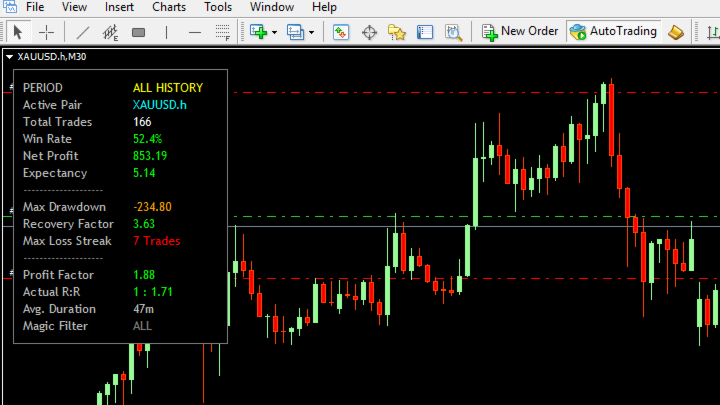
Stop guessing your win rate or profit factor. TradeVantage shows all key metrics directly on your chart, updated automatically whenever your trade history changes.
Perfect for traders who want to evaluate their strategy performance without opening the Statement tab.
Key Features:
- Automatic Updates - dashboard refreshes instantly when new trades close or history changes.
- Win Rate Percentage - with dynamic color coding (Green ≥ 50%, Orange 40-49%, Red < 40%).
- Profit Factor - instant health indicator (Green ≥ 1.5, Orange ≥ 1.0, Red < 1.0).
- Net Profit - includes profit, swap, and commission with automatic color (Green for positive, Red for negative).
- Actual Risk-to-Reward Ratio - shows your real realized performance (format: 1 : X).
- Expectancy Value - average profit/loss you can expect for every trade taken.
- Max Drawdown & Recovery Factor - essential metrics to monitor account safety and recovery strength.
- Max Loss Streak - identifies your highest number of consecutive losing trades based on net profit.
- Average Trade Duration - shows how long your trades typically last (seconds to days).
- Smart Filtering - toggle between Current Symbol or All Symbols, and filter by Magic Number.
- Lightweight & Optimized - updates only when trade history changes, saving CPU resources.
Time Filters:
Choose which trades to analyze:
- All History - complete trading record
- Today - only current day trades (from 00:00)
- This Week - from Monday to current time
- This Month - from day 1 to current time
Filter Options:
- Filter by Current Symbol - when enabled, only shows trades from the current chart symbol
- Magic Number - set to -1 for all trades, 0 for manual trades, or any number for specific EA trades
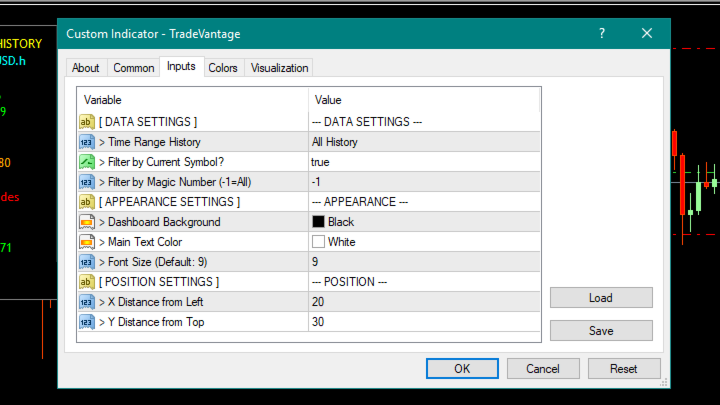
Input Parameters:
- Time Range History - choose period: ALL HISTORY, TODAY, THIS WEEK, THIS MONTH
- Filter by Current Symbol? - YES to show only current pair, NO to show all pairs
- Filter by Magic Number - -1 = all trades, 0 = manual trades, other = specific EA
- Dashboard Background - background color (default: Black)
- Main Text Color - text color for standard labels (default: White)
- Font Size - text size (default: 9, recommended 8-12)
- X Distance from Left - horizontal position on chart (default: 20)
- Y Distance from Top - vertical position on chart (default: 30)
Dashboard Display:
The dashboard shows 15 rows of essential information:
- PERIOD - your selected time filter
- Active Pair - current symbol or "ALL SYMBOLS"
- Total Trades - number of trades in filtered period
- Win Rate (%) - colored by performance
- Net Profit - with swap & commission included
- Expectancy - average profit per trade
- Max Drawdown - peak to trough decline
- Recovery Factor - net profit divided by max drawdown
- Max Loss Streak - longest losing streak
- Profit Factor - gross profit / gross loss
- Actual R:R - realized risk-reward ratio
- Avg. Duration - average trade length
- Magic Filter - active magic number filter
How to Use:
- Attach TradeVantage indicator to any chart (M1 to MN)
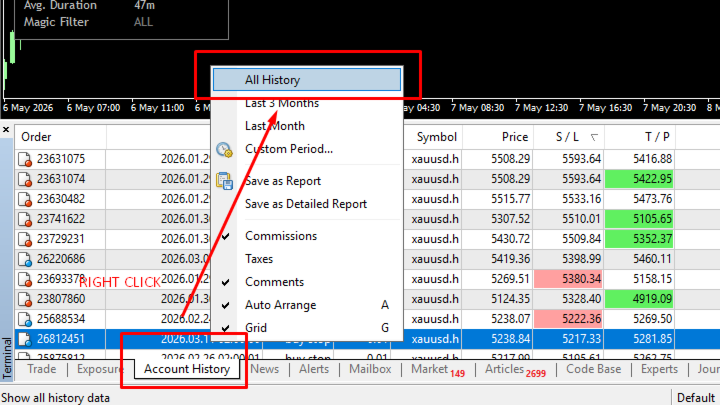
- IMPORTANT: In MT4, go to Terminal → Account History → Right-click → Select "All History" (This ensures all past trades are loaded)
- Dashboard appears automatically at your specified position
- Adjust position using X Offset and Y Offset inputs
- Change time filter to see different periods
- Enable "Filter by Current Symbol" to focus on one pair
- Set Magic Number to filter specific EA trades
The dashboard works with both demo and real accounts. No DLL or additional files needed.
Why TradeVantage?
Most trade statistics tools only show numbers. TradeVantage adds color coding so you instantly know if your performance is good or needs improvement:
- Green = good performance (profitable, high win rate, strong profit factor)
- Orange = average / needs monitoring
- Red = needs attention (losing, low win rate, negative expectancy)
No more manual calculations. No more opening the Statement tab every 5 minutes.
Technical Specifications:
- Platform: MetaTrader 4
- Type: Chart indicator
- Update frequency: On history change (event-driven)
- No DLL required
- Works with all brokers
- Version: 1.1
⭐ Unlike standard MT4 stats, TradeVantage calculates loss streaks and drawdown based on Net Profit (including swaps and commissions), giving you a 100% accurate picture of your account's health.