IchiSpikeGrid EA MT4
- Experts
- Versão: 1.0
- Ativações: 20

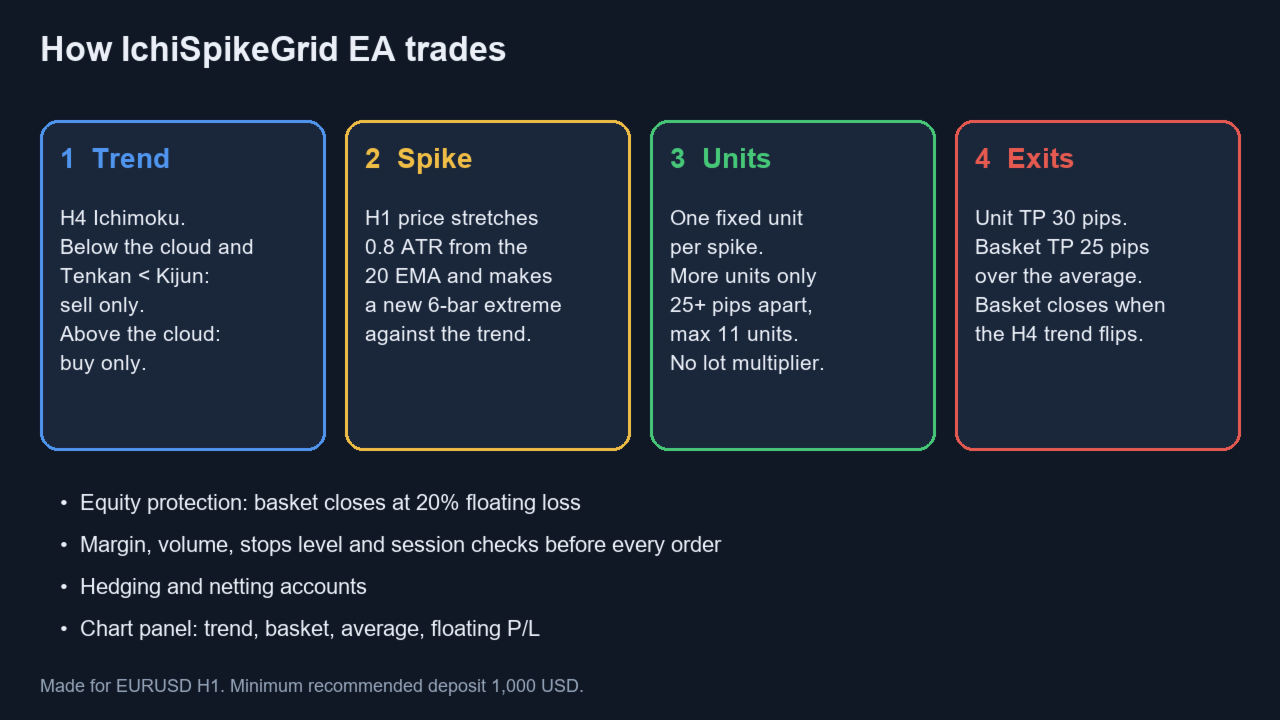
IchiSpikeGrid EA (MT4) trades EURUSD the way experienced bank dealers do: it finds the main trend on a higher timeframe, then sells rallies in a downtrend and buys dips in an uptrend. It does not chase breakouts. It waits for a short-term spike against the trend and fades it. A MetaTrader 5 version is also available.
How it trades
- Trend filter (H4 Ichimoku): sells only when price is below the cloud and Tenkan is below Kijun; buys only in the opposite case. No trend, no trade.
- Entry (H1 counter-spike): a new unit is opened when price stretches away from the 20 EMA by at least 0.8 ATR and makes a new 6-bar extreme against the trend.
- Units and grid: every entry is one fixed unit. If price keeps moving against the basket, new units are added only at a minimum distance (25 pips), up to a maximum of 11 units. There is no lot multiplication (no martingale).
- Exits: each unit takes its own profit (30 pips). The whole basket closes when the weighted average reaches the basket target (25 pips); profits already taken from single units count toward that target.
- Trend flip exit: when the H4 Ichimoku trend turns against the open basket, the basket is closed.
Protection
- Equity protection: closes the basket if its floating loss reaches a % of balance (default 20%).
- Optional stop loss per unit and optional loss cut of the worst unit.
- Trading hours, Friday cut-off, optional Friday basket close, spread filter.
- Free margin, volume limits, stops level, trade session and trade context are checked before every order.
- Info panel on the chart: trend, basket, average price, floating P/L, status.
Recommended setup
- Symbol: EURUSD. Chart timeframe: H1 (the EA reads H4 and H1 itself). The default settings are made for EURUSD H1.
- Minimum deposit 1,000 USD with 0.01 lot per 1,000. Smaller accounts are forced to the minimum lot and take much higher relative risk.
- Low-spread ECN/STP broker and a VPS. Suggested spread filter: InpMaxSpreadPts = 25.
- Please backtest with the "Every tick" model before using it. Coarse models (control points, open prices) do not show where unit take profits are really filled.
Main parameters
- Trend filter: InpBiasTF, InpTenkan, InpKijun, InpSenkou, InpRequireTK, InpAllowSell, InpAllowBuy
- Entry: InpEntryTF, InpMAPeriod, InpMAMethod, InpATRPeriod, InpSpikeATR, InpExtremeBars, InpGridStepPips, InpOneEntryPerBar
- Size: InpLotMode (Fixed / Auto), InpFixedLot, InpLotPer1000, InpMaxUnits
- Exits: InpUnitTPPips, InpBasketTPPips, InpCountRealized, InpFlipExit, InpCutAfterUnits, InpCutLossPips
- Risk: InpUnitSLPips, InpMaxDDPct, InpMaxSpreadPts
- Hours (server time): InpStartHour, InpEndHour, InpFridayLastHour, InpCloseFriday
Important risk notice
This is a grid strategy: it adds units when price moves against the basket and by default uses no fixed stop loss per unit. Losses are limited by the trend-flip exit and the equity protection, not by a stop on each trade. A fast move against the basket can still produce a large loss up to the equity protection level. Past results do not guarantee future results. Test on a demo account first and use only money you can afford to lose.